light Lexus GS350 2008 Owners Manual
[x] Cancel search | Manufacturer: LEXUS, Model Year: 2008, Model line: GS350, Model: Lexus GS350 2008Pages: 598, PDF Size: 14.03 MB
Page 350 of 598
349
3-7. Other interior features
3
Interior features
GS_G_U
June 19, 2008 12:54 pm
Clock
■The clock is displayed when
The “ENGINE START STOP” switch is in ACCESSORY or IGNITION ON mode.
■When the 12 volt battery is disconnected
The time display will automatically be set to 1:00.
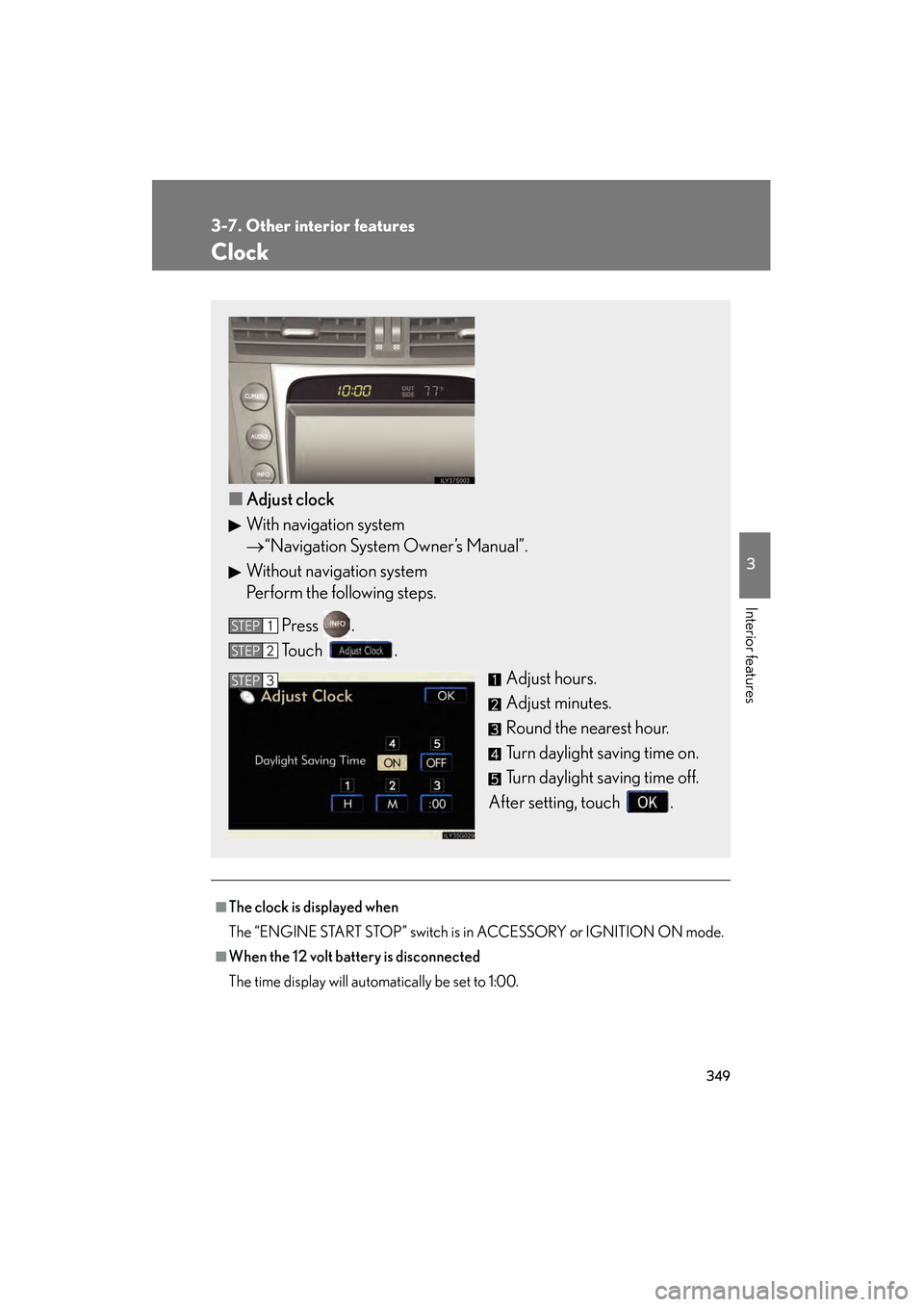
■Adjust clock
With navigation system
→ “Navigation System Owner’s Manual”.
Without navigation system
Perform the following steps.
Press .
Touch . Adjust hours.
Adjust minutes.
Round the nearest hour.
Turn daylight saving time on.
Turn daylight saving time off.
After setting, touch .
STEP1
STEP2
STEP3
GS_U_G.book Page 349 Thursday, June 19, 2008 12:54 PM
Page 353 of 598
352
3-7. Other interior features
GS_G_U
June 19, 2008 12:54 pm
Cigarette lighter
■The cigarette lighter can be used when
The “ENGINE START STOP” switch is in ACCESSORY or IGNITION ON mode.
CAUTION
■To avoid burns or fires
●Do not touch the metal parts of the cigarette lighter.
●Do not hold the cigarette lighter down. It could overheat and cause a fire.
●Do not insert anything other than the cigarette lighter into the outlet.
■When not in use
Keep the ashtray lid closed.
Injuries may result in the event of an accident or sudden braking.
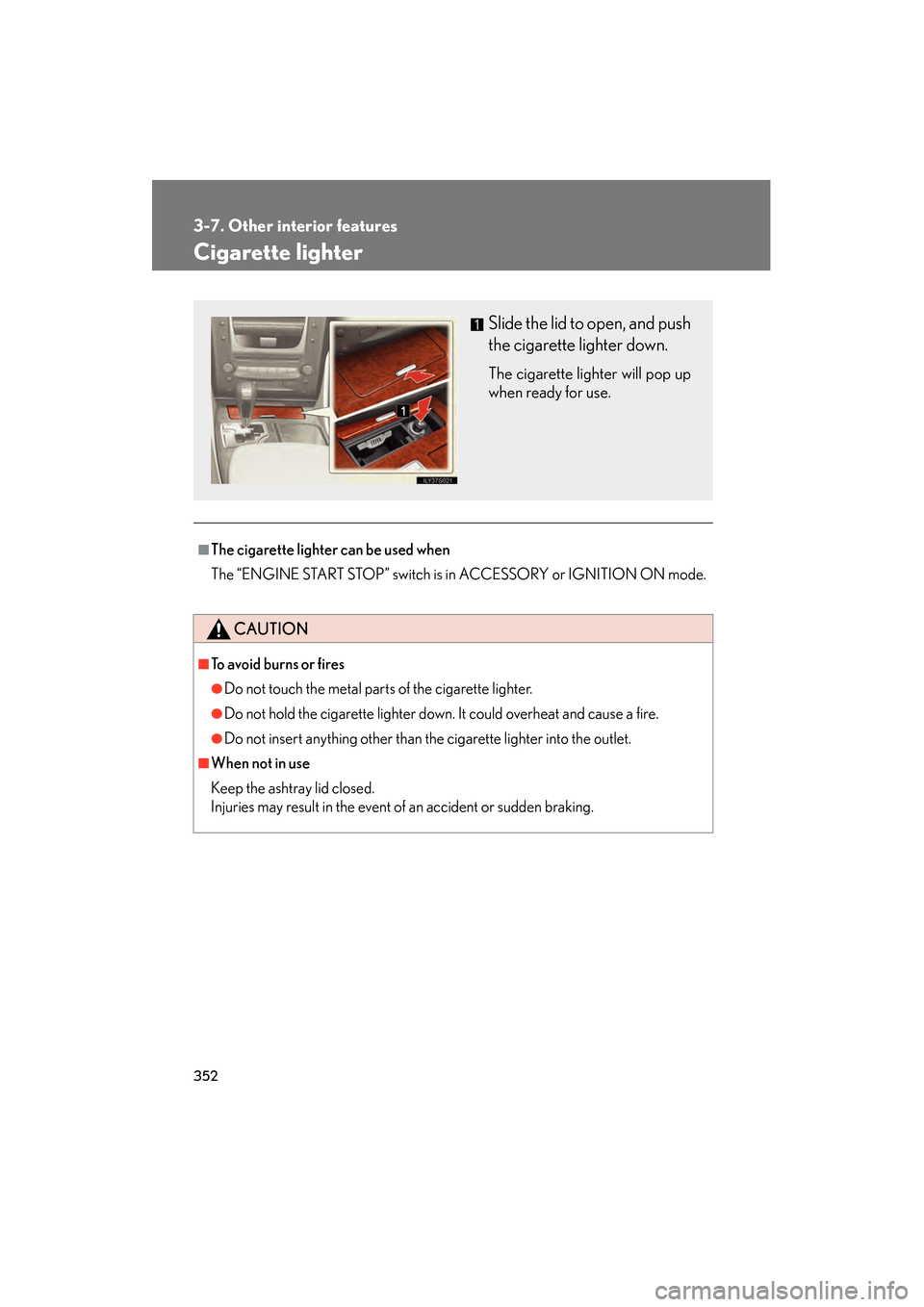
Slide the lid to open, and push
the cigarette lighter down.
The cigarette lighter will pop up
when ready for use.
GS_U_G.book Page 352 Thursday, June 19, 2008 12:54 PM
Page 355 of 598
354
3-7. Other interior features
GS_G_U
June 19, 2008 12:54 pm
Seat heaters/ventilators (if equipped)
■The seat heaters/ventilators can be used when
The “ENGINE START STOP” switch is in IGNITION ON mode.
■When not in use
Set the dial to “0”. The indicator light turns off.
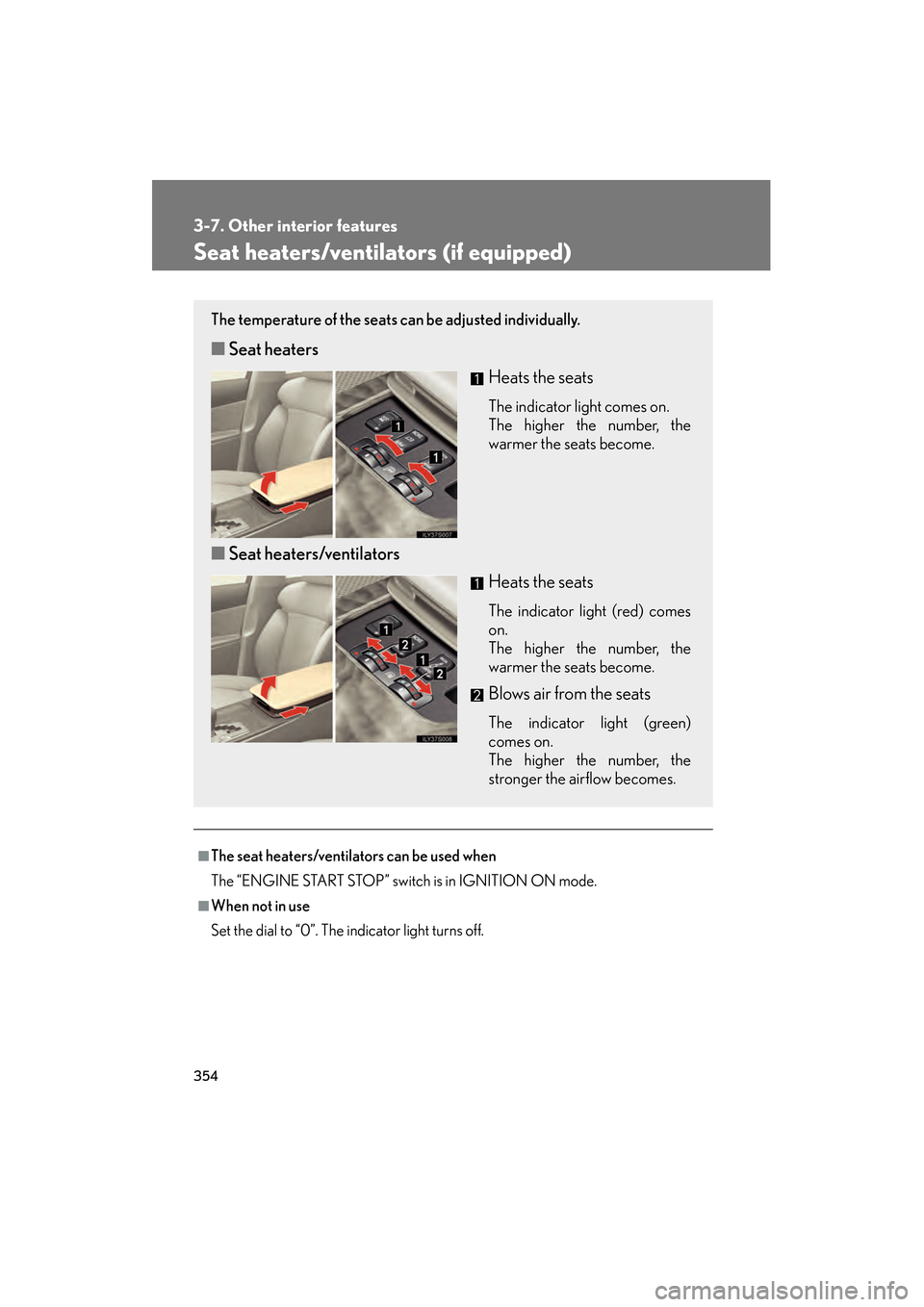
The temperature of the seats can be adjusted individually.
■Seat heaters
Heats the seats
The indicator light comes on.
The higher the number, the
warmer the seats become.
■Seat heaters/ventilators
Heats the seats
The indicator light (red) comes
on.
The higher the number, the
warmer the seats become.
Blows air from the seats
The indicator light (green)
comes on.
The higher the number, the
stronger the airflow becomes.
GS_U_G.book Page 354 Thursday, June 19, 2008 12:54 PM
Page 364 of 598
363
3-7. Other interior features
3
Interior features
GS_G_U
June 19, 2008 12:54 pm
Garage door opener
The garage door opener (HomeLink Universal Transceiver) is manufactured
under license from HomeLink.
Programming the HomeLink (for U.S.A. owners)
The HomeLink
compatible transceiver in your vehicle has 3 buttons
which can be programmed to operate 3 different devices. Refer to the
programming method below appropriate for the device.
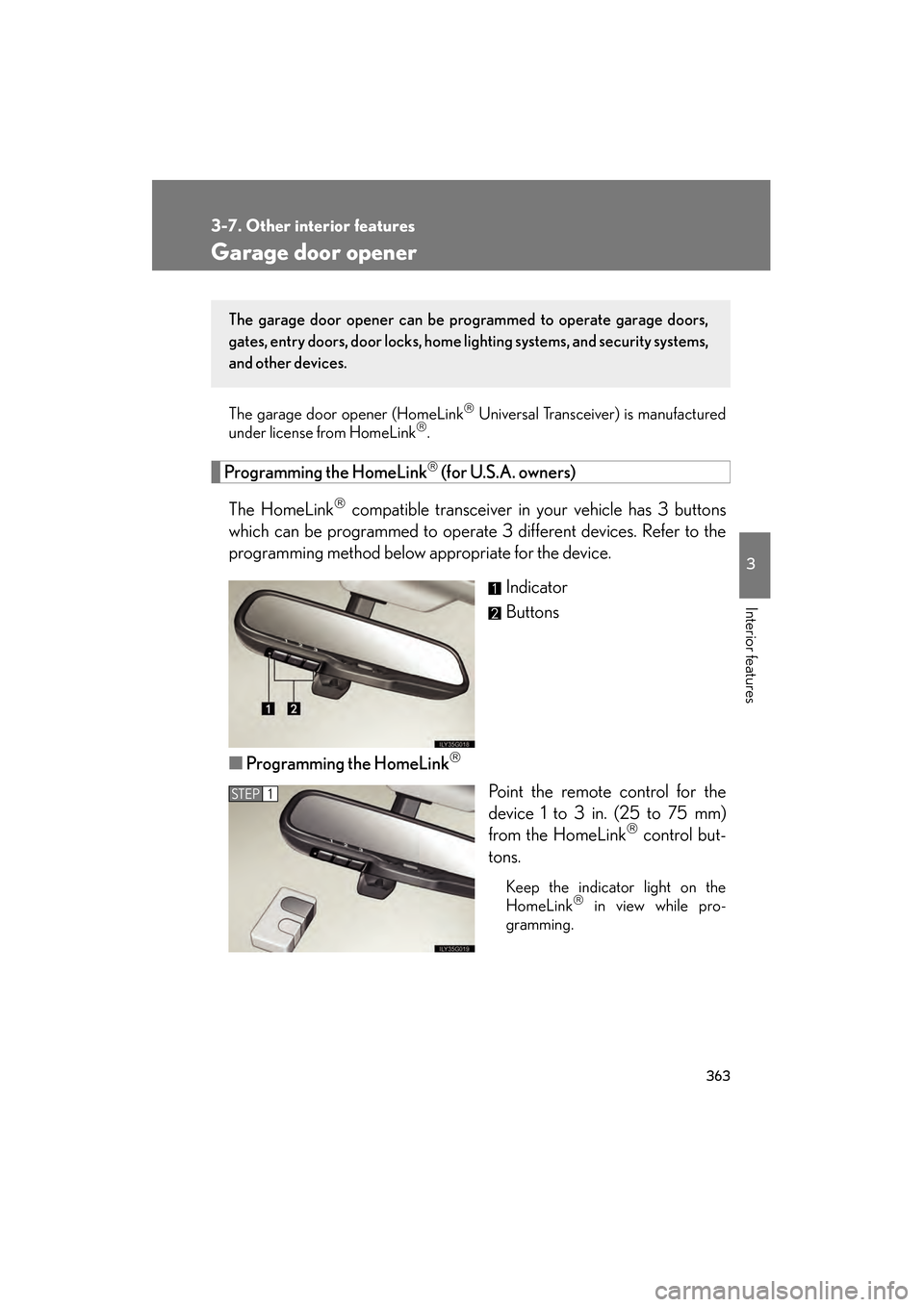
Indicator
Buttons
■ Programming the HomeLink
Point the remote control for the
device 1 to 3 in. (25 to 75 mm)
from the HomeLink
control but-
tons.
Keep the indicator light on the
HomeLink in view while pro-
gramming.
The garage door opener can be pr ogrammed to operate garage doors,
gates, entry doors, door locks, home lighting systems, and security systems,
and other devices.
STEP1
GS_U_G.book Page 363 Thursday, June 19, 2008 12:54 PM
Page 365 of 598
364
3-7. Other interior features
GS_G_U
June 19, 2008 12:54 pm
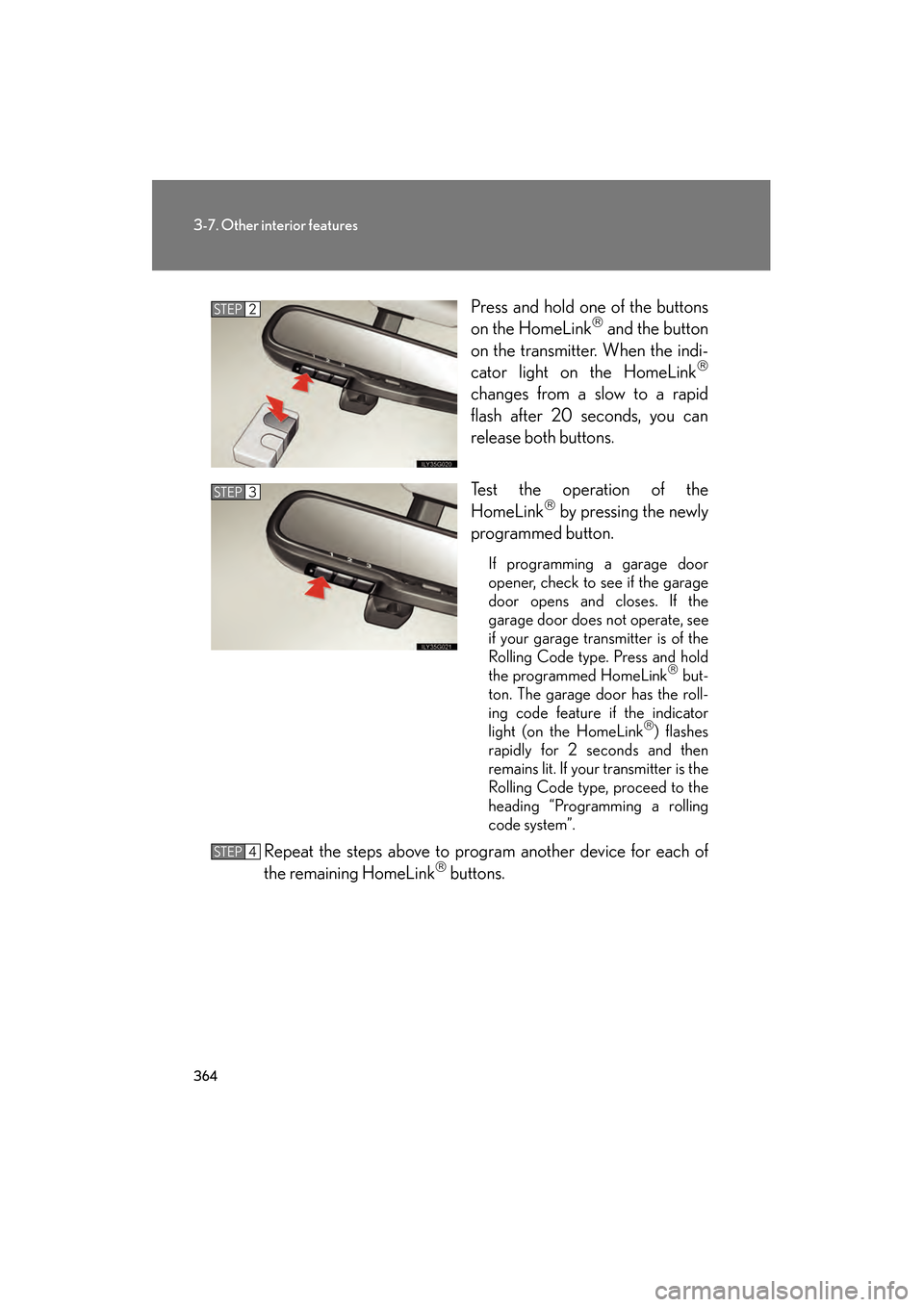
Press and hold one of the buttons
on the HomeLink and the button
on the transmitter. When the indi-
cator light on the HomeLink
changes from a slow to a rapid
flash after 20 seconds, you can
release both buttons.
Test the operation of the
HomeLink
by pressing the newly
programmed button.
If programming a garage door
opener, check to see if the garage
door opens and closes. If the
garage door does not operate, see
if your garage transmitter is of the
Rolling Code type. Press and hold
the programmed HomeLink
but-
ton. The garage door has the roll-
ing code feature if the indicator
light (on the HomeLink
) flashes
rapidly for 2 seconds and then
remains lit. If your transmitter is the
Rolling Code type, proceed to the
heading “Programming a rolling
code system”.
Repeat the steps above to program another device for each of
the remaining HomeLink buttons.
STEP2
STEP3
STEP4
GS_U_G.book Page 364 Thursday, June 19, 2008 12:54 PM
Page 367 of 598
366
3-7. Other interior features
GS_G_U
June 19, 2008 12:54 pm
■Programming an entry gate (for U.S.A. owners)/Programming all
devices in the Canadian market
Place your transmitter 1 to 3 in. (25 to 75 mm) away from the sur-
face of the HomeLink
.
Keep the indicator light on the HomeLink in view while programming.
Press and hold the selected HomeLink button.
Repeatedly press and release (cycle) the device’s remote control
button for two seconds each until step 4 is completed.
When the indicator light on the HomeLink
compatible trans-
ceiver starts to flash rapidly, release the buttons.
Test the operation of the HomeLink
by pressing the newly pro-
grammed button. Check to see if the gate/device operates cor-
rectly.
Repeat the steps above to program another device for each of
the remaining HomeLink
buttons.
■ Programming other devices
To program other devices such as home security systems, home door
locks or lighting, contact your authorized Lexus dealer for assistance.
■ Reprogramming a button
The individual HomeLink
buttons cannot be erased but can be
reprogrammed. To reprogram a button, follow the “Basic program-
ming” instructions.
STEP1
STEP2
STEP3
STEP4
STEP5
STEP6
GS_U_G.book Page 366 Thursday, June 19, 2008 12:54 PM
Page 368 of 598
367
3-7. Other interior features
3
Interior features
GS_G_U
June 19, 2008 12:54 pm
Operating the HomeLink
Press the appropriate HomeLink button. The HomeLink indicator
light on the HomeLink transceiver should turn on.
The HomeLink continues to send a signal for up to 20 seconds as long as
the button is pressed.
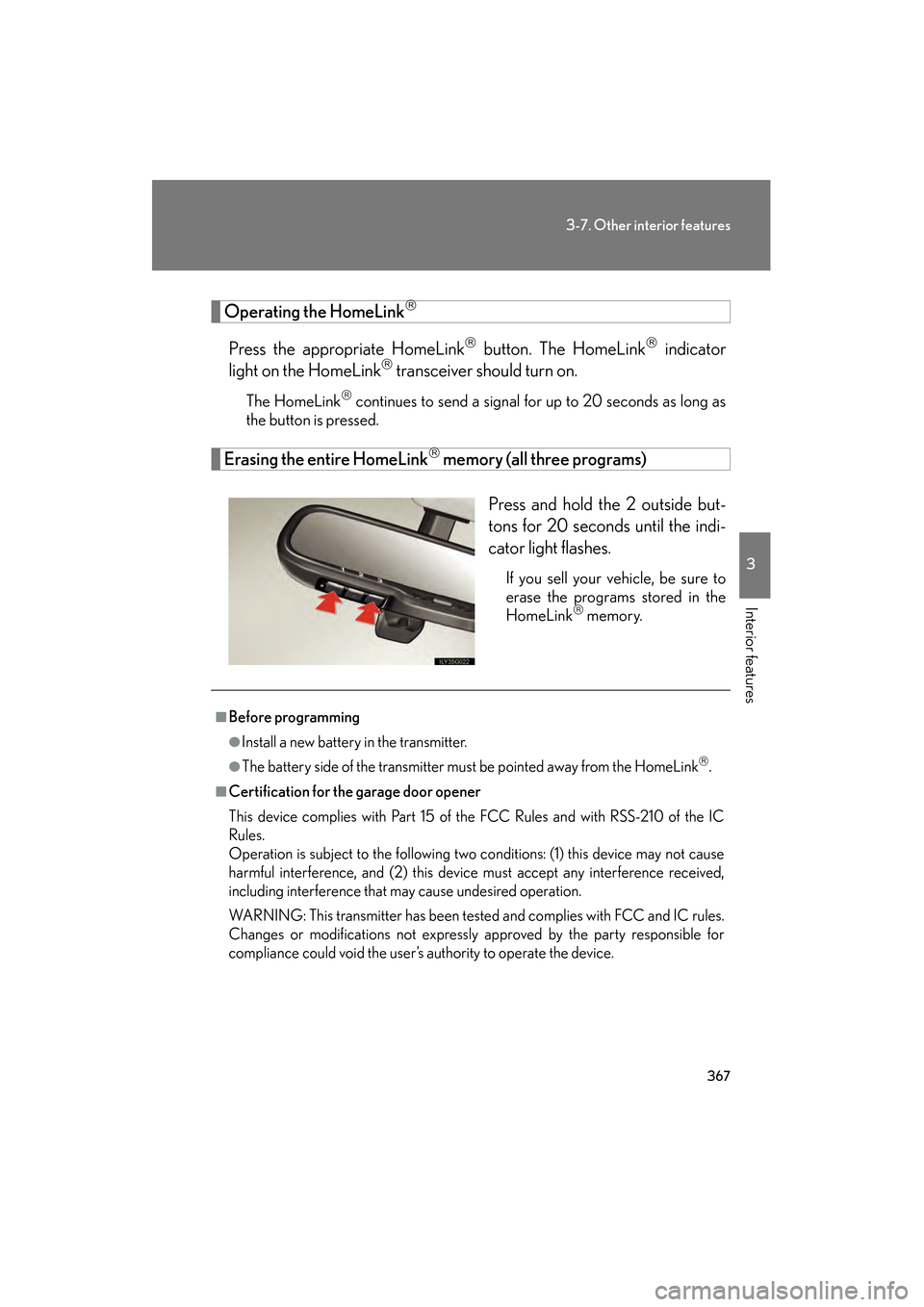
Erasing the entire HomeLink memory (all three programs)
Press and hold the 2 outside but-
tons for 20 seconds until the indi-
cator light flashes.
If you sell your vehicle, be sure to
erase the programs stored in the
HomeLink
memory.
■Before programming
●Install a new battery in the transmitter.
●The battery side of the transmitter must be pointed away from the HomeLink.
■Certification for the garage door opener
This device complies with Part 15 of the FCC Rules and with RSS-210 of the IC
Rules.
Operation is subject to the following two conditions: (1) this device may not cause
harmful interference, and (2) this device must accept any interference received,
including interference that may cause undesired operation.
WARNING: This transmitter has been tested and complies with FCC and IC rules.
Changes or modifications not expressly approved by the party responsible for
compliance could void the user’s authority to operate the device.
GS_U_G.book Page 367 Thursday, June 19, 2008 12:54 PM
Page 374 of 598
373
3-7. Other interior features
3
Interior features
GS_G_U
June 19, 2008 12:54 pm
Lexus Link System (if equipped)
The Lexus Link System is a communication service that uses Global Posi-
tioning System (GPS) data and cellular service to provide you with safety,
security and convenience. This system is only operational in GPS and cellu-
lar coverage areas. Button operation and voice commands are used to
operate the system. To operate the system, follow the voice guidance
instructions. For details about service and subscription, call the Lexus Link
Call Center at 1-800-25-LEXUS (1-800-255-3987) (toll-free).
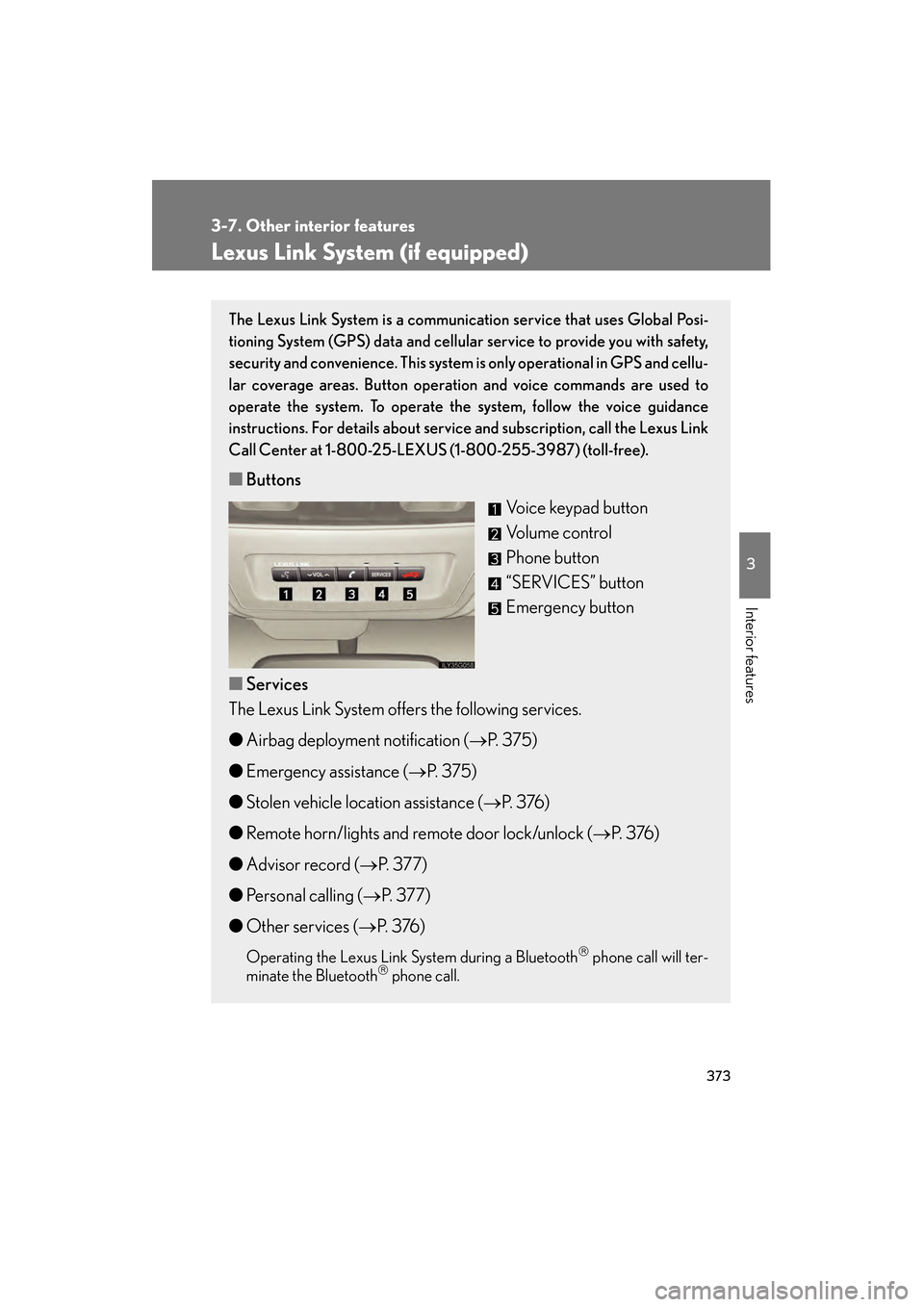
■ Buttons
Voice keypad button
Volume control
Phone button
“SERVICES” button
Emergency button
■ Services
The Lexus Link System offers the following services.
● Airbag deployment notification ( →P. 375)
● Emergency assistance ( →P. 375)
● Stolen vehicle location assistance ( →P. 3 76 )
● Remote horn/lights and remote door lock/unlock ( →P. 3 76 )
● Advisor record ( →P. 3 7 7 )
● Personal calling ( →P. 3 7 7 )
● Other services ( →P. 3 76 )
Operating the Lexus Link System during a Bluetooth phone call will ter-
minate the Bluetooth phone call.
GS_U_G.book Page 373 Thursday, June 19, 2008 12:54 PM
Page 376 of 598
375
3-7. Other interior features
3
Interior features
GS_G_U
June 19, 2008 12:54 pm
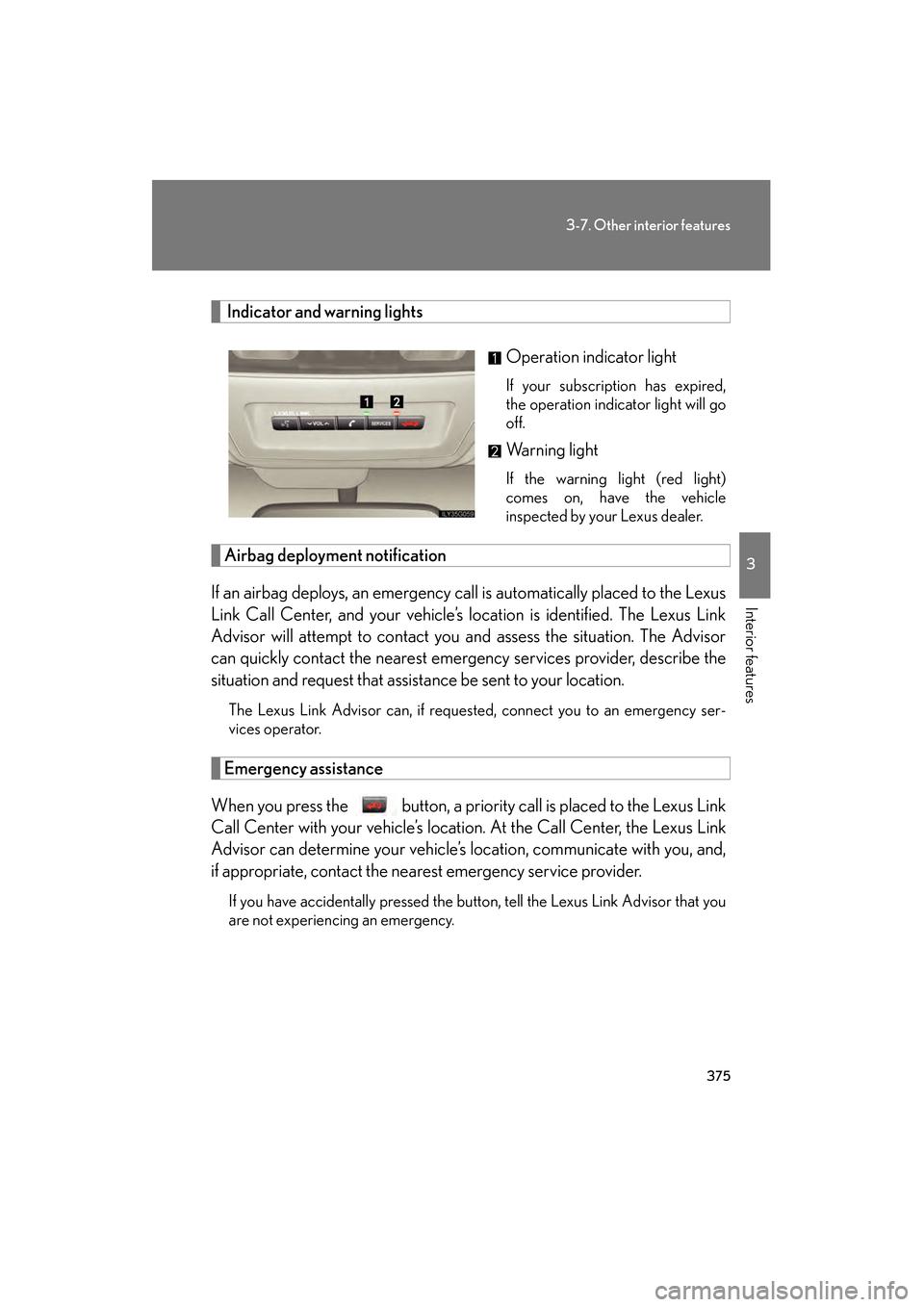
Indicator and warning lightsOperation indicator light
If your subscription has expired,
the operation indicator light will go
off.
Warning light
If the warning light (red light)
comes on, have the vehicle
inspected by your Lexus dealer.
Airbag deployment notification
If an airbag deploys, an emergency call is automatically placed to the Lexus
Link Call Center, and your vehicle’s location is identified. The Lexus Link
Advisor will attempt to contact you and assess the situation. The Advisor
can quickly contact the nearest emerge ncy services provider, describe the
situation and request that assistance be sent to your location.
The Lexus Link Advisor can, if requested, connect you to an emergency ser-
vices operator.
Emergency assistance
When you press the button, a priority call is placed to the Lexus Link
Call Center with your vehicle’s location. At the Call Center, the Lexus Link
Advisor can determine your vehicle’s location, communicate with you, and,
if appropriate, contact the nearest emergency service provider.
If you have accidentally pressed the button, tell the Lexus Link Advisor that you
are not experiencing an emergency.
GS_U_G.book Page 375 Thursday, June 19, 2008 12:54 PM
Page 377 of 598
376
3-7. Other interior features
GS_G_U
June 19, 2008 12:54 pm
Stolen vehicle location assistance
If your vehicle is stolen, call the Lexus Link Call Center at 1-800-25-
LEXUS (1-800-255-3987) (toll-free) and select the option for Lexus Link.
To protect subscribers’ privacy, the location of a vehicle will not be provided to
anyone other than a law enforcement authority.
Remote horn/lights and remote door lock/unlock
The remote operations are performed by contacting the Lexus Link Call
Center from the outside of the vehicle. When necessary, call the Lexus Link
Call Center at 1-800-25-LEXUS (1-800-255-3987) (toll-free) and
select the option for Lexus Link.
● In the case that you forget to lock the vehicle or you are locked out, the
Lexus Link Call Center can send a signal to lock or unlock the vehicle
remotely.
● In the case that you forget where you parked the vehicle, such as in a
large parking lot, the Lexus Link Call Center can send a signal to flash the
headlights and sound the horn to help you locate the vehicle.
When contacting the Lexus Link Call Center from the outside of the vehicle,
you need the Lexus Link PIN (Personal Identification Number). Write the PIN
down and carry it with you.
Other services
Press the button in the vehicle or call the Lexus Link Call Center at 1-
800-25-LEXUS (1-800-255-3987) (toll-free), and then select the option
for Lexus Link. The services provided will depend on the service plan level.
GS_U_G.book Page 376 Thursday, June 19, 2008 12:54 PM