lock Lexus GS350 2008 Repair Manual
[x] Cancel search | Manufacturer: LEXUS, Model Year: 2008, Model line: GS350, Model: Lexus GS350 2008Pages: 598, PDF Size: 14.03 MB
Page 149 of 598
148
2-3. Operating the lights and windshield wipers
GS_G_U
June 19, 2008 12:54 pm
■If no windshield washer fluid sprays
Check that the washer nozzles are not blocked if there is washer fluid in the wind-
shield washer fluid reservoir.
■In extremely hot or cold weather
The system will turn off if the windshield gets extremely hot (at more than 176°F
[80 °C]) or cold (at less than 14 °F [-10 °C]).
■Customization that can be configured at Lexus dealer
Settings (e.g. drip prevention function) can be changed.
(Customizable features →P. 5 7 3 )
CAUTION
■Caution regarding the use of windshield wipers in “AUTO” mode
The windshield wipers may operate unexpectedly if the sensor is touched or the
windshield is subject to vibration in “AUTO” mode. Take care that your fingers or
anything else do not become caught in the windshield wipers.
NOTICE
■When the windshield is dry
Do not use the wipers, as they may damage the windshield.
■When there is no washer fluid spray from the nozzle
Damage to the washer fluid pump may be caused if the lever is pulled toward you
and held continually.
GS_U_G.book Page 148 Thursday, June 19, 2008 12:54 PM
Page 185 of 598
184
2-4. Using other driving systems
GS_G_U
June 19, 2008 12:54 pm
Driving assist systems
To help enhance driving safety and performance, the following systems
operate automatically in response to various driving situations. Be aware,
however, that these systems are supplementary and should not be relied
upon too heavily when operating the vehicle.
■ ABS (Anti-lock Brake System)
Helps to prevent wheel lock when the brakes are applied suddenly, or if
the brakes are applied while driving on a slippery road surface.
■Brake assist
Generates an increased level of braking force after the brake pedal is
depressed, when the system detects a panic stop situation.
■VSC (Vehicle Stability Control)
Helps the driver to control skidding when swerving suddenly or turning on
slippery road surfaces.
■TRAC (Traction Control)
Maintains drive power and prevents the rear wheels from spinning when
starting the vehicle or accelerating on slippery roads.
■Hill-start assist control
Helps prevent the vehicle from rolling backwards when starting on an
incline or slippery slope. It operates for approximately 5 seconds at maxi-
mum.
■EPS (Electric Power Steering)
Employs an electric motor to reduce the amount of effort needed to turn
the steering wheel.
■Active stabilizer suspensi on system (if equipped)
Turns at smaller angles to maintain the stable vehicle posture.
GS_U_G.book Page 184 Thursday, June 19, 2008 12:54 PM
Page 193 of 598
192
2-4. Using other driving systems
GS_G_U
June 19, 2008 12:54 pm
■Conditions that may trigger the system even if there is no danger of collision
●When there is an object by the roadside at the entrance to a curve
●When passing an oncoming vehicle on a curve
●When driving over a narrow iron bridge
●When there is a metal object on the road surface
●When driving on an uneven road surface
●When passing an oncoming vehicle on a left-turn
●When your vehicle rapidly closes on the vehicle in front
When the system is activated in the situations described above there is also a possi-
bility that the seat belts will retract quickly and the brakes will be applied with a force
greater than normal. When the seat belt is locked in the retracted position, stop the
vehicle in a safe place, release the seat belt and refasten.
■When there is a malfunction in the system
Warning lights and/or warning messages will turn on or flash. ( →P. 489, 499)
GS_U_G.book Page 192 Thursday, June 19, 2008 12:54 PM
Page 208 of 598
Interior features3
207
GS_G_U
June 19, 2008 12:54 pm
3-3. Using the audio system ........................... 226
Audio system type.................. 226
Using the radio........................ 229
Using the cassette player ... 238
Using the CD player ............. 242
Playing MP3 and WMA discs............................ 247
Using the DVD player............ 251
Playing DVD video/audio............................ 254
Playing video CD ................... 266
DVD player and DVD video disc information ....... 270
Optimal use of the audio/video system ............ 282
Using the AUX adapter ....... 287
Using the steering
switches................................. 288
3-4. Using the hands-free system (for cellular
phone)............................ 291
Hands-free system (for cellular phone) .............. 291
Using the Bluetooth
®
phone ...................................... 296
Setting the hands-free system ....................................... 311 3-5. Using the interior
lights ............................. 337
Interior lights list .................... 337
3-6. Using the storage features ........................ 340
List of storage features......... 340
3-7. Other interior features ........................ 347
Sun visors ................................. 347
Vanity mirror ........................... 348
Clock ......................................... 349
Outside temperature
display..................................... 350
Ashtrays..................................... 351
Cigarette lighter .................... 352
Power outlet ............................ 353
Seat heaters/ventilators ...... 354
Armrest .................................... 356
Rear sunshade ........................ 357
Floor mats ................................ 359
Trunk features ......................... 360
Garage door opener ............ 363
Compass................................... 369
Lexus Link System ................. 373
GS_U_G.book Page 207 Thursday, June 19, 2008 12:54 PM
Page 210 of 598
209
3-1. Using the touch screen
3
Interior features
GS_G_U
June 19, 2008 12:54 pm
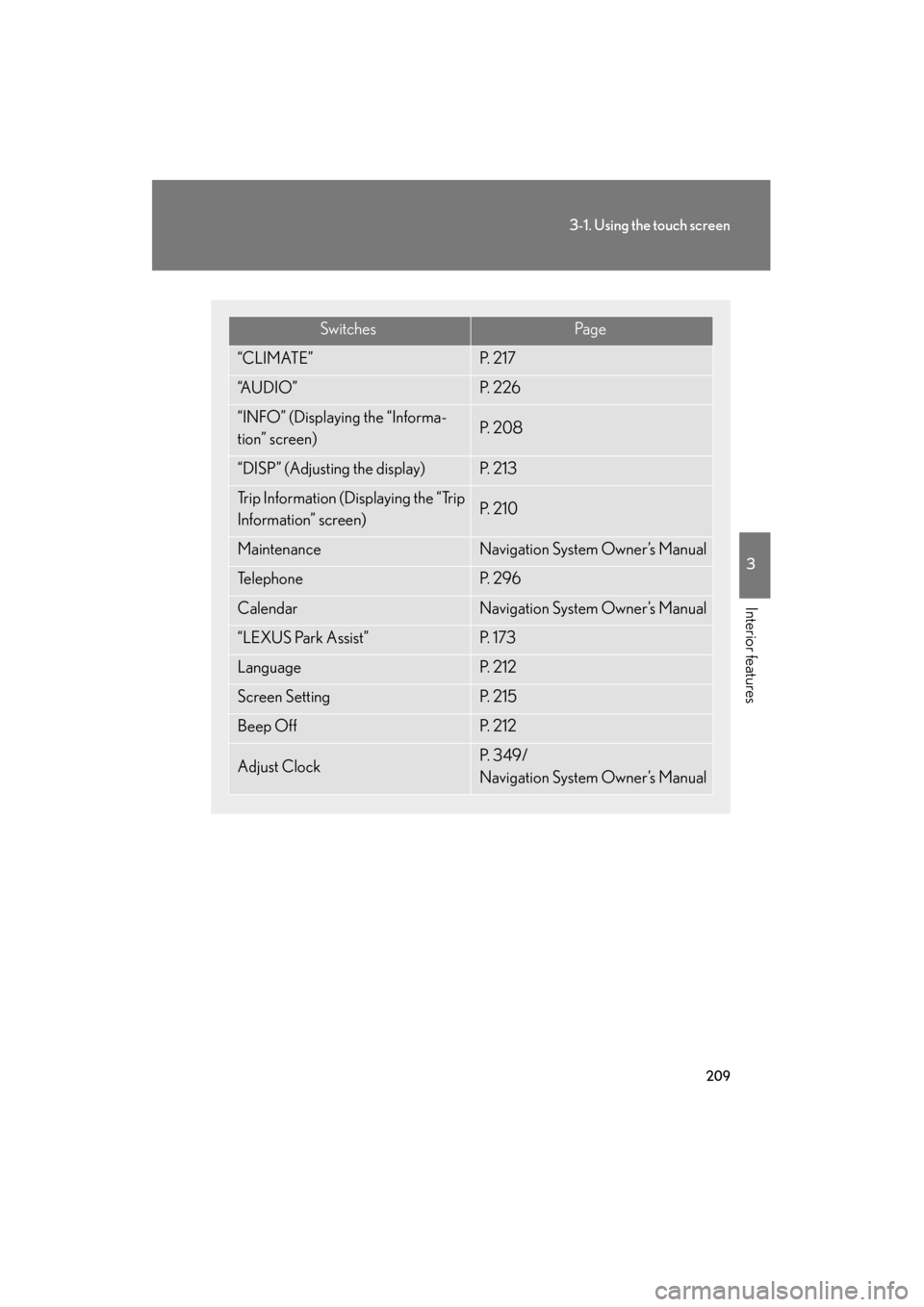
SwitchesPa g e
“CLIMATE”P. 2 1 7
“A U D I O ”P. 2 2 6
“INFO” (Displaying the “Informa-
tion” screen)P. 2 0 8
“DISP” (Adjusting the display)P. 2 1 3
Trip Information (Displaying the “Trip
Information” screen)P. 2 1 0
MaintenanceNavigation System Owner’s Manual
Te l e p h o n eP. 2 9 6
CalendarNavigation System Owner’s Manual
“LEXUS Park Assist”P. 1 7 3
LanguageP. 2 1 2
Screen SettingP. 2 1 5
Beep OffP. 2 1 2
Adjust ClockP. 3 4 9 /
Navigation System Owner’s Manual
GS_U_G.book Page 209 Thursday, June 19, 2008 12:54 PM
Page 225 of 598
224
3-2. Using the air conditioning system and defogger
GS_G_U
June 19, 2008 12:54 pm
■Automatic mode for air intake control
In automatic mode, the system detects exhaust gas and other pollutants and auto-
matically switches between outside air and recirculated air modes.
When the air conditioning is off, and the fan is operating, turning the auto mode ON
will activate the air conditioning system.
■Micro dust and pollen filter
●In order to prevent the windows from fogging up when the outside air is cold,
the following may occur.
• Outside air mode does not switch to .
• The air conditioning system operates automatically.
• The operation cancels after 1 minute.
●In rainy weather, the windows may fog up. Press .
■When the indicator light on flashes
Touch and turn off the air conditioning system before turning it on once
more. There may be a problem in the air conditioning system if the indicator light
continues to flash. Turn the air conditioning system off and have it inspected by your
Lexus dealer.
CAUTION
■To prevent the windshield from fogging up
Do not use during cool air operation in extremely humid weather. The differ-
ence between the temperature of the outside air and that of the windshield can
cause the outer surface of the windshield to fog up, blocking your vision.
NOTICE
■To prevent 12 volt battery discharge
Do not leave the automatic air conditioning system on longer than necessary when
the engine is off.
GS_U_G.book Page 224 Thursday, June 19, 2008 12:54 PM
Page 263 of 598
262
3-3. Using the audio system
GS_G_U
June 19, 2008 12:54 pm
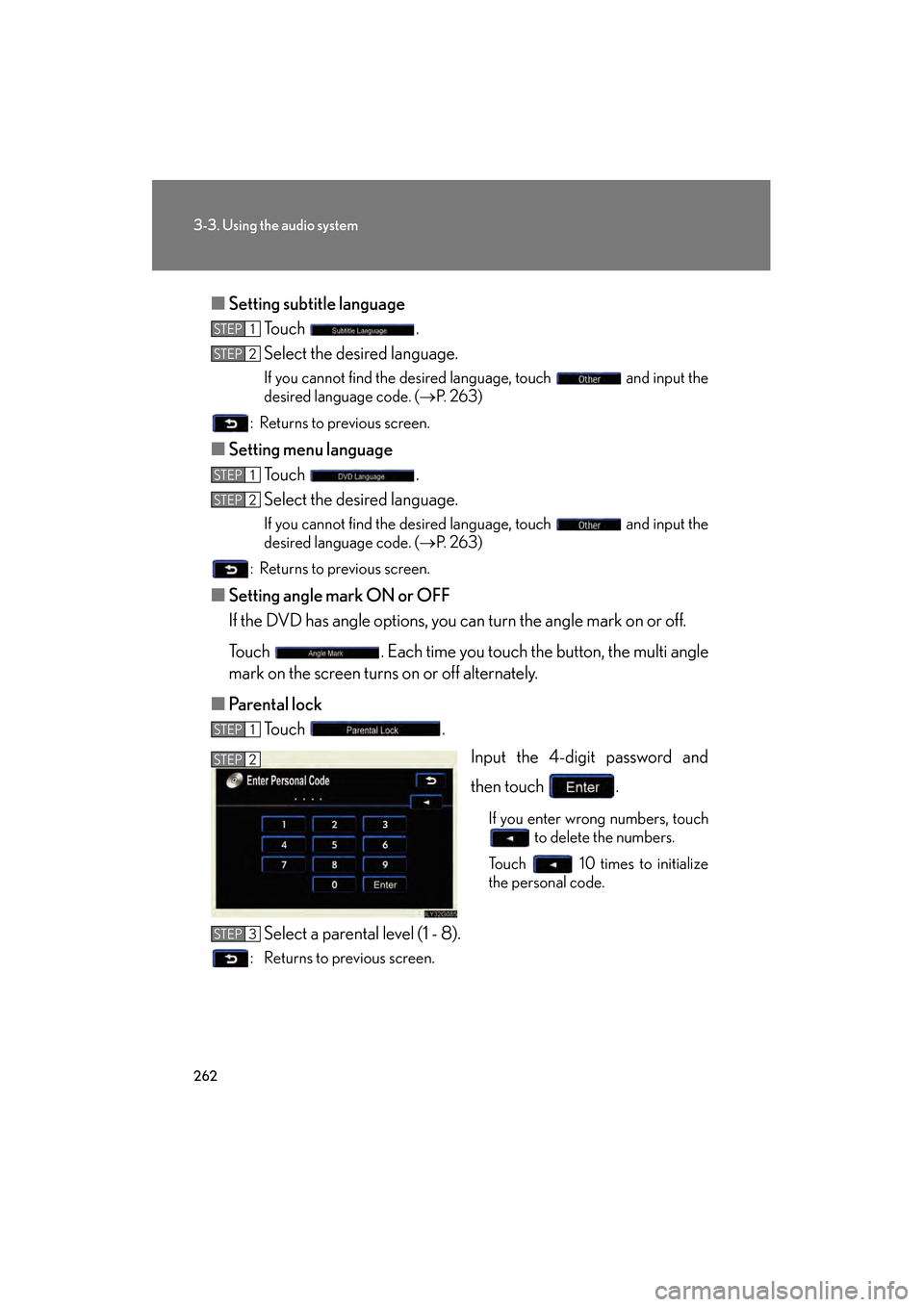
■Setting subtitle language
Touch .
Select the desired language.
If you cannot find the desired language, touch and input the
desired language code. ( →P. 263)
: Returns to previous screen.
■ Setting menu language
Touch .
Select the desired language.
If you cannot find the desired language, touch and input the
desired language code. ( →P. 263)
: Returns to previous screen.
■ Setting angle mark ON or OFF
If the DVD has angle options, you can turn the angle mark on or off.
Touch . Each time you touch the button, the multi angle
mark on the screen turns on or off alternately.
■ Parental lock
Touch .
Input the 4-digit password and
then touch .
If you enter wrong numbers, touch to delete the numbers.
Touch 10 times to initialize
the personal code.
Select a parental level (1 - 8).
: Returns to previous screen.
STEP1
STEP2
STEP1
STEP2
STEP1
STEP2
STEP3
GS_U_G.book Page 262 Thursday, June 19, 2008 12:54 PM
Page 331 of 598
330
3-4. Using the hands-free system (for cellular phone)
GS_G_U
June 19, 2008 12:54 pm
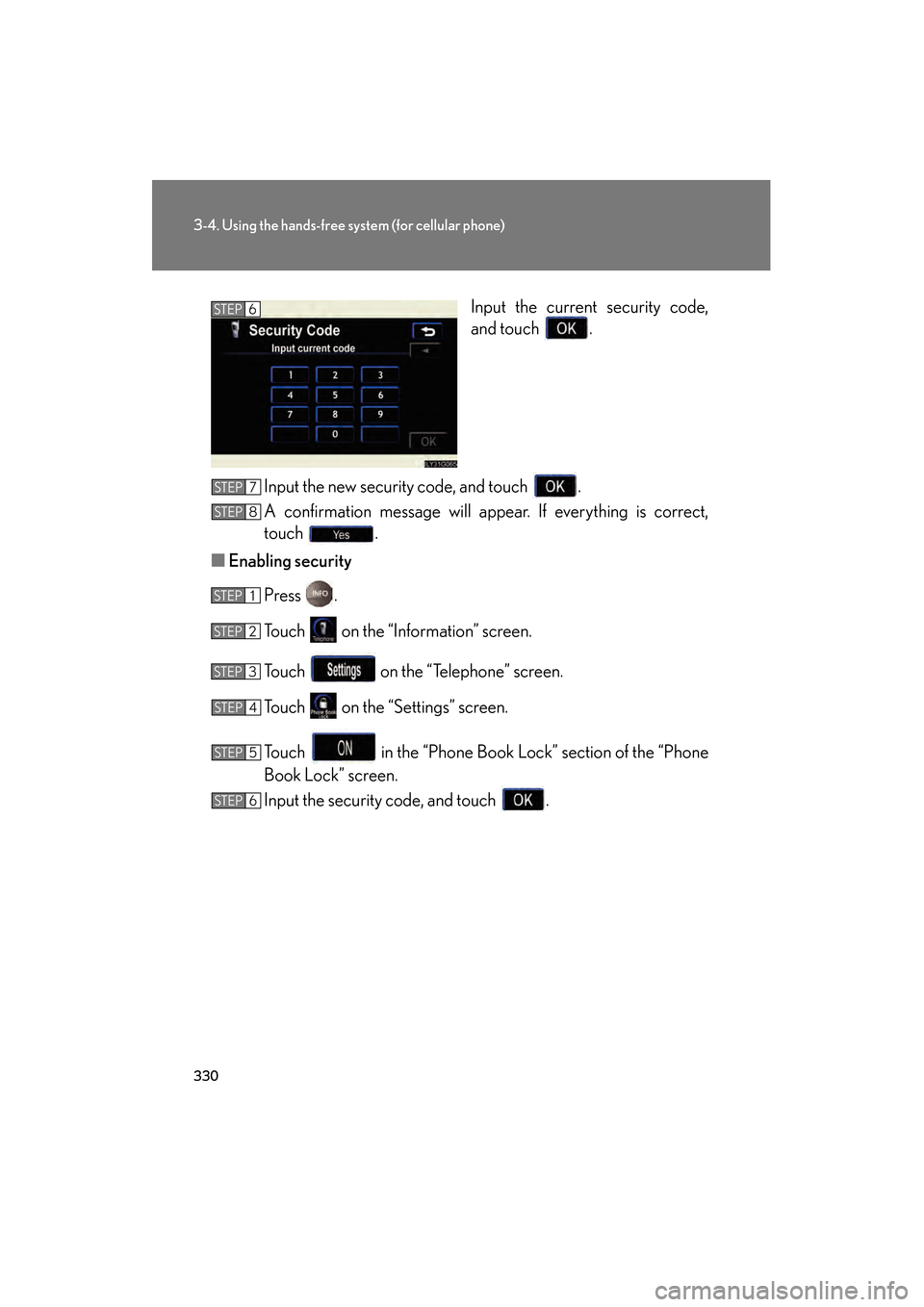
Input the current security code,
and touch .
Input the new security code, and touch .
A confirmation message will appear. If everything is correct,
touch .
■ Enabling security
Press .
Touch on the “Information” screen.
Touch on the “Telephone” screen.
Touch on the “Settings” screen.
Touch in the “Phone Book Lock” section of the “Phone
Book Lock” screen.
Input the security code, and touch .STEP6
STEP7
STEP8
STEP1
STEP2
STEP3
STEP4
STEP5
STEP6
GS_U_G.book Page 330 Thursday, June 19, 2008 12:54 PM
Page 332 of 598
331
3-4. Using the hands-free system (for cellular phone)
3
Interior features
GS_G_U
June 19, 2008 12:54 pm
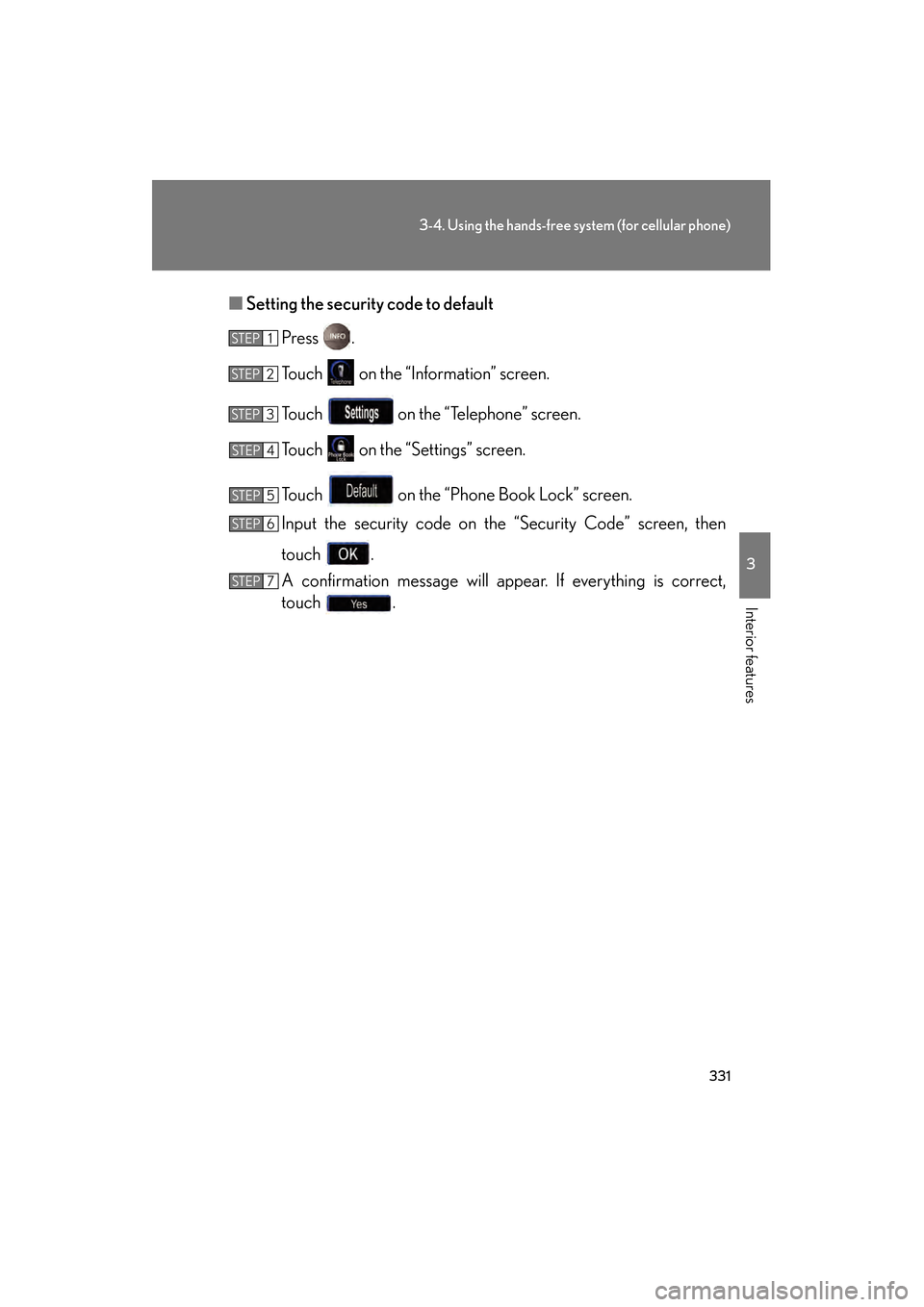
■Setting the security code to default
Press .
Touch on the “Information” screen.
Touch on the “Telephone” screen.
Touch on the “Settings” screen.
Touch on the “Phone Book Lock” screen.
Input the security code on the “Security Code” screen, then
touch .
A confirmation message will appear. If everything is correct,
touch .
STEP1
STEP2
STEP3
STEP4
STEP5
STEP6
STEP7
GS_U_G.book Page 331 Thursday, June 19, 2008 12:54 PM
Page 333 of 598
332
3-4. Using the hands-free system (for cellular phone)
GS_G_U
June 19, 2008 12:54 pm
■If the “Phone Book Lock” is set
If the security code is input and the “Phone Book Lock” set, the following functions
are locked.
●Display of the phone book screen and transferring, registering, editing, deleting
the phone book data.
●Display of speed dial screen, registering, deleting the speed dial and speed dial-
ing.
●Display of the other party’s name for calls being received or made.
●Displayed of dialed numbers screen and received calls screen, deleting dialed
numbers and received numbers.
●Display of phone information screen.
●Changing the security code.
The speed dial screen is not displayed while driving.
■When changing the security code
●Be sure to choose a number difficult for strangers to guess.
●Do not forget the security code. Even your Lexus dealer will be unable to dis-
able the security. If you do forget the code, initialize all personal data. ( →P. 2 1 5 )
GS_U_G.book Page 332 Thursday, June 19, 2008 12:54 PM