ESP Lexus GS350 2009 User Guide
[x] Cancel search | Manufacturer: LEXUS, Model Year: 2009, Model line: GS350, Model: Lexus GS350 2009Pages: 622, PDF Size: 17.98 MB
Page 95 of 622
94
1-7. Safety information
GS_G_U (OM30B43U)
May 1, 2009 1:33 pm
■SRS airbag deployment conditions (SRS front airbags)
●The SRS front airbags will deploy in the event of an impact that exceeds the set
threshold level (the level of force corresponding to a 12 - 18 mph [20 - 30 km/h]
frontal collision with a fixed wall that does not move or deform).
However, this threshold velocity will be considerably higher if the vehicle strikes
an object, such as a parked vehicle or sign pole, which can move or deform on
impact, or if the vehicle is involved in an underride collision (e.g. a collision in
which the front of the vehicle “underrides”, or goes under, the bed of a truck, etc.).
●It is possible that in some collisions where the forward deceleration of the vehi-
cle is very close to the designed threshold level, the SRS front airbags and the
seat belt pretensioners may not activate together.
●The SRS front passenger airbag will not activate, if there is not passenger sitting
in the front passenger seat. However, the front passenger airbag may deploy, if
luggage is put in the seat, or the seat belt is fastened, even if the seat is unoccu-
pied. (→P. 1 0 3 )
■SRS airbag deployment conditions (SRS side airbags and SRS curtain shield air-
bags)
●The SRS side airbags and SRS curtain shield airbags will deploy in the event of
an impact that exceeds the set threshold level (the level of force corresponding
to the impact force produced by a 3300 lb. [1500 kg] vehicle colliding with the
vehicle cabin from a direction perpendicular to the vehicle orientation at a
speed of 12 - 18 mph [20 - 30 km/h]).
●The SRS front side airbag on the passenger seat will not activate if there is no
passenger sitting in the front passenger seat. However, the front side airbag on
the passenger seat may deploy if luggage is put in the seat, or the seat belt is fas-
tened, even if the seat is unoccupied. ( →P. 1 0 3 )
sec_01-07.fm Page 94 Friday, May 1, 2009 1:34 PM
Page 99 of 622
98
1-7. Safety information
GS_G_U (OM30B43U)
April 27, 2009 10:48 am
CAUTION
■SRS airbag precautions
Observe the following precautions regarding the airbags. Failure to do so may
cause death or serious injury.
●The driver and all passengers in the vehicle must wear their seat belts properly.
The SRS airbags are supplemental devices to be used with the seat belts.
●The SRS driver airbag deploys with considerable force, and can cause death or
serious injury especially if the driver is very close to the airbag. The National
Highway Traffic Safety Administration (“NHTSA”) advises:
Since the risk zone for driver airbag is th e first 2 - 3 in. (50 - 75 mm) of inflation,
placing yourself 10 in. (250 mm) from your driver airbag provides you with a
clear margin of safety. This distance is measured from the center of the steering
wheel to your breastbone. If you sit less than 10 in. (250 mm) away now, you can
change your driving position in several ways:
• Move your seat to the rear as far as you can while still reaching the pedals
comfortably.
• Slightly recline the back of the seat. Al though vehicle designs vary, many driv-
ers can achieve the 10 in. (250 mm) distance, even with the driver seat all the
way forward, simply by reclining the back of the seat somewhat. If reclining
the back of your seat makes it hard to see the road, raise yourself by using a
firm, non-slippery cushion, or raise the seat if your vehicle has that feature.
• If your steering wheel is adjustable, ti lt it downward. This points the airbag
toward your chest instead of your head and neck.
The seat should be adjusted as recommended by NHTSA above, while still main-
taining control of the foot pedals, steering wheel, and your view of the instrument
panel controls.
GS_U_G.book Page 98 Monday, April 27, 2009 10:50 AM
Page 100 of 622
99
1-7. Safety information
1
Before driving
GS_G_U (OM30B43U)
April 27, 2009 10:48 am
CAUTION
■SRS airbag precautions
●The SRS front passenger airbag also deploys with considerable force, and can
cause death or serious injury especially if the front passenger is very close to the
airbag. The front passenger seat should be as far from the airbag as possible with
the seatback adjusted, so the front passenger sits upright.
●Improperly seated and/or restrained infants and children can be killed or seri-
ously injured by a deploying airbag. An infant or child who is too small to use a
seat belt should be properly secured using a child restraint system. Lexus strongly
recommends that all infants and children be placed in the rear seats of the vehicle
and properly restrained. The rear seats are the safest for infants and children.
( → P. 1 0 9 )
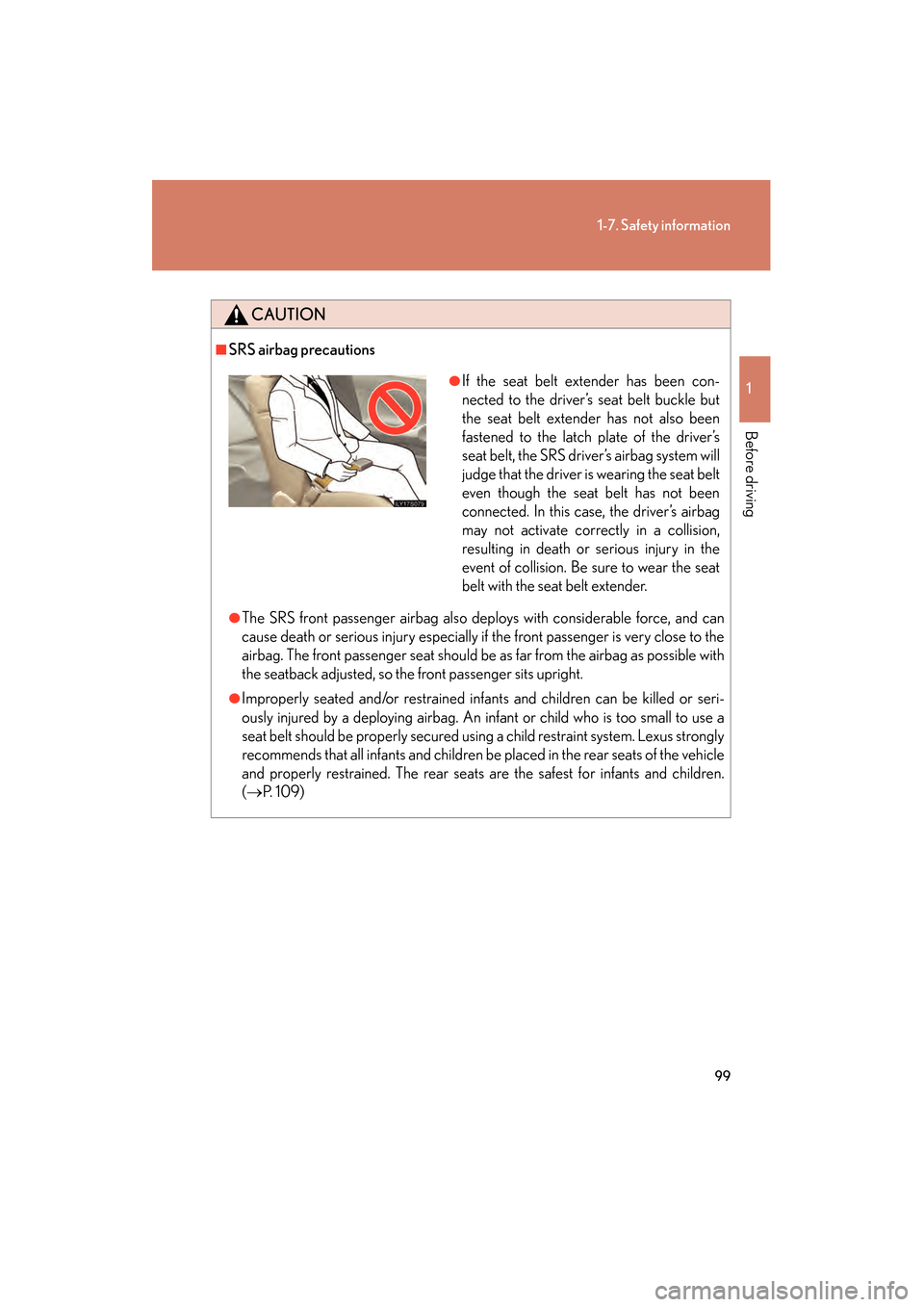
●If the seat belt extender has been con-
nected to the driver’s seat belt buckle but
the seat belt extender has not also been
fastened to the latch plate of the driver’s
seat belt, the SRS driver’s airbag system will
judge that the driver is wearing the seat belt
even though the seat belt has not been
connected. In this case, the driver’s airbag
may not activate correctly in a collision,
resulting in death or serious injury in the
event of collision. Be sure to wear the seat
belt with the seat belt extender.
GS_U_G.book Page 99 Monday, April 27, 2009 10:50 AM
Page 126 of 622
125
2-1. Driving procedures
2
When driving
GS_G_U (OM30B43U)
April 27, 2009 10:48 am
■Driving in the rain
●Drive carefully when it is raining, because visibility will be reduced, the windows
may become fogged-up, and the road will be slippery.
●Drive carefully when it starts to rain, be cause the road surface will be especially
slippery.
●Refrain from high speeds when driving on an expressway in the rain, because
there may be a layer of water between th e tires and the road surface, preventing
the steering and brakes from operating properly.
■Breaking in your new Lexus
To extend the life of the vehicle, the following precautions are recommended to
observe:
●For the first 186 miles (300 km):
Avoid sudden stops.
●For the first 621 miles (1000 km):
• Do not drive at extremely high speeds.
• Avoid sudden acceleration.
• Do not drive continuously in the low range in the “S” position.
• Do not drive at a constant speed for extended periods.
■Operating your vehicle in a foreign country
Comply with the relevant vehicle registration laws and confirm the availability of the
correct fuel. ( →P. 5 6 1 )
■When starting on an incline
The hill-start assist control may operate. ( →P. 200)
GS_U_G.book Page 125 Monday, April 27, 2009 10:50 AM
Page 127 of 622
126
2-1. Driving procedures
GS_G_U (OM30B43U)
April 27, 2009 10:48 am
CAUTION
■When starting the vehicle
Always keep your foot on the brake pedal while stopped with the engine running.
This prevents the vehicle from creeping.
■When driving the vehicle
●Do not drive if you are unfamiliar with the location of the brake and accelerator
pedals to avoid depressing the wrong pedal.
• Accidentally depressing the accelerator pedal instead of the brake pedal will
result in sudden acceleration that may le ad to an accident that could result in
death or serious injury.
• When backing up, you may twist your body around, leading to a difficulty in operating the pedals. Make sure to operate the pedals properly.
• Make sure to keep a correct driving posture even when moving the vehicle only slightly, allowing you to depress the brake and accelerator pedals prop-
erly.
• Depress the brake pedal using your right foot. Depressing the brake pedal using your left foot may delay response in an emergency, resulting in an acci-
dent.
●Do not drive the vehicle over or stop the vehicle near flammable materials.
The exhaust system and exhaust gases ca n be extremely hot. This may cause a
fire if there is any flammable material nearby.
●Do not let the vehicle roll backwards while the shift lever is in a driving position, or
roll forward while the shift lever is in “R”.
Doing so may cause the engine not to oper ate or lead to poor brake and steering
performance, resulting in an accident or damage to the vehicle.
●If the smell of exhaust is noticed inside the vehicle, open the windows and check
that the trunk is closed.
Large amounts of exhaust in the vehicle can cause driver drowsiness and an acci-
dent, resulting in death or a serious health hazard. Have the vehicle inspected by
your Lexus deal er immediately.
●Do not under any circumstances shift the shift lever to “P”, “R” or “N” while the
vehicle is moving.
Doing so can cause significant damage to the automatic transmission and may
result in a loss of vehicle control.
GS_U_G.book Page 126 Monday, April 27, 2009 10:50 AM
Page 155 of 622
154
2-2. Instrument cluster
GS_G_U (OM30B43U)
April 27, 2009 10:48 am
■System check display
After switching the “ENGINE START STOP” switch to IGNITION ON mode,
“CHECK” is displayed while system operation is checked. When the system check
is complete, “COMPLETED” is displayed before returning to the normal screen.
NOTICE
■The multi-information display at low temperatures
Allow the interior of the vehicle to warm up before using the liquid crystal informa-
tion display. At extremely low temperatures, the information display monitor may
respond slowly, and display changes may be delayed.
GS_U_G.book Page 154 Monday, April 27, 2009 10:50 AM
Page 177 of 622
176
2-4. Using other driving systems
GS_G_U (OM30B43U)
April 27, 2009 10:48 am
■Vehicle-to-vehicle distance settings
Select a distance from the table below. Note that the distances shown correspond
to a vehicle speed of 50 mph (80 km/h). Vehicle-to-vehicle distance increases/
decreases in accordance with vehicle speed.
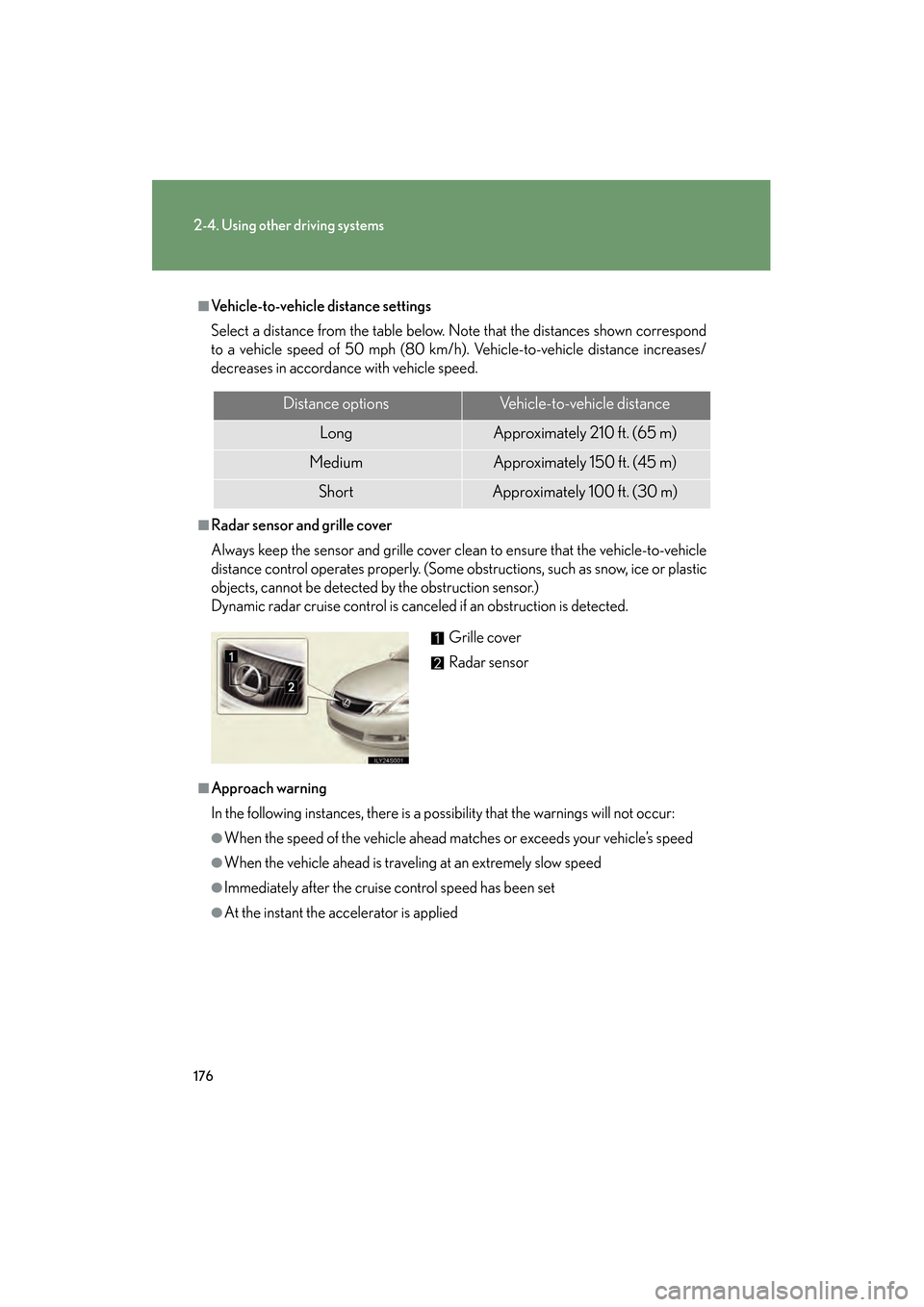
■Radar sensor and grille cover
Always keep the sensor and grille cover clean to ensure that the vehicle-to-vehicle
distance control operates properly. (Some obstructions, such as snow, ice or plastic
objects, cannot be detected by the obstruction sensor.)
Dynamic radar cruise control is canceled if an obstruction is detected.
■Approach warning
In the following instances, there is a po ssibility that the warnings will not occur:
●When the speed of the vehicle ahead ma tches or exceeds your vehicle’s speed
●When the vehicle ahead is traveling at an extremely slow speed
●Immediately after the cruise control speed has been set
●At the instant the accelerator is applied
Distance optionsVehicle-to-vehicle distance
LongApproximately 210 ft. (65 m)
MediumApproximately 150 f t. (45 m)
ShortApproximately 100 f t. (30 m)
Grille cover
Radar sensor
GS_U_G.book Page 176 Monday, April 27, 2009 10:50 AM
Page 178 of 622
177
2-4. Using other driving systems
2
When driving
GS_G_U (OM30B43U)
April 27, 2009 10:48 am
■CertificationFor vehicles sold in the U.S.A.
FCC ID: HYQDNMWR005
This device complies with Part 15 of the FCC Rules. Operation is subject to the fol-
lowing two conditions: (1) this device may not cause harmful interference, and (2)
this device must accept any interference received, including interference that may
cause undesired operation.
FCC WARNING
Changes or modifications not expressly approved by the party responsible for
compliance could void the user’s authority to operate the equipment.
Radio frequency radiation exposure Information:
This equipment complies with FCC radiatio n exposure limits set forth for an uncon-
trolled environment.
This equipment should be in stalled and operated with minimum distance of 20 cm
between the radiator and your body.
This transmitter must not be co-located or operating in conjunction with any other
antenna or transmitter.
For vehicles sold in Canada
Operation is subject to the following two conditions: (1) this device may not cause
interference, and (2) this device must accept any interference, including interfer-
ence that may cause undesired operation of the device.
GS_U_G.book Page 177 Monday, April 27, 2009 10:50 AM
Page 193 of 622
192
2-4. Using other driving systems
GS_G_U (OM30B43U)
April 27, 2009 10:48 am
■When using the intuitive parking assist
●The sensors’ detection areas and reaction times are limited. When moving for-
ward or reversing, check the areas surrounding the vehicle (especially the sides
of the vehicle) for safety, and drive slowly, using the brake to control the vehicle’s
speed.
• The sensors’ detection areas are limited to the areas around the vehicle’s front
and rear bumpers.
• Depending on the shape of the obstacle and other factors, the detection dis-
tance may shorten, or dete ction may be impossible.
• There will be a short delay between obstacle detection and display. Even at
slow speeds, there is a possibility that the obstacle will come within 0.8 ft. (25
cm) of the vehicle before the display is shown and the warning beep sounds.
• Braking distance may differ according to the road conditions (rain, gravel
etc.).
• It might be difficult to hear beeps due to the volume of audio system or air flow noise of air conditioning system.
• For long obstacles such as walls, the obstacle warning may change as the obstacle gets closer.
GS_U_G.book Page 192 Monday, April 27, 2009 10:50 AM
Page 194 of 622
193
2-4. Using other driving systems
2
When driving
GS_G_U (OM30B43U)
April 27, 2009 10:48 am
●In the following situations, the intuitive parking assist may not function correctly,
possibly leading to an accident.
• There is ice, snow or mud on the sensors. (Wiping the sensors will resolve this
problem.)
• The sensor area is frozen. (Thawing the area will resolve this problem.) In especially cold weather, if a sensor is frozen the screen may show an abnor-
mal display, or obstacles may not be detected.
• The vehicle angle is especially wide.
• In harsh sunlight or intense cold weather.
• When driving on bumpy, sloped or gravel roads, or over grass.
• If there is something producing ultrasonic waves nearby, such as another vehicle’s horn, motorcycle engine nois e, air braking sound from heavy-duty
vehicles, or another vehicle using the intuitive parking assist.
• In heavy rain, or if water is splashed on the sensors.
• If a commercial fender pole or radio antenna is installed.
• If towing eyelet is installed on your vehicle.
• If moving towards a high curb or a curb corner.
• Objects such as signs may cause the detection distance to shorten.
• The area directly under the bumpers is not detected. Objects lower than the sens ors or thin stakes etc. may be detected initially,
but as they draw closer, they may cease to be detected.
• If obstacles draw too close to the sensor.
■Obstacles that may not be detected correctly
The following obstacles may not be detected.
●Thin objects such as wire, fencing or rope.
●Objects that absorb sound wave s, such as cotton or snow.
●Objects with sharp corners.
●Objects where the upper section projects out over the lower section.
●Low objects.
■If the display flashes and a message is displayed
→P. 5 2 6
GS_U_G.book Page 193 Monday, April 27, 2009 10:50 AM