radio Lexus GS350 2009 Owner's Guide
[x] Cancel search | Manufacturer: LEXUS, Model Year: 2009, Model line: GS350, Model: Lexus GS350 2009Pages: 622, PDF Size: 17.98 MB
Page 255 of 622
254
3-3. Using the audio system
GS_G_U (OM30B43U)
May 7, 2009 6:22 pm
■When the 12 volt battery is disconnected
All preset stations are erased.
■Reception sensitivity
●Maintaining perfect radio reception at all times is difficult due to the continually
changing position of the antenna, differences in signal strength and surrounding
objects, such as trains, transmitters, etc.
●The radio antenna is mounted inside the rear window. To maintain clear radio
reception, do not attach metallic window tinting or other metallic objects to the
antenna wire mounted inside the rear window.
■Receiving XM® Satellite Radio
The optional Lexus genuine satellite radio tuner and antenna allows you to receive
and play XM
® Satellite Radio broadcasts. (Subscription is required. Not available
in Hawaii and Alaska.)
*
●XM® subscriptions
For detailed information about XM® Satellite Radio or to subscribe, visit XM®
on the web at www.xmradio.com or call 1-877-515-3987.
●Radio ID
You will need the radio ID when activating XM
® service or reporting a prob-
lem. Select “CH000” using the dial, and the receiver’s 8-character ID
number will appear.
●Satellite tuner
The tuner supports only Audio Services (Music and Talk) and the accompany-
ing Text Information of XM
® Satellite Radio.
*: Terms and services provided by XM® Satellite Radio are subject to change with-
out notice.
sec_03_03.fm Page 254 Thursday, May 7, 2009 6:22 PM
Page 256 of 622
255
3-3. Using the audio system
3
Interior features
GS_G_U (OM30B43U)
May 7, 2009 6:22 pm
■If the satellite radio does not operate normally
If a problem occurs with the XM
® tuner, a message will appear on the screen. Refer
to the table below to identify the problem, and take the suggested corrective action.
ANTENNA
The XM® antenna is not connected. Check whether
the XM® antenna cable is attached securely.
There is a short-circuit in the antenna or the surround-
ing antenna cable. See a Lexus certified dealer.
UPDATING
You have not subscribed to XM® Satellite Radio. The
radio is being updated with the latest encryption code.
Contact XM
® Satellite Radio for subscription infor-
mation. When a contract is canceled, you can choose
“CH000” and all free-to-air channels.
The premium channel you selected is not authorized.
Wait for about 2 seconds until the radio returns to the
previous channel or “CH001”. If it does not change
automatically, select another channel. If you want to lis-
ten to the premium channel, contact XM
® Satellite
Radio.
NO SIGNAL
The XM® signal is too weak at the current location.
Wait until your vehicle reaches a location with a stron-
ger signal.
LOAD INGThe unit is acquiring audio or program information.
Wait until the unit has received the information.
OFF AIRThe channel you selected is not broadcasting any pro-
gramming. Select another channel.
sec_03_03.fm Page 255 Thursday, May 7, 2009 6:22 PM
Page 257 of 622
256
3-3. Using the audio system
GS_G_U (OM30B43U)
May 7, 2009 6:22 pm
Contact the XM® Listener Care Center at 1-877-515-3987 during the following
hours
*.
Monday - Saturday: 6 a.m. - 2 a.m. Eastern Time
Sunday: 8 a.m. - 8 p.m. Eastern Time
*: Subject to change without notice.
■Certifications for the radio tuner
This equipment has been tested and found to comply with the limits for a class B
digital device, pursuant to Part 15 of the FCC Rules. These limits are designed to
provide reasonable protection against harmful interference in a residential installa-
tion. This equipment generates, uses and can radiate radio frequency energy and, if
not installed and used in accordance with the instructions, may cause harmful inter-
ference to radio communications. However, there is no guarantee that interference
will not occur in a particular installation.
If this equipment does cause harmful interference to radio or television reception,
which can be determined by turning the equipment off and on, the user is encour-
aged to try to correct the interference by trying one or more of the following:
●Reorienting or relocating the receiving antenna.
●Increasing the separation between the equipment and receiver.
●Connecting the equipment into an outlet on a circuit different from that to which
the receiver is connected.
●Consulting the dealer or an experienced radio/TV technician for help.
---
There is no song/program title or artist name/feature
associated with the channel at that time. No action
needed.
---
The channel you selected is no longer available. Wait
for about 2 seconds until the radio returns to the previ-
ous channel or “CH001”. If it does not change auto-
matically, select another channel.
sec_03_03.fm Page 256 Thursday, May 7, 2009 6:22 PM
Page 302 of 622
301
3-3. Using the audio system
3
Interior features
GS_G_U (OM30B43U)
April 27, 2009 10:48 am
Optimal use of the audio/video system
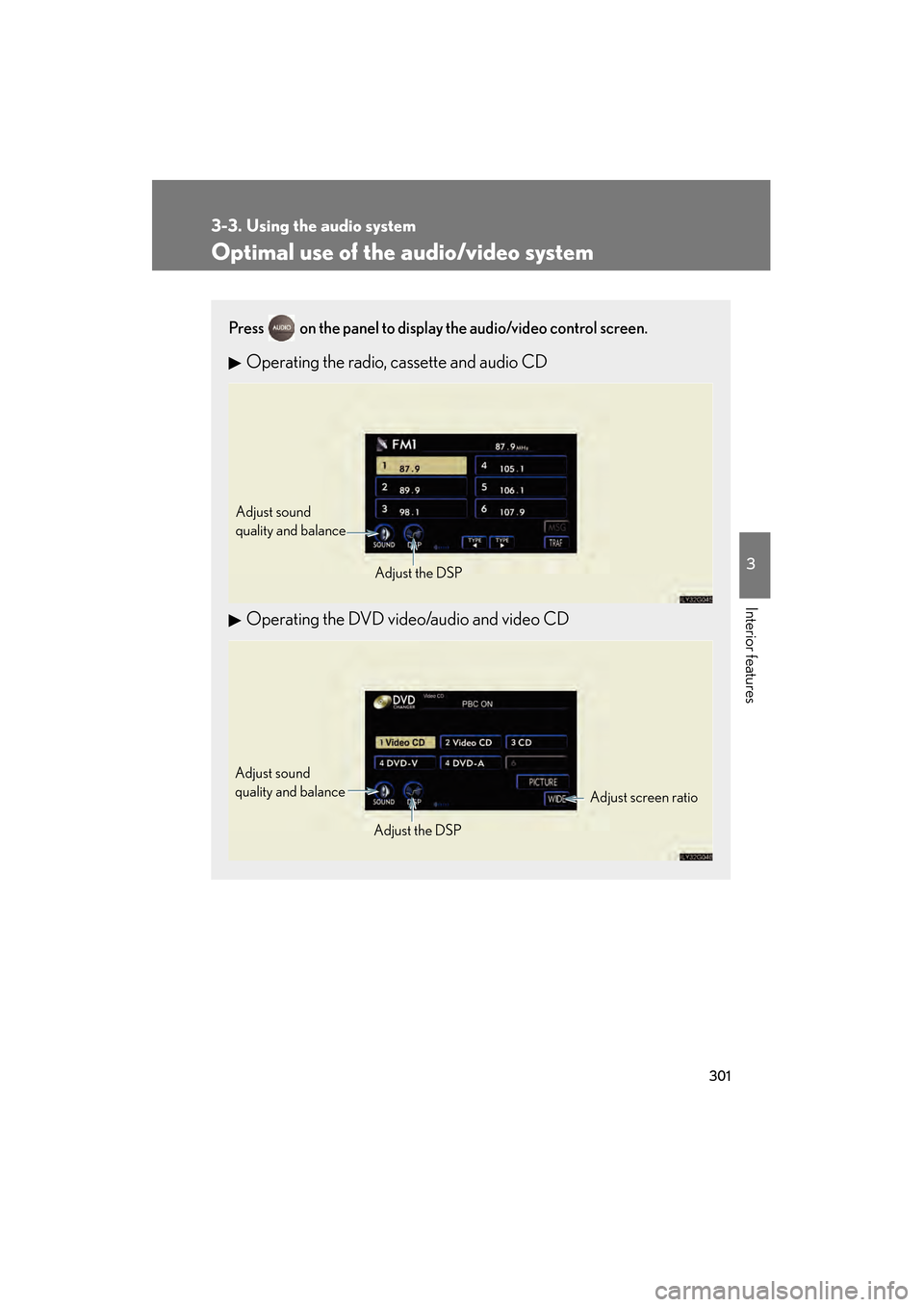
Press on the panel to display the audio/video control screen.
Operating the radio, cassette and audio CD
Operating the DVD video/audio and video CD
Adjust sound
quality and balanceAdjust the DSP
Adjust screen ratio
Adjust sound
quality and balance
Adjust the DSP
GS_U_G.book Page 301 Monday, April 27, 2009 10:50 AM
Page 303 of 622
302
3-3. Using the audio system
GS_G_U (OM30B43U)
April 27, 2009 10:48 am
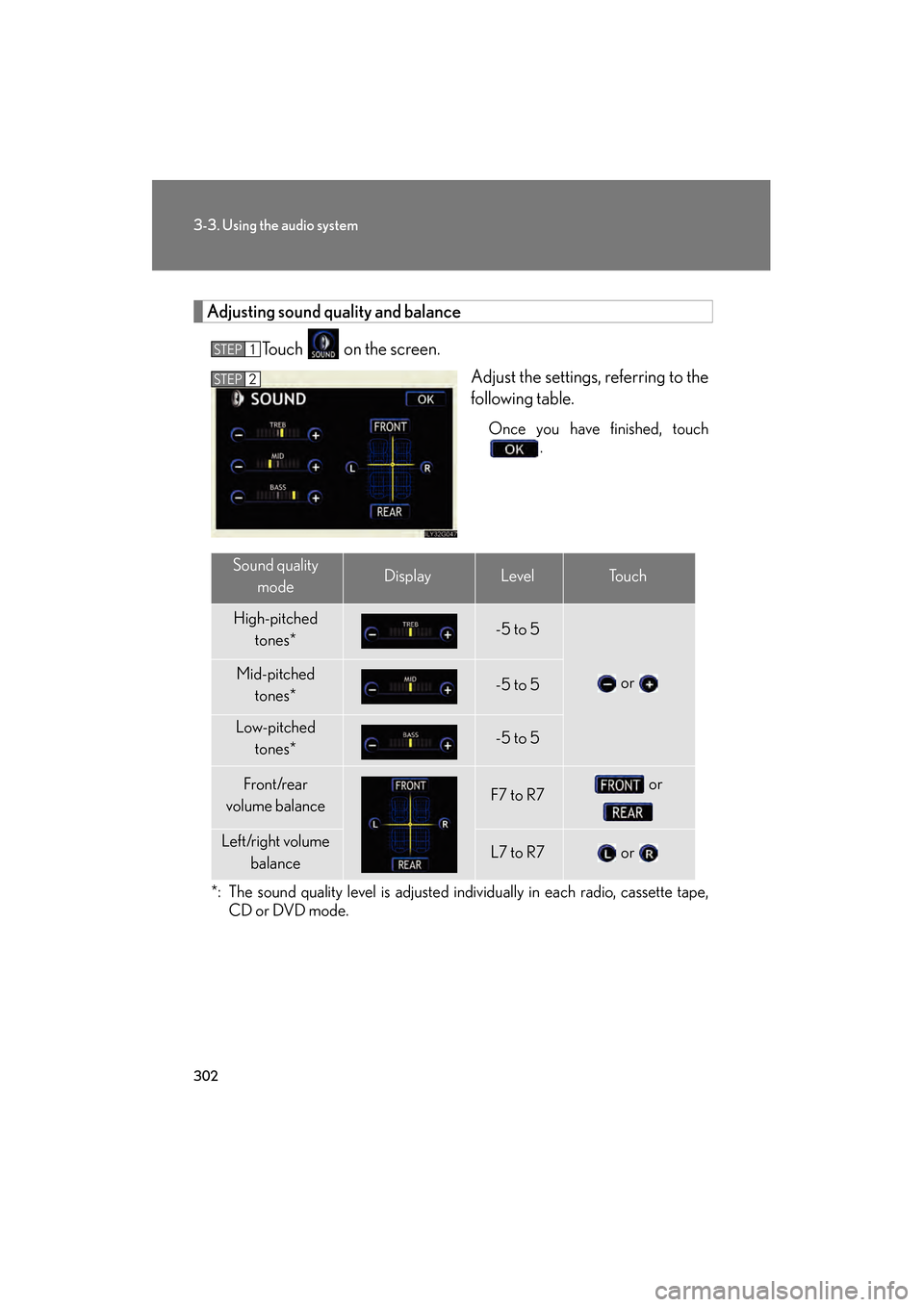
Adjusting sound quality and balanceTouch on the screen. Adjust the settings, referring to the
following table.
Once you have finished, touch.
*: The sound quality level is adjusted individually in each radio, cassette tape, CD or DVD mode.
STEP1
STEP2
Sound quality
modeDisplayLevelTo u c h
High-pitched tones*-5 to 5
or Mid-pitched
tones*-5 to 5
Low-pitched tones*-5 to 5
Front/rear
volume balanceF7 to R7 or
Left/right volume
balanceL7 to R7 or
GS_U_G.book Page 302 Monday, April 27, 2009 10:50 AM
Page 308 of 622
307
3-3. Using the audio system
3
Interior features
GS_G_U (OM30B43U)
April 27, 2009 10:48 am
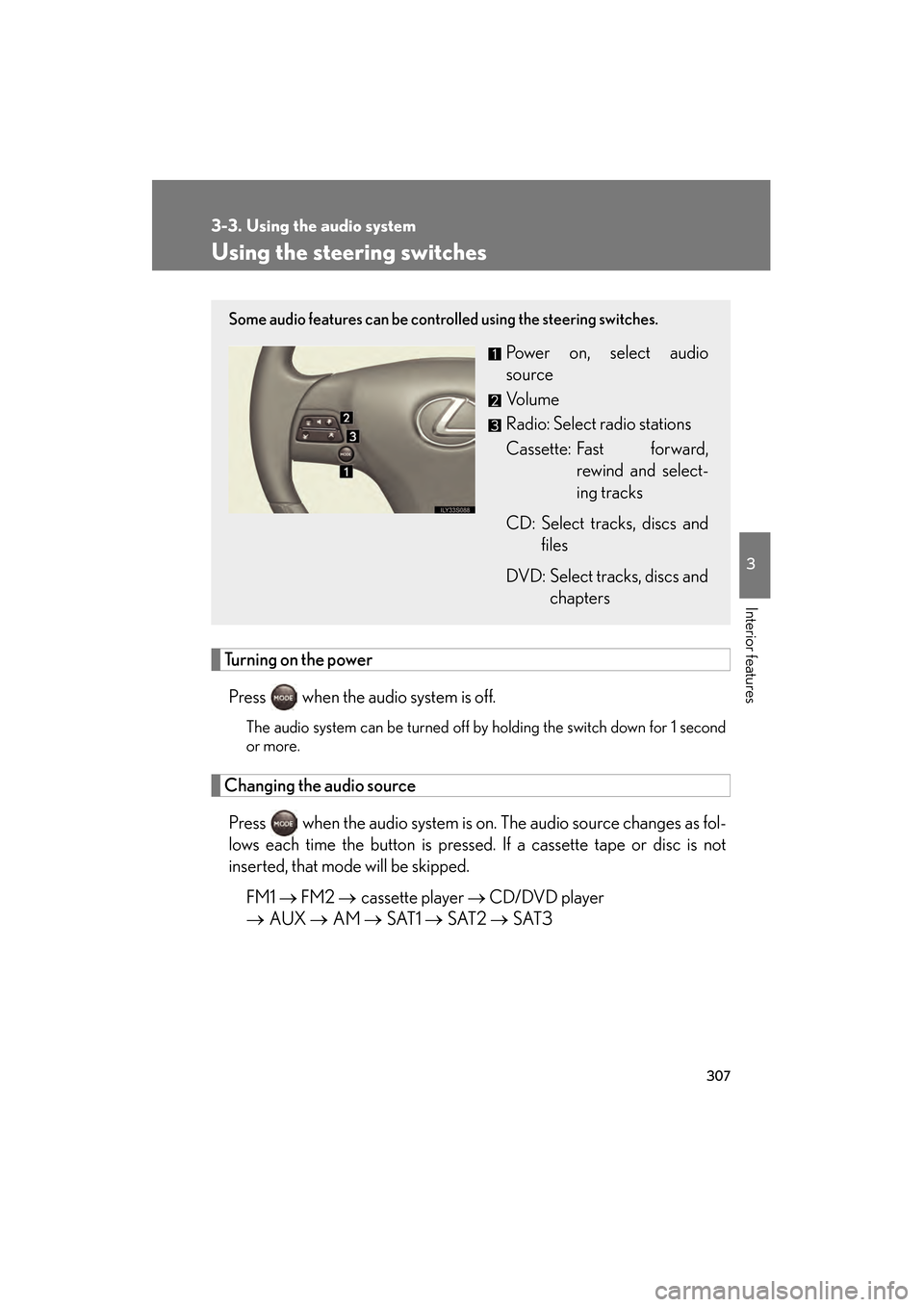
Using the steering switches
Turning on the powerPress when the audio system is off.
The audio system can be turned off by holding the switch down for 1 second
or more.
Changing the audio sourcePress when the audio system is on. The audio source changes as fol-
lows each time the button is pressed. If a cassette tape or disc is not
inserted, that mode will be skipped.
FM1 → FM2 → cassette player → CD/DVD player
→ AUX → AM → SAT1 → SAT2 → SAT3
Some audio features can be controlled using the steering switches.
Power on, select audio
source
Vo l u m e
Radio: Select radio stations
Cassette: Fast forward,
rewind and select-
ing tracks
CD: Select tracks, discs and files
DVD: Select tracks, discs and chapters
GS_U_G.book Page 307 Monday, April 27, 2009 10:50 AM
Page 309 of 622
308
3-3. Using the audio system
GS_G_U (OM30B43U)
April 27, 2009 10:48 am
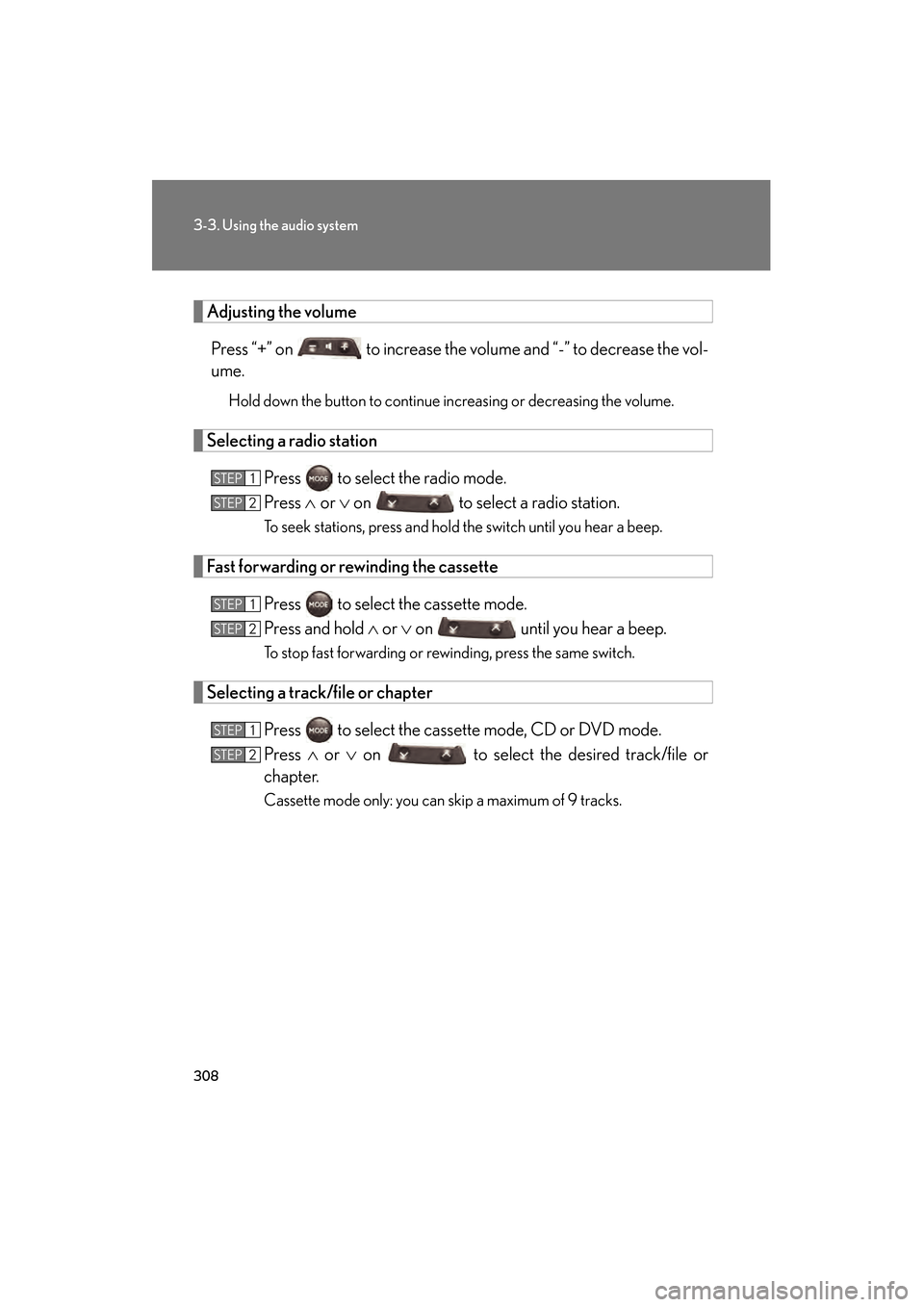
Adjusting the volumePress “+” on to increase the vo lume and “-” to decrease the vol-
ume.
Hold down the button to continue increasing or decreasing the volume.
Selecting a radio station
Press to select the radio mode.
Press ∧ or ∨ on to select a radio station.
To seek stations, press and hold the switch until you hear a beep.
Fast forwarding or rewinding the cassette
Press to select the cassette mode.
Press and hold ∧ or ∨ on until you hear a beep.
To stop fast forwarding or rewinding, press the same switch.
Selecting a track/file or chapter
Press to select the cassette mode, CD or DVD mode.
Press ∧ or ∨ on to select the desired track/file or
chapter.
Cassette mode only: you can skip a maximum of 9 tracks.
STEP1
STEP2
STEP1
STEP2
STEP1
STEP2
GS_U_G.book Page 308 Monday, April 27, 2009 10:50 AM
Page 314 of 622
313
3-4. Using the hands-free system (for cellular phone)
3
Interior features
GS_G_U (OM30B43U)
April 27, 2009 10:48 am
■Battery charge/Signal status
This display may not correspond exactly with the mobile phone itself.
■About Bluetooth®
■Compatible models
Compatible with HFP (Hands Free Profile) Ver. 1.0 and OPP (Object Push Profile)
Ve r. 1 .1 .
If your cellular phone does not supp ort HFP, you cannot enter the Bluetooth
®
phone, and take OPP service individually.
■Certification for the hands-free system
This device complies with Part 15 of the FCC Rules and RSS-210. Operation is sub-
ject to the following two conditions: (1) This device may not cause harmful interfer-
ence, and (2) This device must accept any interference received, including
interference that may cause undesired operation.
FCC WARNING:
Changes or modifications not expressly approved by the party responsible for
compliance could void the user’s authority to operate the equipment.
Radio Frequency Exposure. This device is approved for Mobile Application only
and, to comply with applicable FCC radio frequency exposure regulations, must be
used with a distance of at least 7.9 in. (20 cm) between the antenna and the body of
any person at all time during use. Bluetooth is a registered trademark of
Bluetooth SIG. Inc.
FCC ID: HYQBT0501A
IC ID: 1551A-BT0501A
GS_U_G.book Page 313 Monday, April 27, 2009 10:50 AM
Page 394 of 622
393
3-7. Other interior features
3
Interior features
GS_G_U (OM30B43U)
April 27, 2009 10:48 am
Safety information for the Lexus Link System
Important! Read this information before using the Lexus Link System. ■Exposure to radio frequency signals
The Lexus Link System installed in your vehicle is a low power ratio trans-
mitter and receiver. When the “ENGINE START STOP” switch is in the
IGNITION ON mode, it receives and also sends radio frequency (RF)
signals.
In August 1996, the Federal Communications Commission (FCC)
adopted RF exposure guidelines with safety levels for mobile wireless
phones. Those guidelines are consistent with the safety standards previ-
ously set by both U.S. and international standards bodies.
● ANSI (American National Standards Institute) C95.1 [1992]
● NCRP (National Council on Radi ation Protection and Measurement)
Report 86 [1986]
● ICNIRP (International Commission on Non-Ionizing Radiation Pro-
tection) [1996]
Those standards were based on comp rehensive and periodic evaluations
of the relevant scientific literature. Over 120 scientists, engineers, and
physicians from universities, government health agencies, and industry
reviewed the available body of resear ch to develop the ANSI Standard
(C95.1).
The design of the Lexus Link System complies with the FCC guidelines in
addition to those standards.
GS_U_G.book Page 393 Monday, April 27, 2009 10:50 AM
Page 405 of 622
404
3-7. Other interior features
GS_G_U (OM30B43U)
April 27, 2009 10:48 am
■Certification for the Lexus Link System
NOTE:
This device complies with Part 15 of the FCC Rules. Operation is subject to the fol-
lowing two conditions: (1) this device may not cause harmful interference and (2)
this device must accept any interference received, including interference that may
cause undesired operation.
FCC WARNING:
Changes or modifications in construction not expressly approved by the party
responsible for compliance could void the user’s authority to operate the equip-
ment.
Radio Frequency Exposure. This device is approved for Mobile Application only
and, to comply with applicable FCC radi o frequency exposure regulations, must be
used with a distance of at least 7.9 in. (20 cm) between the antenna and the body of
any person at all time during use.
FCC ID: SCWTR-423-A2
GS_U_G.book Page 404 Monday, April 27, 2009 10:50 AM