display Lexus GS350 2009 Owner's Guide
[x] Cancel search | Manufacturer: LEXUS, Model Year: 2009, Model line: GS350, Model: Lexus GS350 2009Pages: 622, PDF Size: 17.98 MB
Page 194 of 622
193
2-4. Using other driving systems
2
When driving
GS_G_U (OM30B43U)
April 27, 2009 10:48 am
●In the following situations, the intuitive parking assist may not function correctly,
possibly leading to an accident.
• There is ice, snow or mud on the sensors. (Wiping the sensors will resolve this
problem.)
• The sensor area is frozen. (Thawing the area will resolve this problem.) In especially cold weather, if a sensor is frozen the screen may show an abnor-
mal display, or obstacles may not be detected.
• The vehicle angle is especially wide.
• In harsh sunlight or intense cold weather.
• When driving on bumpy, sloped or gravel roads, or over grass.
• If there is something producing ultrasonic waves nearby, such as another vehicle’s horn, motorcycle engine nois e, air braking sound from heavy-duty
vehicles, or another vehicle using the intuitive parking assist.
• In heavy rain, or if water is splashed on the sensors.
• If a commercial fender pole or radio antenna is installed.
• If towing eyelet is installed on your vehicle.
• If moving towards a high curb or a curb corner.
• Objects such as signs may cause the detection distance to shorten.
• The area directly under the bumpers is not detected. Objects lower than the sens ors or thin stakes etc. may be detected initially,
but as they draw closer, they may cease to be detected.
• If obstacles draw too close to the sensor.
■Obstacles that may not be detected correctly
The following obstacles may not be detected.
●Thin objects such as wire, fencing or rope.
●Objects that absorb sound wave s, such as cotton or snow.
●Objects with sharp corners.
●Objects where the upper section projects out over the lower section.
●Low objects.
■If the display flashes and a message is displayed
→P. 5 2 6
GS_U_G.book Page 193 Monday, April 27, 2009 10:50 AM
Page 196 of 622
195
2-4. Using other driving systems
2
When driving
GS_G_U (OM30B43U)
April 27, 2009 10:48 am
NOTICE
■When using the intuitive parking assist
In the following situations, the system may not function correctly due to a sensor
malfunction etc. Have the vehicle checked by your Lexus dealer.
●A beep does not sound when you turn the main switch on.
●The intuitive parking assist operation display flashes, and a beep sound when no
obstacle has been detected.
●If the area around a sensor collides with something, or is subjected to strong
impact.
●If the bumper collides with something.
●If the display shows continuously without a beep.
■When changing tires
If you install tires of a size other than that recommended by the manufacturer, the
system will be unable to correctly detect steering wheel movement. Always use tire
sizes recommended by the manufacturer.
■When washing the vehicle
When washing the vehicle using high pressure cleaning equipment, do not spray
water directly on the sensors. Subjecting the sensors to high pressure impact may
cause a malfunction.
GS_U_G.book Page 195 Monday, April 27, 2009 10:50 AM
Page 197 of 622
196
2-4. Using other driving systems
GS_G_U (OM30B43U)
April 27, 2009 10:48 am
Rear view monitor system∗
∗: If equipped
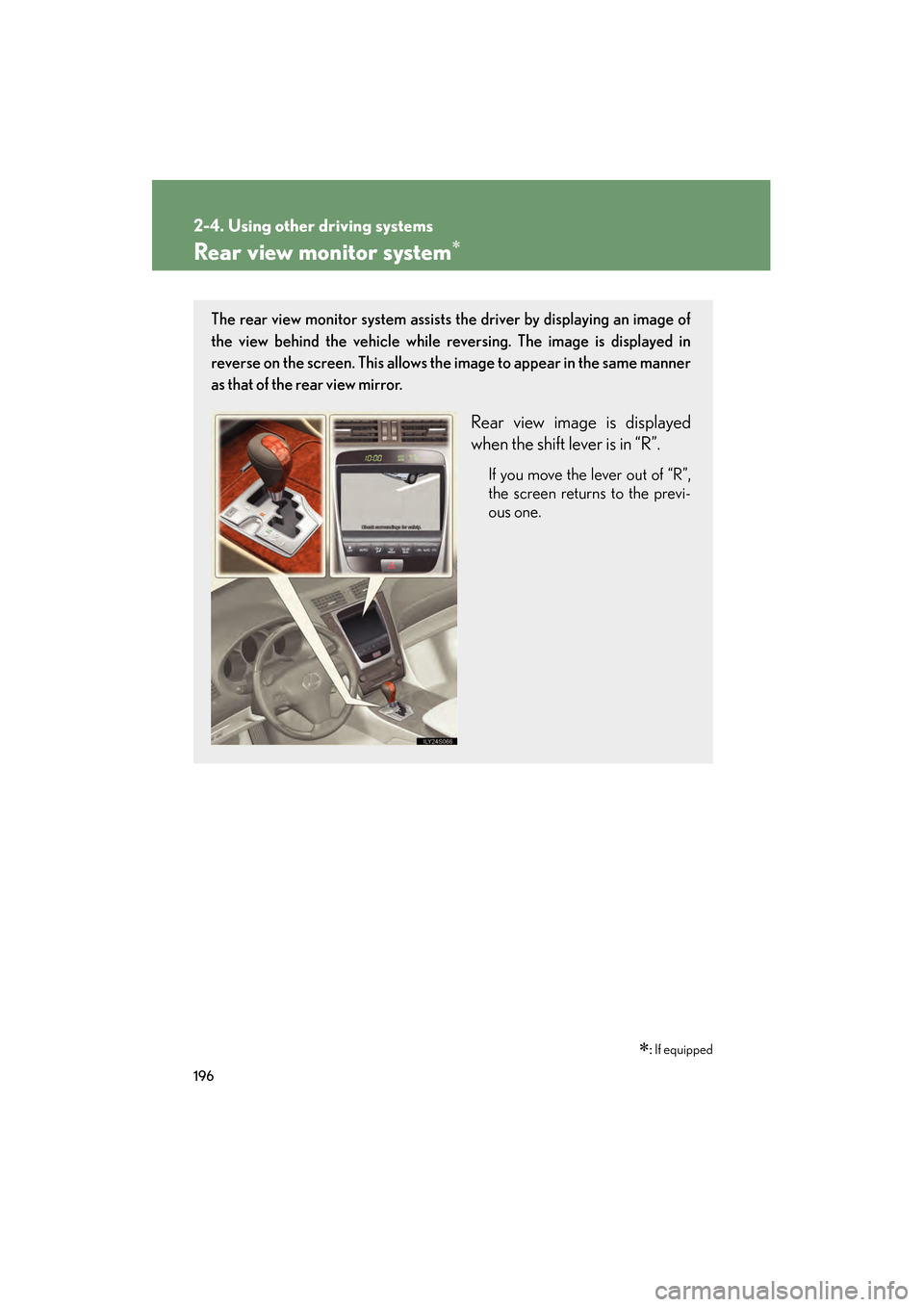
The rear view monitor system assists the driver by displaying an image of
the view behind the vehicle while re versing. The image is displayed in
reverse on the screen. This allows the image to appear in the same manner
as that of the rear view mirror.
Rear view image is displayed
when the shift lever is in “R”.
If you move the lever out of “R”,
the screen returns to the previ-
ous one.
GS_U_G.book Page 196 Monday, April 27, 2009 10:50 AM
Page 198 of 622
197
2-4. Using other driving systems
2
When driving
GS_G_U (OM30B43U)
April 27, 2009 10:48 am
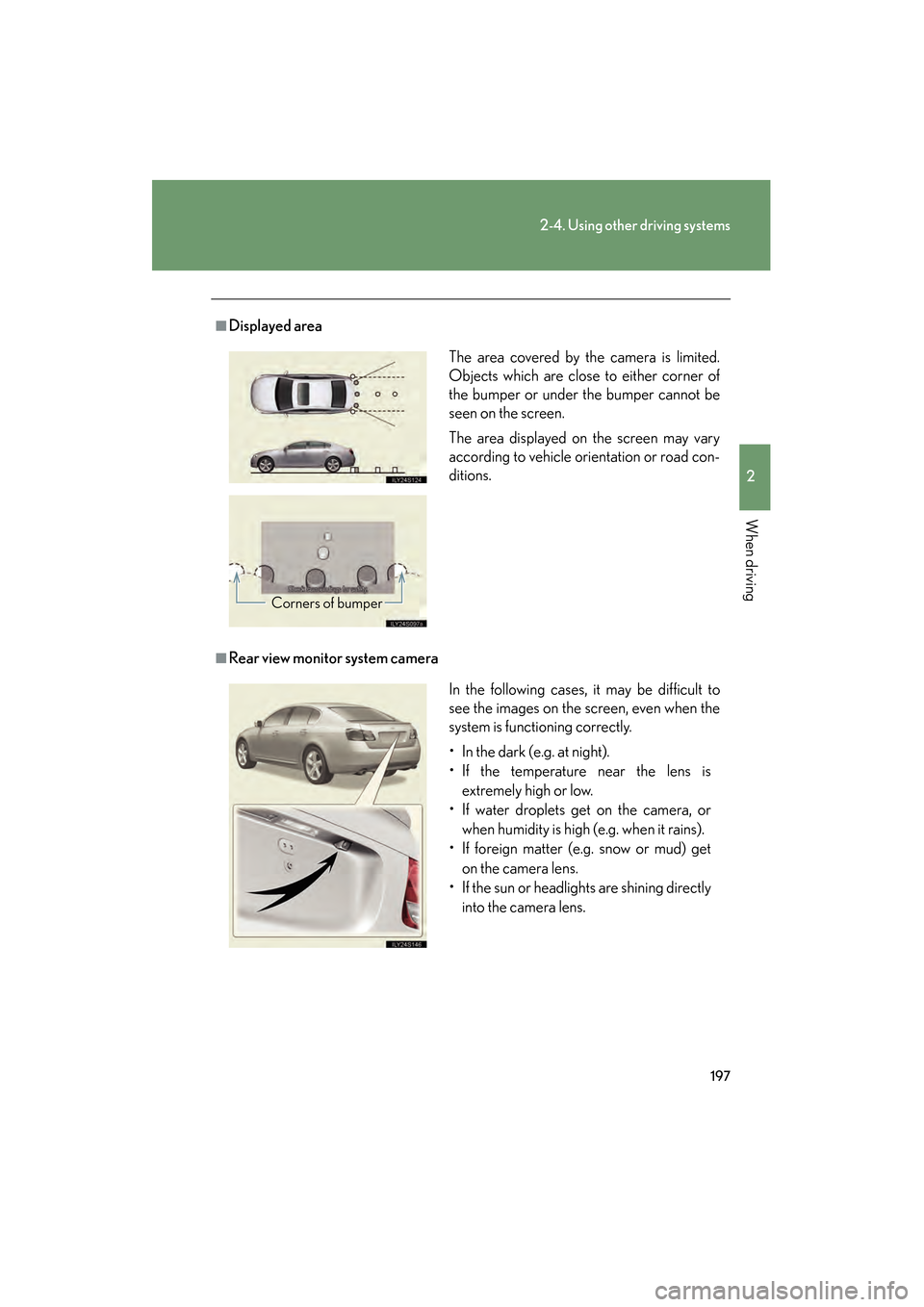
■Displayed area
■Rear view monitor system cameraThe area covered by the camera is limited.
Objects which are close to either corner of
the bumper or under the bumper cannot be
seen on the screen.
The area displayed on the screen may vary
according to vehicle orientation or road con-
ditions.
Corners of bumper
In the following cases, it may be difficult to
see the images on the screen, even when the
system is functioning correctly.
• In the dark (e.g. at night).
• If the temperature near the lens is
extremely high or low.
• If water droplets get on the camera, or
when humidity is high (e.g. when it rains).
• If foreign matter (e.g. snow or mud) get
on the camera lens.
• If the sun or headlights are shining directly into the camera lens.
GS_U_G.book Page 197 Monday, April 27, 2009 10:50 AM
Page 199 of 622
198
2-4. Using other driving systems
GS_G_U (OM30B43U)
April 27, 2009 10:48 am
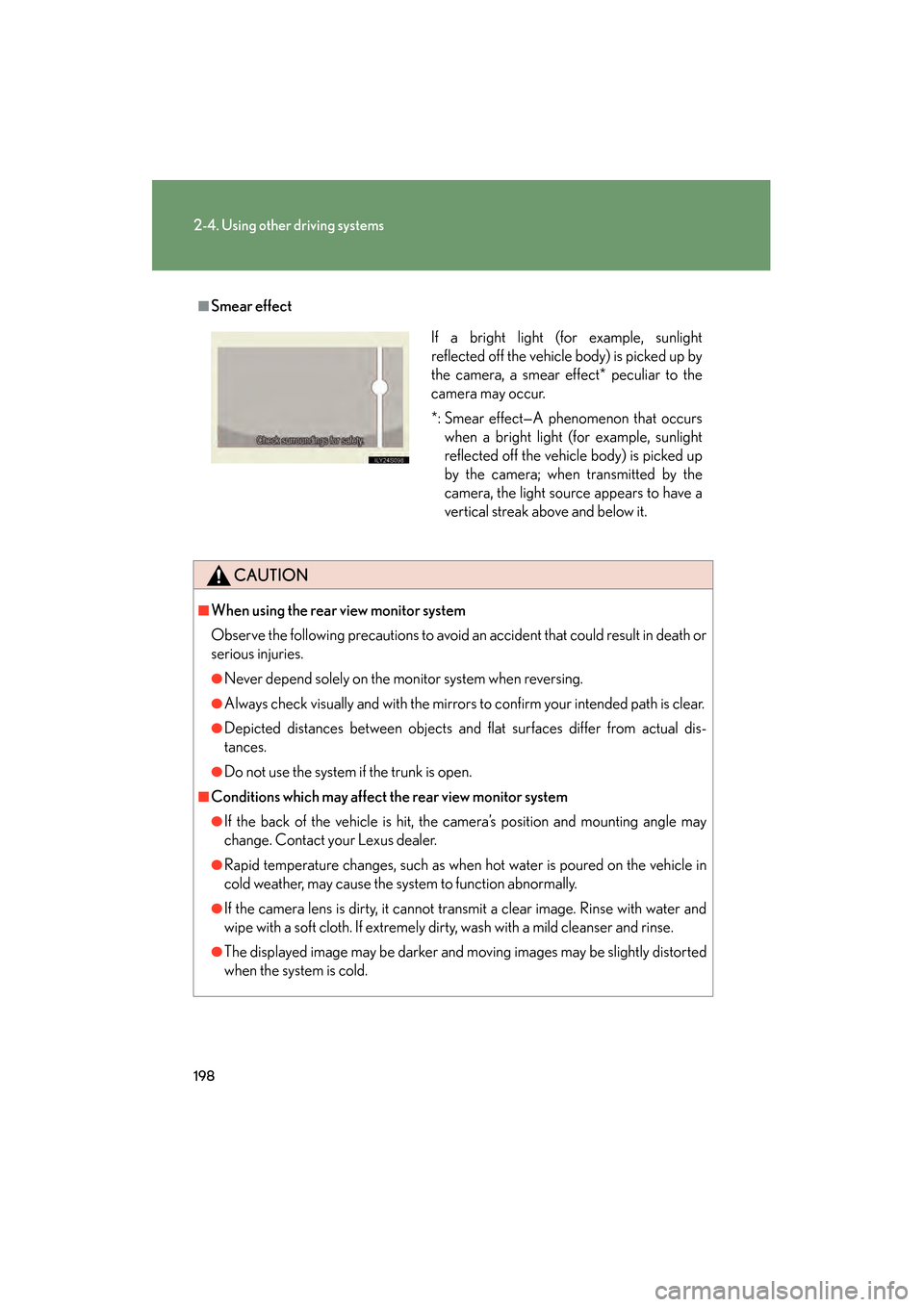
■Smear effect
CAUTION
■When using the rear view monitor system
Observe the following precautions to avoid an accident that could result in death or
serious injuries.
●Never depend solely on the monitor system when reversing.
●Always check visually and with the mirrors to confirm your intended path is clear.
●Depicted distances between objects and flat surfaces differ from actual dis-
tances.
●Do not use the system if the trunk is open.
■Conditions which may affect the rear view monitor system
●If the back of the vehicle is hit, the camera’s position and mounting angle may
change. Contact your Lexus dealer.
●Rapid temperature changes, such as when hot water is poured on the vehicle in
cold weather, may cause the system to function abnormally.
●If the camera lens is dirty, it cannot transmit a clear image. Rinse with water and
wipe with a soft cloth. If extremely dirty, wash with a mild cleanser and rinse.
●The displayed image may be darker and mo ving images may be slightly distorted
when the system is cold.
If a bright light (for example, sunlight
reflected off the vehicle body) is picked up by
the camera, a smear effect* peculiar to the
camera may occur.
*: Smear effect—A phenomenon that occurs when a bright light (for example, sunlight
reflected off the vehicle body) is picked up
by the camera; when transmitted by the
camera, the light source appears to have a
vertical streak above and below it.
GS_U_G.book Page 198 Monday, April 27, 2009 10:50 AM
Page 203 of 622
202
2-4. Using other driving systems
GS_G_U (OM30B43U)
April 27, 2009 10:48 am
To disable TRAC and/or Enhanced VSCIf the vehicle gets stuck in fresh snow or mud, TRAC and Enhanced VSC
may reduce power from the engine to the wheels. You may need to turn
the system off to enable you to rock the vehicle in order to free it.
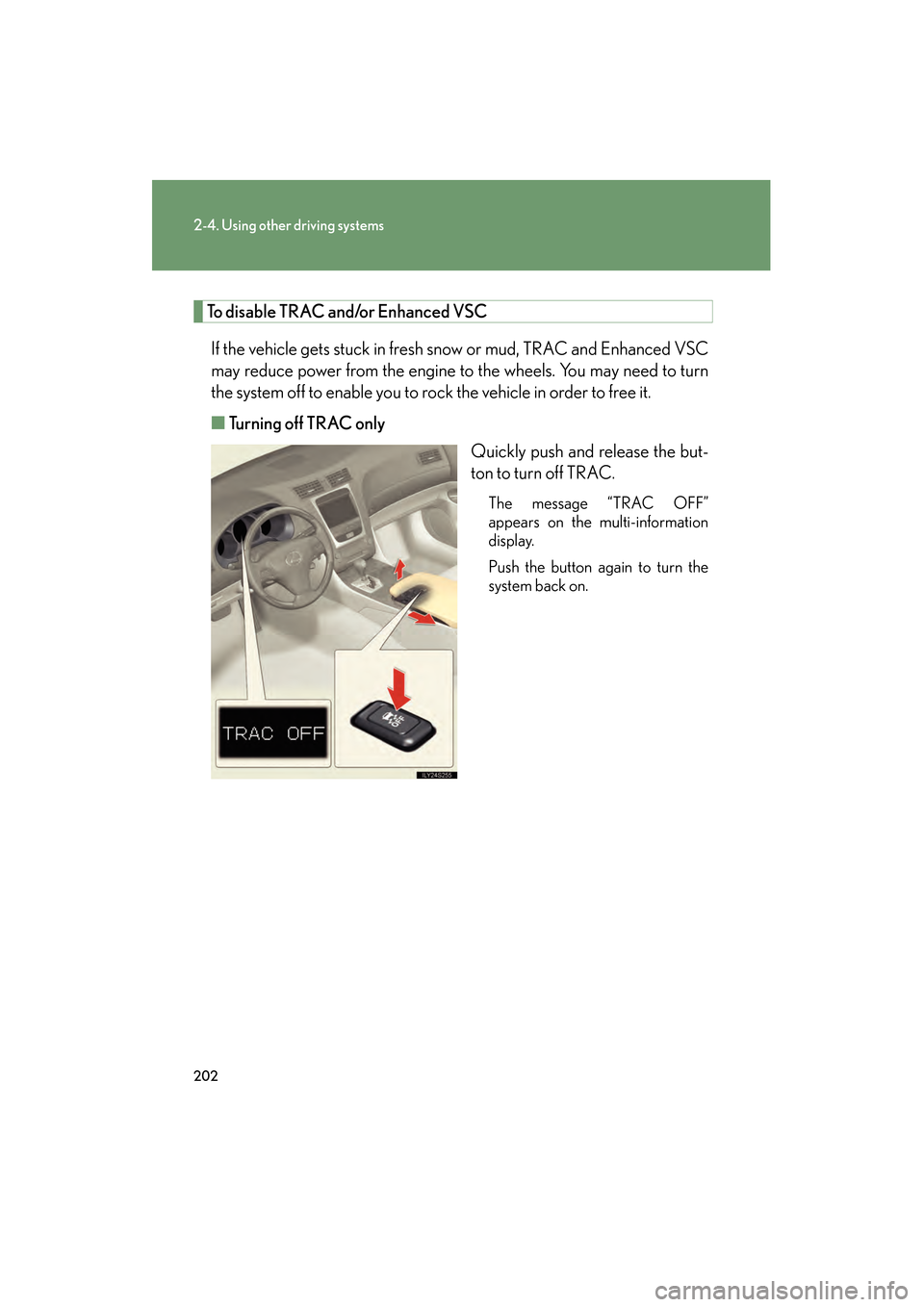
■ Turning off TRAC only
Quickly push and release the but-
ton to turn off TRAC.
The message “TRAC OFF”
appears on the multi-information
display.
Push the button again to turn the
system back on.
GS_U_G.book Page 202 Monday, April 27, 2009 10:50 AM
Page 204 of 622
203
2-4. Using other driving systems
2
When driving
GS_G_U (OM30B43U)
April 27, 2009 10:48 am
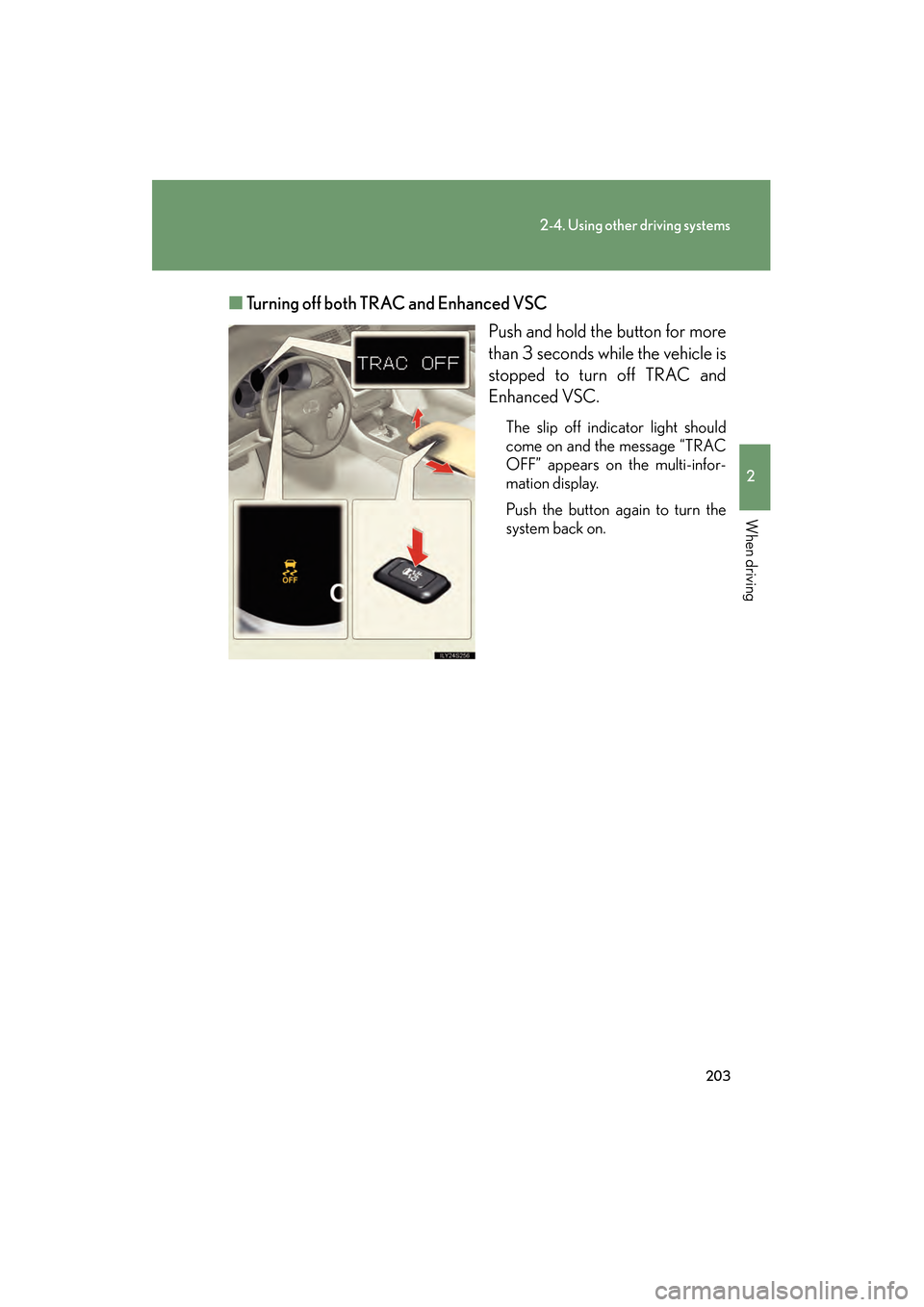
■Turning off both TRAC and Enhanced VSC
Push and hold the button for more
than 3 seconds while the vehicle is
stopped to turn off TRAC and
Enhanced VSC.
The slip off indicator light should
come on and the message “TRAC
OFF” appears on the multi-infor-
mation display.
Push the button again to turn the
system back on.
GS_U_G.book Page 203 Monday, April 27, 2009 10:50 AM
Page 226 of 622
Interior features3
225
GS_G_U (OM30B43U)
April 27, 2009 10:42 am
3-3. Using the audio systemAudio system type.................. 245
Using the radio........................ 248
Using the cassette player .... 257
Using the CD player .............. 261
Playing MP3 and WMA discs............................ 266
Using the DVD player........... 270
Playing DVD video/audio .... 273
Playing video CD (with DVD player) .............. 285
CD/DVD player and DVD
video disc information ...... 289
Optimal use of the audio/video system ....... 301
Using the AUX adapter ....... 306
Using the steering switches .................................. 307
3-4. Using the hands-free system (for cellular phone)
Hands-free system (for cellular phone) .............. 310
Using the Bluetooth
®
phone ....................................... 315
Setting the hands-free system .................................... 330 3-5. Using the interior lights
Interior lights list .................... 356
3-6. Using the storage features List of storage features......... 359
3-7. Other interior features Sun visors ................................. 366
Vanity mirrors .......................... 367
Clock ......................................... 368
Outside temperature display..................................... 369
Ashtrays.................................... 370
Cigarette lighter ..................... 371
Power outlet ............................ 372
Seat heaters/ventilators ...... 373
Armrest .................................... 375
Rear sunshade ......................... 376
Floor mats ................................ 378
Trunk features ......................... 379
Garage door opener ............ 382
Compass .................................. 388
Lexus Link System ................. 392
GS_U_G.book Page 225 Monday, April 27, 2009 10:50 AM
Page 227 of 622

226
GS_G_U (OM30B43U)
April 27, 2009 10:48 am
3-1. Using the touch screen
Touch screen
By touching the screen with your finger, you can control the audio system
and air conditioning, adjust the screen display etc.
With navigation system
Without navigation system
The “Information” screen shown in the above illustration is displayed when
is pressed.
GS_U_G.book Page 226 Monday, April 27, 2009 10:50 AM
Page 228 of 622

227
3-1. Using the touch screen
3
Interior features
GS_G_U (OM30B43U)
April 27, 2009 10:48 am
SwitchesPa g e
“CLIMATE”P. 2 3 5
“A U D I O ”P. 2 4 5
“INFO” (Displaying the “Informa-
tion” screen)P. 2 2 6
“DISP” (Adjusting the display)P. 2 3 1
Trip information (Displaying the “Trip
Information” screen)P. 2 2 8
MaintenanceNavigation System Owner’s Manual
Te l e p h o n eP. 3 1 5
CalendarNavigation System Owner’s Manual
“LEXUS Park Assist”P. 1 9 0
LanguageP. 2 3 0
Screen SettingP. 2 3 3
Beep OffP. 2 3 0
Adjust ClockP. 3 6 8 /
Navigation System Owner’s Manual
GS_U_G.book Page 227 Monday, April 27, 2009 10:50 AM