audio Lexus GS350 2009 Workshop Manual
[x] Cancel search | Manufacturer: LEXUS, Model Year: 2009, Model line: GS350, Model: Lexus GS350 2009Pages: 622, PDF Size: 17.98 MB
Page 285 of 622
284
3-3. Using the audio system
GS_G_U (OM30B43U)
April 27, 2009 10:48 am
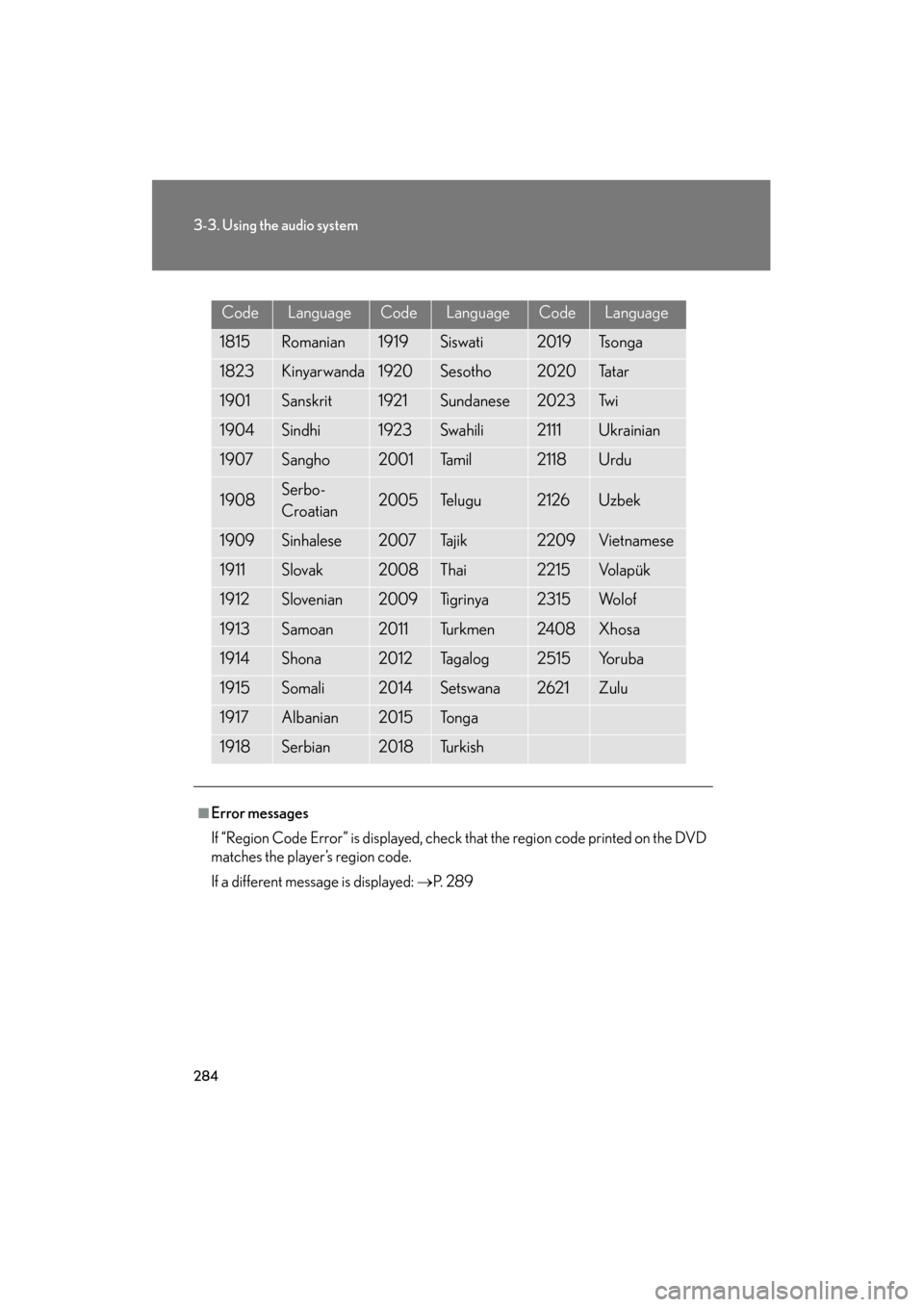
CodeLanguageCodeLanguageCodeLanguage
1815Romanian1919Siswati2019Ts o n g a
1823Kinyarwanda1920Sesotho2020Ta t a r
1901Sanskrit1921Sundanese2023Tw i
1904Sindhi1923Swahili2111Ukrainian
1907Sangho2001Ta m i l2118Urdu
1908Serbo-
Croatian2005Te l u g u2126Uzbek
1909Sinhalese2007Tajik2209Vietnamese
1911Slovak2008Thai2215Vo l a p ü k
1912Slovenian2009Ti g r i n y a2315Wo l o f
1913Samoan2011Tu r k m e n2408Xhosa
1914Shona2012Ta g a l o g2515Yo r u b a
1915Somali2014Setswana2621Zulu
1917Albanian2015To n g a
1918Serbian2018Tu r k i s h
■Error messages
If “Region Code Error” is displayed, check that the region code printed on the DVD
matches the player’s region code.
If a different message is displayed: →P. 2 8 9
GS_U_G.book Page 284 Monday, April 27, 2009 10:50 AM
Page 286 of 622
285
3-3. Using the audio system
3
Interior features
GS_G_U (OM30B43U)
April 27, 2009 10:48 am
Playing video CD (with DVD player)
For safety reasons, you can enjoy the visual contents of discs only when the
vehicle is completely stopped with the “ENGINE START STOP” switch in
ACCESSORY or IGNITION ON mode and the parking brake applied.
While you are driving, only audio contents may be played.
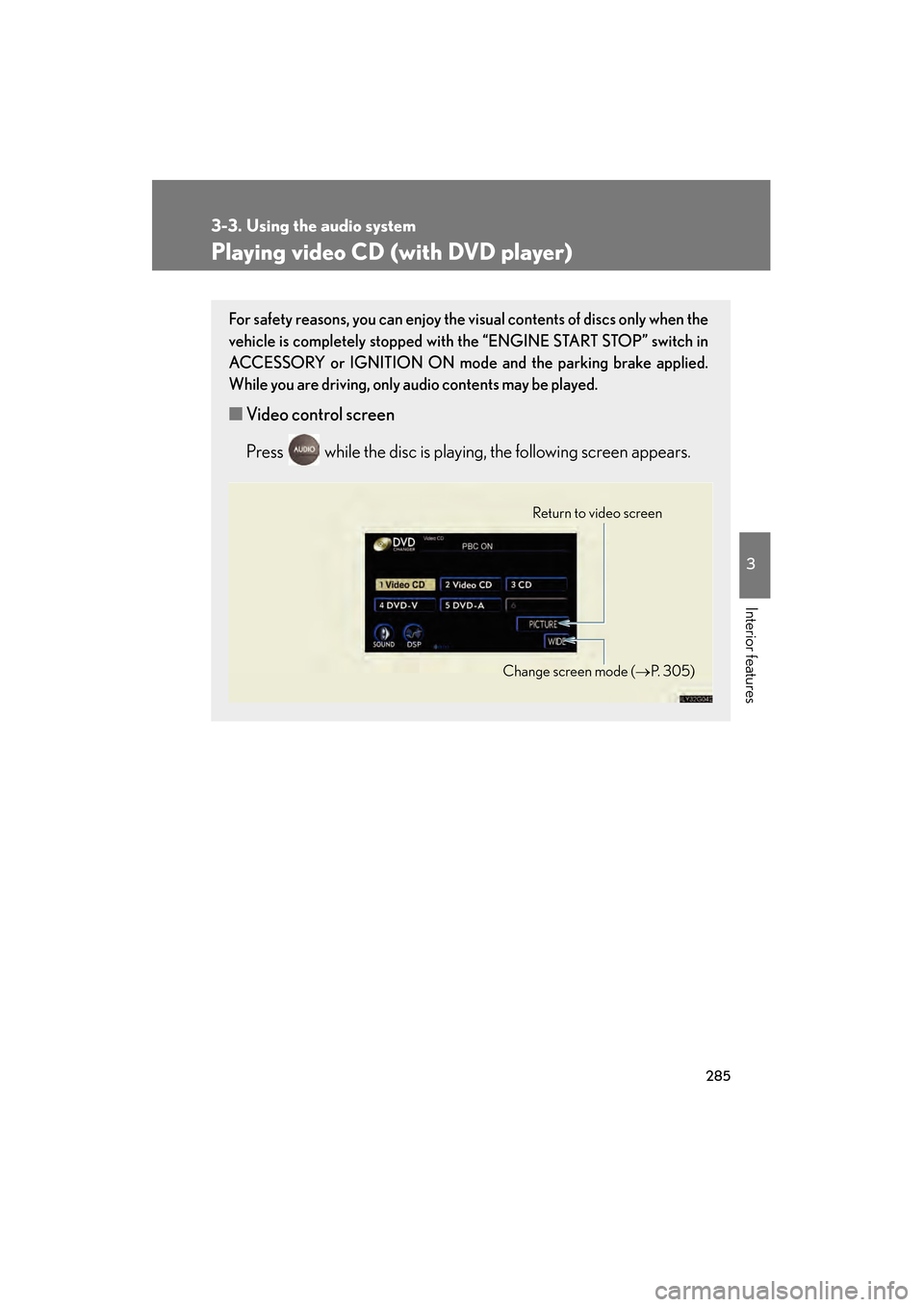
■ Video control screen
Press while the disc is playing, the following screen appears.
Return to video screen
Change screen mode (→ P. 3 0 5 )
GS_U_G.book Page 285 Monday, April 27, 2009 10:50 AM
Page 287 of 622
286
3-3. Using the audio system
GS_G_U (OM30B43U)
April 27, 2009 10:48 am
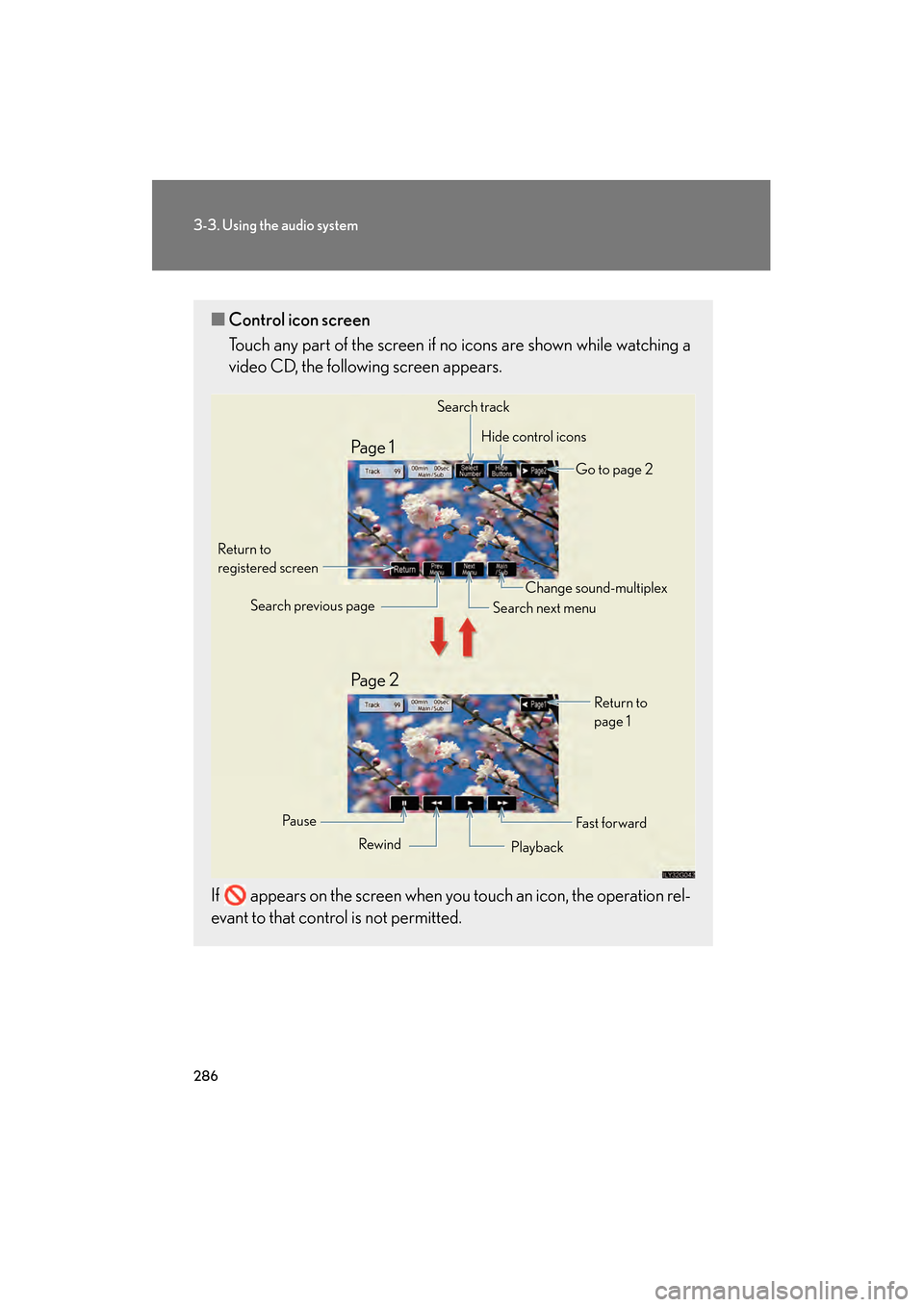
■Control icon screen
Touch any part of the screen if no icons are shown while watching a
video CD, the following screen appears.
If appears on the screen when you touch an icon, the operation rel-
evant to that control is not permitted.
Search track Hide control icons
Go to page 2
Return to
registered screen
Fa st f or wardReturn to
page 1
Change sound-multiplex
Search next menu
Search previous page
Rewind Playback
Pa u s e
Pa g e 2 Pa g e 1
GS_U_G.book Page 286 Monday, April 27, 2009 10:50 AM
Page 288 of 622
287
3-3. Using the audio system
3
Interior features
GS_G_U (OM30B43U)
April 27, 2009 10:48 am
Loading, ejecting and selecting discs→P. 2 6 2
Fast forwarding/rewinding the video CD
Touch and hold or in the co ntrol icons or press and hold
∧ or ∨ on until you hear a beep.
Slow playback
Touch and then touch in the control icons. Video is
played slowly while you are touching .
Using the video CD menu
Touch in the control icons.
Refer to the manual that comes wi th the video CD for specific menu
items.
GS_U_G.book Page 287 Monday, April 27, 2009 10:50 AM
Page 289 of 622
288
3-3. Using the audio system
GS_G_U (OM30B43U)
April 27, 2009 10:48 am
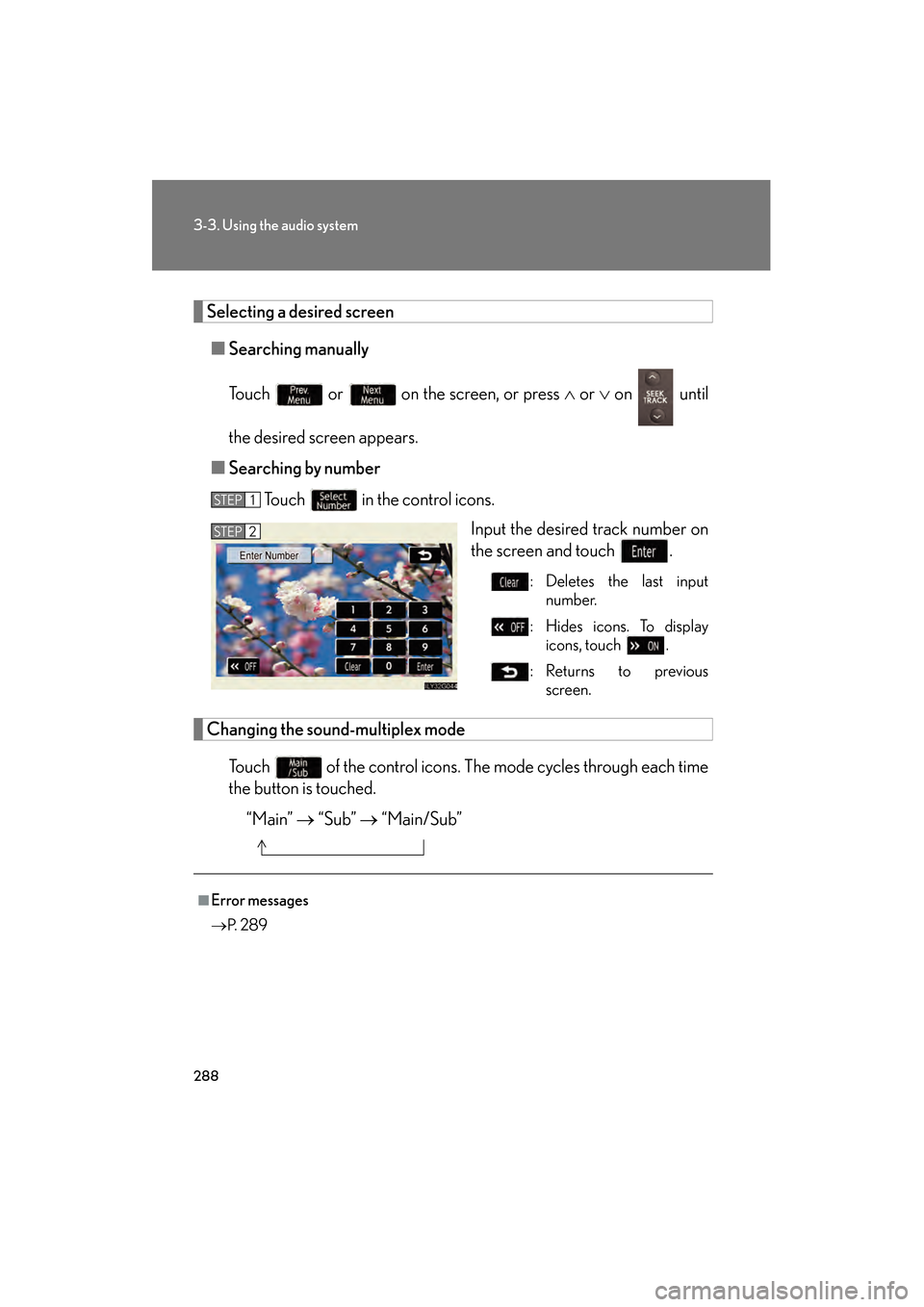
Selecting a desired screen■ Searching manually
Touch or on the screen, or press ∧ or ∨ on until
the desired screen appears.
■ Searching by number
Touch in the control icons. Input the desired track number on
the screen and touch .
: Deletes the last inputnumber.
: Hides icons. To display icons, touch .
:Returns to previous screen.
Changing the sound-multiplex mode
Touch of the control icons. Th e mode cycles through each time
the button is touched.
“Main” → “Sub” → “Main/Sub”
STEP1
STEP2
■Error messages
→P. 2 8 9
GS_U_G.book Page 288 Monday, April 27, 2009 10:50 AM
Page 290 of 622
289
3-3. Using the audio system
3
Interior features
GS_G_U (OM30B43U)
April 27, 2009 10:48 am
CD/DVD player and DVD video disc information
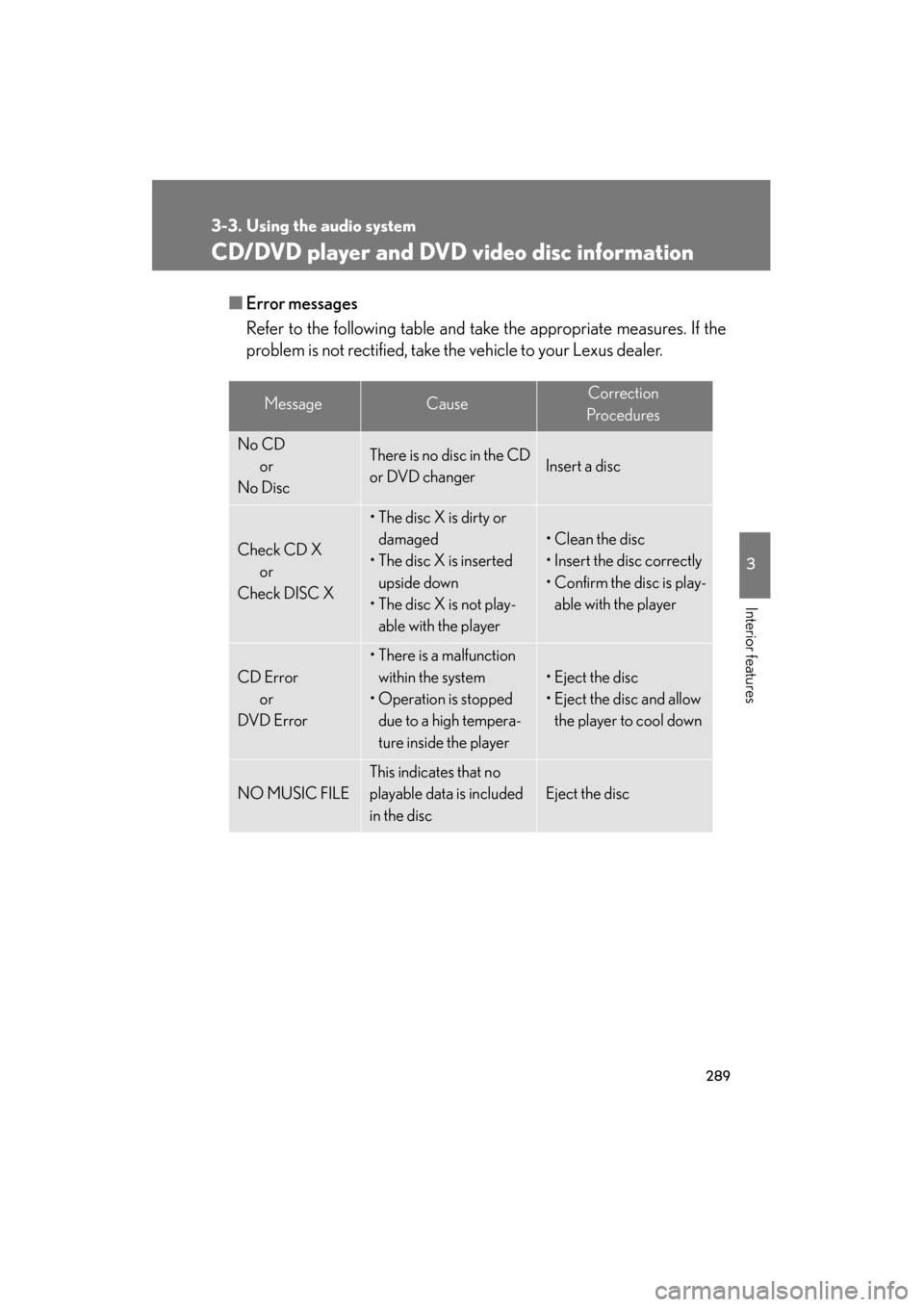
■Error messages
Refer to the following ta ble and take the appropriate measures. If the
problem is not rectified, take the vehicle to your Lexus dealer.
MessageCauseCorrection
Procedures
No CD or
No DiscThere is no disc in the CD
or DVD changerInsert a disc
Check CD X or
Check DISC X
• The disc X is dirty or damaged
• The disc X is inserted
upside down
• The disc X is not play- able with the player
• Clean the disc
• Insert the disc correctly
• Confirm the disc is play-able with the player
CD Error
or
DVD Error
• There is a malfunction within the system
• Operation is stopped due to a high tempera-
ture inside the player
• Eject the disc
• Eject the disc and allow the player to cool down
NO MUSIC FILE
This indicates that no
playable data is included
in the disc
Eject the disc
GS_U_G.book Page 289 Monday, April 27, 2009 10:50 AM
Page 291 of 622
290
3-3. Using the audio system
GS_G_U (OM30B43U)
April 27, 2009 10:48 am
■DVD video discs
The DVD player conforms to NTSC color TV formats.
Region code: Some DVD video disc s have a region code indicating
the region in which you can use the DVD video disc. If the DVD video
disc is not labeled as “ALL” or “1”, you cannot use it on this DVD player.
If you attempt to play an inappropriate DVD video disc on this player,
“Region Code Error” appears on the screen. Even if the DVD video
disc does not have a region code, you may not be able to use it.
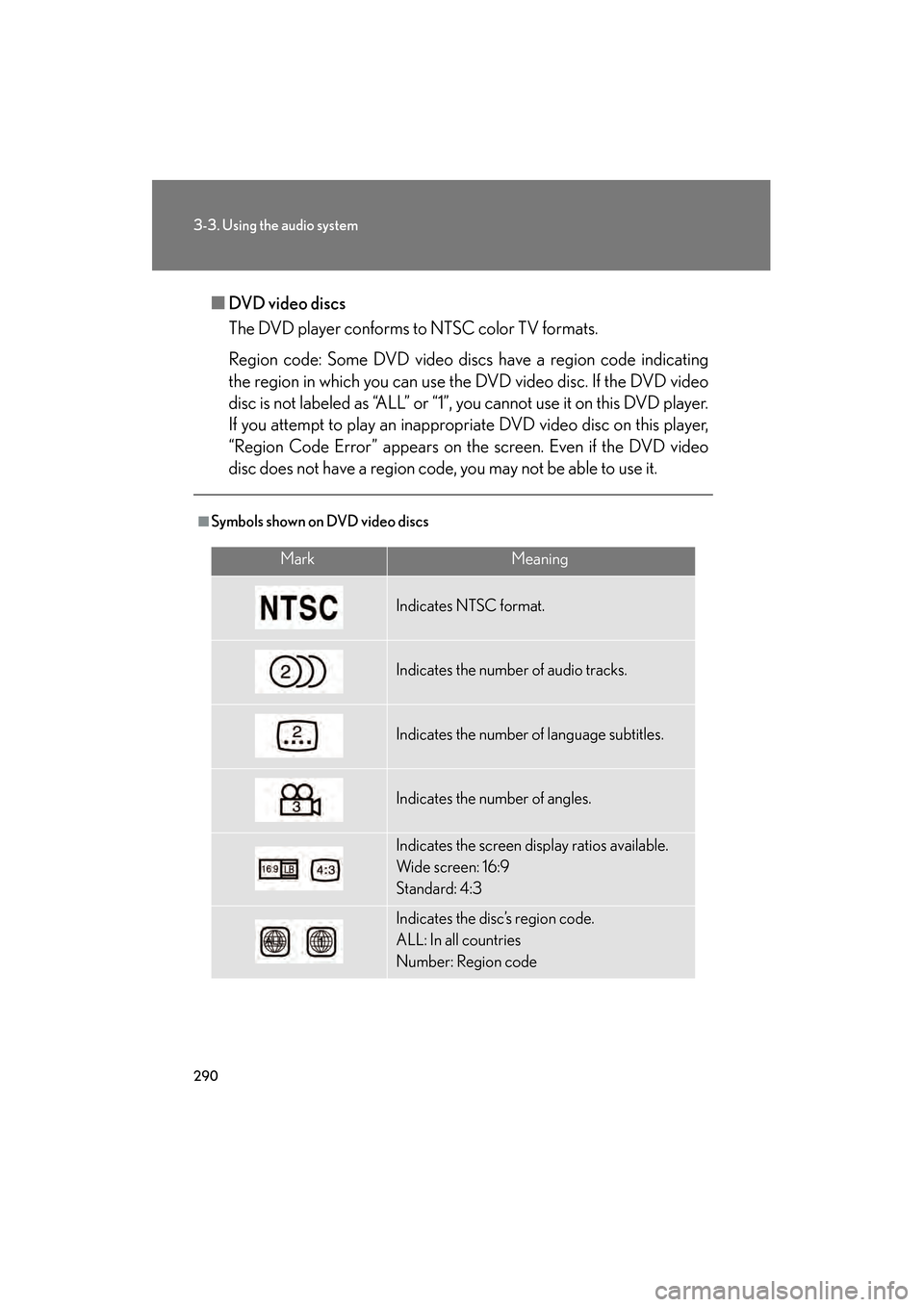
■Symbols shown on DVD video discs
MarkMeaning
Indicates NTSC format.
Indicates the number of audio tracks.
Indicates the number of language subtitles.
Indicates the number of angles.
Indicates the screen display ratios available.
Wide screen: 16:9
Standard: 4:3
Indicates the disc’s region code.
ALL: In all countries
Number: Region code
GS_U_G.book Page 290 Monday, April 27, 2009 10:50 AM
Page 292 of 622
291
3-3. Using the audio system
3
Interior features
GS_G_U (OM30B43U)
April 27, 2009 10:48 am
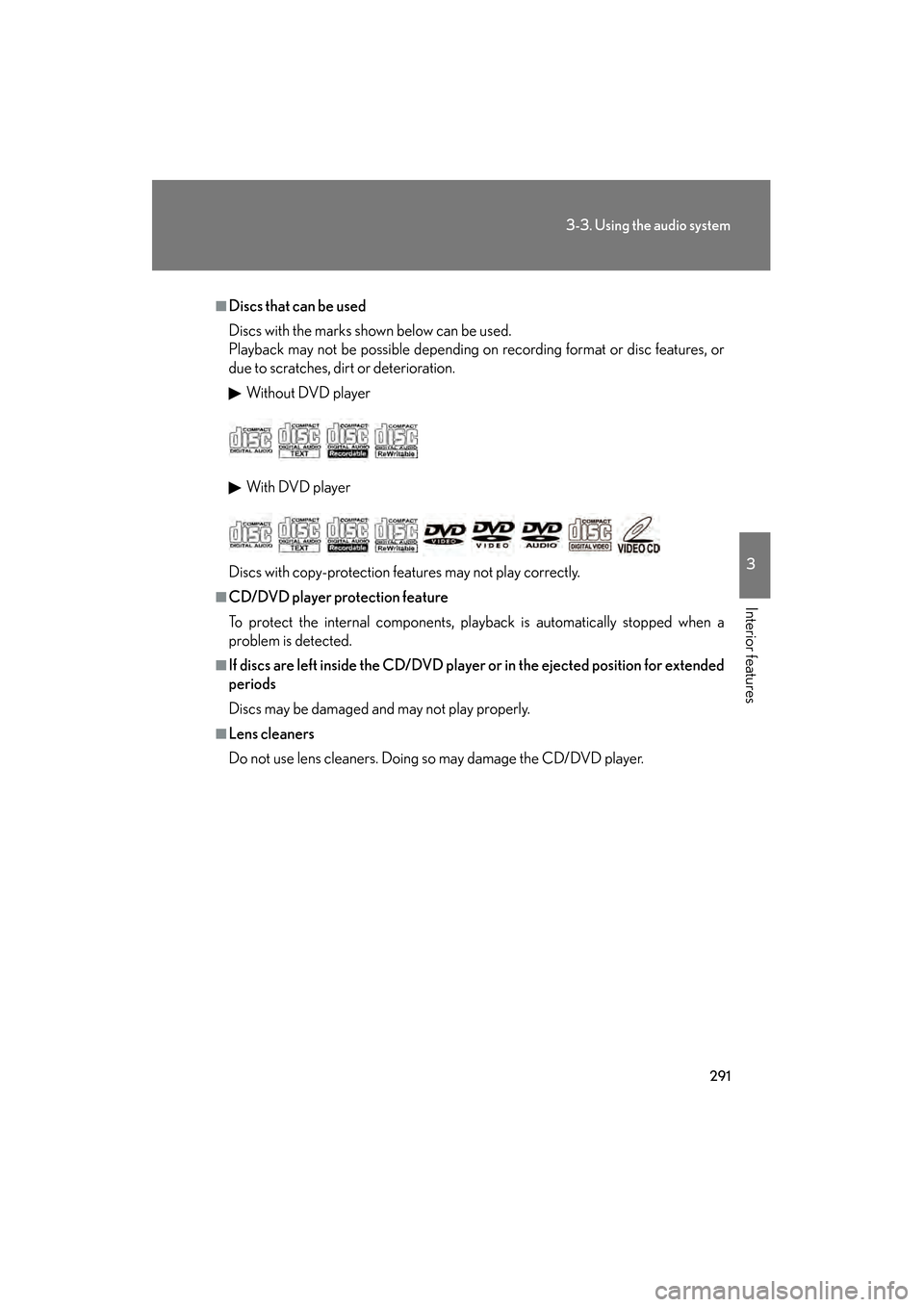
■Discs that can be used
Discs with the marks shown below can be used.
Playback may not be possible depending on recording format or disc features, or
due to scratches, dirt or deterioration.
Without DVD player
With DVD player
Discs with copy-protection feat ures may not play correctly.
■CD/DVD player protection feature
To protect the internal components, play back is automatically stopped when a
problem is detected.
■If discs are left inside the CD/DVD player or in the ejected position for extended
periods
Discs may be damaged and may not play properly.
■Lens cleaners
Do not use lens cleaners. Doing so may damage the CD/DVD player.
GS_U_G.book Page 291 Monday, April 27, 2009 10:50 AM
Page 293 of 622
292
3-3. Using the audio system
GS_G_U (OM30B43U)
April 27, 2009 10:48 am
■DVD video disc information
●DVD video discs
Digital Versatile Disc that holds video. DVD video discs have adopted
“MPEG2”, one of the world standards of digital compression technologies. The
picture data is compressed by 1/40 on average and stored. Variable rate
encoding technology in which the volume of data assigned to the picture is
changed depending on the picture format has also been adopted. Audio data is
stored using PCM and Dolby digital, which enables higher quality of sound. Fur-
thermore, multi-angle and multi-language features will also help you enjoy the
more advanced technology of DVD video.
●Viewer restrictions
This feature limits what can be viewed in conformity with the level of restrictions
of the country. The level of restrictions varies depending on the DVD video disc.
Some DVD video discs cannot be played at all, or violent scenes are skipped or
replaced with other scenes.
Level 1: DVD video discs for children can be played.
Level 2-7: DVD video discs for children and G-rated movies can be played.
Level 8: All types of DVD video discs can be played.
●Multi-angle option
You can enjoy the same scene from different angles.
●Multi-language option
You can select the subtitle and audio languages.
●Region codes
The region codes are found on DVD players and DVD discs. If a DVD video
disc does not have the same region code as the DVD player, you cannot play
the disc on that DVD player. ( →P. 2 9 0 )
GS_U_G.book Page 292 Monday, April 27, 2009 10:50 AM
Page 294 of 622
293
3-3. Using the audio system
3
Interior features
GS_G_U (OM30B43U)
April 27, 2009 10:48 am
●Audio
This DVD player can play linear PCM, Dolby Digital and MPEG audio format
DVD. Other decoded types cannot be played.
●Title and chapter
Video and audio programs stored in DVD video discs are divided into parts by
title and chapter.
Title: The largest unit of the video and audio programs stored on DVD video discs.
Usually, one movie, one album, or one audio program is assigned as a title.
Chapter: A title is comprised of one or more chapters.
■Sound
●Dolby Digital
Manufactured under license from Dolby Laboratories.
“Dolby”, “Pro Logic”, and the double-D symbol are trademarks of Dolby Labo-
ratories. Confidential unpublished works.
©1992-1997 Dolby Laboratories. All rights reserved.
This product incorporates copyright prot ection technology that is protected by
method claims of certain U. S. patent s and other intellectual property rights
owned by Macrovision Corporation and ot her rights owners. Use of this copy-
right protection technology must be authorized by Macrovision Corporation,
and is intended for home and other limited viewing uses only unless otherwise
authorized by Macrovision Corporation.
Reverse engineering or disassembly is prohibited.
●DTS
“DTS” and “DTS Digital Surround” are regi stered trademarks of Digital Theater
System, Inc.
GS_U_G.book Page 293 Monday, April 27, 2009 10:50 AM