light Lexus GS350 2010 Owners Manual
[x] Cancel search | Manufacturer: LEXUS, Model Year: 2010, Model line: GS350, Model: Lexus GS350 2010Pages: 650, PDF Size: 15.04 MB
Page 383 of 650
382
GS_G_U (OM30C80U)
January 27, 2010 4:47 pm
3-5. Using the interior lights
Interior lights list
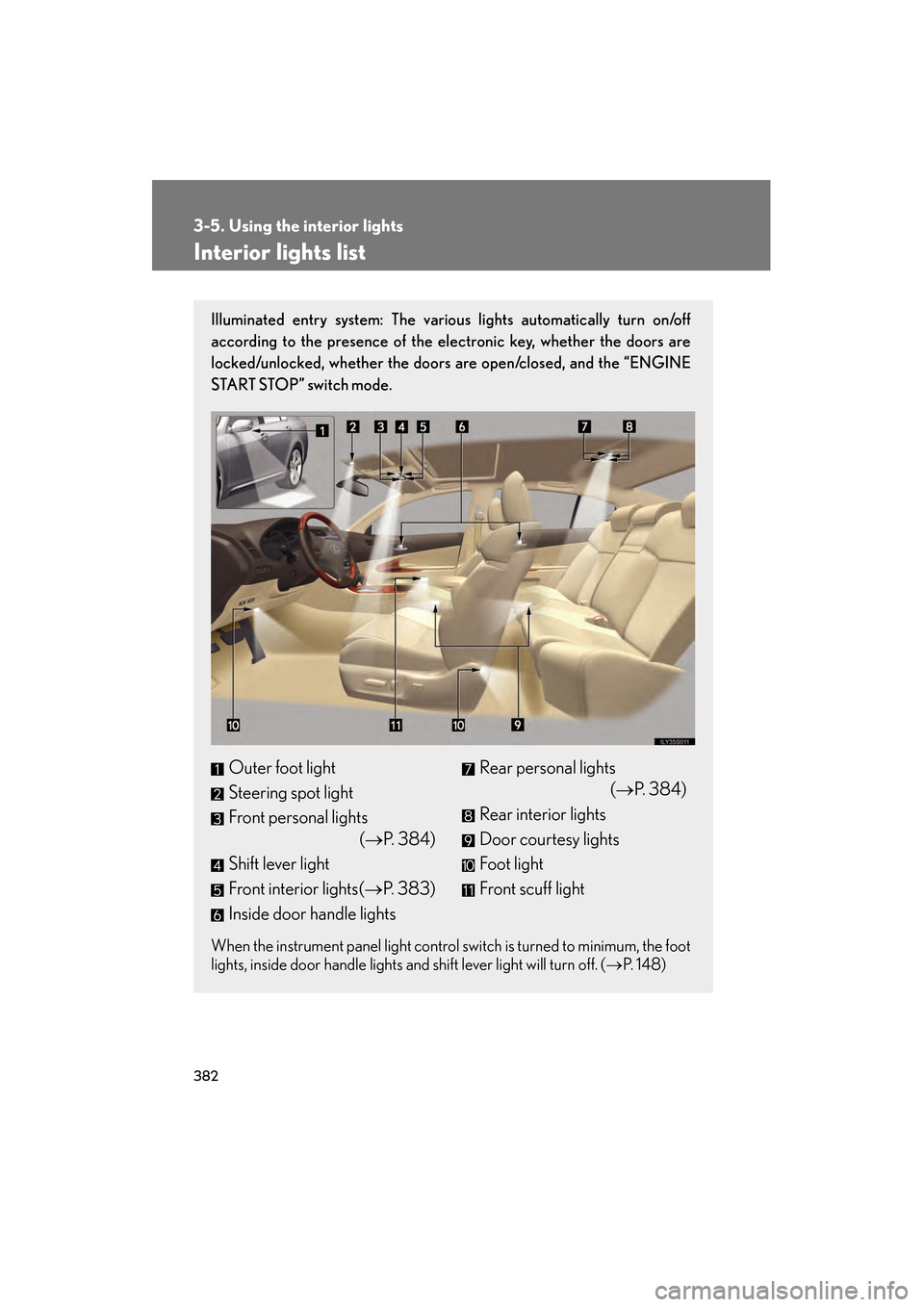
Illuminated entry system: The various lights automatically turn on/off
according to the presence of the electronic key, whether the doors are
locked/unlocked, whether the doors are open/closed, and the “ENGINE
START STOP” switch mode.
When the instrument panel light control switch is turned to minimum, the foot
lights, inside door handle lights and shift lever light will turn off. (→P. 1 4 8 )
Outer foot light
Steering spot light
Front personal lights
(→P. 384)
Shift lever light
Front interior lights( →P. 383)
Inside door handle lightsRear personal lights (→P. 384)
Rear interior lights
Door courtesy lights
Foot light
Front scuff light
GS_U_G.book Page 382 Wednesday, January 27, 2010 4:48 PM
Page 384 of 650
383
3-5. Using the interior lights
3
Interior features
GS_G_U (OM30C80U)
January 27, 2010 4:47 pm
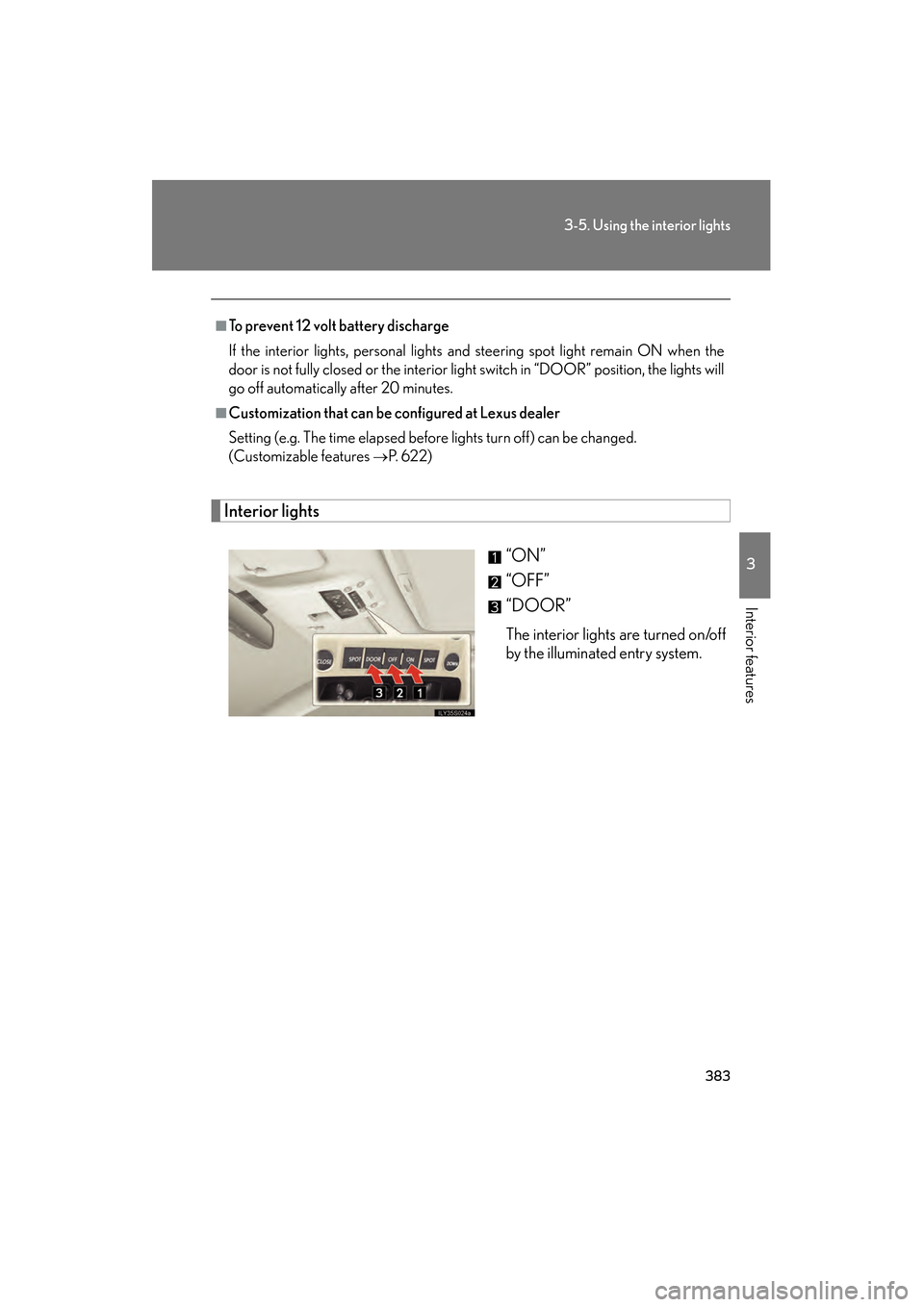
Interior lights“ON”
“OFF”
“DOOR”
The interior lights are turned on/off
by the illuminated entry system.
■To prevent 12 volt battery discharge
If the interior lights, personal lights and steering spot light remain ON when the
door is not fully closed or the interior light switch in “DOOR” position, the lights will
go off automatically after 20 minutes.
■Customization that can be configured at Lexus dealer
Setting (e.g. The time elapsed before lights turn off) can be changed.
(Customizable features
→P. 622)
GS_U_G.book Page 383 Wednesday, January 27, 2010 4:48 PM
Page 385 of 650
384
3-5. Using the interior lights
GS_G_U (OM30C80U)
January 27, 2010 4:47 pm
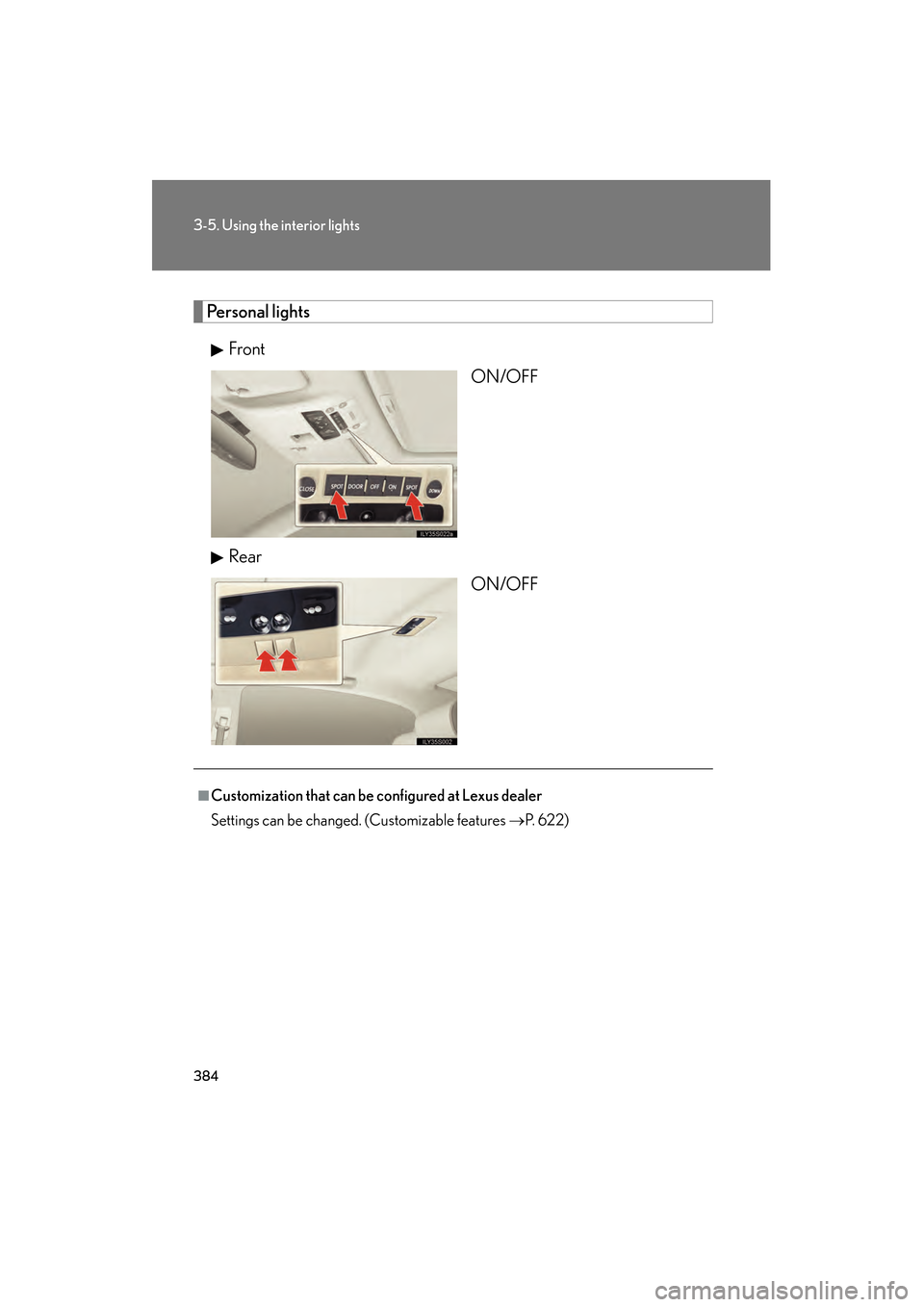
Personal lightsFront ON/OFF
Rear ON/OFF
■Customization that can be configured at Lexus dealer
Settings can be changed. (Customizable features →P. 622)
GS_U_G.book Page 384 Wednesday, January 27, 2010 4:48 PM
Page 387 of 650
386
3-6. Using the storage features
GS_G_U (OM30C80U)
January 27, 2010 4:47 pm
CAUTION
■Items that should not be left in the storage spaces
Do not leave glasses, lighters or spray cans in the storage spaces, as this may cause
the following when cabin temperature becomes high:
●Glasses may be deformed by heat or cracked if they come into contact with
other stored items.
●Lighters or spray cans may explode. If they come into contact with other stored
items, the lighter may catch fire or the spray can may release gas, causing a fire
hazard.
GS_U_G.book Page 386 Wednesday, January 27, 2010 4:48 PM
Page 388 of 650
387
3-6. Using the storage features
3
Interior features
GS_G_U (OM30C80U)
January 27, 2010 4:47 pm
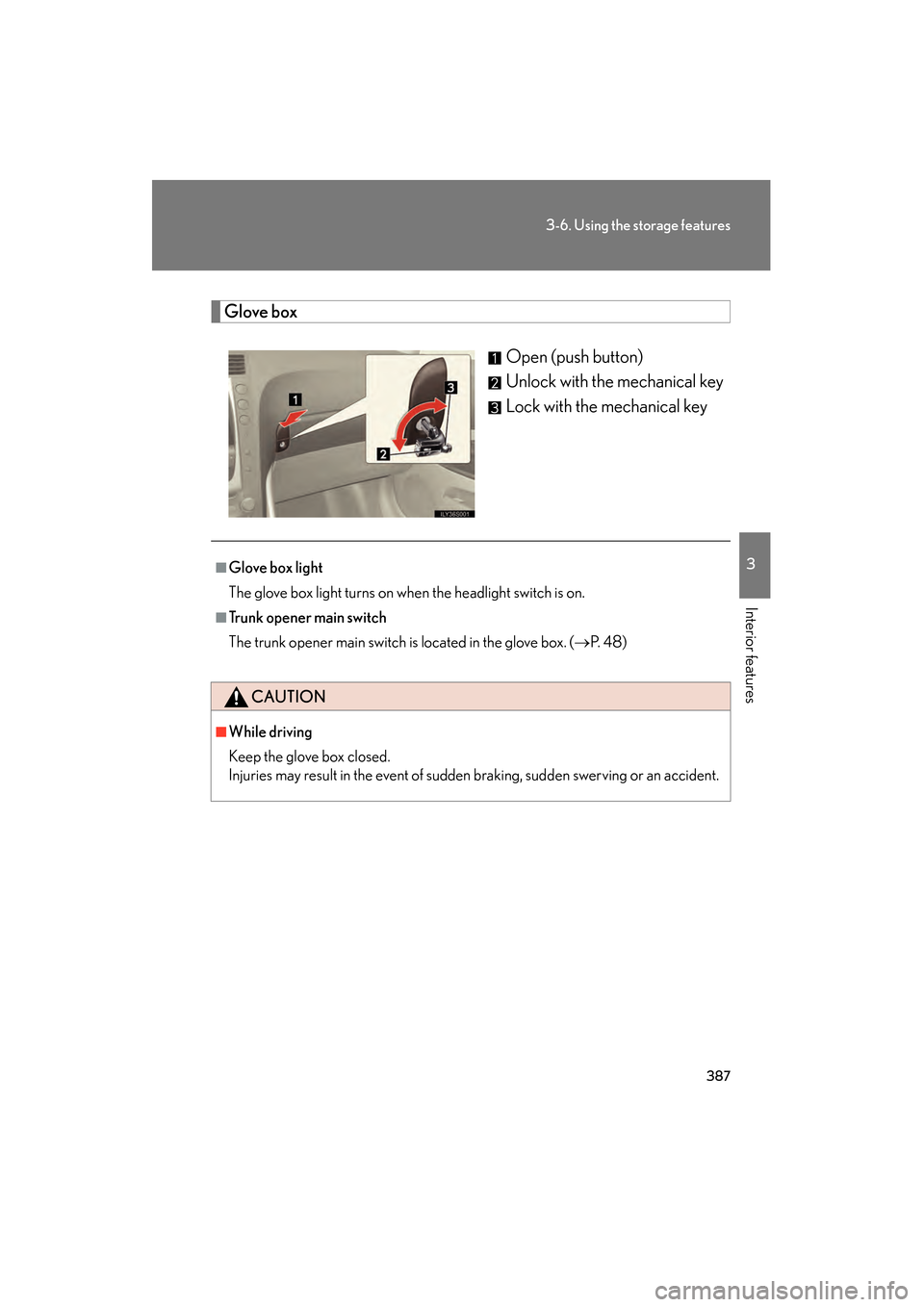
Glove boxOpen (push button)
Unlock with the mechanical key
Lock with the mechanical key
■Glove box light
The glove box light turns on when the headlight switch is on.
■Trunk opener main switch
The trunk opener main switch is located in the glove box. ( →P. 4 8 )
CAUTION
■While driving
Keep the glove box closed.
Injuries may result in the event of sudden braking, sudden swerving or an accident.
GS_U_G.book Page 387 Wednesday, January 27, 2010 4:48 PM
Page 389 of 650
388
3-6. Using the storage features
GS_G_U (OM30C80U)
January 27, 2010 4:47 pm
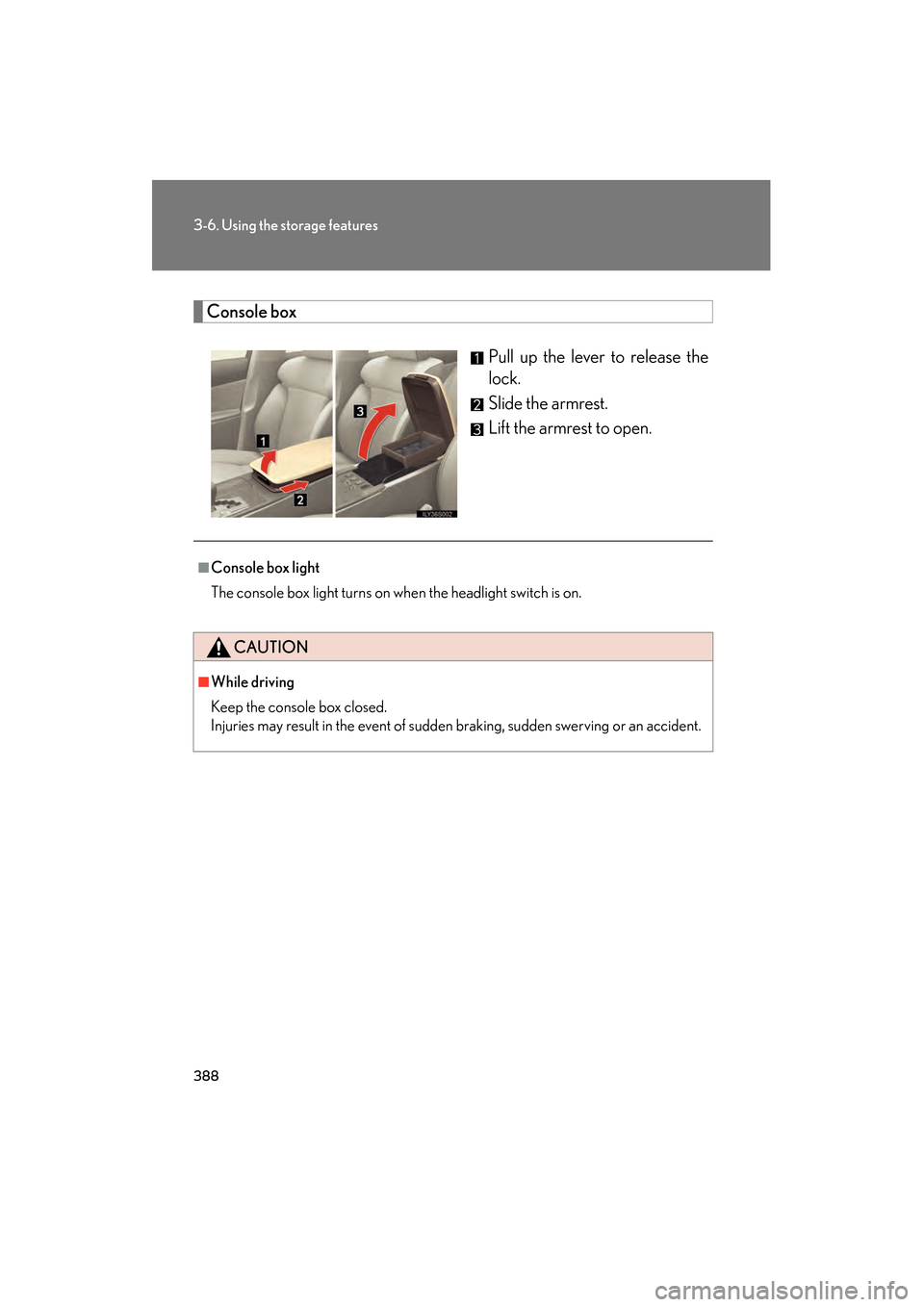
Console boxPull up the lever to release the
lock.
Slide the armrest.
Lift the armrest to open.
■Console box light
The console box light turns on when the headlight switch is on.
CAUTION
■While driving
Keep the console box closed.
Injuries may result in the event of sudden braking, sudden swerving or an accident.
GS_U_G.book Page 388 Wednesday, January 27, 2010 4:48 PM
Page 395 of 650
394
3-7. Other interior features
GS_G_U (OM30C80U)
January 27, 2010 4:47 pm
Vanity mirrors
NOTICE
■To prevent battery discharge
Do not leave the vanity lights on for extended periods while the engine is off.
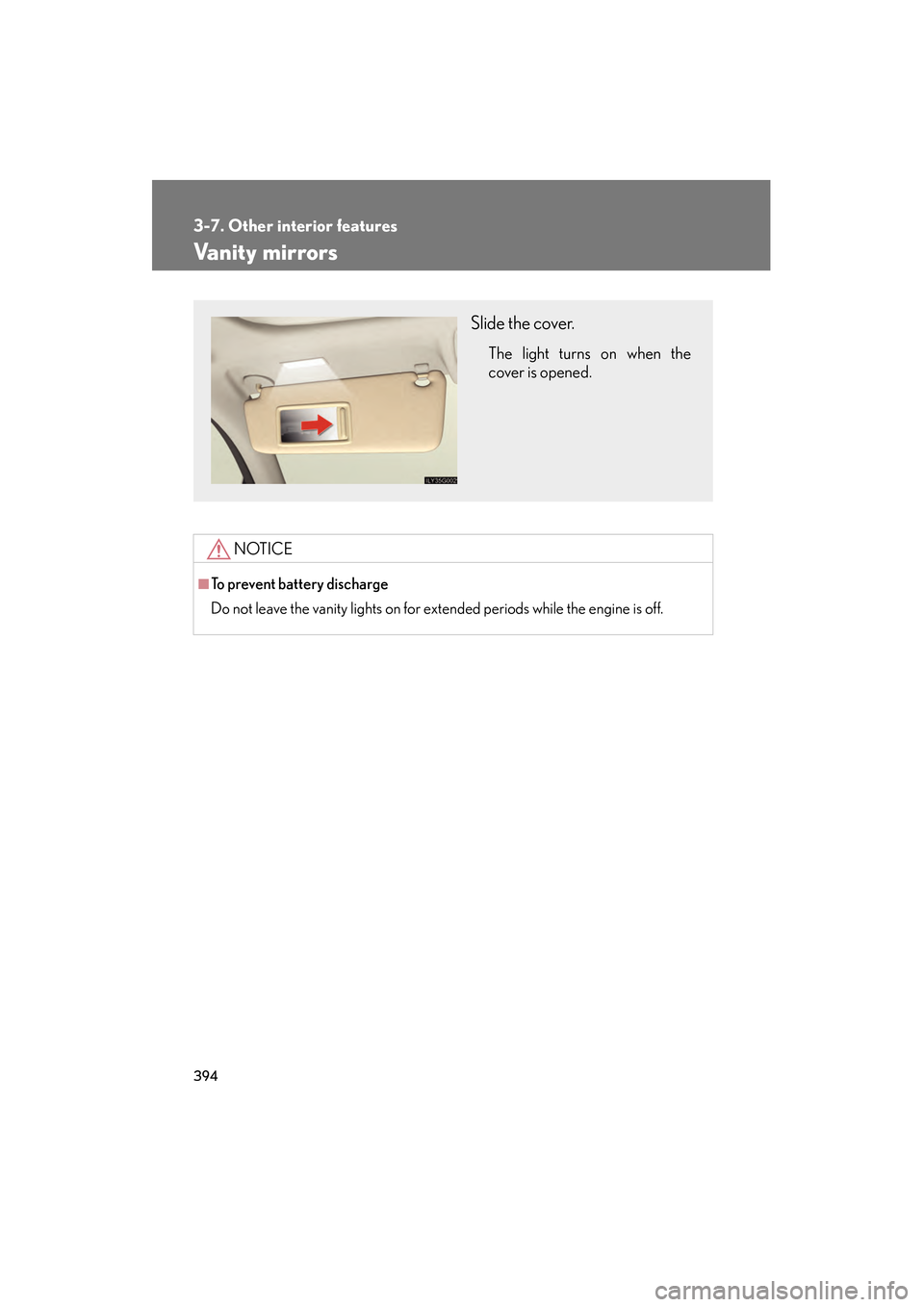
Slide the cover.
The light turns on when the
cover is opened.
GS_U_G.book Page 394 Wednesday, January 27, 2010 4:48 PM
Page 399 of 650
398
3-7. Other interior features
GS_G_U (OM30C80U)
January 27, 2010 4:47 pm
Cigarette lighter
■The cigarette lighter can be used when
The “ENGINE START STOP” switch is in ACCESSORY or IGNITION ON mode.
CAUTION
■To avoid burns or fires
●Do not touch the metal parts of the cigarette lighter.
●Do not hold the cigarette lighter down. It could overheat and cause a fire.
●Do not insert anything other than the cigarette lighter into the outlet.
■When not in use
Keep the ashtray lid closed.
Injuries may result in the event of sudden braking, sudden swerving or an accident.
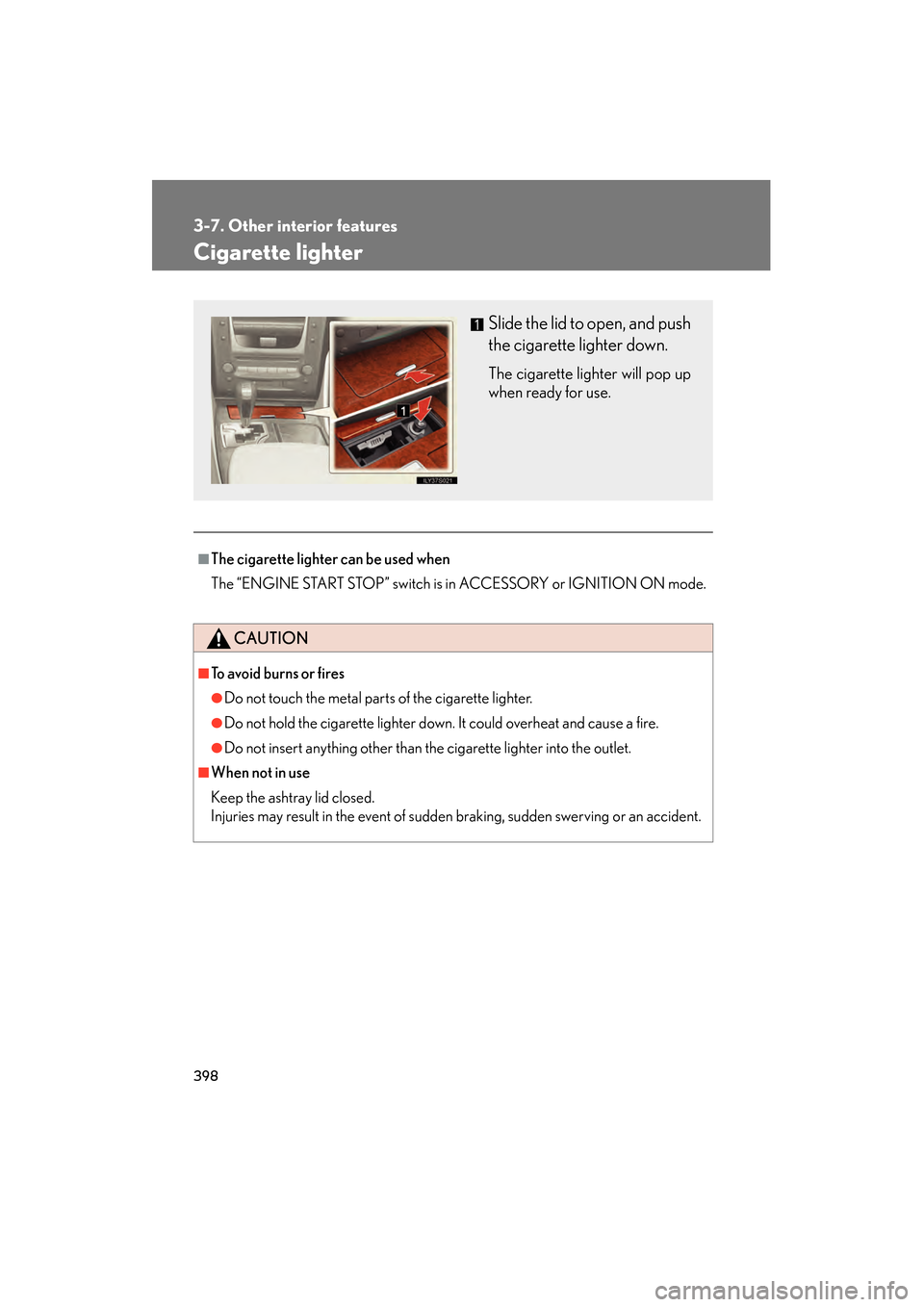
Slide the lid to open, and push
the cigarette lighter down.
The cigarette lighter will pop up
when ready for use.
GS_U_G.book Page 398 Wednesday, January 27, 2010 4:48 PM
Page 401 of 650
400
3-7. Other interior features
GS_G_U (OM30C80U)
January 27, 2010 4:47 pm
Seat heaters/ventilators∗
■The seat heaters/ventilators can be used when
The “ENGINE START STOP” switch is in IGNITION ON mode.
■When not in use
Set the dial to “0”. The indicator light turns off.
∗: If equipped
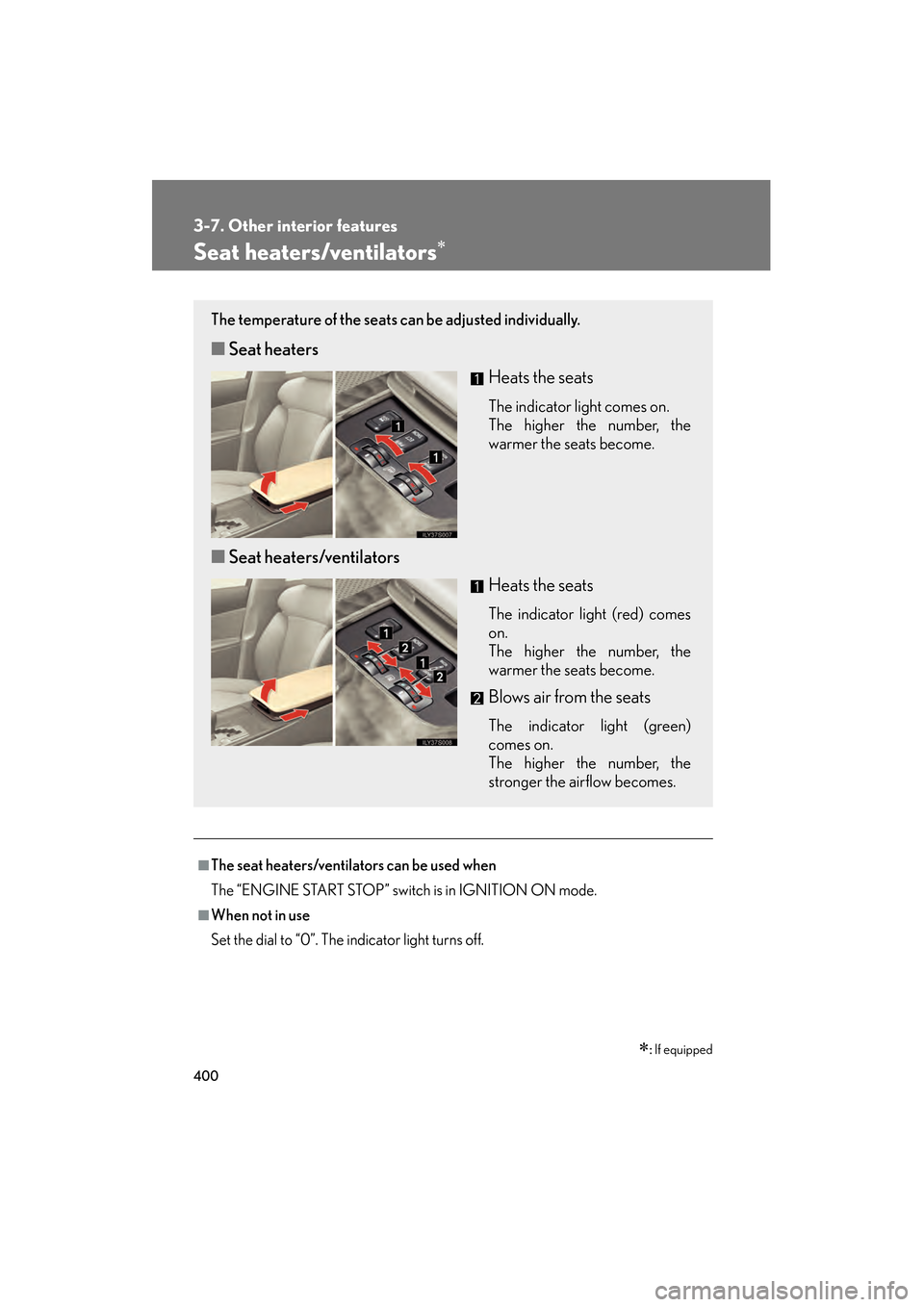
The temperature of the seats can be adjusted individually.
■ Seat heaters
Heats the seats
The indicator light comes on.
The higher the number, the
warmer the seats become.
■Seat heaters/ventilators
Heats the seats
The indicator light (red) comes
on.
The higher the number, the
warmer the seats become.
Blows air from the seats
The indicator light (green)
comes on.
The higher the number, the
stronger the airflow becomes.
GS_U_G.book Page 400 Wednesday, January 27, 2010 4:48 PM
Page 412 of 650
411
3-7. Other interior features
3
Interior features
GS_G_U (OM30C80U)
January 27, 2010 4:47 pm
Garage door opener
The garage door opener (HomeLink® Universal Transceiver) is manufactured
under license from HomeLink®.
Programming the HomeLink® (for U.S.A. owners)
The HomeLink
® compatible transceiver in your vehicle has 3 buttons
which can be programmed to operate 3 different devices. Refer to the
programming method below appropriate for the device.
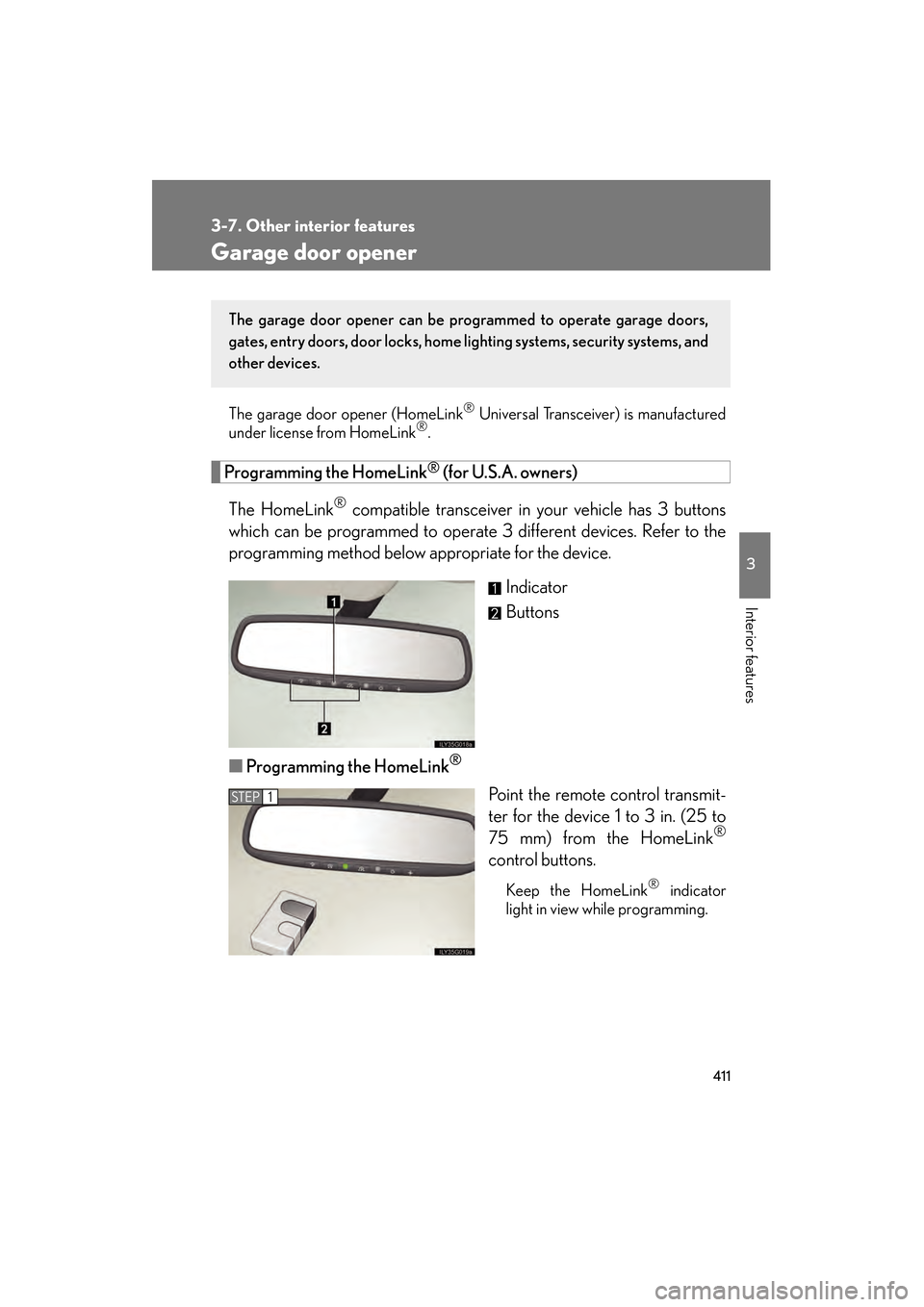
Indicator
Buttons
■ Programming the HomeLink
®
Point the remote control transmit-
ter for the device 1 to 3 in. (25 to
75 mm) from the HomeLink
®
control buttons.
Keep the HomeLink® indicator
light in view while programming.
The garage door opener can be pr ogrammed to operate garage doors,
gates, entry doors, door locks, home lighting systems, security systems, and
other devices.
STEP1
GS_U_G.book Page 411 Wednesday, January 27, 2010 4:48 PM