brake Lexus GS350 2011 Owner's Guide
[x] Cancel search | Manufacturer: LEXUS, Model Year: 2011, Model line: GS350, Model: Lexus GS350 2011Pages: 654, PDF Size: 11.03 MB
Page 207 of 654
206
2-4. Using other driving systems
GS_G_U (OM30C11U)
October 28, 2011 5:15 pm
PCS (Pre-Collision System)∗
∗: If equipped
When the radar sensor detects possibility of a frontal collision. Pre-colli-
sion systems such as the brakes and seat belts are automatically engaged
to lessen impact and injuries to occupants as well as vehicle damage.
■ Pre-collision seat belts (front seats only)
If the pre-collision sensor detects that a collision is unavoidable, the pre-
collision system will retract the seat belt before the collision occurs.
The same will happen if the driver makes an emergency braking or loses
control of the vehicle. ( →P. 6 5 )
However, the system will not operate in the event of skidding when the
TRAC/VSC systems are disabled.
■ Pre-collision brake assist
When there is a high possibility of a frontal collision, the system applies
greater braking force in relation to how strongly the brake pedal is
depressed.
■Pre-collision braking
When there is a possibility of a frontal collision, the system warns the driver
using a warning light, warning display and buzzer. If the system determines
that a collision is unavoidable, the brakes are automatically applied to
reduce the collision speed. Pre-collision braking can be disabled using the
pre-collision braking off switch.
■AVS (if equipped)
If the system determines that the collision is unavoidable, the operation of
AV S ( →P. 198) helps prevent the vehicle front from going down when
hard brakes are applied.
Page 209 of 654
208
2-4. Using other driving systems
GS_G_U (OM30C11U)
October 28, 2011 5:15 pm
■Obstacles not detected
The sensor cannot detect plastic obstacles such as pylons. There may also be occa-
sions when the radar sensor cannot detect pedestrians, animals, bicycles, motorcy-
cles, trees, or snowdrifts.
■The pre-collision system is operational when
●Pre-collision seat belts (linked to the radar sensor)
• Vehicle speed is above 4 mph (5 km/h).
• The speed at which your vehicle is approaching the obstacle or oncomingvehicle exceeds 19 mph (30 km/h).
• The front occupants are wearing a seat belt.
●Pre-collision seat belts (linked to brake operation)
• Vehicle speed exceeds 19 mph (30 km/h).
• The system detects sudden braking or skidding.
• The front occupants are wearing a seat belt.
●Pre-collision brake assist
• Vehicle speed is above 19 mph (30 km/h).
• The speed at which your vehicle is approaching the obstacle or oncoming vehicle exceeds 19 mph (30 km/h).
• The brake pedal is depressed.
●Pre-collision braking
• The pre-collision braking off button is not pressed.
• Vehicle speed is greater than about 10 mph (15 km/h).
• The speed at which your vehicle is approaching the obstacle or the vehicle running ahead of you is greater than about 10 mph (15 km/h).
●AVS (if equipped)
• Vehicle speed is above 4 mph (5 km/h).
• The speed at which your vehicle is approaching the obstacle or oncomingvehicle exceeds 19 mph (30 km/h).
Page 210 of 654
209
2-4. Using other driving systems
2
When driving
GS_G_U (OM30C11U)
October 28, 2011 5:15 pm
■Conditions that may trigger the system even if there is no possibility of collision
●When there is an object by the roadside at the entrance to a curve
●When passing an oncoming vehicle on a curve
●When driving over a narrow iron bridge
●When there is a metal object on the road surface
●When driving on an uneven road surface
●When passing an oncoming vehicle on a left-turn
●When your vehicle rapidly closes on the vehicle in front
●When a grade separation/interchange, sign, billboard, or other structure
appears to be directly in the vehicle’s line of travel
●When an extreme change in vehicle height occurs
●When there is an abnormality in the radar sensor
●When climbing a steep hill causes an overhead billboard or other metallic struc-
ture to appear directly in the vehicle’s line of travel
●When passing through certain ETC (Electronic Toll Collection system) gates
When the system is activated in the situations described above there is also a possi-
bility that the seat belts will retract quickly and the brakes will be applied with a force
greater than normal. When the seat belt is locked in the retracted position, stop the
vehicle in a safe place, release the seat belt and refasten.
■When there is a malfunction in the system
Warning lights and/or warning messages will turn on or flash. ( →P. 535, 546)
Page 213 of 654
212
2-4. Using other driving systems
GS_G_U (OM30C11U)
October 28, 2011 5:15 pm
CAUTION
■Cautions regarding the assist contents of the system
By means of alarms and brake control, the pre-collision system is intended to assist
the driver in avoiding collisions through the process of “LOOK-JUDGE-ACT”.
There are limits to the degree of assistance the system can provide, so please keep
in mind the following important points.
●Assisting the driver in watching the road
The pre-collision system is only able to detect obstacles directly in front of the
vehicle, and only within a limited range. It is not a mechanism that allows careless
or inattentive driving, and it is not a system that can assist the driver in low-visibil-
ity conditions. It is still necessary for the driver to pay close attention to the vehi-
cle’s surroundings.
●Assisting the driver in making correct judgment
When attempting to estimate the likelihood of a collision, the only data available
to the pre-collision system is that from obstacles it has detected directly in front of
the vehicle. Therefore, it is absolutely necessary for the driver to remain vigilant
and to determine whether or not there is a possibility of collision in any given situ-
ation.
●Assisting the driver in taking action
The pre-collision system’s braking assist feature is designed to help reduce the
severity of a collision, and so only acts when the system has judged that a collision
is unavoidable. This system by itself is not capable of automatically avoiding a col-
lision or bringing the vehicle to a stop safely. For this reason, when encountering a
dangerous situation the driver must take direct and immediate action in order to
ensure the safety of all involved.
Page 217 of 654
216
2-5. Driving information
GS_G_U (OM30C11U)
October 28, 2011 5:15 pm
CAUTION
■Things that must not be carried in the trunk
The following things may cause a fire if loaded in the trunk.
●Receptacles containing gasoline
●Aerosol cans
■Storage precautions
Observe the following precautions.
Failing to do so may result in death or serious injury.
●Do not place cargo or luggage in or on the following locations as the item may
get under the brake or accelerator pedal and prevent the pedals from being
depressed properly, block the driver’s vision, or hit the driver or passengers,
causing an accident.
• Driver’s feet
• Front passenger or rear seats (when stacking items)
• Package tray
• Instrument panel
•Dashboard
●Secure all items in the occupant compartment, as they may shift and injure some-
one during sudden braking, sudden swerving or an accident.
■Weight of the load
●Improper loading may cause deterioration of steering or braking control result-
ing in an accident which may cause death or serious injury.
●Do not exceed the maximum axle weight rating or the total vehicle weight rating.
●Even if the total load of occupant’s weight and the cargo load is less than the total
load capacity, do not apply the load unevenly. Improper loading may cause dete-
rioration of steering or braking control which may cause death or serious injury.
Page 219 of 654
218
2-5. Driving information
GS_G_U (OM30C11U)
October 28, 2011 5:15 pm
Winter driving tips
Carry out the necessary preparations and inspections before driving the
vehicle in winter. Always drive the vehicle in a manner appropriate to the
prevailing weather conditions.
■Pre-winter preparations
●Use fluids that are appropriate to the prevailing outside tempera-
tures.
• Engine oil
• Engine coolant
• Washer fluid
● Have a service technician inspect the level and specific gravity of
battery electrolyte.
● Have the vehicle fitted with four snow tires or purchase a set of
tire chains for the rear tires.
Ensure that all tires are the same size and brand, and that chains match
the size of the tires.
■ Before driving the vehicle
Perform the following according to the driving conditions.
●Do not try to forcibly open a window or move a wiper that is fro-
zen. Pour warm water over the frozen area to melt the ice. Wipe
away the water immediately to prevent it from freezing.
● To ensure proper operation of the climate control system fan,
remove any snow that has accumulated on the air inlet vents in
front of the windshield.
● Remove any ice that has accumulated on the vehicle chassis.
● Periodically check for and remove any excess ice or snow that
may have accumulated in the wheel well or on the brakes.
Page 220 of 654
219
2-5. Driving information
2
When driving
GS_G_U (OM30C11U)
October 28, 2011 5:15 pm
Regulations on the use of tire chains
● Regulations regarding the use of tire chains vary according to location
and type of road. Always check local regulations before installing
chains.
● Use SAE Class “S” type radial tire chains, with the exception of radial
cable chains or V-bar type chains.
• Install the chains on the rear tires.
• Refer to the explanation that comes with the tire chains for installa-
tion instructions.
● Retighten the chains after driving 1 /4 - 1 /2 mile (0.5 - 1.0 km).
■When driving the vehicle
Accelerate the vehicle slowly and drive at a reduced speed suitable
to road conditions.
■ When parking the vehicle
Park the vehicle and move the shift lever to “P” without setting the
parking brake. The parking brake may freeze up, preventing it from
being released. If necessary, block the wheels to prevent inadvert-
ent sliding or creeping.
Page 281 of 654
280
3-3. Using the audio system
GS_G_U (OM30C11U)
October 28, 2011 5:15 pm
Playing DVD video/audio (with DVD player)
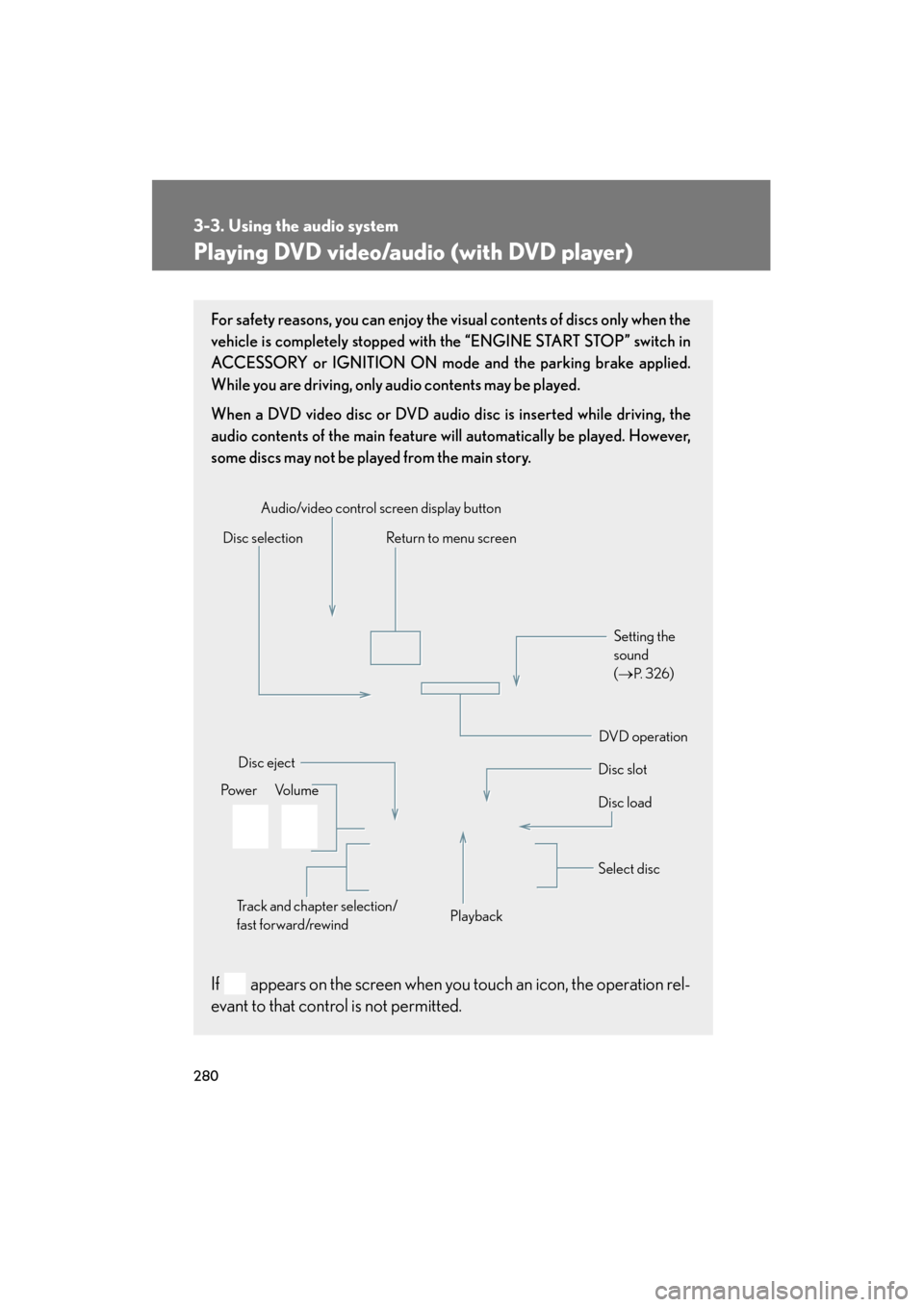
For safety reasons, you can enjoy the visual contents of discs only when the
vehicle is completely stopped with the “ENGINE START STOP” switch in
ACCESSORY or IGNITION ON mode and the parking brake applied.
While you are driving, only audio contents may be played.
When a DVD video disc or DVD audio disc is inserted while driving, the
audio contents of the main feature will automatically be played. However,
some discs may not be played from the main story.
If appears on the screen when you touch an icon, the operation rel-
evant to that control is not permitted.
Disc selectionDisc slot
Disc eject
PlaybackDisc load
Audio/video control screen display button
Po w e r Vo l u m e Select disc
Track and chapter selection/
fast forward/rewind
DVD operation Setting the
sound
(
→
P. 3 2 6)
Return to menu screen
Page 282 of 654
281
3-3. Using the audio system
3
Interior features
GS_G_U (OM30C11U)
October 28, 2011 5:15 pm
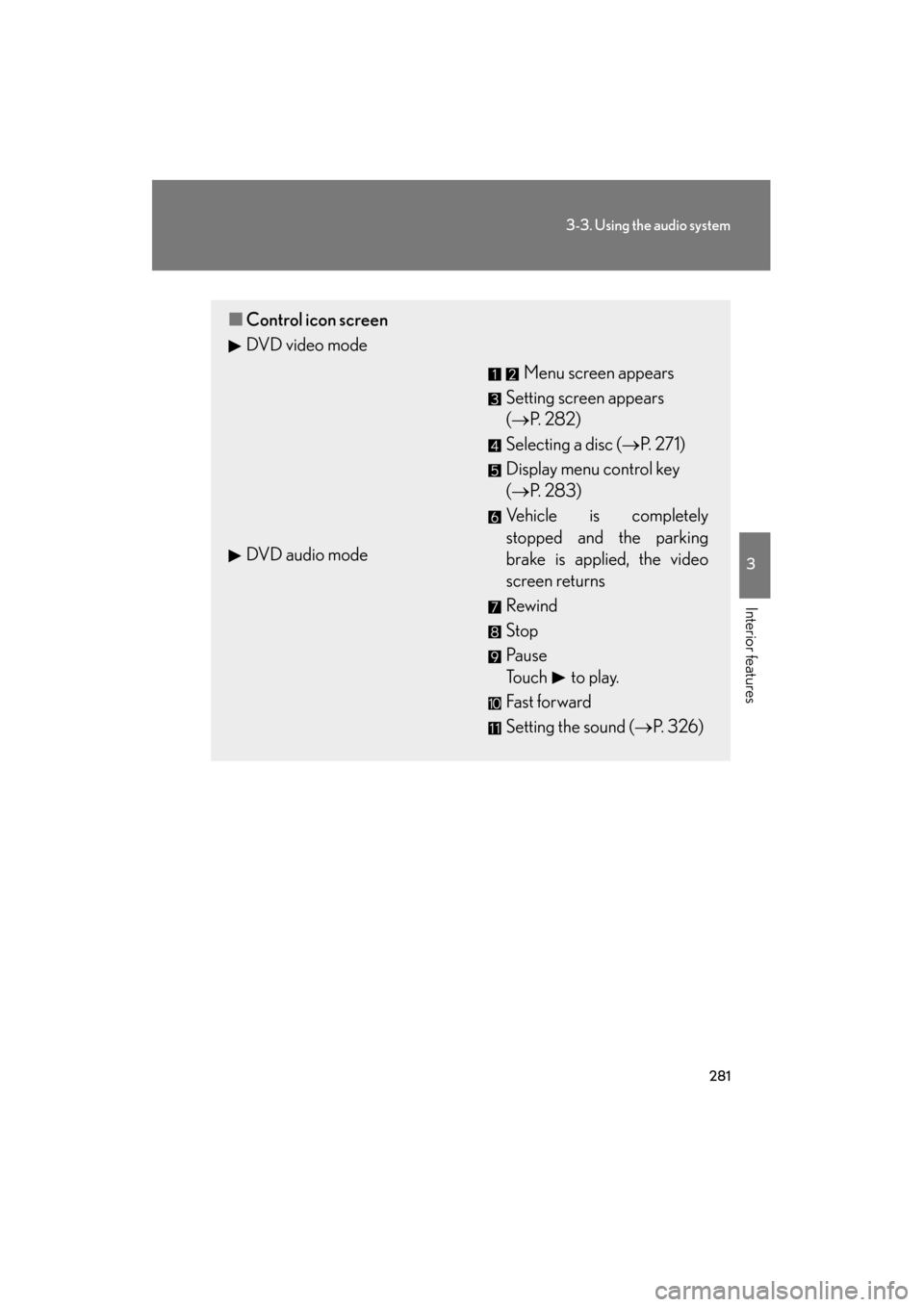
■Control icon screen
DVD video mode
Menu screen appears
Setting screen appears
(→ P. 2 8 2 )
Selecting a disc ( →P. 271)
Display menu control key
(→ P. 283)
Vehicle is completely
stopped and the parking
brake is applied, the video
screen returns
Rewind
Stop
Pa u s e
Touch to play.
Fas t for ward
Setting the sound (→ P. 326)
DVD audio mode
Page 295 of 654
294
3-3. Using the audio system
GS_G_U (OM30C11U)
October 28, 2011 5:15 pm
Playing a video CD (with DVD player)
For safety reasons, you can enjoy the visual contents of discs only when the
vehicle is completely stopped with the “ENGINE START STOP” switch in
ACCESSORY or IGNITION ON mode and the parking brake applied.
While you are driving, only audio contents may be played.
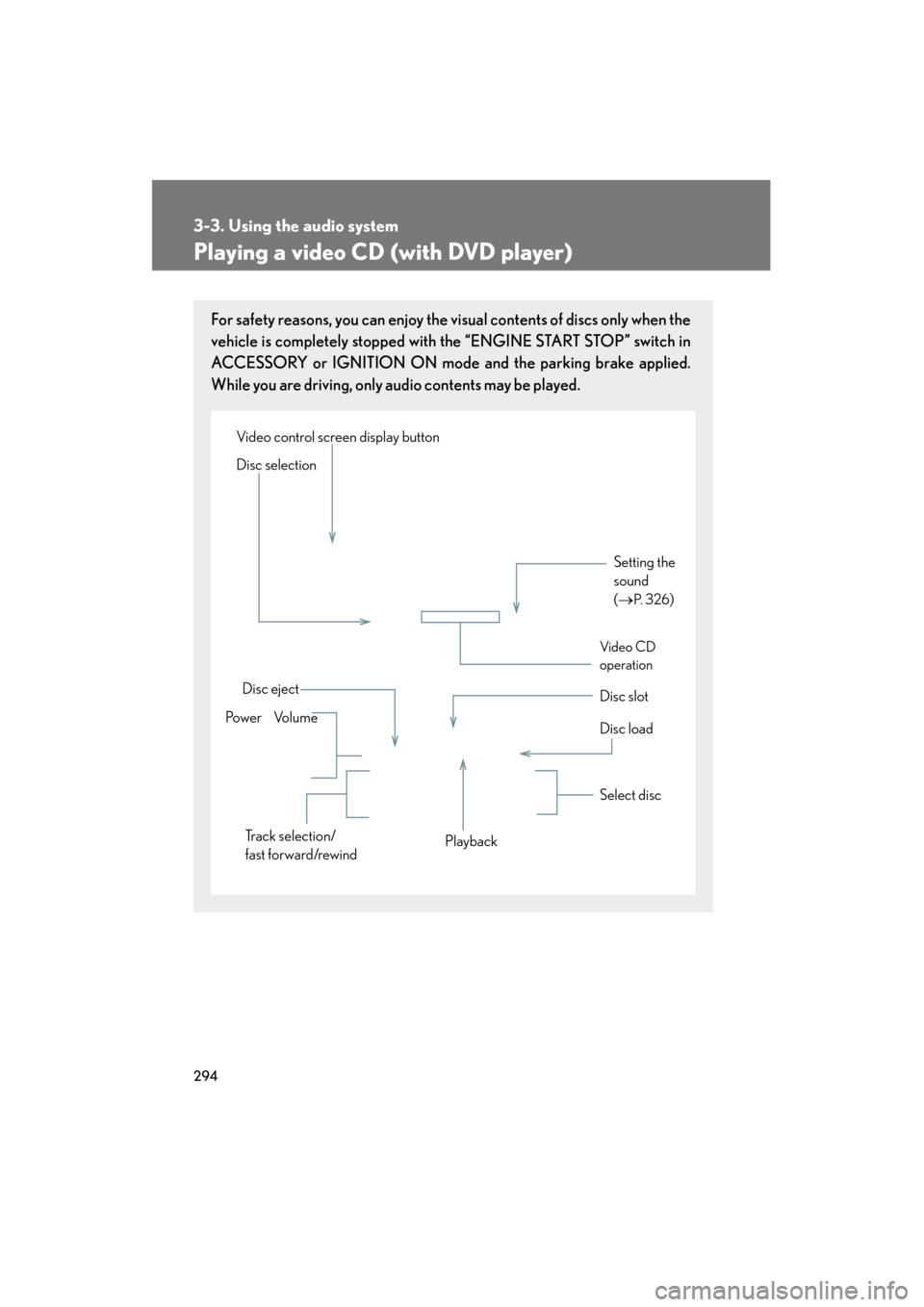
Setting the
sound
(→
P. 3 2 6)
Disc slot
Disc eject
Disc load
Video control screen display button
Po w e r Vo l u m e Select disc
Track selection/
fast forward/rewind Playback
Disc selection
Vid e o CD
operation