engine Lexus GS350 2012 Owners Manual
[x] Cancel search | Manufacturer: LEXUS, Model Year: 2012, Model line: GS350, Model: Lexus GS350 2012Pages: 914, PDF Size: 49.39 MB
Page 283 of 914
2764-5. Using the driving support
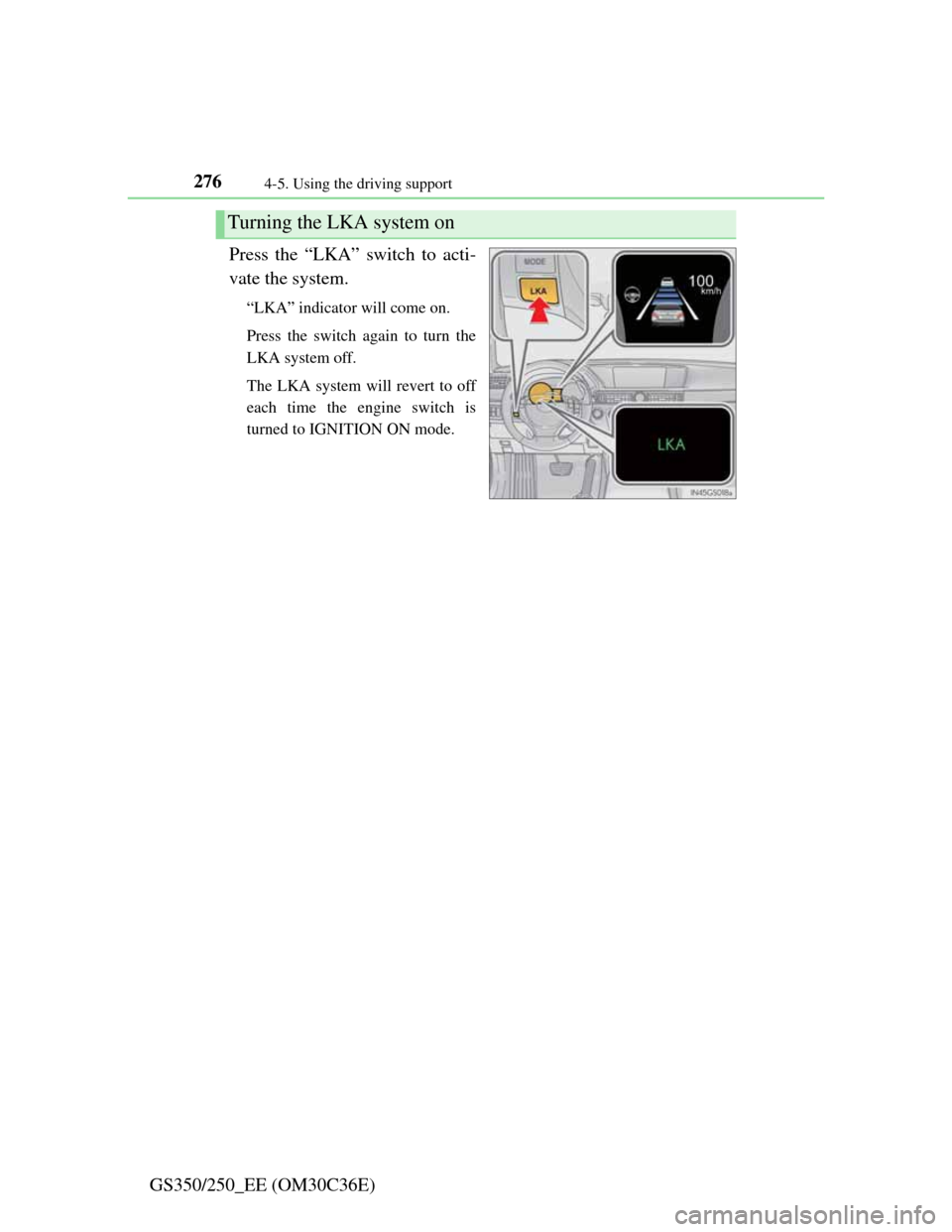
GS350/250_EE (OM30C36E)Press the “LKA” switch to acti-
vate the system.
“LKA” indicator will come on.
Press the switch again to turn the
LKA system off.
The LKA system will revert to off
each time the engine switch is
turned to IGNITION ON mode.
Turning the LKA system on
Page 300 of 914

2934-5. Using the driving support
4
Driving
GS350/250_EE (OM30C36E)
Alert volume setting
The alert volume can be adjusted.
Select “1” to “5” on the “LEXUS park assist settings”.
Select “OK”.
Display on/off setting
On or off can be selected for Lexus parking assist-sensor display.
Select “Display off”.
When the “Display off” indicator is turned on, the display of Lexus
parking assist-sensor will be off. Select “Display off” again to turn the
display of Lexus parking assist-sensor on.
Select “OK”.
Alert distance setting
Front or rear center sensors display and tone indication can be
set.
Select “Front” or “Rear”.
Long distance or short distance can be selected.
Select “OK”.
The Lexus parking assist-sensor can be operated when
Front center sensors:
• The engine switch is in IGNITION ON mode.
• The shift lever is in a position other than P.
• The vehicle speed is less than about 10 km/h (6 mph).
Front corner sensors:
• The engine switch is in IGNITION ON mode.
• The shift lever is in a position other than P or R.
• The vehicle speed is less than about 10 km/h (6 mph).
Rear corner and rear center sensors:
• The engine switch is in IGNITION ON mode.
• The shift lever is in R.
1
2
1
2
1
2
Page 301 of 914

2944-5. Using the driving support
GS350/250_EE (OM30C36E)
Lexus parking assist-sensor display
When an obstacle is detected while the rear view monitor system, is in use,
the warning indicator will appear in the top right of the screen even if the dis-
play setting has been set to off.
Sensor detection information
The sensor’s detection areas are limited to the areas around the vehicle’s
front corner and rear bumpers.
Certain vehicle conditions and the surrounding environment may affect the
ability of the sensor to correctly detect obstacles. Particular instances where
this may occur are listed below.
• There is dirt, snow or ice on the sensor. (Wiping the sensors will resolve
this problem.)
• The sensor is frozen. (Thawing the area will resolve this problem.)
In especially cold weather, if a sensor is frozen the screen may show an
abnormal display, or obstacles may not be detected.
• The sensor is covered in any way.
• The vehicle is leaning considerably to one side.
• On an extremely bumpy road, on an incline, on gravel, or on grass.
• The vicinity of the vehicle is noisy due to vehicle horns, motorcycle
engines, air brakes of large vehicles, or other loud noises producing
ultrasonic waves.
• There is another vehicle equipped with parking assist sensors in the
vicinity.
• The sensor is coated with a sheet of spray or heavy rain.
• The vehicle is equipped with a fender pole or wireless antenna.
• Towing eyelets are installed.
• The bumper or sensor receives a strong impact.
• The vehicle is approaching a tall or curved curb.
• In harsh sunlight or intense cold weather.
• The area directly under the bumpers is not detected.
• If obstacles draw too close to the sensor.
• A non-genuine Lexus suspension (lowered suspension etc.) is installed.
• People may not be detected if they are wearing certain types of clothing.
In addition to the examples above, there are instances in which, because of
their shape, signs and other objects may be judged by the sensor to be closer
than they are.
Page 305 of 914
2984-5. Using the driving support
GS350/250_EE (OM30C36E)
Screen display
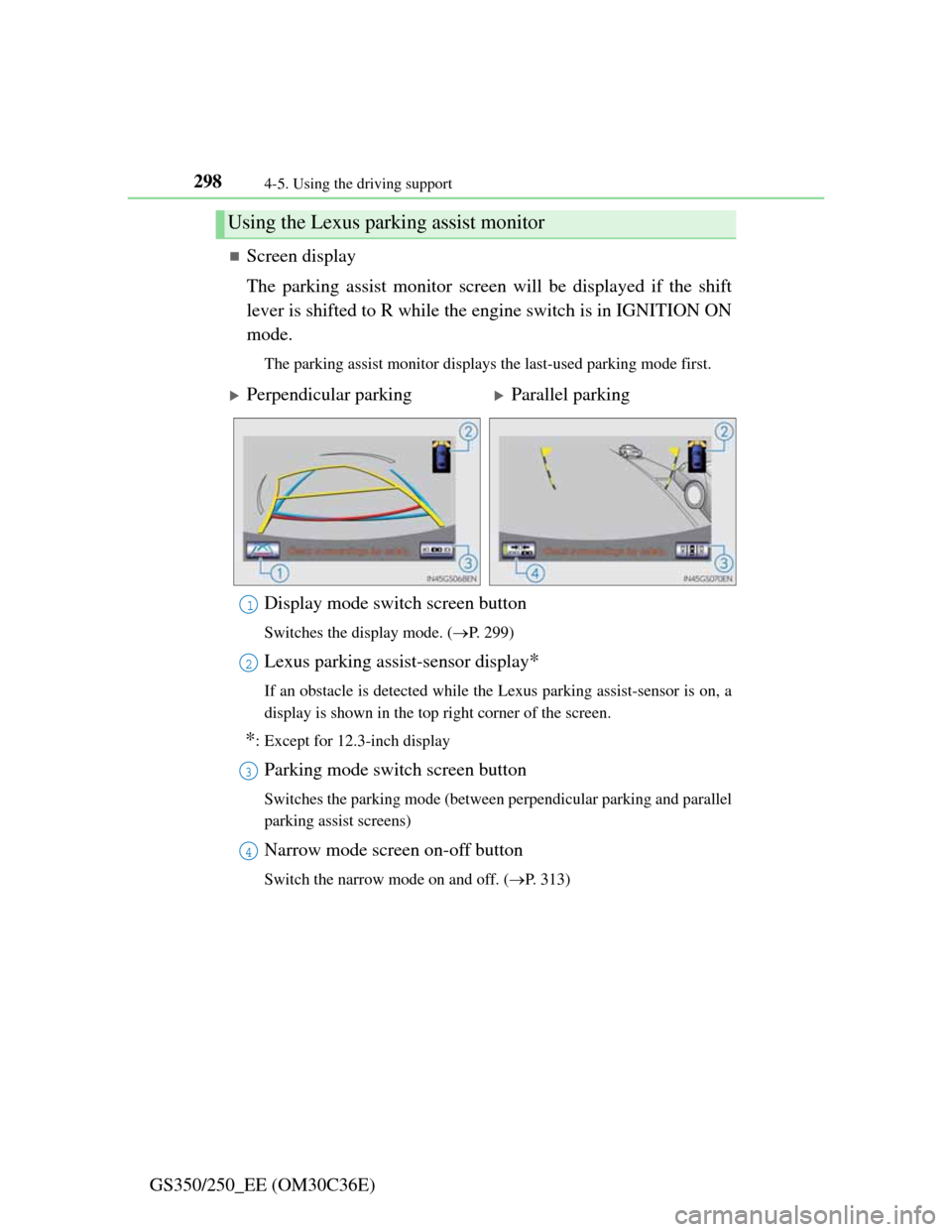
The parking assist monitor screen will be displayed if the shift
lever is shifted to R while the engine switch is in IGNITION ON
mode.
The parking assist monitor displays the last-used parking mode first.
Display mode switch screen button
Switches the display mode. (P. 299)
Lexus parking assist-sensor display*
If an obstacle is detected while the Lexus parking assist-sensor is on, a
display is shown in the top right corner of the screen.
*: Except for 12.3-inch display
Parking mode switch screen button
Switches the parking mode (between perpendicular parking and parallel
parking assist screens)
Narrow mode screen on-off button
Switch the narrow mode on and off. (P. 313)
Using the Lexus parking assist monitor
Perpendicular parkingParallel parking
1
2
3
4
Page 320 of 914
3134-5. Using the driving support
4
Driving
GS350/250_EE (OM30C36E)
If the message “Steering wheel turned too far, please return.” is
displayed
The steering wheel has been turned too far, and the system can-
not function. Return the steering wheel to its original position.
If the message is displayed before the outline is positioned over
the desired parking space, it is likely that the vehicle is too far
away from the shoulder. Check that there is a gap of approxi-
mately 1 m (3 ft.) between your vehicle and the parked vehicle.
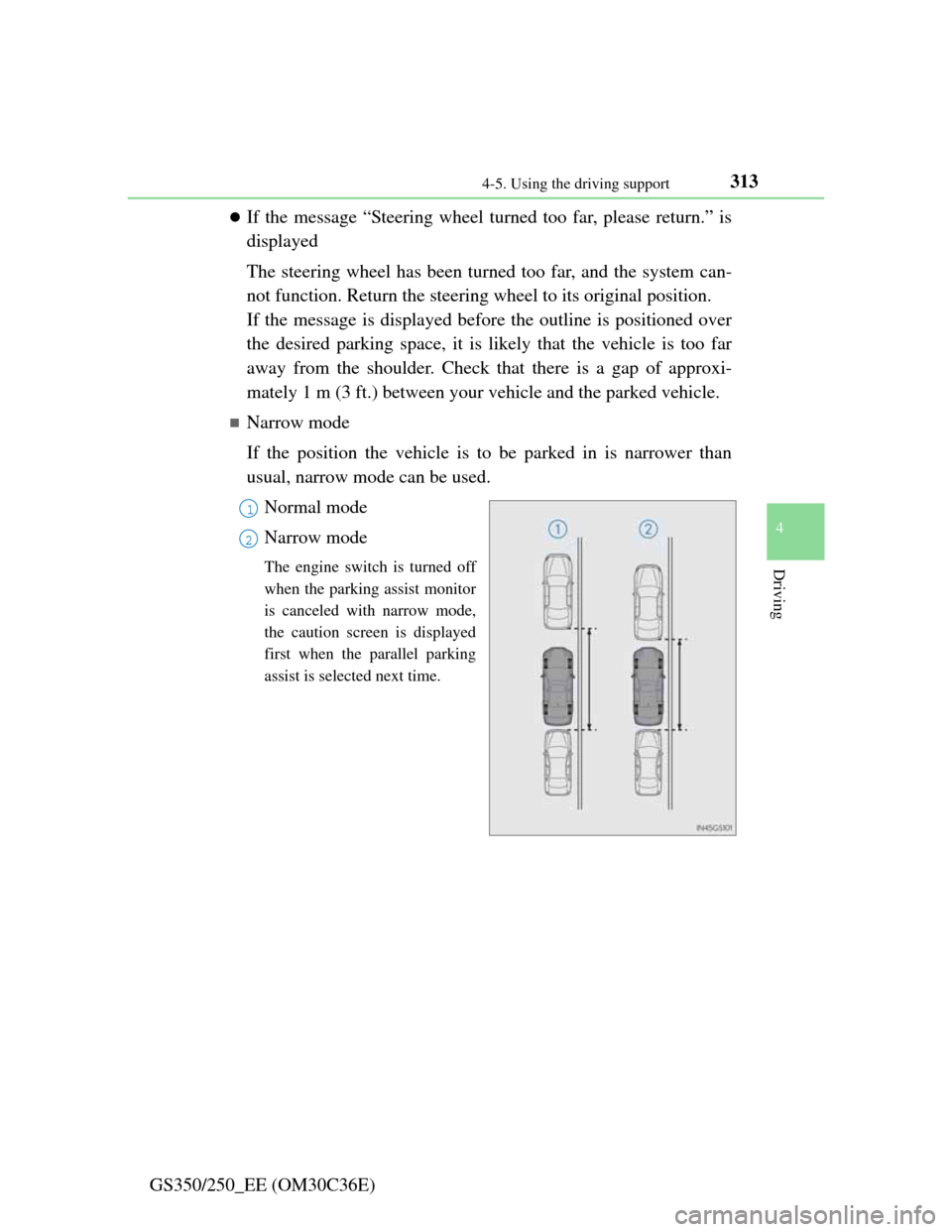
Narrow mode
If the position the vehicle is to be parked in is narrower than
usual, narrow mode can be used.
Normal mode
Narrow mode
The engine switch is turned off
when the parking assist monitor
is canceled with narrow mode,
the caution screen is displayed
first when the parallel parking
assist is selected next time.
1
2
Page 339 of 914

3324-5. Using the driving support
GS350/250_EE (OM30C36E)
Operation of the air conditioning system in Eco drive mode
Eco drive mode controls the heating/cooling operations and fan speed of the
air conditioning system to enhance fuel efficiency (P. 409). To improve air
conditioning performance, adjust the fan speed or turn off Eco drive mode.
Automatic operation of the seat heater during Eco drive mode
If the driving mode select switch is switched to Eco drive mode in cold tem-
peratures, the seat heater will be automatically operated to assist heating per-
formance.
Sport mode automatic deactivation
Sport mode is automatically deactivated if the engine switch is turned off
after driving in sport mode.
Page 341 of 914

3344-5. Using the driving support
GS350/250_EE (OM30C36E)
EPS (Electric Power Steering)
Employs an electric motor to reduce the amount of effort needed
to turn the steering wheel
AVS (Adaptive Variable Suspension system) (if equipped)
By independently controlling the damping force of the shock
absorbers for each of the 4 wheels according to the road and driv-
ing conditions, this system combines riding comfort with supe-
rior steering stability, and ensures good vehicle posture. (P.
328)
VDIM (Vehicle Dynamics Integrated Management)
Provides integrated control of the ABS, brake assist, TRC, VSC,
hill-start assist control and EPS systems
Helps to maintain vehicle stability when swerving on slippery
road surfaces by controlling the brakes, engine output, steering
assist, and steering ratio
PCS (Pre-Crash Safety system) (if equipped)
P. 343
Emergency brake signal
When the brakes are applied suddenly, the stop lights automati-
cally flash to alert the vehicle behind.
Page 342 of 914
3354-5. Using the driving support
4
Driving
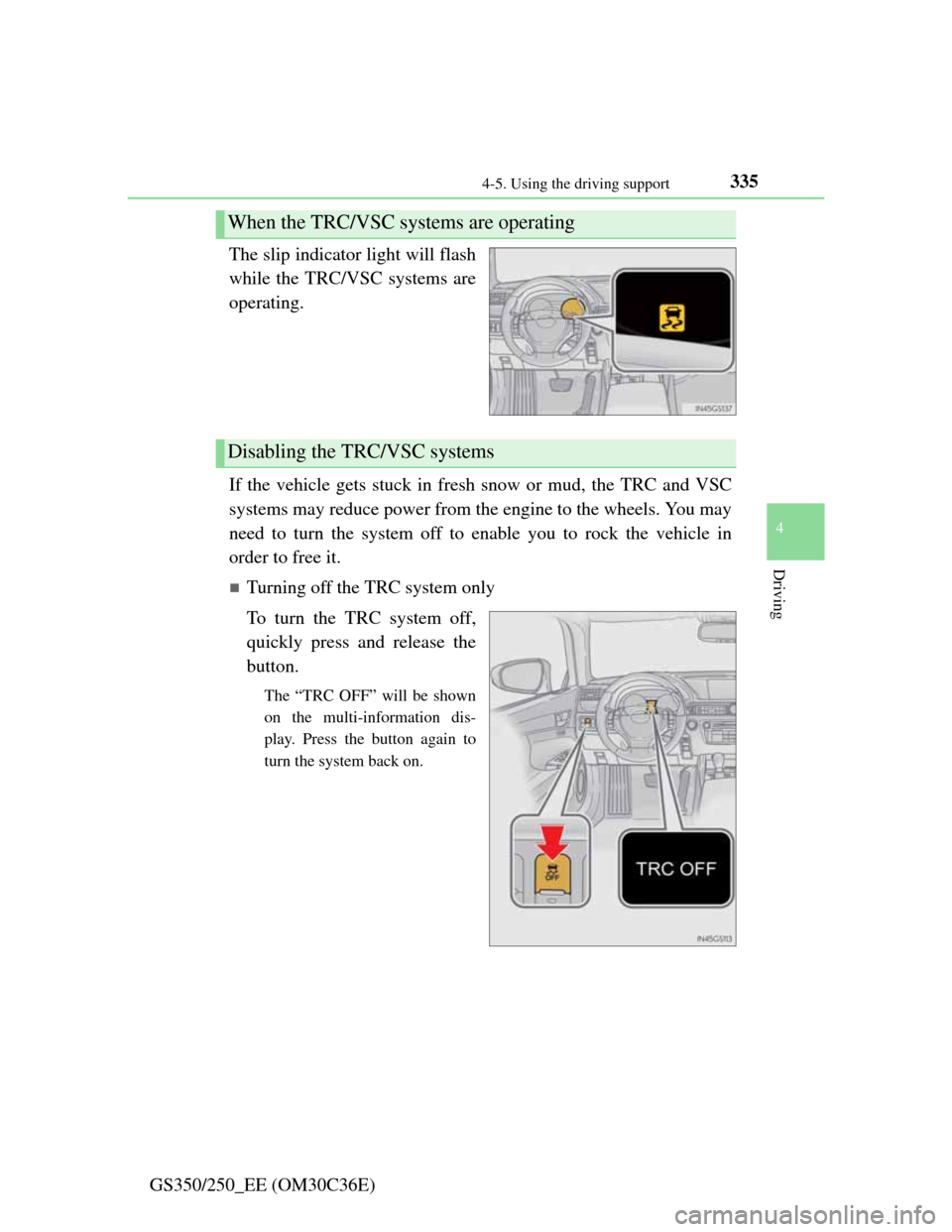
GS350/250_EE (OM30C36E)The slip indicator light will flash
while the TRC/VSC systems are
operating.
If the vehicle gets stuck in fresh snow or mud, the TRC and VSC
systems may reduce power from the engine to the wheels. You may
need to turn the system off to enable you to rock the vehicle in
order to free it.
Turning off the TRC system only
To turn the TRC system off,
quickly press and release the
button.
The “TRC OFF” will be shown
on the multi-information dis-
play. Press the button again to
turn the system back on.
When the TRC/VSC systems are operating
Disabling the TRC/VSC systems
Page 344 of 914

3374-5. Using the driving support
4
Driving
GS350/250_EE (OM30C36E)
When the message is displayed on the multi-information display showing that
TRC has been disabled even if the VSC OFF switch has not been pressed
TRC cannot be operated. Contact any authorized Lexus dealer or repairer, or
another duly qualified and equipped professional.
Sounds and vibrations caused by the ABS, brake assist, VSC and TRC sys-
tems
A sound may be heard from the engine compartment when the engine is
started or just after the vehicle begins to move. This sound does not indicate
that a malfunction has occurred in any of these systems.
Any of the following conditions may occur when the above systems are
operating. None of these indicates that a malfunction has occurred.
• Vibrations may be felt through the vehicle body and steering.
• A motor sound may be heard after the vehicle comes to a stop.
• The brake pedal may pulsate slightly after the ABS is activated.
• The brake pedal may move down slightly after the ABS is activated.
EPS operation sound
When the steering wheel is operated, a motor sound (whirring sound) may be
heard. This does not indicate a malfunction.
Reactivation of the TRC/VSC systems
Even after the TRC/VSC systems have been turned off, turning the engine
off and then on again will automatically reactivate the TRC/VSC systems.
Page 345 of 914

3384-5. Using the driving support
GS350/250_EE (OM30C36E)
Reactivation of the TRC system linked to vehicle speed
When only the TRC system is turned off, the TRC system will turn on when
vehicle speed increases. However, when both TRC and VSC systems are
turned off, the systems will not turn on even when vehicle speed increases.
Reduced effectiveness of the EPS system
The effectiveness of the EPS system is reduced to prevent the system from
overheating when there is frequent steering input over an extended period of
time. The steering wheel may feel heavy as a result.
* Should this occur,
refrain from excessive steering input or stop the vehicle and turn the engine
off. The effectiveness will improve after a short while.
*: If the LKA (Lane-Keeping Assist) system cannot operate in this case, a
warning message will be shown on the multi-information display.
Operating conditions of emergency brake signal
When the following three conditions are met, the emergency brake signal
will operate:
The emergency flashers are off.
Actual vehicle speed is over 55 km/h (35 mph).
The brake pedal is depressed in a manner that cause the system to judge
from the vehicle deceleration that this is a sudden braking operation.
Automatic system cancelation of emergency brake signal
The emergency brake signal will turn off in any of the following situations:
The emergency flashers are turned on.
The brake pedal is released.
The system judges from the vehicle deceleration that is not a sudden brak-
ing operation.