light Lexus GS350 2012 Owner's Manual
[x] Cancel search | Manufacturer: LEXUS, Model Year: 2012, Model line: GS350, Model: Lexus GS350 2012Pages: 914, PDF Size: 49.39 MB
Page 383 of 914
3735-1. Remote Touch screen
5
Interior features
GS350/250_EE (OM30C36E)
To avoid damaging the Remote Touch screen
Remove any dirt on the screen by wiping with a soft cloth. Do not use deter-
gent.
When using the Remote Touch screen
If the screen is cold, the display may be dark, or the system may seem to be
operating slightly slower than normal.
When the screen is viewed through polarized sunglasses, a rainbow pattern
may appear on the screen due to optical characteristics of the screen. If this
is disturbing, please operate the screen without polarized sunglasses.
Dimmed screen buttons cannot be operated.
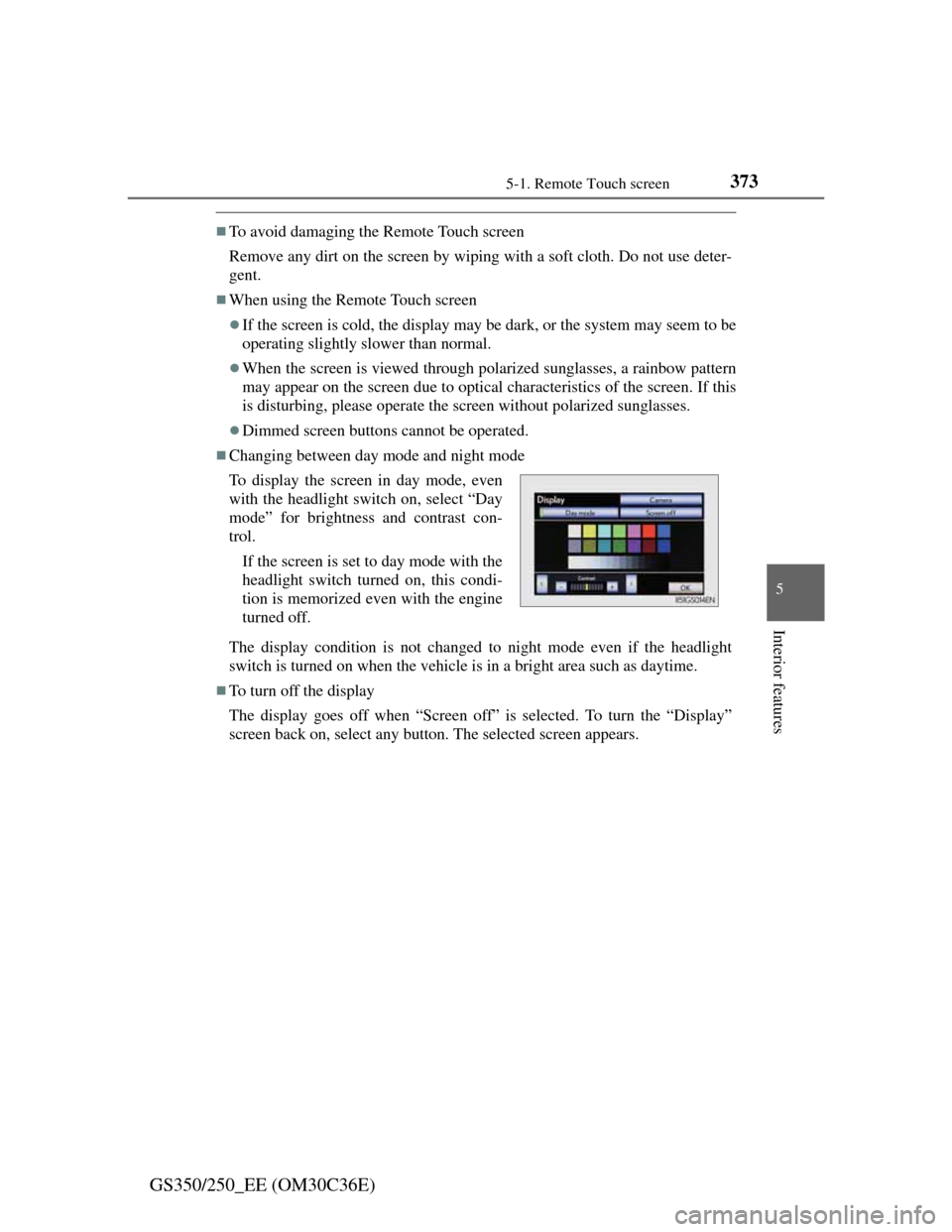
Changing between day mode and night mode
The display condition is not changed to night mode even if the headlight
switch is turned on when the vehicle is in a bright area such as daytime.
To turn off the display
The display goes off when “Screen off” is selected. To turn the “Display”
screen back on, select any button. The selected screen appears. To display the screen in day mode, even
with the headlight switch on, select “Day
mode” for brightness and contrast con-
trol.
If the screen is set to day mode with the
headlight switch turned on, this condi-
tion is memorized even with the engine
turned off.
Page 389 of 914
3795-1. Remote Touch screen
5
Interior features
GS350/250_EE (OM30C36E)
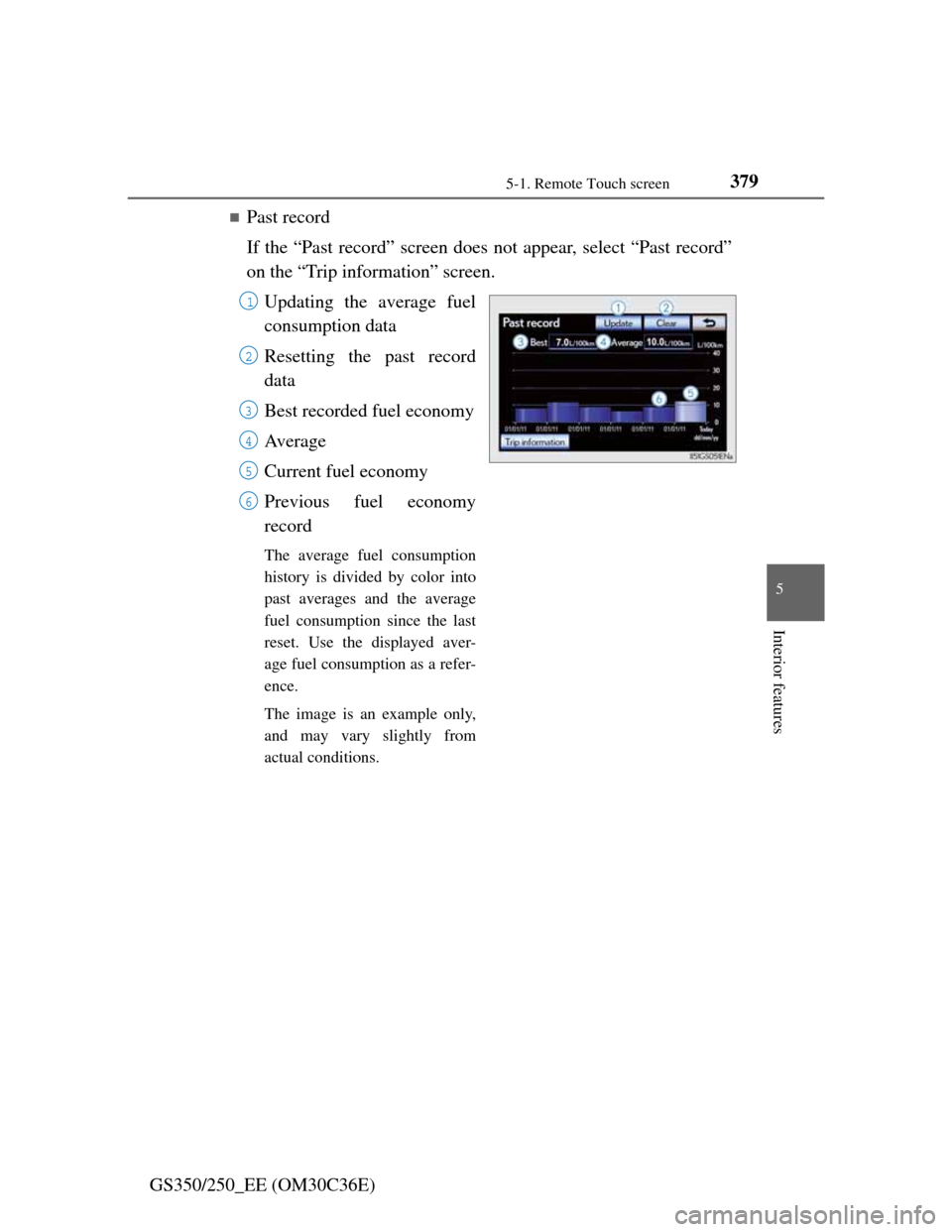
Past record
If the “Past record” screen does not appear, select “Past record”
on the “Trip information” screen.
Updating the average fuel
consumption data
Resetting the past record
data
Best recorded fuel economy
Av e r a g e
Current fuel economy
Previous fuel economy
record
The average fuel consumption
history is divided by color into
past averages and the average
fuel consumption since the last
reset. Use the displayed aver-
age fuel consumption as a refer-
ence.
The image is an example only,
and may vary slightly from
actual conditions.
1
2
3
4
5
6
Page 390 of 914
3805-1. Remote Touch screen
GS350/250_EE (OM30C36E)
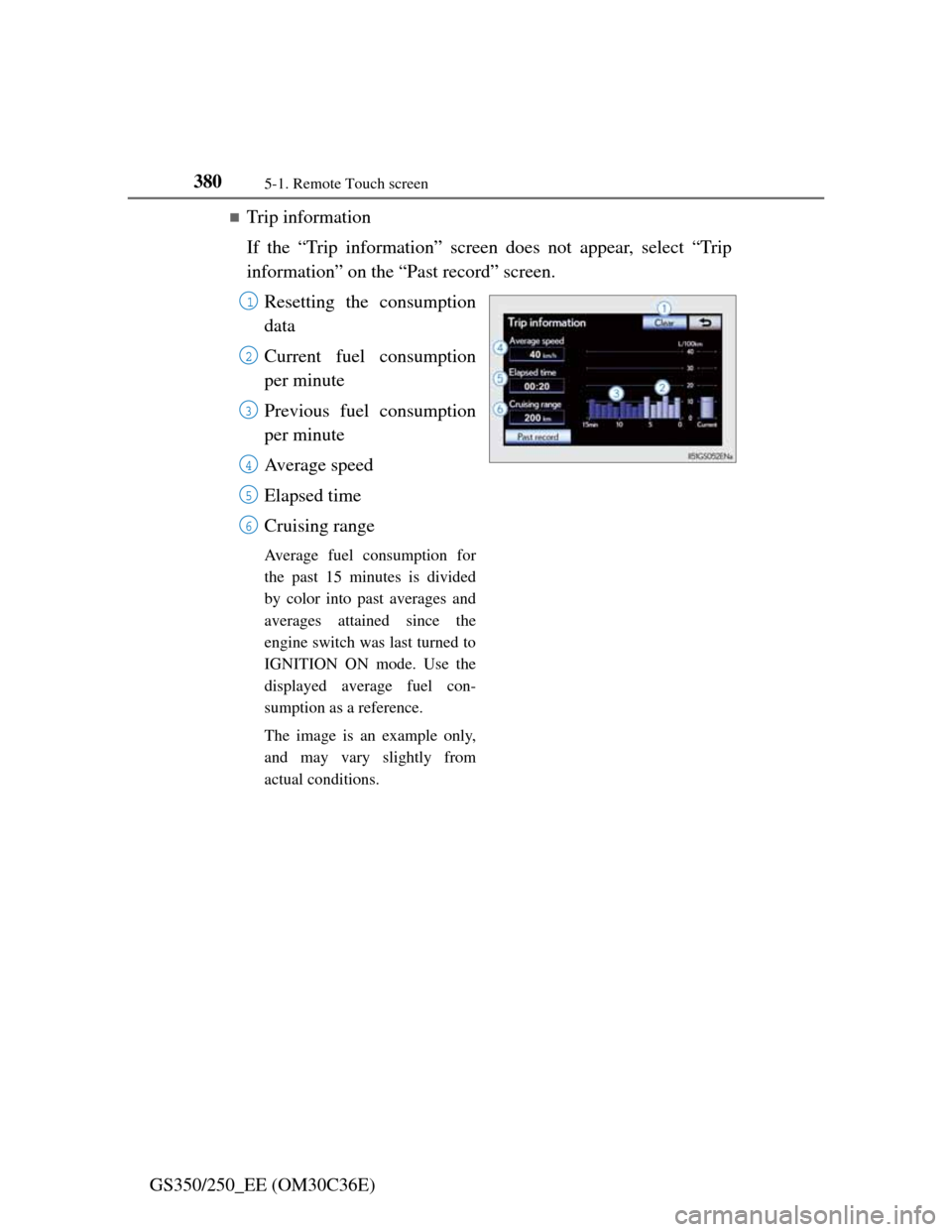
Trip information
If the “Trip information” screen does not appear, select “Trip
information” on the “Past record” screen.
Resetting the consumption
data
Current fuel consumption
per minute
Previous fuel consumption
per minute
Average speed
Elapsed time
Cruising range
Average fuel consumption for
the past 15 minutes is divided
by color into past averages and
averages attained since the
engine switch was last turned to
IGNITION ON mode. Use the
displayed average fuel con-
sumption as a reference.
The image is an example only,
and may vary slightly from
actual conditions.
1
2
3
4
5
6
Page 395 of 914
3855-1. Remote Touch screen
5
Interior features
GS350/250_EE (OM30C36E)
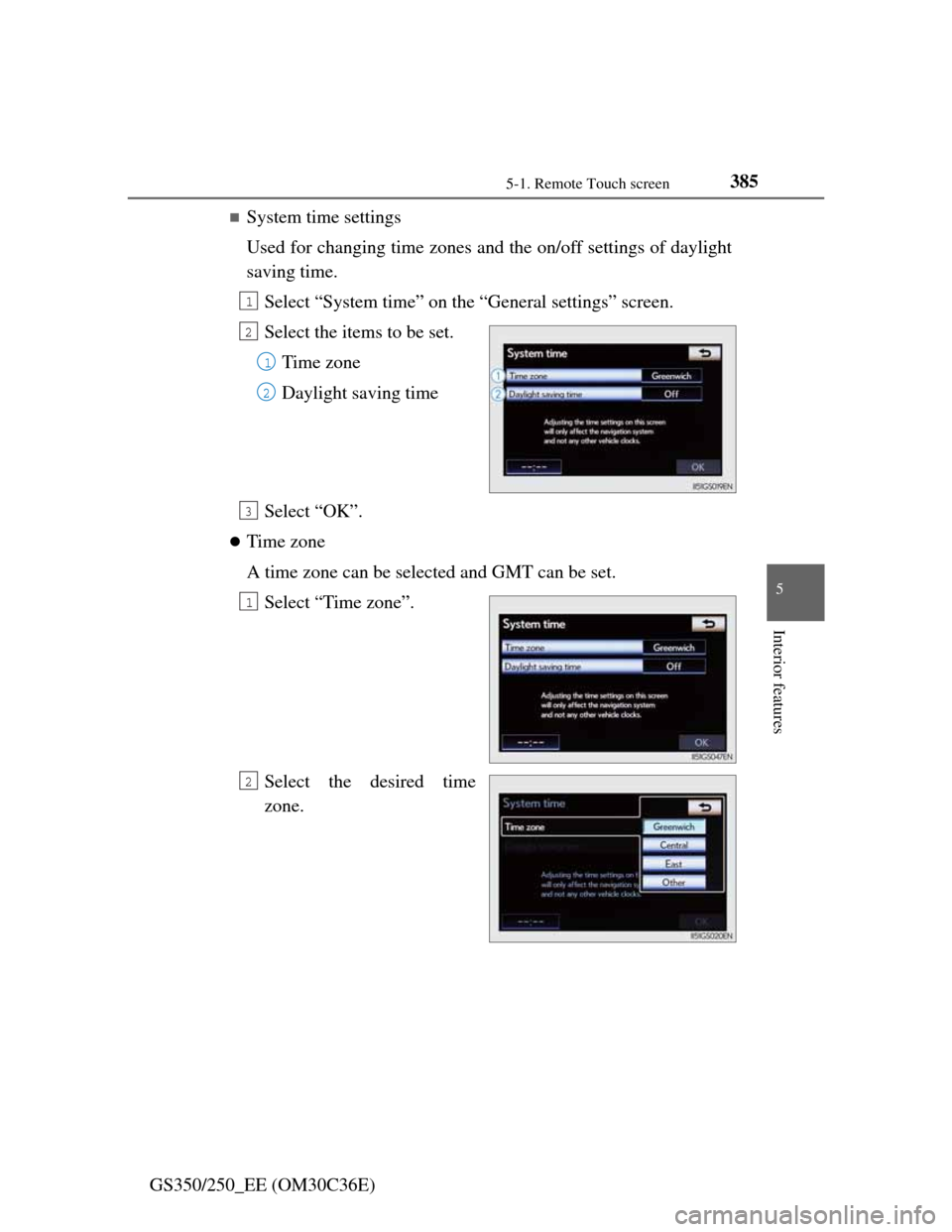
System time settings
Used for changing time zones and the on/off settings of daylight
saving time.
Select “System time” on the “General settings” screen.
Select the items to be set.
Time zone
Daylight saving time
Select “OK”.
Time zone
A time zone can be selected and GMT can be set.
Select “Time zone”.
Select the desired time
zone.
1
2
1
2
3
1
2
Page 396 of 914
3865-1. Remote Touch screen
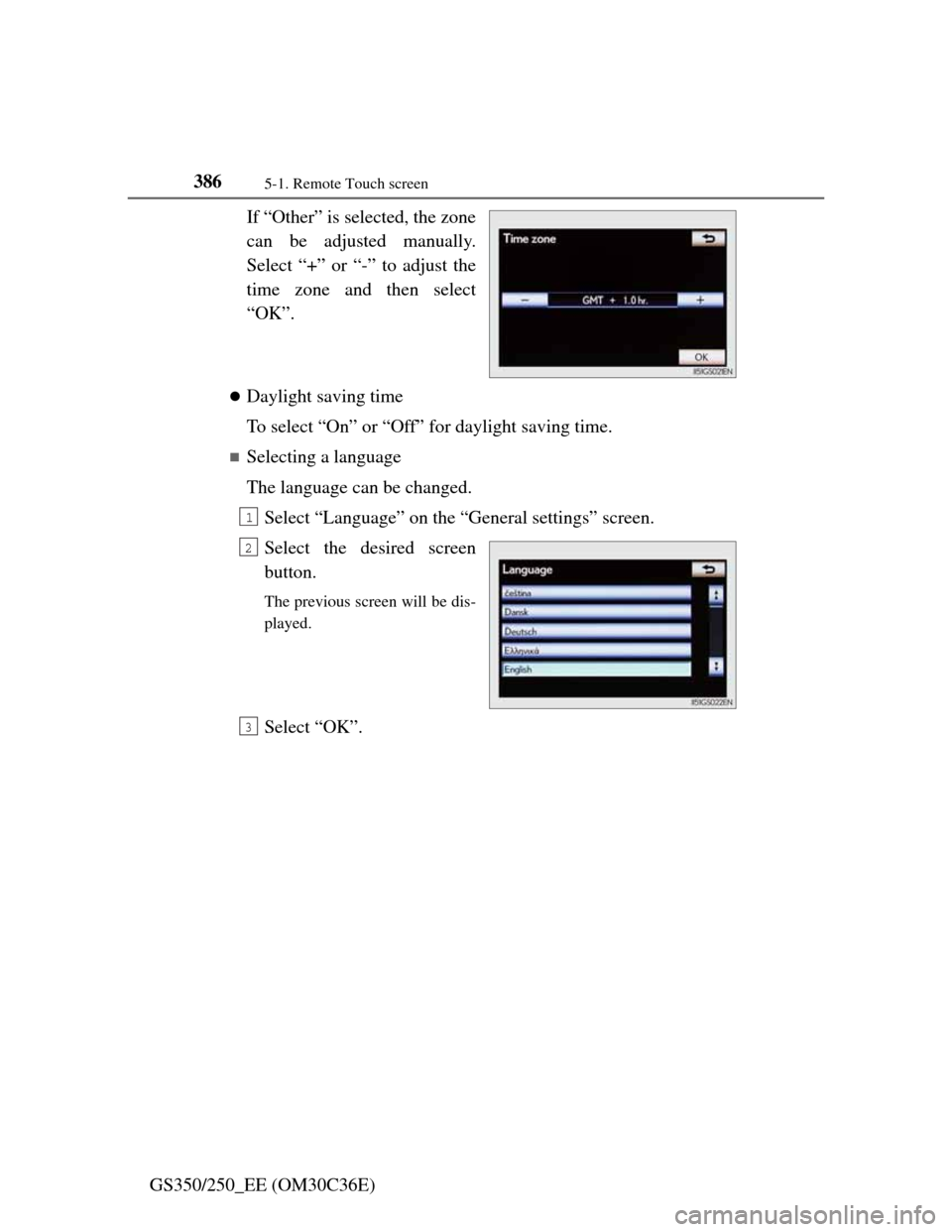
GS350/250_EE (OM30C36E)If “Other” is selected, the zone
can be adjusted manually.
Select “+” or “-” to adjust the
time zone and then select
“OK”.
Daylight saving time
To select “On” or “Off” for daylight saving time.
Selecting a language
The language can be changed.
Select “Language” on the “General settings” screen.
Select the desired screen
button.
The previous screen will be dis-
played.
Select “OK”.
1
2
3
Page 434 of 914
4235-2. Using the air conditioning system and defogger
5
Interior features
GS350/250_EE (OM30C36E)
“nanoe” *1 system
The air conditioning system adopts “nanoe” generator. This helps to pro-
vide clean air and moisture by emitting electrically charged ions coated with
water particles through the front center vent on driver’s side
*2.
When the fan is turned on, the “nanoe” system is automatically activated.
When the fan is operated in the following conditions, system performance
will be maximized. If the following conditions are not met, performance
will be limited.
• The , or air outlets are being used.
• The front center vent on driver’s side is open.
When “nanoe” is generated, a small amount of ozone is emitted and may
be faintly smelled in some situations. However, this is approximately the
same as the amount that already exists in nature, such as in forests, and it
has no affect on the human body.
A slight noise may be heard during operation. This is not a malfunction.
*1: “nanoe” and the “nanoe” mark are trademarks of Panasonic Electric
Works Co., Ltd.
*2: According to temperature and humidity conditions, fan speed and direc-
tion of the air flow, the “nanoe” system may not operate at full capac-
ity.
Air conditioning filter
P. 6 9 3
CAUTION
To prevent the windshield from fogging up
Do not use
during cool air operation in extremely humid weather.
The difference between the temperature of the outside air and that of the
windshield can cause the outer surface of the windshield to fog up, block-
ing your vision.
“nanoe” generator
Do not disassemble or repair the generator because it contains high voltage
parts. Contact any authorized Lexus dealer or repairer, or another duly
qualified and equipped professional if the generator needs repair.
Page 493 of 914
4825-3. Using the audio system
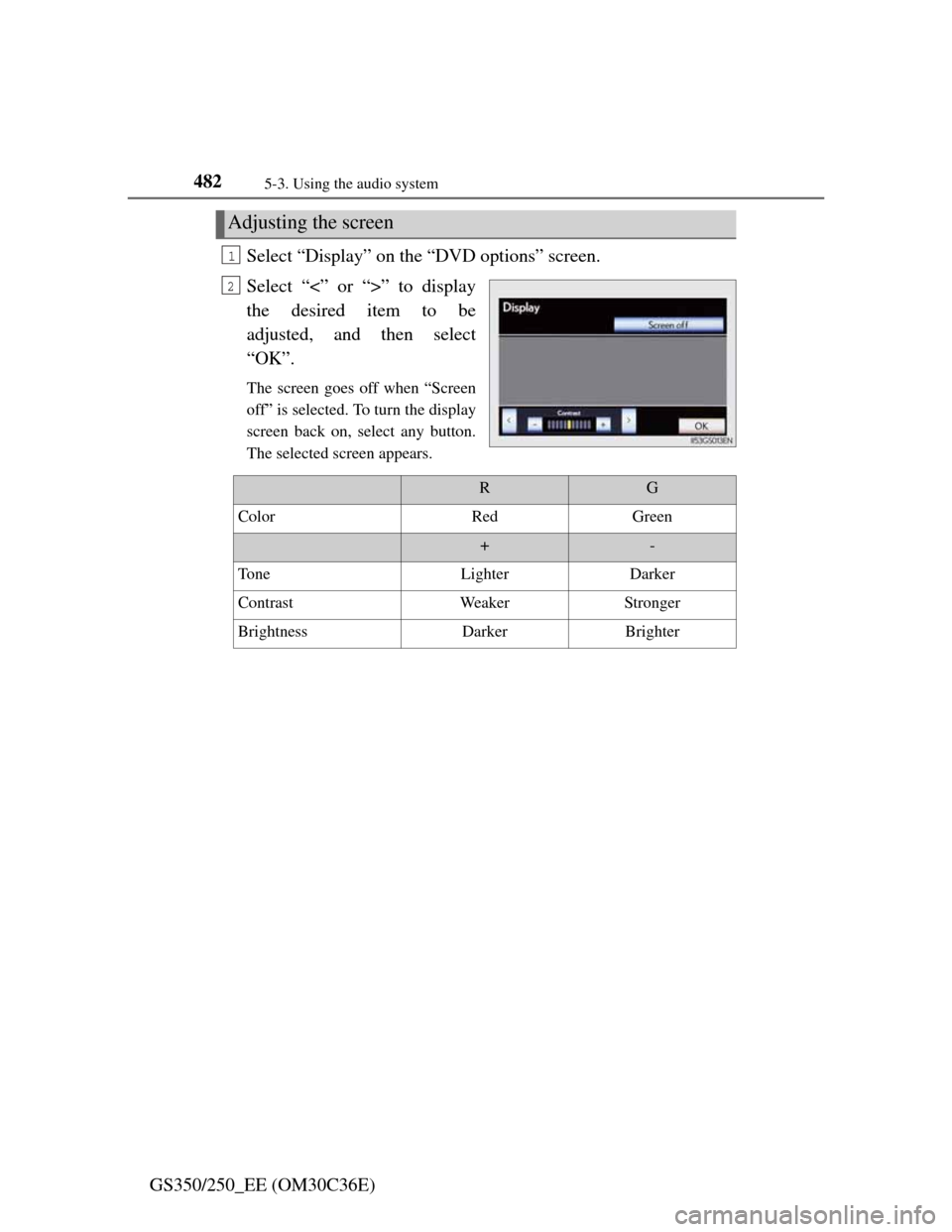
GS350/250_EE (OM30C36E)Select “Display” on the “DVD options” screen.
Select “<” or “>” to display
the desired item to be
adjusted, and then select
“OK”.
The screen goes off when “Screen
off” is selected. To turn the display
screen back on, select any button.
The selected screen appears.
Adjusting the screen
1
2
RG
ColorRedGreen
+-
To n eLighterDarker
ContrastWeakerStronger
BrightnessDarkerBrighter
Page 508 of 914
4975-3. Using the audio system
5
Interior features
GS350/250_EE (OM30C36E)
NOTICE
Player precautions
Failure to follow the precautions below may result in damage to the discs or
the player itself.
Do not insert anything other than discs into the disc slot.
Do not apply oil to the player.
Store discs away from direct sunlight.
Never try to disassemble any part of the player.
Page 518 of 914
5075-3. Using the audio system
5
Interior features
GS350/250_EE (OM30C36E)
If you select
The display returns to the previous screen.
Connecting Bluetooth® audio player
Selecting “Connect portable player” on the “Bluetooth*” screen also con-
nects a Bluetooth® audio player. (P. 606)
When none of the selectable portable players have been registered, a screen
confirming registration is displayed. The registration method is the same as
phone registration. (P. 599)
When the currently connected portable player is selected, a screen confirm-
ing the selected player’s disconnection is displayed. (P. 599)
If connection fails once, a changing connection method confirmation screen
is displayed. If connection fails 2 or more times, a message will be dis-
played. When this message is displayed, try again.
*: Bluetooth is a registered trademark of Bluetooth SIG. Inc.
When using the Bluetooth® audio system
In the following conditions, the system may not function.
• The portable player is turned off
• The portable player is not connected
• The portable player battery is low
There may be a delay if phone connection is carried out during Bluetooth®
audio play.
Depending on the type of portable player that is connected to the system,
operation may differ slightly and certain functions may not be available.
Bluetooth® antenna
The antenna is built into the instrument panel. If the portable player is behind
the seat or in the glove box or console box, or is touching or covered by
metal objects, connection status may deteriorate.
Battery charge/signal status
This display may not correspond exactly with the portable player, and this
system does not have a charging function.
Page 557 of 914
5425-4. Using the hands-free phone system (for cellular phone)
GS350/250_EE (OM30C36E)
Hands-free system (for cellular phone)
The hands-free system is a function that allows you to use your
cellular phone without touching it.
This system supports Bluetooth
® cellular phones. Bluetooth® is a
wireless data system that allows a cellular phone to wirelessly con-
nect to the hands-free system and outgoing/incoming calls.
The illustrations of the hands-free system screens shown here may
slightly vary depending on the type of the system.
Vehicles with a 12.3-inch display: The hands-free system function
can be displayed and operated on the “Side Display”. For details,
refer to the “Navigation System Owner’s Manual”.