battery Lexus GS350 2012 User Guide
[x] Cancel search | Manufacturer: LEXUS, Model Year: 2012, Model line: GS350, Model: Lexus GS350 2012Pages: 914, PDF Size: 49.39 MB
Page 135 of 914

1323-2. Opening, closing and locking the doors and trunk
GS350/250_EE (OM30C36E)
Note for locking the doors
Touching the door lock sensor while wearing gloves may delay or prevent
lock operation. Remove the gloves and touch the lock sensor again.
If the door handle becomes wet while the electronic key is within the effec-
tive range, the door may lock and unlock repeatedly. In that case, follow the
following correction procedures to wash the vehicle:
• Place the electronic key in a location 2 m (6 ft.) or more away from the
vehicle. (Take care to ensure that the key is not stolen.)
• Set the electronic key to battery-saving mode to disable the smart entry
& start system. (P. 129)
If the electronic key is inside the vehicle and a door handle becomes wet
during a car wash, a message may be shown on the multi-information dis-
play and a buzzer will sound outside the vehicle. To turn off the alarm, lock
all the doors.
The lock sensor may not work properly if it comes into contact with ice,
snow, mud, etc. Clean the lock sensor and attempt to operate it again, or use
the lock sensor on the lower part of the door handle.
Fingernails may scrape against the door during operation of the door han-
dle. Be careful not to injure fingernails or damage the surface of the door.
Note for the unlocking function
A sudden approach to the effective range or door handle may prevent the
doors from being unlocked. In this case, return the door handle to the origi-
nal position and check that the doors unlock before pulling the door handle
again.
Gripping the door handle when wearing a glove may not unlock the door.
If the door handle becomes wet while the electronic key is within the effec-
tive range, the door may lock and unlock repeatedly. In that case, follow the
following correction procedures to wash the vehicle:
• Place the electronic key in a location 2 m (6 ft.) or more away from the
vehicle. (Take care to ensure that the key is not stolen.)
• Set the electronic key to battery-saving mode to disable the smart entry
& start system. (P. 129)
If there is another electronic key in the detection area, it may take slightly
longer to unlock the doors after the door handle is gripped.
Fingernails may scrape against the door during operation of the door han-
dle. Be careful not to injure fingernails or damage the surface of the door.
Page 137 of 914

1343-2. Opening, closing and locking the doors and trunk
GS350/250_EE (OM30C36E)
Electronic key battery depletion
The standard battery life is 1 to 2 years. (The card key battery life is about a
year and a half.)
If the battery becomes low, an alarm will sound in the cabin when the
engine stops. (P. 779)
As the electronic key always receives radio waves, the battery will become
depleted even if the electronic key is not used. The following symptoms
indicate that the electronic key battery may be depleted. Replace the battery
when necessary. (P. 695)
• The smart entry & start system or the wireless remote control does not
operate.
• The detection area becomes smaller.
• The LED indicator on the key surface does not turn on.
To avoid serious deterioration, do not leave the electronic key within 1 m (3
ft.) of the following electrical appliances that produce a magnetic field:
•TVs
• Personal computers
• Cellular phones, cordless phones and battery chargers
• Recharging cellular phones or cordless phones
•Table lamps
• Glass top ranges
When the electronic key battery is fully depleted
P. 6 9 5
Customization
Settings (e. g. smart entry & start system) can be changed.
(Customizable features: P. 855)
If the smart entry & start system has been deactivated in a customized setting
Locking and unlocking the doors and opening the trunk:
Use the wireless remote control or mechanical key. (P. 141, 821)
Starting the engine and changing engine switch modes:P. 8 2 2
Stopping the engine: P. 2 0 8
Page 145 of 914

1423-2. Opening, closing and locking the doors and trunk
GS350/250_EE (OM30C36E)
Door lock buzzer
If an attempt to lock the doors is made when a door is not fully closed, a
buzzer sounds continuously for 5 seconds. Fully close the door to stop the
buzzer, and lock the vehicle once more.
Security feature
P. 1 2 3
Alarm (if equipped)
Using the wireless remote control to lock the doors will set the alarm system.
(P. 86)
Conditions affecting operation
P. 1 3 0
If the wireless remote control does not operate properly
Locking and unlocking the doors and opening the trunk: Use the mechanical
key.
(P. 821)
Electronic key battery depletion
P. 1 3 4
When the electronic key battery is fully depleted
P. 6 9 5
Confirmation of the registered key number
The number of keys already registered to the vehicle can be confirmed. Ask
any authorized Lexus dealer or repairer, or another duly qualified and
equipped professional for details.
Customization
Settings (e.g. wireless remote control system) can be changed.
(Customizable features: P. 855)
Page 158 of 914
1553-2. Opening, closing and locking the doors and trunk
3
Operation of each component
GS350/250_EE (OM30C36E)
CAUTION
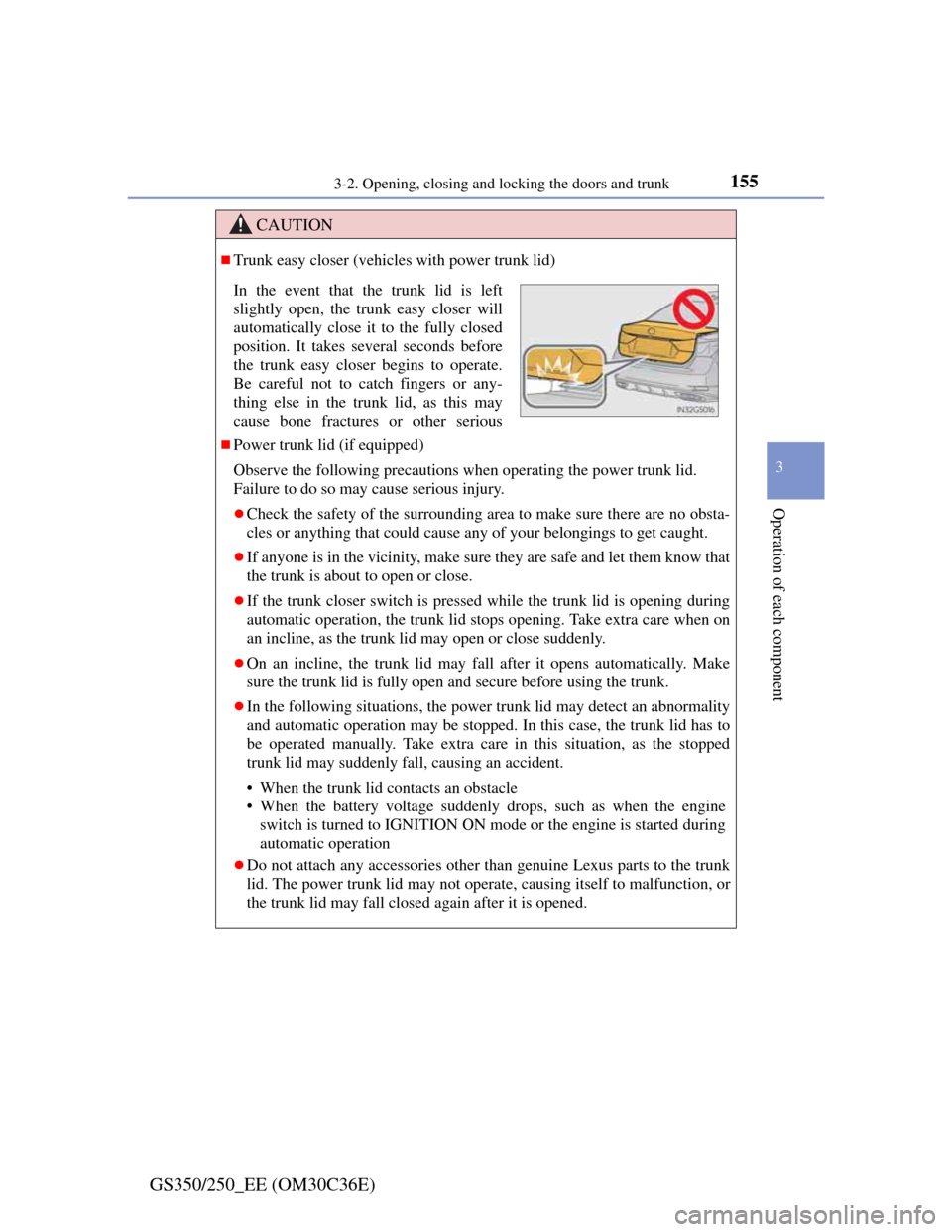
Trunk easy closer (vehicles with power trunk lid)
Power trunk lid (if equipped)
Observe the following precautions when operating the power trunk lid.
Failure to do so may cause serious injury.
Check the safety of the surrounding area to make sure there are no obsta-
cles or anything that could cause any of your belongings to get caught.
If anyone is in the vicinity, make sure they are safe and let them know that
the trunk is about to open or close.
If the trunk closer switch is pressed while the trunk lid is opening during
automatic operation, the trunk lid stops opening. Take extra care when on
an incline, as the trunk lid may open or close suddenly.
On an incline, the trunk lid may fall after it opens automatically. Make
sure the trunk lid is fully open and secure before using the trunk.
In the following situations, the power trunk lid may detect an abnormality
and automatic operation may be stopped. In this case, the trunk lid has to
be operated manually. Take extra care in this situation, as the stopped
trunk lid may suddenly fall, causing an accident.
• When the trunk lid contacts an obstacle
• When the battery voltage suddenly drops, such as when the engine
switch is turned to IGNITION ON mode or the engine is started during
automatic operation
Do not attach any accessories other than genuine Lexus parts to the trunk
lid. The power trunk lid may not operate, causing itself to malfunction, or
the trunk lid may fall closed again after it is opened.
In the event that the trunk lid is left
slightly open, the trunk easy closer will
automatically close it to the fully closed
position. It takes several seconds before
the trunk easy closer begins to operate.
Be careful not to catch fingers or any-
thing else in the trunk lid, as this may
cause bone fractures or other serious
Page 184 of 914

1803-5. Opening, closing the windows and moon roof
GS350/250_EE (OM30C36E)
Door lock linked window operation
The power windows can be opened and closed using the mechanical key.*
(P. 821)
The power windows can be opened and closed using the wireless remote
control.
* (P. 141)
*: These settings must be customized at any authorized Lexus dealer or
repairer, or another duly qualified and equipped professional.
When the battery is disconnected
The window lock switch is disabled. If necessary, press the window lock
switch after reconnecting the battery.
Power windows open warning buzzer
The buzzer sounds and a message is shown on the multi-information display
in the instrument cluster when the engine switch is turned off and the driver’s
door is opened with the power windows open.
Customization
Settings (e.g. linked door lock operation) can be changed.
(Customizable features: P. 855)
CAUTION
Observe the following precautions.
Failure to do so may result in death or serious injury.
Closing the windows
Check to make sure that all passengers do not have any part of their body
in a position where it could be caught when a window is being operated.
Do not allow children to operate the power windows.
Closing a power window on someone can cause serious injury, and in
some instances, even death.
Jam protection function
Never use any part of your body to intentionally activate the jam protec-
tion function.
The jam protection function may not work if something gets caught just
before the window fully closes.
Page 217 of 914

2114-2. Driving procedures
4
Driving
GS350/250_EE (OM30C36E)
Auto power off function
If the vehicle is left in ACCESSORY mode for more than 20 minutes or
IGNITION ON mode (the engine is not running) for more than an hour with
the shift lever in P, the engine switch will automatically turn off. However,
this function cannot entirely prevent battery discharge. Do not leave the vehi-
cle with the engine switch in ACCESSORY or IGNITION ON mode for long
periods of time when the engine is not running.
Electronic key battery depletion
P. 1 3 4
Conditions affecting operation
P. 1 3 0
Notes for the entry function
P. 1 3 1
If the engine does not start
The engine immobilizer system may not have been deactivated. (P. 8 0 )
Contact any authorized Lexus dealer or repairer, or another duly qualified
and equipped professional.
Check that the shift lever is securely set in P. The engine may not start if the
shift lever is displaced out of P. “Shift to P position to Start” will be dis-
played on the multi-information display.
Steering lock
After turning the engine switch off and opening and closing the doors, the
steering wheel will be locked due to the steering lock function. Operating the
engine switch again automatically cancels the steering lock.
Page 218 of 914
2124-2. Driving procedures
GS350/250_EE (OM30C36E)
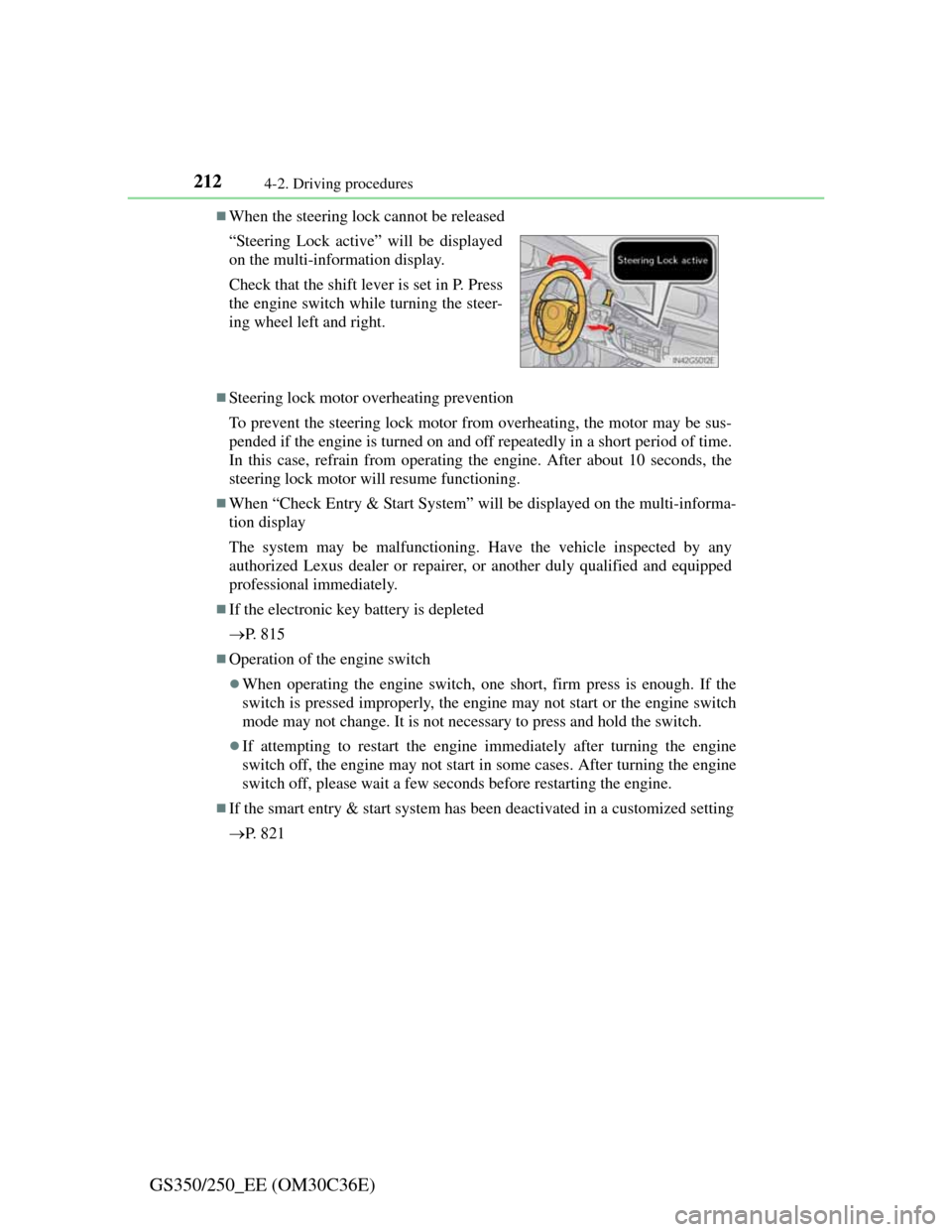
When the steering lock cannot be released
Steering lock motor overheating prevention
To prevent the steering lock motor from overheating, the motor may be sus-
pended if the engine is turned on and off repeatedly in a short period of time.
In this case, refrain from operating the engine. After about 10 seconds, the
steering lock motor will resume functioning.
When “Check Entry & Start System” will be displayed on the multi-informa-
tion display
The system may be malfunctioning. Have the vehicle inspected by any
authorized Lexus dealer or repairer, or another duly qualified and equipped
professional immediately.
If the electronic key battery is depleted
P. 8 1 5
Operation of the engine switch
When operating the engine switch, one short, firm press is enough. If the
switch is pressed improperly, the engine may not start or the engine switch
mode may not change. It is not necessary to press and hold the switch.
If attempting to restart the engine immediately after turning the engine
switch off, the engine may not start in some cases. After turning the engine
switch off, please wait a few seconds before restarting the engine.
If the smart entry & start system has been deactivated in a customized setting
P. 8 2 1 “Steering Lock active” will be displayed
on the multi-information display.
Check that the shift lever is set in P. Press
the engine switch while turning the steer-
ing wheel left and right.
Page 220 of 914
2144-2. Driving procedures
GS350/250_EE (OM30C36E)
NOTICE
To prevent battery discharge
Do not leave the engine switch in ACCESSORY or IGNITION ON mode
for long periods of time without the engine running.
If “POWER ON” is displayed on the multi-information display, the
engine switch is not off. Exit the vehicle after turning the engine switch
off.
Do not stop the engine when the shift lever is in a position other than P. If
the engine is stopped in another shift lever position, the engine switch will
not be turned off but instead be turned to ACCESSORY mode. If the vehi-
cle is left in ACCESSORY mode, battery discharge may occur.
When starting the engine
Do not race a cold engine.
If the engine becomes difficult to start or stalls frequently, have your vehi-
cle checked by any authorized Lexus dealer or repairer, or another duly
qualified and equipped professional immediately.
Symptoms indicating a malfunction with the engine switch
If the engine switch seems to be operating somewhat differently than usual,
such as the switch sticking slightly, there may be a malfunction. Contact
any authorized Lexus dealer or repairer, or another duly qualified and
equipped professional immediately.
Page 239 of 914

2324-3. Operating the lights and wipers
GS350/250_EE (OM30C36E)
If the “AFS OFF” indicator flashes
It may indicate a malfunction in the system. Contact any authorized Lexus
dealer or repairer, or another duly qualified and equipped professional.
Customization
Settings (e.g. light sensor sensitivity) can be changed.
(Customizable features: P. 862)
NOTICE
To prevent battery discharge
Do not leave the lights on longer than necessary when the engine is not run-
ning.
Page 330 of 914
3234-5. Using the driving support
4
Driving
GS350/250_EE (OM30C36E)
Guide lines are not dis-
playedThe trunk lid is open.
Close the trunk lid.
If this does not resolve
the symptom, have the
vehicle inspected by
any authorized Lexus
dealer or repairer, or
another duly qualified
and equipped profes-
sional.
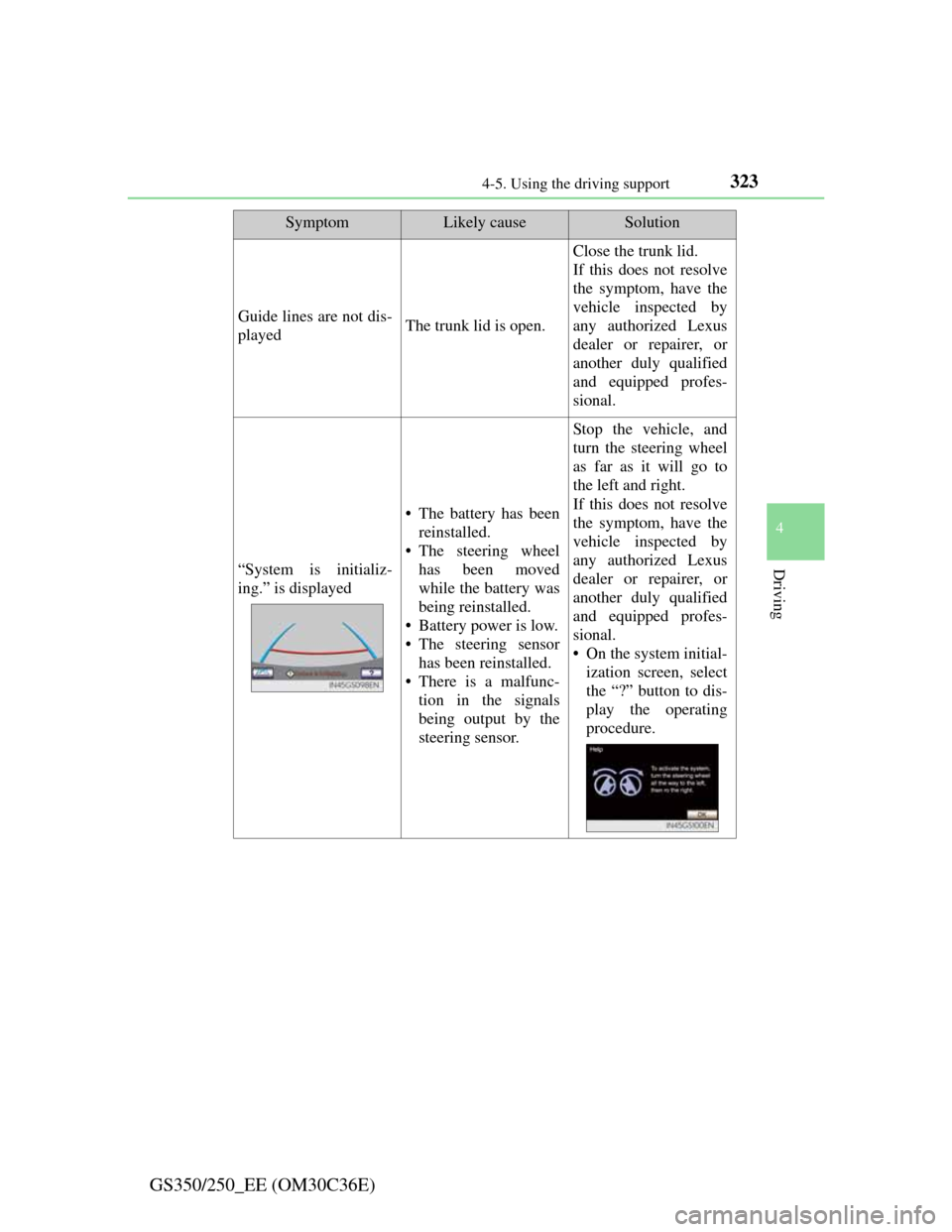
“System is initializ-
ing.” is displayed
• The battery has been
reinstalled.
• The steering wheel
has been moved
while the battery was
being reinstalled.
• Battery power is low.
• The steering sensor
has been reinstalled.
• There is a malfunc-
tion in the signals
being output by the
steering sensor.
Stop the vehicle, and
turn the steering wheel
as far as it will go to
the left and right.
If this does not resolve
the symptom, have the
vehicle inspected by
any authorized Lexus
dealer or repairer, or
another duly qualified
and equipped profes-
sional.
• On the system initial-
ization screen, select
the “?” button to dis-
play the operating
procedure.
SymptomLikely causeSolution