battery Lexus GS350 2012 Owner's Guide
[x] Cancel search | Manufacturer: LEXUS, Model Year: 2012, Model line: GS350, Model: Lexus GS350 2012Pages: 914, PDF Size: 49.39 MB
Page 369 of 914
359
4 4-6. Driving tips
Driving
GS350/250_EE (OM30C36E)
Winter driving tips
Use fluids that are appropriate to the prevailing outside tempera-
tures.
• Engine oil
• Engine coolant
• Washer fluid
Have a service technician inspect the condition of the battery.
Have the vehicle fitted with four snow tires or purchase a set of
tire chains for the rear tires.
*
Ensure that all tires are the specified size and brand, and that chains
match the size of the tires.
*: Tire chains cannot be mounted on the 19 inch tires.
Carry out the necessary preparations and inspections before driv-
ing the vehicle in winter. Always drive the vehicle in a manner
appropriate to the prevailing weather conditions.
Preparation for winter
Page 435 of 914
4245-2. Using the air conditioning system and defogger
GS350/250_EE (OM30C36E)
NOTICE
To prevent battery discharge
Do not leave the air conditioning system on longer than necessary when the
engine is stopped.
To prevent damage to the “nanoe”
Do not insert anything into the driver’s side vent, attach anything to it, or
use sprays around the driver’s side vent. These things may cause the gener-
ator not to work properly.
Page 440 of 914
4295-2. Using the air conditioning system and defogger
5
Interior features
GS350/250_EE (OM30C36E)
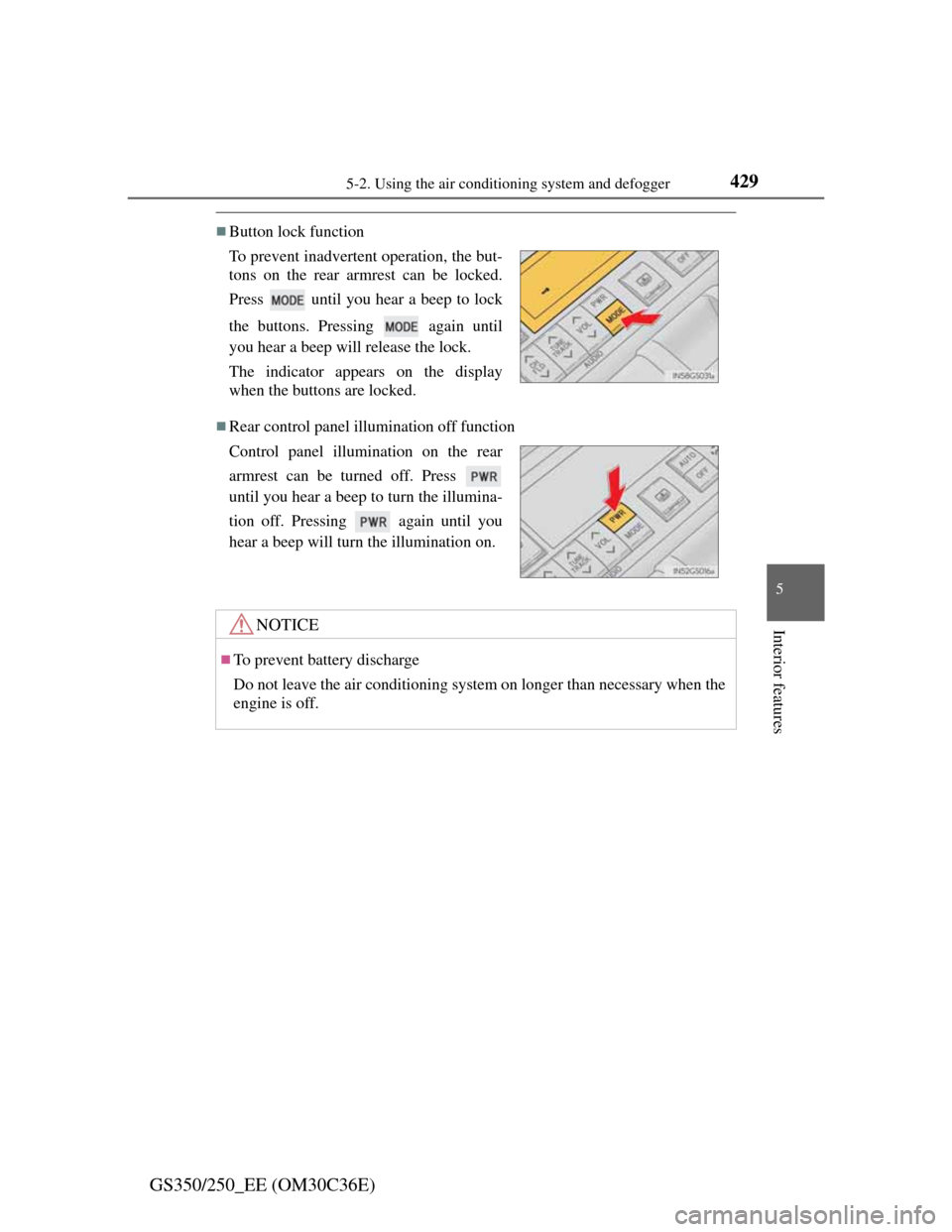
Button lock function
Rear control panel illumination off function To prevent inadvertent operation, the but-
tons on the rear armrest can be locked.
Press until you hear a beep to lock
the buttons. Pressing again until
you hear a beep will release the lock.
The indicator appears on the display
when the buttons are locked.
Control panel illumination on the rear
armrest can be turned off. Press
until you hear a beep to turn the illumina-
tion off. Pressing again until you
hear a beep will turn the illumination on.
NOTICE
To prevent battery discharge
Do not leave the air conditioning system on longer than necessary when the
engine is off.
Page 441 of 914
4305-2. Using the air conditioning system and defogger
GS350/250_EE (OM30C36E)
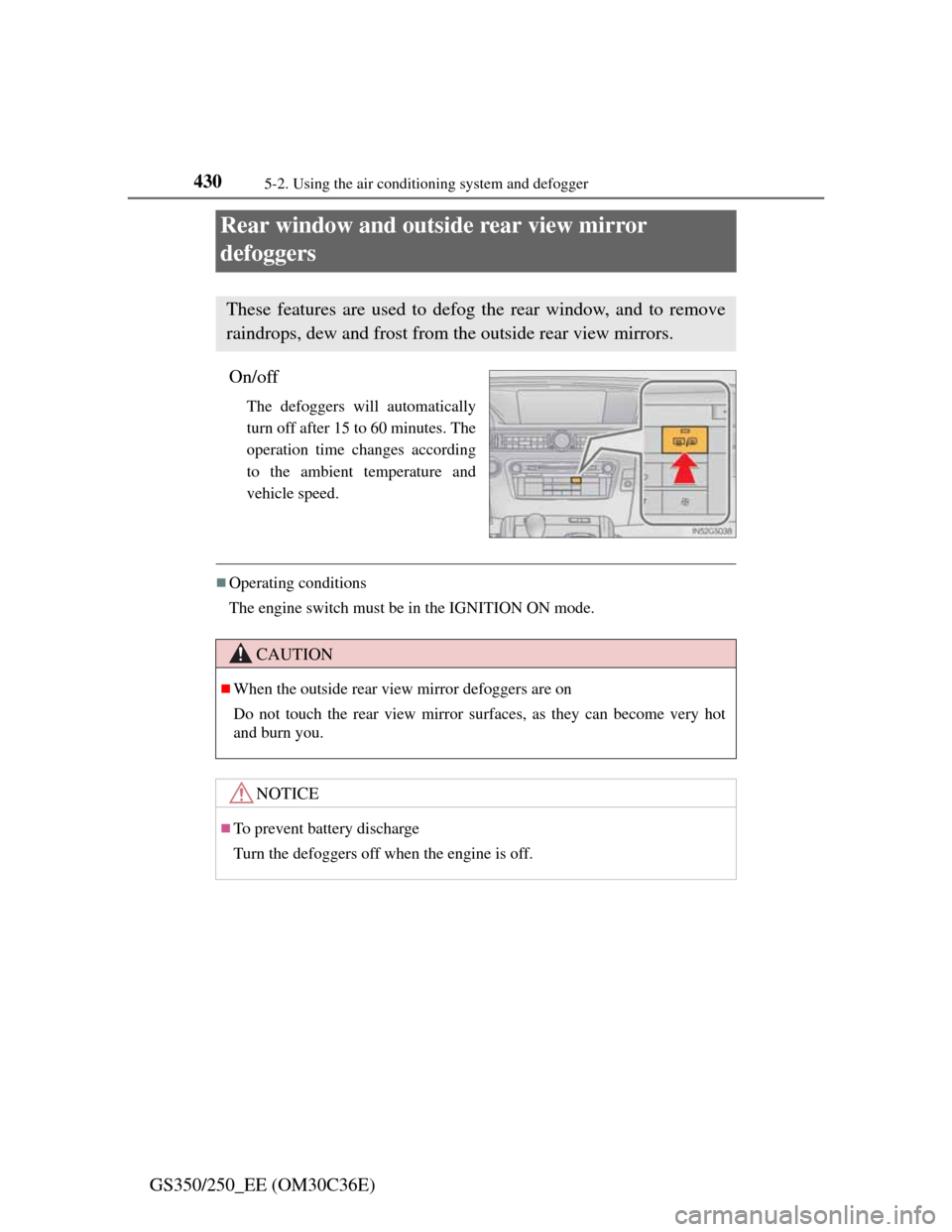
Rear window and outside rear view mirror
defoggers
On/off
The defoggers will automatically
turn off after 15 to 60 minutes. The
operation time changes according
to the ambient temperature and
vehicle speed.
Operating conditions
The engine switch must be in the IGNITION ON mode.
These features are used to defog the rear window, and to remove
raindrops, dew and frost from the outside rear view mirrors.
CAUTION
When the outside rear view mirror defoggers are on
Do not touch the rear view mirror surfaces, as they can become very hot
and burn you.
NOTICE
To prevent battery discharge
Turn the defoggers off when the engine is off.
Page 447 of 914
4365-3. Using the audio system
GS350/250_EE (OM30C36E)
NOTICE
To prevent battery discharge
Do not leave the audio system on longer than necessary when the engine is
off.
To avoid damaging the audio system
Take care not to spill drinks or other fluids on the audio system.
Page 477 of 914
4665-3. Using the audio system
GS350/250_EE (OM30C36E)Press .
Press the button again to turn the system back on.
If you select
The display returns to the previous screen.
EON (Enhanced Other Network) system (for traffic announcement function)
If the RDS station (with EON data) you are listening to is not broadcasting a
traffic information program and the audio system is in the TA (Traffic
announcement) mode, the radio will be switched automatically to a station
broadcasting a traffic information program in the EON AF list when traffic
information begins.
When listening to a disc
When the traffic information program starts, the disc playback mode is inter-
rupted and the traffic information is automatically broadcasted. When the
program ends, the initial operation resumes.
When the battery is disconnected
All preset stations are erased.
Reception sensitivity
Maintaining perfect radio reception at all times is difficult due to the contin-
ually changing position of the antenna, differences in signal strength and
surrounding objects, such as trains, transmitters, etc.
The radio antenna is mounted inside the rear quarter window. To maintain
clear radio reception, do not attach metallic window tinting or other metal-
lic objects to the antenna wire mounted inside the rear quarter window.
About Time shift
The times at which playback is possible depend on the bit rate of the DAB
station to be recorded, the amount of DAB unit memory, and the time at
which reception of the broadcast began.
Silencing the sound
Page 511 of 914
5005-3. Using the audio system
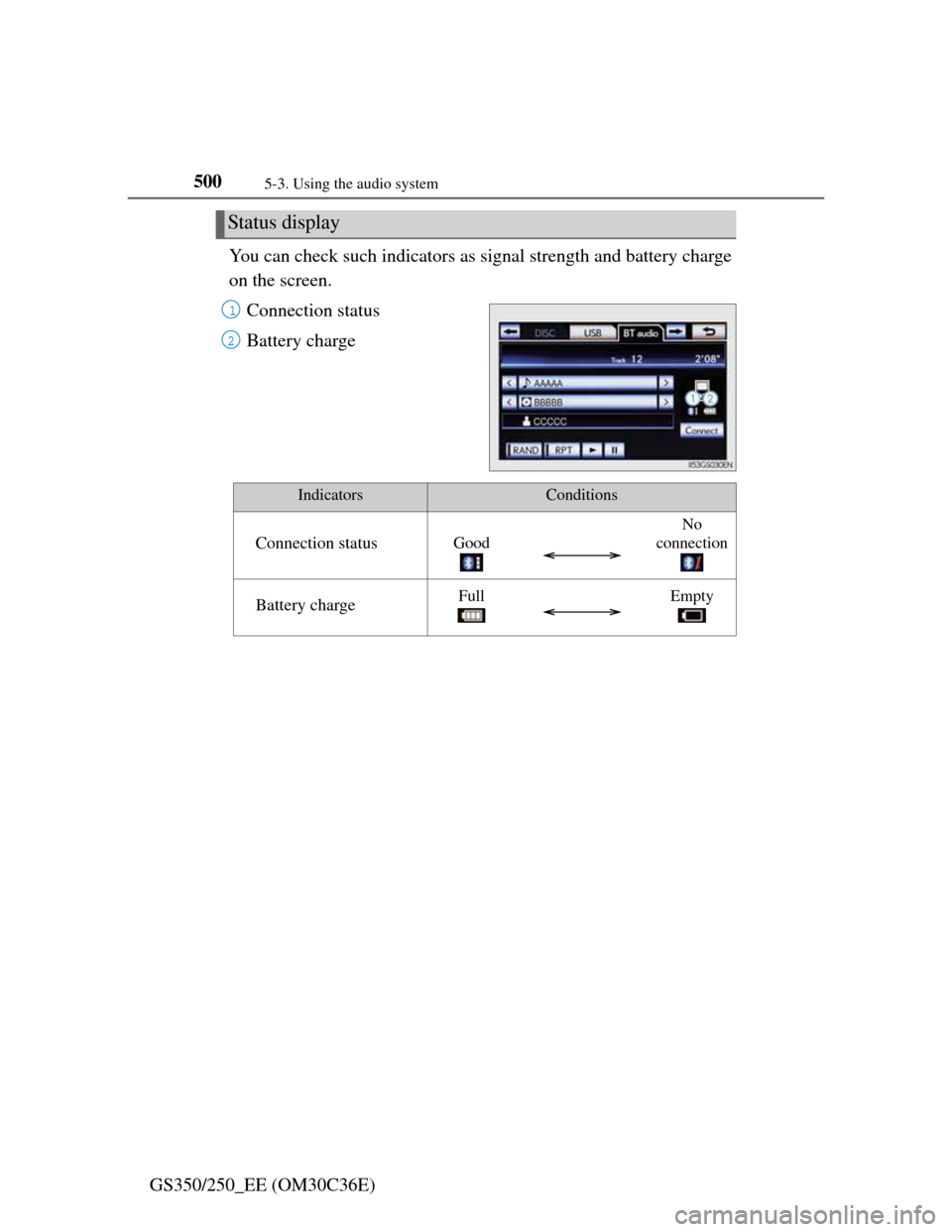
GS350/250_EE (OM30C36E)You can check such indicators as signal strength and battery charge
on the screen.
Connection status
Battery charge
Status display
1
2
IndicatorsConditions
Connection statusGood
No
connection
Battery chargeFullEmpty
Page 518 of 914
5075-3. Using the audio system
5
Interior features
GS350/250_EE (OM30C36E)
If you select
The display returns to the previous screen.
Connecting Bluetooth® audio player
Selecting “Connect portable player” on the “Bluetooth*” screen also con-
nects a Bluetooth® audio player. (P. 606)
When none of the selectable portable players have been registered, a screen
confirming registration is displayed. The registration method is the same as
phone registration. (P. 599)
When the currently connected portable player is selected, a screen confirm-
ing the selected player’s disconnection is displayed. (P. 599)
If connection fails once, a changing connection method confirmation screen
is displayed. If connection fails 2 or more times, a message will be dis-
played. When this message is displayed, try again.
*: Bluetooth is a registered trademark of Bluetooth SIG. Inc.
When using the Bluetooth® audio system
In the following conditions, the system may not function.
• The portable player is turned off
• The portable player is not connected
• The portable player battery is low
There may be a delay if phone connection is carried out during Bluetooth®
audio play.
Depending on the type of portable player that is connected to the system,
operation may differ slightly and certain functions may not be available.
Bluetooth® antenna
The antenna is built into the instrument panel. If the portable player is behind
the seat or in the glove box or console box, or is touching or covered by
metal objects, connection status may deteriorate.
Battery charge/signal status
This display may not correspond exactly with the portable player, and this
system does not have a charging function.
Page 541 of 914
5305-3. Using the audio system
GS350/250_EE (OM30C36E)
iPod cover art
Depending on the iPod and the songs in the iPod, iPod cover art may be dis-
played. This function can be changed to “On” or “Off”. (P. 524)
It may take time to display iPod cover art, and the iPod may not be operated
while the cover art display is in process.
Only iPod cover art that is saved in JPEG format can be displayed.
iPod functions
When the iPod connected to the system includes iPod video, the system can
only output the sound by selecting “Video” on the “iPod” screen.
Depending on the iPod, the video sound may not be able to be heard.
When an iPod is connected and the audio source is changed to iPod mode,
the iPod will resume play from the same point in which it was last used.
Depending on the iPod that is connected to the system, certain functions
may not be available. If a function is unavailable due to a malfunction (as
opposed to a system specification), disconnecting the device and reconnect-
ing it once again may resolve the problem.
When using an iPod
You maybe unable to use the instrument panel power outlet if the iPod is con-
nected to the USB port at the same time.
Battery charge
When an iPod is connected using a genuine iPod cable, the iPod starts
charging its battery.
Error messages for iPod
“iPod error”:
This indicates a problem in the iPod or its connection.
“No music files found.”:
This indicates that there is no music data in the iPod.
“Please check the iPod firmware version.”:
This indicates that the software version is not compatible. Perform the iPod
firmware updates and try again.
“iPod authorization failed.”:
This indicates that it failed to authorize the iPod. Please check your iPod.
Page 559 of 914
5445-4. Using the hands-free phone system (for cellular phone)
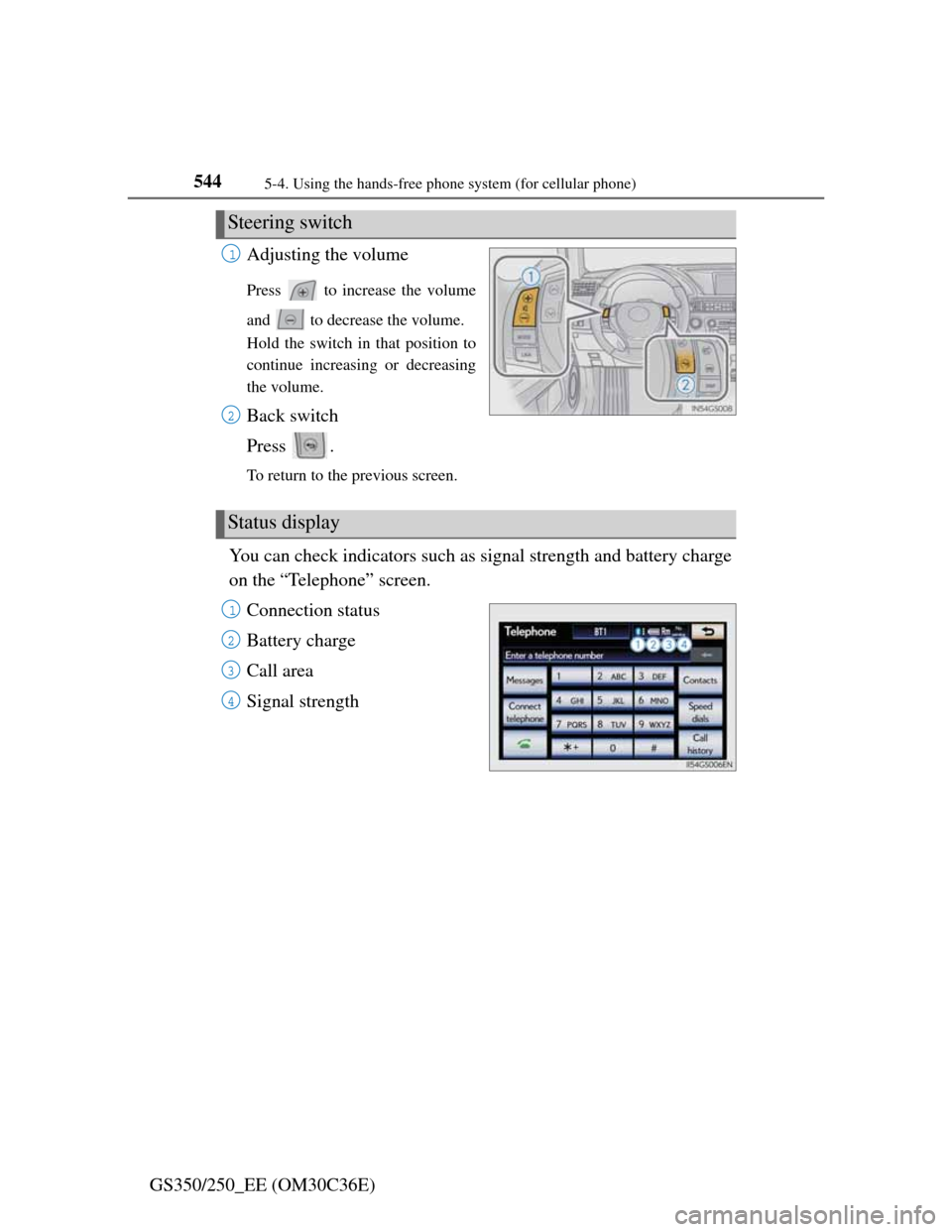
GS350/250_EE (OM30C36E)Adjusting the volume
Press to increase the volume
and to decrease the volume.
Hold the switch in that position to
continue increasing or decreasing
the volume.
Back switch
Press .
To return to the previous screen.
You can check indicators such as signal strength and battery charge
on the “Telephone” screen.
Connection status
Battery charge
Call area
Signal strength
Steering switch
1
2
Status display
1
2
3
4