change Lexus GS350 2013 Adjusting the steering wheel and mirrors / LEXUS 2013 GS350 (OM30C34U) Owner's Guide
[x] Cancel search | Manufacturer: LEXUS, Model Year: 2013, Model line: GS350, Model: Lexus GS350 2013Pages: 828, PDF Size: 10.43 MB
Page 185 of 828

GS350_U (OM30C34U)
1854-2. Driving procedures
4
Driving
■Turn signals can be operated when
The engine switch is in IGNITION ON mode.
■If the indicator flashes faster than usual
Check that a light bulb in the front or rear turn signal lights has not burned out.
■If the turn signals stop flashing before a lane change has been performed
Operate the lever again.
■Customization
The number of times the turn signals flas h during a lane change can be changed.
(Customizable feature P. 777)
Page 194 of 828

194
GS350_U (OM30C34U)
4-3. Operating the lights and wipers
■If the “AFS OFF” indicator flashes
It may indicate a malfunction in the system. Contact your Lexus dealer.
■Customization
Settings (e.g. light sensor sensitivity) can be changed.
(Customizable features: P. 777)
NOTICE
■To prevent battery discharge
Do not leave the lights on longer than necessary when the engine is not running.
Page 196 of 828
196
GS350_U (OM30C34U)
4-3. Operating the lights and wipers
Windshield wipers and washer
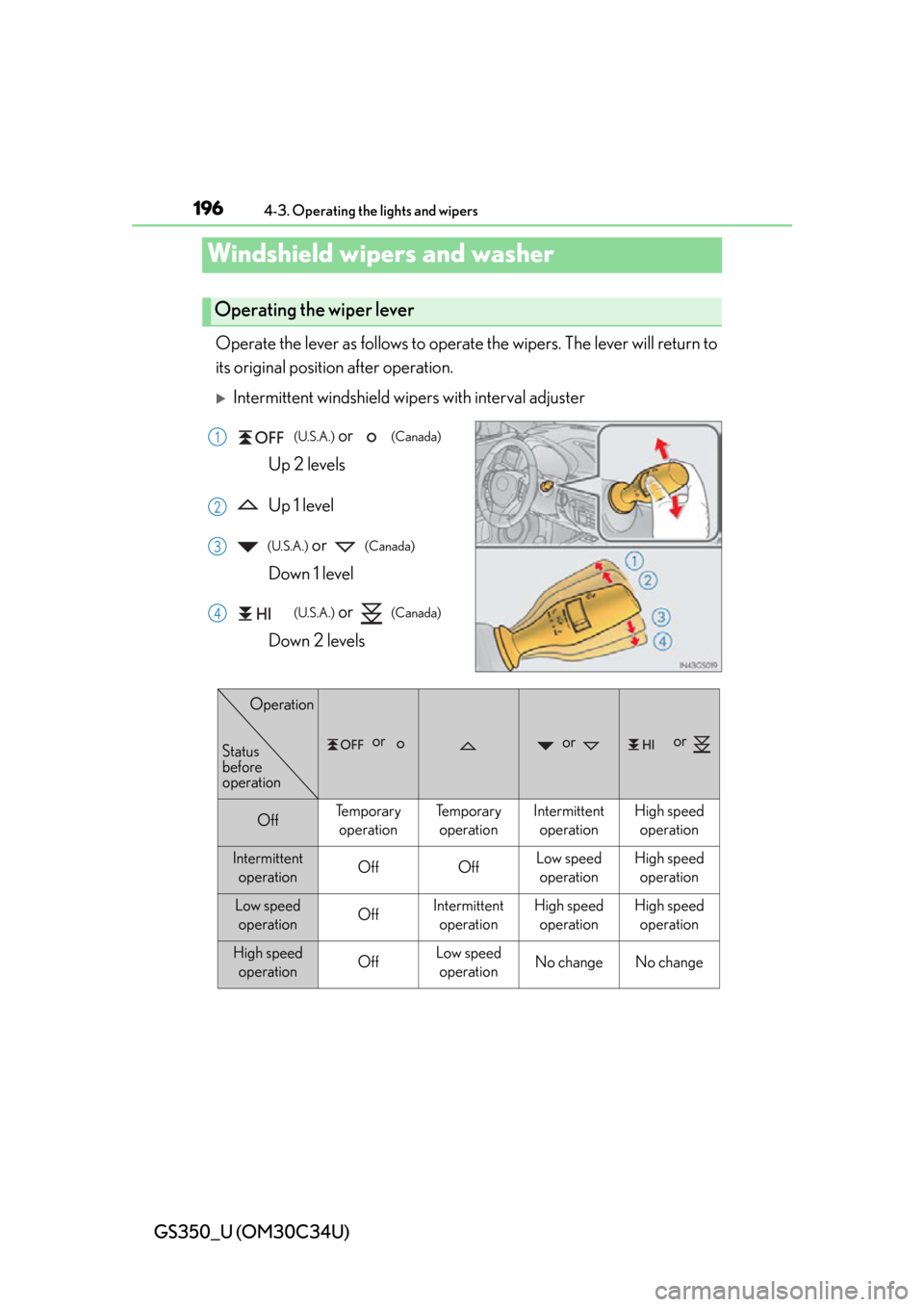
Operate the lever as follows to operate the wipers. The lever will return to
its original position after operation.
Intermittent windshield wipers with interval adjuster
(U.S.A.) or (Canada)
Up 2 levels
Up 1 level
(U.S.A.) or (Canada)
Down 1 level
(U.S.A.) or (Canada)
Down 2 levels
Operating the wiper lever
1
2
3
4
or or or
OffTe m p o r a r y operationTe m p o r a r yoperationIntermittent operationHigh speedoperation
Intermittent operationOffOffLow speedoperationHigh speed operation
Low speed operationOffIntermittent operationHigh speedoperationHigh speedoperation
High speed operationOffLow speedoperationNo changeNo change
Status
before
operation
Operation
Page 198 of 828
198
GS350_U (OM30C34U)
4-3. Operating the lights and wipers
Rain-sensing windshield wipers
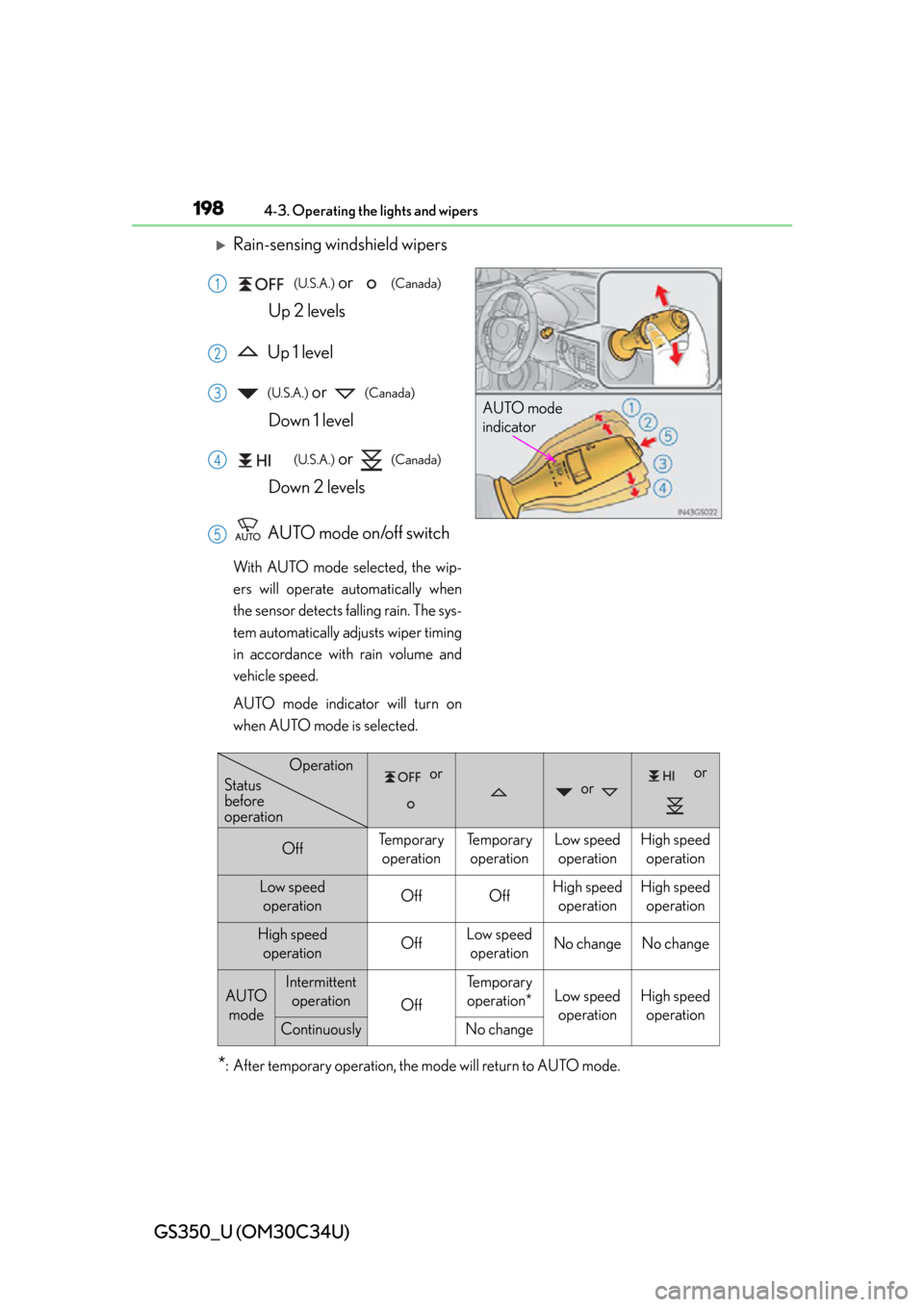
(U.S.A.) or (Canada)
Up 2 levels
Up 1 level
(U.S.A.) or (Canada)
Down 1 level
(U.S.A.) or (Canada)
Down 2 levels
AUTO mode on/off switch
With AUTO mode selected, the wip-
ers will operate automatically when
the sensor detects falling rain. The sys-
tem automatically adjusts wiper timing
in accordance with rain volume and
vehicle speed.
AUTO mode indicator will turn on
when AUTO mode is selected.
*: After temporary operation, the mode will return to AUTO mode.
AUTO mode
indicator
1
2
3
4
5
or or
or
OffTe m p o r a r y operationTe m p o r a r y operationLow speed operationHigh speed operation
Low speed operationOffOffHigh speed operationHigh speedoperation
High speed operationOffLow speedoperationNo changeNo change
AUTO modeIntermittent operation
Off
Te m p o r a r yoperation*Low speed operationHigh speed operation
ContinuouslyNo change
Operation
Status
before
operation
Page 210 of 828
210
GS350_U (OM30C34U)
4-5. Using the driving support systems
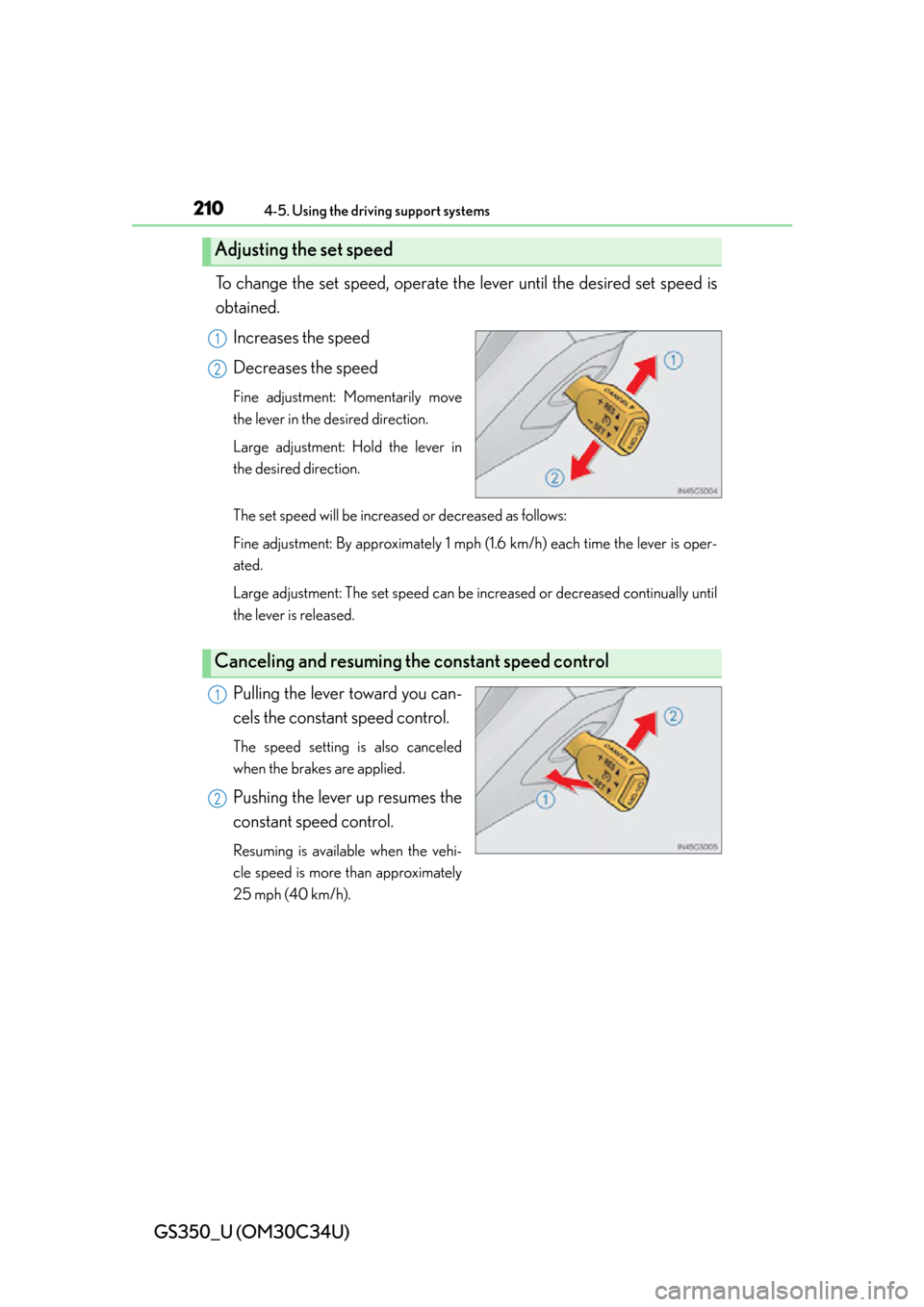
To change the set speed, operate the lever until the desired set speed is
obtained.
Increases the speed
Decreases the speed
Fine adjustment: Momentarily move
the lever in the desired direction.
Large adjustment: Hold the lever in
the desired direction.
The set speed will be increased or decreased as follows:
Fine adjustment: By approximately 1 mph (1.6 km/h) each time the lever is oper-
ated.
Large adjustment: The set speed can be increased or decreased continually until
the lever is released.
Pulling the lever toward you can-
cels the constant speed control.
The speed setting is also canceled
when the brakes are applied.
Pushing the lever up resumes the
constant speed control.
Resuming is available when the vehi-
cle speed is more than approximately
25 mph (40 km/h).
Adjusting the set speed
1
2
Canceling and resuming th e constant speed control
1
2
Page 215 of 828
GS350_U (OM30C34U)
2154-5. Using the driving support systems
4
Driving
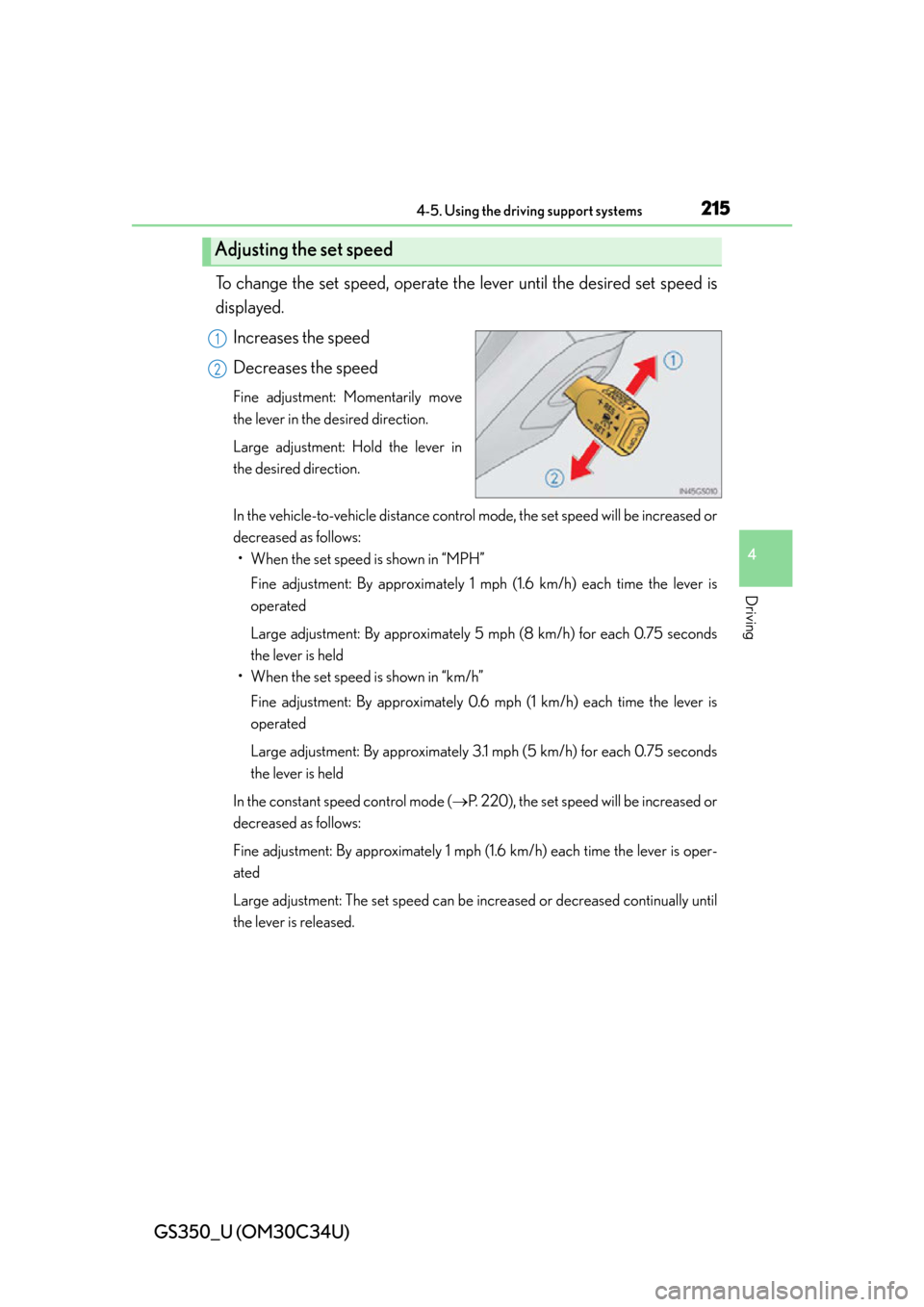
To change the set speed, operate the lever until the desired set speed is
displayed.
Increases the speed
Decreases the speed
Fine adjustment: Momentarily move
the lever in the desired direction.
Large adjustment: Hold the lever in
the desired direction.
In the vehicle-to-vehicle distance control mode, the set speed will be increased or
decreased as follows:• When the set speed is shown in “MPH”
Fine adjustment: By approximately 1 mp h (1.6 km/h) each time the lever is
operated
Large adjustment: By approximately 5 mph (8 km/h) for each 0.75 seconds
the lever is held
• When the set speed is shown in “km/h”
Fine adjustment: By approximately 0.6 mph (1 km/h) each time the lever is
operated
Large adjustment: By approximately 3.1 mph (5 km/h) for each 0.75 seconds
the lever is held
In the constant speed control mode ( P. 220), the set speed will be increased or
decreased as follows:
Fine adjustment: By approximately 1 mph (1.6 km/h) each time the lever is oper-
ated
Large adjustment: The set speed can be increased or decreased continually until
the lever is released.
Adjusting the set speed
1
2
Page 216 of 828
216
GS350_U (OM30C34U)
4-5. Using the driving support systems
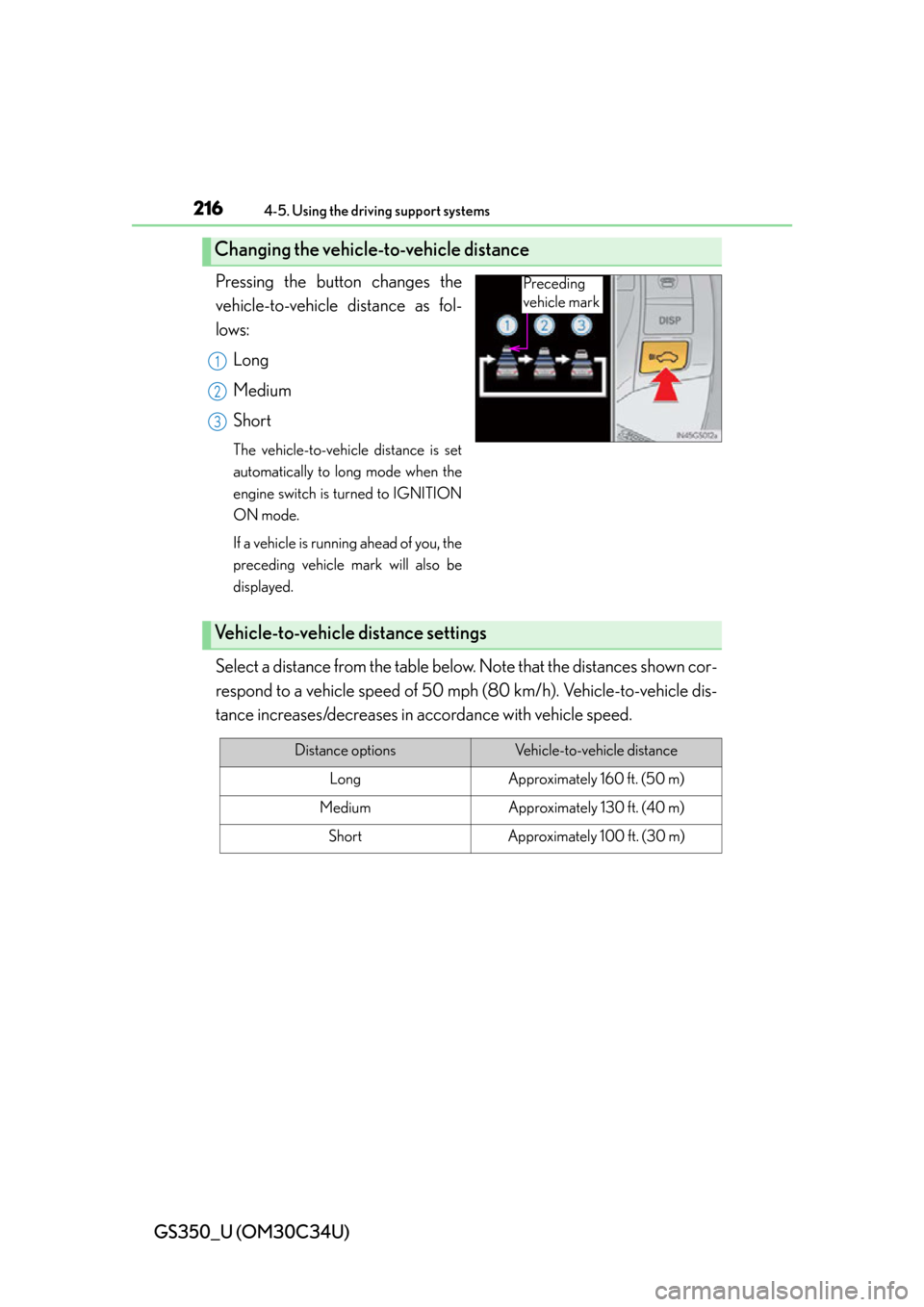
Pressing the button changes the
vehicle-to-vehicle distance as fol-
lows:Long
Medium
Short
The vehicle-to-vehicle distance is set
automatically to lo ng mode when the
engine switch is turned to IGNITION
ON mode.
If a vehicle is running ahead of you, the
preceding vehicle mark will also be
displayed.
Select a distance from the table belo w. Note that the distances shown cor-
respond to a vehicle speed of 50 mph (80 km/h). Vehicle-to-vehicle dis-
tance increases/decreases in accordance with vehicle speed.
Changing the vehicle-to-vehicle distance
Preceding
vehicle mark
1
2
3
Vehicle-to-vehicle distance settings
Distance optionsVehicle-to-vehicle distance
LongApproximately 160 ft. (50 m)
MediumApproximately 130 ft. (40 m)
ShortApproximately 100 ft. (30 m)
Page 219 of 828

GS350_U (OM30C34U)
2194-5. Using the driving support systems
4
Driving
Example of follow-up cruising
When following a vehicle driving slower than the set speed
The system continues follow-up cruising while adjusting for changes in the speed
of the vehicle ahead in order to maintain the vehicle-to-vehicle distance set by the
driver.
Example of acceleration
When there are no longer any vehi cles ahead driving slower than the
set speed
The system accelerates until the set speed is reached. The system then returns to
constant speed cruising.
When your vehicle is too close to a vehicle ahead, and sufficient auto-
matic deceleration via the cruise co ntrol is not possible, the display will
flash and the buzzer will sound to alert the driver. An example of this
would be if another driver cuts in front of you while you are following a
vehicle. Apply the brakes to ensure an appropriate vehicle-to-vehicle dis-
tance.
■Warnings may not occur when
In the following instance s, there is a possibility that the warnings will not
occur:
●When the speed of the vehicle ahea d matches or exceeds your vehi-
cle speed
●When the vehicle ahead is traveling at an extremely slow speed
●Immediately after the cruise control speed was set
●At the instant the accelerator is applied
Approach warning
3
4
Page 223 of 828

GS350_U (OM30C34U)
2234-5. Using the driving support systems
4
Driving
■Certification
For vehicles sold in the U.S.A.
FCC ID: HYQDNMWR004
This device complies with Part 15 of the FCC Rules. Operation is subject to the fol-
lowing two conditions: (1) this device may not cause harmful interference, and (2)
this device must accept any interference received, including interference that may
cause undesired operation.
FCC WARNING
Changes or modifications not expressly ap proved by the party responsible for com-
pliance could void the user’s authority to operate the equipment.
Radio frequency radiation exposure Information:
This equipment complies with FCC radiation exposure limits set forth for an uncon-
trolled environment.
This equipment should be in stalled and operated with minimum distance of 20 cm
between the radiator and your body.
This transmitter must not be co-located or operating in conjunction with any other
antenna or transmitter.
For vehicles sold in Canada
Operation is subject to the following two conditions: (1) this device may not cause
interference, and (2) this device must acc ept any interference, including interfer-
ence that may cause undesired operation of the device.
Page 225 of 828
GS350_U (OM30C34U)
2254-5. Using the driving support systems
4
Driving
CAUTION
■To avoid inadvertent cruise control activation
Switch the cruise control off using the “ON-OFF” button when not in use.
■Situations unsuitable for dynamic radar cruise control
Do not use dynamic radar cruise control in any of the following situations.
Doing so may result in inappropriate sp eed control and could cause an accident
resulting in death or serious injury.
●In heavy traffic
●On roads with sharp bends
●On winding roads
●On slippery roads, such as those covered with rain, ice or snow
●On steep downhills, or where there are sudden changes between sharp up and
down gradients
Vehicle speed may exceed the set speed when driving down a steep hill.
●At entrances to expressways
●When weather conditions are bad enough that they may prevent the sensors
from functioning correctly (fog, snow, sandstorm, heavy rain, etc.)
●When an approach warning buzzer is heard often
●During emergency towing