change Lexus GS350 2013 Adjusting the steering wheel and mirrors / LEXUS 2013 GS350 (OM30C34U) Service Manual
[x] Cancel search | Manufacturer: LEXUS, Model Year: 2013, Model line: GS350, Model: Lexus GS350 2013Pages: 828, PDF Size: 10.43 MB
Page 233 of 828

GS350_U (OM30C34U)
2334-5. Using the driving support systems
4
Driving
■Temporary cancelation of the LKA system functions
If any of the following occurs, the LKA system functions will be temporarily canceled.
The functions will resume after the necessary operating conditions have returned.
●The steering wheel is turned as far as necessary to cause the vehicle to change
lanes.
●When the system detects no-handed driving. (The lane keeping assist function will
be temporarily canceled, but the lane departure warning function will continue.)
●The turn signal lever is operated.
●The vehicle speed deviates from the operating range of the LKA system functions.
(The buzzer will beep twice when the lane keeping assist function is being can-
celed.)
●When the lane lines cannot be recognized while driving. (The buzzer will beep
twice when the lane keeping assist function is being canceled.)
●The wiper switch is set on high speed mode or is set on AUTO mode with wipers
operating at high speed. (The lane keeping assist function will be temporarily can-
celed, but the lane departure warning function will continue.)
●If the vehicle crosses a line for approximately half a minute or more. (The lane keep-
ing assist function will be temporarily canceled, but the lane departure warning
function will continue.)
●When the lane departure warning function is activated.
The lane departure warning function will not operate again for a several seconds
after it has been activated, even if the vehicle leaves the lane again.
■The lane departure warning
It may be difficult to feel the sensory warning depending on the road conditions.
■No-handed driving warning
If the steering wheel is not operated for approximately 15 seconds on a straight road
or approximately 5 seconds on a curve, the buzzer will beep twice, indicators on the
multi-information display will flash, and the lane keeping assist function will be tem-
porarily canceled. If you drive the vehicle with your hands lightly touching the steer-
ing wheel, this may also be detected as no-handed driving.
■After the vehicle has been parked in the sun
The LKA system functions may not be available and a warning message (P. 7 0 8 )
will be displayed for a while after driving ha s started. In such cases, turn the LKA sys-
tem off and turn it on again after normal temperature returns. When the temperature
in the cabin decreases and the temperature around the camera sensor ( P. 2 2 8 )
becomes suitable for its operation, the functions will begin to operate.
Page 234 of 828

234
GS350_U (OM30C34U)
4-5. Using the driving support systems
■If there are lane markers on only one side of the vehicle
The lane keeping assist function will not operate. Also, the lane departure warning
will not operate for the side on which lane markers could not be recognized.
■Conditions in which the function may not operate correctly
In the following conditions, the LKA system functions may not operate, or it may not
be possible to ensure adequate performance. Also, the camera sensor may be
unable to recognize lane lines causing the lane departure warning function to oper-
ate incorrectly, or the lane keeping assist function may not operate properly. How-
ever, this does not indicate a malfunction.
●When driving through an area with no lane markers, such as a tollbooth, a crossing
or before a ticket checkpoint
●When driving on a sharp curve
●When lanes are extremely narrow or extremely wide
●When the vehicle leans to one side an unusual amount due to a heavy load or
improper tire inflation pressure
●When the following distance between your vehicle and the vehicle ahead is
extremely short
●When the lane markers are yellow (These may be more difficult for the system to
recognize compared to white markers.)
●When the lane markers are broken, “Botts’ dots”, “Raised pavement marker” or
stones
●When lane markers are obscured or pa rtially obscured by sand, dirt, etc.
●When there are shadows on the road running parallel with lane markers, or if a
shadow covers the lane markers
●When driving on a particularly bright road surface, such as concrete
●When driving on a road surface that is bright due to reflected light
●When driving in a location where the light level changes rapidly, such as the
entrance to or exit from a tunnel
●When sunlight or the headlights of oncoming vehicles are shining directly into the
camera lens
●When driving on roads that are branching or merging
●When driving on a road surface that is wet due to rain, previous rainfall, standing
water, etc.
●When the vehicle experiences strong up-a nd-down motion such as when driving
on an extremely rough road or on a seam in the pavement
●When headlight brightness at nighttime is reduced due to dirt on the lenses, or
when the headlights are misaligned
●When driving with a strong crosswind
Page 237 of 828

GS350_U (OM30C34U)
2374-5. Using the driving support systems
4
Driving
NOTICE
●Do not place anything on the dashboard.
The camera sensor may recognize the image reflected on the windshield as lane
markers by mistake.
●Do not scratch the camera lens, or let it get dirty.
When cleaning the inside of the windshield, be careful not to get any glass
cleaner etc. on the lens. Also, do not touch the lens.
For lens repair, contact your Lexus dealer.
●Do not change the installation position or direction of the camera sensor or
remove it. The direction of the camera sensor is precisely adjusted.
●Do not subject the camera sensor to stro ng impact or force, and do not disas-
semble the camera sensor.
Page 245 of 828

GS350_U (OM30C34U)
2454-5. Using the driving support systems
4
Driving
■Buzzer operation and distance to an obstacle
A buzzer sounds when the corner sensors and rear center sensors are
operating.
●The buzzer beeps faster as the vehicle approaches an obstacle.
When the vehicle comes within the following distance of the obsta-
cle, the buzzer sounds continuously:• Front center sensors: Approximately 1.0 ft. (30 cm)
• Corner sensors: Approximately 1.0 ft. (30 cm)
• Rear center sensors: Approximately 1.1 ft. (35 cm)
●When 2 or more obstacles are detected simultaneously, the buzzer
system responds to the nearest obst acle. If one or both come within
the above distances, the beep will repeat a long tone, followed by fast
beeps.
Approximately 3.3 ft. (100 cm)
Approximately 4.9 ft. (150 cm)
Approximately 2.0 ft. (60 cm)
The diagram shows the detection
range of the sensors. Note that the
sensors cannot detect obstacles that
are extremely close to the vehicle.
The range of the sensors may change
depending on the shape of the object
etc.
Detection range of the sensors
1
2
3
Page 246 of 828
246
GS350_U (OM30C34U)
4-5. Using the driving support systems
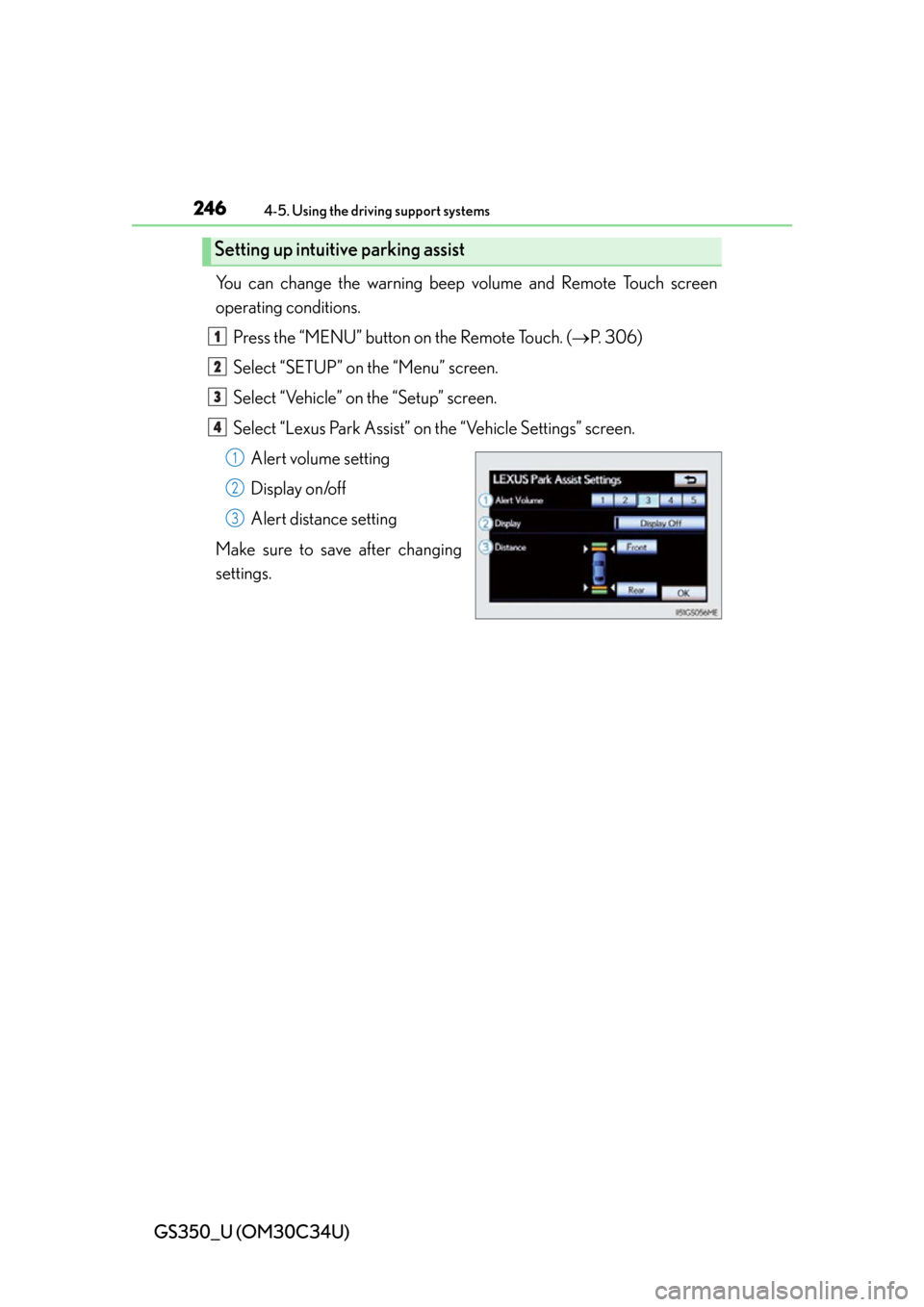
You can change the warning beep volume and Remote Touch screen
operating conditions.
Press the “MENU” button on the Remote Touch. ( P. 306)
Select “SETUP” on the “Menu” screen.
Select “Vehicle” on the “Setup” screen.
Select “Lexus Park Assist” on the “Vehicle Settings” screen. Alert volume setting
Display on/off
Alert distance setting
Make sure to save after changing
settings.
Setting up intuitive parking assist
1
2
3
4
1
2
3
Page 260 of 828

260
GS350_U (OM30C34U)
4-5. Using the driving support systems
CAUTION
■When using the rear view monitor system
When backing up, be sure to check visually behind and all around the vehicle
before proceeding.
Observe the following precautions to avoid an accident that could result in death
or serious injuries.
●The rear view monitor system is a supplemental device intended to assist the
driver when backing up. Never depend on the rear view monitor system entirely
when backing up. Always make sure your intended path is clear.
Use caution, just as you would when backing up any vehicle.
●Never back up while looking only at the screen.
The image shown on the screen may differ from the actual state, and you could
collide with another vehicle or obstacles if backing up looking only at the screen,
possibly causing an accident. When backing up, be sure to check in front of and
behind the vehicle, both directly and with mirrors.
●Be sure to back up slowly, depressing the brake pedal to control vehicle speed.
●The instructions given are only guidelines.
When and how much to turn the steering wheel will vary according to traffic con-
ditions, road surface conditions, vehicle condition, etc. when parking. It is neces-
sary to be fully aware of this before using the rear view monitor system.
●When parking, be sure to check that the parking space will accommodate your
vehicle before maneuvering into it.
●Do not use system in the following cases:
• On icy or slick road surfaces, or in snow
• When using tire chains or the compact spare tire
• When the trunk lid is not closed completely
• On roads that are not flat or straight, such as curves or slopes.
●In low temperatures, the screen may darken or the image may become faint. The
image could distort when the vehicle is moving, or you may become unable to
see the image on the screen. Be sure to check direct visually and with mirror all
around the vehicle before proceeding.
●If the tire sizes are changed, the position of the fixation guide lines displayed on
the screen may change.
●The camera uses a special lens. The di stances between objects and pedestrians
that appear in the image displayed on th e screen will differ from the actual dis-
tances. ( P. 2 5 4 )
Page 261 of 828

GS350_U (OM30C34U)
2614-5. Using the driving support systems
4
Driving
CAUTION
■When using the rear view monitor system screen
●The position of the fixation guide lines displayed on the screen may change in
accordance with the number of passengers, the amount of cargo etc. Be sure to
check behind and all around the vehicle direct visually and with mirror before
proceeding.
●The vehicle width extension guide lines are wider than the actual width of the
vehicle. When backing up, be sure to check behind and all around the vehicle
direct visually and with mirror before proceeding.
Page 262 of 828
262
GS350_U (OM30C34U)
4-5. Using the driving support systems
NOTICE
■How to use the camera
●The rear view monitor system may not operate properly in the following cases, or
if the precautions described below are not followed.
• If the back of the vehicle is hit, the position and mounting angle of the cameramay change.
• As the camera has a water proof construction, do not detach, disassemble or modify it. This may cause incorrect operation.
• Do not strongly rub the camera lens. If the camera lens is scratched, it cannot transmit a clear image.
• Do not allow organic solvent, car wax, window cleaner or glass coat to adhere to the camera. If this happens, wipe it off as soon as possible.
• If the temperature changes rapidly, such as when hot water is poured on the
vehicle in cold weather, the system may not operate normally.
• When washing the vehicle, do not apply intensive bursts of water to the cam- era or camera area. Doing so may result in the camera malfunctioning.
• When the camera is used under fluorescent lights, sodium light or mercury light etc., the lights and the illuminated areas may appear to flicker.
●Do not expose the camera to strong impact as this could cause a malfunction. If
this happens, have the vehicle inspected by your Lexus dealer as soon as possi-
ble.
Page 263 of 828
263
GS350_U (OM30C34U)4-5. Using the driving support systems
4
Driving
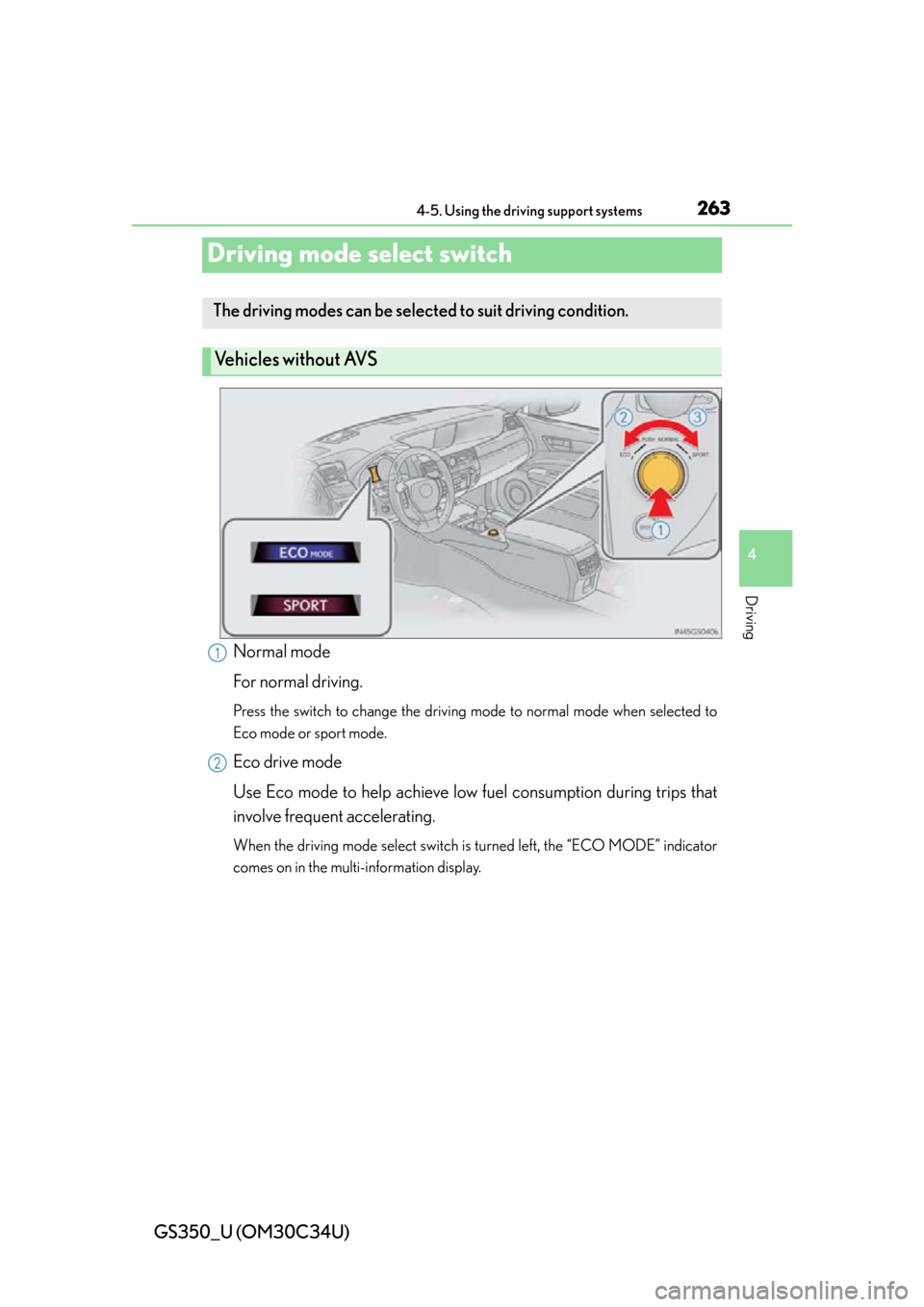
Driving mode select switch
Normal mode
For normal driving.
Press the switch to change the driving mode to normal mode when selected to
Eco mode or sport mode.
Eco drive mode
Use Eco mode to help achieve low fuel consumption during trips that
involve frequent accelerating.
When the driving mode select switch is turned left, the “ECO MODE” indicator
comes on in the multi-information display.
The driving modes can be selected to suit driving condition.
Ve h i c l e s w i t h o u t AV S
1
2
Page 265 of 828
GS350_U (OM30C34U)
2654-5. Using the driving support systems
4
Driving
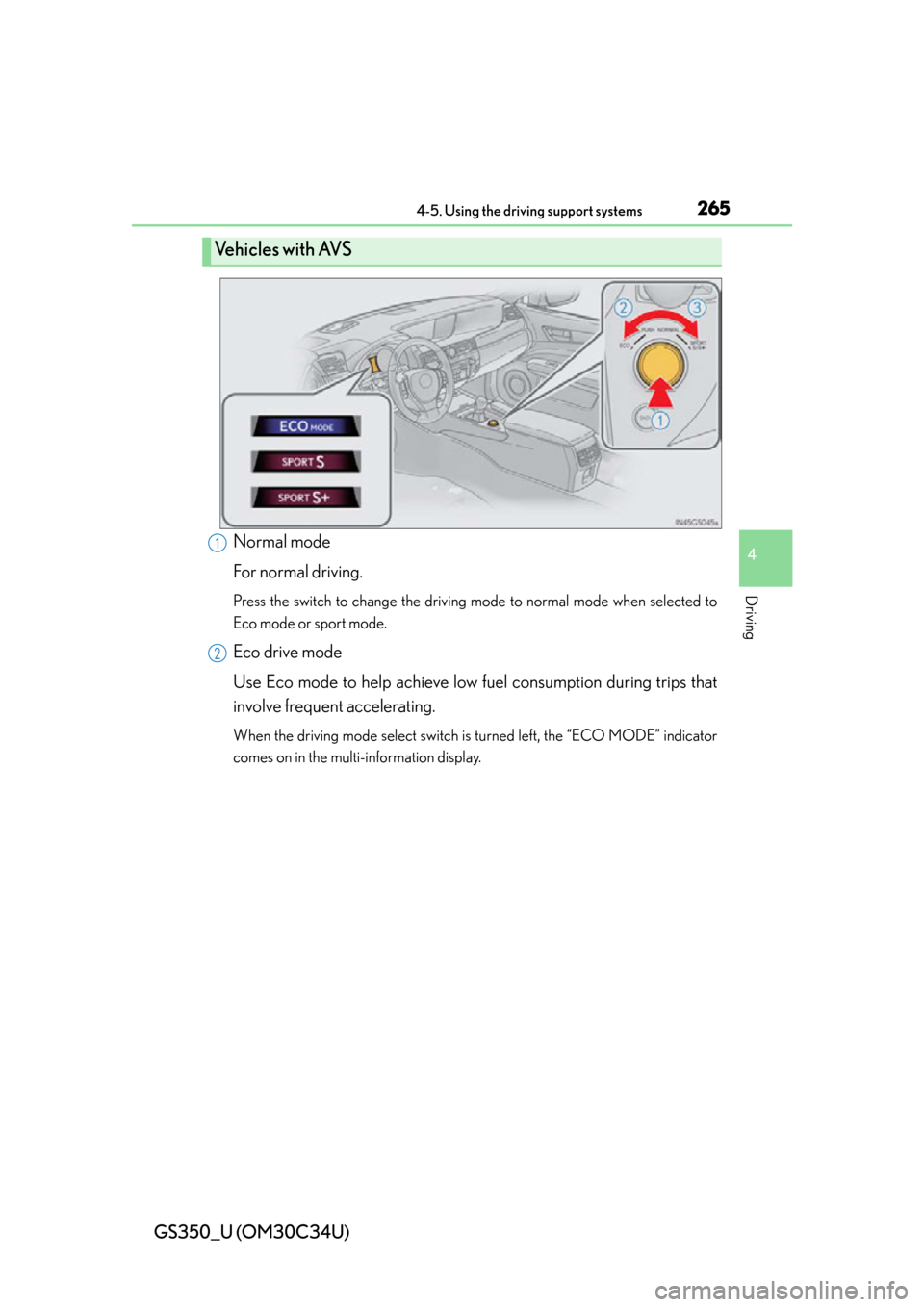
Normal mode
For normal driving.
Press the switch to change the driving mode to normal mode when selected to
Eco mode or sport mode.
Eco drive mode
Use Eco mode to help achieve low fuel consumption during trips that
involve frequent accelerating.
When the driving mode select switch is turned left, the “ECO MODE” indicator
comes on in the multi-information display.
Ve h i c l e s w i t h AV S
1
2