park assist Lexus GS350 2013 Specifications / LEXUS 2013 GS350 (OM30C34U) User Guide
[x] Cancel search | Manufacturer: LEXUS, Model Year: 2013, Model line: GS350, Model: Lexus GS350 2013Pages: 828, PDF Size: 10.43 MB
Page 239 of 828
GS350_U (OM30C34U)
2394-5. Using the driving support systems
4
Driving
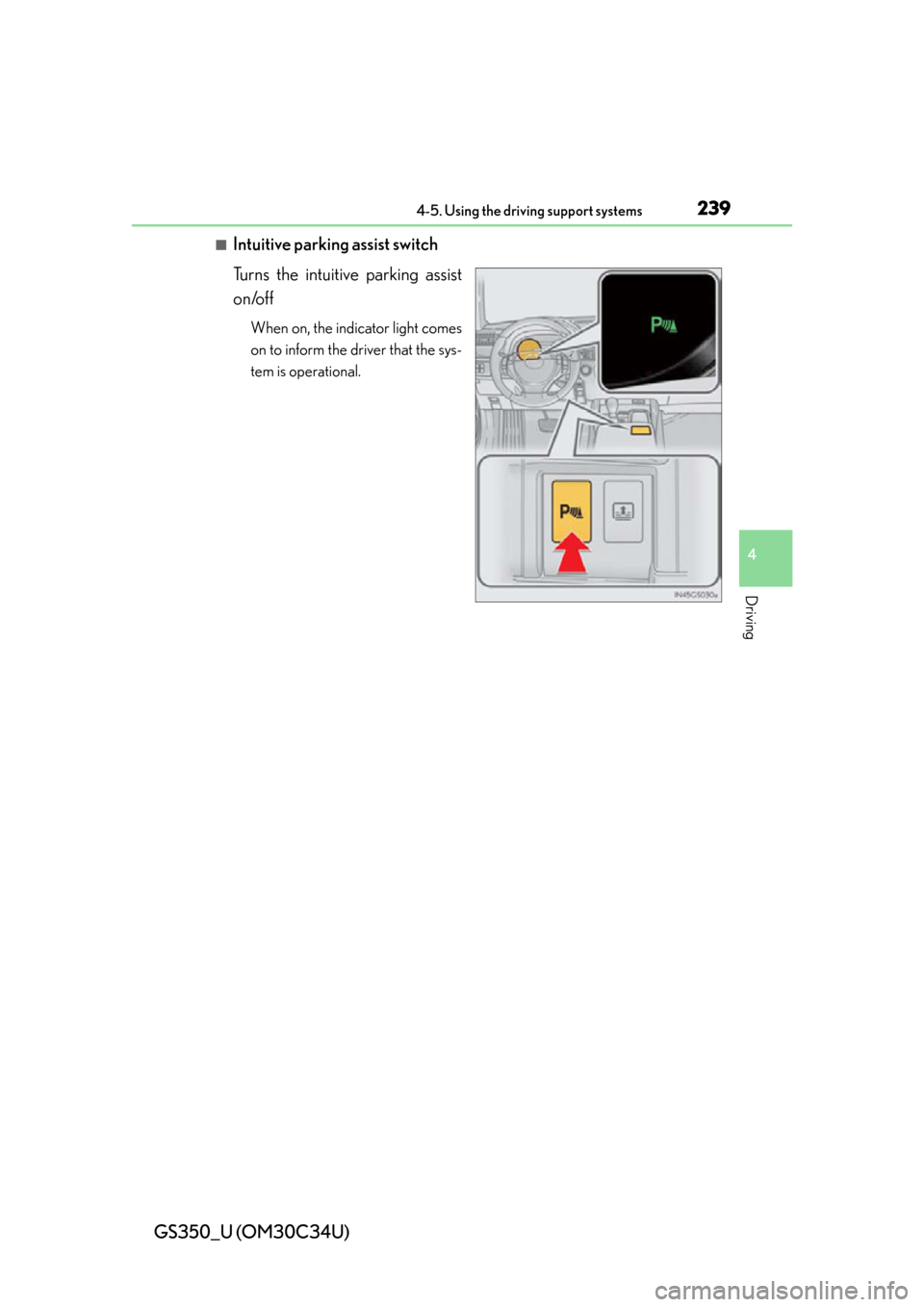
■Intuitive parking assist switch
Turns the intuitive parking assist
on/off
When on, the indicator light comes
on to inform the driver that the sys-
tem is operational.
Page 246 of 828
246
GS350_U (OM30C34U)
4-5. Using the driving support systems
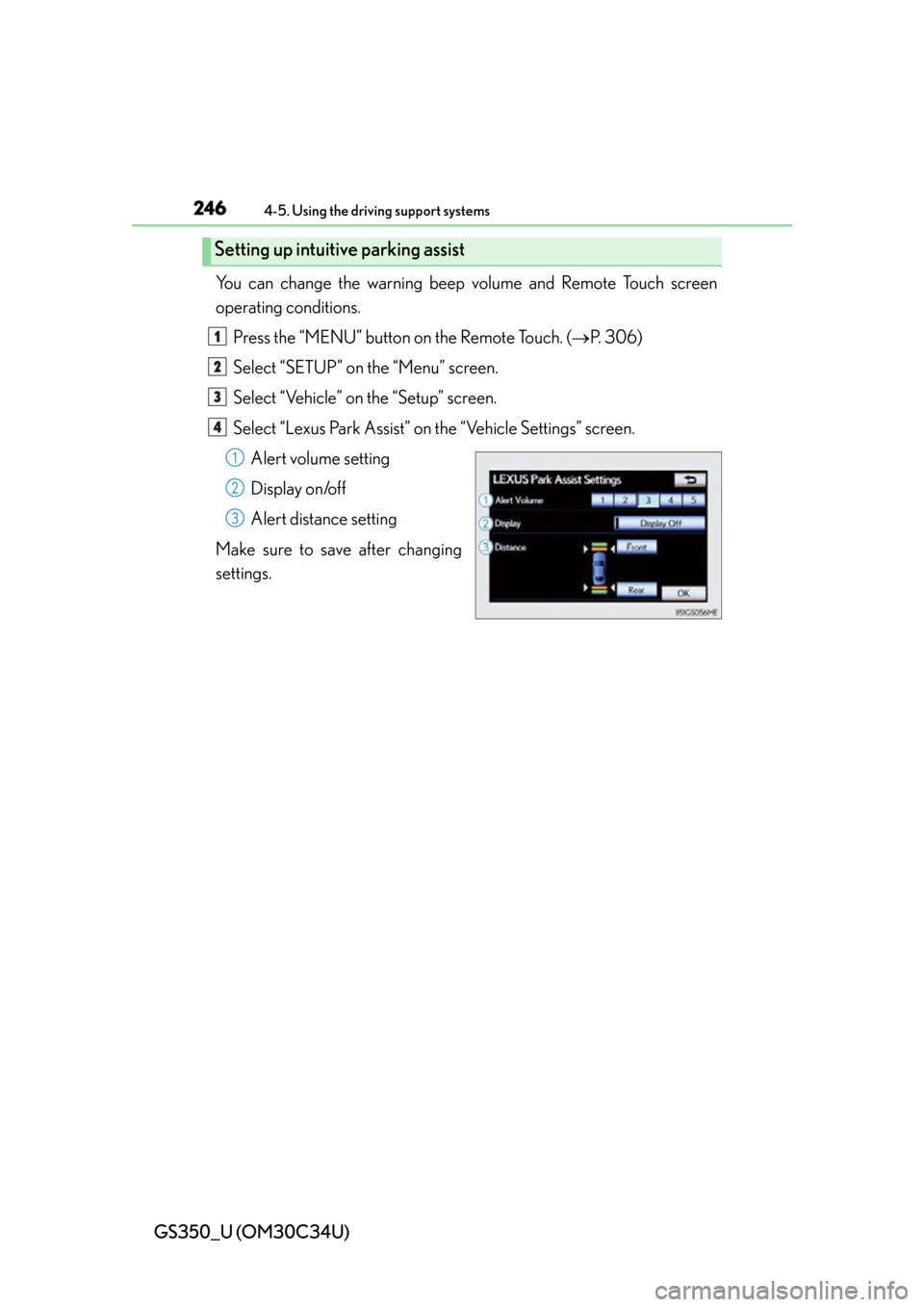
You can change the warning beep volume and Remote Touch screen
operating conditions.
Press the “MENU” button on the Remote Touch. ( P. 306)
Select “SETUP” on the “Menu” screen.
Select “Vehicle” on the “Setup” screen.
Select “Lexus Park Assist” on the “Vehicle Settings” screen. Alert volume setting
Display on/off
Alert distance setting
Make sure to save after changing
settings.
Setting up intuitive parking assist
1
2
3
4
1
2
3
Page 247 of 828

GS350_U (OM30C34U)
2474-5. Using the driving support systems
4
Driving
■Alert volume setting
The alert volume can be adjusted.Select “1” to “5” on the “LEXUS Park Assist settings”.
Select “Save”.
■Display on/off setting
On or off can be selected for intuitive parking assist display.Select “Display Off”.
When the “Display Off” indicator is turned on, the display of intuitive parking
assist will be off. Select “Display Off” again to turn the display of intuitive park-
ing assist on.
Select “Save”.
■Alert distance setting
Front or rear center sensors display and tone indication can be set.Select “Front” or “Rear”.
Long distance or short distance can be selected.
Select “Save”.
■The intuitive parking assist can be operated when
●Front center sensors:
• The engine switch is in IGNITION ON mode.
• The shift lever is in a position other than P.
• The vehicle speed is less than about 6 mph (10 km/h).
●Front corner sensors:
• The engine switch is in IGNITION ON mode.
• The shift lever is in a position other than P or R.
• The vehicle speed is less than about 6 mph (10 km/h).
●Rear corner and rear center sensors:
• The engine switch is in IGNITION ON mode.
• The shift lever is in R.
1
2
1
2
1
2
Page 248 of 828

248
GS350_U (OM30C34U)
4-5. Using the driving support systems
■Intuitive parking assist display
When an obstacle is detected while the rear view monitor system, is in use, the warn-
ing indicator will appear in the top right of the screen even if the display setting has
been set to off.
■Sensor detection information
●The sensor’s detection areas are limited to the areas around the vehicle’s front cor-
ner and rear bumpers.
●Certain vehicle conditions and the surrounding environment may affect the ability
of the sensor to correctly detect obstacles. Particular instances where this may
occur are listed below.
• There is dirt, snow or ice on the sensor. (Wiping the sensors will resolve this problem.)
• The sensor is frozen. (Thawing the area will resolve this problem.) In especially cold weather, if a sensor is frozen the screen may show an abnor-
mal display, or obstacle s may not be detected.
• The sensor is covered in any way.
• The vehicle is leaning considerably to one side.
• On an extremely bumpy road, on an incline, on gravel, or on grass.
• The vicinity of the vehicle is noisy due to vehicle horns, motorcycle engines, air brakes of large vehicles, or other loud noises producing ultrasonic waves.
• There is another vehicle equipped with parking assist sensors in the vicinity.
• The sensor is coated with a sheet of spray or heavy rain.
• The vehicle is equipped with a fender pole or wireless antenna.
• Towing eyelets are installed.
• The bumper or sensor receives a strong impact.
• The vehicle is approaching a tall or curved curb.
• In harsh sunlight or intense cold weather.
• The area directly under th e bumpers is not detected.
• If obstacles draw too close to the sensor.
• A non-genuine Lexus suspension (low ered suspension etc.) is installed.
• People may not be detected if they are wearing certain types of clothing.
In addition to the examples above, there are instances in which, because of their
shape, signs and other objects may be judged by the se nsor to be closer than they
are.
Page 250 of 828

250
GS350_U (OM30C34U)
4-5. Using the driving support systems
CAUTION
■When using the intuitive parking assist
Observe the following precautions.
Failing to do so may result in the vehicle being unable to be driven safely and possi-
bly cause an accident.
●Do not use the sensor at speeds in excess of 6 mph (10 km/h).
●The sensors’ detection areas and reaction times are limited. When moving for-
ward or reversing, check the areas surrounding the vehicle (especially the sides
of the vehicle) for safety, and drive slowly, using the brake to control the vehicle’s
speed.
●Do not install accessories within the sensors’ detection areas.
NOTICE
■When using intuitive parking assist-sensor
In the following situations, the system may not function correctly due to a sensor
malfunction etc. Have the vehicl e checked by your Lexus dealer.
●The intuitive parking assist operation disp lay flashes, and a beep sounds when no
obstacles are detected.
●If the area around a sensor collides with something, or is subjected to strong
impact.
●If the bumper collides with something.
●If the display shows continuously without a beep.
●If a display error occurs, first check the sensor.
If the error occurs even if there is no ice, snow or mud on the sensor, it is likely that
the sensor is malfunctioning.
■Notes when washing the vehicle
Do not apply intensive bursts of wa ter or steam to the sensor area.
Doing so may result in the sensor malfunctioning.
Page 251 of 828
251
GS350_U (OM30C34U)4-5. Using the driving support systems
4
Driving
Rear view monitor system
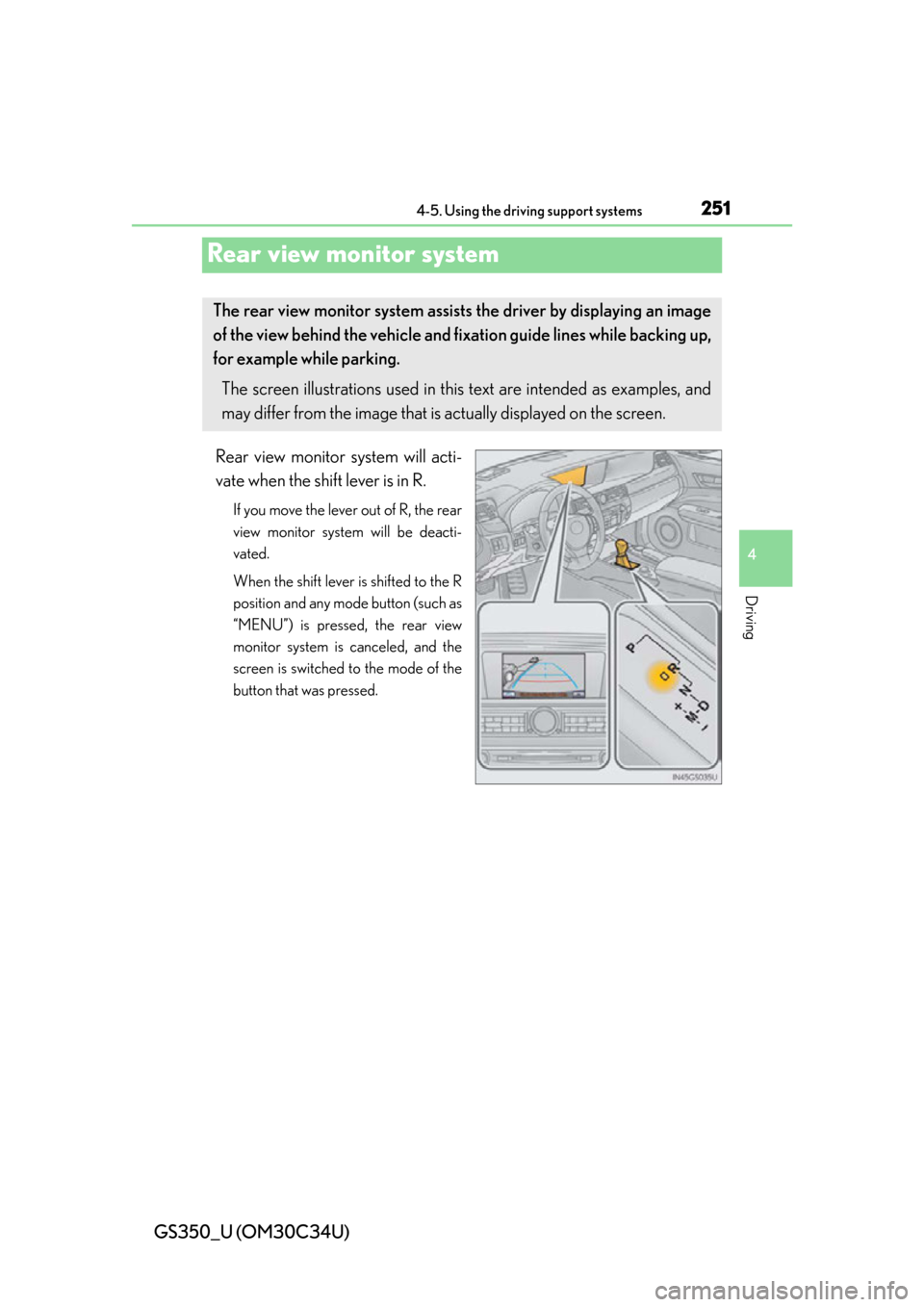
Rear view monitor system will acti-
vate when the shift lever is in R.
If you move the lever out of R, the rear
view monitor system will be deacti-
vated.
When the shift lever is shifted to the R
position and any mode button (such as
“MENU”) is pressed, the rear view
monitor system is canceled, and the
screen is switched to the mode of the
button that was pressed.
The rear view monitor system assist s the driver by displaying an image
of the view behind the vehicle and fixation guide lines while backing up,
for example while parking.
The screen illustrations used in this text are intended as examples, and
may differ from the image that is ac tually displayed on the screen.
Page 252 of 828
252
GS350_U (OM30C34U)
4-5. Using the driving support systems
■Screen description
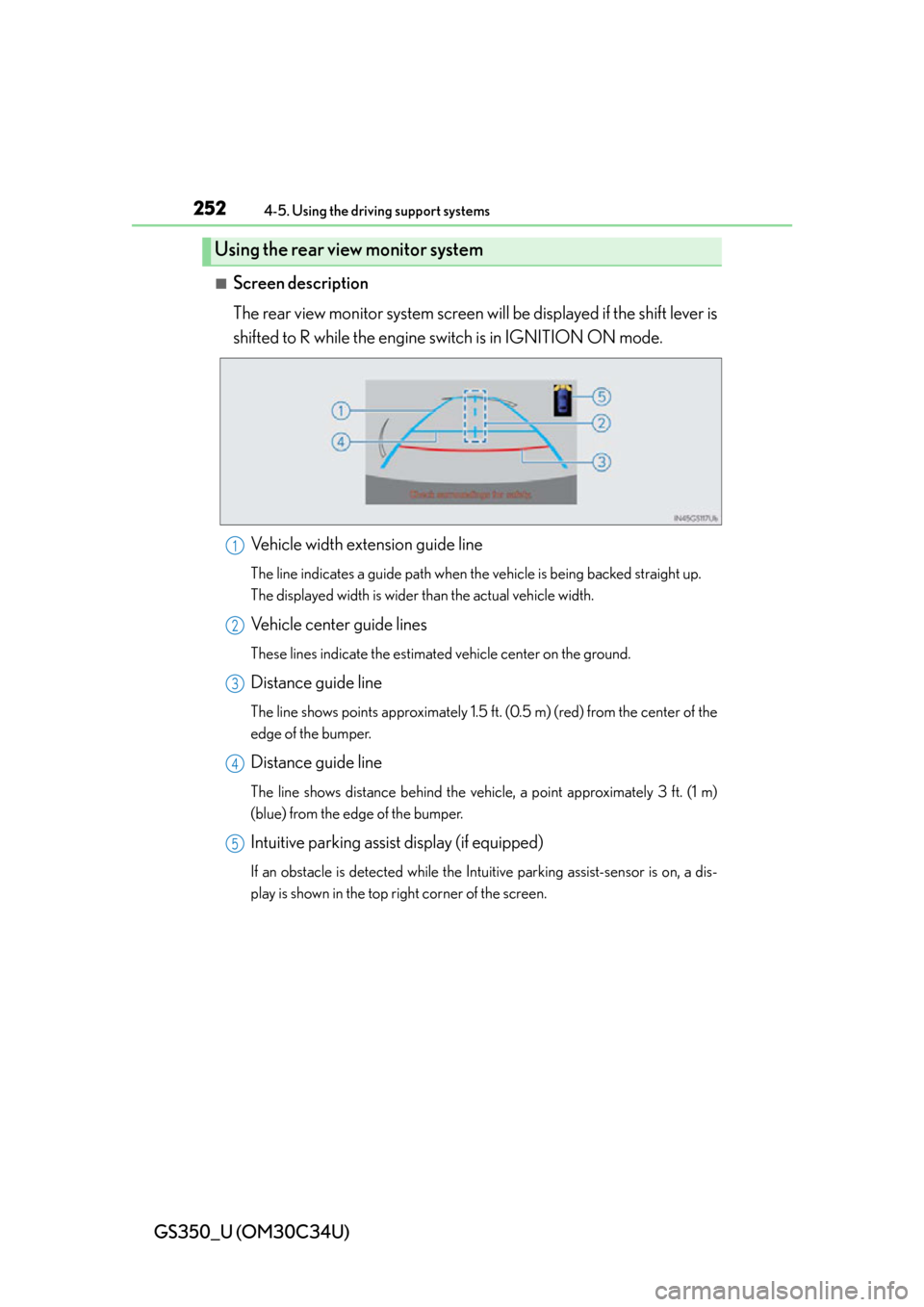
The rear view monitor system screen will be displayed if the shift lever is
shifted to R while the engine switch is in IGNITION ON mode.
Vehicle width extension guide line
The line indicates a guide path when th e vehicle is being backed straight up.
The displayed width is wider than the actual vehicle width.
Vehicle center guide lines
These lines indicate the estimated vehicle center on the ground.
Distance guide line
The line shows points approximately 1.5 ft. (0.5 m) (red) from the center of the
edge of the bumper.
Distance guide line
The line shows distance behind the vehi cle, a point approximately 3 ft. (1 m)
(blue) from the edge of the bumper.
Intuitive parking assist display (if equipped)
If an obstacle is detected while the In tuitive parking assist-sensor is on, a dis-
play is shown in the top right corner of the screen.
Using the rear view monitor system
1
2
3
4
5
Page 260 of 828

260
GS350_U (OM30C34U)
4-5. Using the driving support systems
CAUTION
■When using the rear view monitor system
When backing up, be sure to check visually behind and all around the vehicle
before proceeding.
Observe the following precautions to avoid an accident that could result in death
or serious injuries.
●The rear view monitor system is a supplemental device intended to assist the
driver when backing up. Never depend on the rear view monitor system entirely
when backing up. Always make sure your intended path is clear.
Use caution, just as you would when backing up any vehicle.
●Never back up while looking only at the screen.
The image shown on the screen may differ from the actual state, and you could
collide with another vehicle or obstacles if backing up looking only at the screen,
possibly causing an accident. When backing up, be sure to check in front of and
behind the vehicle, both directly and with mirrors.
●Be sure to back up slowly, depressing the brake pedal to control vehicle speed.
●The instructions given are only guidelines.
When and how much to turn the steering wheel will vary according to traffic con-
ditions, road surface conditions, vehicle condition, etc. when parking. It is neces-
sary to be fully aware of this before using the rear view monitor system.
●When parking, be sure to check that the parking space will accommodate your
vehicle before maneuvering into it.
●Do not use system in the following cases:
• On icy or slick road surfaces, or in snow
• When using tire chains or the compact spare tire
• When the trunk lid is not closed completely
• On roads that are not flat or straight, such as curves or slopes.
●In low temperatures, the screen may darken or the image may become faint. The
image could distort when the vehicle is moving, or you may become unable to
see the image on the screen. Be sure to check direct visually and with mirror all
around the vehicle before proceeding.
●If the tire sizes are changed, the position of the fixation guide lines displayed on
the screen may change.
●The camera uses a special lens. The di stances between objects and pedestrians
that appear in the image displayed on th e screen will differ from the actual dis-
tances. ( P. 2 5 4 )
Page 276 of 828
276
GS350_U (OM30C34U)
4-5. Using the driving support systems
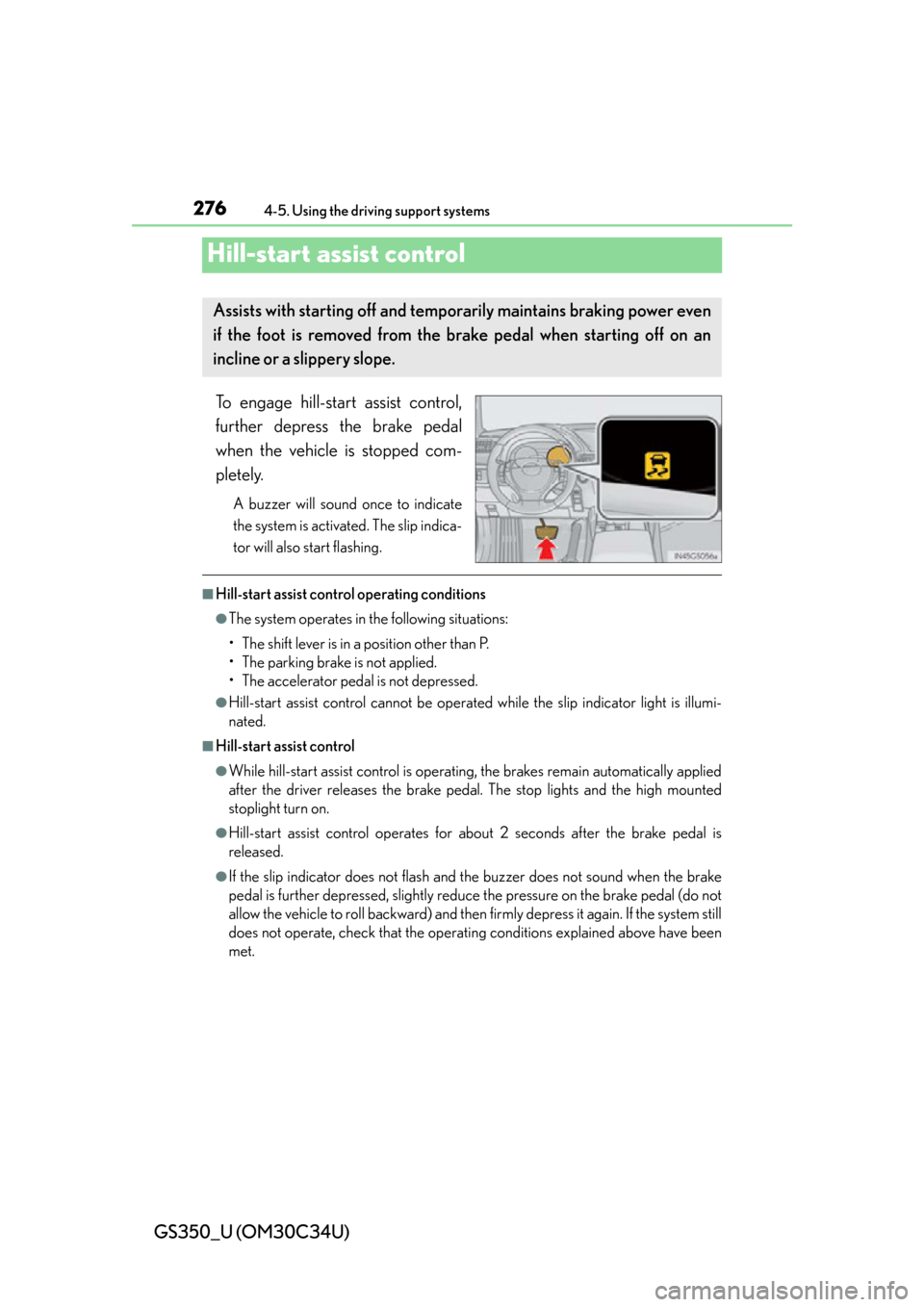
Hill-start assist control
To engage hill-start assist control,
further depress the brake pedal
when the vehicle is stopped com-
pletely.
A buzzer will sound once to indicate
the system is activated. The slip indica-
tor will also start flashing.
■Hill-start assist control operating conditions
●The system operates in the following situations:
• The shift lever is in a position other than P.
• The parking brake is not applied.
• The accelerator peda l is not depressed.
●Hill-start assist control cannot be operated while the slip indicator light is illumi-
nated.
■Hill-start assist control
●While hill-start assist control is operating, the brakes remain automatically applied
after the driver releases the brake pedal. The stop lights and the high mounted
stoplight turn on.
●Hill-start assist control operates for about 2 seconds after the brake pedal is
released.
●If the slip indicator does not flash and the buzzer does not sound when the brake
pedal is further depressed, slightly reduce the pressure on the brake pedal (do not
allow the vehicle to roll backward) and then firmly depress it again. If the system still
does not operate, check that the operating conditions explained above have been
met.
Assists with starting off and temporarily maintains braking power even
if the foot is removed from the brake pedal when starting off on an
incline or a slippery slope.
Page 277 of 828

GS350_U (OM30C34U)
2774-5. Using the driving support systems
4
Driving
■Hill-start assist control buzzer
●When hill-start assist control is activated, the buzzer will sound once.
●In the following situations, hill-start assist control will be canceled and the buzzer
will sound twice.
• No attempt is made to drive the vehicle within approximately 2 seconds ofreleasing the brake pedal.
• The shift lever is moved to P.
• The parking brake is applied.
• The brake pedal is depressed again.
• The brake pedal has been depressed fo r more than approximately 3 minutes.
■If the slip indicator comes on
It may indicate a malfunction in the system. Contact your Lexus dealer.
CAUTION
■Hill-start assist control
●Do not overly rely on hill-start assist control. Hill-start assist control may not oper-
ate effectively on steep inclines and roads covered with ice.
●Unlike the parking brake, hill-start assist control is not intended to hold the vehi-
cle stationary for an extended period of time. Do not attempt to use hill-start
assist control to hold the vehicle on an in cline, as doing so may lead to an acci-
dent.