remote Lexus GS350 2013 Using the interior lights /
[x] Cancel search | Manufacturer: LEXUS, Model Year: 2013, Model line: GS350, Model: Lexus GS350 2013Pages: 94, PDF Size: 2.07 MB
Page 1 of 94
1
GS350_QG_U (OM30C68U)
The Quick Guide is not intended as a substitute for your Owner’s
Manual. We strongly encourage you to review the Owner’s
Manual and supplementary manuals so you will have a better
understanding of your vehicle’s capabilities and limitations.
Audio System
Audio control screen........................................................................................................... ......... 64
Side Display (vehicles with a navigation system).............................................................. 64
Basic operation ................................................................................................................ ...............65
Radio ...................................................................................................................................................65
DVD player/CD player ........................................................................................................... .... 66
Operating an iPod .............................................................................................................. ........... 67
Remote control (steering wheel switches).......................................................................... 64
Rear seat audio controls ....................................................................................................... ...... 67
Automatic Transmission ......................................................................................................... ............ 18
BSM (Blind Spot Monitor) ....................................................................................................... ........39
Cruise Control ................................................................................................................. .....................33
Door Locks ..................................................................................................................... ........................83
Driving Mode Select Switch ..................................................................................................... ....... 42
Driving Position Memory........................................................................................................ ........... 14
Dynamic Radar Cruise Control................................................................................................... ..35
Eco Driving Indicator .......................................................................................................... ............... 26
Engine (Ignition) Switch....................................................................................................... ............... 15
Front Air Conditioning System
Side Display (vehicles with a navigation system).............................................................. 69
Using the automatic mode......................................................................................................... 70
Adjusting the temperature...................................................................................................... ... 70
Using the S-FLOW mode .......................................................................................................... 70
Front Seats .................................................................................................................... ........................... 13
Fuel Tank Cap .................................................................................................................. ...................... 87
Garage Door Opener ............................................................................................................. ...........76
Hands-free System For Cellular Phone
Bluetooth
® phone pairing ......................................................................................................... 57
Phonebook transfer ............................................................................................................. ........ 58
Registering a speed dial ....................................................................................................... .......59
Calling by name................................................................................................................ ..............60
Calling by speed dial .......................................................................................................... ............61
Calling using SMS/MMS message ....................................................................................... 62
Receiving a call ............................................................................................................... ................63
Steering switches .............................................................................................................. .............63
Page 2 of 94
2
GS350_QG_U (OM30C68U)
Headlights ............................................................................................................................................... 27
Head-up Display................................................................................................................ ...................25
Intuitive Parking Assist ....................................................................................................... ............... 38
Keys............................................................................................................................................................... 9
Lexus Enform with Safety Connect ............................................................................................. 80
Lexus Night View ............................................................................................................... .................. 44
LKA (Lane-Keeping Assist)...................................................................................................... .......40
Moon Roof ...................................................................................................................... ....................... 86
Multi-information Display ...................................................................................................... ...........23
Navigation System
Register home .................................................................................................................. ................ 51
Destination input - Search by address .................................................................................. 52
Destination input - Search points of interest by name....................................................54
Destination input - Search points of interest by category.............................................55
Destination input - Search points of intere st by telephone number .........................56
Parking Brake.................................................................................................................. ....................... 22
Portable Audio Device Ports.................................................................................................... ........76
Power Windows .................................................................................................................. ................. 85
Rear Air Conditioning System
Front controller ................................................................................................................................ 71
Remote Touch ................................................................................................................... ..................... 47
Safety Connect ................................................................................................................. .................... 78
Seat Heaters/Seat Ventilators ........................... ............................................................................. 72
Smart Access System with Push-button Start........ ................................................................... 10
Theft Deterrent System ......................................................................................................... ............. 12
Tire Pressure Warning System ................................................................................................... ..... 46
Trunk .......................................................................................................................... ............................... 88
Turn Signal Lever .............................................................................................................. ..................... 21
Voice Command System
Basic operation ............................................................................................................................... 73
Command list ................................................................................................................... ................74
Windshield Wipers and Washer ................................................................................................... .29
XM Services.................................................................................................................... .......................82
Page 4 of 94
4
GS350_QG_U (OM30C68U)
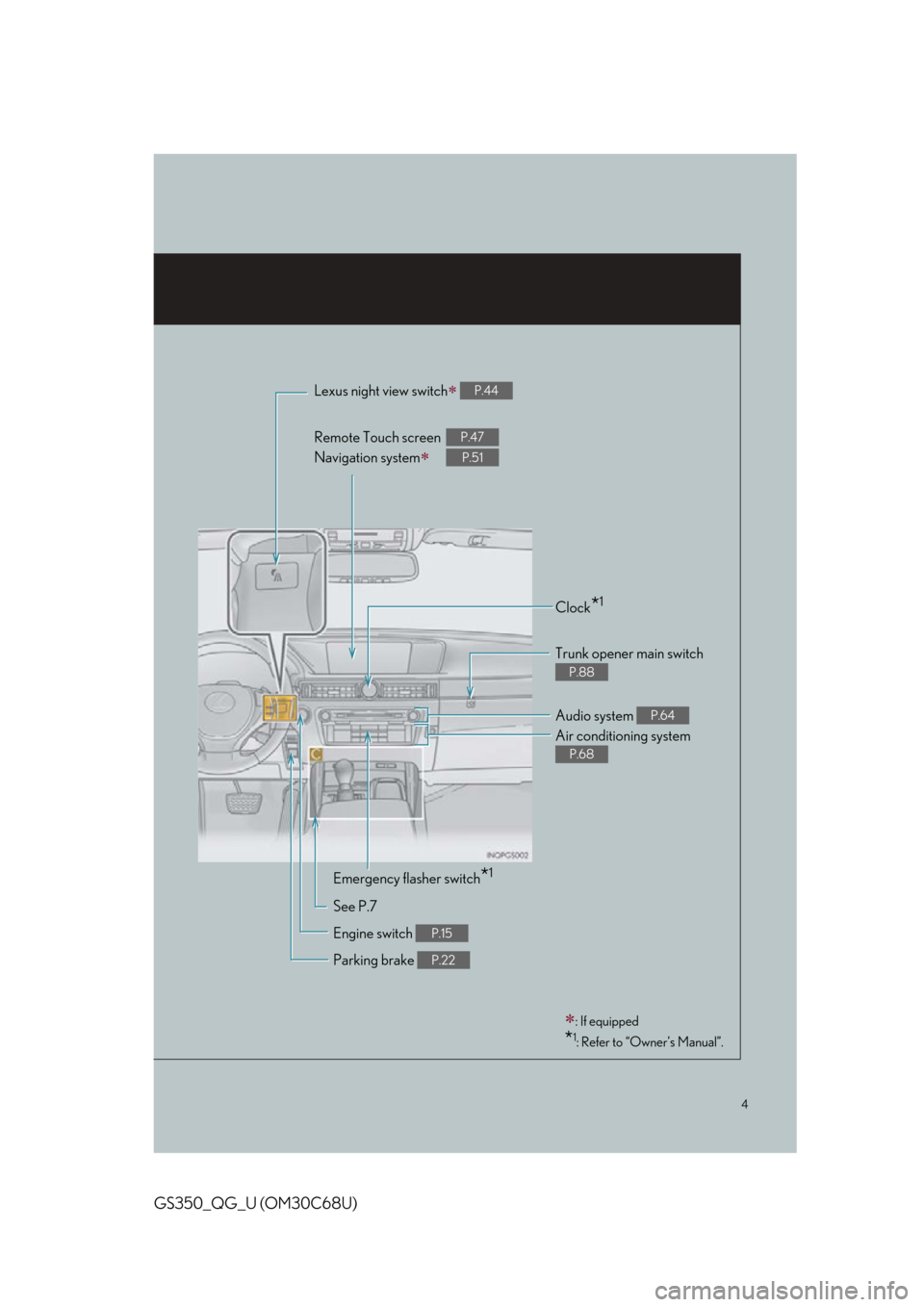
Lexus night view switch P.44
Remote Touch screen
Navigation system
P.47
P.51
Clock*1
Trunk opener main switch
P.88
Audio system P.64
Air conditioning system
P.68
Emergency flasher switch*1
See P.7
Engine switch
P.15
Parking brake P.22
: If equipped
*1: Refer to “Owner’s Manual”.
Page 6 of 94
6
GS350_QG_U (OM30C68U)
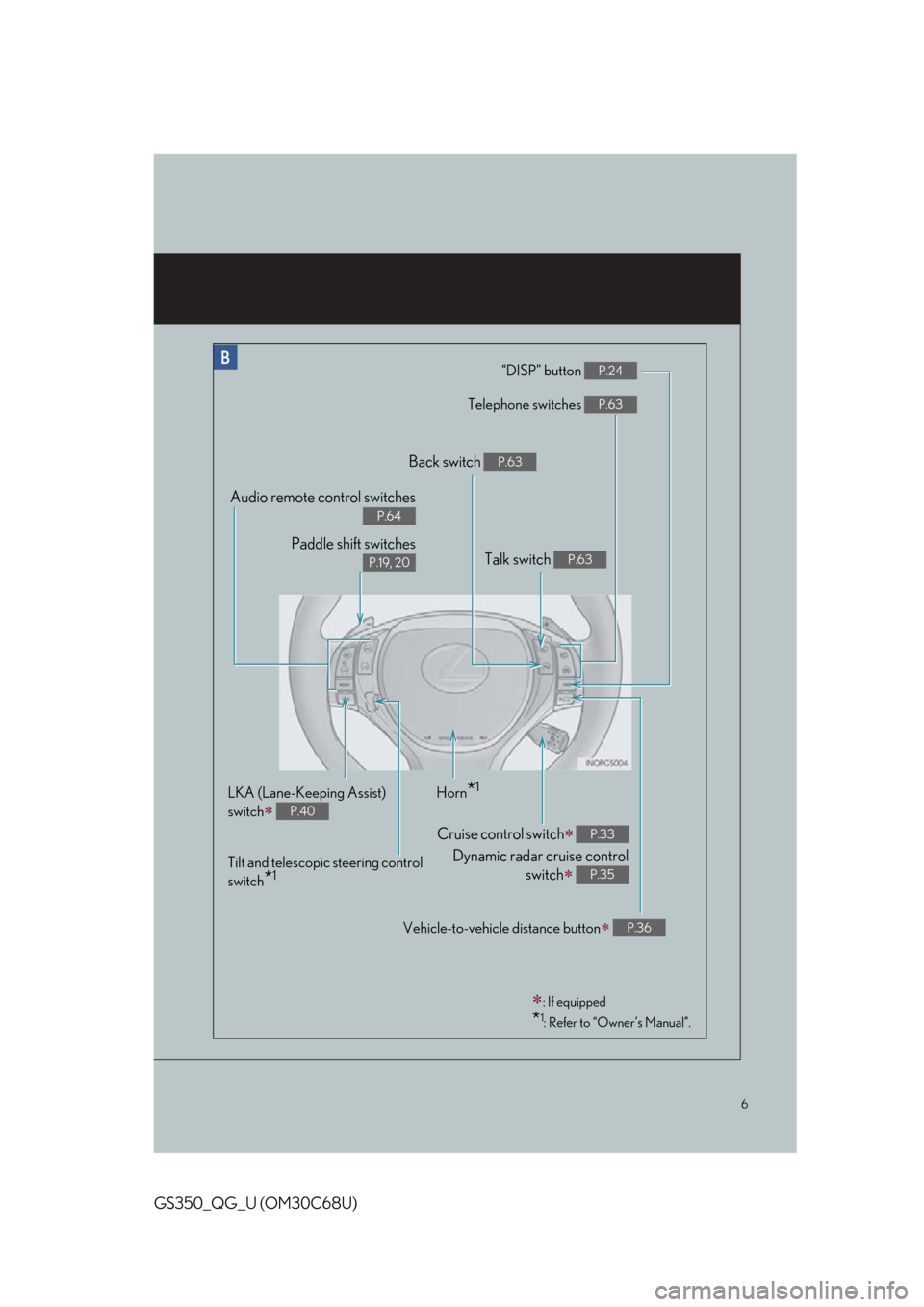
“DISP” button P.24
Telephone switches P.63
Vehicle-to-vehicle distance button P.36
Back switch P.63
Talk switch P.63
Audio remote control switches
P.64
Paddle shift switches
P.19, 20
LKA (Lane-Keeping Assist)
switch
P.40
Cruise control switch
Dynamic radar cruise control switch
P.33
P.35
Horn*1
Tilt and telescopic steering control
switch
*1
: If equipped
*1: Refer to “Owner’s Manual”.
Page 7 of 94
7
GS350_QG_U (OM30C68U)
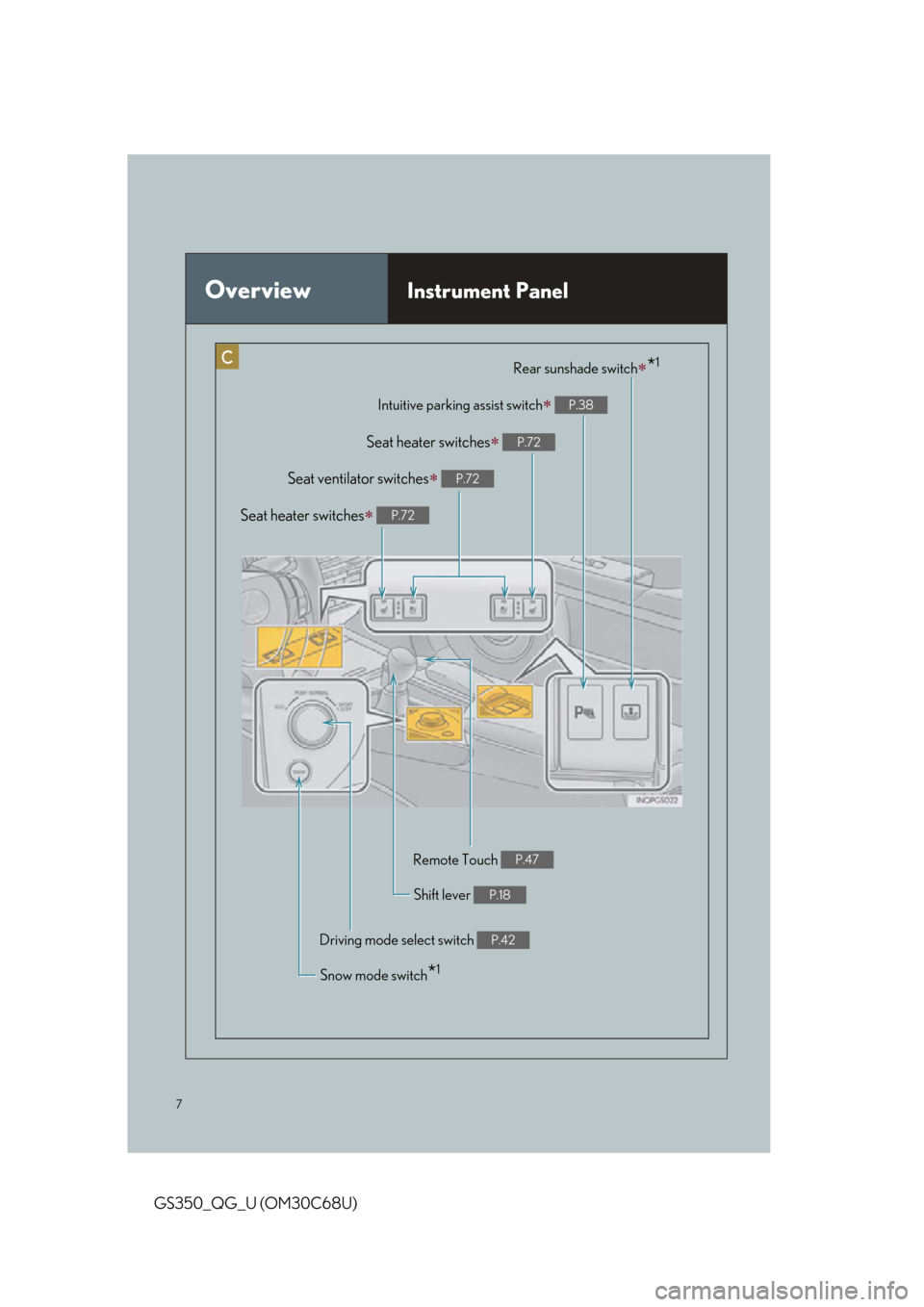
OverviewInstrument Panel
Intuitive parking assist switch P.38
Rear sunshade switch*1
Remote Touch P.47
Seat ventilator switches P.72
Shift lever P.18
Driving mode select switch P.42
Snow mode switch*1
Seat heater switches P.72
Seat heater switches P.72
Page 9 of 94
9
GS350_QG_U (OM30C68U)
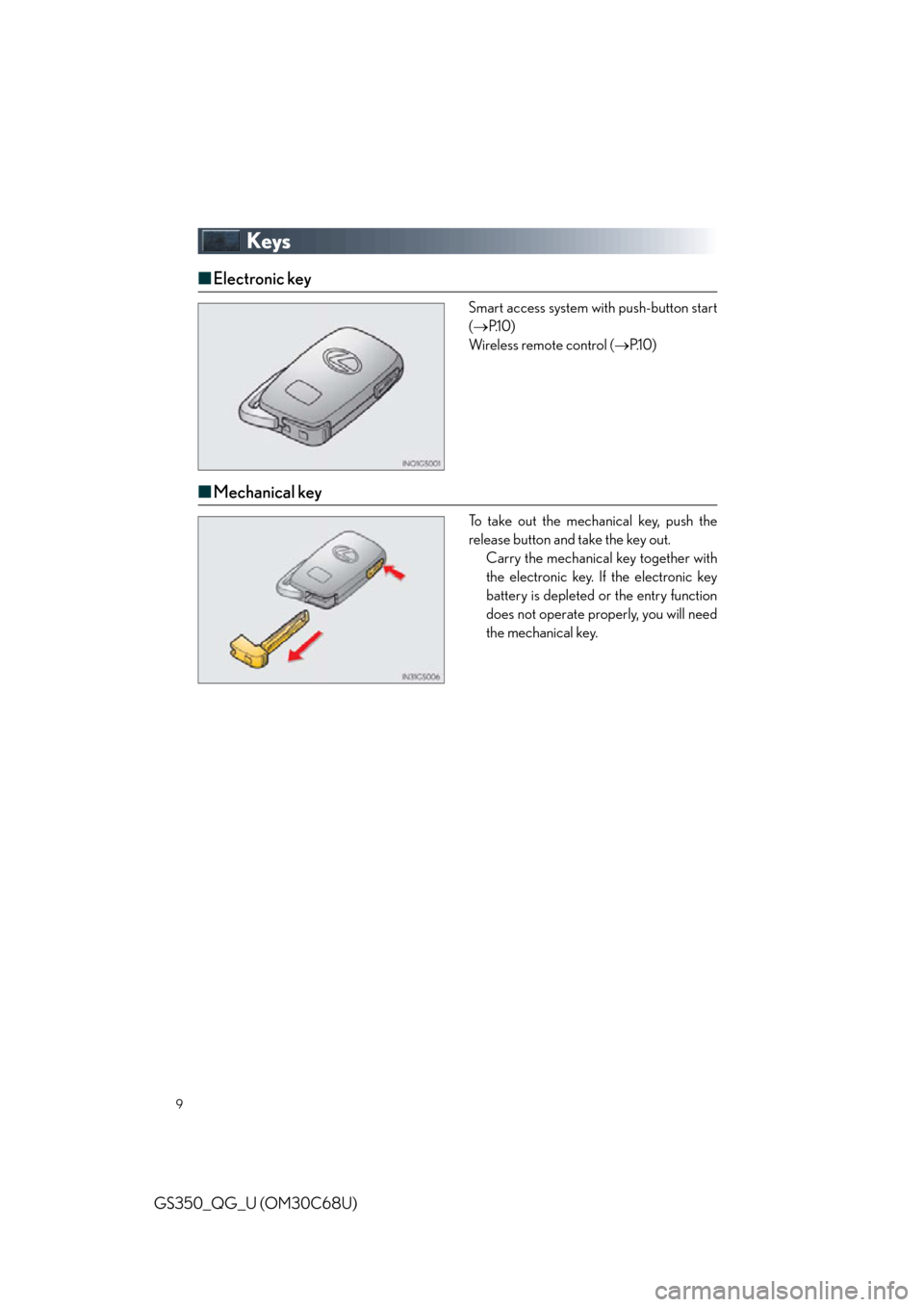
Keys
■Electronic key
Smart access system with push-button start
( P.1 0 )
Wireless remote control ( P.1 0 )
■Mechanical key
.To take out the mechanical key, push the
release button and take the key out.
Carry the mechanical key together with
the electronic key. If the electronic key
battery is depleted or the entry function
does not operate properly, you will need
the mechanical key.
Page 10 of 94
10
GS350_QG_U (OM30C68U)
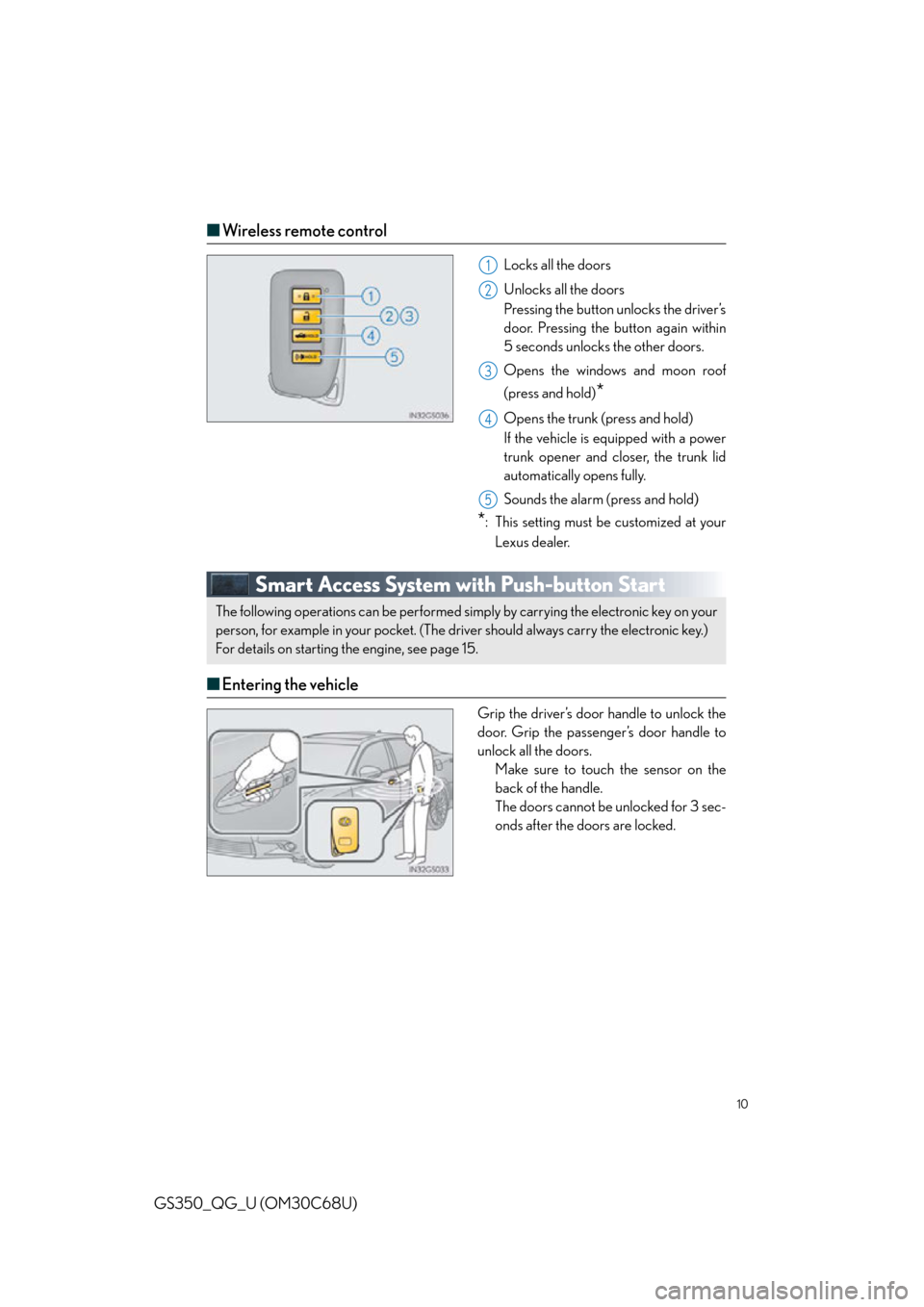
■Wireless remote control
Locks all the doors
Unlocks all the doors
Pressing the button unlocks the driver’s
door. Pressing the button again within
5 seconds unlocks the other doors.
Opens the windows and moon roof
(press and hold)
*
Opens the trunk (press and hold)
If the vehicle is equipped with a power
trunk opener and closer, the trunk lid
automatically opens fully.
Sounds the alarm (press and hold)
*: This setting must be customized at your
Lexus dealer.
Smart Access System with Push-button Start
■ Entering the vehicle
Grip the driver’s door handle to unlock the
door. Grip the passenger’s door handle to
unlock all the doors.
Make sure to touch the sensor on the
back of the handle.
The doors cannot be unlocked for 3 sec-
onds after the doors are locked.
1
2
3
4
5
The following operations can be performed simp ly by carrying the electronic key on your
person, for example in your pocket. (The driver should always carry the electronic key.)
For details on starting the engine, see page 15.
Page 14 of 94
14
GS350_QG_U (OM30C68U)
Driving Position Memory
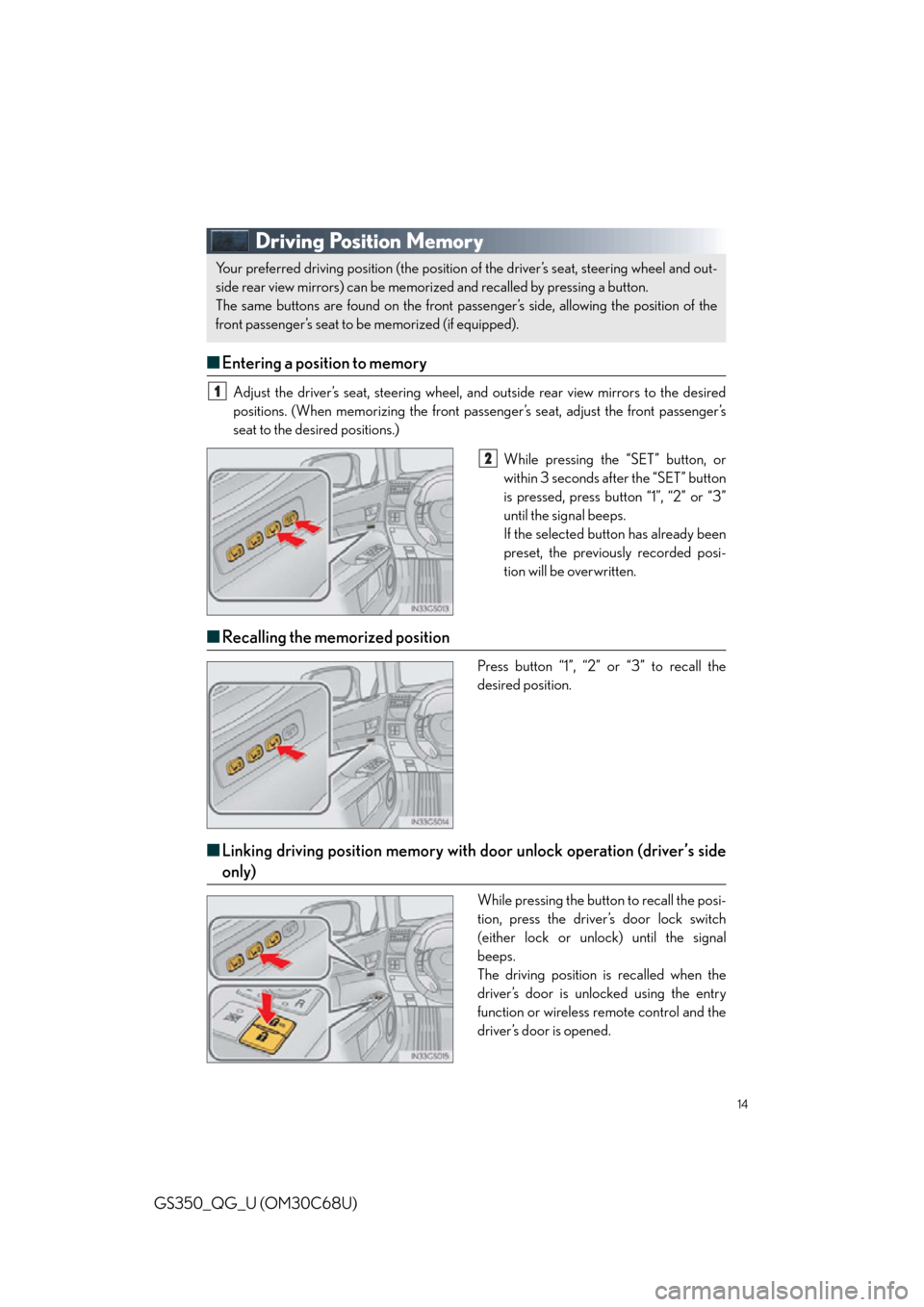
■Entering a position to memory
Adjust the driver’s seat, steering wheel, and outside rear view mirrors to the desired
positions. (When memorizing the front pass enger’s seat, adjust the front passenger’s
seat to the desired positions.)
While pressing the “SET” button, or
within 3 seconds after the “SET” button
is pressed, press button “1”, “2” or “3”
until the signal beeps.
If the selected button has already been
preset, the previously recorded posi-
tion will be overwritten.
■Recalling the memorized position
Press button “1”, “2” or “3” to recall the
desired position.
■Linking driving position memory with door unlock operation (driver’s side
only)
While pressing the button to recall the posi-
tion, press the driver’s door lock switch
(either lock or unlock) until the signal
beeps.
The driving position is recalled when the
driver’s door is unlocked using the entry
function or wireless remote control and the
driver’s door is opened.
Your preferred driving position (the position of the driver’s seat, steering wheel and out-
side rear view mirrors) can be memorized and recalled by pressing a button.
The same buttons are found on the front passenger’s side, allowing the position of the
front passenger’s seat to be memorized (if equipped).
1
2
Page 38 of 94
38
GS350_QG_U (OM30C68U)
Intuitive Parking Assist (if equipped)
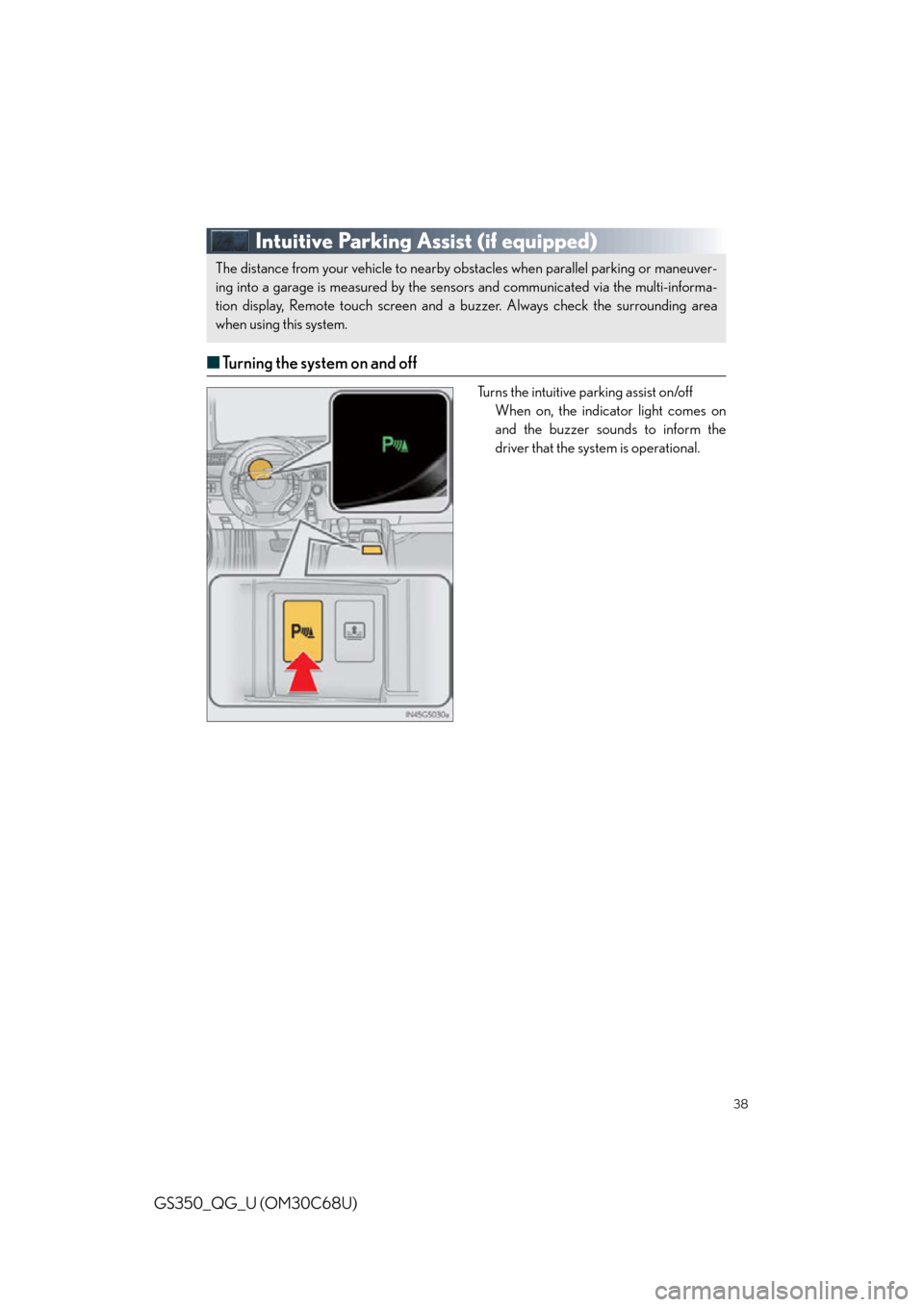
■Turning the system on and off
Turns the intuitive parking assist on/off
When on, the indicator light comes on
and the buzzer sounds to inform the
driver that the syst em is operational.
The distance from your vehicle to nearby ob stacles when parallel parking or maneuver-
ing into a garage is measured by the sens ors and communicated via the multi-informa-
tion display, Remote touch screen and a buzzer. Always check the surrounding area
when using this system.
Page 44 of 94
44
GS350_QG_U (OM30C68U)
Lexus Night View (if equipped)
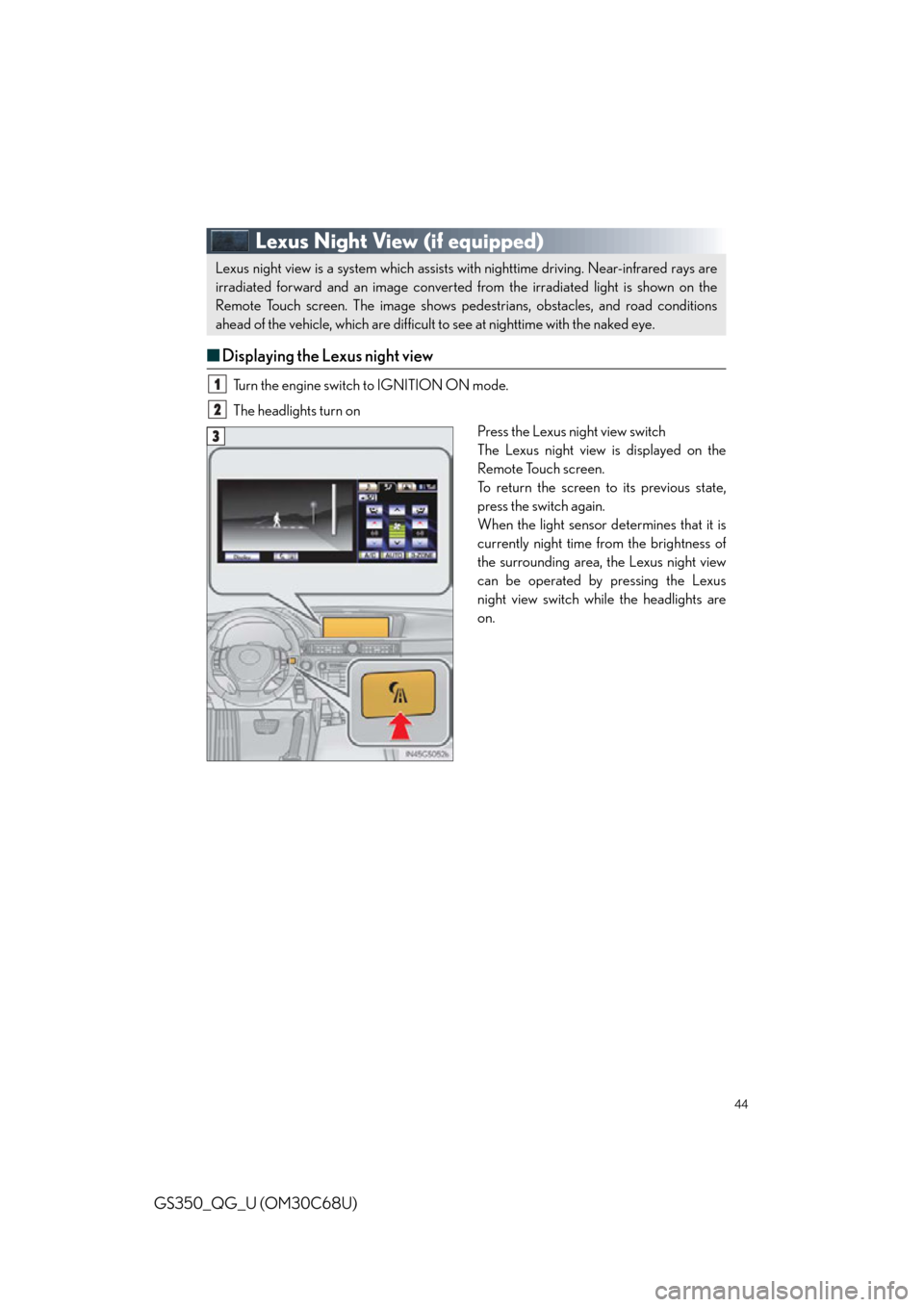
■Displaying the Lexus night view
Turn the engine switch to IGNITION ON mode.
The headlights turn on
Press the Lexus night view switch
The Lexus night view is displayed on the
Remote Touch screen.
To return the screen to its previous state,
press the switch again.
When the light sensor determines that it is
currently night time from the brightness of
the surrounding area, the Lexus night view
can be operated by pressing the Lexus
night view switch while the headlights are
on.
Lexus night view is a system which assists with nighttime driving. Near-infrared rays are
irradiated forward and an image converted from the irradiated light is shown on the
Remote Touch screen. The image shows pede strians, obstacles, and road conditions
ahead of the vehicle, which are difficult to see at nighttime with the naked eye.
1
2
3