phone Lexus GS350 2014 Navigation manual
[x] Cancel search | Manufacturer: LEXUS, Model Year: 2014, Model line: GS350, Model: Lexus GS350 2014Pages: 438, PDF Size: 54.27 MB
Page 52 of 438
52
2. NETWORK SETTINGS
GS_Navi+MM_OM30E40E_(EE)
14.07.24 15:56
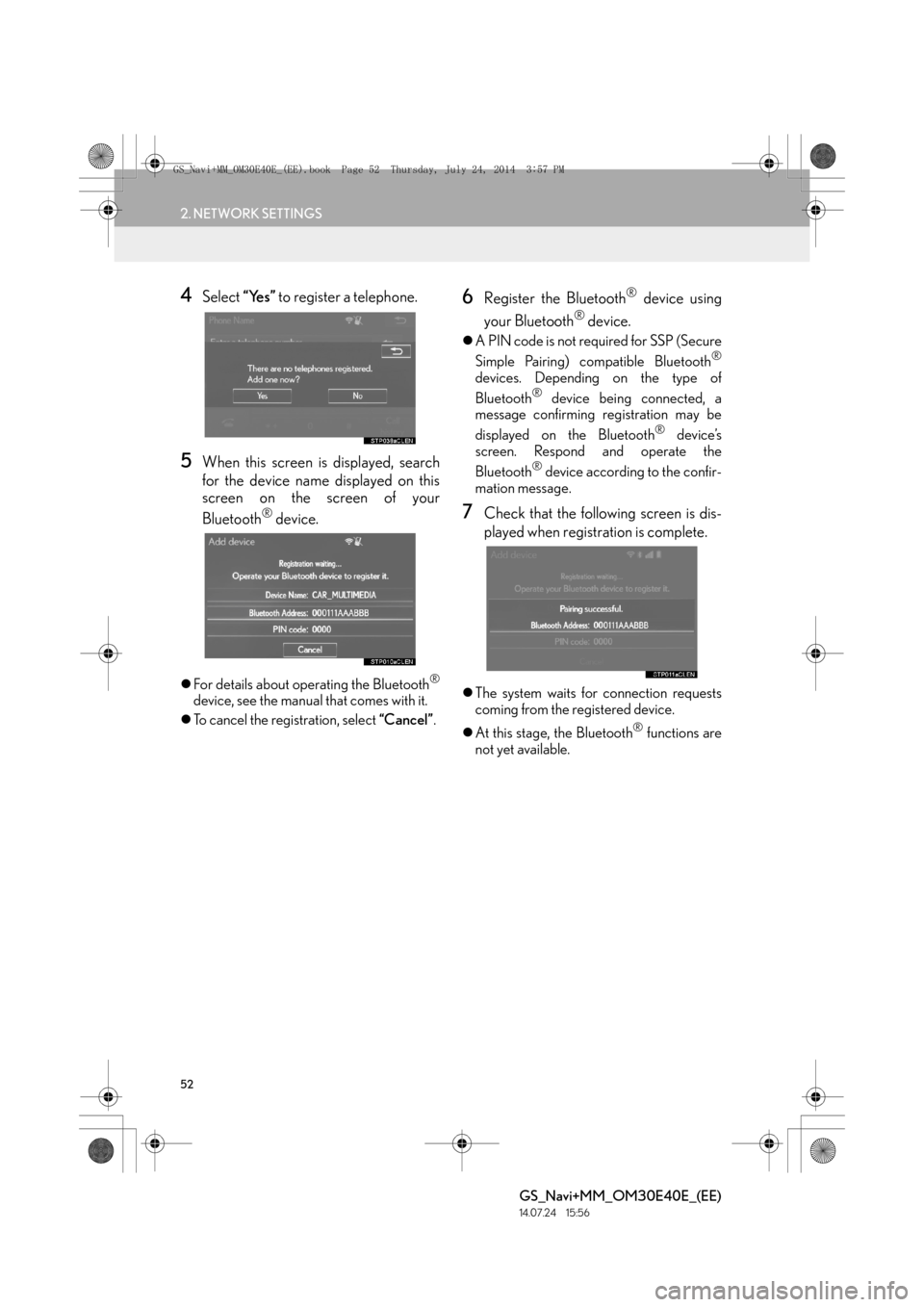
4Select “Yes” to register a telephone.
5When this screen is displayed, search
for the device name displayed on this
screen on the screen of your
Bluetooth
® device.
zFor details about operating the Bluetooth®
device, see the manual that comes with it.
z To cancel the registration, select “Cancel”.
6Register the Bluetooth® device using
your Bluetooth
® device.
z A PIN code is not required for SSP (Secure
Simple Pairing) compatible Bluetooth®
devices. Depending on the type of
Bluetooth® device being connected, a
message confirming registration may be
displayed on the Bluetooth
® device’s
screen. Respond and operate the
Bluetooth
® device according to the confir-
mation message.
7Check that the following screen is dis-
played when registration is complete.
z The system waits for connection requests
coming from the registered device.
z At this stage, the Bluetooth
® functions are
not yet available.
GS_Navi+MM_OM30E40E_(EE).book Page 52 Thursday, July 24, 2014 3:57 PM
Page 55 of 438
55
2. NETWORK SETTINGS
BASIC FUNCTION
GS_Navi+MM_OM30E40E_(EE)
14.07.24 15:56
2
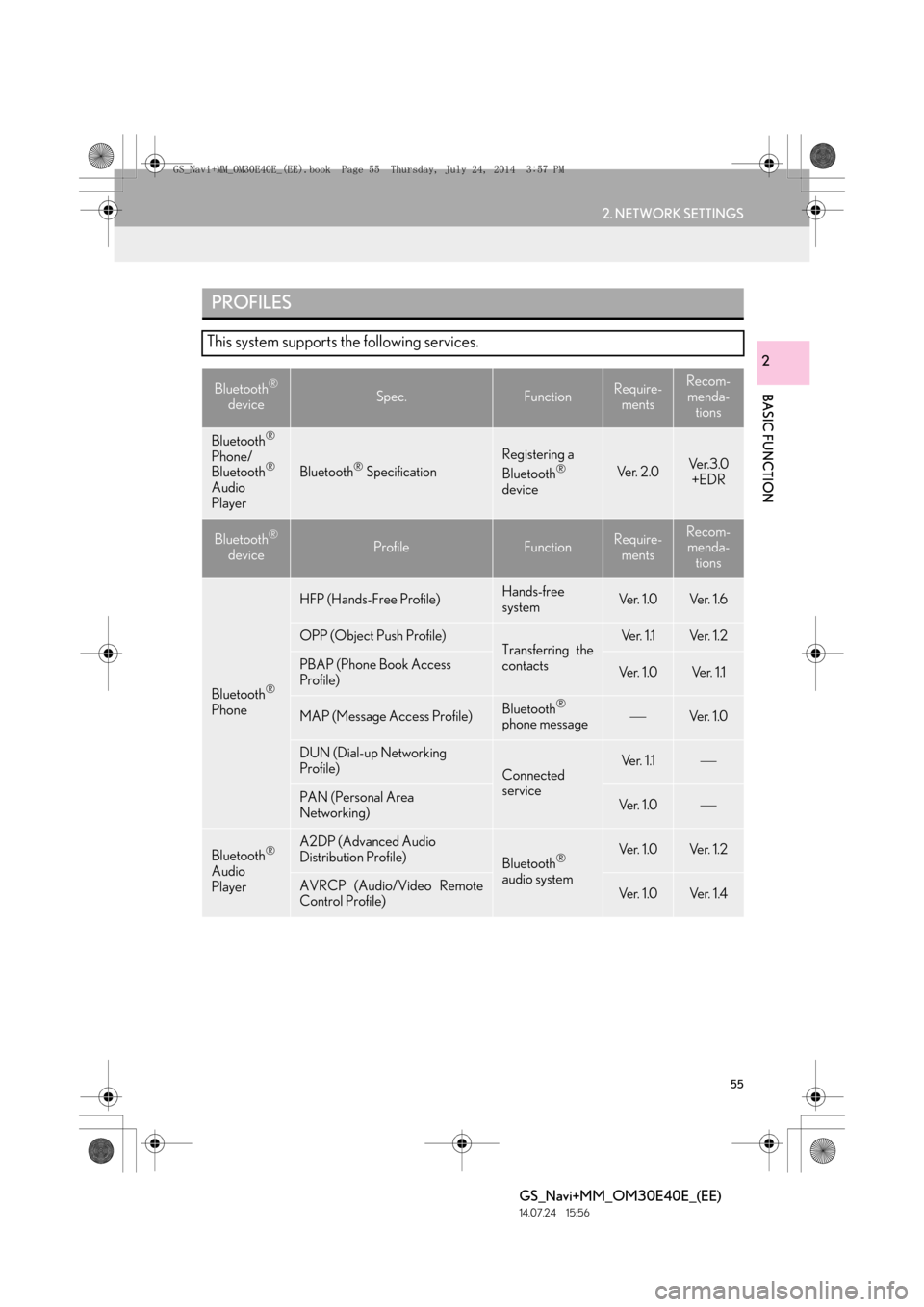
PROFILES
This system supports the following services.
Bluetooth®
deviceSpec.FunctionRequire- mentsRecom-
menda- tions
Bluetooth®
Phone/
Bluetooth®
Audio
PlayerBluetooth® Specification
Registering a
Bluetooth®
deviceVe r. 2 . 0Ve r. 3 . 0 +EDR
Bluetooth®
deviceProfileFunctionRequire- mentsRecom-menda- tions
Bluetooth®
Phone
HFP (Hands-Free Profile)Hands-free
systemVe r. 1 . 0Ve r. 1 . 6
OPP (Object Push Profile)Transferring the
contactsVe r. 1 .1Ve r. 1 . 2
PBAP (Phone Book Access
Profile)Ve r. 1 . 0Ve r. 1 .1
MAP (Message Access Profile)Bluetooth®
phone messageVe r. 1 .0
DUN (Dial-up Networking
Profile)
Connected
serviceVe r. 1 .1
PAN (Personal Area
Networking)Ve r. 1 . 0
Bluetooth®
Audio
Player
A2DP (Advanced Audio
Distribution Profile)
Bluetooth®
audio systemVe r. 1 . 0Ve r. 1 . 2
AVRCP (Audio/Video Remote
Control Profile)Ve r. 1 . 0Ve r. 1 . 4
GS_Navi+MM_OM30E40E_(EE).book Page 55 Thursday, July 24, 2014 3:57 PM
Page 56 of 438

56
2. NETWORK SETTINGS
GS_Navi+MM_OM30E40E_(EE)
14.07.24 15:56
Bluetooth is a registered trademark of Bluetooth SIG, Inc.
INFORMATION
●
If your cellular phone does not support HFP, registering the Bluetooth® phone or using
OPP, PBAP, MAP, DUN or PAN profiles individually will not be possible.
●If the connected Bluetooth® device version is older than recommended or incompatible,
the Bluetooth® device function may not work properly.
GS_Navi+MM_OM30E40E_(EE).book Page 56 Thursday, July 24, 2014 3:57 PM
Page 58 of 438

58
2. NETWORK SETTINGS
GS_Navi+MM_OM30E40E_(EE)
14.07.24 15:56
1Display the “Bluetooth*” screen.
(→ P.57)
2Select “Bluetooth* setup” .
3Select the desired item to be set.
■DISPLAYING THE “Bluetooth* set-
up” SCREEN IN A DIFFERENT WAY
1Display the telephone top screen.
(→ P.346)
2Select “Connect telephone” .
*: Bluetooth is a registered trademark of Bluetooth SIG, Inc.
“Bluetooth* setup” SCREEN
FunctionPage
Registering a Bluetooth® device59
Deleting a Bluetooth® device60
Connecting a Bluetooth® device61
Editing the Bluetooth® device in-
formation63
GS_Navi+MM_OM30E40E_(EE).book Page 58 Thursday, July 24, 2014 3:57 PM
Page 59 of 438

59
2. NETWORK SETTINGS
BASIC FUNCTION
GS_Navi+MM_OM30E40E_(EE)
14.07.24 15:56
2
1Select “A d d ”.
X When another Bluetooth
® device is con-
nected
z To disconnect the Bluetooth® device,
select “Yes”.
XWhen 5 Bluetooth® devices have al-
ready been registered
z A registered device needs to be replaced.
Select “Yes”, and select the device to be
replaced.
2When this screen is displayed, search
for the device name displayed on this
screen on the screen of your
Bluetooth
® device.
z For details about operating the Bluetooth®
device, see the manual that comes with it.
z To cancel the registration, select “Cancel”.
3Register the Bluetooth® device using
your Bluetooth
® device.
z A PIN code is not required for SSP (Secure
Simple Pairing) compatible Bluetooth®
devices. Depending on the type of
Bluetooth® device being connected, a
message confirming registration may be
displayed on the Bluetooth
® device’s
screen. Respond and operate the
Bluetooth
® device according to the confir-
mation message.
REGISTERING A Bluetooth®
DEVICE
Up to 5 Bluetooth
® devices can be reg-
istered.
Bluetooth
® compatible telephones
(HFP) and audio players (AVP) can be
registered simultaneously.
This operation cannot be performed
while driving.
GS_Navi+MM_OM30E40E_(EE).book Page 59 Thursday, July 24, 2014 3:57 PM
Page 60 of 438
60
2. NETWORK SETTINGS
GS_Navi+MM_OM30E40E_(EE)
14.07.24 15:56
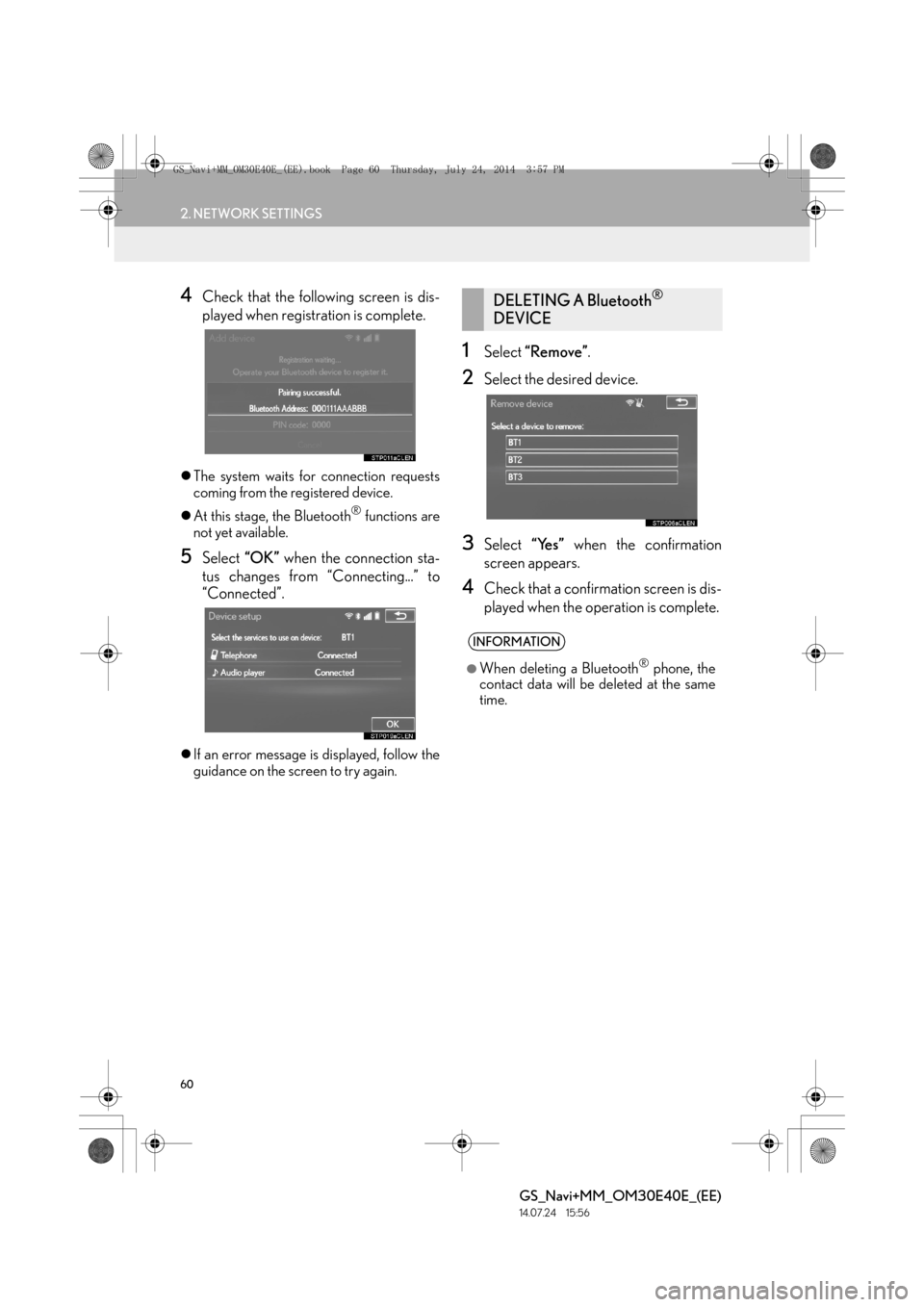
4Check that the following screen is dis-
played when registration is complete.
zThe system waits for connection requests
coming from the registered device.
z At this stage, the Bluetooth
® functions are
not yet available.
5Select “OK” when the connection sta-
tus changes from “Connecting...” to
“Connected”.
z If an error message is displayed, follow the
guidance on the screen to try again.
1Select “Remove” .
2Select the desired device.
3Select “Yes” when the confirmation
screen appears.
4Check that a confirmation screen is dis-
played when the operation is complete.
DELETING A Bluetooth®
DEVICE
INFORMATION
●
When deleting a Bluetooth® phone, the
contact data will be deleted at the same
time.
GS_Navi+MM_OM30E40E_(EE).book Page 60 Thursday, July 24, 2014 3:57 PM
Page 61 of 438

61
2. NETWORK SETTINGS
BASIC FUNCTION
GS_Navi+MM_OM30E40E_(EE)
14.07.24 15:56
2
1Select the device to be connected.
zSupported profile icons will be displayed.
: Telephone
: Audio player
zSupported profile icons for currently con-
nected devices will illuminate.
z Dimmed icons can be selected to connect
to the function directly.
2Select the desired connection.
X When another Bluetooth
® device is con-
nected
z To disconnect the Bluetooth® device,
select “Yes”.
3Check that a confirmation screen is dis-
played when the connection is complete.
z If an error message is displayed, follow the
guidance on the screen to try again.
CONNECTING A Bluetooth®
DEVICE
Up to 5 Bluetooth
® devices (Tele-
phones (HFP) and audio players (AVP))
can be registered.
If more than 1 Bluetooth
® device has
been registered, select which device to
connect to.
z If the desired Bluetooth® device is not on
the list, select “A d d ” to register the
device. ( →P. 5 9 )
INFORMATION
●
It may take time if the device connection
is carried out during Bluetooth® audio
playback.
●Depending on the type of Bluetooth®
device being connected, it may be neces-
sary to perform additional steps on the
device.
GS_Navi+MM_OM30E40E_(EE).book Page 61 Thursday, July 24, 2014 3:57 PM
Page 62 of 438

62
2. NETWORK SETTINGS
GS_Navi+MM_OM30E40E_(EE)
14.07.24 15:56
■AUTO CONNECTION MODE
zWhen the engine
ACCESSORY or IGNITION ON
mode, the system searches for a nearby
registered device.
z The system will connect with the registered
device that was last connected, if it is
nearby.
■ CONNECTING MANUALLY
1Press the “MENU” button on the
Remote Touch and select “Setup”.
2Select “Bluetooth*” .
3Follow the steps in “CONNECTING A
Bluetooth
® DEVICE” from “STEP 1”.
( → P.61)
*: Bluetooth is a registered trademark of Bluetooth SIG, Inc.
■ RECONNECTING THE Bluetooth®
PHONE
zIf a Bluetooth® phone is disconnected on
purpose, such as turning it off, this does not
happen. Reconnect the Bluetooth
® phone
manually.
To turn auto connection mode on, set
“Bluetooth* power” to on. ( →P.66)
Leave the Bluetooth
® device in a loca-
tion where the connection can be estab-
lished.
When the auto connection has failed or
“Bluetooth* power” is turned off, it is
necessary to connect Bluetooth
® man-
ually.
If a Bluetooth® phone is disconnected
due to poor reception from the
Bluetooth
® network when the engine
IGNITION ON
tem automatically reconnects the
Bluetooth
® phone.
GS_Navi+MM_OM30E40E_(EE).book Page 62 Thursday, July 24, 2014 3:57 PM
Page 63 of 438

63
2. NETWORK SETTINGS
BASIC FUNCTION
GS_Navi+MM_OM30E40E_(EE)
14.07.24 15:56
2
1Select the desired device to be edited.
2Select “Device info” .
3Confirm and change the Bluetooth®
device information.
EDITING THE Bluetooth®
DEVICE INFORMATION
The Bluetooth
® device’s information
can be displayed on the screen. The dis-
played information can be edited.
No.Information
The name of the Bluetooth® device
can be changed to a desired name.
( → P.64)
Device address is unique to the de-
vice and cannot be changed.
The telephone number of the
Bluetooth® phone.
Compatibility profile of the
Bluetooth® device.
Select to set the Bluetooth® audio
player connection method. ( →P.64)
Select to reset all setup items.
GS_Navi+MM_OM30E40E_(EE).book Page 63 Thursday, July 24, 2014 3:57 PM
Page 64 of 438

64
2. NETWORK SETTINGS
GS_Navi+MM_OM30E40E_(EE)
14.07.24 15:56
■CHANGING A DEVICE NAME
1Select “Device name” .
2Enter the name and select “OK”.
■SETTING AUDIO PLAYER CON-
NECTION METHOD
1Select “Connect audio player from” .
2Select the desired connection method.
“Vehicle” : Select to connect the audio sys-
tem to the audio player.
“Device” : Select to connect the audio play-
er to the audio system.
z Depending on the audio player, the “Vehi-
cle” or “Device” connection method may
be best. As such, refer to the manual that
comes with the audio player.
z To reset the connection method, select
“Defaults” .
INFORMATION
●
If 2 Bluetooth® devices have been regis-
tered with the same device name, the
devices can be distinguished referring to
the device’s address.
●Depending on the type of telephone,
some information may not be displayed.
INFORMATION
●
Even if the device name is changed, the
name registered in your Bluetooth®
device does not change.
GS_Navi+MM_OM30E40E_(EE).book Page 64 Thursday, July 24, 2014 3:57 PM