phone Lexus GS350 2014 Navigation manual
[x] Cancel search | Manufacturer: LEXUS, Model Year: 2014, Model line: GS350, Model: Lexus GS350 2014Pages: 438, PDF Size: 54.27 MB
Page 65 of 438

65
2. NETWORK SETTINGS
BASIC FUNCTION
GS_Navi+MM_OM30E40E_(EE)
14.07.24 15:56
2
1Display the “Bluetooth*” screen.
(→ P.57)
2Select “Detailed Bluetooth* settings” .
3Select the desired item to be set.
*: Bluetooth is a registered trademark of Bluetooth SIG, Inc.
“Detailed Bluetooth* settings”
SCREEN
The Bluetooth® settings can be con-
firmed and changed.
No.InformationPage
Select to set Bluetooth®
connection on/off. 66
Displayed system name can
be changed to a desired
name.66
PIN code used when the
Bluetooth® device was reg-
istered. It can be changed to
a desired code.66
Device address is unique to
the device and cannot be
changed.
Select to set the telephone
connection status display
on/off.
Select to set the connection
status display of the audio
player on/off.
Compatibility profile of the
system.
Select to reset all setup
items.
GS_Navi+MM_OM30E40E_(EE).book Page 65 Thursday, July 24, 2014 3:57 PM
Page 68 of 438

68
2. NETWORK SETTINGS
GS_Navi+MM_OM30E40E_(EE)
14.07.24 15:56
7Select a country.
zThe previous screen will be displayed.
8Select “Provider” on the “Communica-
tion settings” screen.
9Select your mobile network provider.
10Select “OK” on the “Communication
settings” screen.
z If “Other ” is selected for country and/or
mobile network provider, the “Detail set-
tings” screen will be displayed. ( →P. 6 9 )
z The system will automatically set the details
of the mobile network provider’s informa-
tion and perform a communication con-
nection test.
z If the setting cannot be performed auto-
matically, the “Detail settings” screen will be
displayed. ( →P. 6 9 )
11When the cellular phone has been con-
nected successfully, “Data connection
successful.” will be displayed on the
screen. The online search and importing
memory points function will be avail-
able.
zBefore performing a communication
connection test, a confirmation screen
will be displayed in accordance with the
connected service settings. ( →P. 4 1 3 )
z When accessing Lexus portal site using a
cellular phone, your user name and pass-
word will be required. ( →P. 6 9 )
GS_Navi+MM_OM30E40E_(EE).book Page 68 Thursday, July 24, 2014 3:57 PM
Page 84 of 438

84
3. OTHER SETTINGS
GS_Navi+MM_OM30E40E_(EE)
14.07.24 15:56
1Display the “General settings” screen.
(→ P.76)
2Select “Delete personal data” .
3Select “Delete” .
4Select “Yes” when the confirmation
screen appears.
z Registered or changed personal settings
will be deleted or returned to their default
conditions.
Fo r example:
• General settings
• Navigation settings*
• Audio settings
•Telephone settings
• Connected service settings*
*: Vehicles with navigation system
DELETING PERSONAL DATA
GS_Navi+MM_OM30E40E_(EE).book Page 84 Thursday, July 24, 2014 3:57 PM
Page 90 of 438

90
3. OTHER SETTINGS
GS_Navi+MM_OM30E40E_(EE)
14.07.24 15:56
3Select the desired item to be edited.■EDITING DEALER OR CONTACT
NAME
1Select “Dealer” or “Contact” .
2Enter the name and select “OK”.
■EDITING THE LOCATION
1Select “Location” .
2Scroll the map to the desired point
(→ P.105) and select “OK”.
■EDITING TELEPHONE NUMBER
1Select “Tel. no.” .
2Enter the telephone number and select
“OK”.
No.FunctionPage
Select to enter the name of
a dealer.90
Select to enter the name of
a dealer member.90
Select to set the location.90
Select to set the telephone
number.90
Select to set the displayed
dealer as a destination.133
Select to delete the dealer
information displayed on
the screen.
GS_Navi+MM_OM30E40E_(EE).book Page 90 Thursday, July 24, 2014 3:57 PM
Page 92 of 438

92
GS_Navi+MM_OM30E40E_(EE)
14.07.24 15:56
1. DESTINATION SEARCH SCREEN......................................................118
2. SEARCH OPERATION ......................... 120
SELECTING THE SEARCH AREA ................. 121
SETTING HOME AS DESTINATION............ 121
SETTING QUICK ACCESS AS DESTINATION...................................................... 122
SEARCHING BY ADDRESS ............................. 122
SEARCHING BY POI*
2...................................... 125
SEARCHING BY MAP......................................... 126
SEARCHING BY MEMORY POINTS ......... 126
SEARCHING FROM PREVIOUS DESTINATIONS ................................................... 127
SEARCHING BY INTERSECTION ............... 128
SEARCHING BY MOTORWAY ENTRANCE/EXIT ............................................... 129
SEARCHING BY COORDINATES .............. 130
SEARCHING BY TELEPHONE NUMBER.................................................................. 130
SEARCHING BY POI*
2 NEAR
CURSOR ................................................................... 131
SEARCHING BY UK/NL POSTAL CODE ........................................................................ 132
3. STARTING ROUTE GUIDANCE ...... 133
STARTING ROUTE GUIDANCE................... 133
SUSPENDING GUIDANCE ............................. 137
1. ROUTE GUIDANCE SCREEN .......... 138
ROUTE GUIDANCE SCREEN....................... 138
DURING MOTORWAY DRIVING ............... 142
WHEN APPROACHING INTERSECTION ................................................... 143
TURN LIST SCREEN .............................................. 144
ARROW SCREEN .................................................. 144
2. TYPICAL VOICE GUIDANCE PROMPTS.................................................145
3. EDITING ROUTE ......................................146
ADDING DESTINATIONS ................................ 147
REORDERING DESTINATIONS.................... 148
DELETING DESTINATIONS............................. 148
SETTING SEARCH CONDITION ................. 149
DETOUR SETTING ................................................ 149
ROAD PREFERENCE .......................................... 150
ROUTE OVERVIEW............................................... 151
2DESTINATION SEARCH3ROUTE GUIDANCE
GS_Navi+MM_OM30E40E_(EE).book Page 92 Thursday, July 24, 2014 3:57 PM
Page 95 of 438
95
1. BASIC OPERATION
GS_Navi+MM_OM30E40E_(EE)
14.07.24 15:56
NAVIGATION SYSTEM
3
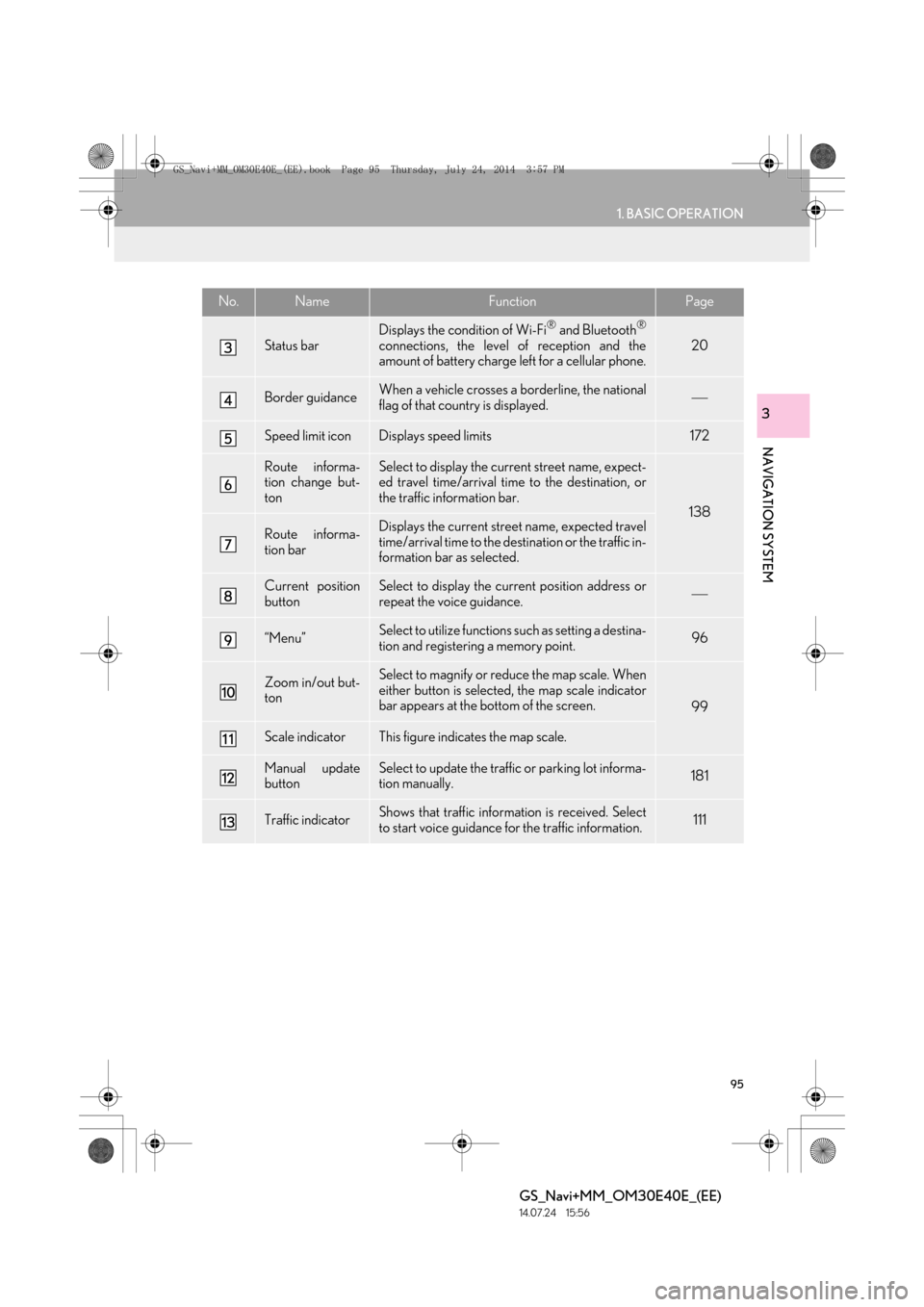
Status bar
Displays the condition of Wi-Fi® and Bluetooth®
connections, the level of reception and the
amount of battery charge left for a cellular phone.20
Border guidanceWhen a vehicle crosses a borderline, the national
flag of that country is displayed.
Speed limit iconDisplays speed limits172
Route informa-
tion change but-
tonSelect to display the current street name, expect-
ed travel time/arrival time to the destination, or
the traffic information bar.
138
Route informa-
tion barDisplays the current street name, expected travel
time/arrival time to the destination or the traffic in-
formation bar as selected.
Current position
buttonSelect to display the current position address or
repeat the voice guidance.
“Menu”Select to utilize functions such as setting a destina-
tion and registering a memory point.96
Zoom in/out but-
tonSelect to magnify or reduce the map scale. When
either button is selected, the map scale indicator
bar appears at the bottom of the screen.
99
Scale indicatorThis figure indicates the map scale.
Manual update
buttonSelect to update the traffic or parking lot informa-
tion manually. 181
Traffic indicatorShows that traffic information is received. Select
to start voice guidance for the traffic information.111
No.NameFunctionPage
GS_Navi+MM_OM30E40E_(EE).book Page 95 Thursday, July 24, 2014 3:57 PM
Page 110 of 438

110
1. BASIC OPERATION
GS_Navi+MM_OM30E40E_(EE)
14.07.24 15:56
No.Function
Select to set as a destination.
(→ P.133) If a destination has al-
ready been set, “Add to ” and “Re-
place ” will be displayed.
“A d d t o ” : Select to add a destina-
tion.
“Replace ” : Select to delete the
existing destination(s) and set a new
one.
Select to register as a memory point.
Select to call the registered tele-
phone number.
Select to edit a memory point.
( → P.157)
Select to delete a memory point.
Select to display a QR code. Desti-
nation information can be acquired
by scanning the QR code with a cel-
lular phone.
Select to delete a destination.
Select to display detailed informa-
tion.
INFORMATION
●
Even when traffic/parking information is
not currently being received, traffic infor-
mation and “Info” will be displayed for a
while after traffic information has been
received.
STANDARD MAP ICONS
IconInformation
Town with > 1 million people
Town with 500,000-1 mil-
lion people
Town with 200,000-
500,000 people
Town with 100,000-
200,000 people
Town with 20,000-
100,000 people
Town with 10,000-20,000
people
Town with < 10,000 people
Park/Monument
Golf Course
Airport
Hospital/Polyclinic
Shopping centre
University/College
GS_Navi+MM_OM30E40E_(EE).book Page 110 Thursday, July 24, 201 4 3:57 PM
Page 111 of 438
111
1. BASIC OPERATION
GS_Navi+MM_OM30E40E_(EE)
14.07.24 15:56
NAVIGATION SYSTEM
3
4. TRAFFIC AND PARKING INFORMATION
*: Can only be used when receiving RDS-TMCor TPEG (Transport Protocol Experts Group)
information. Depending on the country or ar-
ea, receiving RDS-TMC and TPEG informa-
tion may not be possible.
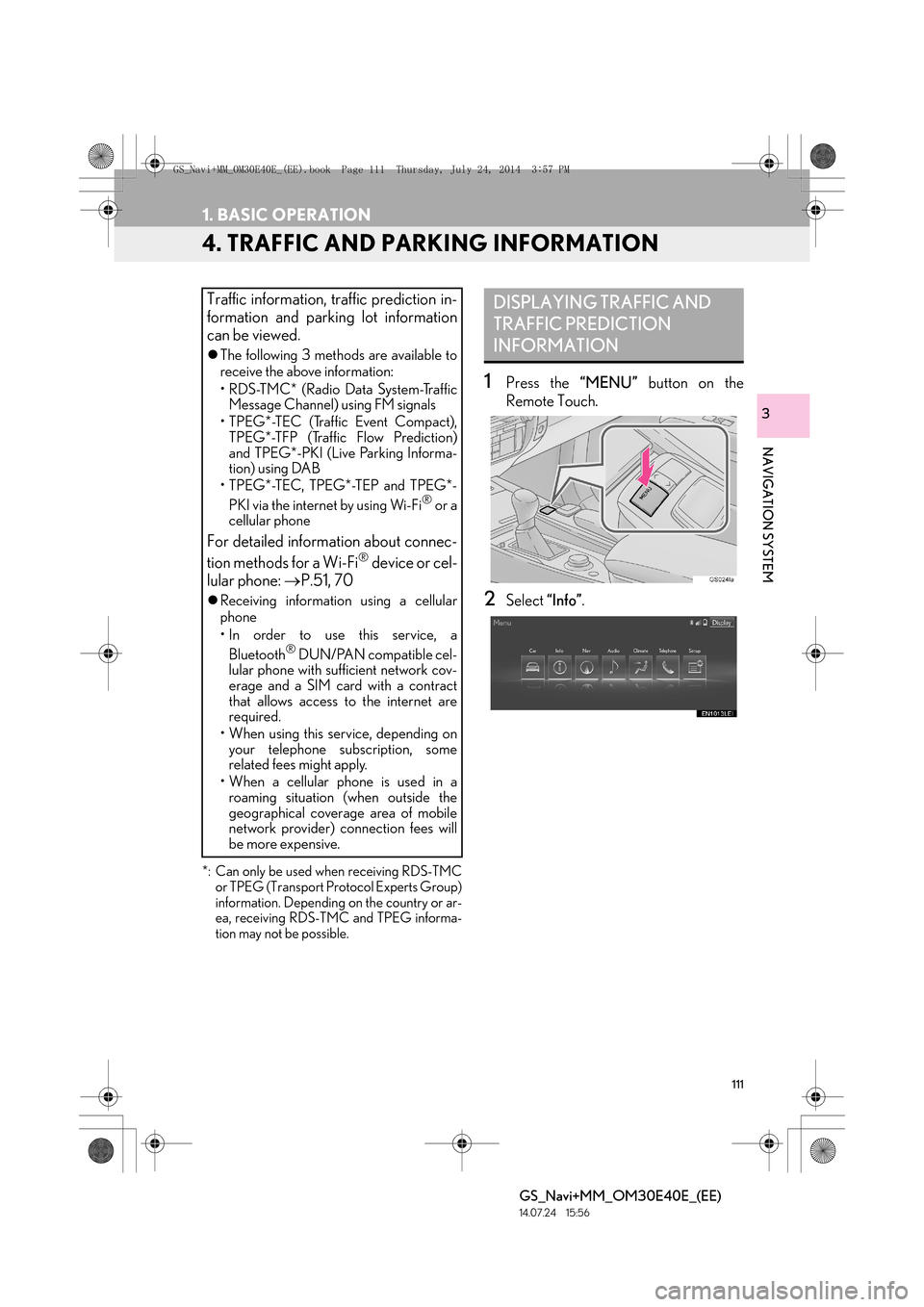
1Press the “MENU” button on the
Remote Touch.
2Select “Info”.
Traffic information, traffic prediction in-
formation and parking lot information
can be viewed.
zThe following 3 methods are available to
receive the above information:
• R D S -T M C * ( R a d i o D a t a S y s t e m -Tr a f f i c
Message Channel) using FM signals
• TPEG*-TEC (Traffic Event Compact), TPEG*-TFP (Traffic Flow Prediction)
and TPEG*-PKI (Live Parking Informa-
tion) using DAB
• TPEG*-TEC, TPEG*-TEP and TPEG*-
PKI via the internet by using Wi-Fi
® or a
cellular phone
For detailed information about connec-
tion methods for a Wi-Fi® device or cel-
lular phone: →P.51, 70
zReceiving informatio n using a cellular
phone
• In order to use this service, a
Bluetooth
® DUN/PAN compatible cel-
lular phone with sufficient network cov-
erage and a SIM card with a contract
that allows access to the internet are
required.
• When using this service, depending on your telephone subscription, some
related fees might apply.
• When a cellular phone is used in a roaming situation (when outside the
geographical coverage area of mobile
network provider) connection fees will
be more expensive.
DISPLAYING TRAFFIC AND
TRAFFIC PREDICTION
INFORMATION
GS_Navi+MM_OM30E40E_(EE).book Page 111 Thursday, July 24, 201 4 3:57 PM
Page 119 of 438

119
2. DESTINATION SEARCH
GS_Navi+MM_OM30E40E_(EE)
14.07.24 15:56
NAVIGATION SYSTEM
3
Select to search for a destination by the last displayed map.126
Select to search for a destination by memory points.126
Select to search for a destination from previously set destinations.127
Select to search for a destination by intersection.128
Select to search for a destination by motorway entrance/exit.129
Select to search for a destination by UK/NL postal code.132
Select to search for a destination by coordinates.130
Select to search for a destination by telephone number.130
Select to search for a destination by point of interest near cursor.131
Select to set a destination by home.121
Select to set a destination by quick access.122
No.FunctionPage
GS_Navi+MM_OM30E40E_(EE).book Page 119 Thursday, July 24, 2014 3:57 PM
Page 130 of 438
130
2. DESTINATION SEARCH
GS_Navi+MM_OM30E40E_(EE)
14.07.24 15:56
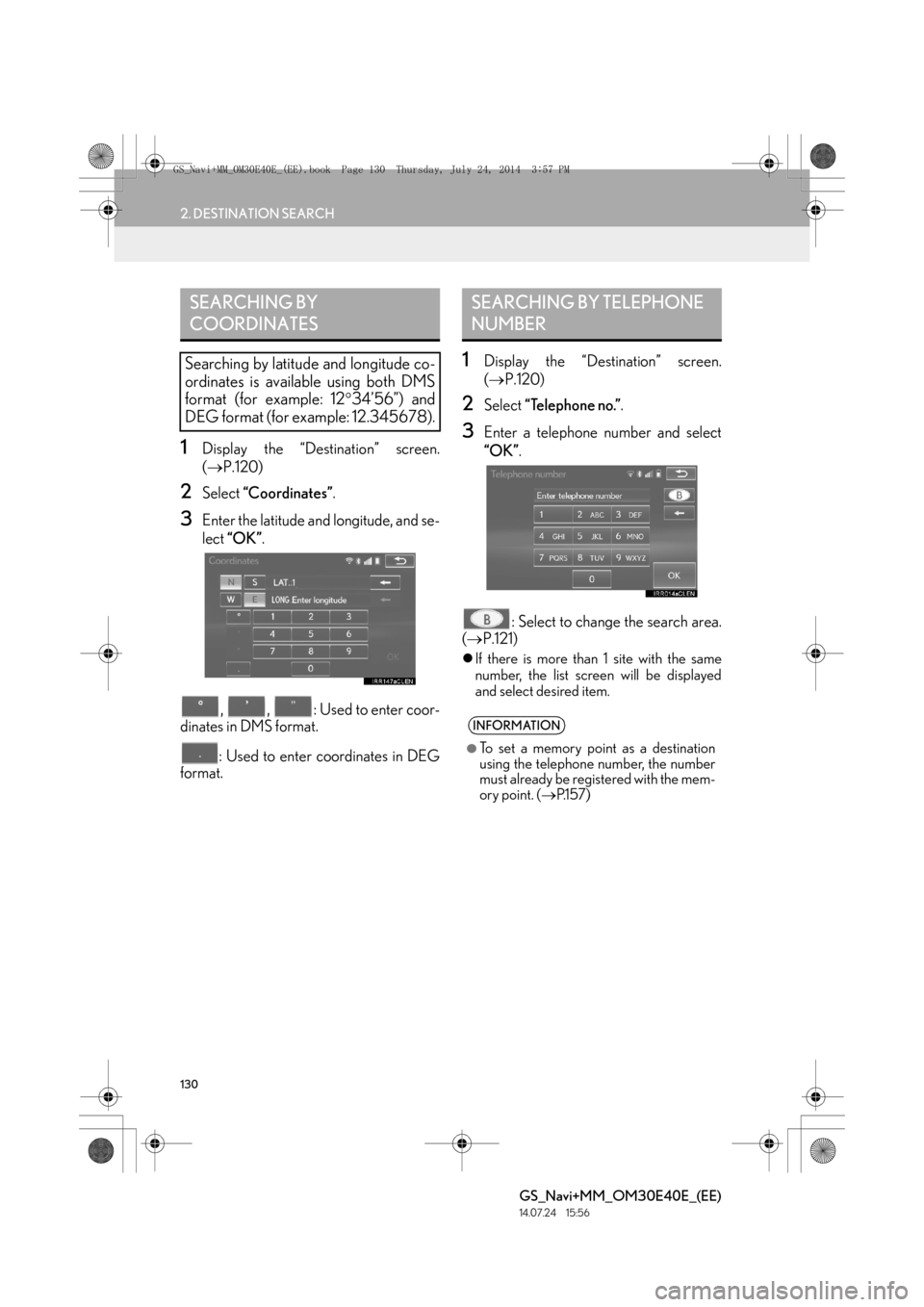
1Display the “Destination” screen.
(→ P.120)
2Select “Coordinates” .
3Enter the latitude and longitude, and se-
lect “OK” .
, , : Used to enter coor-
dinates in DMS format.
: Used to enter coordinates in DEG
format.
1Display the “Destination” screen.
( → P.120)
2Select “Telephone no.” .
3Enter a telephone number and select
“OK”.
: Select to change the search area.
( → P.121)
zIf there is more than 1 site with the same
number, the list screen will be displayed
and select desired item.
SEARCHING BY
COORDINATES
Searching by latitude and longitude co-
ordinates is available using both DMS
format (for example: 12 °34’56”) and
DEG format (for example: 12.345678).
SEARCHING BY TELEPHONE
NUMBER
INFORMATION
●
To set a memory point as a destination
using the telephone number, the number
must already be registered with the mem-
ory point. ( →P.1 5 7 )
GS_Navi+MM_OM30E40E_(EE).book Page 130 Thursday, July 24, 201 4 3:57 PM