phone Lexus GS350 2014 Navigation manual
[x] Cancel search | Manufacturer: LEXUS, Model Year: 2014, Model line: GS350, Model: Lexus GS350 2014Pages: 438, PDF Size: 54.27 MB
Page 366 of 438
366
2. SETUP
GS_Navi+MM_OM30E40E_(EE)
14.07.24 15:56
1Display the “Telephone settings”
screen. (→P.365)
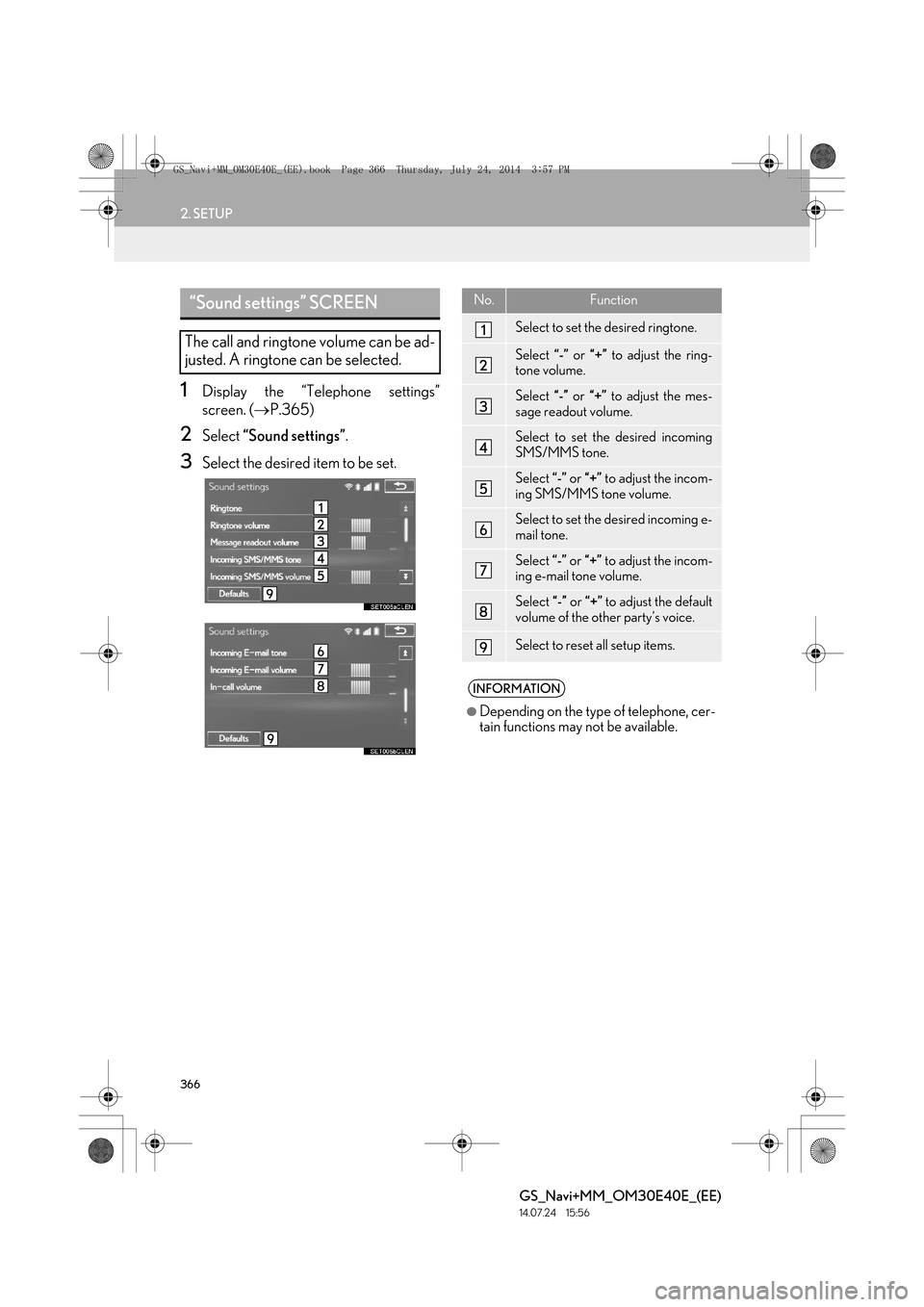
2Select “Sound settings” .
3Select the desired item to be set.
“Sound settings” SCREEN
The call and ringtone volume can be ad-
justed. A ringtone can be selected.
No.Function
Select to set the desired ringtone.
Select “-” or “+” to adjust the ring-
tone volume.
Select “-” or “+” to adjust the mes-
sage readout volume.
Select to set the desired incoming
SMS/MMS tone.
Select “-” or “+” to adjust the incom-
ing SMS/MMS tone volume.
Select to set the desired incoming e-
mail tone.
Select “-” or “+” to adjust the incom-
ing e-mail tone volume.
Select “-” or “+” to adjust the default
volume of the other party’s voice.
Select to reset all setup items.
INFORMATION
●
Depending on the type of telephone, cer-
tain functions may not be available.
GS_Navi+MM_OM30E40E_(EE).book Page 366 Thursday, July 24, 201 4 3:57 PM
Page 367 of 438

367
2. SETUP
TELEPHONE
GS_Navi+MM_OM30E40E_(EE)
14.07.24 15:56
7
1Display the “Telephone settings”
screen. (→P.365)
2Select “Messaging settings” .
3Select the desired item to be set.
“Messaging settings” SCREENNo.Function
Select to set automatic message
transfer on/off.
Select to set automatic message
readout on/off.
Select to set the SMS/MMS notifica-
tion popup on/off.
Select to set the e-mail notification
popup on/off.
Select to set adding the vehicle signa-
ture to outgoing messages on/off.
Select to set updating message read
status on telephone on/off.
Select to change the incoming SMS/
MMS display.
“Full screen”: When an SMS/MMS
message is received, the incoming
SMS/MMS display screen is dis-
played and can be operated on the
screen.
“Drop down” : When an SMS/MMS
message is received, a message is
displayed on the upper side of the
screen.
GS_Navi+MM_OM30E40E_(EE).book Page 367 Thursday, July 24, 201 4 3:57 PM
Page 368 of 438
368
2. SETUP
GS_Navi+MM_OM30E40E_(EE)
14.07.24 15:56
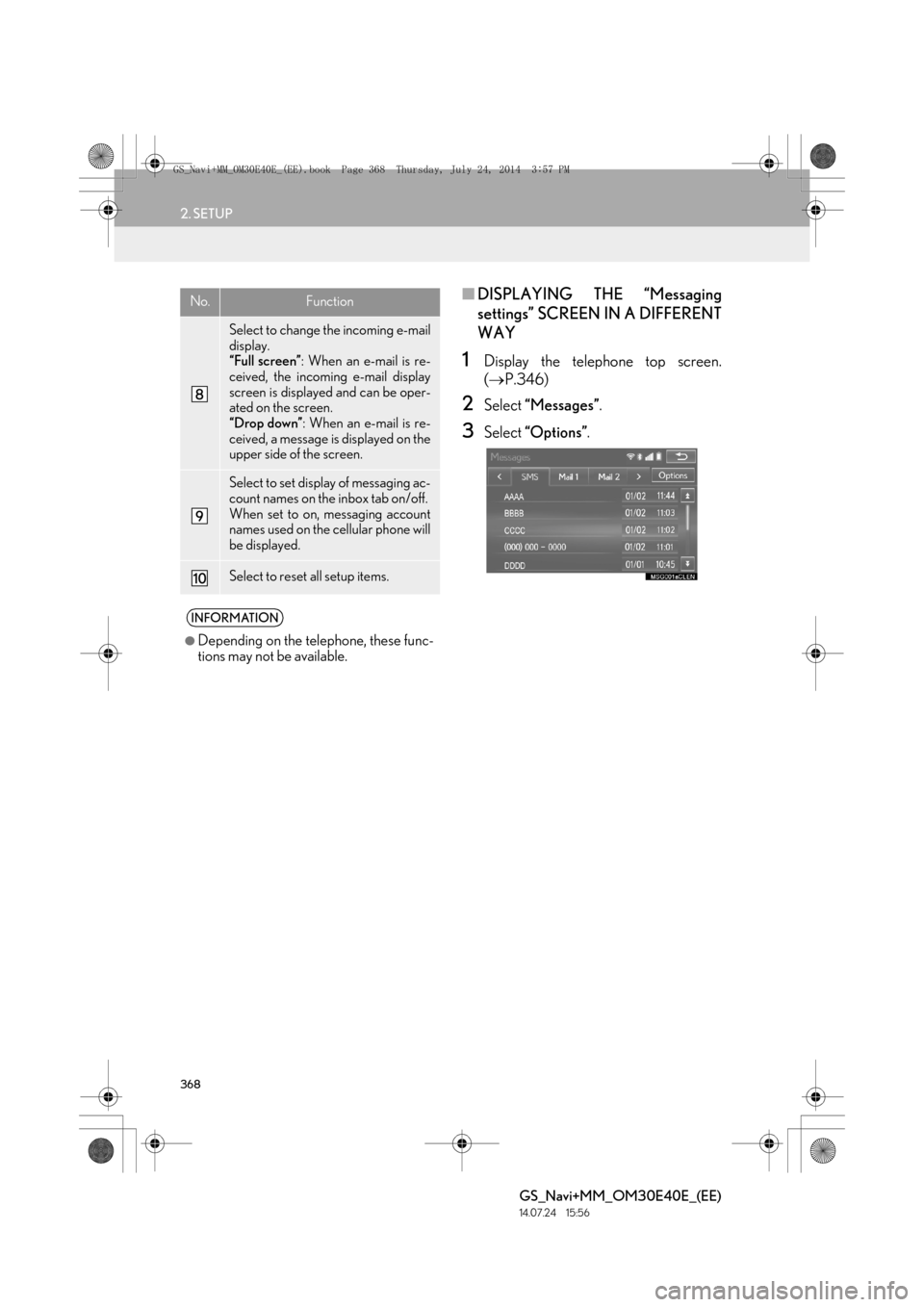
■DISPLAYING THE “Messaging
settings” SCREEN IN A DIFFERENT
WAY
1Display the telephone top screen.
(→ P.346)
2Select “Messages” .
3Select “Options” .
Select to change the incoming e-mail
display.
“Full screen” : When an e-mail is re-
ceived, the incoming e-mail display
screen is displayed and can be oper-
ated on the screen.
“Drop down” : When an e-mail is re-
ceived, a message is displayed on the
upper side of the screen.
Select to set display of messaging ac-
count names on the inbox tab on/off.
When set to on, messaging account
names used on the cellular phone will
be displayed.
Select to reset all setup items.
INFORMATION
●
Depending on the telephone, these func-
tions may not be available.
No.Function
GS_Navi+MM_OM30E40E_(EE).book Page 368 Thursday, July 24, 201 4 3:57 PM
Page 369 of 438
369
2. SETUP
TELEPHONE
GS_Navi+MM_OM30E40E_(EE)
14.07.24 15:56
7
1Display the “Telephone settings”
screen. (→P.365)
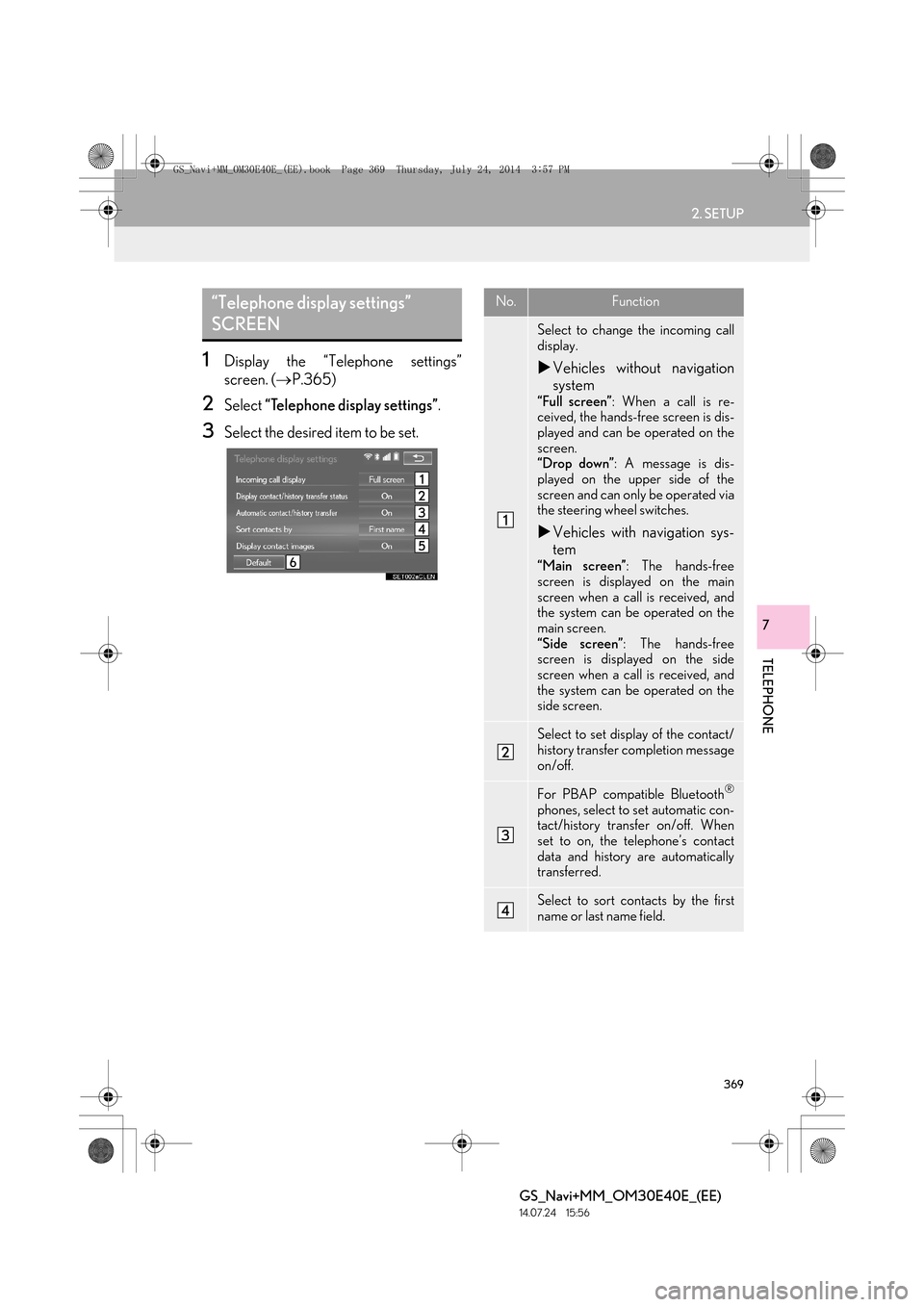
2Select “Telephone display settings” .
3Select the desired item to be set.
“Telephone display settings”
SCREENNo.Function
Select to change the incoming call
display.
XVehicles without navigation
system
“Full screen” : When a call is re-
ceived, the hands-free screen is dis-
played and can be operated on the
screen.
“Drop down” : A message is dis-
played on the upper side of the
screen and can only be operated via
the steering wheel switches.
X Vehicles with navigation sys-
tem
“Main screen” : The hands-free
screen is displayed on the main
screen when a call is received, and
the system can be operated on the
main screen.
“Side screen” : The hands-free
screen is displayed on the side
screen when a call is received, and
the system can be operated on the
side screen.
Select to set display of the contact/
history transfer completion message
on/off.
For PBAP compatible Bluetooth®
phones, select to set automatic con-
tact/history transfer on/off. When
set to on, the telephone’s contact
data and history are automatically
transferred.
Select to sort contacts by the first
name or last name field.
GS_Navi+MM_OM30E40E_(EE).book Page 369 Thursday, July 24, 201 4 3:57 PM
Page 370 of 438
370
2. SETUP
GS_Navi+MM_OM30E40E_(EE)
14.07.24 15:56
1Display the “Telephone settings”
screen. (→P.365)
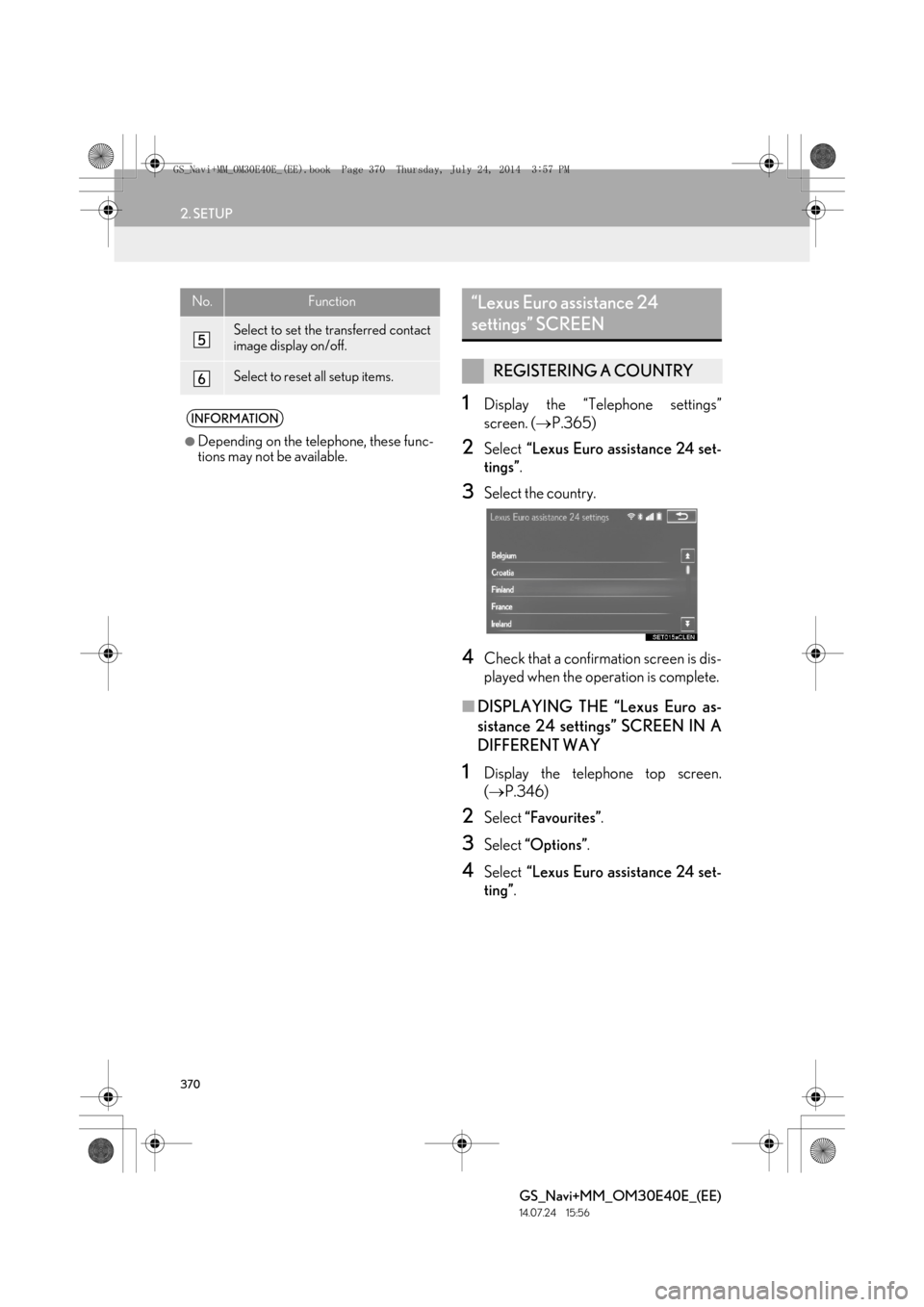
2Select “Lexus Euro assistance 24 set-
tings” .
3Select the country.
4Check that a confirmation screen is dis-
played when the operation is complete.
■DISPLAYING THE “Lexus Euro as-
sistance 24 settings” SCREEN IN A
DIFFERENT WAY
1Display the telephone top screen.
(→ P.346)
2Select “Favourites” .
3Select “Options” .
4Select “Lexus Euro assistance 24 set-
ting” .
Select to set the transferred contact
image display on/off.
Select to reset all setup items.
INFORMATION
●
Depending on the telephone, these func-
tions may not be available.
No.Function“Lexus Euro assistance 24
settings” SCREEN
REGISTERING A COUNTRY
GS_Navi+MM_OM30E40E_(EE).book Page 370 Thursday, July 24, 201 4 3:57 PM
Page 371 of 438

371
2. SETUP
TELEPHONE
GS_Navi+MM_OM30E40E_(EE)
14.07.24 15:56
7
1Display the telephone top screen.
(→ P.346)
2Select “Favourites” .
3Select “Lexus Euro assistance 24” .
X If a country has not been registered
4Select a country.
5Select “Yes” when the confirmation
screen appears. X
If a country has already been registered
4Select the registered country’s screen
button.
5Select another country to replace the
existing country.
6Select “Yes” when the confirmation
screen appears.
REGISTERING A COUNTRY IN
A DIFFERENT WAY
GS_Navi+MM_OM30E40E_(EE).book Page 371 Thursday, July 24, 201 4 3:57 PM
Page 372 of 438

372
2. SETUP
GS_Navi+MM_OM30E40E_(EE)
14.07.24 15:56
2. CONTACT SETTINGS
1Press the “MENU” button on the
Remote Touch.
2Select “Setup” .
3Select “Telephone” .
4Select “Contacts” .
5Select the desired item to be set.
No.FunctionPage
Select to transfer contacts
from the connected tele-
phone to the system and to
add/edit/delete contacts.
373
Select to add or delete con-
tacts to the favourites list. 380
Select to clear contacts
from the call history. 384
INFORMATION
●
Depending on the type of telephone, cer-
tain functions may not be available.
●Contact data is managed independently
for every registered telephone. When
one telephone is connected, another
telephone’s registered data cannot be
read.
GS_Navi+MM_OM30E40E_(EE).book Page 372 Thursday, July 24, 201 4 3:57 PM
Page 373 of 438

373
2. SETUP
TELEPHONE
GS_Navi+MM_OM30E40E_(EE)
14.07.24 15:56
7
1Display the “Contacts” screen.
(→ P.372)
2Select “Manage contacts” .
3Select the desired item to be set.
*: For PBAP compatible Bluetooth
®
phones, this function is available when
“Automatic contact/history transfer” is
set to off. ( →P.369)
■DISPLAYING THE “Contacts”
SCREEN IN A DIFFERENT WAY
1Display the telephone top screen.
(→ P.346)
2Select “Contacts” .
3Select “Options” .
4Select “Manage contacts” .
“Contacts” SCREEN
No.FunctionPage
Select to transfer contacts
from the connected tele-
phone.374
*Select to add new contacts
to the contact list.376
*Select to edit contacts in
the contact list.377
*Select to delete contacts
from the contact list.379
GS_Navi+MM_OM30E40E_(EE).book Page 373 Thursday, July 24, 201 4 3:57 PM
Page 374 of 438

374
2. SETUP
GS_Navi+MM_OM30E40E_(EE)
14.07.24 15:56
■FOR PBAP COMPATIBLE
Bluetooth
® PHONES
1Select “Transfer contacts” .
zContacts are transferred automatically.
X When “Automatic contact/history trans-
fer” is set to on ( →P.369)
2Check that a confirmation screen is dis-
played when the operation is complete.
zThis operation may be unnecessary
depending on the type of cellular phone.
z Depending on the type of cellular phone,
OBEX authentication may be required
when transferring contact data. Enter
“1234” into the Bluetooth
® phone.
z If another Bluetooth
® device is connected
when transferring contact data, depending
on the telephone, the connected
Bluetooth
® device may need to be discon-
nected.
z Depending on the type of Bluetooth
®
phone being connected, it may be neces-
sary to perform additional steps on the
phone.
X When “Automatic contact/history trans-
fer” is set to off ( →P.369)
2Follow the steps in “FOR PBAP IN-
COMPATIBLE BUT OPP COMPATI-
BLE Bluetooth
® PHONES” from
“STEP 2”. ( →P.375)
TRANSFER CONTACTS FROM
TELEPHONE
Operation methods differ between
PBAP compatible and PBAP incompat-
ible but OPP compatible Bluetooth
®
phones.
If your cellular phone is neither PBAP
nor OPP compatible, the contacts can-
not be transferred.
GS_Navi+MM_OM30E40E_(EE).book Page 374 Thursday, July 24, 201 4 3:57 PM
Page 375 of 438

375
2. SETUP
TELEPHONE
GS_Navi+MM_OM30E40E_(EE)
14.07.24 15:56
7
■FOR PBAP INCOMPATIBLE BUT
OPP COMPATIBLE Bluetooth
®
PHONES
1Select “Transfer contacts” .
2Select “Replace contacts” or “Add con-
tact” .
“Replace contacts” : Select to transfer the
contact from the connected cellular phone
and replace the current one.
“Add contact” : Select to transfer the de-
sired contact data from the connected cel-
lular phone to add to the current one.
3Transfer the contact data to the system
using a Bluetooth
® phone.
z This operation may be unnecessary
depending on the type of cellular phone.
z Depending on the type of cellular phone,
OBEX authentication may be required
when transferring contact data. Enter
“1234” into the Bluetooth
® phone.
z To cancel this function, select “Cancel”.
4Select “Done” when it appears on the
screen.
5Check that a confirmation screen is dis-
played when the operation is complete.
This operation cannot be performed
while driving.
GS_Navi+MM_OM30E40E_(EE).book Page 375 Thursday, July 24, 201 4 3:57 PM