display Lexus GS350 2014 Owner's Manual
[x] Cancel search | Manufacturer: LEXUS, Model Year: 2014, Model line: GS350, Model: Lexus GS350 2014Pages: 846, PDF Size: 35.04 MB
Page 351 of 846
350
GS350_OM_OM30D41U_(U)
5-1. Remote Touch screen
■Natural speech information
●The “Use the Phone” and “Play Music” commands displayed on the “Shortcut
Menu” screen can be operated using natural language speech recognition tech-
nology.
●If the command cannot be recognized completely, the command input screen will
be displayed. (Search results will be shown based on the part of the command that
was recognized.)
■When turning the audio system or air conditioning system on
●Commands relating to operation of the audio/video and air conditioning systems
can only be performed when the audio/video and air conditioning systems are
turned on.
●Expanded voice commands can be recognized when the “Shortcut Menu” screen
is displayed.
■The Gracenote® media database
Music recognition technology and related data are provided by Gracenote
®.
Gracenote is the industry standard in music recognition technology and related
content delivery. For more information visit www.gracenote.com
.
GS350_OM_OM30D41U_(U).book Page 350 Monday, July 29, 2013 2:22 PM
Page 352 of 846
351
GS350_OM_OM30D41U_(U)5-1. Remote Touch screen
5
Interior features
Mobile Assistant
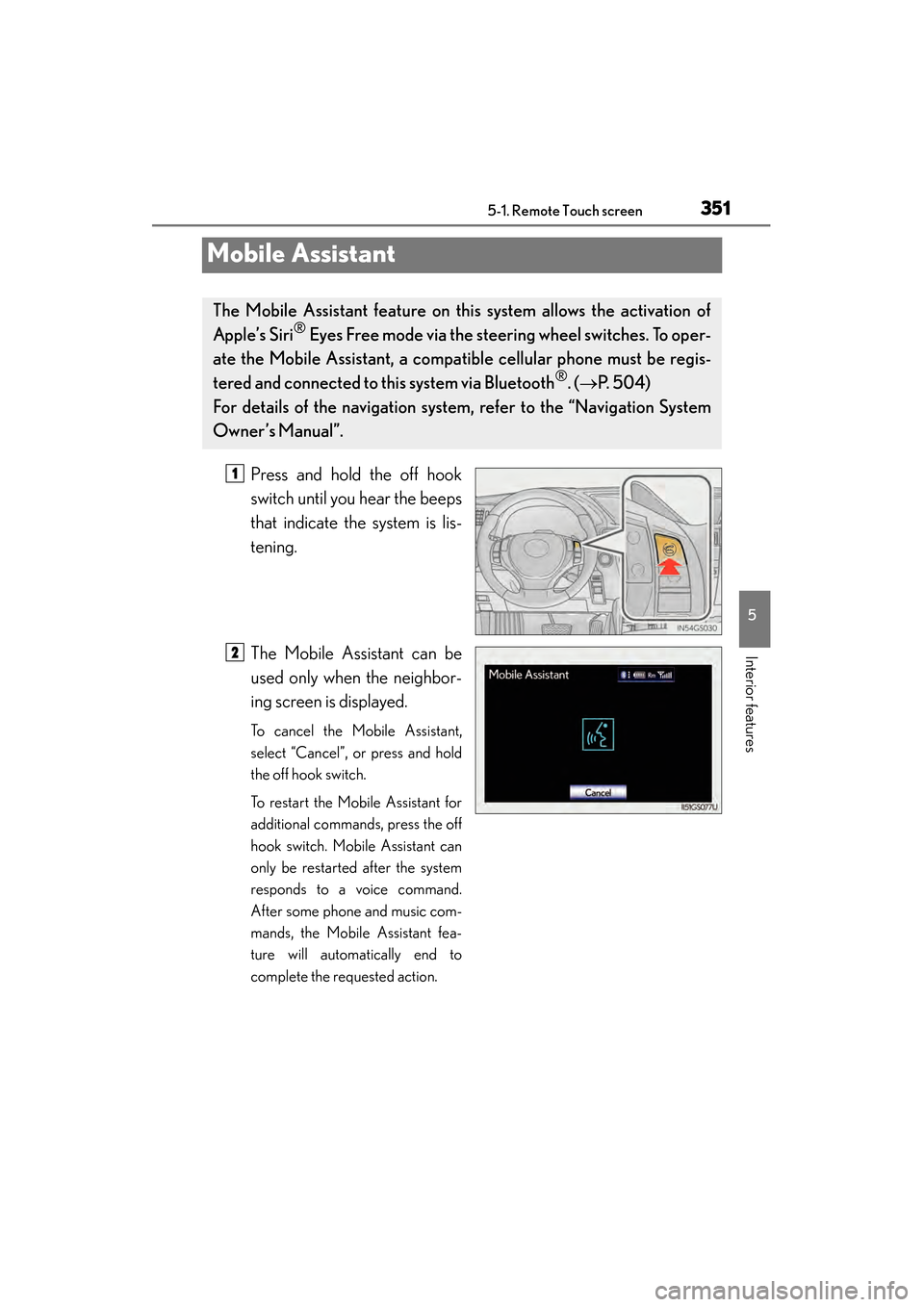
Press and hold the off hook
switch until you hear the beeps
that indicate the system is lis-
tening.
The Mobile Assistant can be
used only when the neighbor-
ing screen is displayed.
To cancel the Mobile Assistant,
select “Cancel”, or press and hold
the off hook switch.
To restart the Mobile Assistant for
additional commands, press the off
hook switch. Mobile Assistant can
only be restarted after the system
responds to a voice command.
After some phone and music com-
mands, the Mobile Assistant fea-
ture will automatically end to
complete the requested action.
The Mobile Assistant feature on this system allows the activation of
Apple’s Siri
® Eyes Free mode via the steer ing wheel switches. To oper-
ate the Mobile Assistant, a compat ible cellular phone must be regis-
tered and connected to this system via Bluetooth
®. ( → P. 504)
For details of the navigation system , refer to the “Navigation System
Owner’s Manual”.
1
2
GS350_OM_OM30D41U_(U).book Page 351 Monday, July 29, 2013 2:22 PM
Page 353 of 846
352
GS350_OM_OM30D41U_(U)
5-1. Remote Touch screen
■Adjusting the volume
The volume of the Mobile Assistant can be adjusted using the “PWR/VOL” knob or
steering wheel volume switches. The Mobile Assistant and phone call volumes are
synchronized.
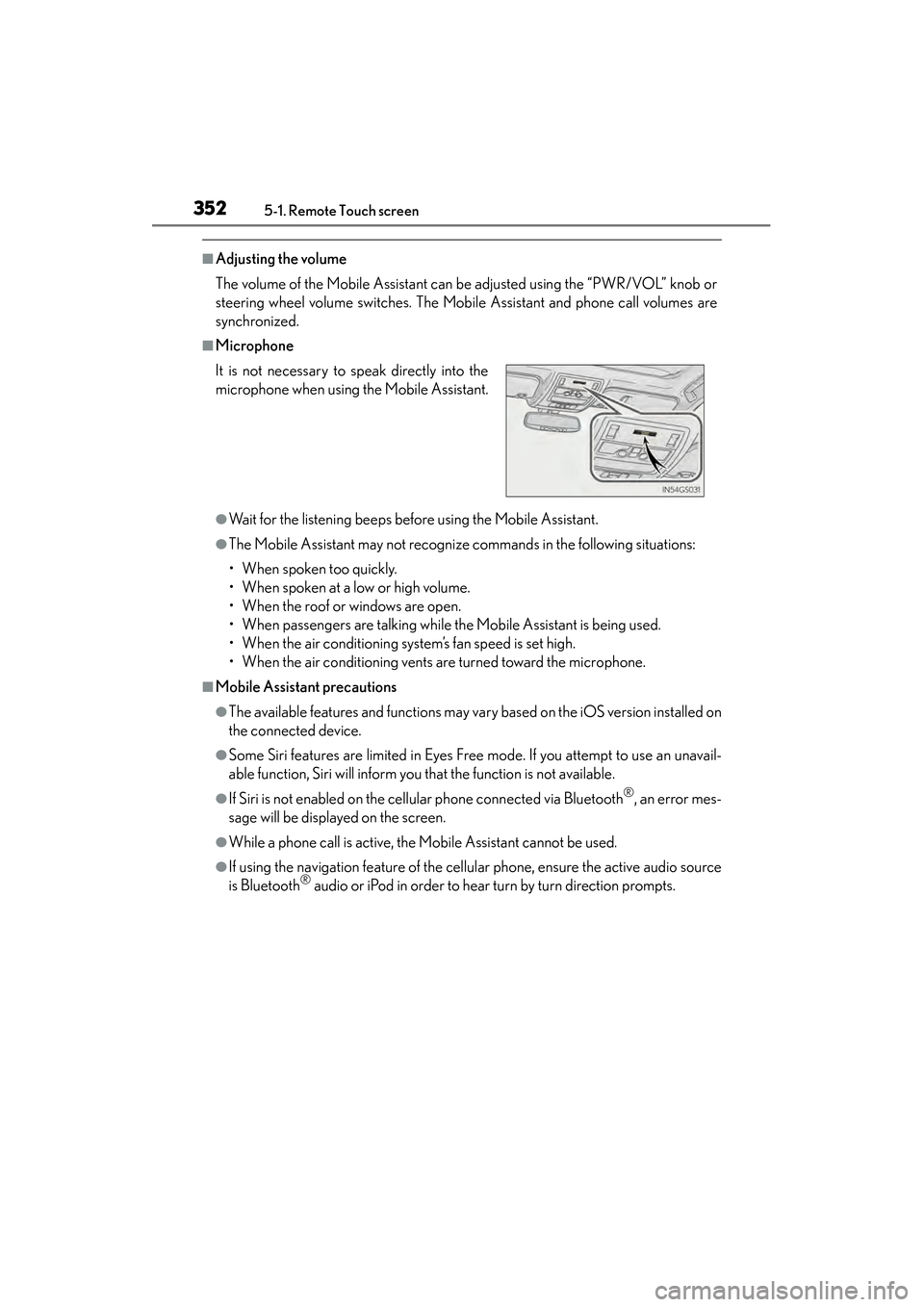
■Microphone
●Wait for the listening beeps before using the Mobile Assistant.
●The Mobile Assistant may not recognize commands in the following situations:
• When spoken too quickly.
• When spoken at a low or high volume.
• When the roof or windows are open.
• When passengers are talking while the Mobile Assistant is being used.
• When the air conditioning system’s fan speed is set high.
• When the air conditioning vents are turned toward the microphone.
■Mobile Assistant precautions
●The available features and functions may vary based on the iOS version installed on
the connected device.
●Some Siri features are limited in Eyes Free mode. If you attempt to use an unavail-
able function, Siri will inform you that the function is not available.
●If Siri is not enabled on the cellular phone connected via Bluetooth®, an error mes-
sage will be displayed on the screen.
●While a phone call is active, the Mobile Assistant cannot be used.
●If using the navigation feature of the cellular phone, ensure the active audio source
is Bluetooth® audio or iPod in order to hear turn by turn direction prompts.
It is not necessary to speak directly into the
microphone when using the Mobile Assistant.
GS350_OM_OM30D41U_(U).book Page 352 Monday, July 29, 2013 2:22 PM
Page 354 of 846
353
GS350_OM_OM30D41U_(U)5-2. Using the air conditioning system and defogger
5
Interior features
Front automatic air conditioning system
Air outlets and fan speed are automat ically adjusted according to the
temperature setting.
Vehicles with a navigation system: The air conditioning system can be
displayed and operated on the “Side Display”. For details, refer to the
“Navigation System Owner’s Manual”.
Press the “MENU” button on the Remote Touch, then select “Climate”
to display the air conditioning operation screen.
The display and button positions will di ffer depending on the type of the
system.
GS350_OM_OM30D41U_(U).book Page 353 Monday, July 29, 2013 2:22 PM
Page 357 of 846
356
GS350_OM_OM30D41U_(U)
5-2. Using the air conditioning system and defogger
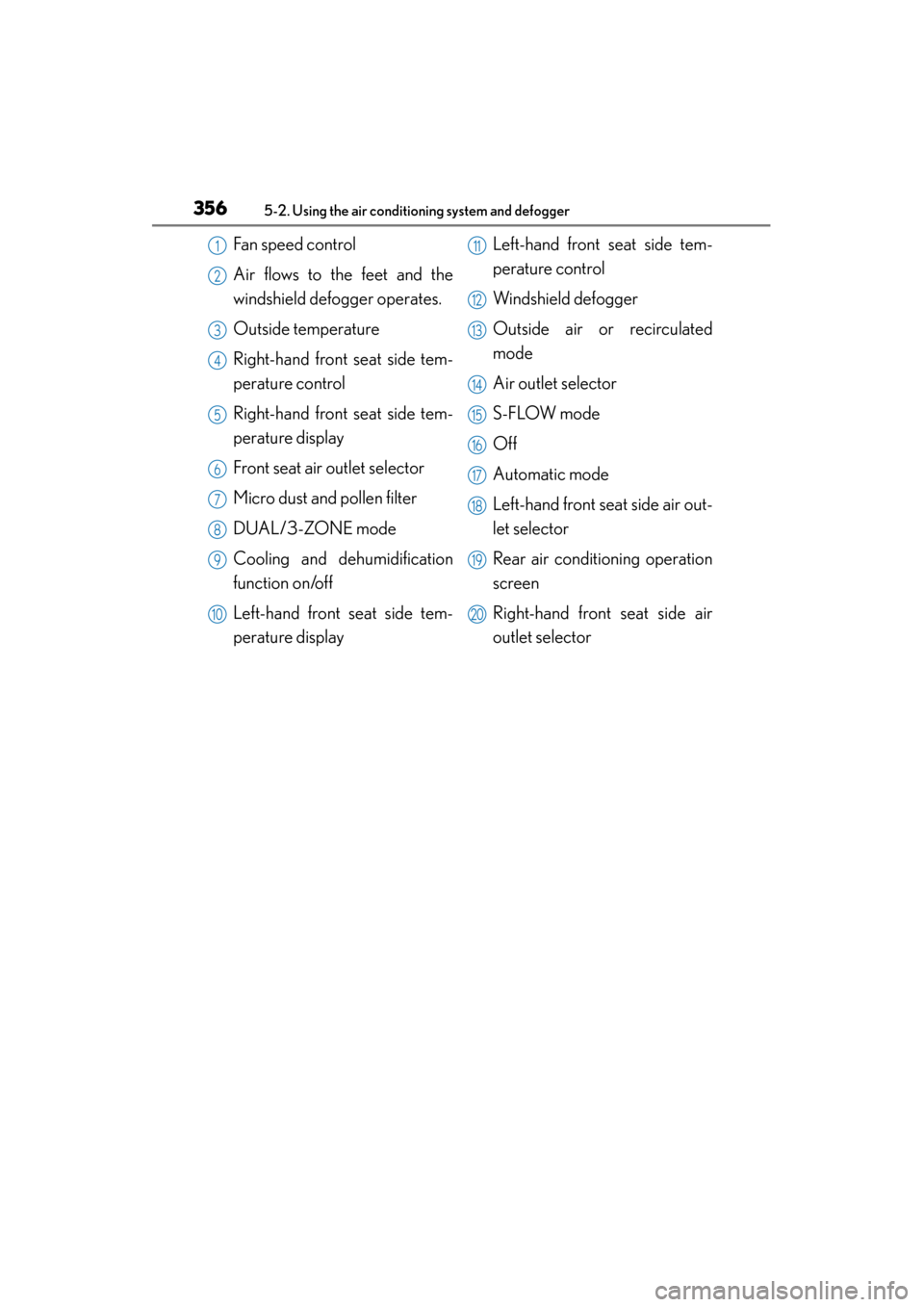
Fan speed control
Air flows to the feet and the
windshield defogger operates.
Outside temperature
Right-hand front seat side tem-
perature control
Right-hand front seat side tem-
perature display
Front seat air outlet selector
Micro dust and pollen filter
DUAL/3-ZONE mode
Cooling and dehumidification
function on/off
Left-hand front seat side tem-
perature displayLeft-hand front seat side tem-
perature control
Windshield defogger
Outside air or recirculated
mode
Air outlet selector
S-FLOW mode
Off
Automatic mode
Left-hand front seat side air out-
let selector
Rear air conditioning operation
screen
Right-hand front seat side air
outlet selector1
2
3
4
5
6
7
8
9
10
11
12
13
14
15
16
17
18
19
20
GS350_OM_OM30D41U_(U).book Page 356 Monday, July 29, 2013 2:22 PM
Page 368 of 846
GS350_OM_OM30D41U_(U)
3675-2. Using the air conditioning system and defogger
5
Interior features
■Micro dust and pollen filter
●In order to prevent the windshield from fogging up when the outside air is cold, the
following may occur:
• Outside air mode does not switch to (recirculated air) mode.
• The dehumidification function operates.
• The operation cancels after approximately 1 minute.
●In rainy weather, the windows may fog up. Press .
●In extremely humid weather, the windows may fog up.
●The pollens are filtered out even if the micro dust and pollen filter is turned off.
■Operation of the air conditioning system in Eco drive mode
In the Eco drive mode, the air conditioning system is controlled as follows to priori-
tize fuel efficiency:
●Engine speed and compressor operation controlled to restrict heating/cooling
capacity
●Fan speed restricted when automatic mode is selected
To improve air conditioning performance, perform the following operations:
●Adjust the fan speed
●Turn off Eco drive mode
■When the S-FLOW mode operates
If air flows to the driver’s seat only, the temperature setting for the front passenger’s
seat is not displayed.
■When the outside temperature falls to nearly 32 °F (0 °C)
The dehumidification function may not operate even when is selected.
GS350_OM_OM30D41U_(U).book Page 367 Monday, July 29, 2013 2:22 PM
Page 370 of 846
369
GS350_OM_OM30D41U_(U)5-2. Using the air conditioning system and defogger
5
Interior features
Rear air conditioning system∗
∗: If equipped
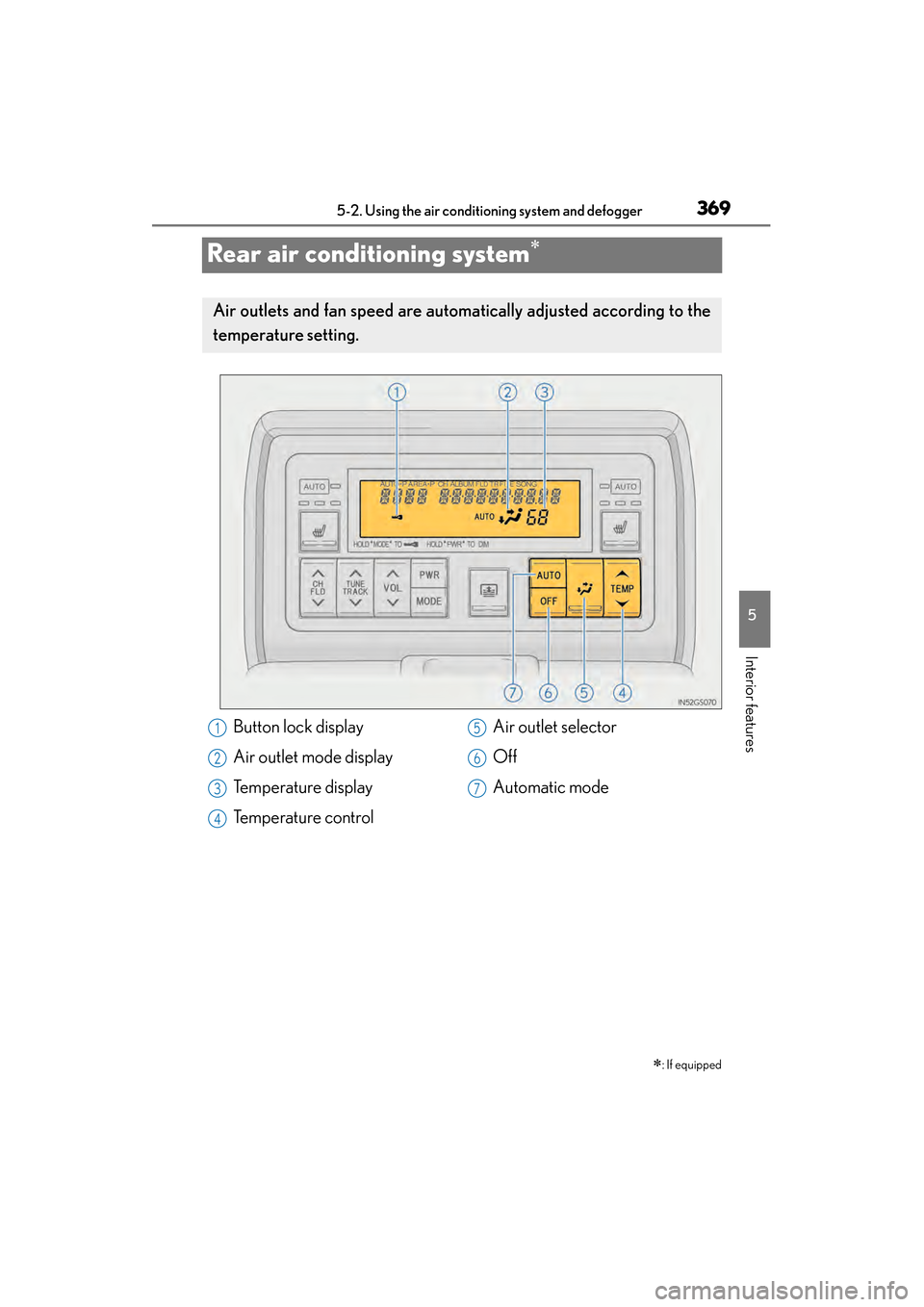
Air outlets and fan speed are automat ically adjusted according to the
temperature setting.
Button lock display
Air outlet mode display
Temperature display
Temperature control Air outlet selector
Off
Automatic mode1
2
3
4
5
6
7
GS350_OM_OM30D41U_(U).book Page 369 Monday, July 29, 2013 2:22 PM
Page 371 of 846

370
GS350_OM_OM30D41U_(U)
5-2. Using the air conditioning system and defogger
Press .
The air conditioning system will operate, and air outlets and fan speed will be
adjusted automatically.
“AUTO” will be displayed on the control panel.
Press “∧” on to increase the temperature and “ ∨” to decrease
the temperature.
When the rear seat heaters are set to “AUTO” mode, the system is
operated automatically according to the set temperature, outside tem-
perature, etc.
Using automatic air conditioning system
1
2
GS350_OM_OM30D41U_(U).book Page 370 Monday, July 29, 2013 2:22 PM
Page 374 of 846
GS350_OM_OM30D41U_(U)
3735-2. Using the air conditioning system and defogger
5
Interior features
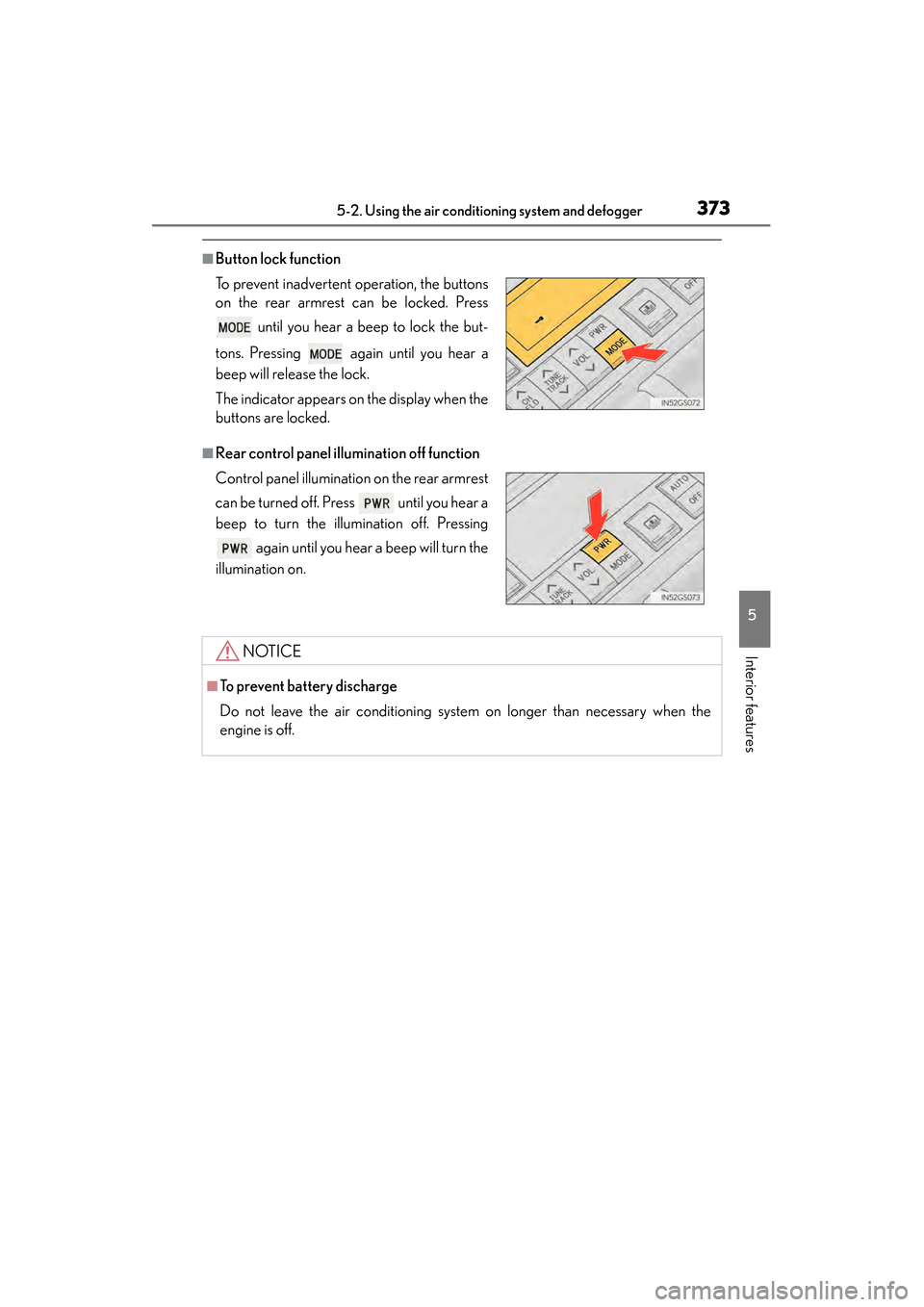
■Button lock function
■Rear control panel illumination off function To prevent inadvertent operation, the buttons
on the rear armrest can be locked. Press until you hear a beep to lock the but-
tons. Pressing again until you hear a
beep will release the lock.
The indicator appears on the display when the
buttons are locked.
Control panel illumination on the rear armrest
can be turned off. Press until you hear a
beep to turn the illumination off. Pressing again until you hear a beep will turn the
illumination on.
NOTICE
■To prevent battery discharge
Do not leave the air conditioning system on longer than necessary when the
engine is off.
GS350_OM_OM30D41U_(U).book Page 373 Monday, July 29, 2013 2:22 PM
Page 377 of 846
376
GS350_OM_OM30D41U_(U)
5-3. Using the audio system
Audio system type
CD and DVD player with AM/FM radio
Vehicles with a navigation system: The audio fun ctions can be displayed
and operated on the “Side Display”. For details, refer to the “Navigation
System Owner’s Manual”.
XUsing the instrument panel
Press the “RADIO” or “MEDIA” button to display the audio control
screen.
XUsing the Remote Touch
Press the “MENU” button on the Remote Touch, select “Radio” or
“Media” and select each tab to display the audio control screen.
GS350_OM_OM30D41U_(U).book Page 376 Monday, July 29, 2013 2:22 PM