ignition Lexus GS350 2014 User Guide
[x] Cancel search | Manufacturer: LEXUS, Model Year: 2014, Model line: GS350, Model: Lexus GS350 2014Pages: 846, PDF Size: 35.04 MB
Page 134 of 846
GS350_OM_OM30D41U_(U)
1333-3. Adjusting the seats
3
Operation of each component
■Operation of the power easy access system
When exiting the vehicle, the power easy access system may not operate if the seat
is already close to the rearmost position, etc.
■Customization
The seat movement amount settings of the power easy access system can be cus-
tomized. (Customizable features: →P. 7 9 3 )
Your preferred driving position (the position of the driver’s seat, steering
wheel and outside rear view mirrors) can be recorded and recalled by
pressing a button.
Three different driving positions can be recorded into memory.
■Recording procedure
Check that the shift lever is in P.
Turn the engine switch to IGNITION ON mode.
Adjust the driver’s seat, steering wheel, and outside rear view mirrors
to the desired positions.
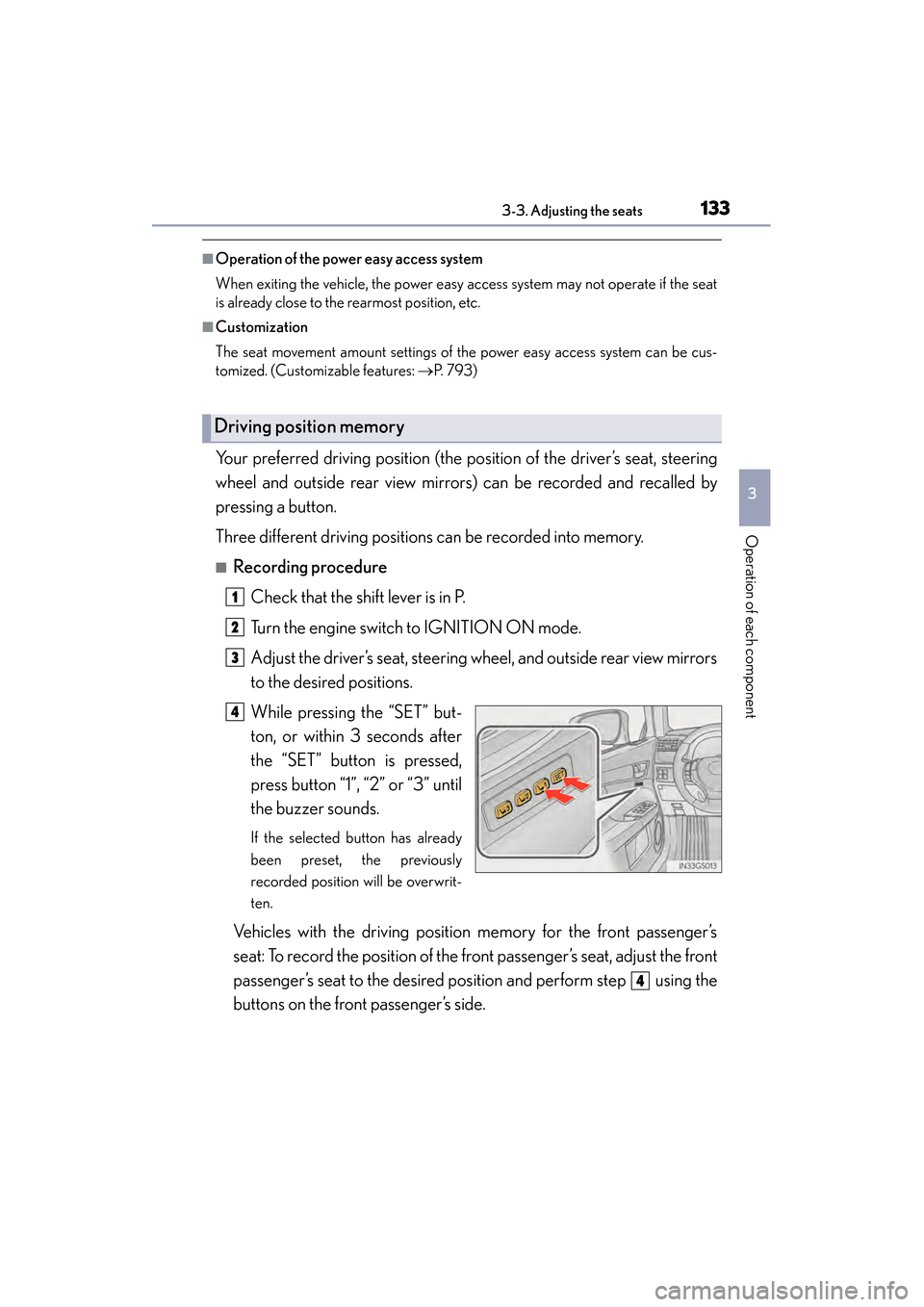
While pressing the “SET” but-
ton, or within 3 seconds after
the “SET” button is pressed,
press button “1”, “2” or “3” until
the buzzer sounds.
If the selected button has already
been preset, the previously
recorded position will be overwrit-
ten.
Vehicles with the driving position memory for the front passenger’s
seat: To record the position of the front passenger’s seat, adjust the front
passenger’s seat to the desired position and perform step using the
buttons on the front passenger’s side.
Driving position memory
1
2
3
4
4
GS350_OM_OM30D41U_(U).book Page 133 Monday, July 29, 2013 2:22 PM
Page 135 of 846
134
GS350_OM_OM30D41U_(U)
3-3. Adjusting the seats
■Recall procedureCheck that the shift lever is in P.
Turn the engine switch to IGNITION ON mode.
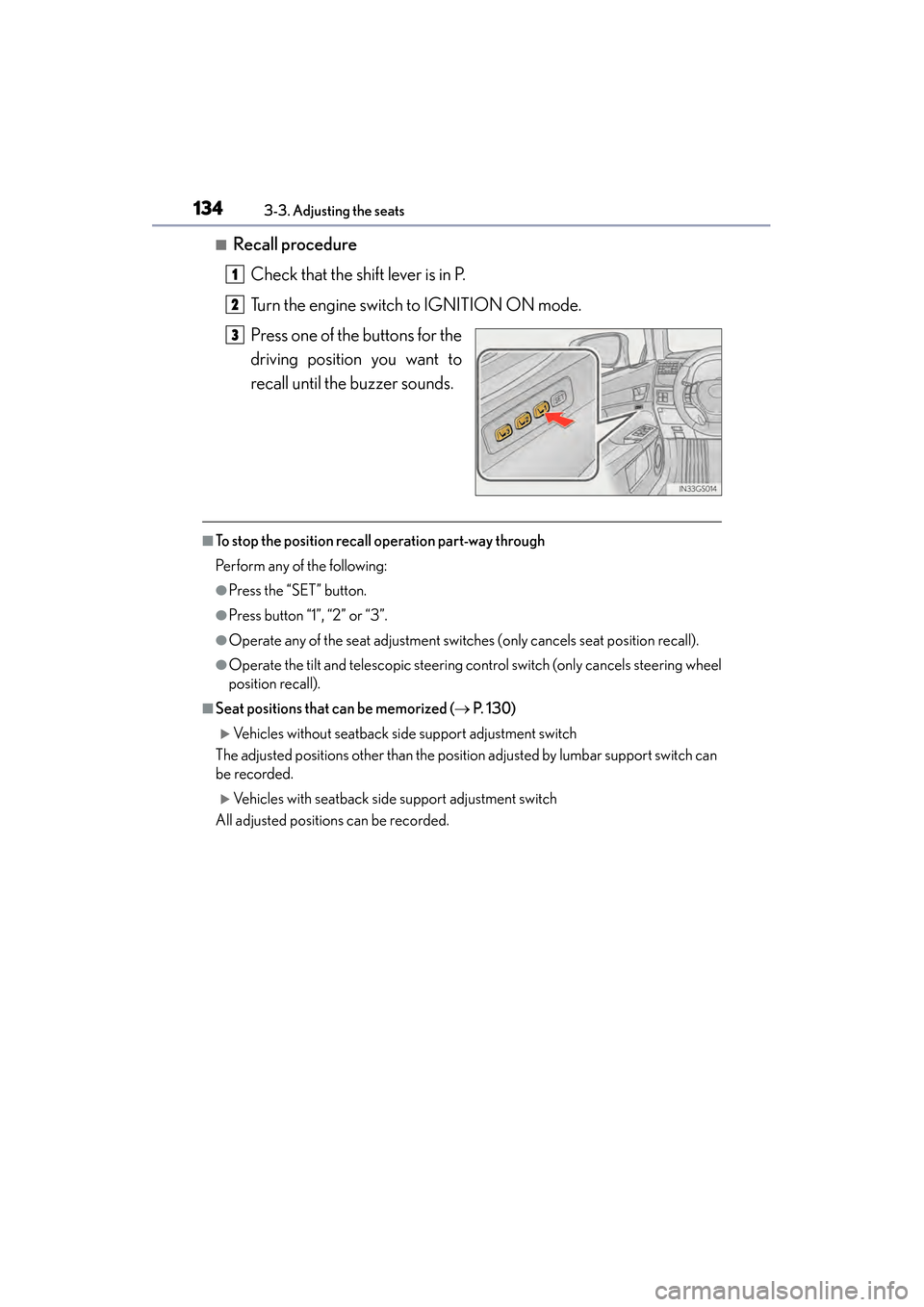
Press one of the buttons for the
driving position you want to
recall until the buzzer sounds.
■To stop the position recall operation part-way through
Perform any of the following:
●Press the “SET” button.
●Press button “1”, “2” or “3”.
●Operate any of the seat adjustment switches (only cancels seat position recall).
●Operate the tilt and telescopic steering control switch (only cancels steering wheel
position recall).
■Seat positions that can be memorized ( → P. 1 3 0 )
XVehicles without seatback side support adjustment switch
The adjusted positions other than the position adjusted by lumbar support switch can
be recorded.
XVehicles with seatback side support adjustment switch
All adjusted positions can be recorded.
1
2
3
GS350_OM_OM30D41U_(U).book Page 134 Monday, July 29, 2013 2:22 PM
Page 136 of 846
GS350_OM_OM30D41U_(U)
1353-3. Adjusting the seats
3
Operation of each component
■Operating the driving position memory after turning the engine switch off
Driver’s seat:
Recorded seat positions can be activated up to 180 seconds after the driver’s door is
opened and another 60 seconds after it is closed again.
Front passenger’s seat:
Recorded seat positions can be activated up to 180 seconds after the front passen-
ger’s door is opened.
■In order to correctly use the dr iving position memory function
If a seat position is already in the furthest possible position and the seat is operated in
the same direction, the recorded position may be slightly different when it is recalled.
Each electronic key can be registered to recall your preferred driving
position.
■Registering procedure
Record your driving position to button “1”, “2” or “3” before performing
the following:
Carry only the key you want to register, and then close the driver’s door.
If 2 or more keys are in the vehicle, the driving position cannot be
recorded properly.
Check that the shift lever is in P.
Turn the engine switch to IGNITION ON mode.
Recall the driving position that you want to record.
Memory recall function (driver’s side only)
1
2
3
GS350_OM_OM30D41U_(U).book Page 135 Monday, July 29, 2013 2:22 PM
Page 137 of 846
136
GS350_OM_OM30D41U_(U)
3-3. Adjusting the seats
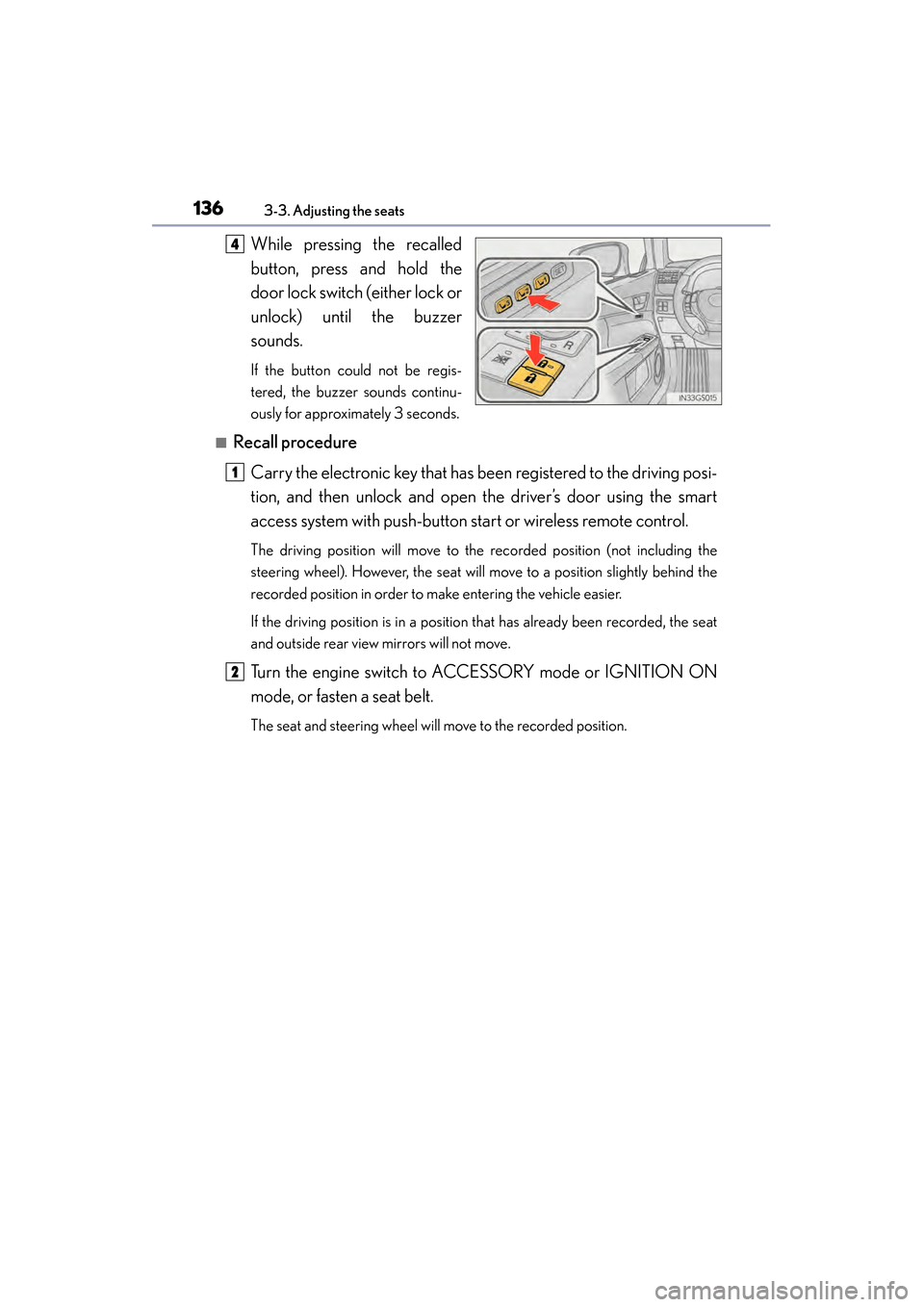
While pressing the recalled
button, press and hold the
door lock switch (either lock or
unlock) until the buzzer
sounds.
If the button could not be regis-
tered, the buzzer sounds continu-
ously for approximately 3 seconds.
■Recall procedureCarry the electronic key that has been registered to the driving posi-
tion, and then unlock and open the driver’s door using the smart
access system with push-button start or wireless remote control.
The driving position will move to the recorded position (not including the
steering wheel). However, the seat will move to a position slightly behind the
recorded position in order to make entering the vehicle easier.
If the driving position is in a position that has already been recorded, the seat
and outside rear view mirrors will not move.
Turn the engine switch to ACCESSORY mode or IGNITION ON
mode, or fasten a seat belt.
The seat and steering wheel will move to the recorded position.
4
1
2
GS350_OM_OM30D41U_(U).book Page 136 Monday, July 29, 2013 2:22 PM
Page 138 of 846
GS350_OM_OM30D41U_(U)
1373-3. Adjusting the seats
3
Operation of each component
■Cancelation procedure
Carry only the key you want to cancel and then close the driver’s door.
If 2 or more keys are in the vehicle, the driving position cannot be can-
celed properly.Turn the engine switch to IGNITION ON mode.
While pressing the “SET” button, press and hold the door lock switch
(either lock or unlock) until the buzzer sounds twice.
If the button could not be canceled, the buzzer sounds continuously for
approximately 3 seconds.
■Recalling the driving position using the memory recall function
●Different driving positions can be registered for each electronic key. Therefore, the
driving position that is recalled may be different depending on the key being car-
ried.
●If a door other than the driver’s door is unlocked with the smart access system with
push-button start, the driving position cannot be recalled. In this case, press the
driving position button which has been set.
■Customization
The unlock door settings of the memory recall function can be customized.
(Customizable features: → P. 7 9 3 )
CAUTION
■Seat adjustment caution
Take care during seat adjustment so that the seat does not strike the rear passen-
ger or squeeze your body against the steering wheel.
1
2
GS350_OM_OM30D41U_(U).book Page 137 Monday, July 29, 2013 2:22 PM
Page 142 of 846
1413-4. Adjusting the steering wheel and mirrors
3
Operation of each component
GS350_OM_OM30D41U_(U)
Steering wheel
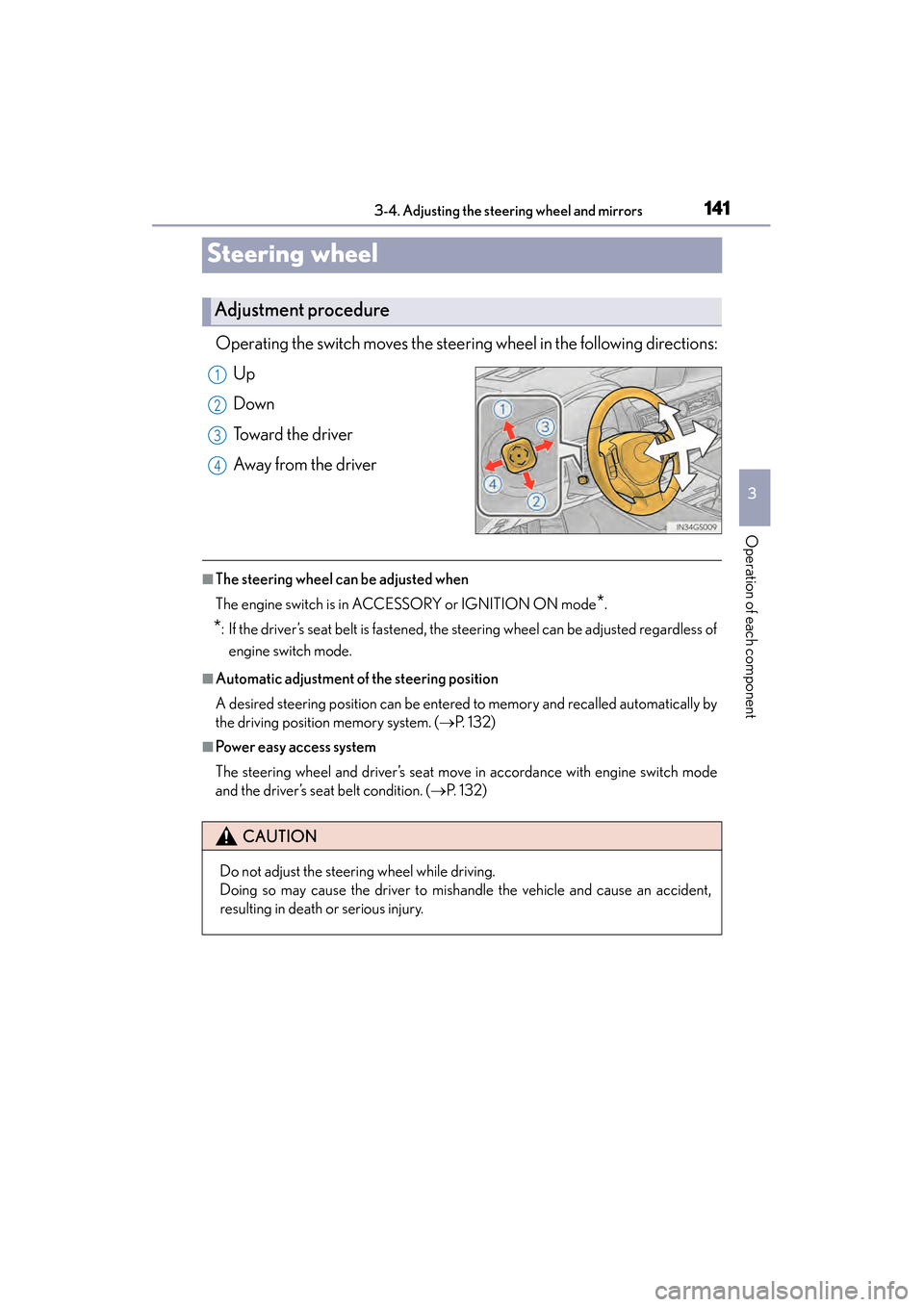
Operating the switch moves the steering wheel in the following directions:
Up
Down
Toward the driver
Away from the driver
■The steering wheel can be adjusted when
The engine switch is in ACCESSORY or IGNITION ON mode
*.
*: If the driver’s seat belt is fastened, the steering wheel can be adjusted regardless of engine switch mode.
■Automatic adjustment of the steering position
A desired steering position can be entered to memory and recalled automatically by
the driving position memory system. ( →P. 1 3 2 )
■Power easy access system
The steering wheel and driver’s seat move in accordance with engine switch mode
and the driver’s seat belt condition. ( →P. 1 3 2 )
Adjustment procedure
1
2
3
4
CAUTION
Do not adjust the steering wheel while driving.
Doing so may cause the driver to mishandle the vehicle and cause an accident,
resulting in death or serious injury.
GS350_OM_OM30D41U_(U).book Page 141 Monday, July 29, 2013 2:22 PM
Page 143 of 846
1423-4. Adjusting the steering wheel and mirrors
GS350_OM_OM30D41U_(U)
Inside rear view mirror
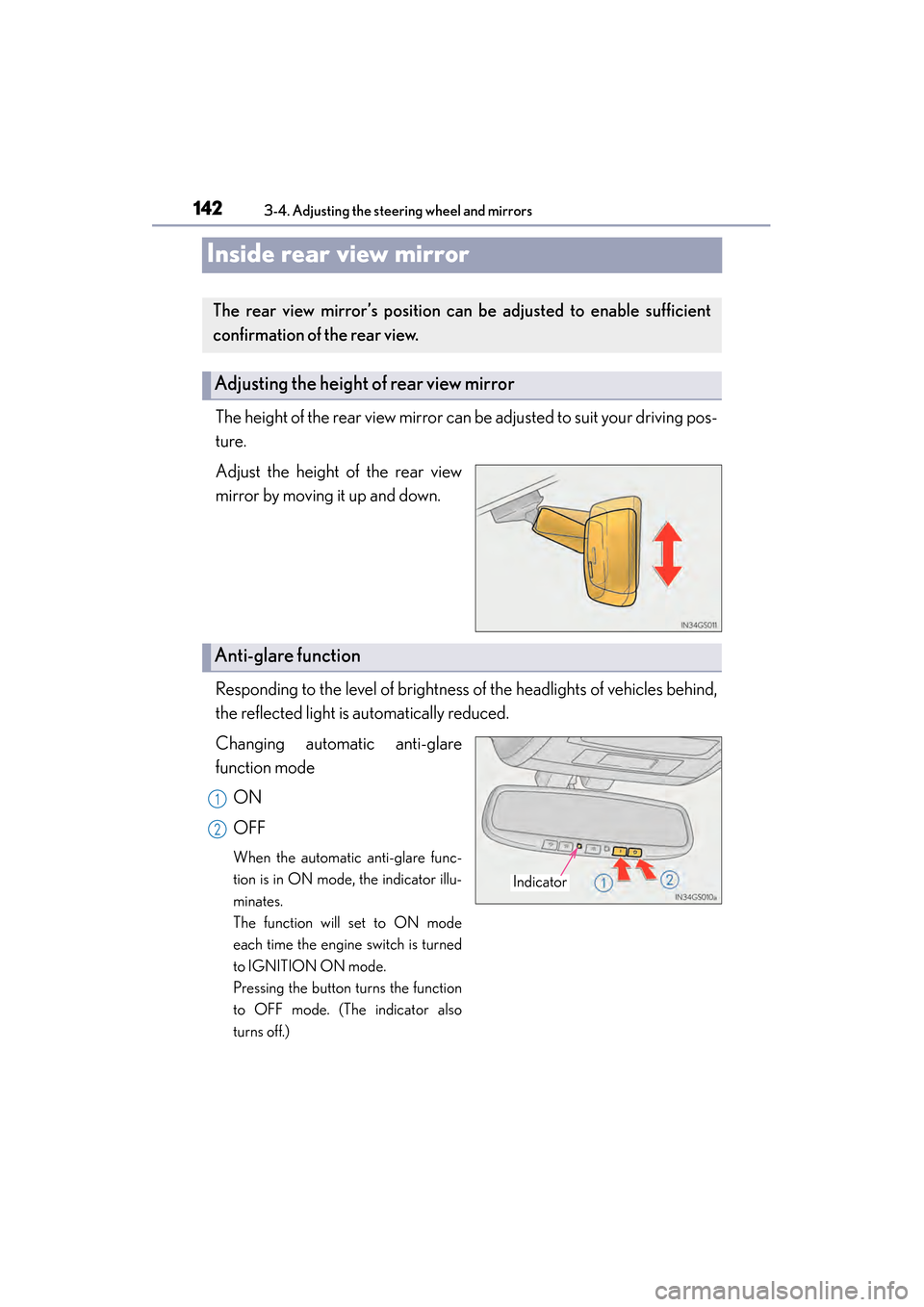
The height of the rear view mirror can be adjusted to suit your driving pos-
ture.
Adjust the height of the rear view
mirror by moving it up and down.
Responding to the level of brightness of the headlights of vehicles behind,
the reflected light is automatically reduced.
Changing automatic anti-glare
function modeON
OFF
When the automatic anti-glare func-
tion is in ON mode, the indicator illu-
minates.
The function will set to ON mode
each time the engine switch is turned
to IGNITION ON mode.
Pressing the button turns the function
to OFF mode. (The indicator also
turns off.)
The rear view mirror’s position ca n be adjusted to enable sufficient
confirmation of the rear view.
Adjusting the height of rear view mirror
Anti-glare function
Indicator
1
2
GS350_OM_OM30D41U_(U).book Page 142 Monday, July 29, 2013 2:22 PM
Page 146 of 846
1453-4. Adjusting the steering wheel and mirrors
3
Operation of each component
GS350_OM_OM30D41U_(U)
■Mirror angle can be adjusted when
The engine switch is in ACCESSORY or IGNITION ON mode.
■Linked mirror function when reversing
●When either “L” or “R” of the mirror select switch is selected, the outside rear view
mirrors will automatically angle downwards when the vehicle is reversing in order
to give a better view of the ground. To disable this function, select neither “L” nor
“R”.
●If the mirror angle adjustment switch is operated while the linked mirror function is
in operation, the angle and position of the mirrors can be remembered, and the
mirrors will operate at the angle adjusted to the last time the linked mirror function
was operated.
However, because the mirrors move based on the angle they are in when the linked
mirror function is not operating, the mirror angle when the linked mirror function is
operating will also be changed if the mirrors are adjusted while the function is not
operating.
■When the mirrors are fogged up
The outside rear view mirrors can be cleared using the mirror defoggers. Turn on the
rear window defogger to turn on the outside rear view mirror defoggers. (→P. 3 74 )
■Automatic adjustment of the mirror angle
A desired mirror face angle can be entered to memory and recalled automatically
by the driving position memory. ( →P. 1 3 2 )
■Auto anti-glare function
When the anti-glare inside rear view mirror is set to automatic mode, the outside
rear view mirrors will activate in conjunction with the anti-glare inside rear view mir-
ror to reduce reflected light. ( →P. 1 4 2 )
GS350_OM_OM30D41U_(U).book Page 145 Monday, July 29, 2013 2:22 PM
Page 149 of 846
148
GS350_OM_OM30D41U_(U)
3-5. Opening, closing the windows and moon roof
■The power windows can be operated when
The engine switch is in IGNITION ON mode.
■Operating the power windows after turning the engine off
The power windows can be operated for approximately 45 seconds even after the
engine switch is turned to ACCESSORY mode or turned off. They cannot, however,
be operated once either front door is opened.
■Jam protection function
If an object becomes caught between the window and the window frame, window
travel is stopped and the window is opened slightly.
■When the power window does not close normally
If the jam protection function is operating abnormally and a window cannot be
closed, perform the following operations using the power window switch on the rele-
vant door.
●After stopping the vehicle, the window can be closed by holding the power window
switch in the one-touch closing position while the engine switch is turned to IGNI-
TION ON mode.
●If the window still cannot be closed even by carrying out the operation as explained
above, initialize the function by performing the following procedure.Hold the power window switch in the one-touch closing position. Continue
holding the switch for a further 6 seconds after the window has closed.
Hold the power window switch in the one-touch opening position. Continue
holding the switch for a further 2 seconds after the window has opened com-
pletely.
Hold the power window switch in the one-touch closing position once again.
Continue holding the switch for a further 2 seconds after the window has
closed.
If you release the switch while the window is moving, start again from the beginning.
If the window continues to close but then re-open slightly even after performing the
above procedure correctly, have the vehicle inspected by your Lexus dealer.
1
2
3
GS350_OM_OM30D41U_(U).book Page 148 Monday, July 29, 2013 2:22 PM
Page 152 of 846

GS350_OM_OM30D41U_(U)
1513-5. Opening, closing the windows and moon roof
3
Operation of each component
■The moon roof can be operated when
The engine switch is in IGNITION ON mode.
■Operating the moon roof after turning the engine off
The moon roof can be operated for approximately 45 seconds after the engine
switch is turned to ACCESSORY mode or turned off. It cannot, however, be oper-
ated once either front door is opened.
■Jam protection function
If an object is detected between the moon roof and the frame while the moon roof is
closing or tilting down, travel is stopped and the moon roof opens slightly.
■Sunshade
The sunshade can be opened and closed manually. However, the sunshade will open
automatically when the moon roof is opened.
■Door lock linked moon roof operation
●The moon roof can be opened and closed using the mechanical key.* (→ P. 7 5 4 )
●The moon roof can be opened using the wireless remote control.* (→ P. 1 1 6 )
*: These settings must be customized at your Lexus dealer.
GS350_OM_OM30D41U_(U).book Page 151 Monday, July 29, 2013 2:22 PM