ignition Lexus GS350 2014 Workshop Manual
[x] Cancel search | Manufacturer: LEXUS, Model Year: 2014, Model line: GS350, Model: Lexus GS350 2014Pages: 846, PDF Size: 35.04 MB
Page 559 of 846
558
GS350_OM_OM30D41U_(U)
5-4. Using the hands-free phone system (for cellular phone)
■Changing Bluetooth* power
The Bluetooth
* device is automatically connected when you turn the
engine switch to ACCESSORY or IGNITION ON mode. You can
change between “On” or “Off”.
Display the “Detailed Bluetooth
* Settings” screen. (→P. 5 5 7 )
Select “Bluetooth
* Power” on the “Detailed Bluetooth* Settings”
screen.
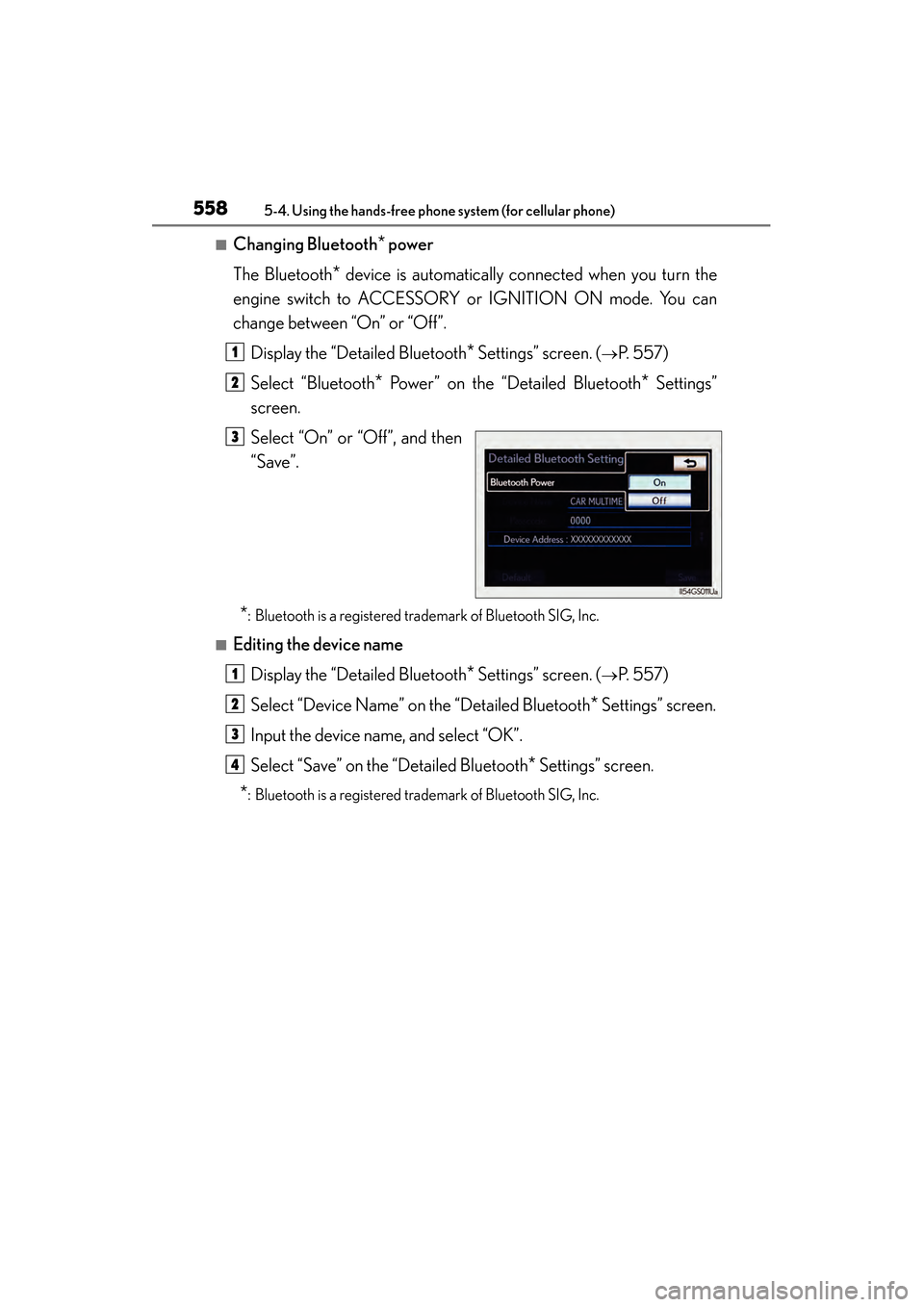
Select “On” or “Off”, and then
“Save”.
*: Bluetooth is a registered trademark of Bluetooth SIG, Inc.
■Editing the device name
Display the “Detailed Bluetooth
* Settings” screen. (→P. 5 5 7 )
Select “Device Name” on the “Detailed Bluetooth
* Settings” screen.
Input the device name, and select “OK”.
Select “Save” on the “Detailed Bluetooth
* Settings” screen.
*: Bluetooth is a registered trademark of Bluetooth SIG, Inc.
1
2
3
1
2
3
4
GS350_OM_OM30D41U_(U).book Page 558 Monday, July 29, 2013 2:22 PM
Page 560 of 846
GS350_OM_OM30D41U_(U)
5595-4. Using the hands-free phone system (for cellular phone)
5
Interior features
■Editing the passcodeDisplay the “Detailed Bluetooth
* Settings” screen. (→P. 5 5 7 )
Select “Passcode” on the “Detailed Bluetooth
* Settings” screen.
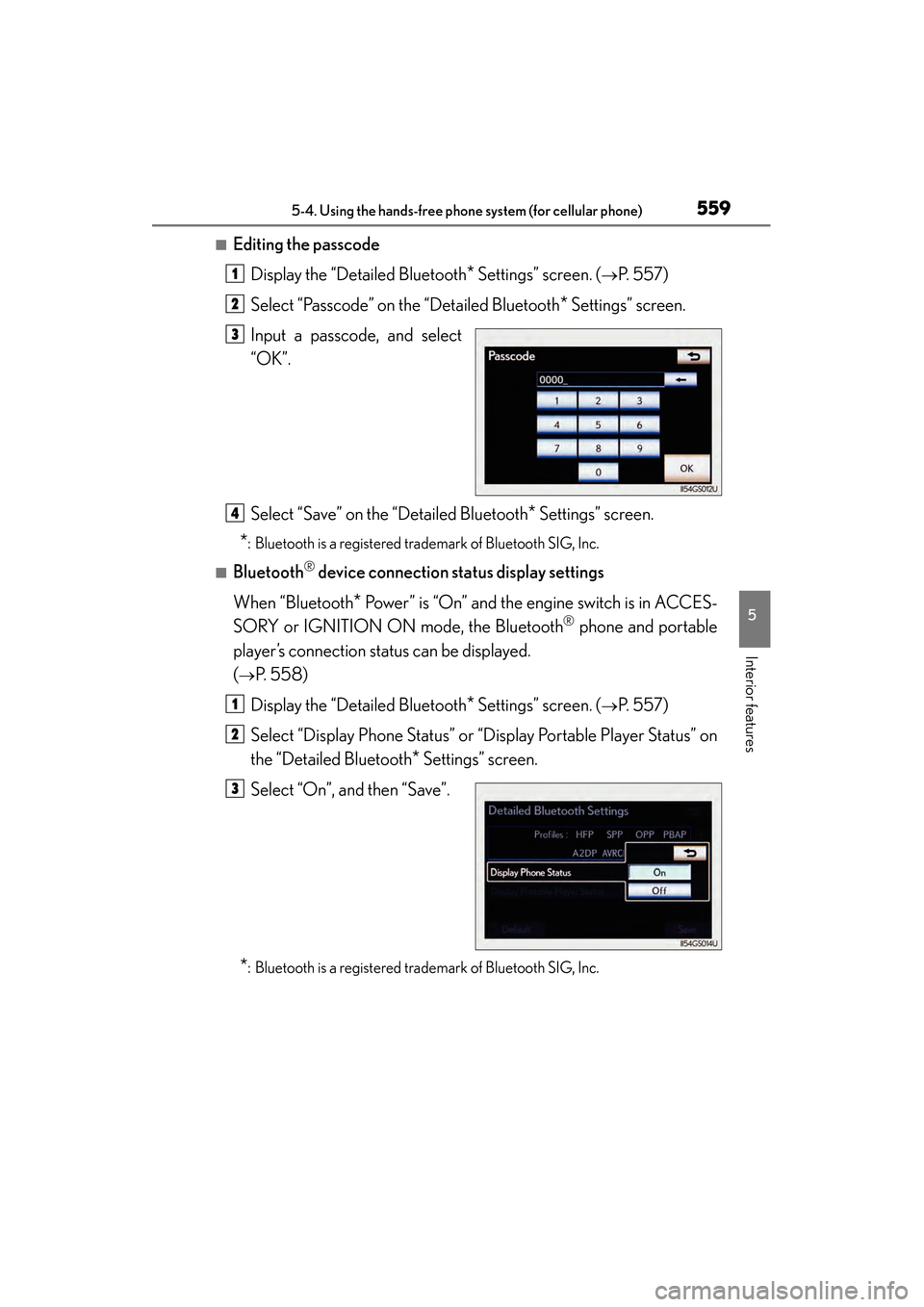
Input a passcode, and select
“OK”.
Select “Save” on the “Detailed Bluetooth
* Settings” screen.
*: Bluetooth is a registered trademark of Bluetooth SIG, Inc.
■Bluetooth® device connection status display settings
When “Bluetooth
* Power” is “On” and the engine switch is in ACCES-
SORY or IGNITION ON mode, the Bluetooth
® phone and portable
player’s connection status can be displayed.
(
→P. 5 5 8 )
Display the “Detailed Bluetooth
* Settings” screen. (→P. 5 5 7 )
Select “Display Phone Status” or “Display Portable Player Status” on
the “Detailed Bluetooth
* Settings” screen.
Select “On”, and then “Save”.
*: Bluetooth is a registered trademark of Bluetooth SIG, Inc.
1
2
3
4
1
2
3
GS350_OM_OM30D41U_(U).book Page 559 Monday, July 29, 2013 2:22 PM
Page 578 of 846
577
GS350_OM_OM30D41U_(U)5-7. Other interior features
5
Interior features
Powe r o u t l e t s
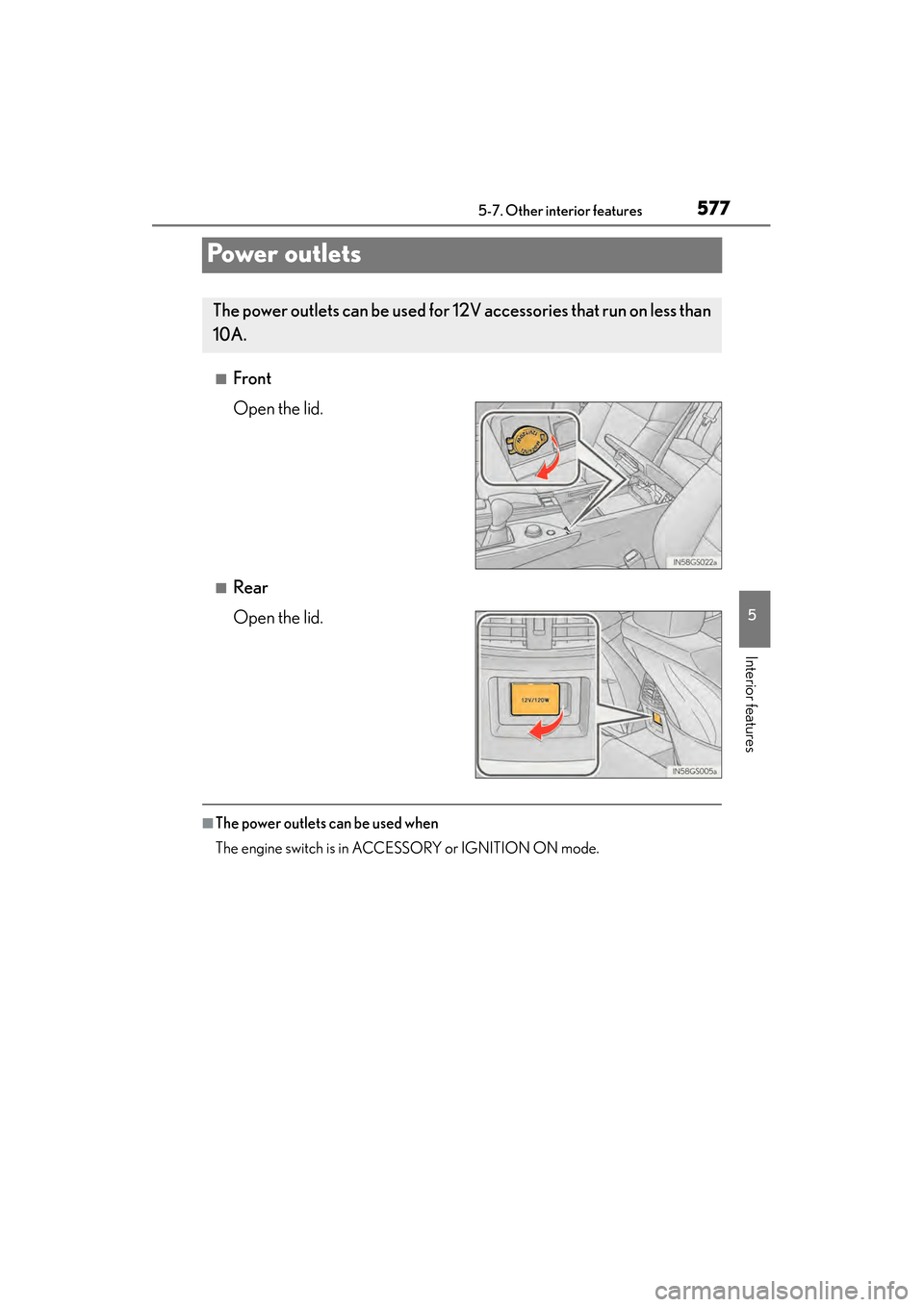
■Front
Open the lid.
■Rear
Open the lid.
■The power outlets can be used when
The engine switch is in ACCESSORY or IGNITION ON mode.
The power outlets can be used for 12V accessories that run on less than
10A.
GS350_OM_OM30D41U_(U).book Page 577 Monday, July 29, 2013 2:22 PM
Page 580 of 846
579
GS350_OM_OM30D41U_(U)5-7. Other interior features
5
Interior features
Heated steering wheel∗
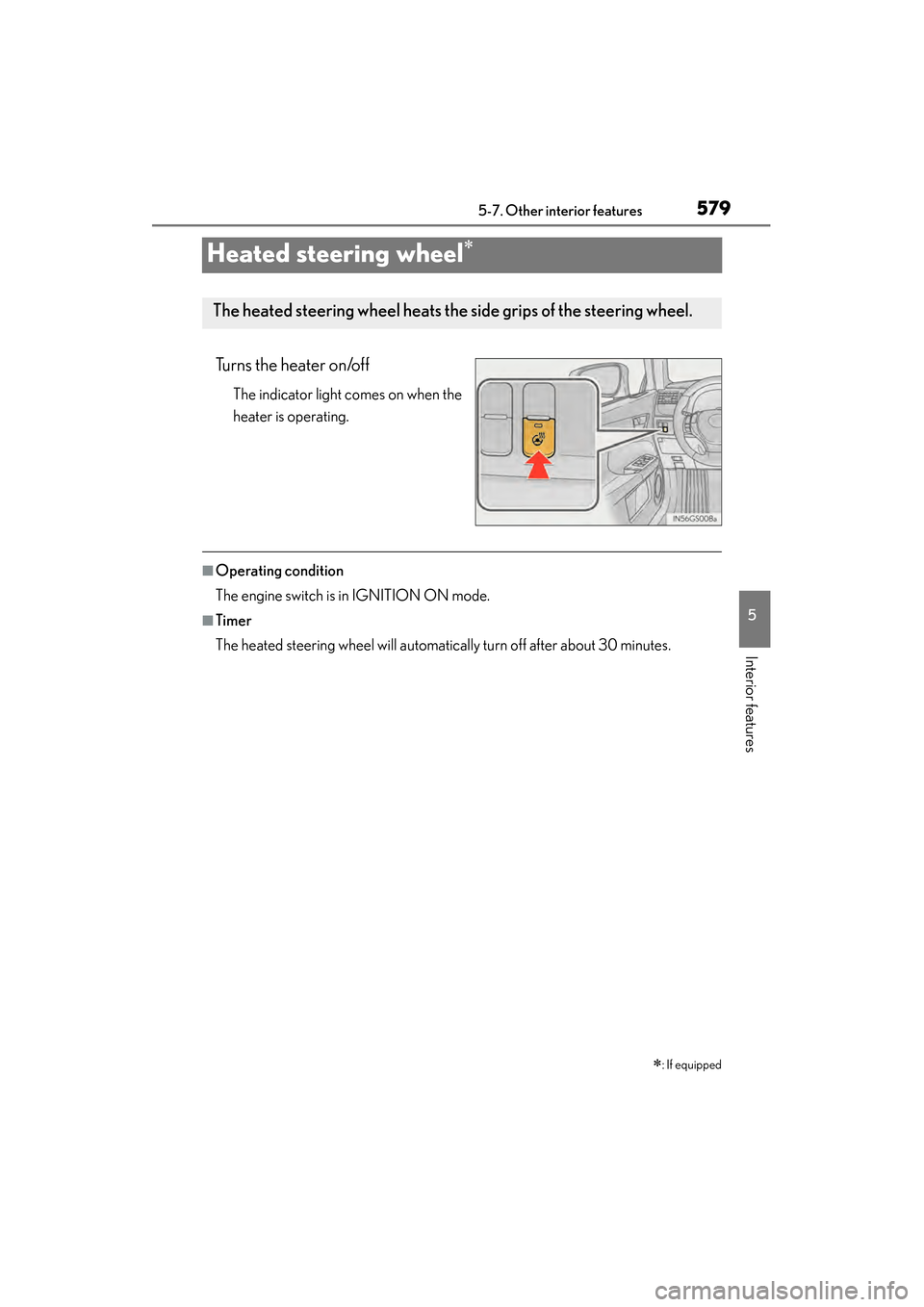
Turns the heater on/off
The indicator light comes on when the
heater is operating.
■Operating condition
The engine switch is in IGNITION ON mode.
■Timer
The heated steering wheel will automatically turn off after about 30 minutes.
∗: If equipped
The heated steering wheel heats the side grips of the steering wheel.
GS350_OM_OM30D41U_(U).book Page 579 Monday, July 29, 2013 2:22 PM
Page 583 of 846
582
GS350_OM_OM30D41U_(U)
5-7. Other interior features
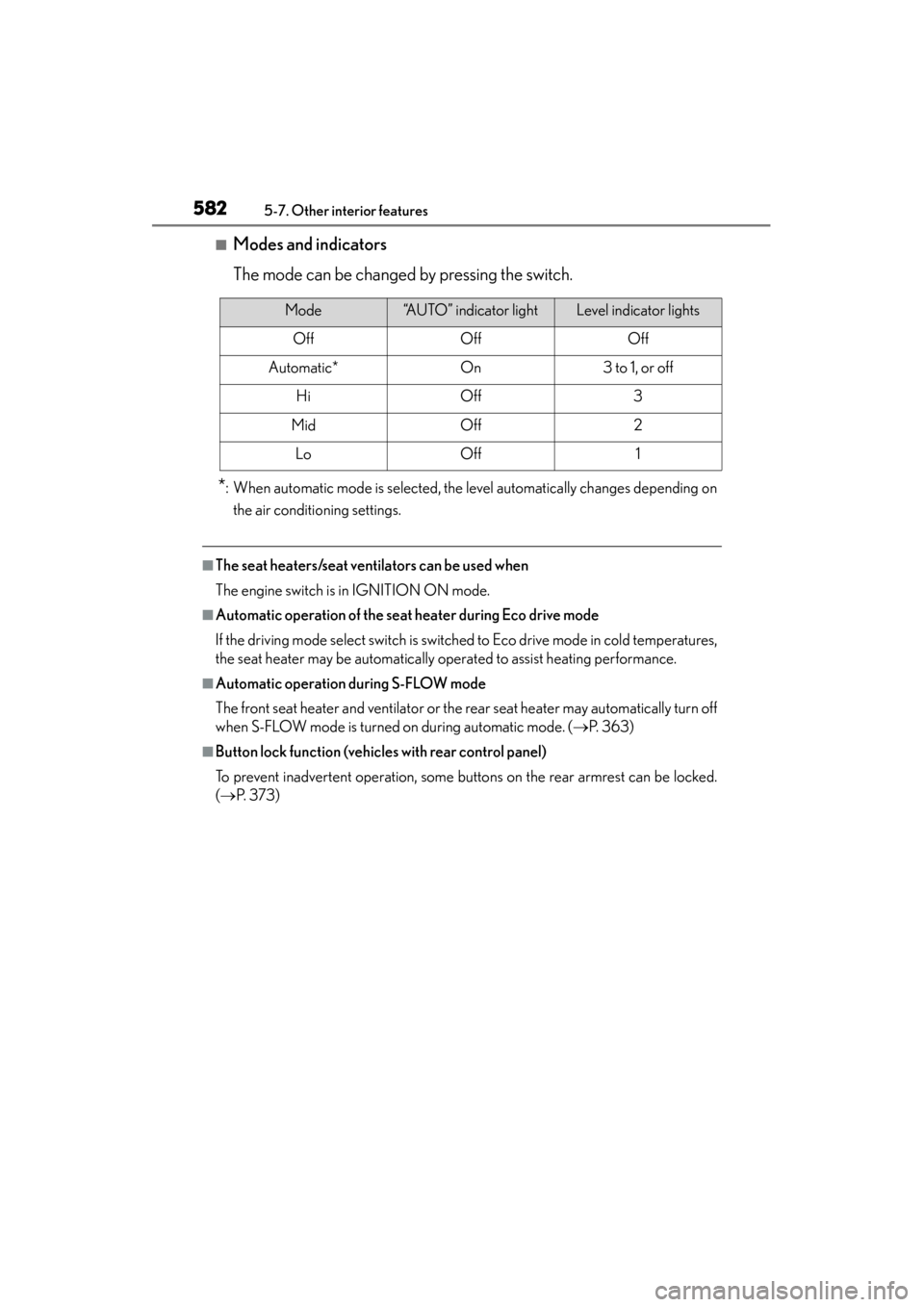
■Modes and indicators
The mode can be changed by pressing the switch.
*: When automatic mode is selected, the level automatically changes depending onthe air conditioning settings.
■The seat heaters/seat ventilators can be used when
The engine switch is in IGNITION ON mode.
■Automatic operation of the seat heater during Eco drive mode
If the driving mode select switch is switched to Eco drive mode in cold temperatures,
the seat heater may be automatically operated to assist heating performance.
■Automatic operation during S-FLOW mode
The front seat heater and ventilator or the rear seat heater may automatically turn off
when S-FLOW mode is turned on during automatic mode. ( →P. 363)
■Button lock function (vehicles with rear control panel)
To prevent inadvertent operation, some buttons on the rear armrest can be locked.
(→ P. 3 7 3 )
Mode“AUTO” indicator lightLevel indicator lights
OffOffOff
Automatic*On3 to 1, or off
HiOff3
MidOff2
LoOff1
GS350_OM_OM30D41U_(U).book Page 582 Monday, July 29, 2013 2:22 PM
Page 588 of 846
GS350_OM_OM30D41U_(U)
5875-7. Other interior features
5
Interior features
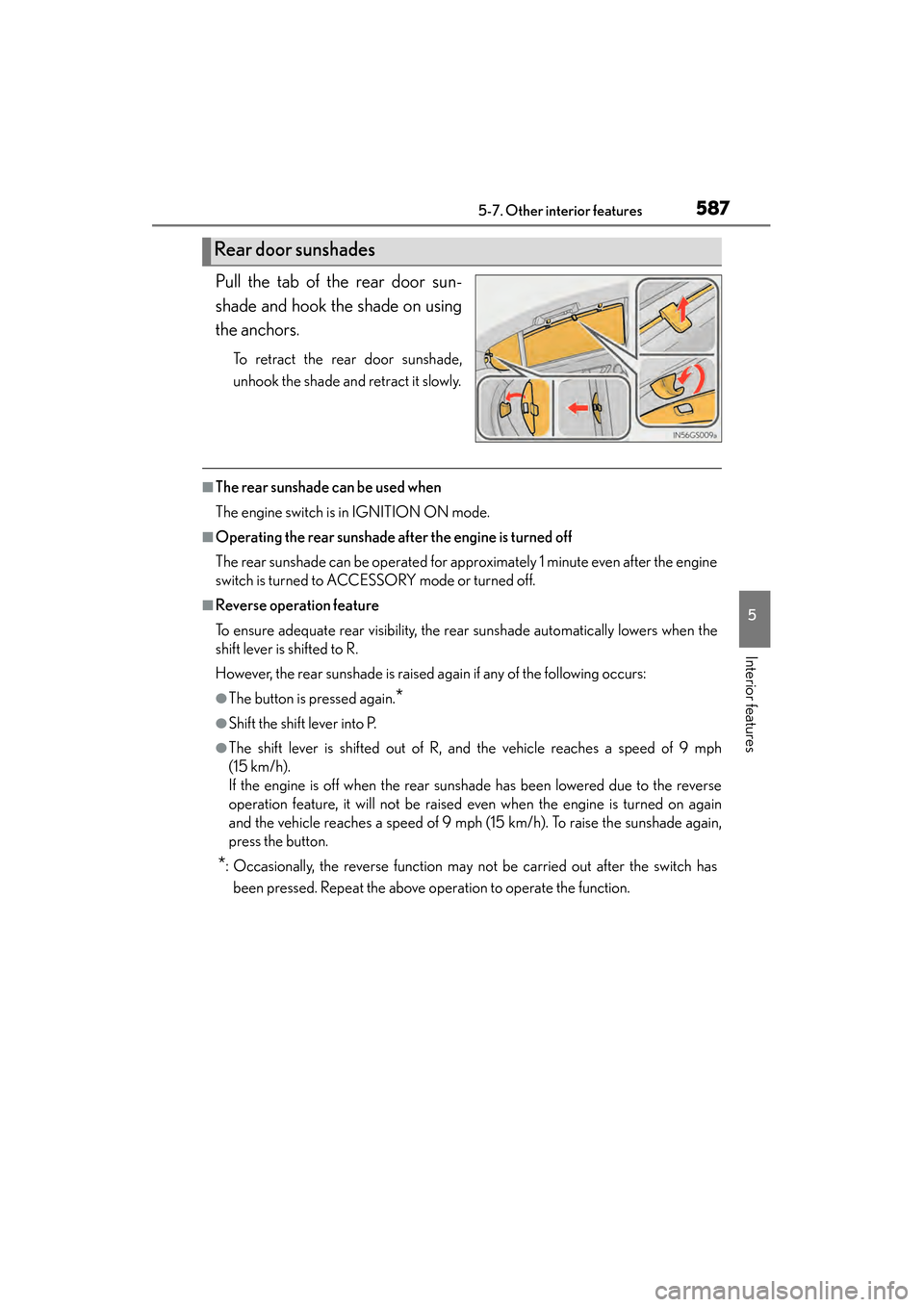
Pull the tab of the rear door sun-
shade and hook the shade on using
the anchors.
To retract the rear door sunshade,
unhook the shade and retract it slowly.
■The rear sunshade can be used when
The engine switch is in IGNITION ON mode.
■Operating the rear sunshade after the engine is turned off
The rear sunshade can be operated for approximately 1 minute even after the engine
switch is turned to ACCESSORY mode or turned off.
■Reverse operation feature
To ensure adequate rear visibility, the rear sunshade automatically lowers when the
shift lever is shifted to R.
However, the rear sunshade is raised again if any of the following occurs:
●The button is pressed again.*
●Shift the shift lever into P.
●The shift lever is shifted out of R, and the vehicle reaches a speed of 9 mph
(15 km/h).
If the engine is off when the rear sunshade has been lowered due to the reverse
operation feature, it will not be raised even when the engine is turned on again
and the vehicle reaches a speed of 9 mph (15 km/h). To raise the sunshade again,
press the button.
*: Occasionally, the reverse function may not be carried out after the switch hasbeen pressed. Repeat the above operation to operate the function.
Rear door sunshades
GS350_OM_OM30D41U_(U).book Page 587 Monday, July 29, 2013 2:22 PM
Page 604 of 846
GS350_OM_OM30D41U_(U)
6035-7. Other interior features
5
Interior features
When the engine switch is turned to IGNITION ON mode, the red indi-
cator light comes on for 2 seconds then turns off. Afterward, the green
indicator light comes on, indicating that the service is active.
The following indicator light patterns indicate specific system usage con-
ditions:
●Green indicator light on = Active service
●Green indicator light flashing = Safety Connect call in process
●Red indicator light (except at vehicle start-up) = System malfunction
(contact your Lexus dealer)
●No indicator light (off) = Safety Connect service not active
■Automatic Collision Notification
In case of either airbag deployment or severe rear-end collision, the
system is designed to automatically call the response center. The
responding agent receives the vehicle’s location and attempts to speak
with the vehicle occupants to assess the level of emergency. If the occu-
pants are unable to communicate, the agent automatically treats the
call as an emergency, contacts the nearest emergency services pro-
vider to describe the situation, and requests that assistance be sent to
the location.
Safety Connect LED light Indicators
Safety Connect services
GS350_OM_OM30D41U_(U).book Page 603 Monday, July 29, 2013 2:22 PM
Page 617 of 846
616
GS350_OM_OM30D41U_(U)
6-2. Maintenance
■Repair and replacement
It is recommended that genuine Lexus parts be used for repairs to ensure perfor-
mance of each system. If non-Lexus parts are used in replacement or if a repair shop
other than a Lexus dealer performs repairs, confirm the warranty coverage.
■Resetting the message indicating maintenance is required (U.S.A. only)
After the required maintenance is performed according to the maintenance sched-
ule, please reset the maintenance data.
To reset the data, follow the procedure described below:Switch the display to the trip meter “A” ( →P. 82) when the engine is running.
Turn the engine switch off.
While pressing the “ODO TRIP” button ( →P. 82), turn the engine switch to the
IGNITION ON mode (do not start the engine because otherwise the reset mode
will be canceled).
■Allow inspection and repairs to be performed by a Lexus dealer
●Lexus technicians are well-trained specialists and are kept up to date with the latest
service information. They are well informed about the operations of all systems on
your vehicle.
●Keep a copy of the repair order. It proves that the maintenance that has been per-
formed is under warranty coverage. If any problem should arise while your vehicle
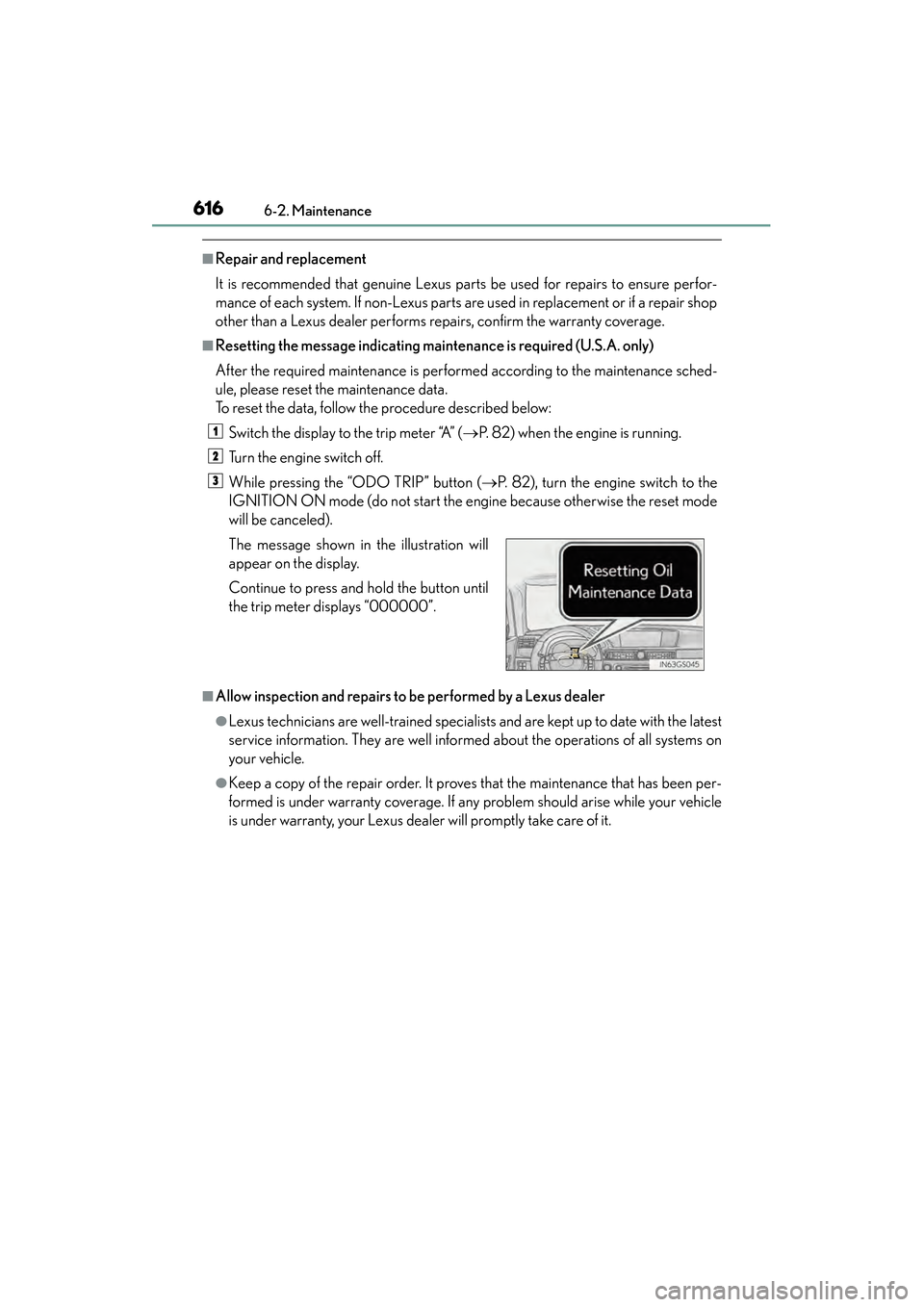
is under warranty, your Lexus dealer will promptly take care of it. The message shown in the illustration will
appear on the display.
Continue to press and hold the button until
the trip meter displays “000000”.
1
2
3
GS350_OM_OM30D41U_(U).book Page 616 Monday, July 29, 2013 2:22 PM
Page 626 of 846
GS350_OM_OM30D41U_(U)
6256-3. Do-it-yourself maintenance
6
Maintenance and care
CAUTION
The engine compartment contains many mechanisms and fluids that may move sud-
denly, become hot, or become electrically energized. To avoid death or serious
injury, observe the following precautions.
■When working on the engine compartment
●Keep hands, clothing and tools away from the moving fan and engine drive belt.
●Be careful not to touch the engine, radiator, exhaust manifold, etc. right after driv-
ing as they may be hot. Oil and other fluids may also be hot.
●Do not leave anything that may burn easily, such as paper and rags, in the engine
compartment.
●Do not smoke, cause sparks or expose an open flame to fuel or the battery. Fuel
and battery fumes are flammable.
●Be extremely cautious when working on the battery. It contains poisonous and
corrosive sulfuric acid.
■When working near the electric cooling fans or radiator grille
Be sure the engine switch is off.
With the engine switch in IGNITION ON mode, the electric cooling fans may
automatically start to run if the air conditioning is on and/or the coolant tempera-
ture is high. (→P. 636)
■Safety glasses
Wear safety glasses to prevent flying or falling material, fluid spray, etc. from get-
ting in your eyes.
NOTICE
■If you remove the air cleaner filter
Driving with the air cleaner filter removed may cause excessive engine wear due to
dirt in the air.
GS350_OM_OM30D41U_(U).book Page 625 Monday, July 29, 2013 2:22 PM
Page 646 of 846
GS350_OM_OM30D41U_(U)
6456-3. Do-it-yourself maintenance
6
Maintenance and care
■How to initialize the tire pressure warning system
Park the vehicle in a safe place and turn the engine switch off.
Initialization cannot be performed while the vehicle is moving.
Adjust the tire inflation pressure to the specified cold tire inflation
pressure level. ( →P. 775)
Make sure to adjust the tire pressure to the specified cold tire inflation pres-
sure level. The tire pressure warning system will operate based on this pressure
level.
Turn the engine switch to IGNITION ON mode.
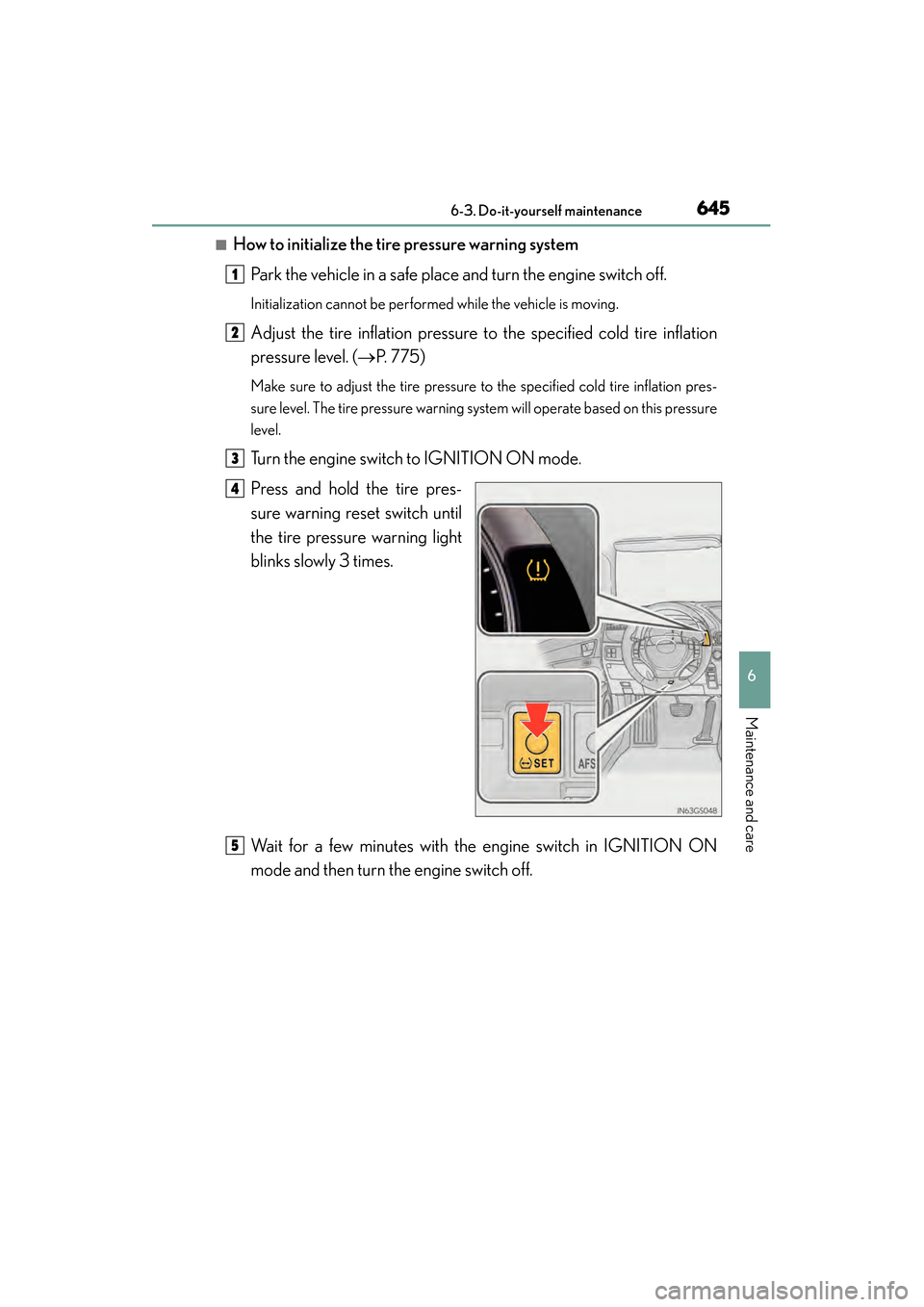
Press and hold the tire pres-
sure warning reset switch until
the tire pressure warning light
blinks slowly 3 times.
Wait for a few minutes with the engine switch in IGNITION ON
mode and then turn the engine switch off.
1
2
3
4
5
GS350_OM_OM30D41U_(U).book Page 645 Monday, July 29, 2013 2:22 PM