Park Lexus GS350 2014 Owner's Guide
[x] Cancel search | Manufacturer: LEXUS, Model Year: 2014, Model line: GS350, Model: Lexus GS350 2014Pages: 846, PDF Size: 35.04 MB
Page 164 of 846

GS350_OM_OM30D41U_(U)
1634-1. Before driving
4
Driving
CAUTION
■When the vehicle is parked
●Do not leave glasses, cigarette lighters, spray cans, or soft drink cans in the vehi-
cle when it is in the sun.
Doing so may result in the following:
• Gas may leak from a cigarette lighter or spray can, and may lead to a fire.
• The temperature inside the vehicle may cause the plastic lenses and plasticmaterial of glasses to deform or crack.
• Soft drink cans may fracture, causing the contents to spray over the interior of the vehicle, and may also cause a short circuit in the vehicle’s electrical com-
ponents.
●Do not leave cigarette lighters in the vehicle. If a cigarette lighter is in a place such
as the glove box or on the floor, it may be lit accidentally when luggage is loaded
or the seat is adjusted, causing a fire.
●Do not attach adhesive discs to the windshield or windows. Do not place contain-
ers such as air fresheners on the instrument panel or dashboard. Adhesive discs
or containers may act as lenses, causing a fire in the vehicle.
●Do not leave a door or window open if the curved glass is coated with a metal-
lized film such as a silver-colored one. Reflected sunlight may cause the glass to
act as a lens, causing a fire.
●Always apply the parking brake, shift the sh ift lever to P, stop the engine and lock
the vehicle.
Do not leave the vehicle unattended while the engine is running.
●Do not touch the exhaust pipes while the engine is running or immediately after
turning the engine off.
Doing so may cause burns.
GS350_OM_OM30D41U_(U).book Page 163 Monday, July 29, 2013 2:22 PM
Page 165 of 846
164
GS350_OM_OM30D41U_(U)
4-1. Before driving
CAUTION
■When taking a nap in the vehicle
Always turn the engine off. Otherwise, if you accidentally move the shift lever or
depress the accelerator pedal, this could cause an accident or fire due to engine
overheating. Additionally, if the vehicle is parked in a poorly ventilated area,
exhaust gases may collect and enter the vehicle, leading to death or a serious
health hazard.
■When braking
●When the brakes are wet, drive more cautiously.
Braking distance increases when the brakes are wet, and this may cause one side
of the vehicle to brake differently than the other side. Also, the parking brake may
not securely hold the vehicle.
●If the power brake assist function does not operate, do not follow other vehicles
closely and avoid hills or sharp turns that require braking.
In this case, braking is still possible, but the brake pedal should be depressed
more firmly than usual. Also, the braking distance will increase. Have your brakes
fixed immediately.
●The brake system consists of 2 individual hydraulic systems; if one of the systems
fails, the other will still operate. In this case, the brake pedal should be depressed
more firmly than usual and the braking distance will increase. Have your brakes
fixed immediately.
■If the vehicle becomes stuck (AWD models)
Do not spin the wheels excessively when any of the tires is up in the air, or the vehi-
cle is stuck in sand, mud, etc. This may damage the driveline components or propel
the vehicle forward or backward, causing an accident.
GS350_OM_OM30D41U_(U).book Page 164 Monday, July 29, 2013 2:22 PM
Page 166 of 846
GS350_OM_OM30D41U_(U)
1654-1. Before driving
4
Driving
NOTICE
■When driving the vehicle
●Do not depress the accelerator and brake pedals at the same time during driving,
as this may restrain driving torque.
●Do not use the accelerator pedal or depress the accelerator and brake pedals at
the same time to hold the vehicle on a hill.
■When parking the vehicle
Always shift the shift lever to P. Failure to do so may cause the vehicle to move or
the vehicle may accelerate suddenly if the accelerator pedal is accidentally
depressed.
■Avoiding damage to vehicle parts
●Do not turn the steering wheel fully in either direction and hold it there for an
extended period of time.
Doing so may damage the power steering motor.
●When driving over bumps in the road, drive as slowly as possible to avoid damag-
ing the wheels, underside of the vehicle, etc.
■If you get a flat tire while driving
A flat or damaged tire may cause the following situations. Hold the steering wheel
firmly and gradually depress the brake pedal to slow down the vehicle.
●It may be difficult to control your vehicle.
●The vehicle will make abnormal sounds or vibrations.
●The vehicle will lean abnormally.
Information on what to do in case of a flat tire ( →P. 7 3 6 )
GS350_OM_OM30D41U_(U).book Page 165 Monday, July 29, 2013 2:22 PM
Page 174 of 846

173
GS350_OM_OM30D41U_(U)4-2. Driving procedures
4
Driving
Engine (ignition) switch
Check that the parking brake is set.
Check that the shift lever is set in P.
Firmly depress the brake pedal.
will be displayed on the multi-information display.
If it is not displayed, the engine cannot be started.
Press the engine switch.
The engine will crank until it starts or
for up to 30 seconds, whichever is
less.
Continue depressing the brake pedal
until the engine is completely started.
The engine can be started from any
engine switch mode.
Performing the fol lowing operations when ca rrying the electronic key
on your person starts the engine or changes engine switch modes.
Starting the engine
1
2
3
4
GS350_OM_OM30D41U_(U).book Page 173 Monday, July 29, 2013 2:22 PM
Page 175 of 846

174
GS350_OM_OM30D41U_(U)
4-2. Driving procedures
Stop the vehicle.
Shift the shift lever to P.
Set the parking brake. (→P. 188)
Press the engine switch.
Release the brake pedal and check that “POWER ON” on the multi-
information display is off.
Modes can be changed by pressing the engine switch with brake pedal
released. (The mode changes each time the switch is pressed.)
Off*
The emergency flashers can be used.
The multi-information display will not
be displayed.
ACCESSORY mode
Some electrical components such as
the audio system can be used.
“POWER ON” will be displayed on
the multi-information display.
IGNITION ON mode
All electrical components can be
used.
“POWER ON” will be displayed on
the multi-information display.
*: If the shift lever is in a position other than P when turning off the engine, the
engine switch will be turned to
ACCESSORY mode, not to off.
Stopping the engine
Changing engine switch modes
1
2
3
4
5
GS350_OM_OM30D41U_(U).book Page 174 Monday, July 29, 2013 2:22 PM
Page 176 of 846

GS350_OM_OM30D41U_(U)
1754-2. Driving procedures
4
Driving
If the engine is stopped with the shift lever in a position other than P, the
engine switch will not be turned off but instead be turned to ACCES-
SORY mode. Perform the following procedure to turn the switch off:Check that the parking brake is set.
Shift the shift lever to P.
Check that “POWER ON” and “Turn Power OFF” are displayed alter-
nately on the multi-information display and then press the engine switch
once.
Check that “POWER ON” and “Turn Power OFF” on the multi-infor-
mation display are off.
When stopping the engine with th e shift lever in a position other
than P
1
2
3
4
GS350_OM_OM30D41U_(U).book Page 175 Monday, July 29, 2013 2:22 PM
Page 182 of 846

GS350_OM_OM30D41U_(U)
1814-2. Driving procedures
4
Driving
*1: To improve fuel efficiency and reduce noises, set the shift lever in D for normaldriving.
*2: Any gear range can be fixed when driving in M mode.
■Sport mode/Eco drive mode
→ P. 2 6 4
■Snow mode
Snow mode can be selected to suit the conditions when driving on slip-
pery road surfaces, such as on snow.
Press the switch.
Press the switch again to return to
normal mode.
Shift position purpose
Shift positionObjective or function
PParking the vehicle/starting the engine
RReversing
NNeutral (Condition in which the power is not transmitted)
DNormal driving*1
MM mode driving*2 (→ P. 1 8 3 )
Selecting the driving mode
GS350_OM_OM30D41U_(U).book Page 181 Monday, July 29, 2013 2:22 PM
Page 189 of 846

188
GS350_OM_OM30D41U_(U)
4-2. Driving procedures
Pa rk in g b ra ke
Sets the parking brake
The parking brake indicator light will
come on. (→P. 1 8 9 )
Press and hold the parking brake
switch if an emergency occurs and it is
necessary to operate the parking
brake while driving.
Releases the parking brake
Operate the parking brake switch
while depressing the brake pedal.
Make sure that the parking brake indi-
cator light goes off.
A selections can be made as desired from the following modes.
Manual mode
U.S.A. Canada
1
2
GS350_OM_OM30D41U_(U).book Page 188 Monday, July 29, 2013 2:22 PM
Page 190 of 846
GS350_OM_OM30D41U_(U)
1894-2. Driving procedures
4
Driving
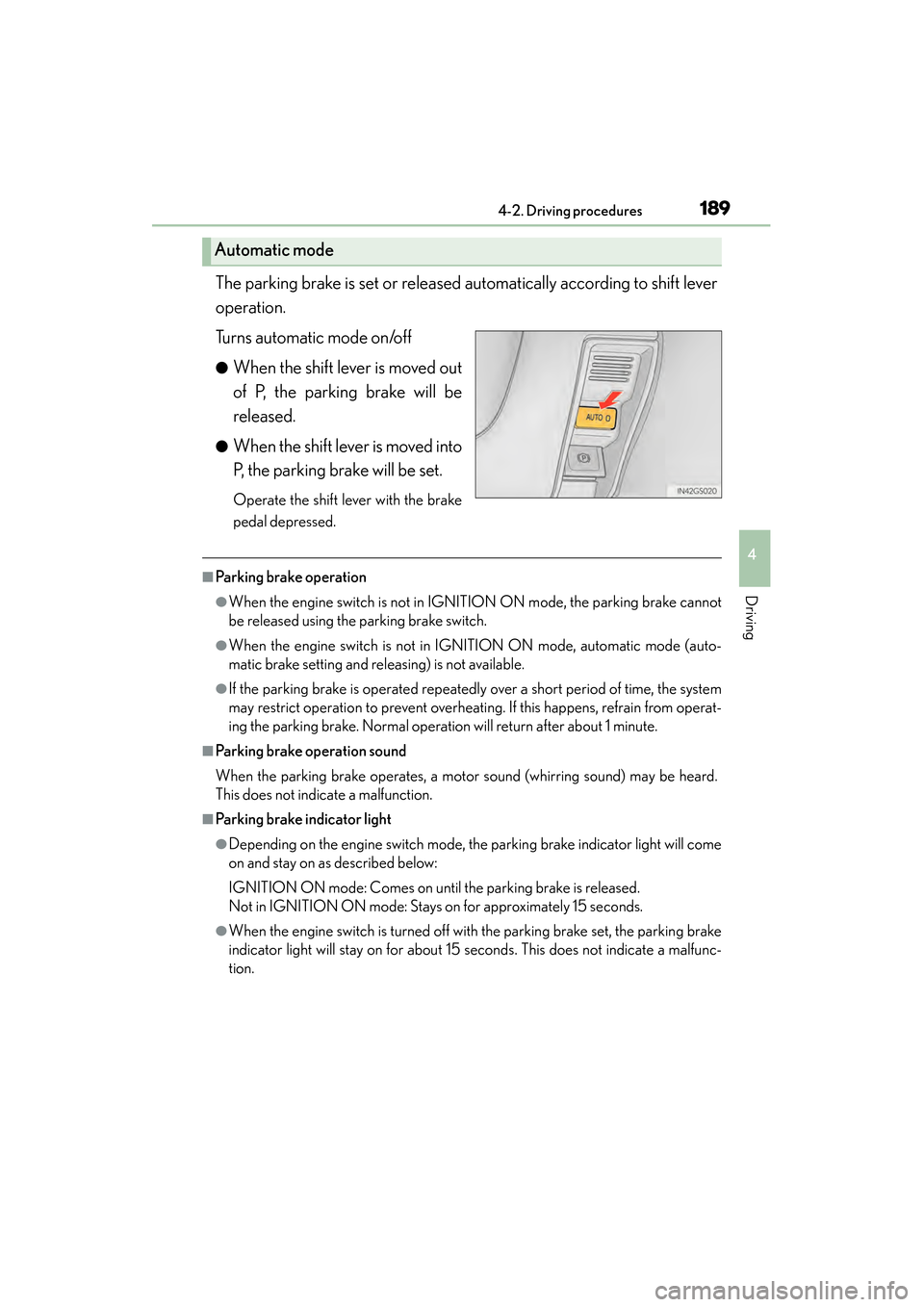
The parking brake is set or released automatically according to shift lever
operation.
Turns automatic mode on/off
●When the shift lever is moved out
of P, the parking brake will be
released.
●When the shift lever is moved into
P, the parking brake will be set.
Operate the shift lever with the brake
pedal depressed.
■Parking brake operation
●When the engine switch is not in IGNITION ON mode, the parking brake cannot
be released using the parking brake switch.
●When the engine switch is not in IGNITION ON mode, automatic mode (auto-
matic brake setting and releasing) is not available.
●If the parking brake is operated repeatedly over a short period of time, the system
may restrict operation to prevent overheating. If this happens, refrain from operat-
ing the parking brake. Normal operation will return after about 1 minute.
■Parking brake operation sound
When the parking brake operates, a motor sound (whirring sound) may be heard.
This does not indicate a malfunction.
■Parking brake indicator light
●Depending on the engine switch mode, the parking brake indicator light will come
on and stay on as described below:
IGNITION ON mode: Comes on until the parking brake is released.
Not in IGNITION ON mode: Stays on for approximately 15 seconds.
●When the engine switch is turned off with the parking brake set, the parking brake
indicator light will stay on for about 15 seconds. This does not indicate a malfunc-
tion.
Automatic mode
GS350_OM_OM30D41U_(U).book Page 189 Monday, July 29, 2013 2:22 PM
Page 191 of 846
190
GS350_OM_OM30D41U_(U)
4-2. Driving procedures
■When there is a malfunction in the system
Warning lights and/or warning message will turn on or flash. (→P. 704, 717)
Depending on the condition, the parking brake indicator light may flash.
■Usage in winter time
→ P. 3 0 5
NOTICE
■When parking the vehicle
Before you leave the vehicle, set the parking brake, shift the shift lever to P and
make sure that the vehicle does not move.
■When the system malfunctions
Stop the vehicle in a safe place and check the warning messages.
■When the parking brake cannot be released due to a malfunction
Use the parking brake release tool to manually release the parking brake.
(→ P. 7 5 2 )
Driving the vehicle with the parking brake set will lead to brake components over-
heating, which may affect braking performance and increase brake wear.
GS350_OM_OM30D41U_(U).book Page 190 Monday, July 29, 2013 2:22 PM