Park Lexus GS350 2014 Service Manual
[x] Cancel search | Manufacturer: LEXUS, Model Year: 2014, Model line: GS350, Model: Lexus GS350 2014Pages: 846, PDF Size: 35.04 MB
Page 254 of 846
253
GS350_OM_OM30D41U_(U)4-5. Using the driving support systems
4
Driving
Rear view monitor system
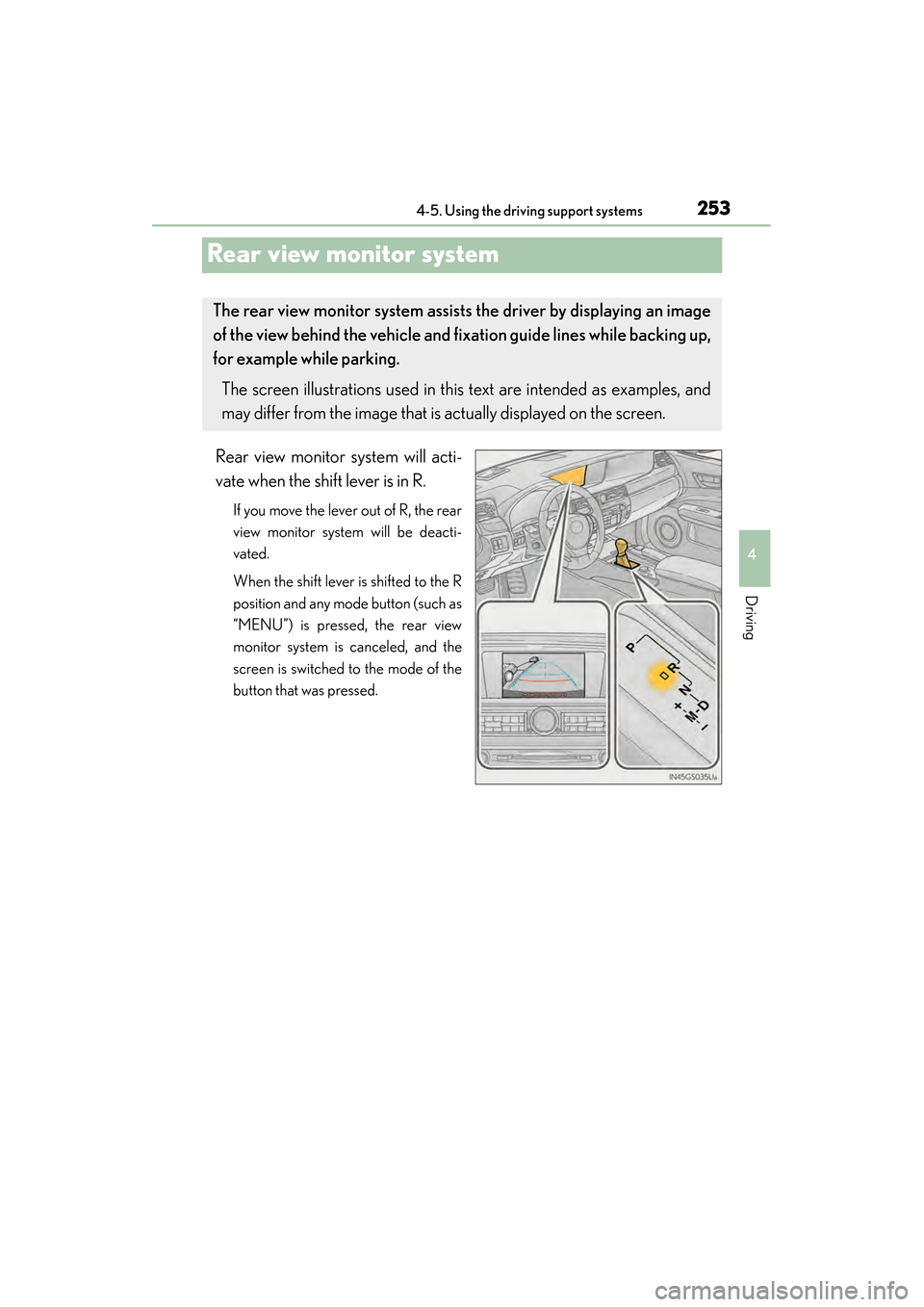
Rear view monitor system will acti-
vate when the shift lever is in R.
If you move the lever out of R, the rear
view monitor system will be deacti-
vated.
When the shift lever is shifted to the R
position and any mode button (such as
“MENU”) is pressed, the rear view
monitor system is canceled, and the
screen is switched to the mode of the
button that was pressed.
The rear view monitor system assists the driver by displaying an image
of the view behind the vehicle and fi xation guide lines while backing up,
for example while parking.
The screen illustrations used in this text are intended as examples, and
may differ from the image that is actually displayed on the screen.
GS350_OM_OM30D41U_(U).book Page 253 Monday, July 29, 2013 2:22 PM
Page 255 of 846
254
GS350_OM_OM30D41U_(U)
4-5. Using the driving support systems
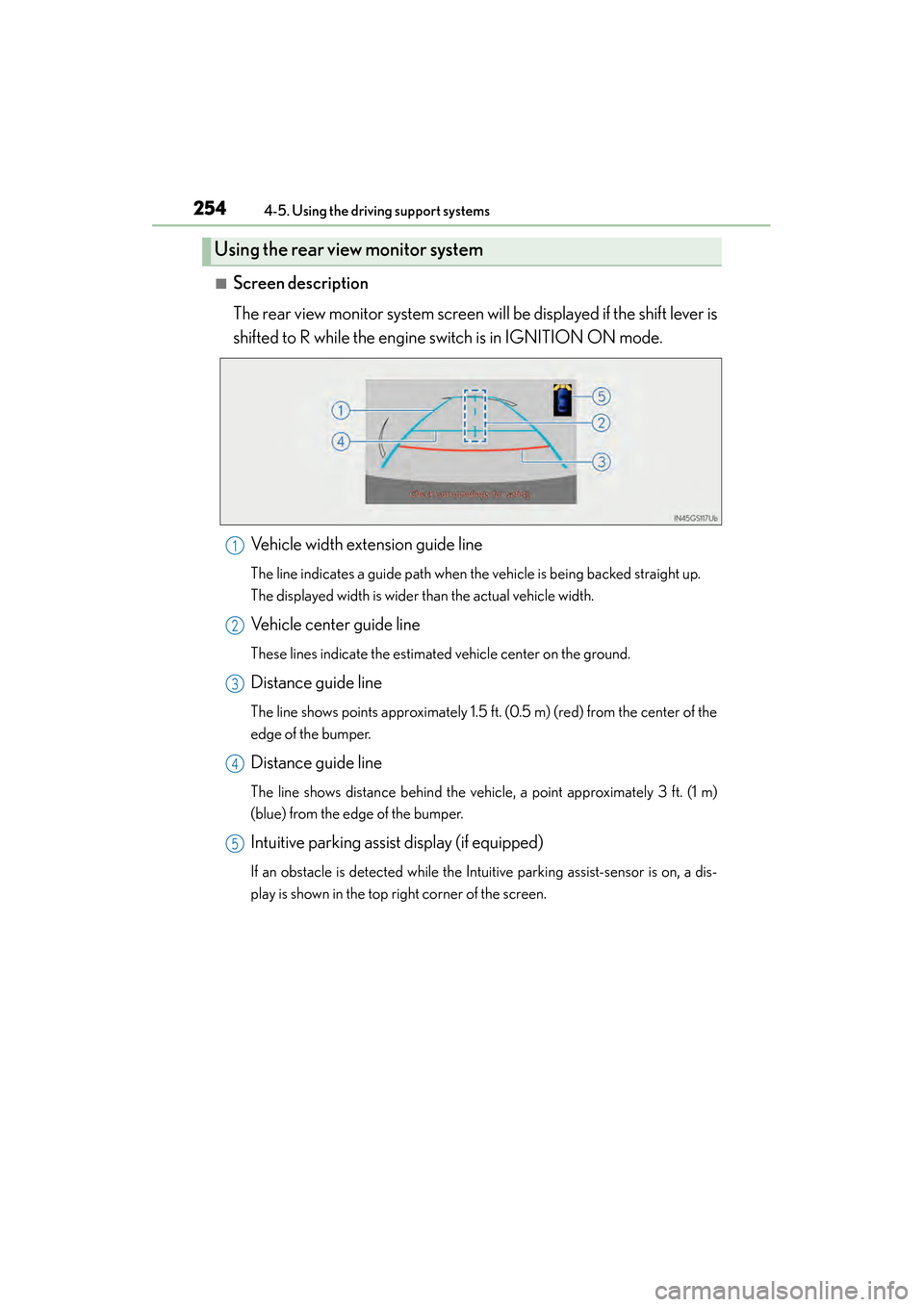
■Screen description
The rear view monitor system screen will be displayed if the shift lever is
shifted to R while the engine switch is in IGNITION ON mode.
Vehicle width extension guide line
The line indicates a guide path when the vehicle is being backed straight up.
The displayed width is wider than the actual vehicle width.
Vehicle center guide line
These lines indicate the estimated vehicle center on the ground.
Distance guide line
The line shows points approximately 1.5 ft. (0.5 m) (red) from the center of the
edge of the bumper.
Distance guide line
The line shows distance behind the vehicle, a point approximately 3 ft. (1 m)
(blue) from the edge of the bumper.
Intuitive parking assist display (if equipped)
If an obstacle is detected while the Intuitive parking assist-sensor is on, a dis-
play is shown in the top right corner of the screen.
Using the rear view monitor system
1
2
3
4
5
GS350_OM_OM30D41U_(U).book Page 254 Monday, July 29, 2013 2:22 PM
Page 257 of 846
256
GS350_OM_OM30D41U_(U)
4-5. Using the driving support systems
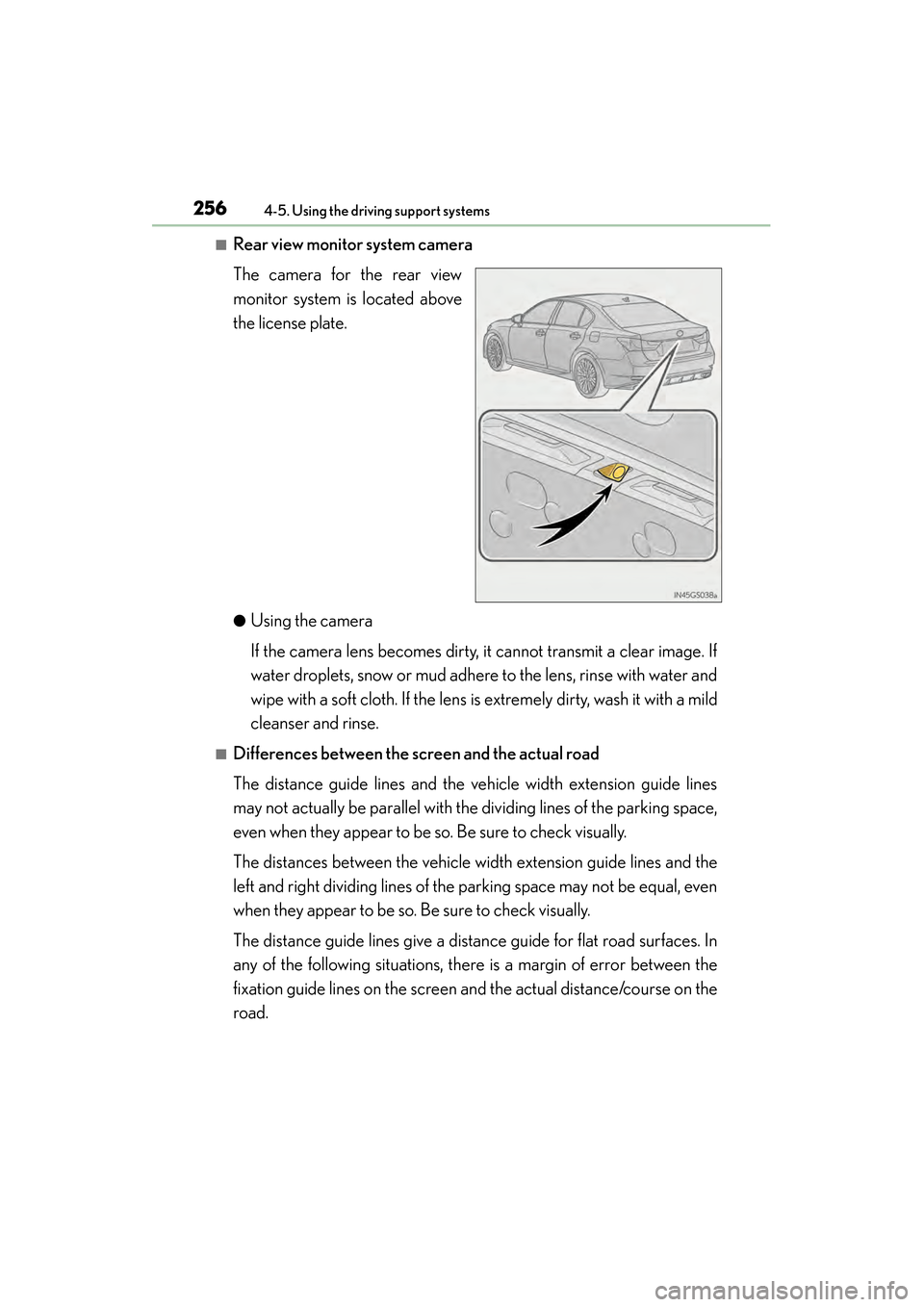
■Rear view monitor system camera
The camera for the rear view
monitor system is located above
the license plate.
●Using the camera
If the camera lens becomes dirty, it cannot transmit a clear image. If
water droplets, snow or mud adhere to the lens, rinse with water and
wipe with a soft cloth. If the lens is extremely dirty, wash it with a mild
cleanser and rinse.
■Differences between the screen and the actual road
The distance guide lines and the vehicle width extension guide lines
may not actually be parallel with the dividing lines of the parking space,
even when they appear to be so. Be sure to check visually.
The distances between the vehicle width extension guide lines and the
left and right dividing lines of the parking space may not be equal, even
when they appear to be so. Be sure to check visually.
The distance guide lines give a distance guide for flat road surfaces. In
any of the following situations, there is a margin of error between the
fixation guide lines on the screen and the actual distance/course on the
road.
GS350_OM_OM30D41U_(U).book Page 256 Monday, July 29, 2013 2:22 PM
Page 259 of 846
258
GS350_OM_OM30D41U_(U)
4-5. Using the driving support systems
●When any part of the vehicle sags
When any part of the vehicle
sags due to the number of pas-
sengers or the distribution of
the load, there is a margin of
error between the fixation
guide lines on the screen and
the actual distance/course on
the road.
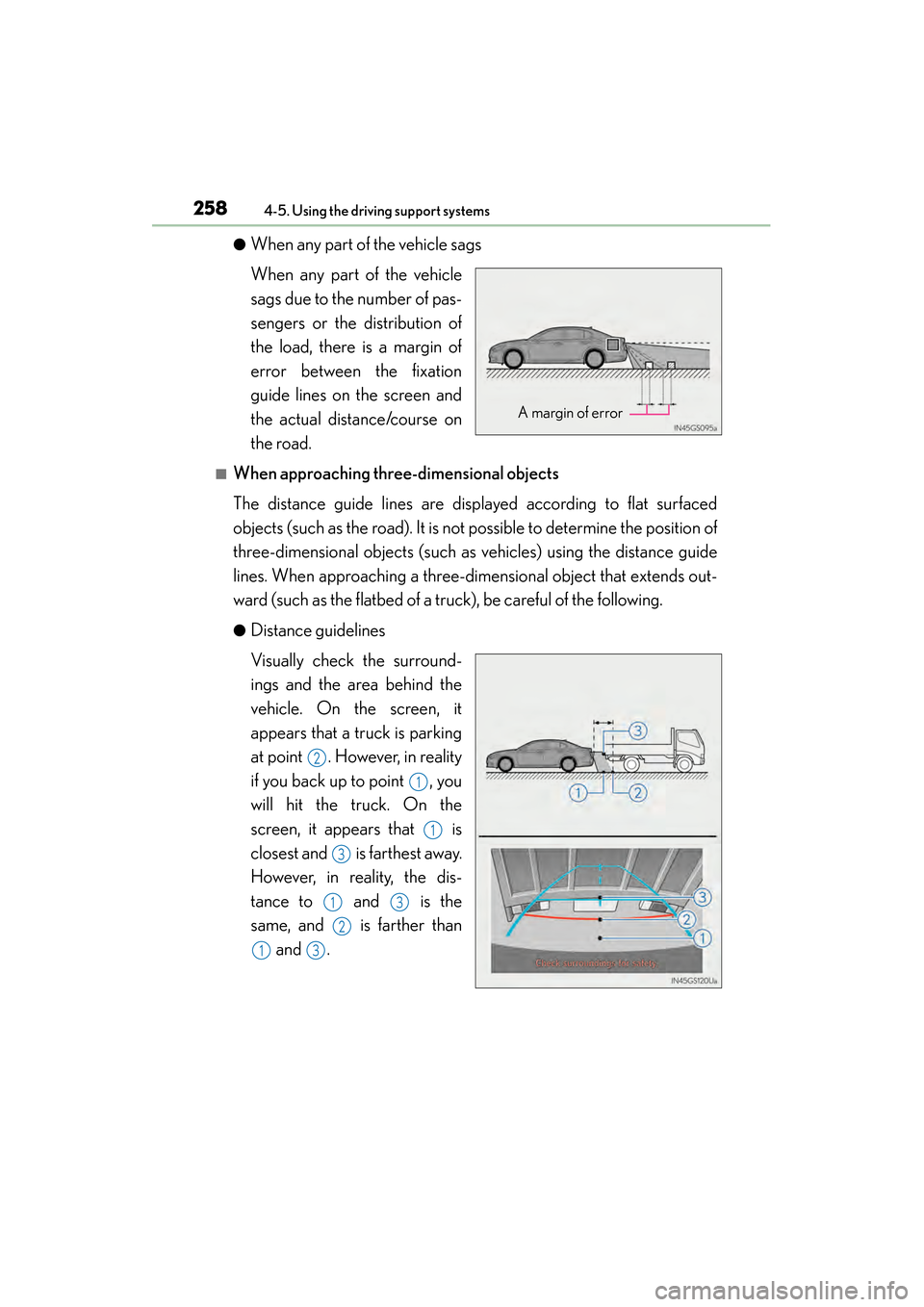
■When approaching three-dimensional objects
The distance guide lines are displayed according to flat surfaced
objects (such as the road). It is not possible to determine the position of
three-dimensional objects (such as vehicles) using the distance guide
lines. When approaching a three-dimensional object that extends out-
ward (such as the flatbed of a truck), be careful of the following.
●Distance guidelines
Visually check the surround-
ings and the area behind the
vehicle. On the screen, it
appears that a truck is parking
at point . However, in reality
if you back up to point , you
will hit the truck. On the
screen, it appears that is
closest and is farthest away.
However, in reality, the dis-
tance to and is the
same, and is farther than and .
A margin of error
2
1
1
3
13
2
13
GS350_OM_OM30D41U_(U).book Page 258 Monday, July 29, 2013 2:22 PM
Page 263 of 846

262
GS350_OM_OM30D41U_(U)
4-5. Using the driving support systems
CAUTION
■When using the rear view monitor system
The rear view monitor system is a supplemental device intended to assist the driver
when backing up. When backing up, be sure to check visually behind and all
around the vehicle before proceeding.
Observe the following precautions to avoid an accident that could result in death
or serious injuries.
●Never depend on the rear view monitor system entirely when backing up. The
image and the position of the guide lines displayed on the screen may differ from
the actual state.
Use caution, just as you would when backing up any vehicle.
●Be sure to back up slowly, depressing the brake pedal to control vehicle speed.
●The instructions given are only guidelines.
When and how much to turn the steering wheel will vary according to traffic con-
ditions, road surface conditions, vehicle condition, etc. when parking. It is neces-
sary to be fully aware of this before using the rear view monitor system.
●When parking, be sure to check that the parking space will accommodate your
vehicle before maneuvering into it.
●Do not use the rear view monitor system in the following cases:
• On icy or slick road surfaces, or in snow
• When using tire chains or the compact spare tire
• When the trunk lid is not closed completely
• On roads that are not flat or straight, such as curves or slopes.
●In low temperatures, the screen may darken or the image may become faint. The
image could distort when the vehicle is moving, or you may become unable to
see the image on the screen. Be sure to check direct visually and with the mirrors
all around the vehicle before proceeding.
●If the tire sizes are changed, the position of the fixation guide lines displayed on
the screen may change.
●The camera uses a special lens. The distances between objects and pedestrians
that appear in the image displayed on the screen will differ from the actual dis-
tances. (→P. 2 5 6 )
GS350_OM_OM30D41U_(U).book Page 262 Monday, July 29, 2013 2:22 PM
Page 278 of 846
277
GS350_OM_OM30D41U_(U)4-5. Using the driving support systems
4
Driving
Hill-start assist control
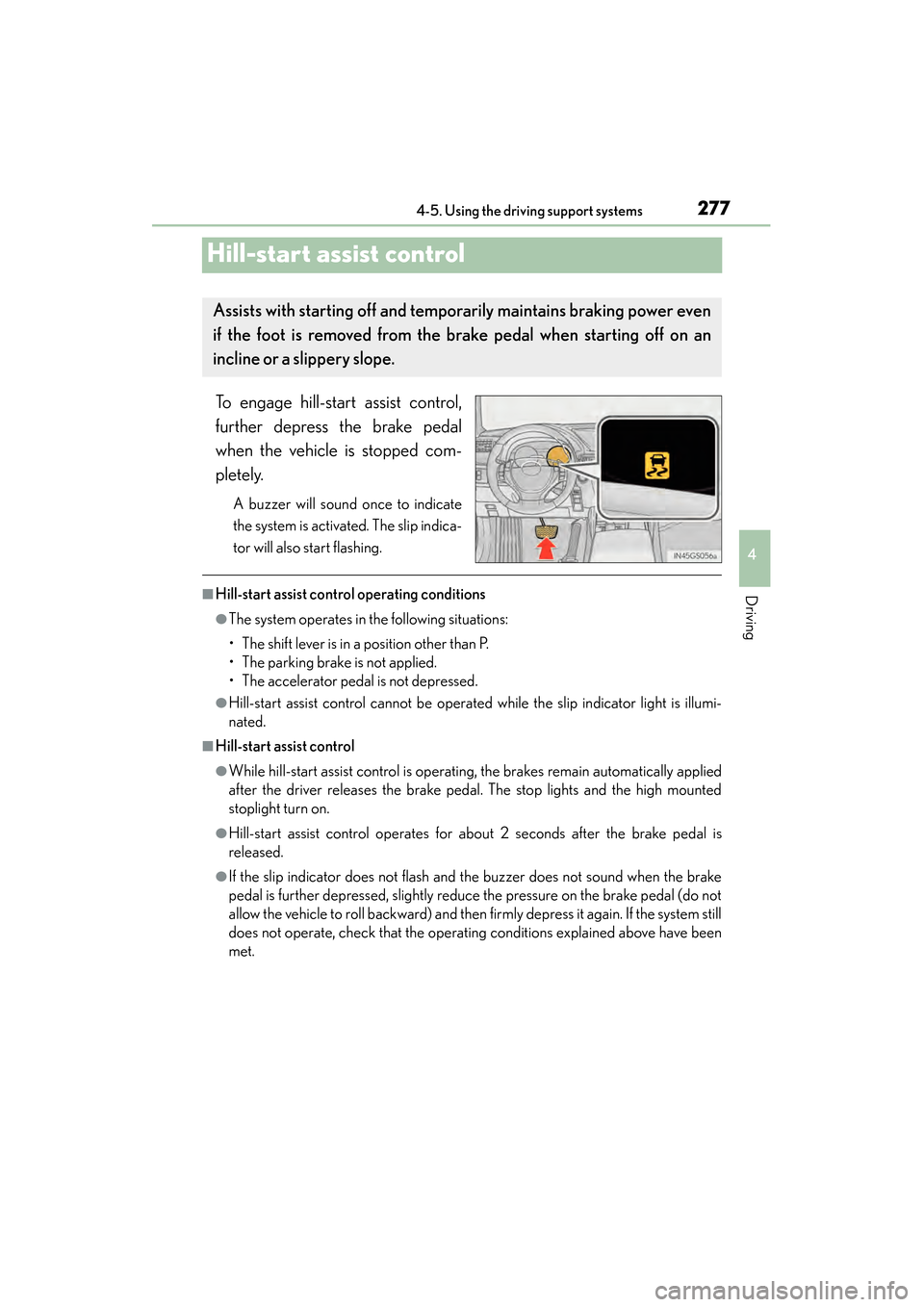
To engage hill-start assist control,
further depress the brake pedal
when the vehicle is stopped com-
pletely.
A buzzer will sound once to indicate
the system is activated. The slip indica-
tor will also start flashing.
■Hill-start assist control operating conditions
●The system operates in the following situations:
• The shift lever is in a position other than P.
• The parking brake is not applied.
• The accelerator pedal is not depressed.
●Hill-start assist control cannot be operated while the slip indicator light is illumi-
nated.
■Hill-start assist control
●While hill-start assist control is operating, the brakes remain automatically applied
after the driver releases the brake pedal. The stop lights and the high mounted
stoplight turn on.
●Hill-start assist control operates for about 2 seconds after the brake pedal is
released.
●If the slip indicator does not flash and the buzzer does not sound when the brake
pedal is further depressed, slightly reduce the pressure on the brake pedal (do not
allow the vehicle to roll backward) and then firmly depress it again. If the system still
does not operate, check that the operating conditions explained above have been
met.
Assists with starting off and temporarily maintains braking power even
if the foot is removed from the brake pedal when starting off on an
incline or a slippery slope.
GS350_OM_OM30D41U_(U).book Page 277 Monday, July 29, 2013 2:22 PM
Page 279 of 846
278
GS350_OM_OM30D41U_(U)
4-5. Using the driving support systems
■Hill-start assist control buzzer
●When hill-start assist control is activated, the buzzer will sound once.
●In the following situations, hill-start assist control will be canceled and the buzzer
will sound twice.
• No attempt is made to drive the vehicle within approximately 2 seconds ofreleasing the brake pedal.
• The shift lever is moved to P.
• The parking brake is applied.
• The brake pedal is depressed again.
• The brake pedal has been depressed for more than approximately 3 minutes.
■If the slip indicator comes on
It may indicate a malfunction in the system. Contact your Lexus dealer.
CAUTION
■Hill-start assist control
●Do not overly rely on hill-start assist control. Hill-start assist control may not oper-
ate effectively on steep inclines and roads covered with ice.
●Unlike the parking brake, hill-start assist control is not intended to hold the vehi-
cle stationary for an extended period of time. Do not attempt to use hill-start
assist control to hold the vehicle on an incline, as doing so may lead to an acci-
dent.
GS350_OM_OM30D41U_(U).book Page 278 Monday, July 29, 2013 2:22 PM
Page 294 of 846
GS350_OM_OM30D41U_(U)
2934-5. Using the driving support systems
4
Driving
■The Blind Spot Monitor function is operational when
●The BSM main switch is set to on
●Vehicle speed is greater than approximately 10 mph (16 km/h).
■The Blind Spot Monitor function will detect a vehicle when
●A vehicle in an adjacent lane overtakes your vehicle.
●Another vehicle enters the detection area when it changes lanes.
■Conditions under which the Blind Spot Monitor function will not detect a vehicle
The Blind Spot Monitor function is not designed to detect the following types of vehi-
cles and/or objects:
●Small motorcycles, bicycles, pedestrians etc.*
●Vehicles traveling in the opposite direction
●Guardrails, walls, signs, parked vehicles and similar stationary objects*
●Following vehicles that are in the same lane*
●Vehicles driving 2 lanes across from your vehicle*
*
: Depending on conditions, detection of a vehicle and/or object may occur.
CAUTION
■Cautions regarding the use of the system
The driver is solely responsible for safe driving. Always drive safely, taking care to
observe your surroundings.
The Blind Spot Monitor function is a supplementary function which alerts the
driver that a vehicle is present in the blind spot. Do not overly rely on the Blind Spot
Monitor function. The function cannot judge if it is safe to change lanes, therefore
over reliance could cause an accident resulting in death or serious injury.
According to conditions, the system may not function correctly. Therefore the
driver’s own visual confirmation of safety is necessary.
GS350_OM_OM30D41U_(U).book Page 293 Monday, July 29, 2013 2:22 PM
Page 298 of 846
GS350_OM_OM30D41U_(U)
2974-5. Using the driving support systems
4
Driving
■Conditions under which the Rear Cross Traffic Alert function will not detect a vehi-
cle
The Rear Cross Traffic Alert function is not designed to detect the following types of
vehicles and/or objects.
●Small motorcycles, bicycles, pedestrians etc.*
●Vehicles approaching from directly behind
●Guardrails, walls, signs, parked vehicles and similar stationary objects*
●Vehicles moving away from your vehicle
●Vehicles approaching from the parking spaces next to your vehicle*
●Vehicles backing up in the parking space next to your vehicle*
*
: Depending on conditions, detection of a vehicle and/or object may occur.
■Conditions under which the Rear Cross Traffic Alert function may not function
correctly
The Rear Cross Traffic Alert function may not detect vehicles correctly in the follow-
ing conditions:
●During bad weather such as heavy rain, fog, snow etc.
●When ice or mud etc. is attached to the rear bumper
●When multiple vehicles approach continuously
●Shallow angle parking
●When a vehicle is approaching at high speed
●When parking on a steep incline, such as hills, a dip in the road etc.
●Directly after the BSM main switch is set to on
●When items such as a bicycle carrier are installed on the rear of the vehicle
●Directly after the engine is started with the BSM main switch on
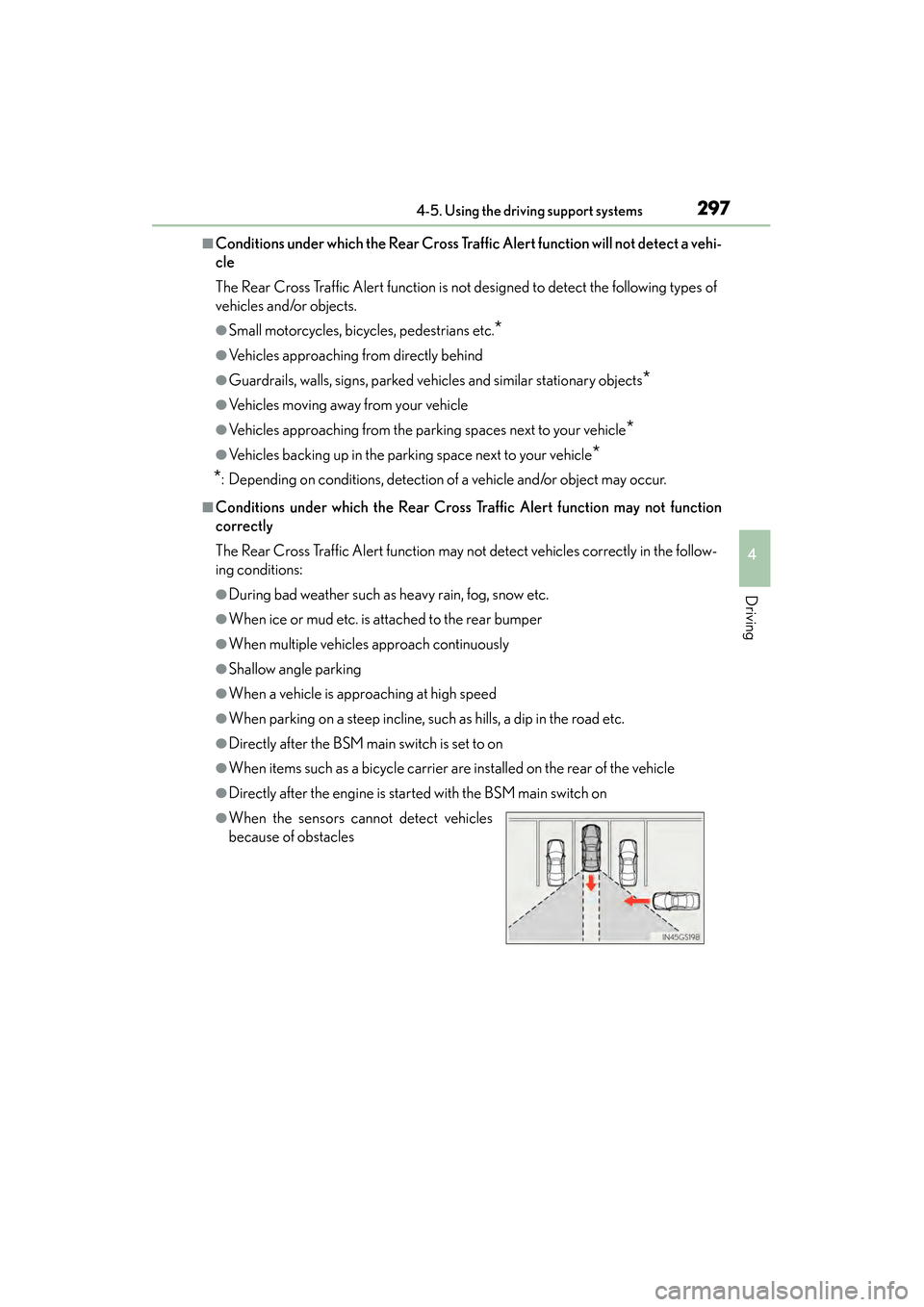
●When the sensors cannot detect vehicles
because of obstacles
GS350_OM_OM30D41U_(U).book Page 297 Monday, July 29, 2013 2:22 PM
Page 306 of 846
GS350_OM_OM30D41U_(U)
3054-6. Driving tips
4
Driving
Perform the following according to the driving conditions:
●Do not try to forcibly open a window or move a wiper that is frozen.
Pour warm water over the frozen area to melt the ice. Wipe away the
water immediately to prevent it from freezing.
●To ensure proper operation of the climate control system fan, remove
any snow that has accumulated on the air inlet vents in front of the wind-
shield.
●Check for and remove any excess ice or snow that may have accumu-
lated on the exterior lights, vehicle’s roof, chassis, around the tires or on
the brakes.
●Remove any snow or mud from the bottom of your shoes before getting
in the vehicle.
Accelerate the vehicle slowly, keep a safe distance between you and the
vehicle ahead, and drive at a reduced speed suitable to road conditions.
Park the vehicle and move the shift lever to P without setting the parking
brake. The parking brake may freeze up, preventing it from being
released. If necessary, block the wheels to prevent inadvertent sliding or
creeping.
Before driving the vehicle
When driving the vehicle
When parking the vehicle
GS350_OM_OM30D41U_(U).book Page 305 Monday, July 29, 2013 2:22 PM