battery Lexus GS350 2014 Owner's Guide
[x] Cancel search | Manufacturer: LEXUS, Model Year: 2014, Model line: GS350, Model: Lexus GS350 2014Pages: 846, PDF Size: 35.04 MB
Page 369 of 846
368
GS350_OM_OM30D41U_(U)
5-2. Using the air conditioning system and defogger
■Air conditioning odors
●During use, various odors from inside and outside the vehicle may enter into and
accumulate in the air conditioning system. This may then cause odor to be emitted
from the vents.
●To reduce potential odors from occurring:
• It is recommended that the air conditioning system be set to outside air modeprior to turning the vehicle off.
• The start timing of the blower may be delayed for a short period of time immedi-
ately after the air conditioning system is started in automatic mode.
■Air conditioning filter
→ P. 6 5 7
■Customization
Settings (e.g. exhaust gas sensor sensitivity) can be changed.
(Customizable features: → P. 7 9 3 )
CAUTION
■To prevent the windshield from fogging up
Do not use
during cool air operation in extremely humid weather. The differ-
ence between the temperature of the outside air and that of the windshield can
cause the outer surface of the windshield to fog up, blocking your vision.
NOTICE
■To prevent battery discharge
Do not leave the air conditioning system on longer than necessary when the
engine is stopped.
■Humidity sensor
Follow these points to avoid damaging the sensor:
●Do not disassemble the sensor
●Do not spray the glass cleaner on the sensor or subject it to strong impacts
●Do not stick anything on the sensor
GS350_OM_OM30D41U_(U).book Page 368 Monday, July 29, 2013 2:22 PM
Page 374 of 846
GS350_OM_OM30D41U_(U)
3735-2. Using the air conditioning system and defogger
5
Interior features
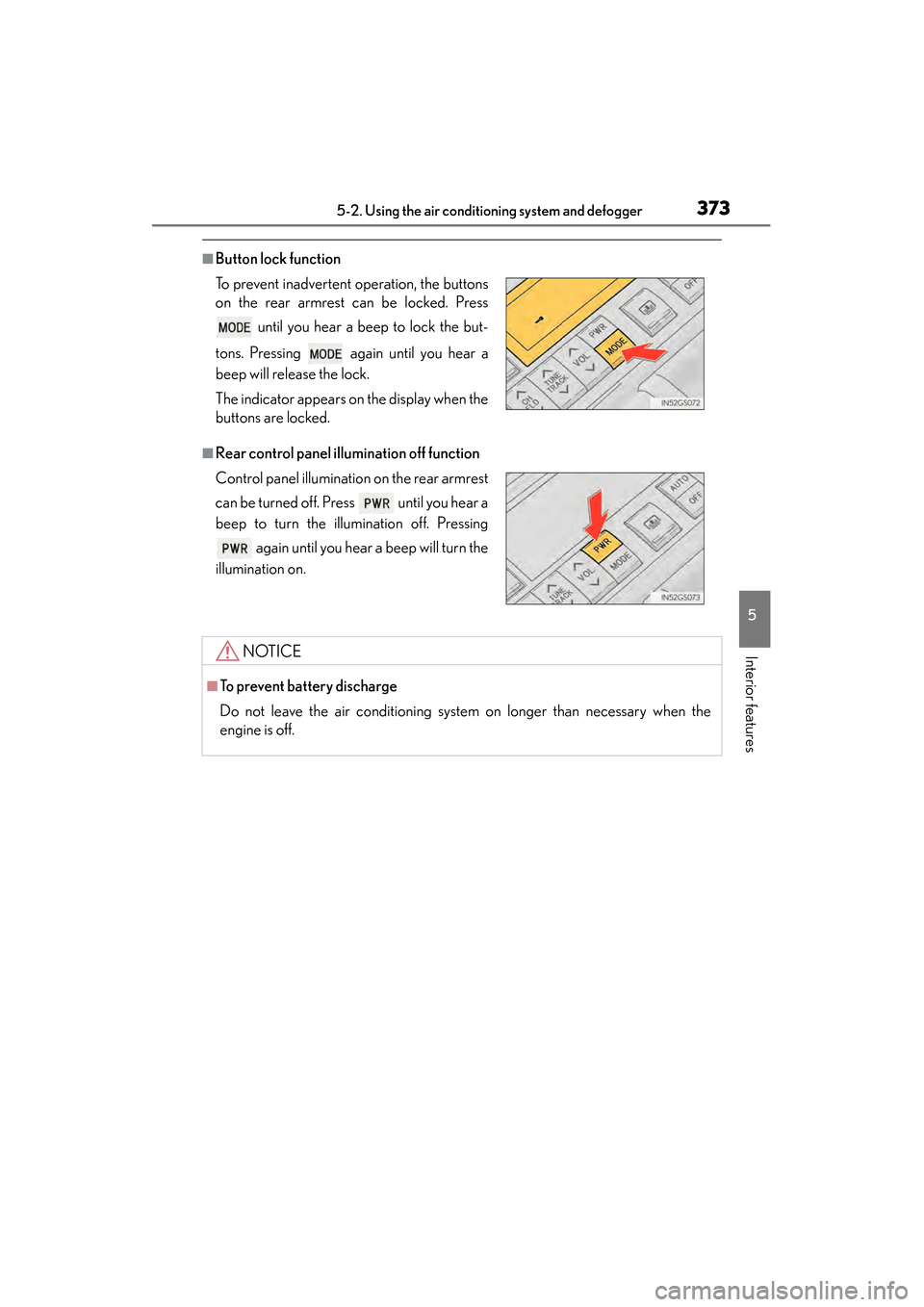
■Button lock function
■Rear control panel illumination off function To prevent inadvertent operation, the buttons
on the rear armrest can be locked. Press until you hear a beep to lock the but-
tons. Pressing again until you hear a
beep will release the lock.
The indicator appears on the display when the
buttons are locked.
Control panel illumination on the rear armrest
can be turned off. Press until you hear a
beep to turn the illumination off. Pressing again until you hear a beep will turn the
illumination on.
NOTICE
■To prevent battery discharge
Do not leave the air conditioning system on longer than necessary when the
engine is off.
GS350_OM_OM30D41U_(U).book Page 373 Monday, July 29, 2013 2:22 PM
Page 375 of 846
374
GS350_OM_OM30D41U_(U)
5-2. Using the air conditioning system and defogger
Rear window and outside rear view mirror
defoggers
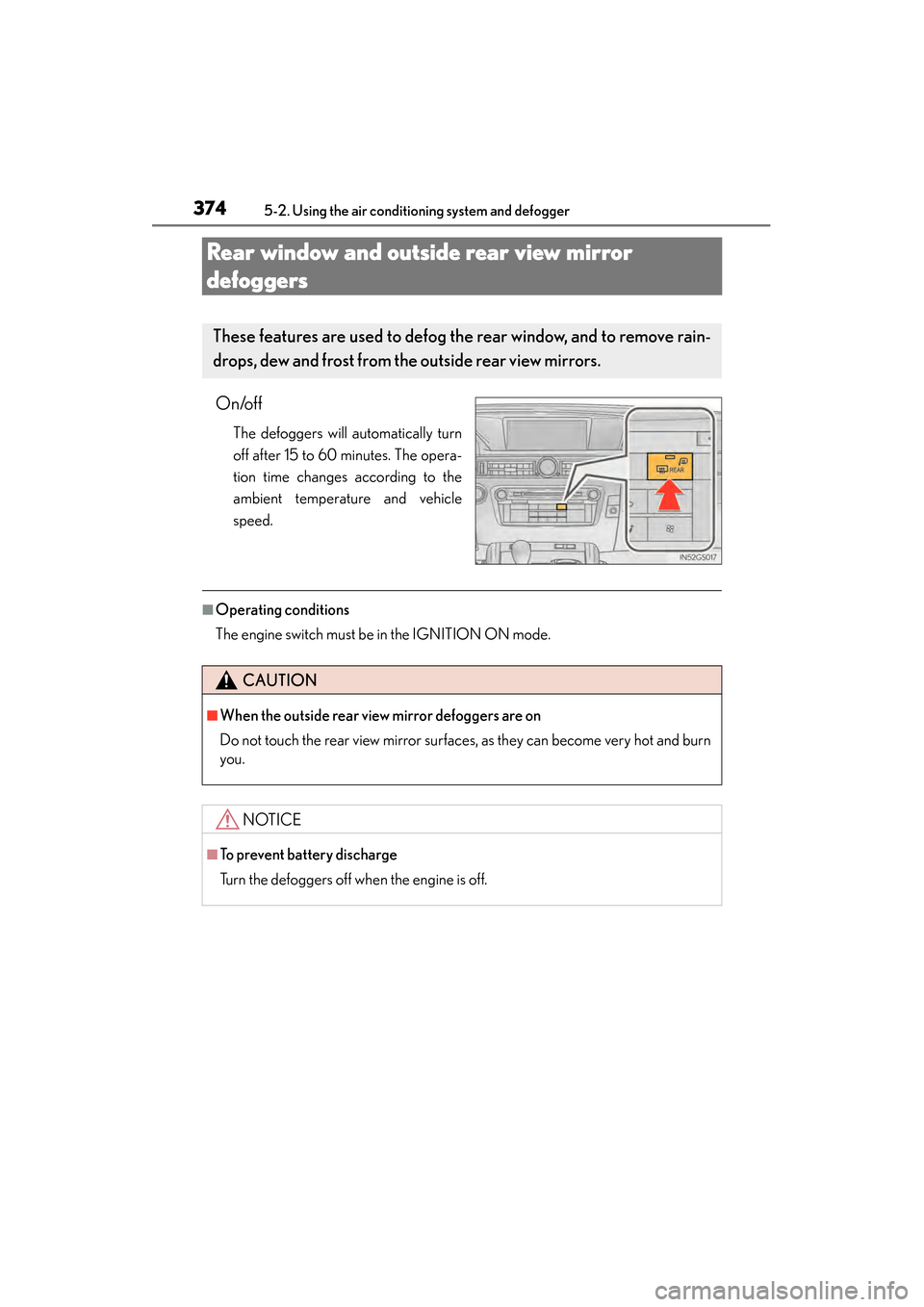
On/off
The defoggers will automatically turn
off after 15 to 60 minutes. The opera-
tion time changes according to the
ambient temperature and vehicle
speed.
■Operating conditions
The engine switch must be in the IGNITION ON mode.
These features are used to defog the rear window, and to remove rain-
drops, dew and frost from the outside rear view mirrors.
CAUTION
■When the outside rear view mirror defoggers are on
Do not touch the rear view mirror surfaces, as they can become very hot and burn
you.
NOTICE
■To prevent battery discharge
Turn the defoggers off when the engine is off.
GS350_OM_OM30D41U_(U).book Page 374 Monday, July 29, 2013 2:22 PM
Page 380 of 846
GS350_OM_OM30D41U_(U)
3795-3. Using the audio system
5
Interior features
■Using cellular phones
Interference may be heard through the audio system’s speakers if a cellular phone is
being used inside or close to the vehicle while the audio system is operating.
■When using the Remote Touch screen
Dimmed screen buttons cannot be operated.
■Ta b
Select or , located either side of the screen tabs, to display tabs from the pre-
vious or next page.
■About Dolby
Manufactured under license from Dolby Laboratories. Dolby and the double-D sym-
bol are trademarks of Dolby Laboratories.
CAUTION
■For vehicles sold in the U.S.A. and Canada
●Part 15 of the FCC Rules
FCC Warning:
Changes or modifications not expressly approved by the party responsible for
compliance could void the user’s authority to operate the equipment.
●Laser products
• USE OF CONTROL OR ADJUSTMENT OR PERFORMANCE OF PRO- CEDURES OTHER THAN THOSE SPECIFIED HEREIN MAY RESULT IN
HAZARDOUS RADIATION EXPOSURE.
• THE USE OF OPTICAL INSTRUMENTS WITH THIS PRODUCT WILL INCREASE EYE HAZARD.
NOTICE
■To prevent battery discharge
Do not leave the audio system on longer than necessary when the engine is off.
■To avoid damaging the audio system
Take care not to spill drinks or other fluids on the audio system.
GS350_OM_OM30D41U_(U).book Page 379 Monday, July 29, 2013 2:22 PM
Page 412 of 846
GS350_OM_OM30D41U_(U)
4115-3. Using the audio system
5
Interior features
■If you select
The display returns to the previous screen.
■When the battery is disconnected
All preset stations are erased.
■Reception sensitivity
●Cargo loaded on the roof luggage carrier, especially metal objects, may adversely
affect the reception of XM® Satellite Radio.
●Maintaining perfect radio reception at all times is difficult due to the continually
changing position of the antenna, differences in signal strength and surrounding
objects, such as trains, transmitters, etc.
●The radio antenna is mounted inside the rear window. To maintain clear radio
reception, do not attach metallic window tinting or other metallic objects to the
antenna wire mounted inside the rear window.
■XM Radio Services — Descriptions (vehicles without a navigation system for
U.S.A.)
●Radio and Entertainment
XM offers more than 170 satellite radio channels of commercial-free music and
premier sports, news, talk, and entertainment. XM is broadcast via satellites to mil-
lions of listeners across the continental United States. XM subscribers listen to
XM on satellite radio receivers for the car, home, and portable use. More informa-
tion about XM is available online at www.siriusxm.com.
●Satellite tuner
The tuner supports only Audio Services (Music and Talk) and the accompanying
Te x t I n f o r m a t i o n o f X M
® Satellite Radio.
GS350_OM_OM30D41U_(U).book Page 411 Monday, July 29, 2013 2:22 PM
Page 455 of 846
454
GS350_OM_OM30D41U_(U)
5-3. Using the audio system
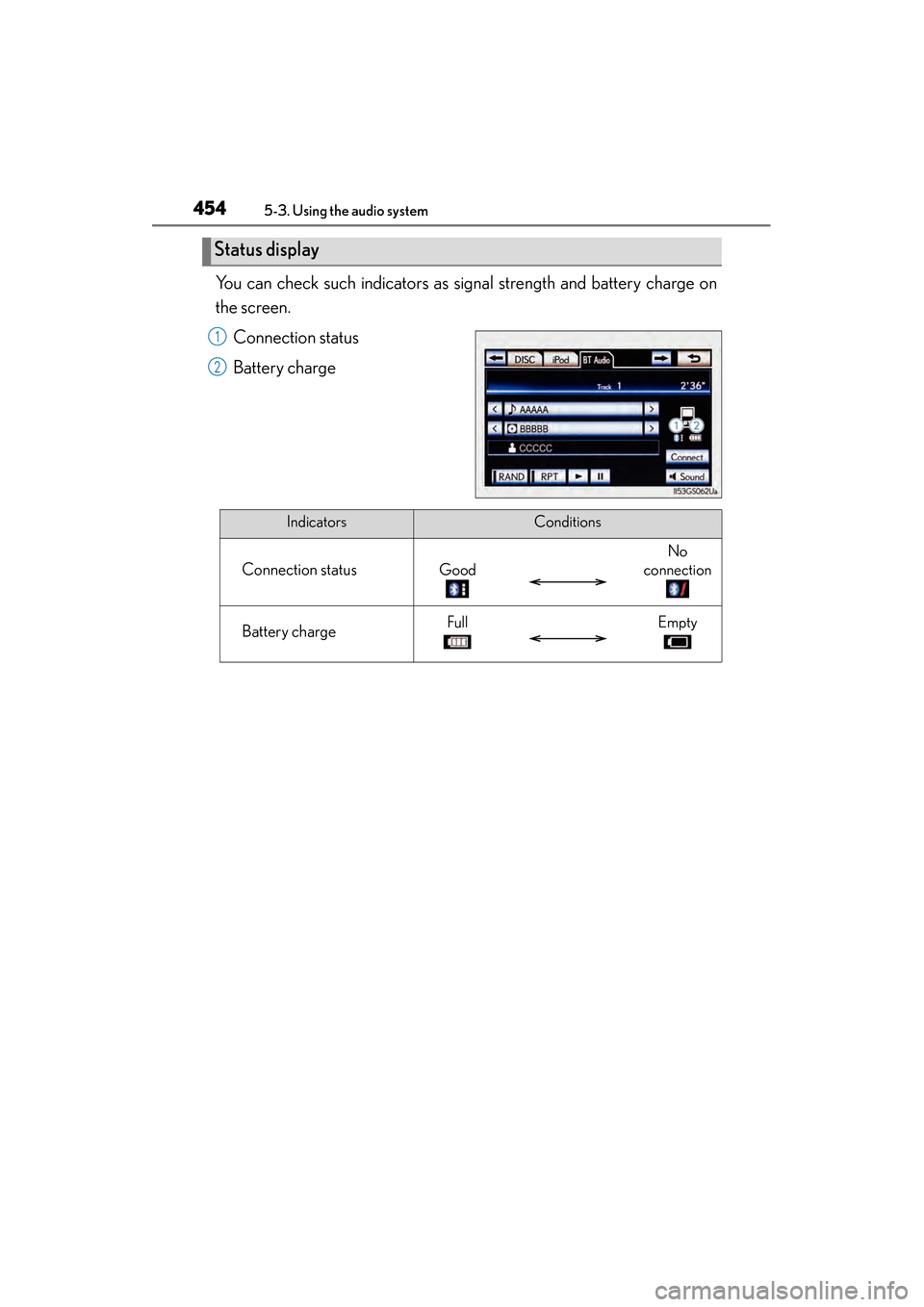
You can check such indicators as signal strength and battery charge on
the screen.Connection status
Battery charge
Status display
1
2
IndicatorsConditions
Connection statusGood
No
connection
Battery chargeFullEmpty
GS350_OM_OM30D41U_(U).book Page 454 Monday, July 29, 2013 2:22 PM
Page 461 of 846
460
GS350_OM_OM30D41U_(U)
5-3. Using the audio system
■When using the Bluetooth® audio system
●In the following conditions, the system may not function.
• The portable player is turned off
• The portable player is not connected
• The portable player battery is low
●There may be a delay if phone connection is carried out during Bluetooth® audio
play.
●Depending on the type of portable player that is connected to the system, opera-
tion may differ slightly and certain functions may not be available.
■Bluetooth® antenna
The antenna is built into the instrument panel. If the portable player is behind the seat
or in the glove box or console box, or is touching or covered by metal objects, con-
nection status may deteriorate.
■Battery charge/signal status
This display may not correspond exactly with the portable player, and this system
does not have a charging function.
■About Bluetooth®
Bluetooth is a registered trademark of
Bluetooth SIG, Inc.
GS350_OM_OM30D41U_(U).book Page 460 Monday, July 29, 2013 2:22 PM
Page 481 of 846
480
GS350_OM_OM30D41U_(U)
5-3. Using the audio system
■iPod cover art
●Depending on the iPod and the songs in the iPod, iPod cover art may be displayed.
This function can be changed to “On” or “Off”. (→P. 4 76 )
●It may take time to display iPod cover art, and the iPod may not be operated while
the cover art display is in process.
●Only iPod cover art that is saved in JPEG format can be displayed.
■iPod functions
●When the iPod connected to the system includes iPod video, the system can only
output the sound by selecting “Video” on the “iPod” screen.
●Depending on the iPod, the video sound may not be able to be heard.
●When an iPod is connected and the audio source is changed to iPod mode, the
iPod will resume play from the same point in which it was last used.
●Depending on the iPod that is connected to the system, certain functions may not
be available. If a function is unavailable due to a malfunction (as opposed to a sys-
tem specification), disconnecting the device and reconnecting it once again may
resolve the problem.
■When using an iPod
You maybe unable to use the instrument panel power outlet if the iPod is connected
to the USB port at the same time.
■Battery charge
When an iPod is connected using a genuine iPod cable, the iPod starts charging its
battery.
■Error messages for iPod
“iPod Error”: This indicates a problem in the iPod or its connection.
“No music files found.”: This indicates that there is no music data in the iPod.
“Please check the iPod firmware version.”:
This indicates that the software version is not compatible.
Perform the iPod firmware updates and try again.
“iPod authorization failed.”: This indicates th at it failed to authorize the iPod. Please
check your iPod.
GS350_OM_OM30D41U_(U).book Page 480 Monday, July 29, 2013 2:22 PM
Page 498 of 846
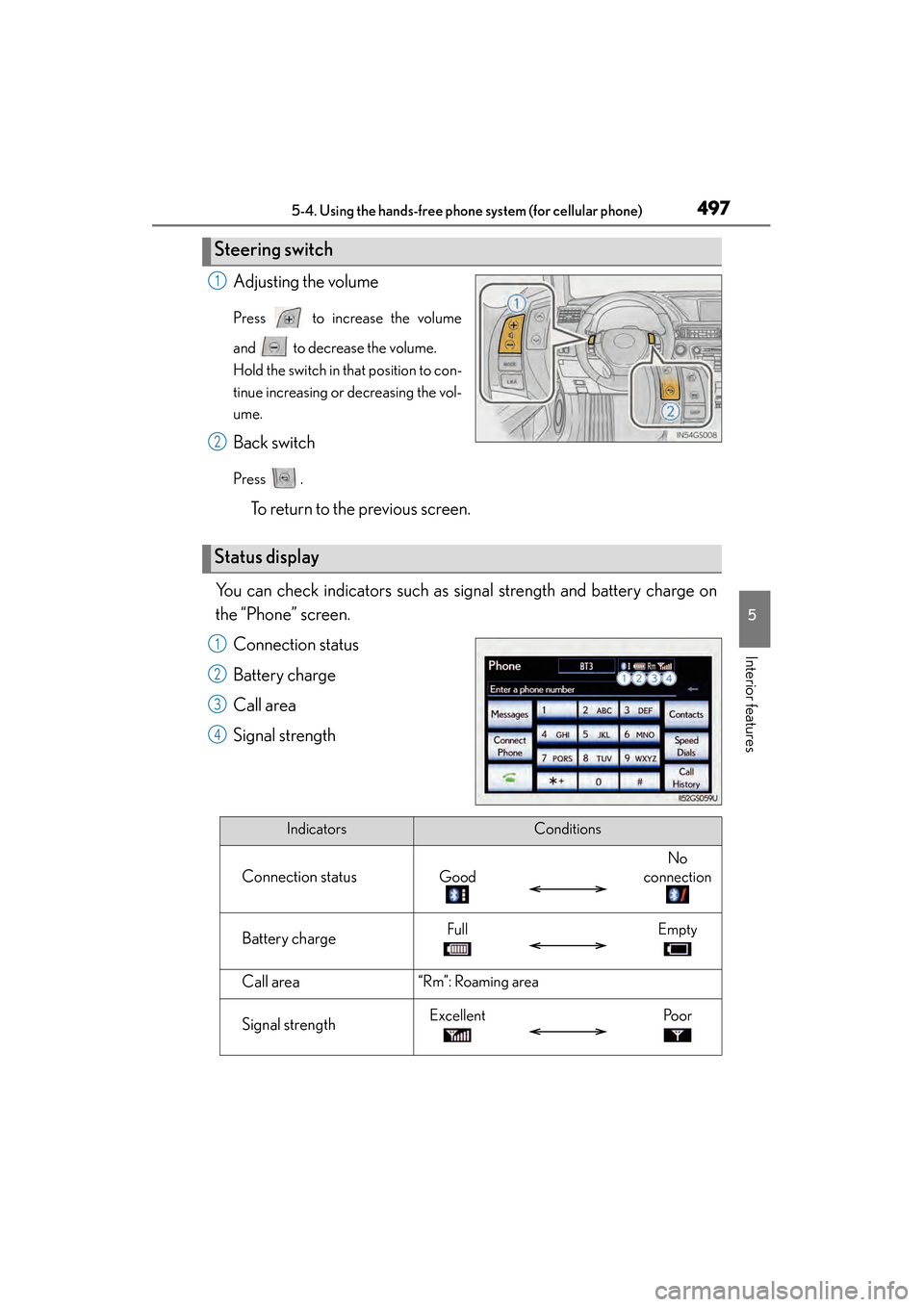
GS350_OM_OM30D41U_(U)
4975-4. Using the hands-free phone system (for cellular phone)
5
Interior features
Adjusting the volume
Press to increase the volume
and to decrease the volume.
Hold the switch in that position to con-
tinue increasing or decreasing the vol-
ume.
Back switch
Press .
To return to the previous screen.
You can check indicators such as signal strength and battery charge on
the “Phone” screen. Connection status
Battery charge
Call area
Signal strength
Steering switch
1
2
Status display
1
2
3
4
IndicatorsConditions
Connection statusGood
No
connection
Battery chargeFullEmpty
Call area“Rm”: Roaming area
Signal strengthExcellentPo o r
GS350_OM_OM30D41U_(U).book Page 497 Monday, July 29, 2013 2:22 PM
Page 499 of 846

498
GS350_OM_OM30D41U_(U)
5-4. Using the hands-free phone system (for cellular phone)
■When using the hands-free system
●The audio system is muted when making a call.
●If both parties speak at the same time, it may be difficult to hear.
●If the incoming call volume is overly loud, an echo may be heard.
●Try to face toward the microphone as much as possible when speaking.
●In the following circumstances, it may be difficult to hear the other party:
• When driving on unpaved roads
• When driving at high speeds
• If a window is open
• If the air conditioning is blowing directly on the microphone
• If the air conditioning is set to high
• There is an effect from the network of the cellular phone
■Conditions under which the system will not operate
●If using a cellular phone that does not support Bluetooth®
●If the cellular phone is turned off
●If you are outside service range
●If the cellular phone is not connected
●If the cellular phone’s battery is low
■Bluetooth® antenna
The antenna is built into the instrument panel. If the cellular phone is behind the seat
or in the console box, or touching or covered by metal objects, connection status
may deteriorate.
■Battery charge/Signal status
●This display may not correspond exactly with the cellular phone itself.
●When the cellular phone is not connected, “No connect” is displayed.
●When the cellular phone is out of the service area or in a place inaccessible by
radio waves, “No Service” is displayed.
■When using Bluetooth® audio and hands-free system at the same time
The following problems may occur.
●The Bluetooth® connection may be cut.
●Noise may be heard on the Bluetooth® audio playback.
GS350_OM_OM30D41U_(U).book Page 498 Monday, July 29, 2013 2:22 PM