eco Lexus GS350 2015 Owners Manual
[x] Cancel search | Manufacturer: LEXUS, Model Year: 2015, Model line: GS350, Model: Lexus GS350 2015Pages: 615, PDF Size: 12.93 MB
Page 259 of 615
GS350_OM_OM30F69U_(U)
2574-5. Using the driving support systems
4
Driving
■Hill-start assist control buzzer
●When hill-start assist control is activated, the buzzer will sound once.
●In the following situations, hill-start assist control will be canceled and the buzzer
will sound twice.
• No attempt is made to drive the vehicle within approximately 2 seconds ofreleasing the brake pedal.
• The shift lever is moved to P.
• The parking brake is applied.
• The brake pedal is depressed again.
• The brake pedal has been depressed for more than approximately 3 minutes.
■If the slip indicator comes on
It may indicate a malfunction in the system. Contact your Lexus dealer.
CAUTION
■Hill-start assist control
●Do not overly rely on hill-start assist control. Hill-start assist control may not oper-
ate effectively on steep inclines and roads covered with ice.
●Unlike the parking brake, hill-start assist control is not intended to hold the vehi-
cle stationary for an extended period of time. Do not attempt to use hill-start
assist control to hold the vehicle on an incline, as doing so may lead to an acci-
dent.
GS350_OM_OM30F69U_(U).book Page 257 Monday, January 19, 2015 2:53 PM
Page 266 of 615

264
GS350_OM_OM30F69U_(U)
4-5. Using the driving support systems
CAUTION
■Limitations of the pre-collision system
Do not overly rely on the pre-collision system. Always drive safely, taking care to
observe your surroundings and checking for any obstacles or other road hazards.
Failure to do so may cause an accident resulting in death or serious injury.
■Handling the radar sensor
Observe the following to ensure the pre-collision system can function effectively.
Otherwise, the system may not function correctly and could result in an accident.
●Keep the sensor and grille cover clean at all times.
Clean the sensor and grille cover with a soft cloth so you do not mark or damage
them.
●Do not subject the sensor or surrounding area to a strong impact.
If the sensor moves even slightly off position, the system may become inaccurate
or malfunction. If the sensor or surrounding area is subject to a strong impact,
always have the area inspected and adjusted by your Lexus dealer.
●Do not disassemble the sensor.
●Do not attach accessories or stickers to the sensor, grille cover or surrounding
area.
●Do not modify or paint the sensor and grille cover.
●If the radar sensor needs to be replaced, contact your Lexus dealer.
■Determining the direction the driver is fa cing and whether the driver’s eyes are
open or closed
The direction the driver is facing and whether the driver’s eyes are open or closed
may not be determined correctly if the following conditions exist:
●There is an object between the driver monitor sensor and the driver’s face, such
as when the sensor is blocked.
●A part of the driver’s face is covered.
●The sensor or the driver’s face is exposed to intense light such as sunlight.
●The driving posture is improper.
GS350_OM_OM30F69U_(U).book Page 264 Monday, January 19, 2015 2:53 PM
Page 271 of 615
GS350_OM_OM30F69U_(U)
2694-5. Using the driving support systems
4
Driving
■The outside rear view mirror indicators visibility
When under strong sunlight, the outside rear view mirror indicator may be difficult to
see.
■Rear Cross Traffic Alert buzzer hearing
Rear Cross Traffic Alert function may be difficult to hear over loud noises such as
high audio volume.
■When there is a malfunction in the Blind Spot Monitor
If a system malfunction is detected due to any of the following reasons, warning mes-
sages will be displayed: (→P. 4 8 4 , 4 9 0 )
●There is a malfunction with the sensors
●The sensors have become dirty
●The outside temperature is extremely high or low
●The sensor voltage has become abnormal
■Certification for the Blind Spot Monitor
XFor vehicles sold in the U.S.A.
FCC ID : OAYSRR2A
This device complies with part 15 of the FCC Rules. Operation is subject to the fol-
lowing two conditions:
(1) This device may not cause harmful interference, and
(2) this device must accept any interference received, including interference that may cause undesired operation.
FCC Warning
Changes or modifications not expressly approved by the party responsible for com-
pliance could void the user’s authority to operate the equipment.
XFor vehicles sold in Canada
Applicable law : Canada 310
This device complies with Industry Canada licence-exempt RSS standard(s). Oper-
ation is subject to the following two condit ions: (1) this device may not cause interfer-
ence, and (2) this device must accept any interference, including interference that
may cause undesired operation of the device.
Frequency bands : 24.05 - 24.25GHz
Output power : less than 20 milliwatts
GS350_OM_OM30F69U_(U).book Page 269 Monday, January 19, 2015 2:53 PM
Page 289 of 615
GS350_OM_OM30F69U_(U)
2874-6. Driving tips
4
Driving
CAUTION
■Driving with snow tires
Observe the following precautions to reduce the risk of accidents.
Failure to do so may result in a loss of vehicle control and cause death or serious
injury.
●Use tires of the specified size.
●Maintain the recommended level of air pressure.
●Do not drive in excess of 75 mph (120 km/h), regardless of the type of snow tires
being used.
●Use snow tires on all, not just some wheels.
●Do not use LKA (Lane-Keeping Assist) system.
■Driving with tire chains (vehicles with front and rear tires of the same size except
for the vehicles with LDH and 19 inch tires)
Observe the following precautions to reduce the risk of accidents.
Failure to do so may result in the vehicle being unable to be driven safely, and may
cause death or serious injury.
●Do not drive in excess of the speed limit specified for the tire chains being used,
or 30 mph (50 km/h), whichever is lower.
●Avoid driving on bumpy road surfaces or over potholes.
●Avoid sudden acceleration, abrupt steering, sudden braking and shifting opera-
tions that cause sudden engine braking.
●Slow down sufficiently before entering a curve to ensure that vehicle control is
maintained.
●Do not use LKA (Lane-Keeping Assist) system.
GS350_OM_OM30F69U_(U).book Page 287 Monday, January 19, 2015 2:53 PM
Page 294 of 615
292
GS350_OM_OM30F69U_(U)
5-1. Remote Touch screen
■Screen display during low temperatures
When the ambient temperature is extremely low, screen response may be delayed
even if the Remote Touch is operated.
CAUTION
■When using the Remote Touch
●Do not allow fingers, fingernails or hair to become caught in the Remote Touch as
this may cause an injury.
●Be careful when selecting the Remote Touch in extreme temperatures as it may
become very hot or cold due to the temperature inside the vehicle.
NOTICE
■To prevent damage to the Remote Touch
●Do not allow the Remote Touch to come into contact with food, liquid, stickers or
lit cigarettes as doing so may cause it to change color, emit a strange odor or stop
functioning.
●Do not subject the Remote Touch to excessive pressure or strong impact as the
knob may bend or break off.
●Do not allow coins, contact lenses or other such items to become caught in the
Remote Touch as this may cause it to stop functioning.
●Items of clothing may rip if they become caught on the Remote Touch knob.
●If your hand or any object is on the Remote Touch knob when the engine switch is
turned to ACCESSORY mode, the Remote Touch knob may not operate prop-
erly.
GS350_OM_OM30F69U_(U).book Page 292 Monday, January 19, 2015 2:53 PM
Page 319 of 615
GS350_OM_OM30F69U_(U)
3175-2. Using the air conditioning system and defogger
5
Interior features
■Micro dust and pollen filter
●In order to prevent the windshield from fogging up when the outside air is cold, the
following may occur:
• Outside air mode does not switch to (recirculated air) mode.
• The dehumidification function operates.
• The operation cancels after approximately 1 minute.
●In rainy weather, the windows may fog up. Press .
●In extremely humid weather, the windows may fog up.
●The pollens are filtered out even if the micro dust and pollen filter is turned off.
■Operation of the air conditioning system in Eco drive mode
In the Eco drive mode, the air conditioning system is controlled as follows to priori-
tize fuel efficiency:
●Engine speed and compressor operation controlled to restrict heating/cooling
capacity
●Fan speed restricted when automatic mode is selected
To improve air conditioning performance, perform the following operations:
●Adjust the fan speed
●Turn off Eco drive mode
■When the S-FLOW mode operates
If air flows to the driver’s seat only, the temperature setting for the front passenger’s
seat is not displayed.
■When the outside temperature falls to nearly 32 °F (0 °C)
The dehumidification function may not operate even when “A/C” on the option con-
trol screen is selected.
GS350_OM_OM30F69U_(U).book Page 317 Monday, January 19, 2015 2:53 PM
Page 320 of 615

318
GS350_OM_OM30F69U_(U)
5-2. Using the air conditioning system and defogger
■Ventilation and air conditioning odors
●To let fresh air in, set the air conditioning system to the outside air mode.
●During use, various odors from inside and outside the vehicle may enter into and
accumulate in the air conditioning system. This may then cause odor to be emitted
from the vents.
●To reduce potential odors from occurring:
• It is recommended that the air conditioning system be set to outside air modeprior to turning the vehicle off.
• The start timing of the blower may be delayed for a short period of time immedi- ately after the air conditioning system is started in automatic mode.
■Air conditioning filter
→ P. 4 2 3
■Customization
Settings (e.g. exhaust gas sensor sensitivity) can be changed.
(Customizable features: → P. 559)
CAUTION
■To prevent the windshield from fogging up
Do not use
during cool air operation in extremely humid weather. The differ-
ence between the temperature of the outside air and that of the windshield can
cause the outer surface of the windshield to fog up, blocking your vision.
NOTICE
■To prevent battery discharge
Do not leave the air conditioning system on longer than necessary when the
engine is stopped.
■Humidity sensor
Follow these points to avoid damaging the sensor:
●Do not disassemble the sensor
●Do not spray the glass cleaner on the sensor or subject it to strong impacts
●Do not stick anything on the sensor
GS350_OM_OM30F69U_(U).book Page 318 Monday, January 19, 2015 2:53 PM
Page 326 of 615
324
GS350_OM_OM30F69U_(U)
5-2. Using the air conditioning system and defogger
Rear window and outside rear view mirror
defoggers
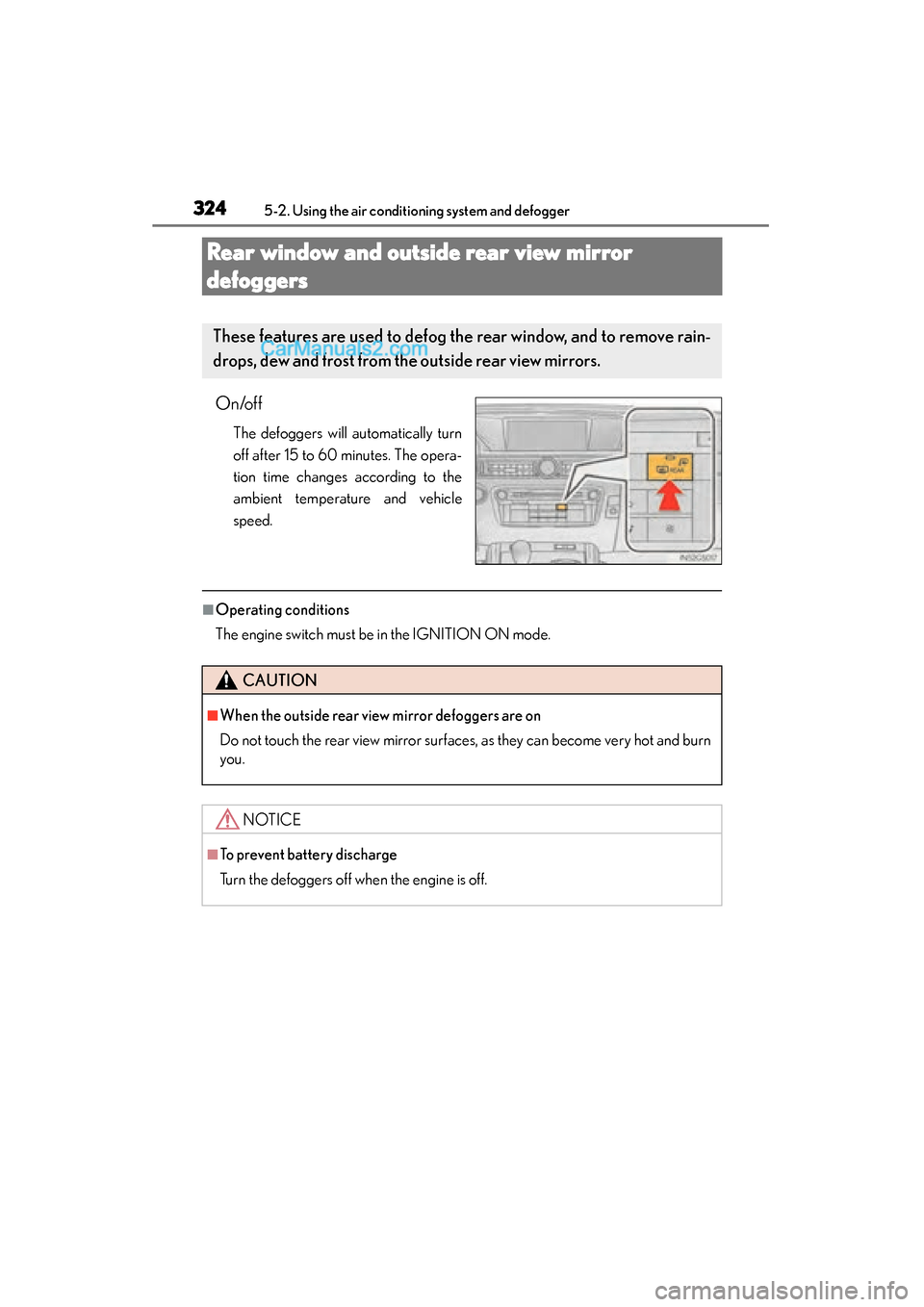
On/off
The defoggers will automatically turn
off after 15 to 60 minutes. The opera-
tion time changes according to the
ambient temperature and vehicle
speed.
■Operating conditions
The engine switch must be in the IGNITION ON mode.
These features are used to defog the rear window, and to remove rain-
drops, dew and frost from the outside rear view mirrors.
CAUTION
■When the outside rear view mirror defoggers are on
Do not touch the rear view mirror surfaces, as they can become very hot and burn
you.
NOTICE
■To prevent battery discharge
Turn the defoggers off when the engine is off.
GS350_OM_OM30F69U_(U).book Page 324 Monday, January 19, 2015 2:53 PM
Page 328 of 615

326
GS350_OM_OM30F69U_(U)
5-2. Using the air conditioning system and defogger
CAUTION
■When the windshield wiper de-icer is on
Do not touch the glass at the lower part of the windshield or to the side of the front
pillars as the surfaces can become very hot and burn you.
GS350_OM_OM30F69U_(U).book Page 326 Monday, January 19, 2015 2:53 PM
Page 333 of 615
GS350_OM_OM30F69U_(U)
3315-4. Using the storage features
5
Interior features
CAUTION
■Items that should not be left in the storage spaces
Do not leave glasses, lighters or spray cans in the storage spaces, as this may cause
the following when cabin temperature becomes high:
●Glasses may be deformed by heat or cracked if they come into contact with
other stored items.
●Lighters or spray cans may explode. If they come into contact with other stored
items, the lighter may catch fire or the spray can may release gas, causing a fire
hazard.
■When driving or when the storage compartments are not in use
Keep the lids closed.
In the event of sudden braking or sudden swerving, an accident may occur due to
an occupant being struck by an open lid or the items stored inside.
GS350_OM_OM30F69U_(U).book Page 331 Monday, January 19, 2015 2:53 PM