eco Lexus GS350 2015 Owner's Manual
[x] Cancel search | Manufacturer: LEXUS, Model Year: 2015, Model line: GS350, Model: Lexus GS350 2015Pages: 615, PDF Size: 12.93 MB
Page 350 of 615
348
GS350_OM_OM30F69U_(U)
5-5. Other interior features
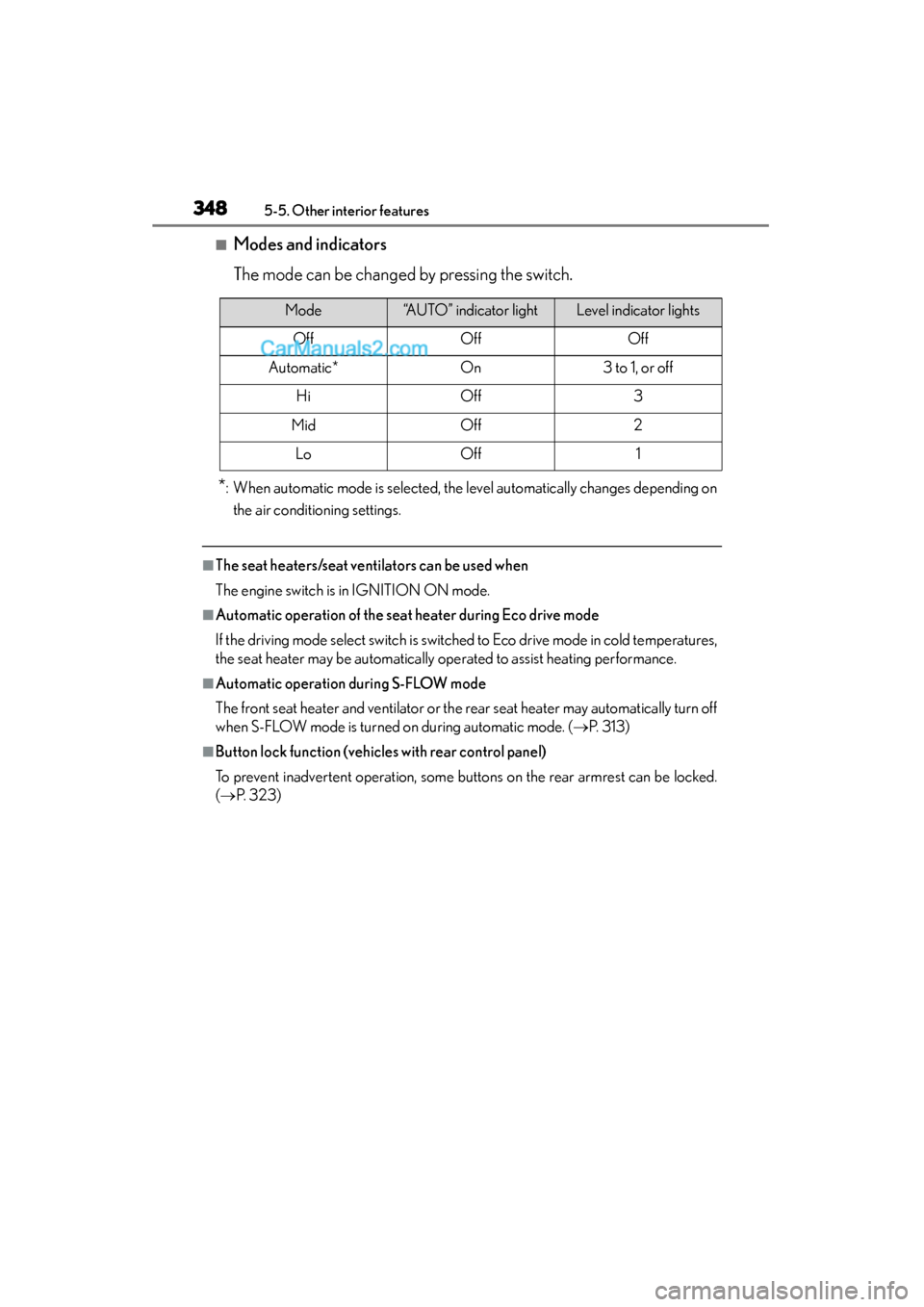
■Modes and indicators
The mode can be changed by pressing the switch.
*: When automatic mode is selected, the level automatically changes depending onthe air conditioning settings.
■The seat heaters/seat ventilators can be used when
The engine switch is in IGNITION ON mode.
■Automatic operation of the seat heater during Eco drive mode
If the driving mode select switch is switched to Eco drive mode in cold temperatures,
the seat heater may be automatically operated to assist heating performance.
■Automatic operation during S-FLOW mode
The front seat heater and ventilator or the rear seat heater may automatically turn off
when S-FLOW mode is turned on during automatic mode. ( →P. 313)
■Button lock function (vehicles with rear control panel)
To prevent inadvertent operation, some buttons on the rear armrest can be locked.
(→ P. 323)
Mode“AUTO” indicator lightLevel indicator lights
OffOffOff
Automatic*On3 to 1, or off
HiOff3
MidOff2
LoOff1
GS350_OM_OM30F69U_(U).book Page 348 Monday, January 19, 2015 2:53 PM
Page 358 of 615
356
GS350_OM_OM30F69U_(U)
5-5. Other interior features
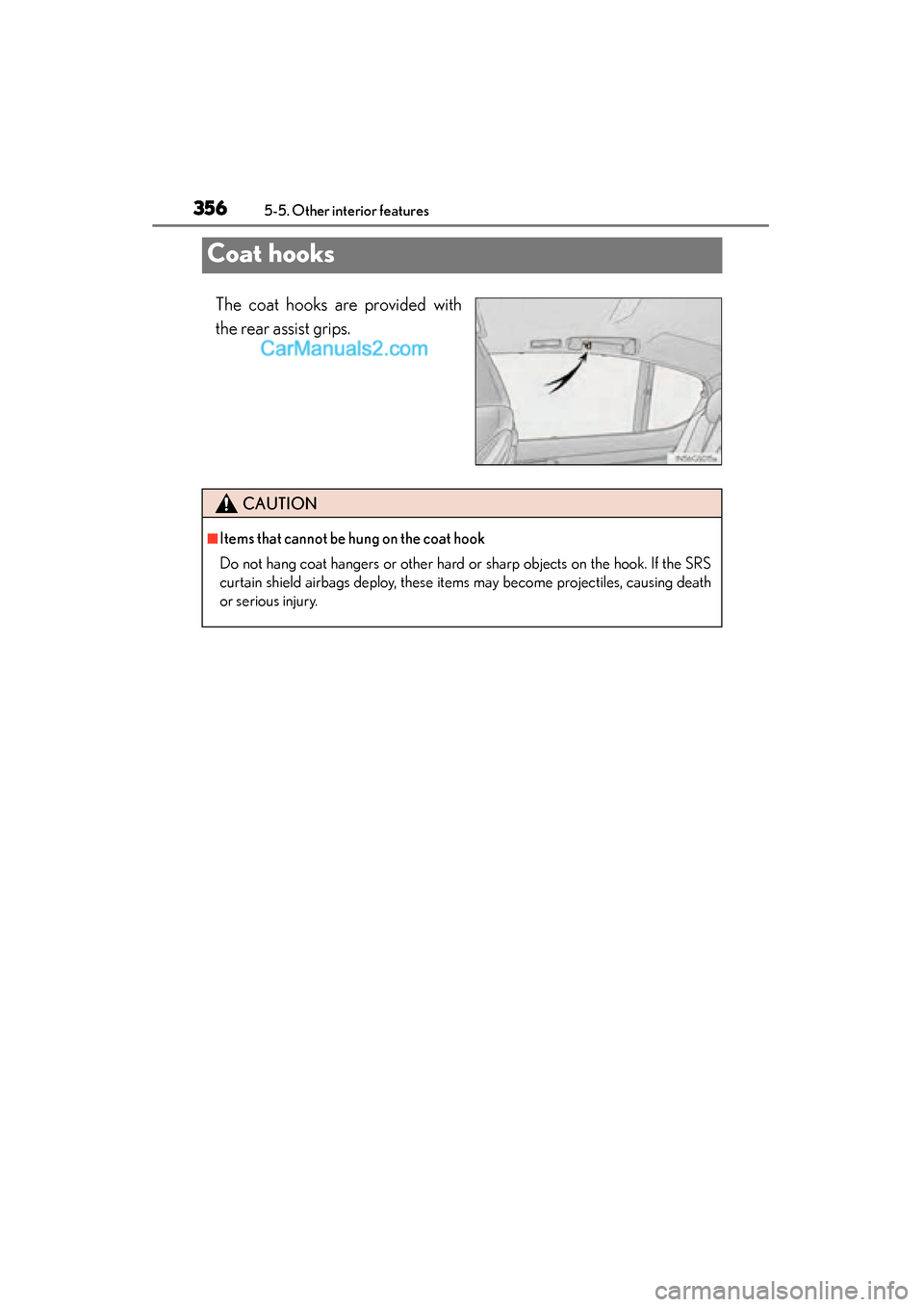
Coat hooks
The coat hooks are provided with
the rear assist grips.
CAUTION
■Items that cannot be hung on the coat hook
Do not hang coat hangers or other hard or sharp objects on the hook. If the SRS
curtain shield airbags deploy, these items may become projectiles, causing death
or serious injury.
GS350_OM_OM30F69U_(U).book Page 356 Monday, January 19, 2015 2:53 PM
Page 362 of 615
360
GS350_OM_OM30F69U_(U)
5-5. Other interior features
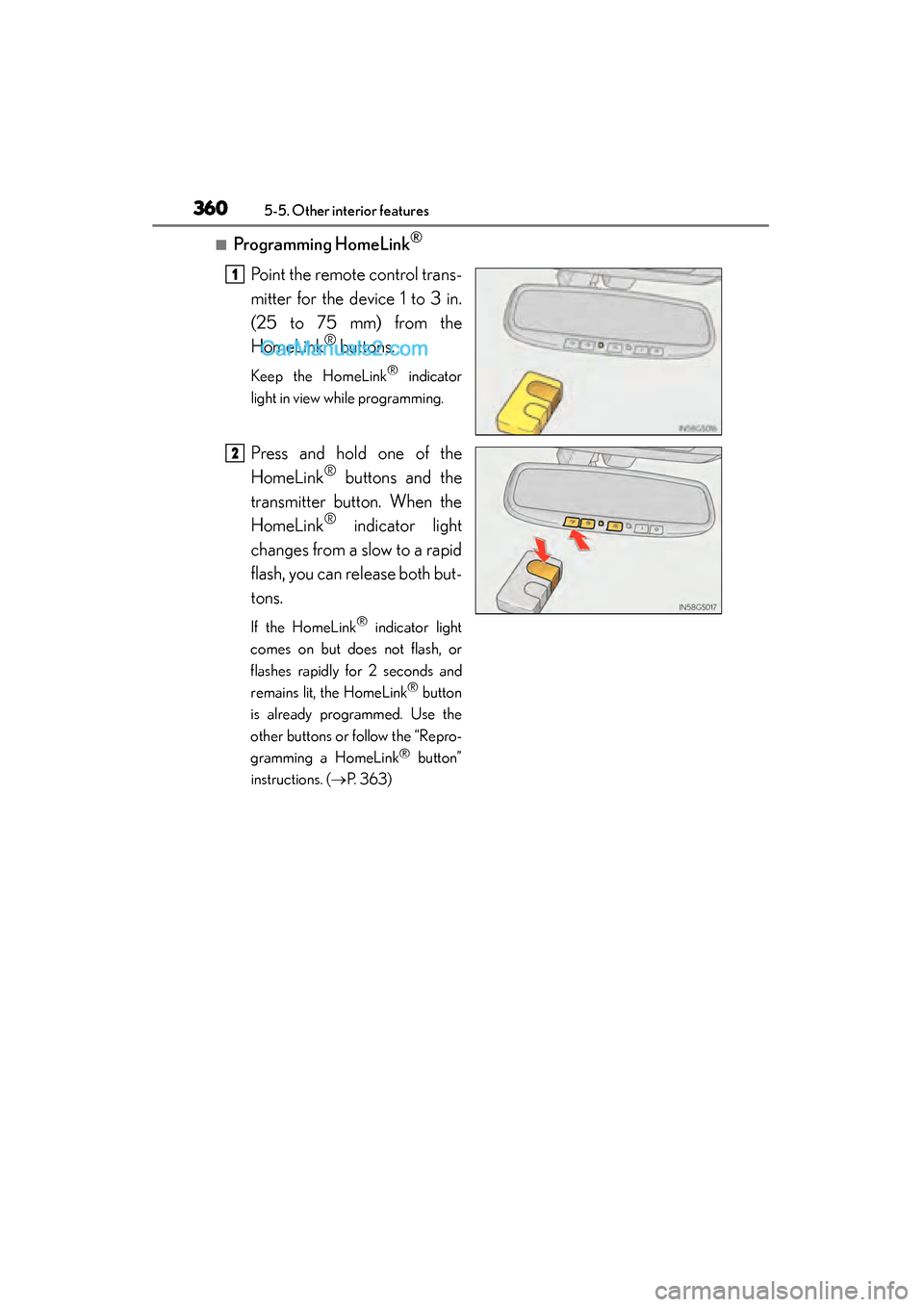
■Programming HomeLink®
Point the remote control trans-
mitter for the device 1 to 3 in.
(25 to 75 mm) from the
HomeLink
® buttons.
Keep the HomeLink® indicator
light in view while programming.
Press and hold one of the
HomeLink
® buttons and the
transmitter button. When the
HomeLink
® indicator light
changes from a slow to a rapid
flash, you can release both but-
tons.
If the HomeLink® indicator light
comes on but does not flash, or
flashes rapidly for 2 seconds and
remains lit, the HomeLink
® button
is already programmed. Use the
other buttons or follow the “Repro-
gramming a HomeLink
® button”
instructions. ( →P. 363)
1
2
GS350_OM_OM30F69U_(U).book Page 360 Monday, January 19, 2015 2:53 PM
Page 363 of 615
GS350_OM_OM30F69U_(U)
3615-5. Other interior features
5
Interior features
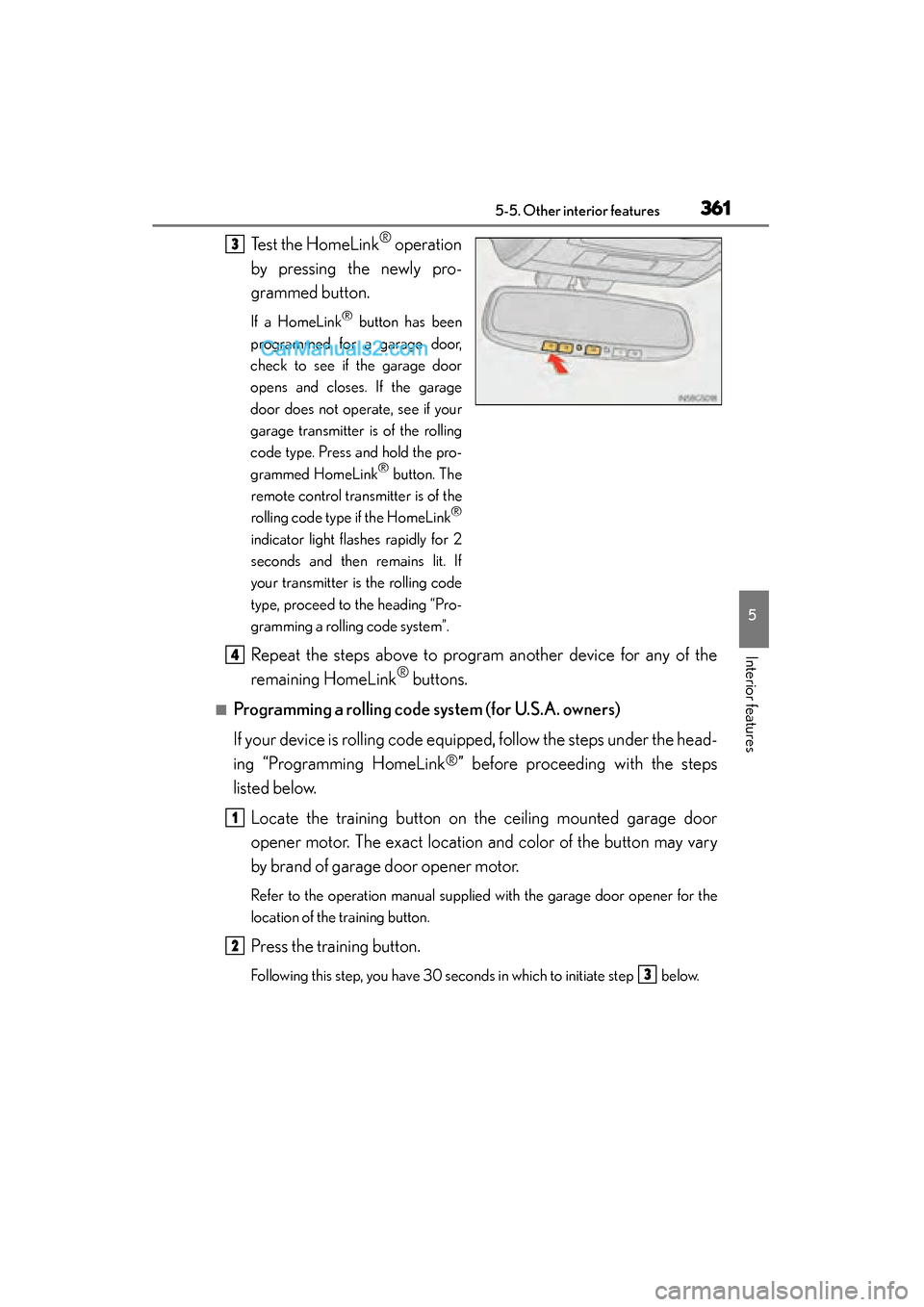
Test the HomeLink® operation
by pressing the newly pro-
grammed button.
If a HomeLink® button has been
programmed for a garage door,
check to see if the garage door
opens and closes. If the garage
door does not operate, see if your
garage transmitter is of the rolling
code type. Press and hold the pro-
grammed HomeLink
® button. The
remote control transmitter is of the
rolling code type if the HomeLink
®
indicator light flashes rapidly for 2
seconds and then remains lit. If
your transmitter is the rolling code
type, proceed to the heading “Pro-
gramming a rolling code system”.
Repeat the steps above to program another device for any of the
remaining HomeLink
® buttons.
■Programming a rolling code system (for U.S.A. owners)
If your device is rolling code equipped, follow the steps under the head-
ing “Programming HomeLink
®” before proceeding with the steps
listed below.
Locate the training button on the ceiling mounted garage door
opener motor. The exact location and color of the button may vary
by brand of garage door opener motor.
Refer to the operation manual supplied with the garage door opener for the
location of the training button.
Press the training button.
Following this step, you have 30 seconds in which to initiate step below.
3
4
1
2
3
GS350_OM_OM30F69U_(U).book Page 361 Monday, January 19, 2015 2:53 PM
Page 364 of 615
362
GS350_OM_OM30F69U_(U)
5-5. Other interior features
Press and hold the vehicle’s programmed HomeLink® button for 2
seconds and release it. Repeat this step once again. The garage door
may open.
If the garage door opens, the programming process is complete. If the door
does not open, press and release the button a third time. This third press and
release will complete the programming process by opening the garage door.
The ceiling mounted garage door opener motor should now recognize the
HomeLink
® signal and operate the garage door.
Repeat the steps above to program another rolling code system for
any of the remaining HomeLink
® buttons.
■Programming an entry gate (for U.S.A. owners)/Programming a
devices in the Canadian market
Place the remote control transmit ter 1 to 3 in. (25 to 75 mm) away
from the HomeLink
® buttons.
Keep the HomeLink® indicator light in view while programming.
Press and hold the selected HomeLink® button.
Repeatedly press and release (cycle) the remote control transmitter
for 2 seconds each until step is completed.
When the HomeLink
® indicator light starts to flash rapidly, release
the buttons.
Test the HomeLink
® operation by pressing the newly programmed
button. Check to see if the gate/device operates correctly.
Repeat the steps above to program another device for any of the
remaining HomeLink
® buttons.
■Programming other devices
To program other devices such as home security systems, home door
locks and lighting, contact your Lexus dealer for assistance.
■Reprogramming a button
The individual HomeLink
® buttons cannot be erased but can be repro-
grammed. To reprogram a button, follow the “Reprogramming a
HomeLink
® button” instructions.
3
4
1
2
3
4
4
5
6
GS350_OM_OM30F69U_(U).book Page 362 Monday, January 19, 2015 2:53 PM
Page 365 of 615
GS350_OM_OM30F69U_(U)
3635-5. Other interior features
5
Interior features
Press the appropriate HomeLink® button. The HomeLink® indicator light
should come on.
The HomeLink® compatible transceiver in your vehicle continues to send a sig-
nal for up to 20 seconds as long as the button is pressed.
Press and hold the desired HomeLink® button. After 20 seconds, the
HomeLink
® indicator light will start flashing slowly. Keep pressing the
HomeLink
® button and press and hold the transmitter button until the
HomeLink
® indicator light changes from a slow to a rapid flash. Release
the buttons.
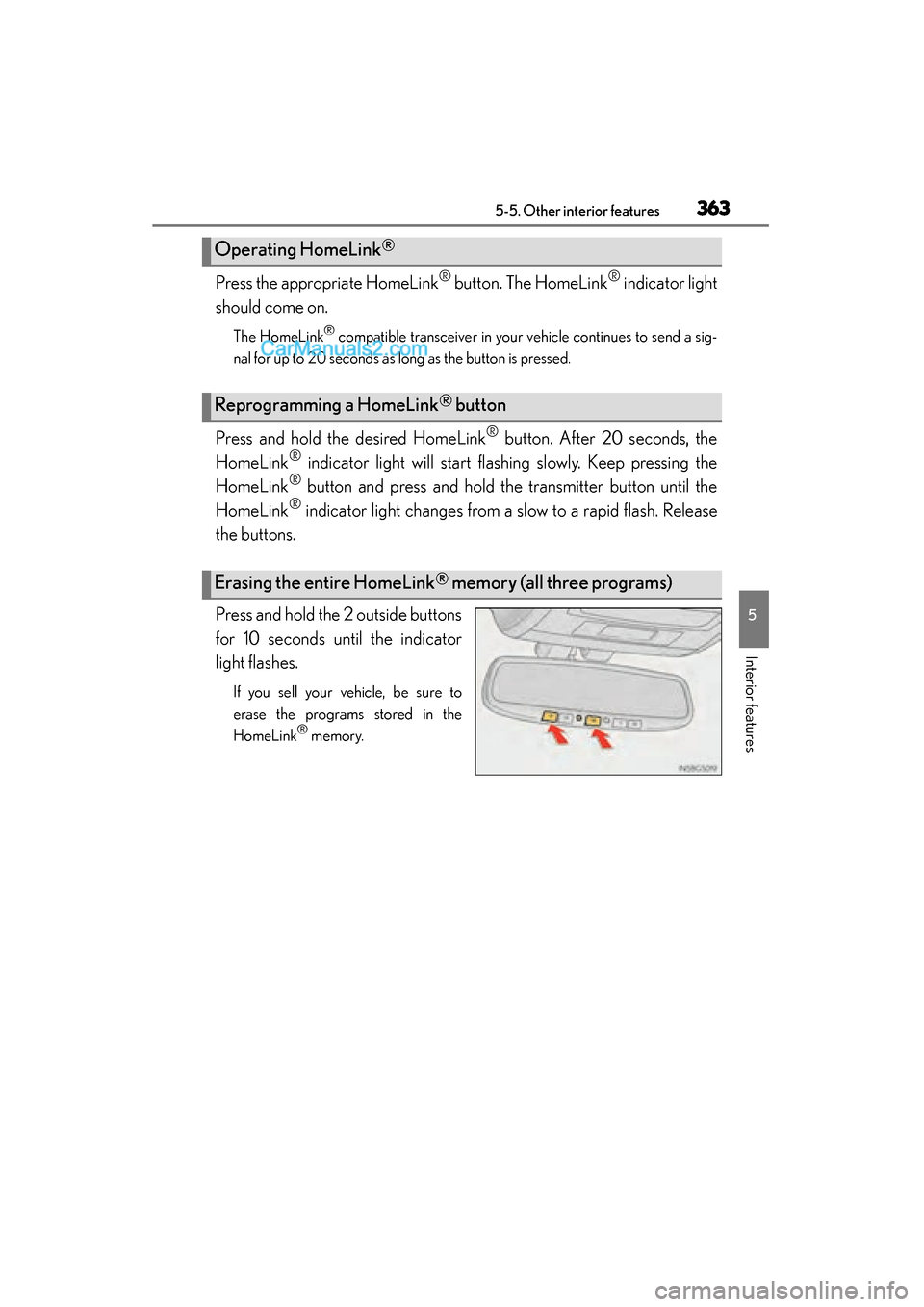
Press and hold the 2 outside buttons
for 10 seconds until the indicator
light flashes.
If you sell your vehicle, be sure to
erase the programs stored in the
HomeLink
® memory.
Operating HomeLink®
Reprogramming a HomeLink® button
Erasing the entire HomeLink® memory (all three programs)
GS350_OM_OM30F69U_(U).book Page 363 Monday, January 19, 2015 2:53 PM
Page 370 of 615
368
GS350_OM_OM30F69U_(U)
5-5. Other interior features
■Safety Connect Services Information
●Phone calls using the vehicles Bluetooth® technology will not be possible during
Safety Connect.
●Safety Connect is available beginning Fall 2009 on select Lexus models. Contact
with the Safety Connect response center is dependent upon the telematics device
being in operative condition, cellular connection availability, and GPS satellite sig-
nal reception, which can limit the ability to reach the response center or receive
emergency service support. Enrollment and Telematics Subscription Service
Agreement required. A variety of subscription terms is available; charges vary by
subscription term selected.
●Automatic Collision Notification, Emergency Assistance and Stolen Vehicle Loca-
tion will function in the United States, including Hawaii and Alaska, and in Canada,
and Enhanced Roadside Assistance will function in the United States (except
Hawaii) and in Canada. No Safety Connect services will function outside of the
United States in countries other than Canada.
●Safety Connect services are not subject to section 255 of the Telecommunications
Act and the device is not TTY compatible.
■Languages
The Safety Connect response center will offer support in multiple languages. The
Safety Connect system will offer voice prompts in English and Spanish. Please indi-
cate your language of choice when enrolling.
■When contacting the response center
You may be unable to contact the response center if the network is busy.
GS350_OM_OM30F69U_(U).book Page 368 Monday, January 19, 2015 2:53 PM
Page 371 of 615
GS350_OM_OM30F69U_(U)
3695-5. Other interior features
5
Interior features
When the engine switch is turned to IGNITION ON mode, the red indi-
cator light comes on for 2 seconds then turns off. Afterward, the green
indicator light comes on, indicating that the service is active.
The following indicator light patterns indicate specific system usage con-
ditions:
●Green indicator light on = Active service
●Green indicator light flashing = Safety Connect call in process
●Red indicator light (except at vehicle start-up) = System malfunction
(contact your Lexus dealer)
●No indicator light (off) = Safety Connect service not active
■Automatic Collision Notification
In case of either airbag deployment or severe rear-end collision, the
system is designed to automatically call the response center. The
responding agent receives the vehicle’s location and attempts to speak
with the vehicle occupants to assess the level of emergency. If the occu-
pants are unable to communicate, the agent automatically treats the
call as an emergency, contacts the nearest emergency services pro-
vider to describe the situation, and requests that assistance be sent to
the location.
Safety Connect LED light Indicators
Safety Connect services
GS350_OM_OM30F69U_(U).book Page 369 Monday, January 19, 2015 2:53 PM
Page 372 of 615
370
GS350_OM_OM30F69U_(U)
5-5. Other interior features
■Stolen Vehicle Location
If your vehicle is stolen, Safety Connect can work with local authorities
to assist them in locating and recovering the vehicle. After filing a police
report, call the Safety Connect response center at 1-800-25-LEXUS
(1-800-255-3987) and follow the prompts for Safety Connect to ini-
tiate this service.
In addition to assisting law enforcement with recovery of a stolen vehi-
cle, Safety-Connect-equipped vehicle location data may, under certain
circumstances, be shared with third parties to locate your vehicle. Fur-
ther information is available at Lexus.com.
■Emergency Assistance Button (“SOS”)
In the event of an emergency on the road, push the “SOS” button to
reach the Safety Connect response center. The answering agent will
determine your vehicle’s location, assess the emergency, and dispatch
the necessary assistance required.
If you accidentally press the “SOS” button, tell the response-center agent that
you are not experiencing an emergency.
■Enhanced Roadside Assistance
Enhanced Roadside Assistance adds GPS data to the already included
warranty-based Lexus roadside service.
Subscribers can press the “SOS” button to reach a Safety Connect
response-center agent, who can help with a wide range of needs, such
as: towing, flat tire, fuel delivery, etc. For a description of the Roadside
Assistance services and their limitations, please see the Safety Connect
Terms and Conditions, which are available at Lexus.com.
GS350_OM_OM30F69U_(U).book Page 370 Monday, January 19, 2015 2:53 PM
Page 376 of 615
374
GS350_OM_OM30F69U_(U)
6-1. Maintenance and care
Cleaning and protecting the vehicle exterior
●Working from top to bottom, liberally apply water to the vehicle body,
wheel wells and underside of the vehicle to remove any dirt and dust.
●Wash the vehicle body using a sponge or soft cloth, such as a chamois.
●For hard-to-remove marks, use car wash soap and rinse thoroughly
with water.
●Wipe away any water.
●Wax the vehicle when the waterproof coating deteriorates.
If water does not bead on a clean surface, apply wax when the vehicle body is
cool.
■Self-restoring coat
The vehicle body has a self-restoring coating that is resistant to small surface
scratches caused in a car wash etc.
●The coating lasts for 5 to 8 years from when the vehicle is delivered from the plant.
●The restoration time differs depending on the depth of the scratch and outside
temperature. The restoration time may become shorter when the coating is
warmed by applying warm water.
●Deep scratches caused by keys, coins, etc. cannot be restored.
●Do not use wax that contain abrasives.
■Automatic car washes
●Fold the mirrors before washing the vehicle. Start washing from the front of the
vehicle. Make sure to extend the mirrors before driving.
●Brushes used in automatic car washes may scratch the vehicle surface and harm
your vehicle’s paint.
●Rear spoiler (if equipped) may not be washable in some automatic car washes.
There may also be an increased risk of damage to vehicle.
Perform the following to protect the vehicle and maintain it in prime
condition:
GS350_OM_OM30F69U_(U).book Page 374 Monday, January 19, 2015 2:53 PM