fuel Lexus GS350 2015 Owner's Guide
[x] Cancel search | Manufacturer: LEXUS, Model Year: 2015, Model line: GS350, Model: Lexus GS350 2015Pages: 615, PDF Size: 12.93 MB
Page 187 of 615
GS350_OM_OM30F69U_(U)
1854-2. Driving procedures
4
Driving
*1: To improve fuel efficiency and reduce noises, set the shift lever in D for normaldriving.
*2: Any gear range can be fixed when driving in M mode.
■Sport mode/Eco drive mode
→ P. 2 4 3
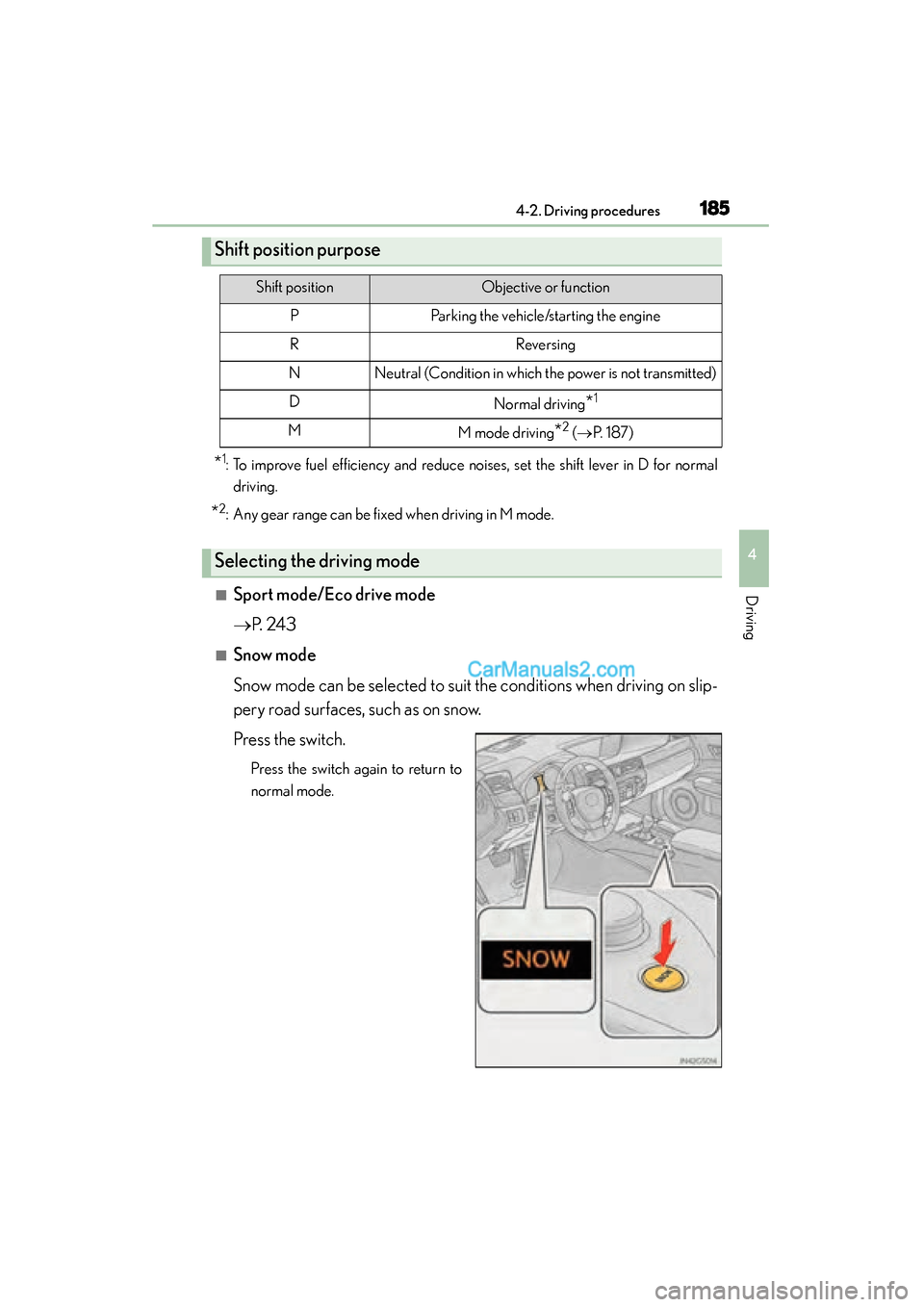
■Snow mode
Snow mode can be selected to suit the conditions when driving on slip-
pery road surfaces, such as on snow.
Press the switch.
Press the switch again to return to
normal mode.
Shift position purpose
Shift positionObjective or function
PParking the vehicle/starting the engine
RReversing
NNeutral (Condition in which the power is not transmitted)
DNormal driving*1
MM mode driving*2 (→ P. 1 8 7 )
Selecting the driving mode
GS350_OM_OM30F69U_(U).book Page 185 Monday, January 19, 2015 2:53 PM
Page 201 of 615

GS350_OM_OM30F69U_(U)
1994-3. Operating the lights and wipers
4
Driving
■Daytime running light system
●To make your vehicle more visible to other drivers during daytime driving, the day-
time running lights turn on automatically whenever the engine is started and the
parking brake is released with the headlight switch in the or “AUTO” position.
(Illuminate brighter than the parking lights.)
Daytime running lights are not designed for use at night.
For the U.S.A.: Daytime running lights can be turned off by operating the switch.
●Compared to turning on the headlights, the daytime running light system offers
greater durability and consumes less electricity, so it can help improve fuel econ-
omy.
■Headlight control sensor
■Automatic light off system
When the light switch is in or : The headlights and tail lights turn off 30 sec-
onds after the engine switch is turned to ACCESSORY mode or turned off and a
door is opened and all of the doors and trunk are closed. (The lights turn off immedi-
ately if on the key is pressed twice after all the doors are closed.)
To turn the lights on again, turn the engine switch to IGNITION ON mode, or turn
the light switch off once and then back to or .
If any of the doors or trunk lid is kept open, the lights automatically turn off after 20
minutes.
■Light reminder buzzer
A buzzer sounds when the engine switch is turned off or turned to ACCESSORY
mode and the driver’s door is opened while the lights are turned on.
■Automatic headlight leveling system
The level of the headlights is automatically adjusted according to the number of pas-
sengers and the loading condition of the vehi cle to ensure that the headlights do not
interfere with other road users. The sensor may not function properly if an
object is placed on the sensor, or anything
that blocks the sensor is affixed to the wind-
shield.
Doing so interferes with the sensor detecting
the level of ambient light and may cause the
automatic headlight system to malfunction.
GS350_OM_OM30F69U_(U).book Page 199 Monday, January 19, 2015 2:53 PM
Page 211 of 615
209
GS350_OM_OM30F69U_(U)4-4. Refueling
4
Driving
Opening the fuel tank cap
●Close all the doors and windows, and turn the engine switch off.
●Confirm the type of fuel.
■Fuel types
Unleaded gasoline (Octane rating 91 [Research Octane Number 96] or higher)
Perform the following steps to open the fuel tank cap:
Before refueling the vehicle
GS350_OM_OM30F69U_(U).book Page 209 Monday, January 19, 2015 2:53 PM
Page 212 of 615
210
GS350_OM_OM30F69U_(U)
4-4. Refueling
CAUTION
■When refueling the vehicle
Observe the following precautions while refueling the vehicle. Failure to do so may
result in death or serious injury.
●After exiting the vehicle and before opening the fuel door, touch an unpainted
metal surface to discharge any static electricity. It is important to discharge static
electricity before refueling because sparks resulting from static electricity can
cause fuel vapors to ignite while refueling.
●Always hold the grips on the fuel tank cap and turn it slowly to remove it.
A whooshing sound may be heard when the fuel tank cap is loosened. Wait until
the sound cannot be heard before fully removing the cap. In hot weather, pressur-
ized fuel may spray out the filler neck and cause injury.
●Do not allow anyone that has not discharged static electricity from their body to
come close to an open fuel tank.
●Do not inhale vaporized fuel.
Fuel contains substances that are harmful if inhaled.
●Do not smoke while refueling the vehicle.
Doing so may cause the fuel to ignite and cause a fire.
●Do not return to the vehicle or touch any person or object that is statically
charged.
This may cause static electricity to build up, resulting in a possible ignition hazard.
■When refueling
Observe the following precautions to prevent fuel overflowing from the fuel tank:
●Securely insert the fuel nozzle into the fuel filler neck.
●Stop filling the tank after the fuel nozzle automatically clicks off.
●Do not top off the fuel tank.
NOTICE
■Refueling
Do not spill fuel during refueling.
Doing so may damage the vehicle, such as causing the emission control system to
operate abnormally or damaging fuel system components or the vehicle’s painted
surface.
GS350_OM_OM30F69U_(U).book Page 210 Monday, January 19, 2015 2:53 PM
Page 213 of 615
GS350_OM_OM30F69U_(U)
2114-4. Refueling
4
Driving
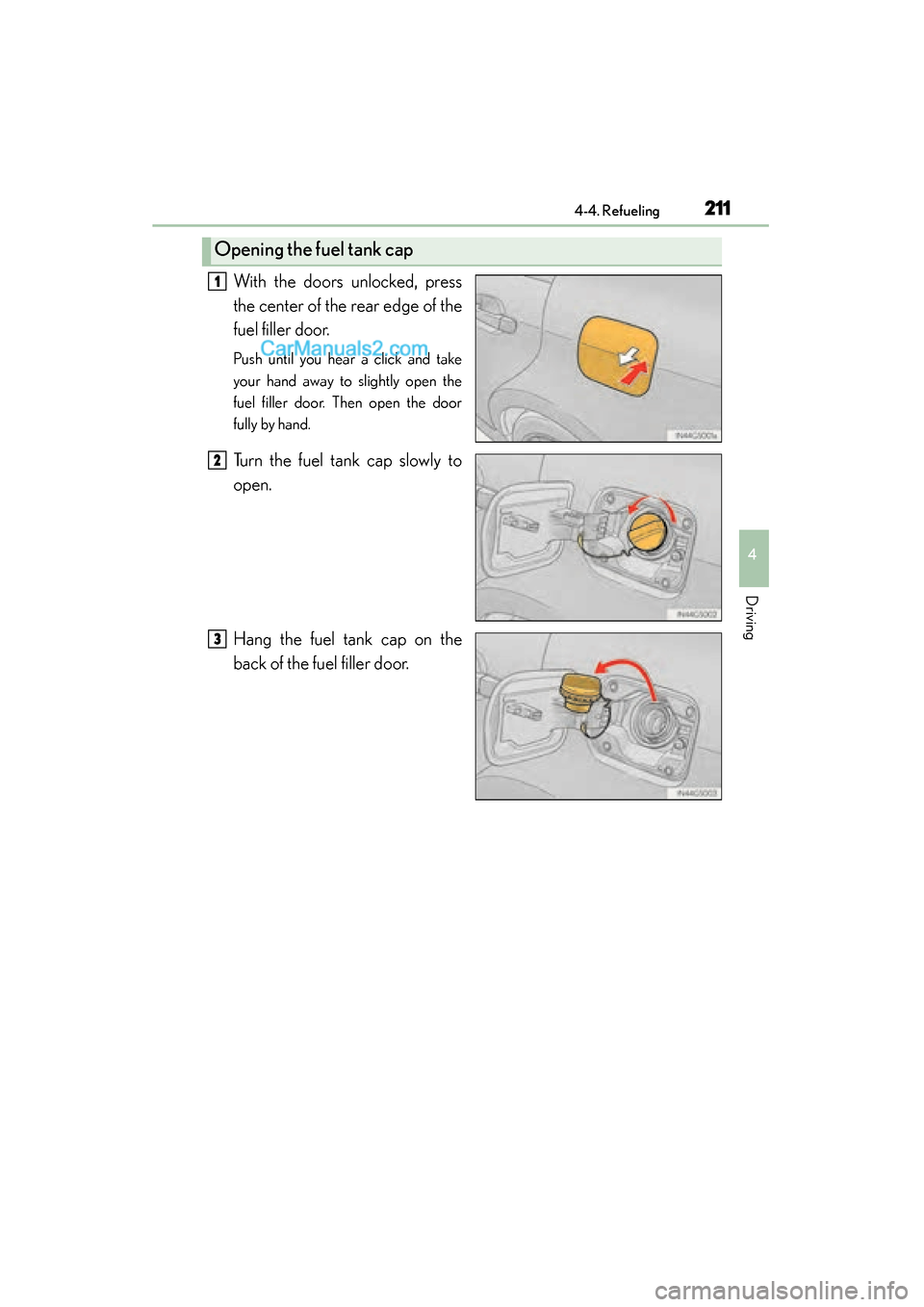
With the doors unlocked, press
the center of the rear edge of the
fuel filler door.
Push until you hear a click and take
your hand away to slightly open the
fuel filler door. Then open the door
fully by hand.
Turn the fuel tank cap slowly to
open.
Hang the fuel tank cap on the
back of the fuel filler door.
Opening the fuel tank cap
1
2
3
GS350_OM_OM30F69U_(U).book Page 211 Monday, January 19, 2015 2:53 PM
Page 214 of 615
212
GS350_OM_OM30F69U_(U)
4-4. Refueling
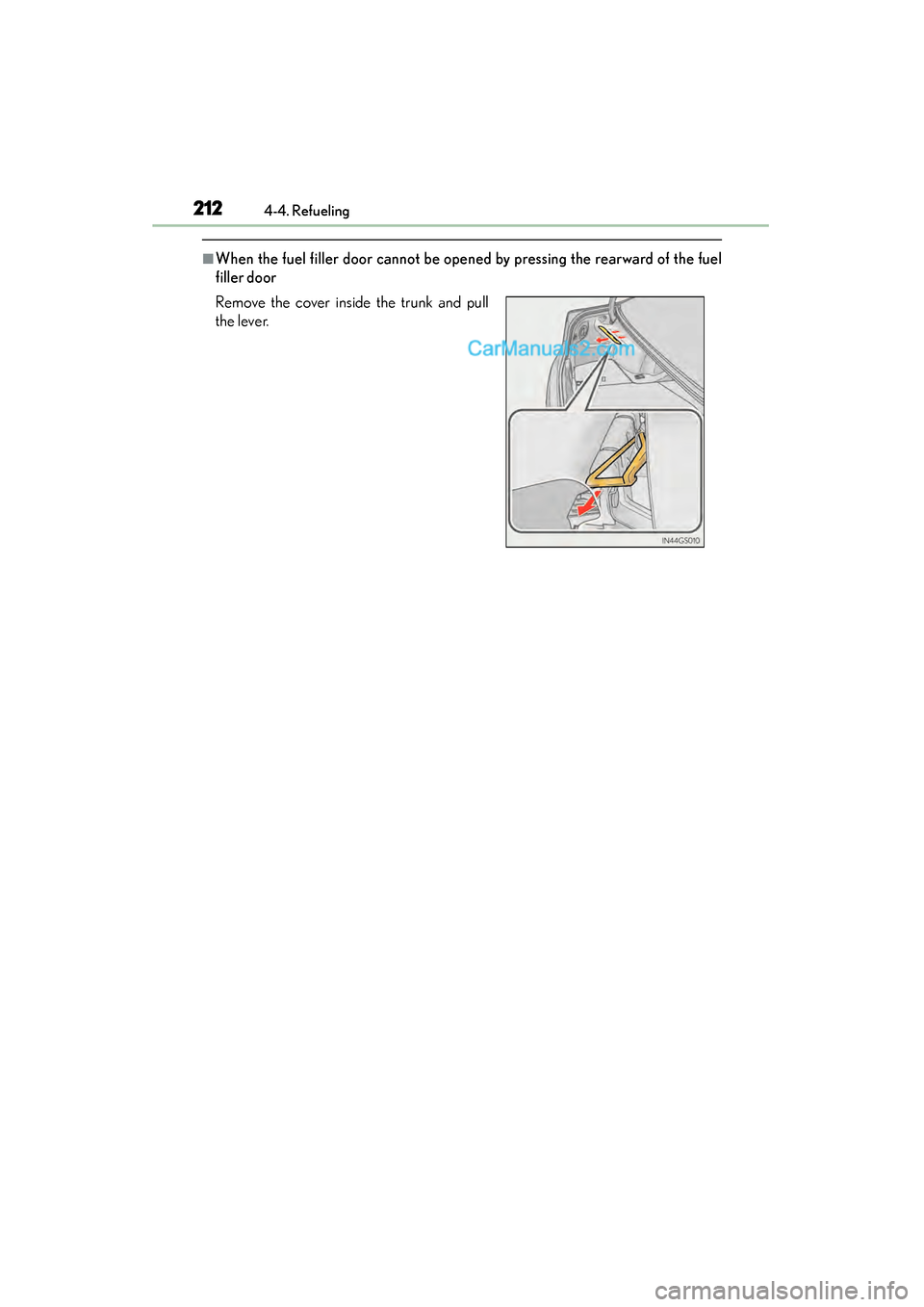
■When the fuel filler door cannot be opened by pressing the rearward of the fuel
filler door
Remove the cover inside the trunk and pull
the lever.
GS350_OM_OM30F69U_(U).book Page 212 Monday, January 19, 2015 2:53 PM
Page 215 of 615
GS350_OM_OM30F69U_(U)
2134-4. Refueling
4
Driving
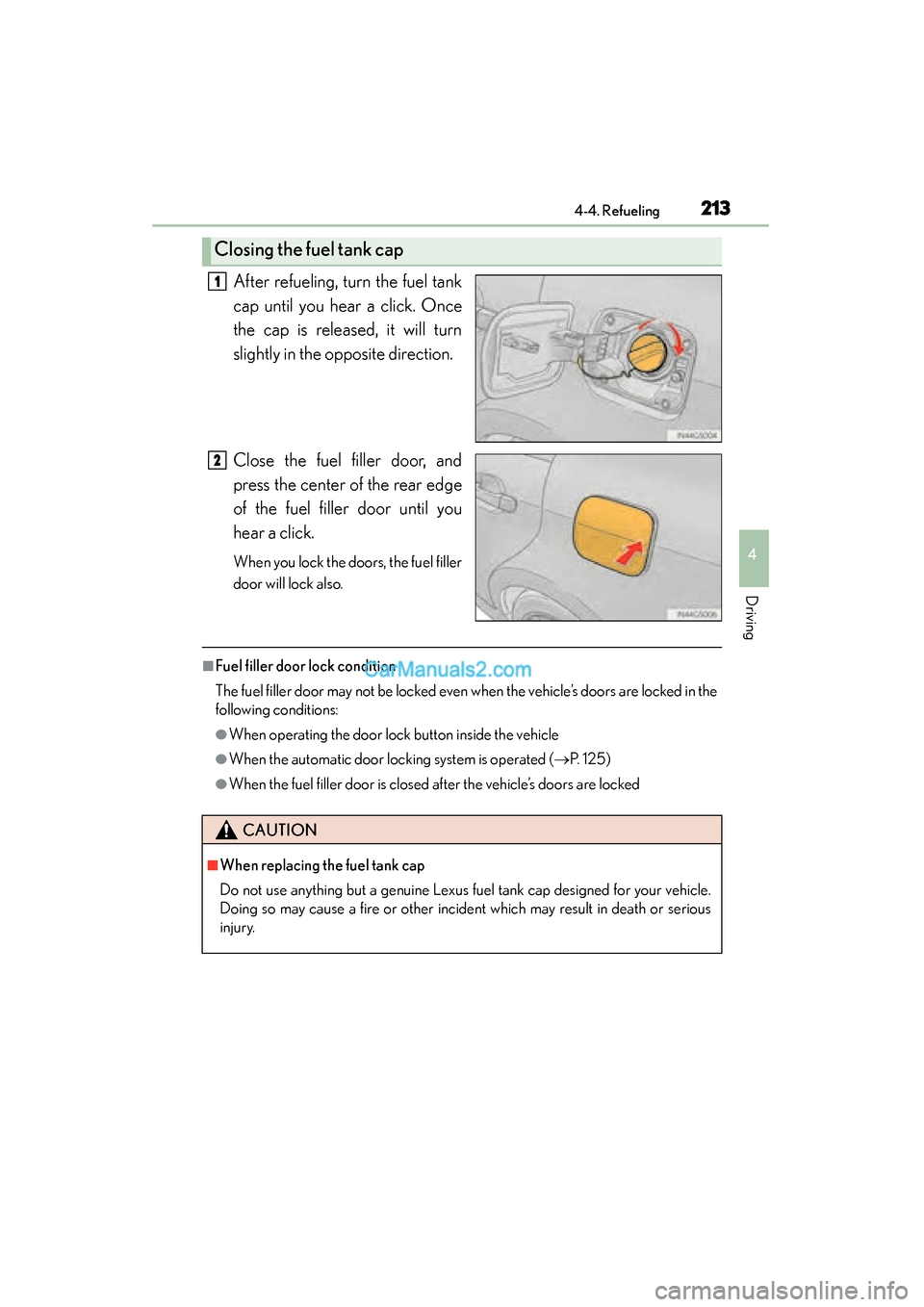
After refueling, turn the fuel tank
cap until you hear a click. Once
the cap is released, it will turn
slightly in the opposite direction.
Close the fuel filler door, and
press the center of the rear edge
of the fuel filler door until you
hear a click.
When you lock the doors, the fuel filler
door will lock also.
■Fuel filler door lock condition
The fuel filler door may not be locked even when the vehicle’s doors are locked in the
following conditions:
●When operating the door lock button inside the vehicle
●When the automatic door locking system is operated (→P. 1 2 5 )
●When the fuel filler door is closed after the vehicle’s doors are locked
Closing the fuel tank cap
1
2
CAUTION
■When replacing the fuel tank cap
Do not use anything but a genuine Lexus fuel tank cap designed for your vehicle.
Doing so may cause a fire or other incident which may result in death or serious
injury.
GS350_OM_OM30F69U_(U).book Page 213 Monday, January 19, 2015 2:53 PM
Page 245 of 615
243
GS350_OM_OM30F69U_(U)4-5. Using the driving support systems
4
Driving
Driving mode select switch
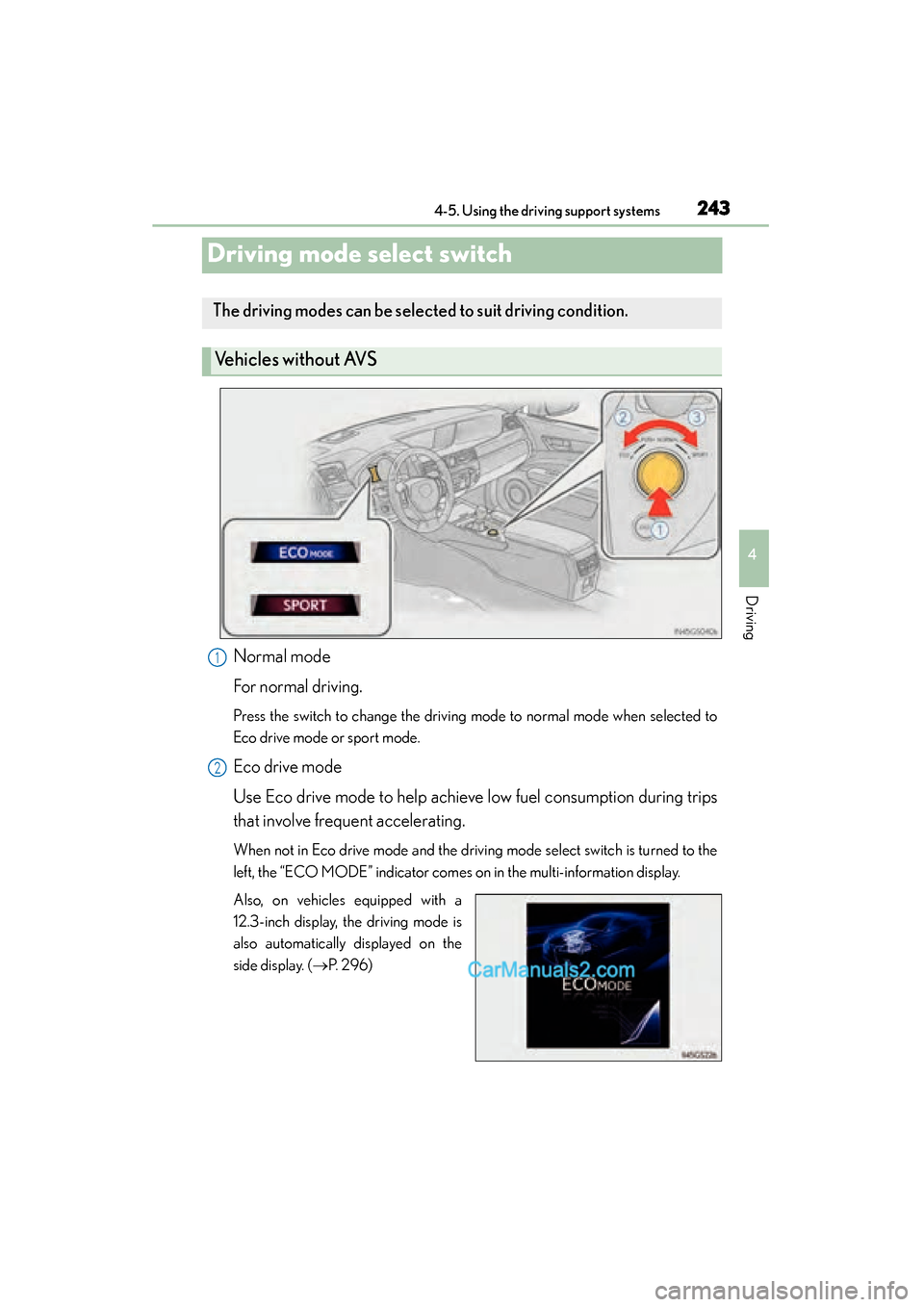
Normal mode
For normal driving.
Press the switch to change the driving mode to normal mode when selected to
Eco drive mode or sport mode.
Eco drive mode
Use Eco drive mode to help achieve low fuel consumption during trips
that involve frequent accelerating.
When not in Eco drive mode and the driving mode select switch is turned to the
left, the “ECO MODE” indicator comes on in the multi-information display.
Also, on vehicles equipped with a
12.3-inch display, the driving mode is
also automatically displayed on the
side display. ( →P. 296)
The driving modes can be selected to suit driving condition.
Vehicles without AVS
1
2
GS350_OM_OM30F69U_(U).book Page 243 Monday, January 19, 2015 2:53 PM
Page 247 of 615
GS350_OM_OM30F69U_(U)
2454-5. Using the driving support systems
4
Driving
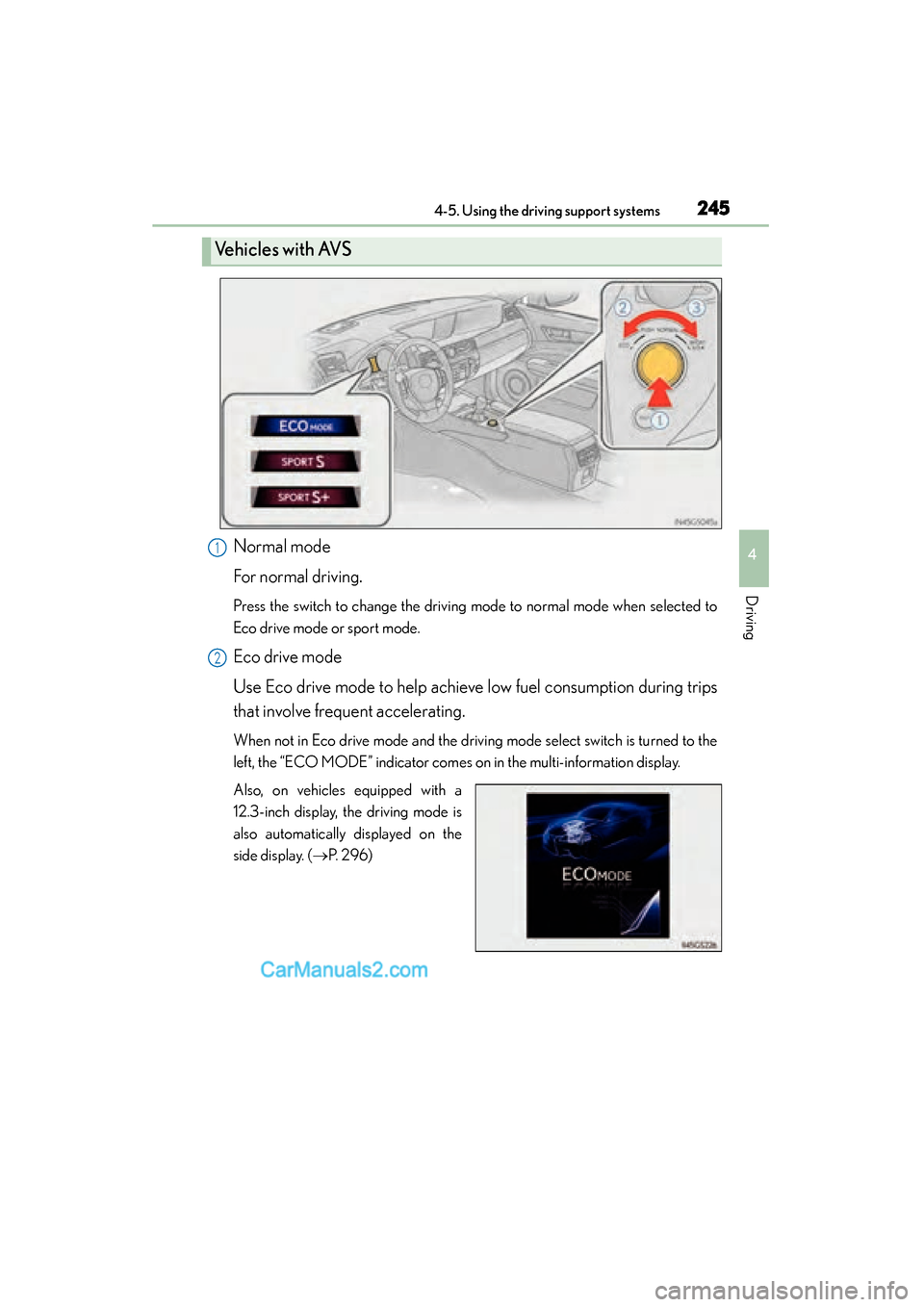
Normal mode
For normal driving.
Press the switch to change the driving mode to normal mode when selected to
Eco drive mode or sport mode.
Eco drive mode
Use Eco drive mode to help achieve low fuel consumption during trips
that involve frequent accelerating.
When not in Eco drive mode and the driving mode select switch is turned to the
left, the “ECO MODE” indicator comes on in the multi-information display.
Also, on vehicles equipped with a
12.3-inch display, the driving mode is
also automatically displayed on the
side display. (→P. 296)
Ve h i c l e s w i t h AV S
1
2
GS350_OM_OM30F69U_(U).book Page 245 Monday, January 19, 2015 2:53 PM
Page 249 of 615
GS350_OM_OM30F69U_(U)
2474-5. Using the driving support systems
4
Driving
■Operation of the air conditioning system in Eco drive mode
Eco drive mode controls the heating/cooling operations and fan speed of the air
conditioning system to enhance fuel efficiency (→P. 299). To improve air condition-
ing performance, adjust the fan speed or turn off Eco drive mode.
■Automatic operation of the seat heater during Eco drive mode
Eco drive mode controls the heating operation and fan speed of the air conditioning
system to enhance fuel efficiency. If the driving mode select switch is switched to Eco
drive mode in cold temperatures, the seat heater will be automatically operated to
assist heating performance.
■Sport mode automatic deactivation
Sport mode is automatically deactivated if the engine switch is turned off after driv-
ing in sport mode.
GS350_OM_OM30F69U_(U).book Page 247 Monday, January 19, 2015 2:53 PM