remote Lexus GS350 2015 TIPS FOR THE NAVIGATION SYSTEM / LEXUS 2015 GS350 FROM MAR. 2015 PROD. OWNERS MANUAL (OM30F69U)
[x] Cancel search | Manufacturer: LEXUS, Model Year: 2015, Model line: GS350, Model: Lexus GS350 2015Pages: 612, PDF Size: 7.74 MB
Page 2 of 612
TABLE OF CONTENTS2
GS350_OM_OM30F69U_(U)
For your information ................................... 8
Reading this manual................................... 12
How to search ..............................................13
Pictorial index ............................................... 14
1-1. For safe useBefore driving................................. 26
For safety drive............................... 28
Seat belts .......................................... 30
SRS airbags ..................................... 36
Front passenger occupant classification system...................47
Safety information for children ................................... 54
Child restraint systems ............... 55
Installing child restraints............. 59
Exhaust gas precautions ............ 69
1-2. Theft deterrent system Engine immobilizer system ............................................. 70
Alarm ..................................................72
2. Instrument cluster Warning lights and indicators ............................... 76
Gauges and meters .......................81
Multi-information display .......... 84
Head-up display ............................ 92
Fuel consumption information ................................... 99 3-1. Key information
Keys .................................................. 104
3-2. Opening, closing and locking the doors and trunk
Smart access system with push-button start .............107
Wireless remote control ...........120
Doors ................................................123
Trunk.................................................. 127
3-3. Adjusting the seats Front seats.......................................134
Driving position memory..........136
Head restraints ............................. 142
3-4. Adjusting the steering wheel and mirrors
Steering wheel .............................. 145
Inside rear view mirror ..............146
Outside rear view mirrors....... 148
3-5. Opening, closing the windows and moon roof
Power windows.............................. 151
Moon roof .......................................155
1For safety and security
2Instrument cluster
3Operation of each
component
Page 4 of 612

TABLE OF CONTENTS4
GS350_OM_OM30F69U_(U)
5-1. Remote Touch screenRemote Touch/12.3-inch display.......................................... 290
5-2. Using the air conditioning system and defogger
Front automatic air conditioning system......... 299
Rear air conditioning system ........................................... 319
Rear window and outside rear view mirror defoggers .......... 324
Windshield wiper de-icer....... 325
5-3. Using the interior lights Interior lights list ..........................327• Interior light ............................ 328
• Personal lights ....................... 328 5-4. Using the storage features
List of storage features ............ 330
• Glove box ............................... 332
• Console box .......................... 333
• Cup holders ........................... 334
• Auxiliary boxes ..................... 336
Trunk features ...............................337
5-5. Other interior features Sun visors and vanity mirrors ................... 340
Clock ................................................341
Ashtrays ......................................... 342
Power outlets ............................... 343
Heated steering wheel ............ 345
Seat heaters/ seat ventilators ......................... 347
Armrest............................................351
Rear sunshade/ rear door sunshades.............. 352
Trunk storage extension .......... 355
Coat hooks ................................... 356
Assist grips ....................................357
Utility hook ................................... 358
Garage door opener ............... 359
LEXUS Enform Safety Connect...................................... 366
5Interior features
Page 11 of 612

GS350_OM_OM30F69U_(U)
11
The SRS airbag and seat belt pretensioner devices in your Lexus contain explosive
chemicals. If the vehicle is scrapped with the airbags and seat belt pretensioners left
as they are, this may cause an accident such as fire. Be sure to have the systems of
the SRS airbag and seat belt pretensioner removed and disposed of by a qualified
service shop or by your Lexus deal er before you scrap your vehicle.
Special handling may apply, See www.dt sc.ca.gov/hazardouswaste/perchlorate.
Your vehicle has components that may contain perchlorate. These components may
include airbag, seat belt pretensioners, and wireless remote control batteries.
Scrapping of your Lexus
Perchlorate Material
CAUTION
■General precautions while driving
Driving under the influence: Never drive your vehicle when under the influence of
alcohol or drugs that have impaired your ability to operate your vehicle. Alcohol
and certain drugs delay reaction time, impa ir judgment and reduce coordination,
which could lead to an accident that could result in death or serious injury.
Defensive driving: Always drive defensively. Anticipate mistakes that other drivers
or pedestrians might make and be ready to avoid accidents.
Driver distraction: Always give your full attention to driving. Anything that distracts
the driver, such as adjusting controls, ta lking on a cellular phone or reading can
result in a collision with resulting death or serious injury to you, your occupants or
others.
■General precaution regarding children’s safety
Never leave children unattended in the vehicle, and never allow children to have or
use the key.
Children may be able to start the vehicle or shift the vehicle into neutral. There is
also a danger that children may injure th emselves by playing with the windows, the
moon roof, or other features of the vehicle. In addition, heat build-up or extremely
cold temperatures inside the vehicle can be fatal to children.
Page 20 of 612

20Pictorial index
GS350_OM_OM30F69U_(U)
Audio remote control switches*1
Paddle shift switches. . . . . . . . . . . . . . . . . . . . . . . . . . . . . . . . . . . . . . . . . . . . . . . . . .P. 186
Back switch
*1
Ta l k s w i t c h*1
Telephone switches*1
“DISP” button. . . . . . . . . . . . . . . . . . . . . . . . . . . . . . . . . . . . . . . . . . . . . . . . . . . . . . . . . P. 8 5
Vehicle-to-vehicle distance button
*2. . . . . . . . . . . . . . . . . . . . . . . . . . . . . . . .P. 221
Cruise control switch
Cruise control
*2 . . . . . . . . . . . . . . . . . . . . . . . . . . . . . . . . . . . . . . . . . . . . . . . . . . . . P. 214
Dynamic radar cruise control
*2 . . . . . . . . . . . . . . . . . . . . . . . . . . . . . . . . . . . . .P. 218
Tilt and telescopic steering control switch . . . . . . . . . . . . . . . . . . . . . . . . . . . P. 145
LKA (Lane-Keeping Assist) switch
*2. . . . . . . . . . . . . . . . . . . . . . . . . . . . . . . P. 233
1
2
3
4
5
6
7
8
9
10
Page 72 of 612

721-2. Theft deterrent system
GS350_OM_OM30F69U_(U)
Alarm
The alarm uses light and sound to give an alert when an intrusion is
detected.
The alarm is triggered in the following situations when the alarm is set:
●A locked door or trunk is unlocked or opened in any way other than
using the entry function, wireless remote control or mechanical key.
(The doors will lock again automatically.)
●The hood is opened.
Close the doors, trunk and hood,
and lock all the doors. The system
will be set automatically after 30
seconds.
The indicator light changes from
being on to flashing when the system
is set.
Do one of the following to deactivate or stop the alarms:
●Unlock the doors or open the trunk.
●Turn the engine switch to ACCE SSORY or IGNITION ON mode, or
start the engine. (The alarm will be deactivated or stopped after a few
seconds.)
The alarm
Setting the alarm system
Deactivating or stopping the alarm
Page 99 of 612

99
GS350_OM_OM30F69U_(U)2. Instrument cluster
2
Instrument cluster
Fuel consumption information
Remote Touch screen
Remote Touch knob
“MENU” button
Fuel consumption information can be displayed on the Remote Touch
screen.
Vehicles with a 12.3-inch display: The fuel consumption information can
be displayed and operated on the side display.
1
2
3
Page 100 of 612

100
GS350_OM_OM30F69U_(U)
2. Instrument cluster
Press the “MENU” button on the Remote Touch, then select on the
“Menu” screen, and then select “Fuel Consumption”.
■Trip information
If the “Past Record” screen is di splayed, select “Trip Information”.
Resetting the consumption
data
Fuel consumption in the past
15 minutes
Current fuel consumption
Average vehicle speed since
the engine was started.
Elapsed time since the engine was started.
Cruising range ( P. 1 0 1 )
Average fuel consumption for the past 15 minutes is divided by color into past
averages and averages attained since the engine switch was last turned to
IGNITION ON mode. Use the displayed average fuel consumption as a ref-
erence.
The image is an example only, and may vary slightly from actual conditions.
Fuel consumption
1
2
3
4
5
6
Page 103 of 612

103
GS350_OM_OM30F69U_(U)
Operation of
each component
3
3-1. Key information
Keys .................................................. 104
3-2. Opening, closing and locking the doors and trunk
Smart access system with push-button start .............107
Wireless remote control .......... 120
Doors ............................................... 123
Trunk .................................................. 127
3-3. Adjusting the seats Front seats ...................................... 134
Driving position memory ......... 136
Head restraints .............................142
3-4. Adjusting the steering wheel and mirrors
Steering wheel ..............................145
Inside rear view mirror.............. 146
Outside rear view mirrors ....... 148
3-5. Opening, closing the windows and moon roof
Power windows .............................. 151
Moon roof ...................................... 155
Page 104 of 612
104
GS350_OM_OM30F69U_(U)
3-1. Key information
Keys
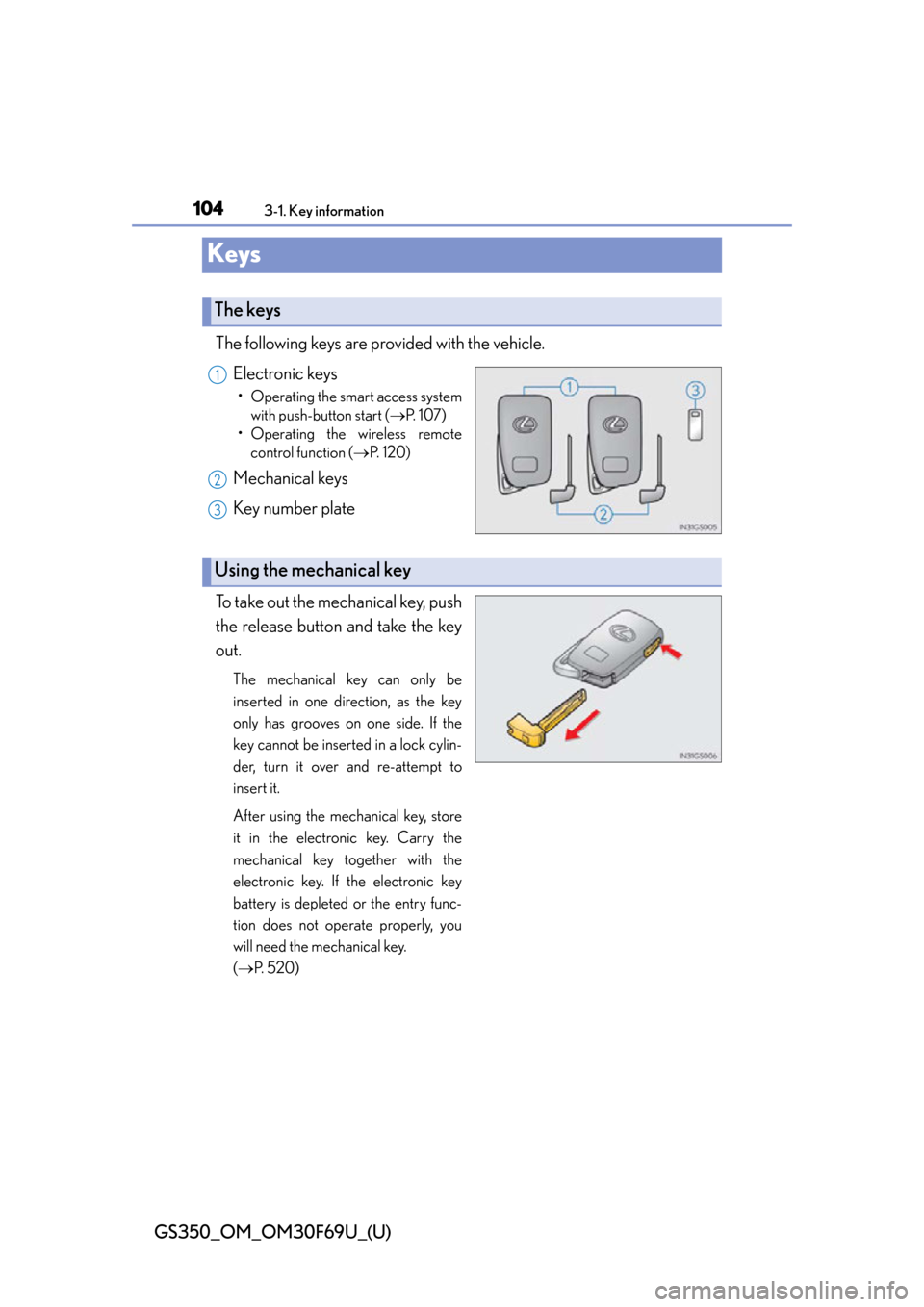
The following keys are provided with the vehicle.Electronic keys
• Operating the smart access systemwith push-button start ( P. 1 0 7 )
• Operating the wireless remote control function ( P. 1 2 0 )
Mechanical keys
Key number plate
To take out the mechanical key, push
the release button and take the key
out.
The mechanical key can only be
inserted in one direction, as the key
only has grooves on one side. If the
key cannot be inserted in a lock cylin-
der, turn it over and re-attempt to
insert it.
After using the mechanical key, store
it in the electronic key. Carry the
mechanical key together with the
electronic key. If the electronic key
battery is depleted or the entry func-
tion does not operate properly, you
will need the mechanical key.
( P. 5 2 0 )
The keys
1
2
3
Using the mechanical key
Page 107 of 612

107
GS350_OM_OM30F69U_(U)3-2. Opening, closing and locking the doors and trunk
3
Operation of each component
Smart access system with push-button start
The following operations can be perf ormed simply by carrying the elec-
tronic key on your person, for exam ple in your pocket. (The driver should
always carry the electronic key.)
■Operation signals
A buzzer sounds and the emergency flashe rs flash to indicate that the doors have
been locked/unlocked. (Locked: once; Unlocked: twice)
■Security feature
If a door is not opened within approx imately 60 seconds after the vehicle is
unlocked, the security feature automatically locks the vehicle again.
■Welcome light illumination control
The side marker, parking, tail and license plate lights automatically turn on at night
when the doors are unlocked using the entr y function or wireless remote control if
the light switch is in the “AUTO” position.
Function summary
Locks and unlocks the doors ( P. 1 0 8 )
Opens the trunk ( P. 1 0 8 )
Starts the engine ( P. 177)1
2
3