change time Lexus GS350 2016 User Guide
[x] Cancel search | Manufacturer: LEXUS, Model Year: 2016, Model line: GS350, Model: Lexus GS350 2016Pages: 624, PDF Size: 15.29 MB
Page 146 of 624
146
GS350_200t_GS F_OM_OM30E86U_(U)3-2. Opening, closing and
locking the doors and trunk
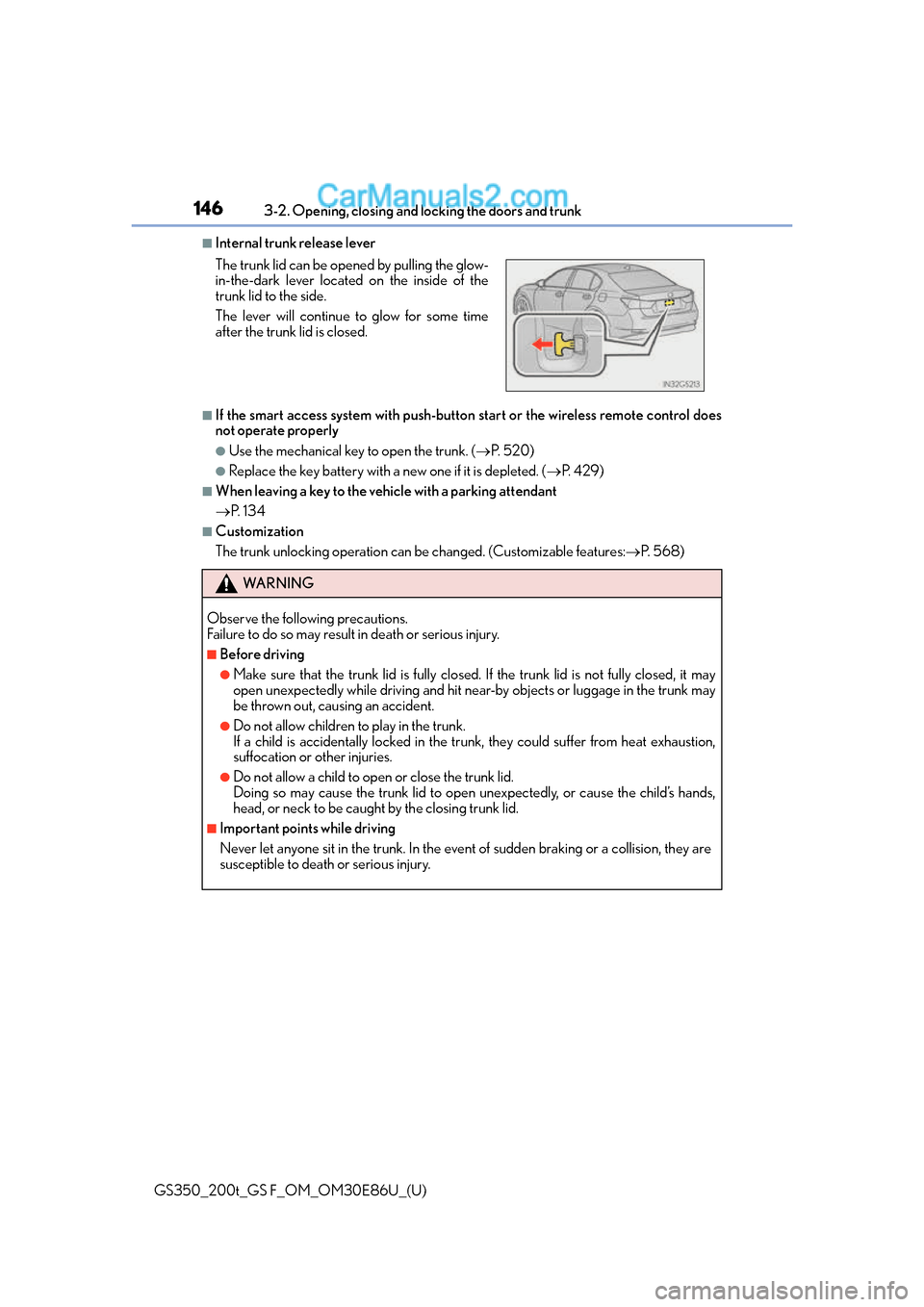
■Internal trunk release lever
■If the smart access system with push-butto n start or the wireless remote control does
not operate properly
●Use the mechanical key to open the trunk. ( P. 5 2 0 )
●Replace the key battery with a new one if it is depleted. ( P. 4 2 9 )
■When leaving a key to the vehi cle with a parking attendant
P. 1 3 4
■Customization
The trunk unlocking operation can be changed. (Customizable features: P. 5 6 8 )
The trunk lid can be open
ed by pulling the glow-
in-the-dark lever located on the inside of the
trunk lid to the side.
The lever will continue to glow for some time
after the trunk lid is closed.
WA R N I N G
Observe the following precautions.
Failure to do so may result in death or serious injury.
■Before driving
●Make sure that the trun k lid is fully closed. If the trunk lid is not fully closed, it may
open unexpectedly while driving and hit ne ar-by objects or luggage in the trunk may
be thrown out, causing an accident.
●Do not allow children to play in the trunk.
If a child is accidentally locked in the trunk, they could suffer from heat exhaustion,
suffocation or other injuries.
●Do not allow a child to open or close the trunk lid.
Doing so may cause the trunk lid to open unexpectedly, or cause the child’s hands,
head, or neck to be caught by the closing trunk lid.
■Important points while driving
Never let anyone sit in the trunk. In the even t of sudden braking or a collision, they are
susceptible to death or serious injury.
Page 173 of 624
1733-4. Adjusting the steering wheel and mirrors
3
Operation of each component
GS350_200t_GS F_OM_OM30E86U_(U)
When either “L” or “R” of the mirror select switch is selected, the outside rear
view mirrors will automatically angle downwards when the vehicle is reversing in
order to give a better view of the ground. To disable this function, select neither
“L” nor “R”.
■Adjusting the mirror angle when the vehicle is reversing
With the shift lever in R, adjust the mirror angle at a desired position. The
adjusted angle will be memorized and the mirror will automatically tilt to the
memorized angle whenever the shift lever is shifted to R from next time.
The memorized downward tilt position of the mirror is linked to the normal position
(angle adjusted with the shif t lever in other than R). Therefore, if the normal posi-
tion is changed after adjustment, th e tilt position will also change.
When the normal position is chang ed, readjust the angle in reversing.
■Mirror angle can be adjusted when
The engine switch is in ACCESSORY or IGNITION ON mode.
■When the mirrors are fogged up
The outside rear view mirrors can be cleare d using the mirror defoggers. Turn on the
rear window defogger to turn on the outside rear view mirror defoggers. ( P. 3 3 4 )
■Automatic adjustment of the mirror angle
A desired mirror face angle can be entered to memory and recalled automatically by the
driving position memory. ( P. 1 6 0 )
■Auto anti-glare function
When the anti-glare inside rear view mirror is set to automatic mode, the outside rear
view mirrors will activate in conjunction with the anti-glare inside rear view mirror to
reduce reflected light. ( P. 1 6 9 )
■Using automatic mode in cold weather (if equipped)
When automatic mode is used in cold weather, the door mirror could freeze up and
automatic stowing and return may not be possib le. In this event, remove any ice and snow
from the door mirror, then either operate th e mirror using manual mode or move the mir-
ror by hand.
Linked mirror function when reversing
Page 198 of 624
198
GS350_200t_GS F_OM_OM30E86U_(U)4-2. Driving procedures
Stop the vehicle.
Shift the shift lever to P.
Set the parking brake. (
P. 2 1 0 )
Press the engine switch.
Release the brake pedal and check that “POWER ON” on the multi-informa-
tion display is off.
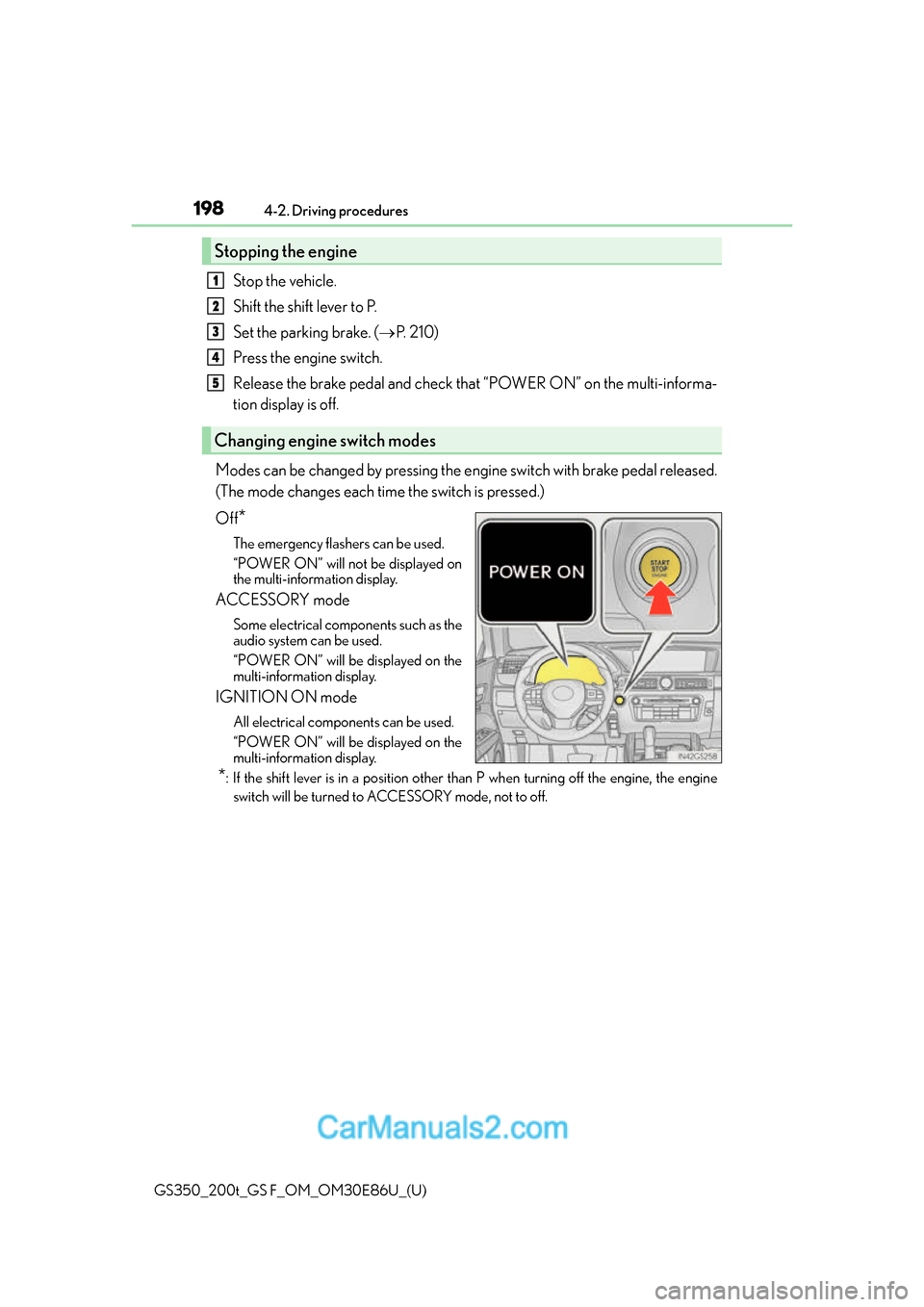
Modes can be changed by pressing the engine switch with brake pedal released.
(The mode changes each time the switch is pressed.)
Off
*
The emergency flashers can be used.
“POWER ON” will not be displayed on
the multi-information display.
ACCESSORY mode
Some electrical components such as the
audio system can be used.
“POWER ON” will be displayed on the
multi-information display.
IGNITION ON mode
All electrical components can be used.
“POWER ON” will be displayed on the
multi-information display.
*: If the shift lever is in a position other than P when turning off the engine, the engine
switch will be turned to ACCESSORY mode, not to off.
Stopping the engine
Changing engine switch modes
1
2
3
4
5
Page 200 of 624
200
GS350_200t_GS F_OM_OM30E86U_(U)4-2. Driving procedures
■Steering lock motor overheating prevention
To prevent the steering lock motor from overheating, the motor may be suspended if the
engine is turned on and off repeatedly in a sh
ort period of time. In this case, refrain from
operating the engine. After about 10 seconds, the steering lock motor will resume func-
tioning.
■When “Check Access System with Elec. Ke y” will be displayed on the multi-informa-
tion display
The system may be malfunctioning. Have the vehicle inspected by your Lexus dealer
immediately.
■If the electronic key battery is depleted
P. 4 2 9
■Operation of the engine switch
●When operating the engine switch, one short, firm press is enough. If the switch is
pressed improperly, the engine may not start or the engine switch mode may not
change. It is not necessary to press and hold the switch.
●If attempting to restart the engine immediat ely after turning the engine switch off, the
engine may not start in some cases. After tu rning the engine switch off, please wait a
few seconds before re starting the engine.
■If the smart access system with push-butto n start has been deactivated in a customized
setting
P. 5 2 0
WA R N I N G
■When starting the engine
Always start the engine while sitting in the driver’s seat. Do not depress the accelerator
pedal while starting the engine under any circumstances.
Doing so may cause an accident resu lting in death or serious injury.
■Caution while driving
If engine failure occurs while the vehicle is moving, do not lock or open the doors until
the vehicle reaches a safe and complete stop. Activation of the steering lock in this cir-
cumstance may lead to an accident, re sulting in death or serious injury.
■Stopping the engine in an emergency
If you want to stop the engine in an emergency while driving the vehicle, press and hold
the engine switch for more than 2 seconds, or press it briefly 3 times or more in succes-
sion. ( P. 4 4 3 )
However, do not touch the engine switch while driving except in an emergency. Turning
the engine off while driving will not cause lo ss of steering or braking control, but the
power assist to these systems will be lost. Th is will make it more difficult to steer and
brake, so you should pull over and stop the vehicle as soon as it is safe to do so.
Page 205 of 624
GS350_200t_GS F_OM_OM30E86U_(U)
2054-2. Driving procedures
4
Driving
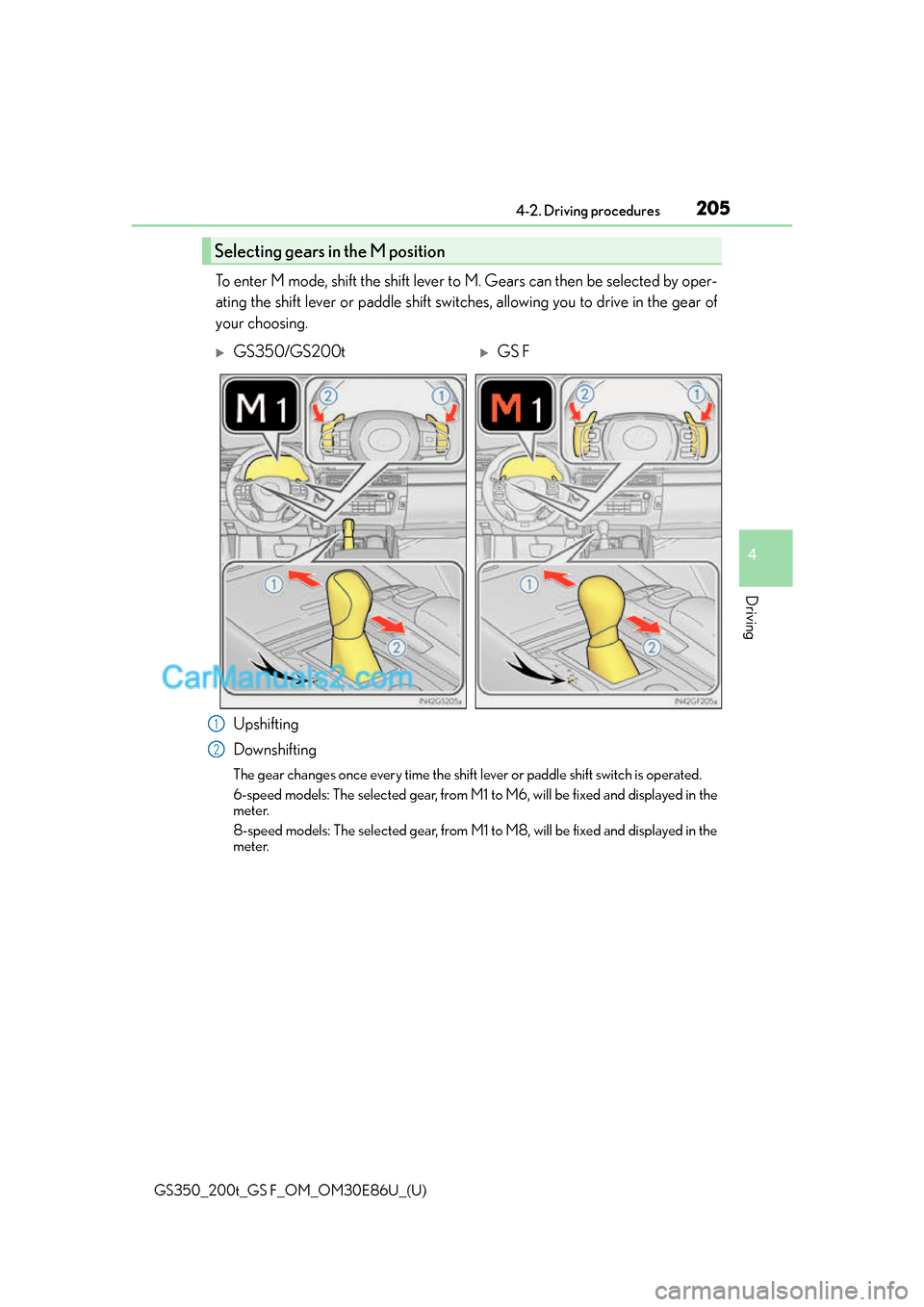
To enter M mode, shift the shift lever to M. Gears can then be selected by oper-
ating the shift lever or paddle shift switches, allowing you to drive in the gear of
your choosing.
Upshifting
Downshifting
The gear changes once every time the shift lever or paddle shift switch is operated.
6-speed models: The selected gear, from M1 to M6, will be fixed and displayed in the
meter.
8-speed models: The selected gear, from M1 to M8, will be fixed and displayed in the
meter.
Selecting gears in the M position
GS350/GS200tGS F
1
2
Page 209 of 624
209
GS350_200t_GS F_OM_OM30E86U_(U)4-2. Driving procedures
4
Driving
Turn signal lever
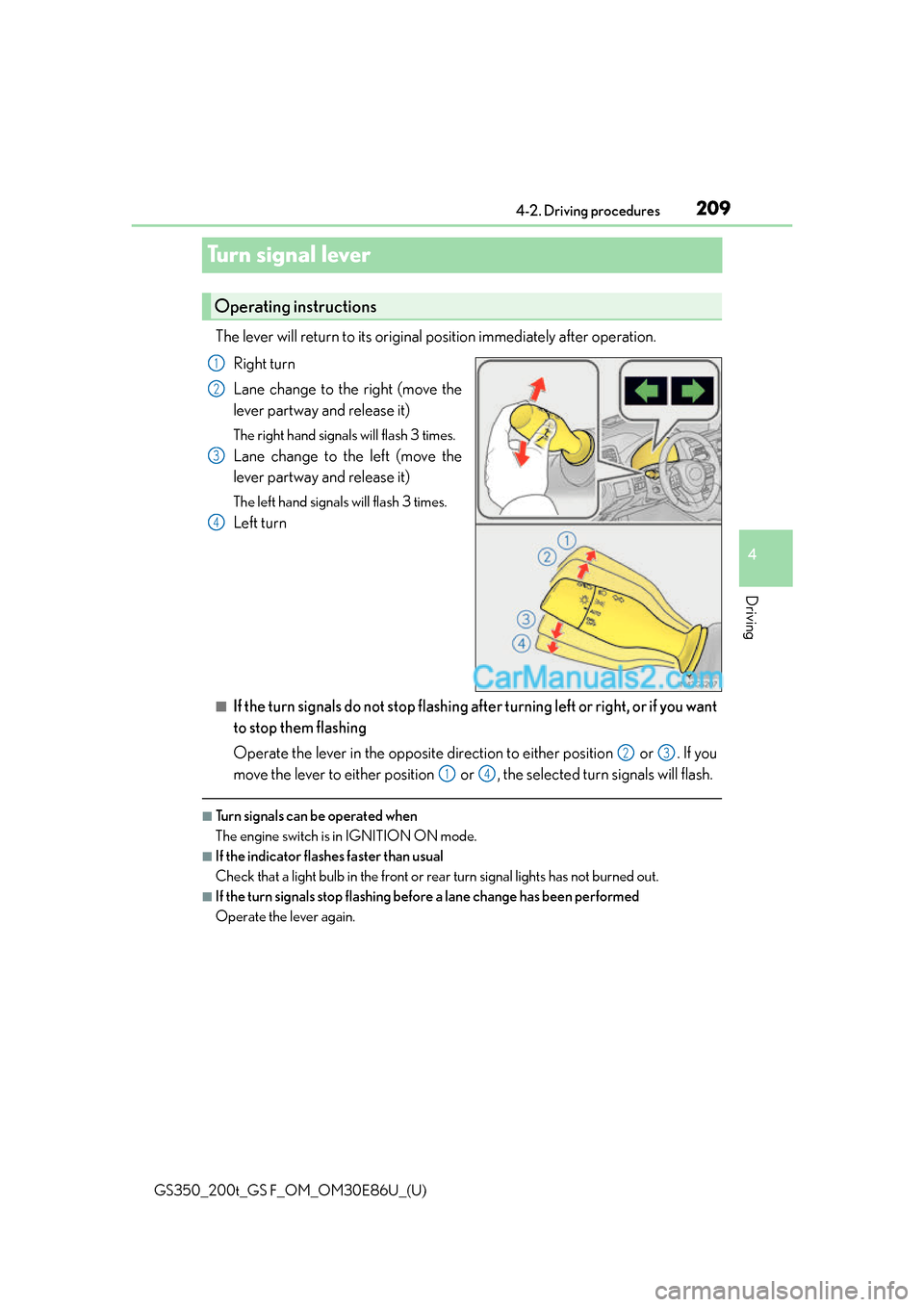
The lever will return to its original
position immediately after operation.
Right turn
Lane change to the right (move the
lever partway and release it)
The right hand signals will flash 3 times.
Lane change to the left (move the
lever partway and release it)
The left hand signals will flash 3 times.
Left turn
■If the turn signals do not stop flashing af ter turning left or right, or if you want
to stop them flashing
Operate the lever in the opposite direction to either position or . If you
move the lever to either position or , the selected turn signals will flash.
■Turn signals can be operated when
The engine switch is in IGNITION ON mode.
■If the indicator flashes faster than usual
Check that a light bulb in the front or rear turn signal lights has not burned out.
■If the turn signals stop flashing befo re a lane change has been performed
Operate the lever again.
Operating instructions
1
2
3
4
23
14
Page 216 of 624
216
GS350_200t_GS F_OM_OM30E86U_(U)4-3. Operating the lights and wipers
AFS (Adaptive Front-lighting System) secure
s excellent visibility at intersections
and on curves by automatically adjusting the direction of the light axis of the
headlights according to vehicle speed and the degree of the tire’s angle as con-
trolled by steering input.
AFS operates at speeds of 6 mph (10 km/h) or higher.
■Deactivating AFS
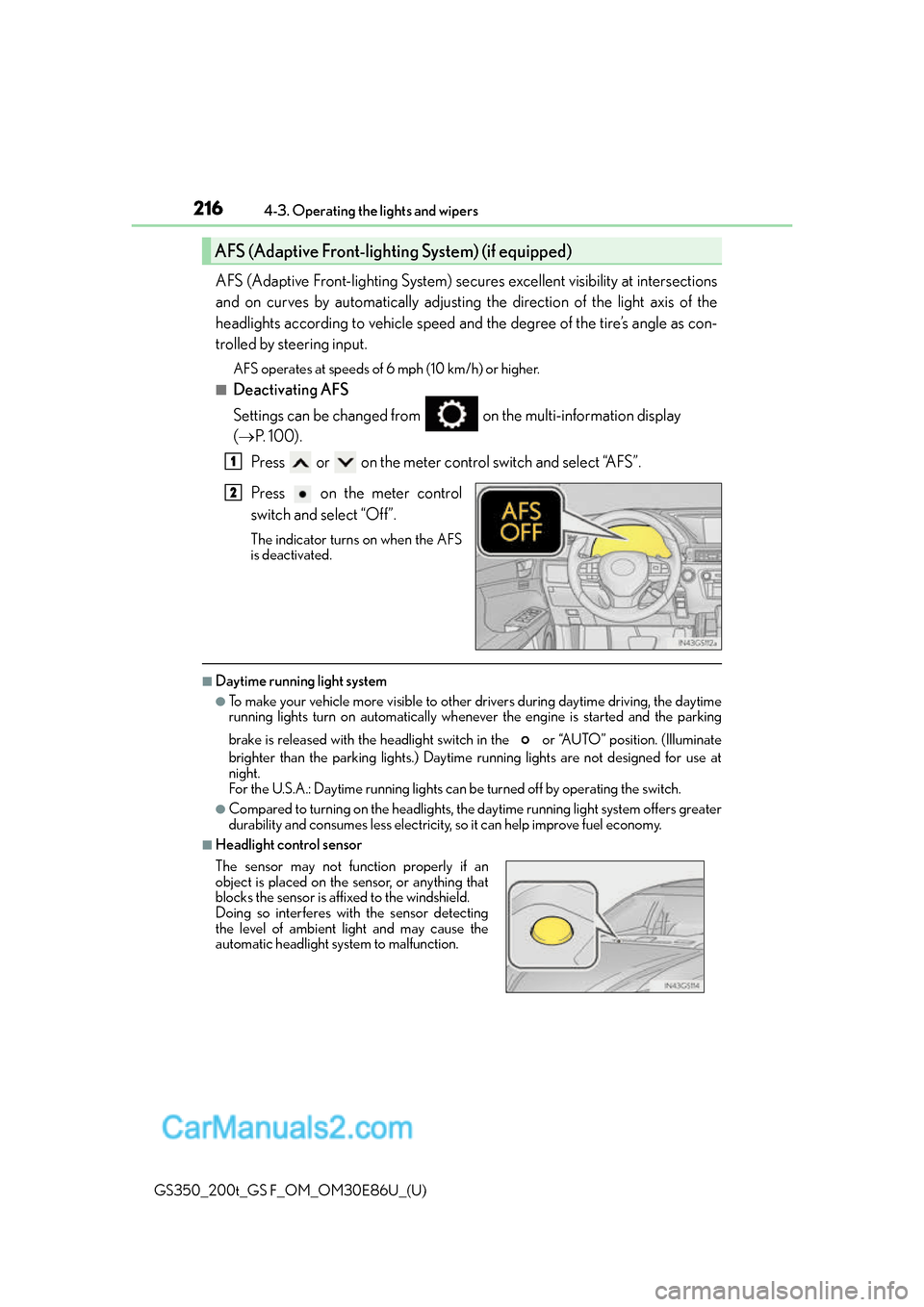
Settings can be changed from on the multi-information display
( P. 100).
Press or on the meter control switch and select “AFS”.
Press on the meter control
switch and select “Off”.
The indicator turns on when the AFS
is deactivated.
■Daytime running light system
●To make your vehicle more visible to other drivers during daytime driving, the daytime
running lights turn on automatically whenever the engine is started and the parking
brake is released with the headlight switch in the or “AUTO” position. (Illuminate
brighter than the parking lights.) Daytim e running lights are not designed for use at
night.
For the U.S.A.: Daytime running lights can be turned off by operating the switch.
●Compared to turning on the headlights, the daytime running light system offers greater
durability and consumes less electricity, so it can help improve fuel economy.
■Headlight control sensor
AFS (Adaptive Front-lighting System) (if equipped)
1
2
The sensor may not function properly if an
object is placed on the sensor, or anything that
blocks the sensor is affixed to the windshield.
Doing so interferes with the sensor detecting
the level of ambient light and may cause the
automatic headlight system to malfunction.
Page 221 of 624
GS350_200t_GS F_OM_OM30E86U_(U)
2214-3. Operating the lights and wipers
4
Driving
■Temporarily lowering sensor sensitivity
The sensitivity of the sensor can be temporarily lowered.
Turn the engine switch off while the following conditions are met.
• The headlight switch is in or .
• The headlight switch lever is in high beam position.
• Automatic High Beam switch is on.
Turn the engine switch to IGNITION ON mode.
Within 30 seconds after , re peat pulling the headlight switch lever to the original
position then pushing it to the high beam po sition quickly 10 times, then leave the lever
in high beam position.
If the sensitivity is changed, the Automatic High Beam indicator is turn on and off 3
times.
Automatic High Beam (headlights) may turn on even the vehicle is stopped.
■Wa r n i n g m e s s a g e
Warning messages are used to indicate a syst em malfunction or to inform the driver of
the need for caution. ( P. 4 5 9 )
1
2
32
4
Page 224 of 624
224
GS350_200t_GS F_OM_OM30E86U_(U)4-3. Operating the lights and wipers
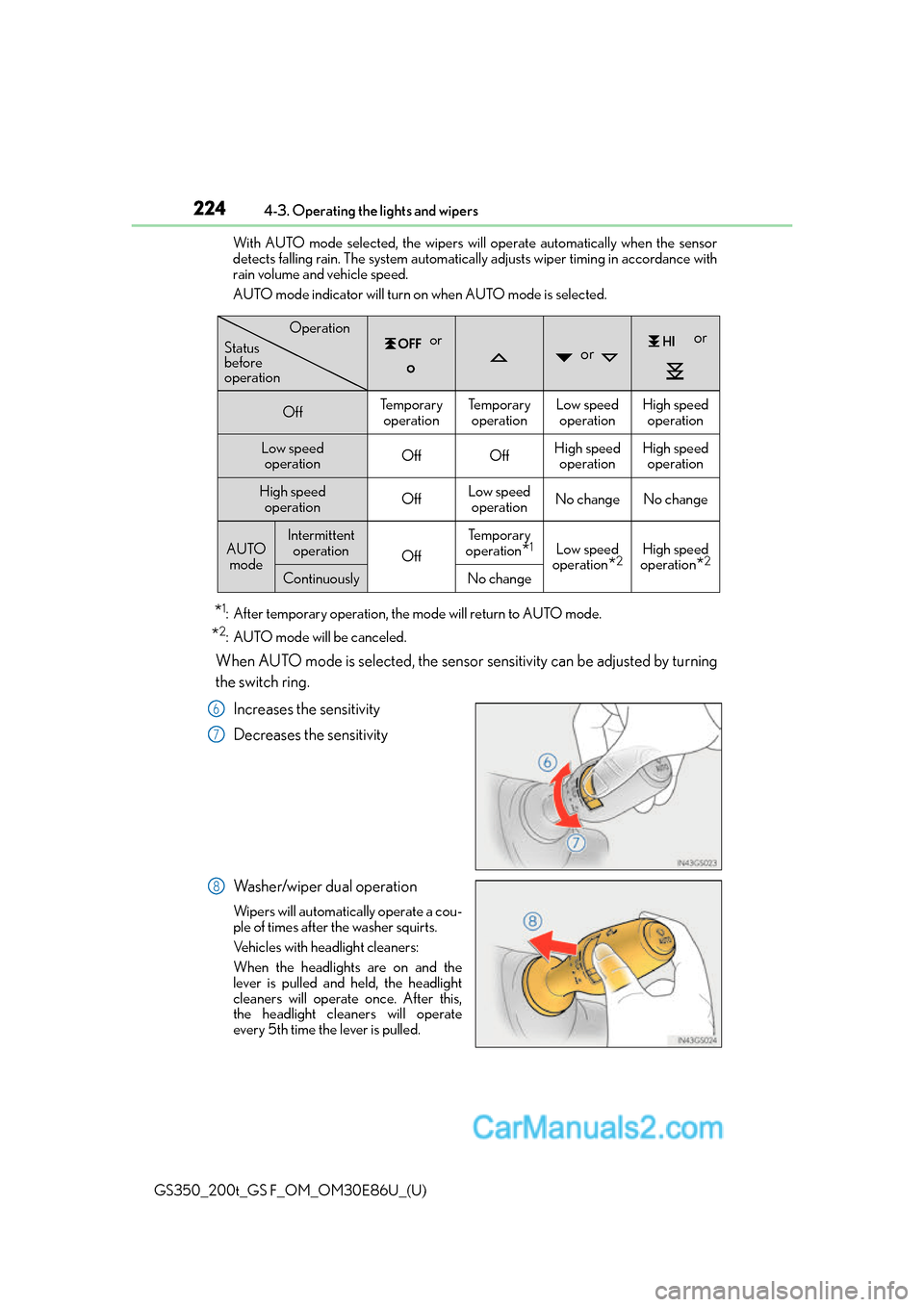
With AUTO mode selected, the wipers will operate automatically when the sensor
detects falling rain. The system automatically adjusts wiper timing in accordance with
rain volume and vehicle speed.
AUTO mode indicator will turn on when AUTO mode is selected.
*1: After temporary operation, the mode will return to AUTO mode.
*2: AUTO mode will be canceled.
When AUTO mode is selected, the sensor sensitivity can be adjusted by turning
the switch ring.
Increases the sensitivity
Decreases the sensitivity
Washer/wiper dual operation
Wipers will automatically operate a cou-
ple of times after the washer squirts.
Vehicles with headlight cleaners:
When the headlights are on and the
lever is pulled and held, the headlight
cleaners will operate once. After this,
the headlight cleaners will operate
every 5th time the lever is pulled.
or or
or
OffTe m p o r a r y operationTe m p o r a r y operationLow speed operationHigh speed operation
Low speed operationOffOffHigh speed operationHigh speedoperation
High speed
operationOffLow speedoperationNo changeNo change
AUTO modeIntermittent operation
Off
Te m p o r a r y
operation
*1Low speed
operation
*2High speed
operation
*2
ContinuouslyNo change
Operation
Status
before
operation
6
7
8
Page 225 of 624
GS350_200t_GS F_OM_OM30E86U_(U)
2254-3. Operating the lights and wipers
4
Driving
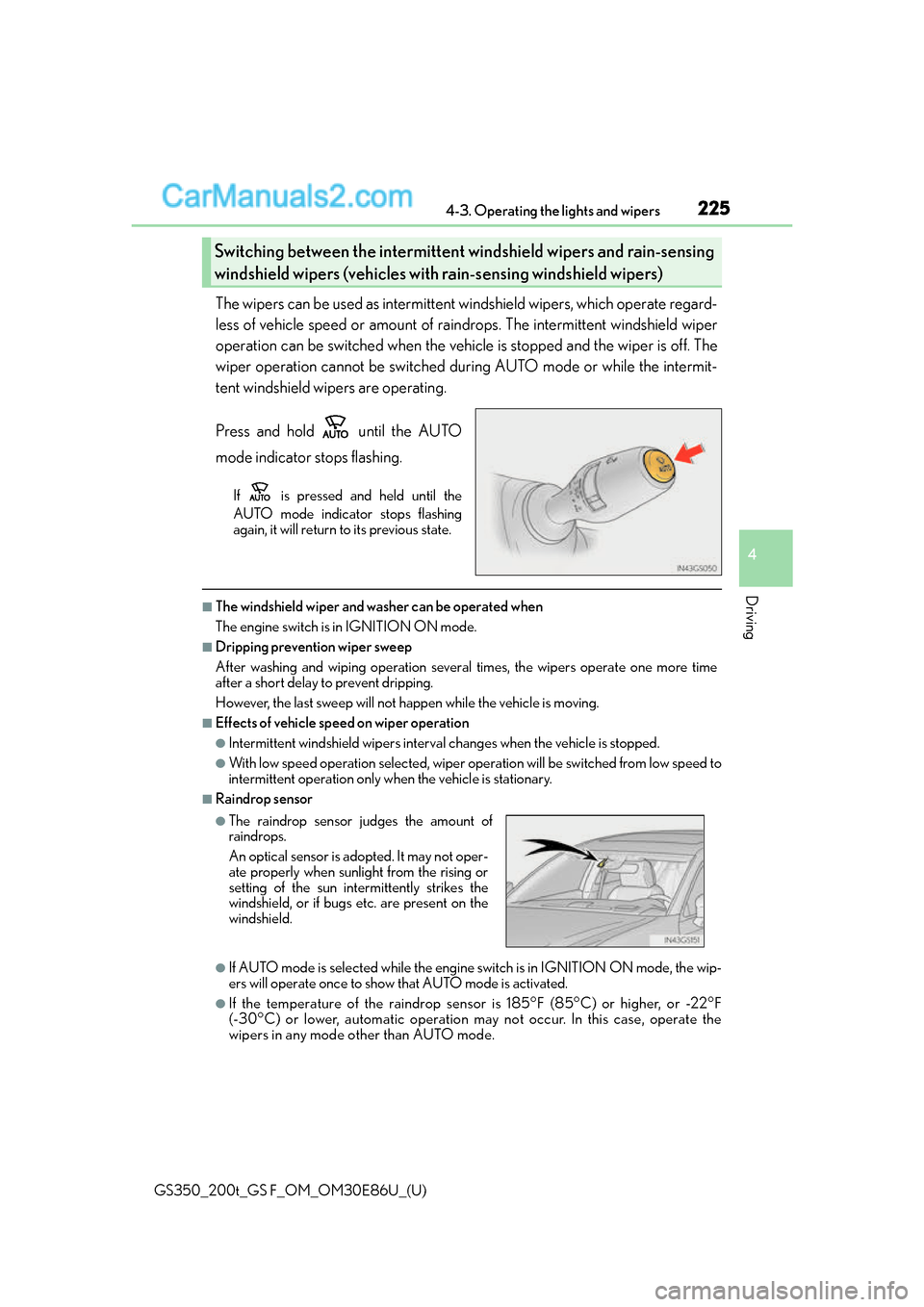
The wipers can be used as intermittent windshield wipers, which operate regard-
less of vehicle speed or amount of raindrops. The intermittent windshield wiper
operation can be switched when the vehicl e is stopped and the wiper is off. The
wiper operation cannot be switched during AUTO mode or while the intermit-
tent windshield wipers are operating.
Press and hold until the AUTO
mode indicator stops flashing.
If is pressed and held until the
AUTO mode indicator stops flashing
again, it will return to its previous state.
■The windshield wiper and washer can be operated when
The engine switch is in IGNITION ON mode.
■Dripping prevention wiper sweep
After washing and wiping operation several times, the wipers operate one more time
after a short delay to prevent dripping.
However, the last sweep will not happen while the vehicle is moving.
■Effects of vehicle speed on wiper operation
●Intermittent windshield wi pers interval changes when the vehicle is stopped.
●With low speed operation selected, wiper oper ation will be switched from low speed to
intermittent operation only wh en the vehicle is stationary.
■Raindrop sensor
●If AUTO mode is selected while the engine switch is in IGNITION ON mode, the wip-
ers will operate once to show that AUTO mode is activated.
●If the temperature of the raindrop sensor is 185°F (85°C) or higher, or -22°F
(-30°C) or lower, automatic operation ma y not occur. In this case, operate the
wipers in any mode other than AUTO mode.
Switching between the intermittent wi ndshield wipers and rain-sensing
windshield wipers (vehicles with rain-sensing windshield wipers)
●The raindrop sensor judges the amount of
raindrops.
An optical sensor is ad opted. It may not oper-
ate properly when sunlight from the rising or
setting of the sun intermittently strikes the
windshield, or if bugs etc. are present on the
windshield.