fuel Lexus GS350 2016 User Guide
[x] Cancel search | Manufacturer: LEXUS, Model Year: 2016, Model line: GS350, Model: Lexus GS350 2016Pages: 624, PDF Size: 15.29 MB
Page 97 of 624
GS350_200t_GS F_OM_OM30E86U_(U)
972. Instrument cluster
2
Instrument cluster
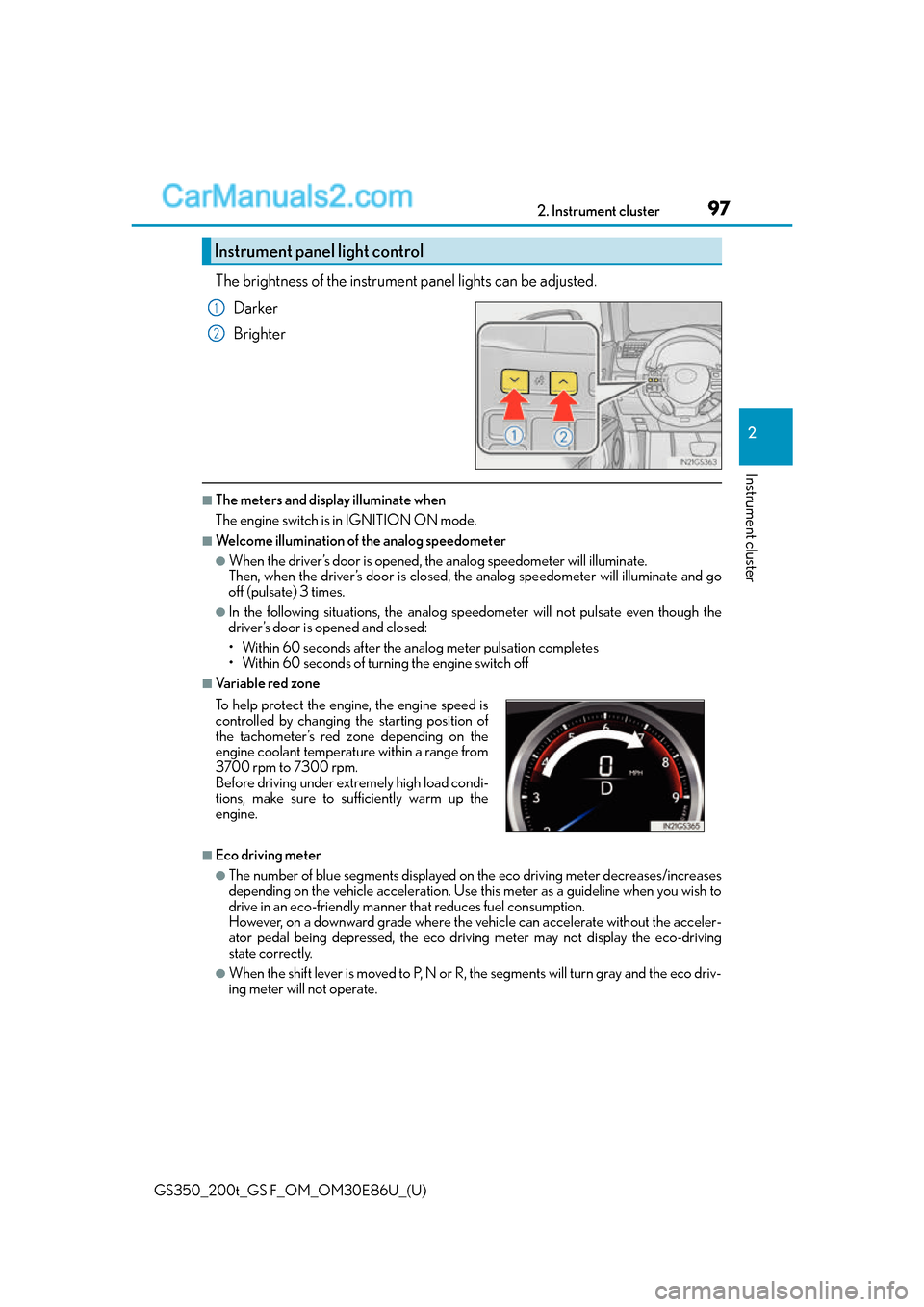
The brightness of the instrument panel lights can be adjusted.
Darker
Brighter
■The meters and display illuminate when
The engine switch is in IGNITION ON mode.
■Welcome illumination of the analog speedometer
●When the driver’s door is opened, th e analog speedometer will illuminate.
Then, when the driver’s door is closed, the analog speedometer will illuminate and go
off (pulsate) 3 times.
●In the following situations, the analog speedometer will no t pulsate even though the
driver’s door is opened and closed:
• Within 60 seconds after the analog meter pulsation completes
• Within 60 seconds of turn ing the engine switch off
■Va r i a b l e r e d z o n e
■Eco driving meter
●The number of blue segments displayed on the eco driving meter decreases/increases
depending on the vehicle acceleration. Use this meter as a guideline when you wish to
drive in an eco-friendly manner that reduces fuel consumption.
However, on a downward grade where the vehicle can accelerate without the acceler-
ator pedal being depressed, the eco driv ing meter may not display the eco-driving
state correctly.
●When the shift lever is moved to P, N or R, the segments will turn gray and the eco driv-
ing meter will not operate.
Instrument panel light control
1
2
To help protect the engine, the engine speed is
controlled by changing the starting position of
the tachometer’s red zone depending on the
engine coolant temperature within a range from
3700 rpm to 7300 rpm.
Before driving under extremely high load condi-
tions, make sure to sufficiently warm up the
engine.
Page 102 of 624
102
GS350_200t_GS F_OM_OM30E86U_(U)2. Instrument cluster
Items displayed can be switched by pressing or of the meter control
switches to select and pressing or .
■Current fuel consumption*1
Displays the current rate of fuel consumption
■Average fuel economy (after reset*2/after start/after refuel)*1
Displays the average fuel consumptio
n since the function was reset, the
engine was started, and the vehicle was refueled, respectively
Use the displayed average fuel consumption as a reference.
■Average speed (after reset*2/a f t e r s t a r t )*1
Displays the average vehicle speed since the function was reset and the
engine was started, respectively
■Elapsed time (after reset*2/after start)*1
Displays the elapsed time since the function was reset and the engine was
started, respectively
■Distance (range/after start)*1
Displays the estimated maximum distance that can be driven with the quantity
of fuel remaining and the distance driv en after the engine was started respec-
tively.
• This distance is computed based on your average fuel consumption. As a result,
the actual distance that can be driven may differ from that displayed.
• When only a small amount of fuel is added to the tank, the display may not be
updated.
When refueling, turn the engine switch off. If the vehicle is refueled without turning
the engine switch off, the display may not be updated.
■Eco Driving Indicator Zone Display
P. 8 5
Drive information
Page 109 of 624
GS350_200t_GS F_OM_OM30E86U_(U)
1092. Instrument cluster
2
Instrument cluster
Settings display
Select to change the meter display settings. (P. 5 7 1 )
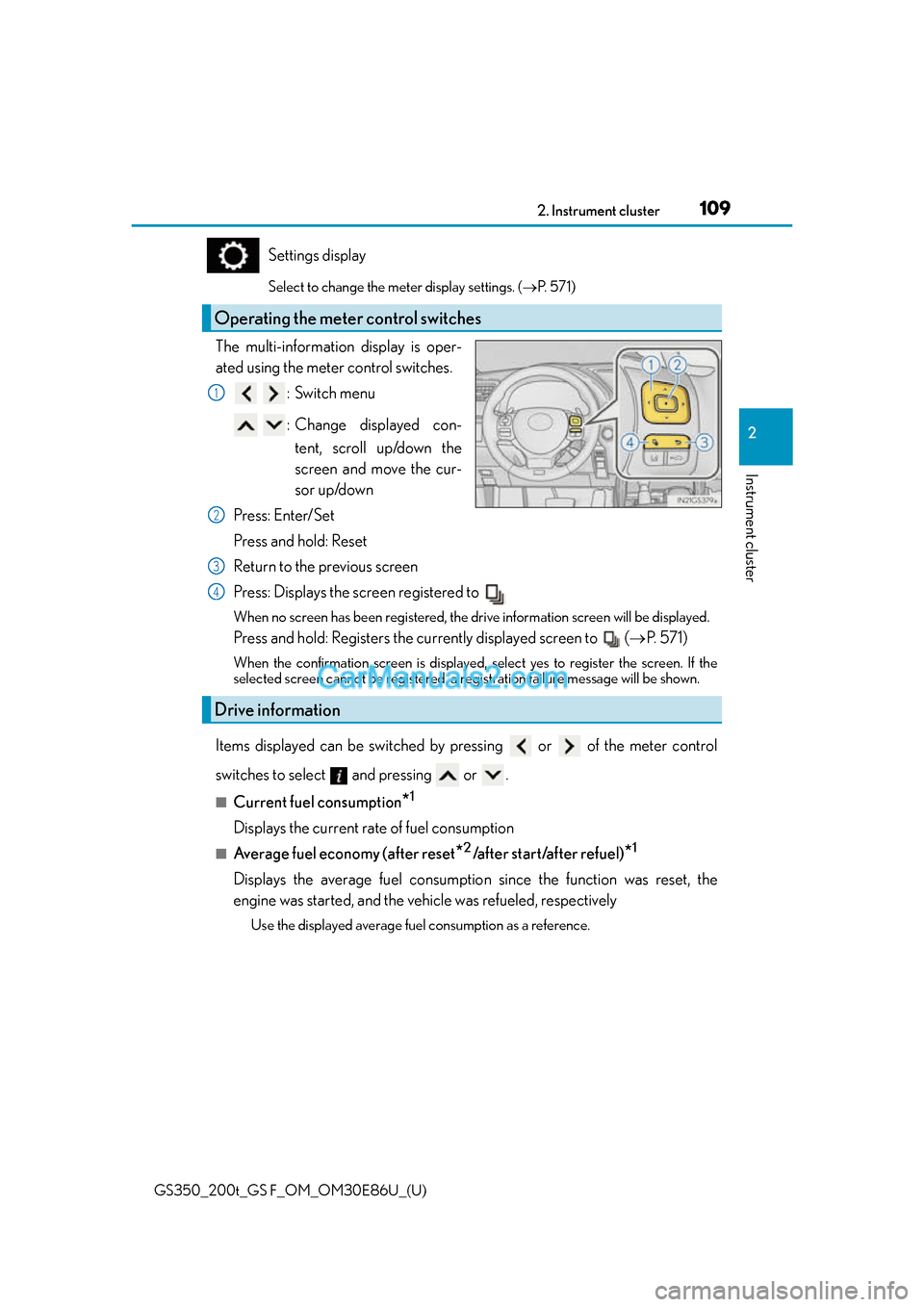
The multi-information display is oper-
ated using the meter control switches.
:Switch menu
: Change displayed con-tent, scroll up/down the
screen and move the cur-
sor up/down
Press: Enter/Set
Press and hold: Reset
Return to the previous screen
Press: Displays the screen registered to
When no screen has been registered, the drive information screen will be displayed.
Press and hold: Registers the currently displayed screen to ( P. 5 7 1 )
When the confirmation screen is displayed, select yes to register the screen. If the
selected screen cannot be registered, a re gistration failure message will be shown.
Items displayed can be switched by pressing or of the meter control
switches to select and pressing or .
■Current fuel consumption*1
Displays the current rate of fuel consumption
■Average fuel economy (after reset*2/after start/after refuel)*1
Displays the average fuel consumption since the function was reset, the
engine was started, and the vehicle was refueled, respectively
Use the displayed average fuel consumption as a reference.
Operating the meter control switches
1
2
Drive information
3
4
Page 110 of 624
110
GS350_200t_GS F_OM_OM30E86U_(U)2. Instrument cluster
■Average speed (after reset*2/a f t e r s t a r t )*1
Displays the average vehicle speed since the function was reset and the
engine was started, respectively
■Elapsed time (after reset*2/after start)*1
Displays the elapsed time since the function was reset and the engine was
started, respectively
■Distance (range/after start)*1
Displays the estimated maximum distance that can be driven with the quantity
of fuel remaining and the distance driv
en after the engine was started respec-
tively.
• This distance is computed based on your average fuel consumption. As a result,
the actual distance that can be driven may differ from that displayed.
• When only a small amount of fuel is added to the tank, the display may not be
updated.
When refueling, turn the engine switch off. If the vehicle is refueled without turning
the engine switch off, the display may not be updated.
■Tire inflation pressure
Displays inflation pressure of each tire.
The inflation pressure of the sp are tire will not be displayed.
■Gear positions
Displays the current gear position when the shift lever is in D or M.
■LDA (Lane Departure Alert with steering control) vehicle sway warning (if
equipped)
P. 2 5 8
■Display off
A blank screen is displayed
*1: Displayed when the item is set in “Drive In fo 1”, “Drive Info 2” or “Drive Info 3”.
( P. 5 7 1 )
*2: The function can be reset by pressing th e of the meter control switches for longer
than 1 second when the item to reset is displayed.
If there is more than one item that can be reset, the item selection screen will appear.
Page 127 of 624
127
GS350_200t_GS F_OM_OM30E86U_(U)2. Instrument cluster
2
Instrument cluster
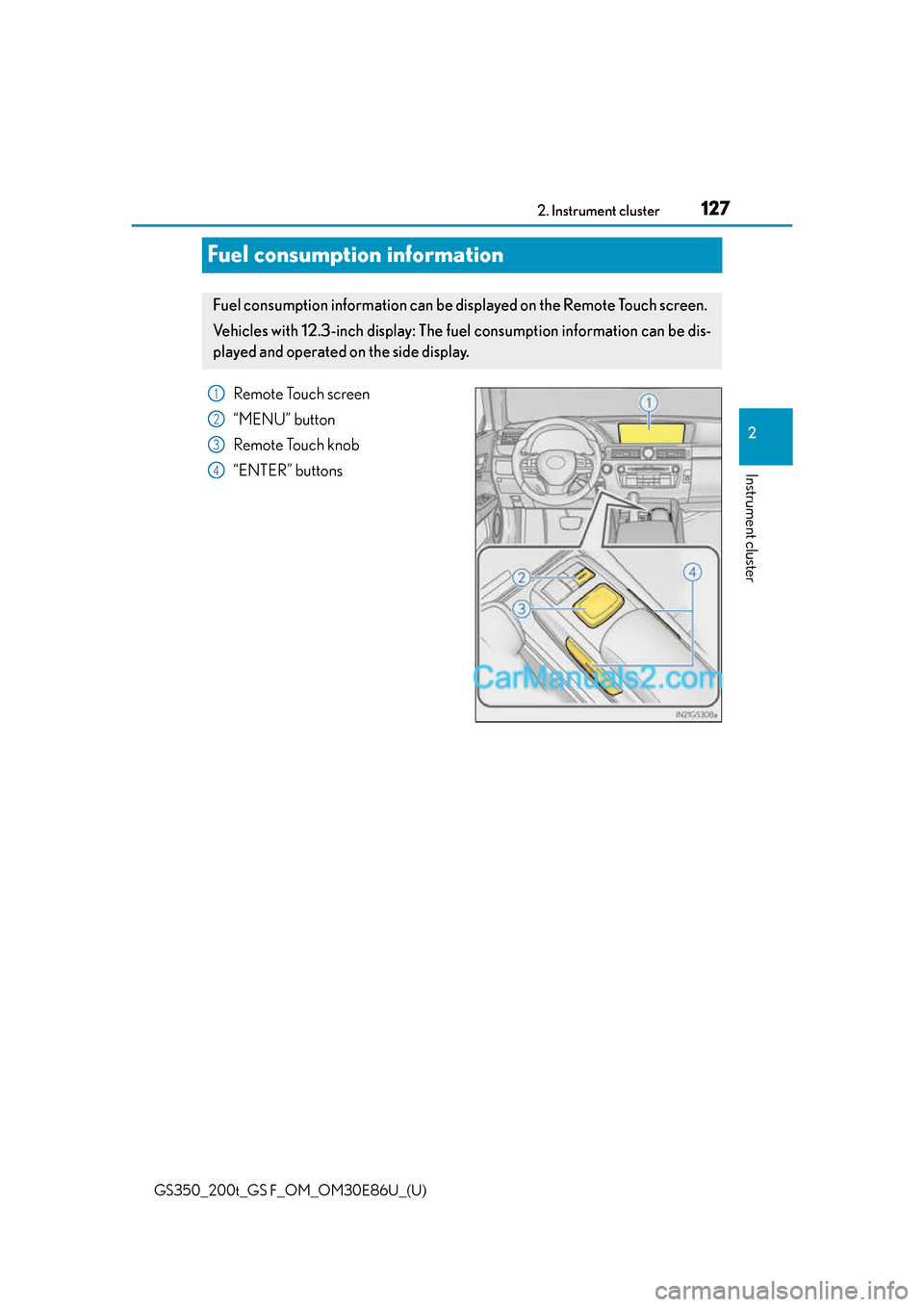
Fuel consumption information
Remote Touch screen
“MENU” button
Remote Touch knob
“ENTER” buttons
Fuel consumption information can be di
splayed on the Remote Touch screen.
Ve h i c l e s w i t h 1 2 . 3 - i n c h d i splay: The fuel consumption information can be dis-
played and operated on the side display.
1
2
3
4
Page 128 of 624
128
GS350_200t_GS F_OM_OM30E86U_(U)2. Instrument cluster
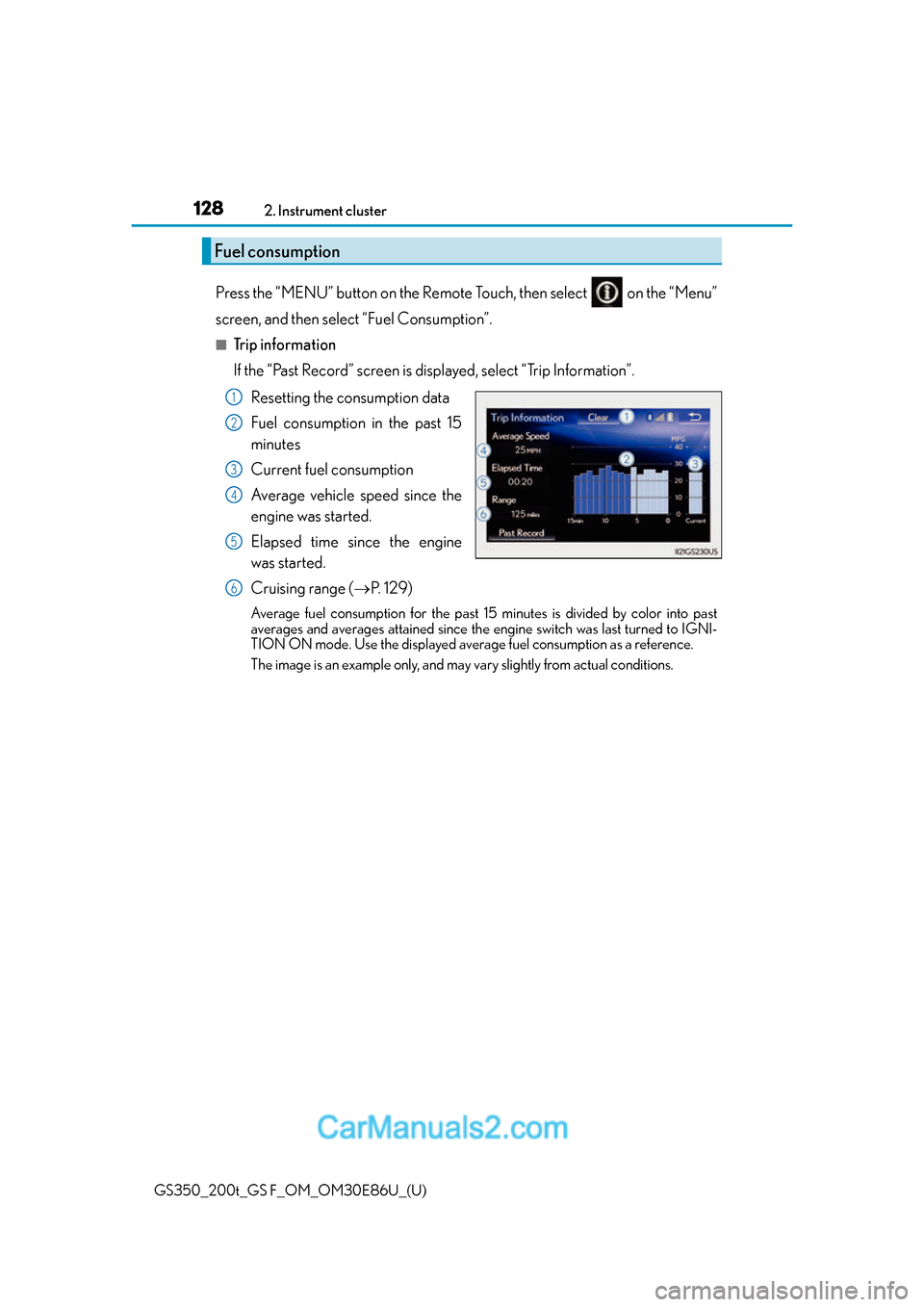
Press the “MENU” button on the Remote Touch, then select on the “Menu”
screen, and then select “Fuel Consumption”.
■Trip information
If the “Past Record” screen is displayed, select “Trip Information”.
Resetting the consumption data
Fuel consumption in the past 15
minutes
Current fuel consumption
Average vehicle speed since the
engine was started.
Elapsed time since the engine
was started.
Cruising range ( P. 1 2 9 )
Average fuel consumption for the past 15 minutes is divided by color into past
averages and averages attained since the engine switch was last turned to IGNI-
TION ON mode. Use the displayed average fuel consumption as a reference.
The image is an example only, and may vary slightly from actual conditions.
Fuel consumption
1
2
3
4
5
6
Page 129 of 624
GS350_200t_GS F_OM_OM30E86U_(U)
1292. Instrument cluster
2
Instrument cluster
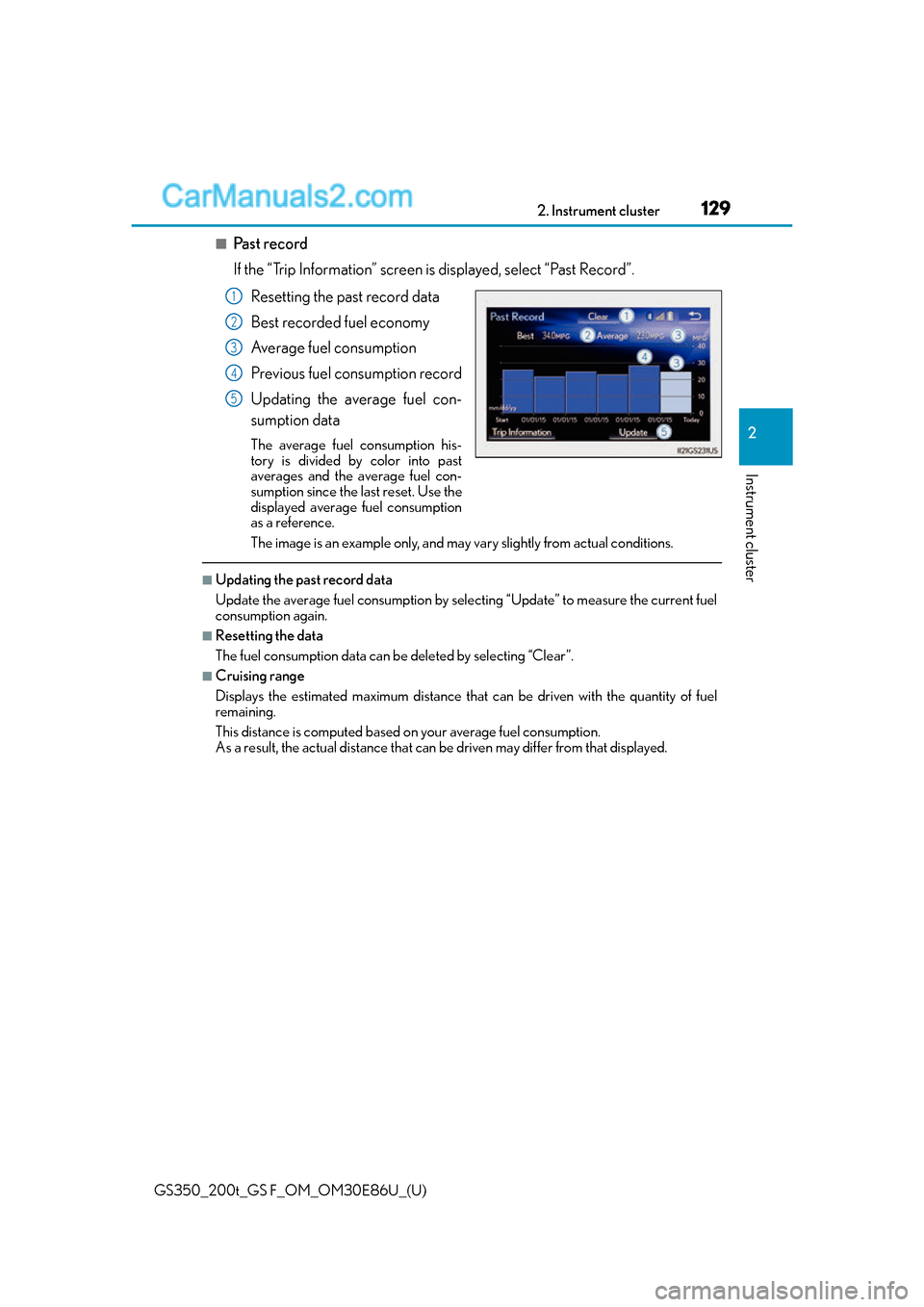
■Past record
If the “Trip Information” screen is displayed, select “Past Record”.
Resetting the past record data
Best recorded fuel economy
Average fuel consumption
Previous fuel consumption record
Updating the average fuel con-
sumption data
The average fuel consumption his-
tory is divided by color into past
averages and the average fuel con-
sumption since the last reset. Use the
displayed average fuel consumption
as a reference.
The image is an example only, and may vary slightly from actual conditions.
■Updating the past record data
Update the average fuel consumption by selecting “Update” to measure the current fuel
consumption again.
■Resetting the data
The fuel consumption data can be deleted by selecting “Clear”.
■Cruising range
Displays the estimated maximum distance that can be driven with the quantity of fuel
remaining.
This distance is computed based on your average fuel consumption.
As a result, the actual distance that can be driven may differ from that displayed.
1
2
3
4
5
Page 130 of 624
130
GS350_200t_GS F_OM_OM30E86U_(U)2. Instrument cluster
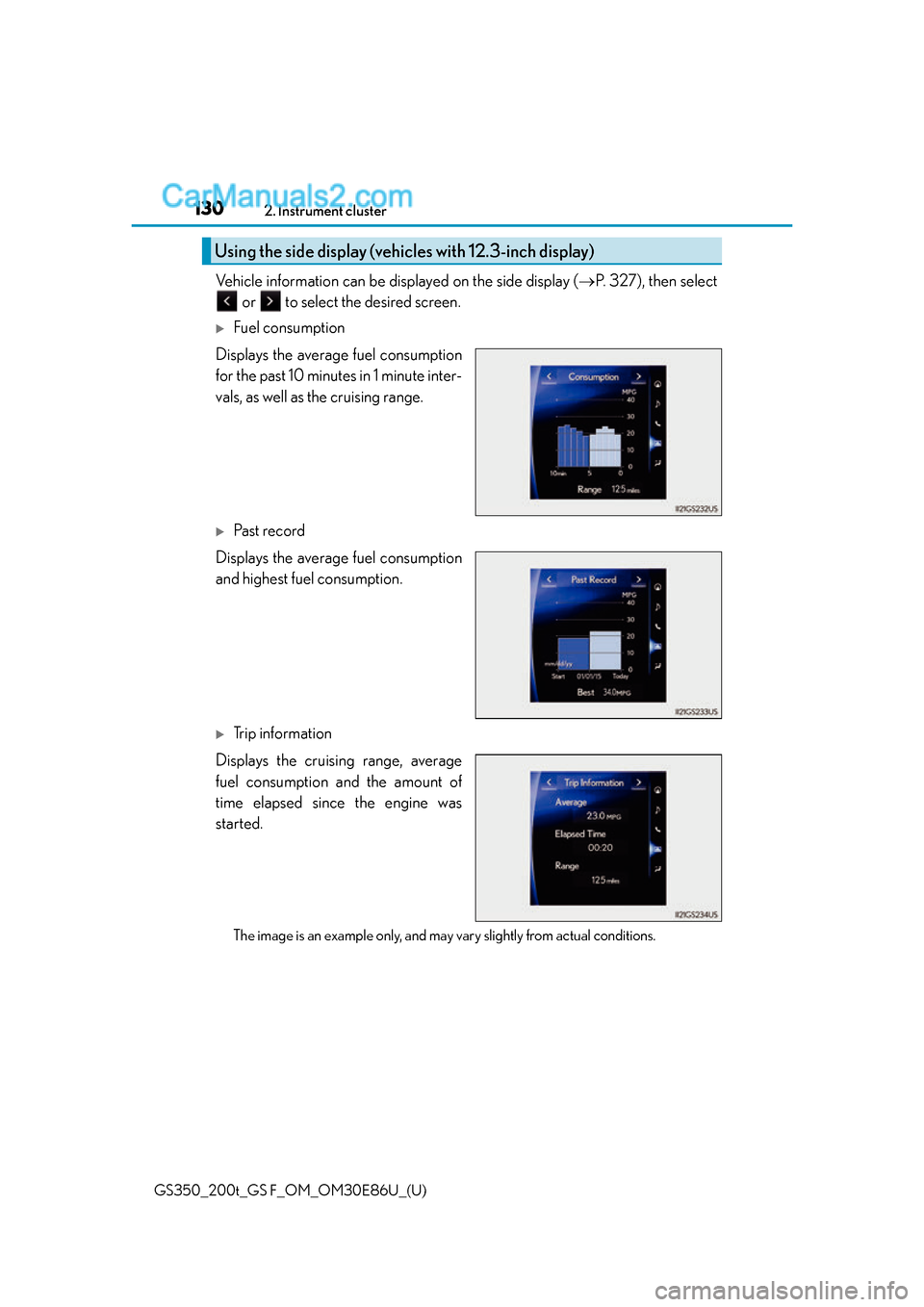
Vehicle information can be displayed on the side display (
P. 3 2 7 ) , t h e n s e l e c t
or to select the desired screen.
Fuel consumption
Displays the average fuel consumption
for the past 10 minutes in 1 minute inter-
vals, as well as the cruising range.
Past record
Displays the average fuel consumption
and highest fuel consumption.
Trip information
Displays the cruising range, average
fuel consumption and the amount of
time elapsed since the engine was
started.
The image is an example only, and may vary slightly from actual conditions.
Using the side display (vehicles with 12.3-inch display)
Page 181 of 624
181
GS350_200t_GS F_OM_OM30E86U_(U)
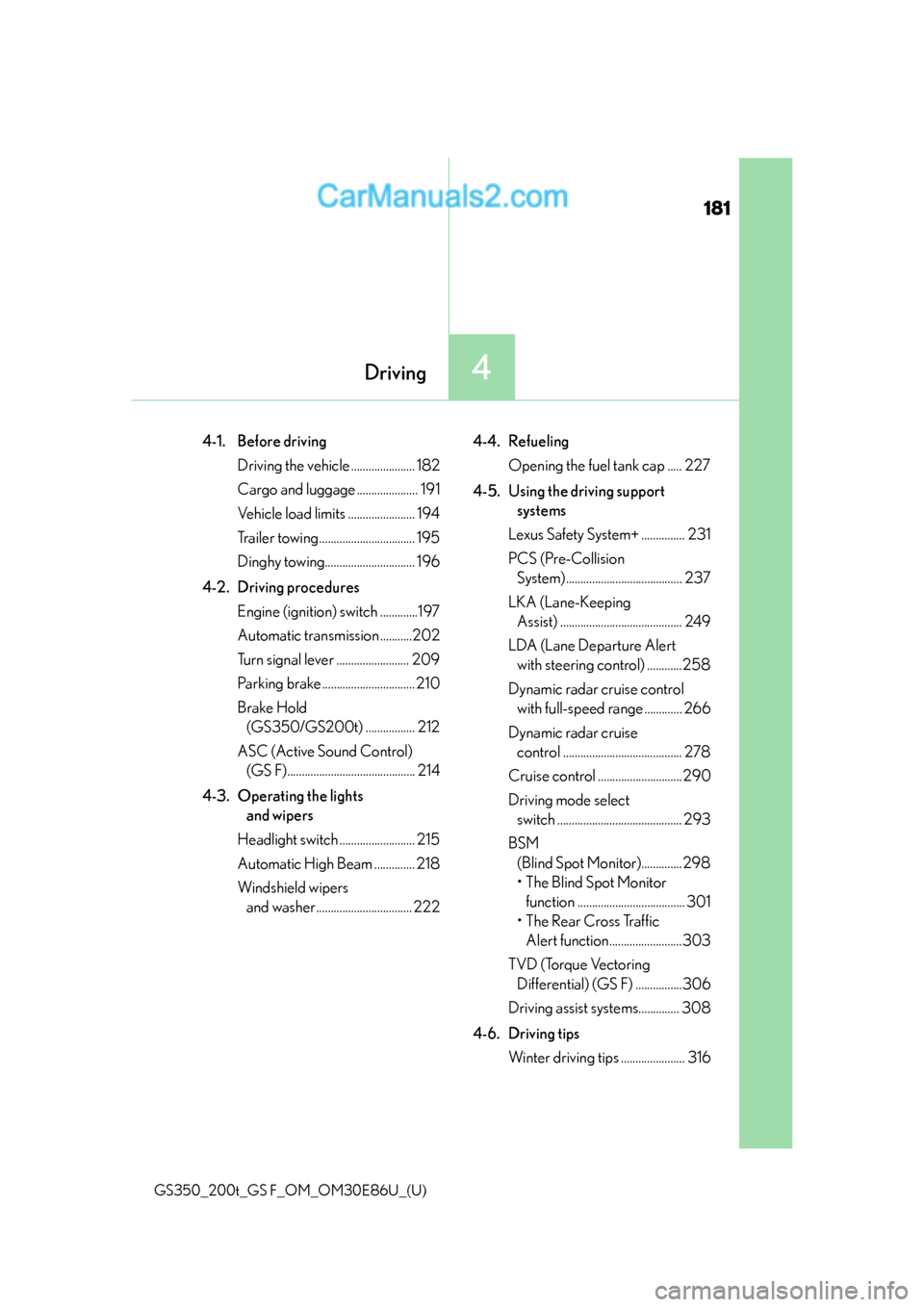
4Driving
4-1. Before drivingDriving the vehicle ...................... 182
Cargo and luggage ..................... 191
Vehicle load limits ....................... 194
Trailer towing ................................. 195
Dinghy towing............................... 196
4-2. Driving procedures Engine (ignition) switch .............197
Automatic transmission ...........202
Turn signal lever ......................... 209
Parking brake ................................ 210
Brake Hold (GS350/GS200t) ................. 212
ASC (Active Sound Control) (GS F)............................................ 214
4-3. Operating the lights and wipers
Headlight switch .......................... 215
Automatic High Beam .............. 218
Windshield wipers and washer ................................. 222 4-4. Refueling
Opening the fuel tank cap ..... 227
4-5. Using the driving support systems
Lexus Safety System+ ............... 231
PCS (Pre-Collision System)........................................ 237
LKA (Lane-Keeping Assist) .......................................... 249
LDA (Lane Departure Alert with steering control) ............258
Dynamic radar cruise control with full-speed range ............. 266
Dynamic radar cruise control ......................................... 278
Cruise control ............................. 290
Driving mode select switch ........................................... 293
BSM (Blind Spot Moni tor)..............298
• The Blind Spot Monitor function ..................................... 301
• The Rear Cross Traffic Alert function.........................303
TVD (Torque Vectoring Differential) (GS F) ................306
Driving assist systems.............. 308
4-6. Driving tips Winter driving tips ...................... 316
Page 184 of 624
184
GS350_200t_GS F_OM_OM30E86U_(U)4-1. Before driving
■Drum-in-disc type parking brake system
Your vehicle has a drum-in-disc type parking brake system. This type of brake system
needs bedding-down of the brake shoes periodically or whenever the parking brake
shoes and/or drum are replaced. Have your Lexus dealer perform the bedding down
operation.
■Operating your vehicle in a foreign country
Comply with the relevant vehi
cle registration laws and confirm the availability of the cor-
rect fuel. ( P. 5 4 1 )
■Brake pads and discs (F SPORT mo dels of GS350/GS200t, and GS F)
The brake pads and discs are designed for use under high load conditions. Therefore,
brake noise may be generated depending on the vehicle speed, braking force and vehi-
cle environment (temperature, humidity, etc.).
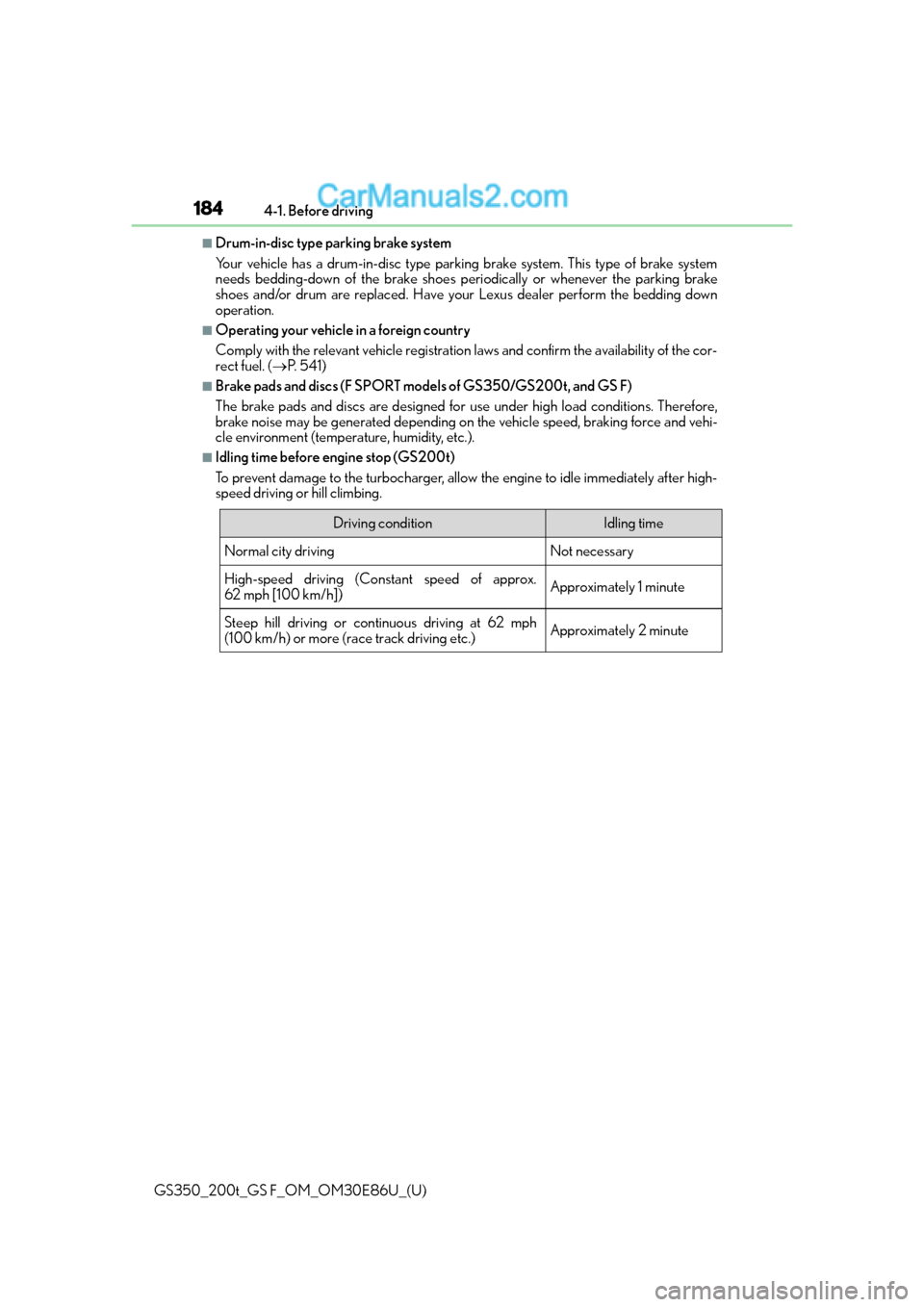
■Idling time before engine stop (GS200t)
To prevent damage to the turbocharger, allow the engine to idle immediately after high-
speed driving or hill climbing.
Driving conditionIdling time
Normal city drivingNot necessary
High-speed driving (Constant speed of approx.
62 mph [100 km/h])Approximately 1 minute
Steep hill driving or continuous driving at 62 mph
(100 km/h) or more (race track driving etc.)Approximately 2 minute