start stop button Lexus GS350 2016 Owner's Manual
[x] Cancel search | Manufacturer: LEXUS, Model Year: 2016, Model line: GS350, Model: Lexus GS350 2016Pages: 624, PDF Size: 15.29 MB
Page 134 of 624
134
GS350_200t_GS F_OM_OM30E86U_(U)3-1. Key information
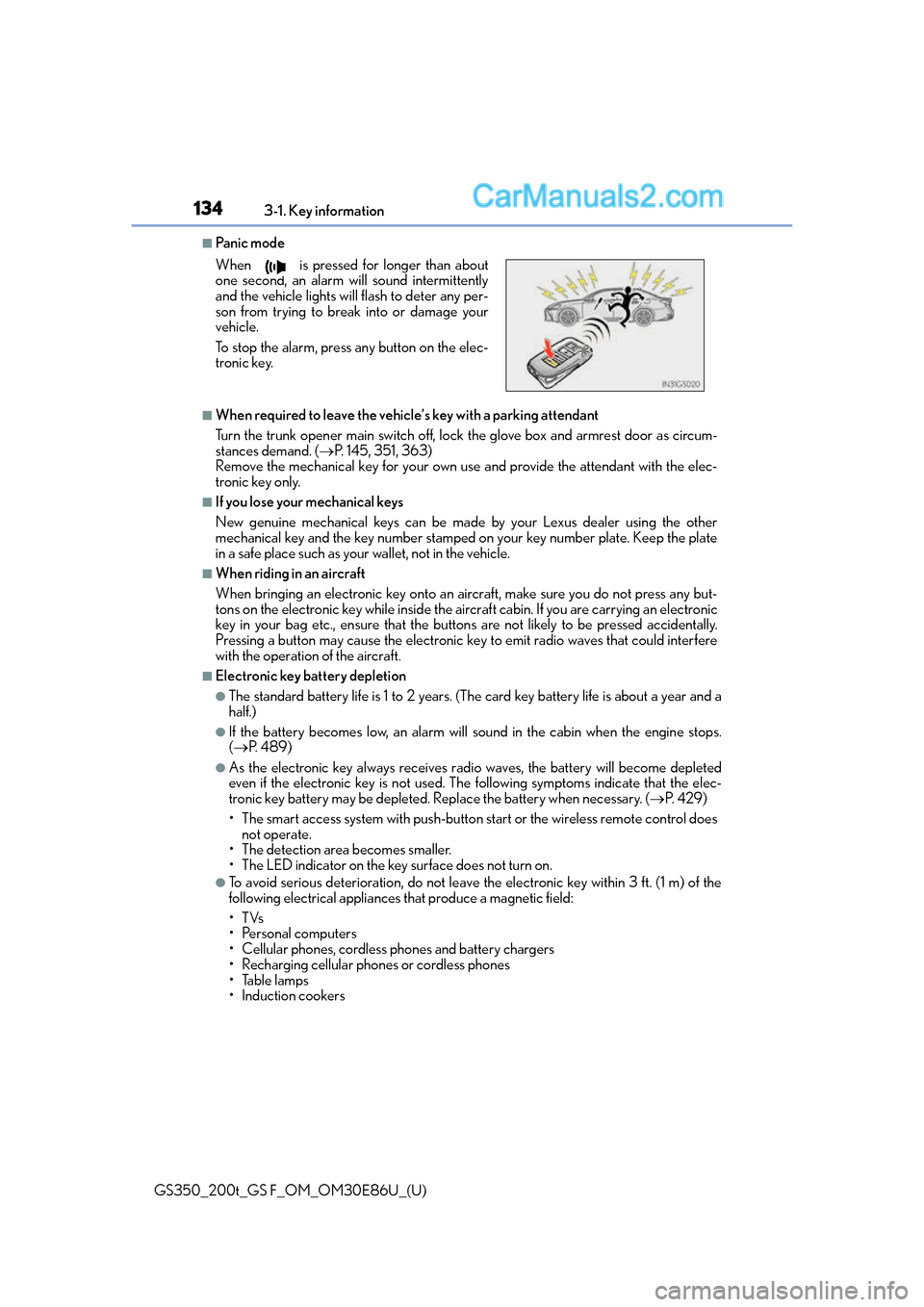
■Panic mode
■When required to leave the vehicle’s key with a parking attendant
Turn the trunk opener main switch off, lock the glove box and armrest door as circum-
stances demand. (
P. 145, 351, 363)
Remove the mechanical key for your own use and provide the attendant with the elec-
tronic key only.
■If you lose your mechanical keys
New genuine mechanical keys can be made by your Lexus dealer using the other
mechanical key and the key number stamped on your key number plate. Keep the plate
in a safe place such as your wallet, not in the vehicle.
■When riding in an aircraft
When bringing an electronic key onto an aircraft, make sure you do not press any but-
tons on the electronic key while inside the airc raft cabin. If you are carrying an electronic
key in your bag etc., ensure that the buttons are not likely to be pressed accidentally.
Pressing a button may cause the electronic key to emit radio waves that could interfere
with the operation of the aircraft.
■Electronic key battery depletion
●The standard battery life is 1 to 2 years. (The card key battery life is about a year and a
half.)
●If the battery becomes low, an alarm will sound in the cabin when the engine stops.
( P. 4 8 9 )
●As the electronic key always receives ra dio waves, the battery will become depleted
even if the electronic key is not used. The following symptoms indicate that the elec-
tronic key battery may be depleted. Replace the battery when necessary. ( P. 4 2 9 )
• The smart access system with push-button start or the wireless remote control does
not operate.
• The detection area becomes smaller.
• The LED indicator on the key surface does not turn on.
●To avoid serious deterioration, do not leave the electronic key within 3 ft. (1 m) of the
following electrical appliances that produce a magnetic field:
•TVs
• Personal computers
• Cellular phones, cordless phones and battery chargers
• Recharging cellular phones or cordless phones
• Table lamps
• Induction cookers
When is pressed for longer than about
one second, an alarm will sound intermittently
and the vehicle lights will flash to deter any per-
son from trying to break into or damage your
vehicle.
To stop the alarm, press any button on the elec-
tronic key.
Page 141 of 624
GS350_200t_GS F_OM_OM30E86U_(U)
1413-2. Opening, closing and locking the doors and trunk
3
Operation of each component
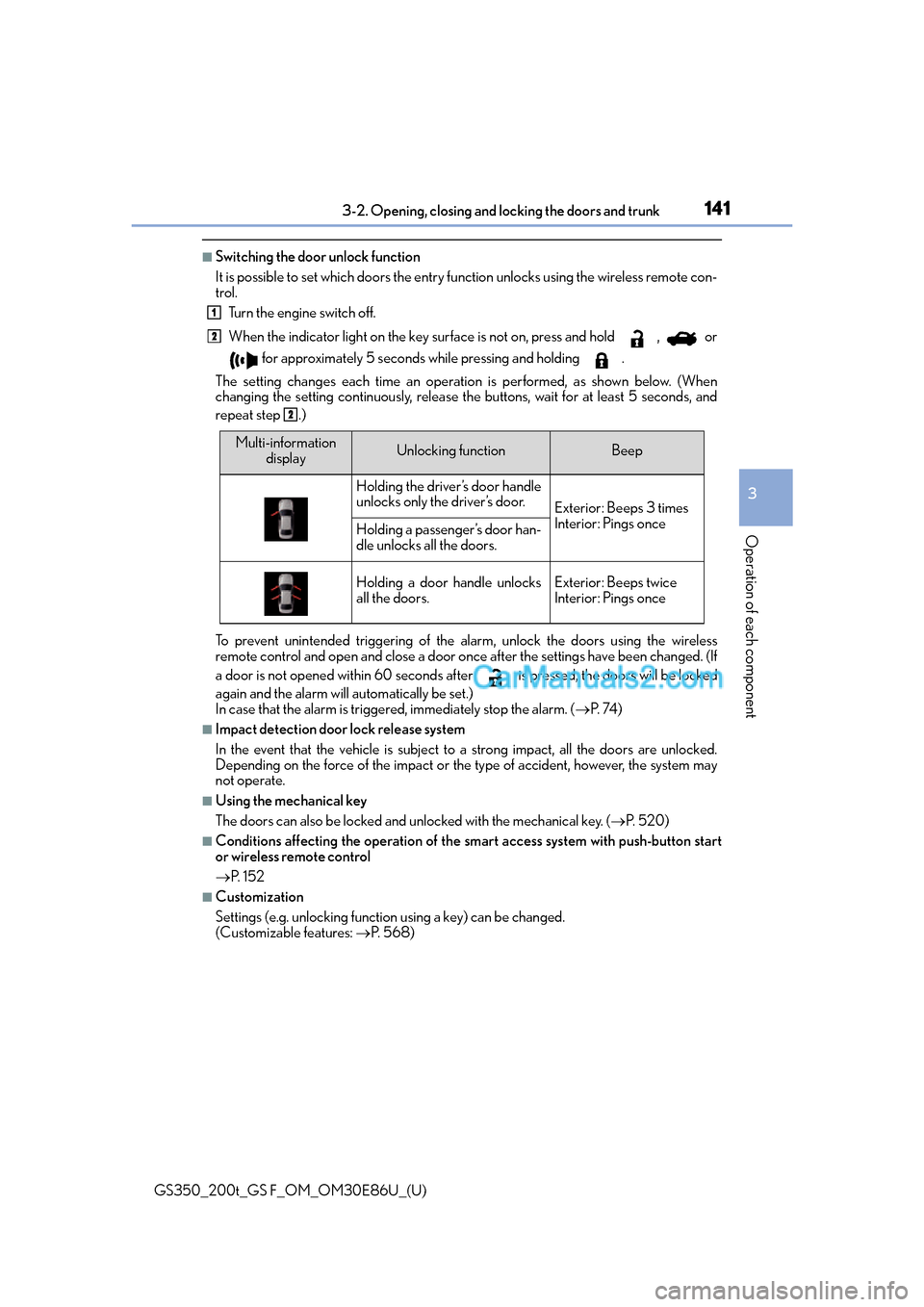
■Switching the door unlock function
It is possible to set which doors the entry fu nction unlocks using the wireless remote con-
trol.
Turn the engine switch off.
When the indicator light on the key su rface is not on, press and hold , or
for approximately 5 seconds while pressing and holding .
The setting changes each time an operatio n is performed, as shown below. (When
changing the setting continuously, release the buttons, wait for at least 5 seconds, and
repeat step .)
To prevent unintended triggering of the alarm, unlock the doors using the wireless
remote control and open and close a door once after the settings have been changed. (If
a door is not opened within 60 seconds af ter is pressed, the doors will be locked
again and the alarm will automatically be set.)
In case that the alarm is triggered, immediately stop the alarm. ( P. 74 )
■Impact detection door lock release system
In the event that the vehicle is subject to a strong impact, all the doors are unlocked.
Depending on the force of the impact or the type of accident, however, the system may
not operate.
■Using the mechanical key
The doors can also be locked and unlocked with the mechanical key. ( P. 5 2 0 )
■Conditions affecting the operation of the sm art access system with push-button start
or wireless remote control
P. 1 5 2
■Customization
Settings (e.g. unlocking function using a key) can be changed.
(Customizable features: P. 5 6 8 )
1
2
2
Multi-information
displayUnlocking functionBeep
Holding the driver’s door handle
unlocks only the driver’s door.
Exterior: Beeps 3 times
Interior: Pings once
Holding a passenger’s door han-
dle unlocks all the doors.
Holding a door handle unlocks
all the doors.Exterior: Beeps twice
Interior: Pings once
Page 152 of 624
152
GS350_200t_GS F_OM_OM30E86U_(U)3-2. Opening, closing and
locking the doors and trunk
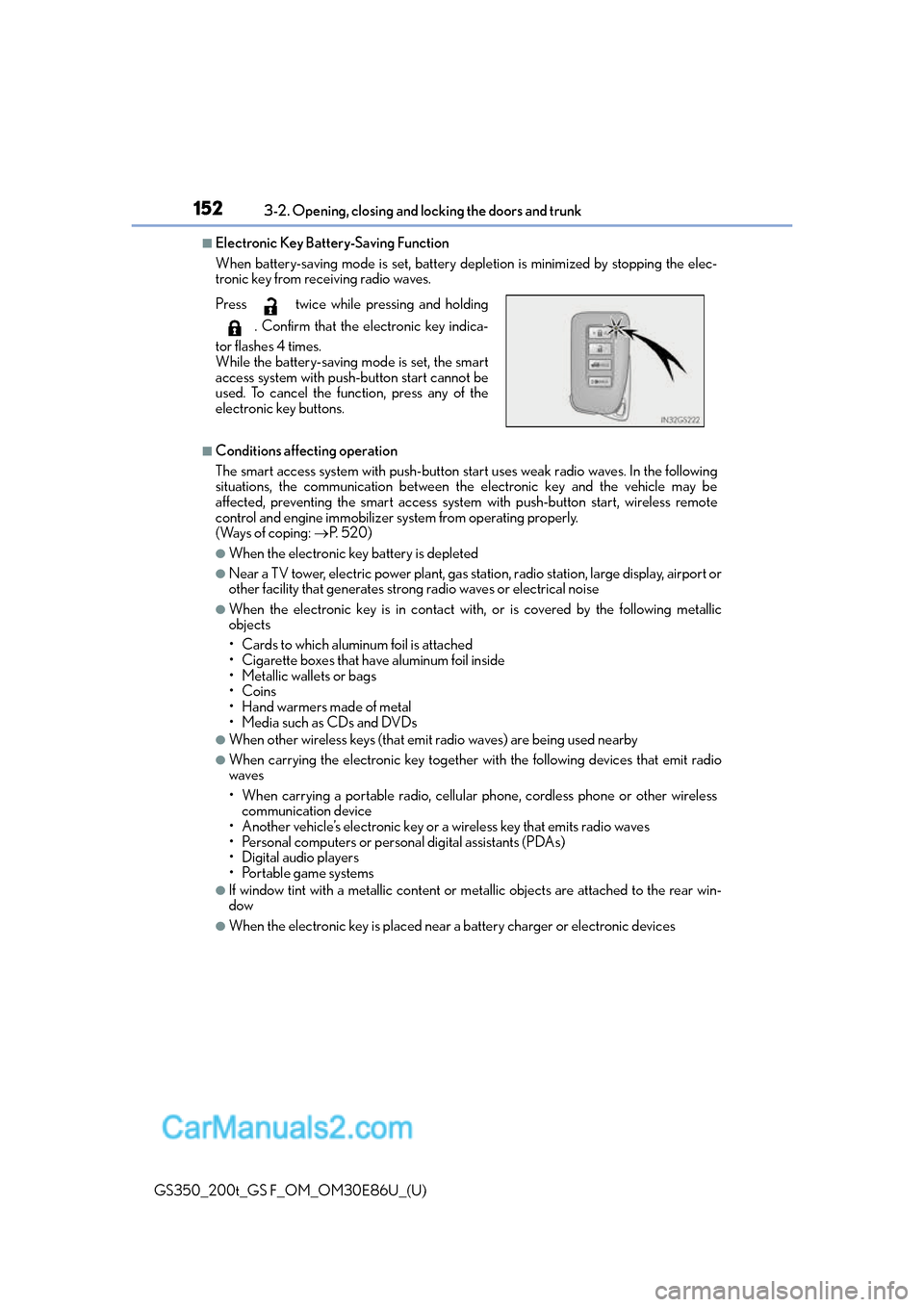
■Electronic Key Battery-Saving Function
When battery-saving mode is set, battery depletion is minimized by stopping the elec-
tronic key from receiving radio waves.
■Conditions affecting operation
The smart access system with push-button start uses weak radio waves. In the following
situations, the communication between th e electronic key and the vehicle may be
affected, preventing the smart access system with push-button start, wireless remote
control and engine immobilizer system from operating properly.
(Ways of coping: P. 5 2 0 )
●When the electronic key battery is depleted
●Near a TV tower, electric powe r plant, gas station, radio station, large display, airport or
other facility that generates strong radio waves or electrical noise
●When the electronic key is in contact wi th, or is covered by the following metallic
objects
• Cards to which aluminum foil is attached
• Cigarette boxes that have aluminum foil inside
• Metallic wallets or bags
•Coins
•Hand warmers made of metal
• Media such as CDs and DVDs
●When other wireless keys (that emit radio waves) are being used nearby
●When carrying the electronic key together with the following devices that emit radio
waves
• When carrying a portable radio, cellular phone, cordless phone or other wireless
communication device
• Another vehicle’s electronic key or a wireless key that emits radio waves
• Personal computers or personal digital assistants (PDAs)
• Digital audio players
• Portable game systems
●If window tint with a metallic content or me tallic objects are attached to the rear win-
dow
●When the electronic key is placed near a battery charger or electronic devices
Press twice while pressing and holding
. Confirm that the electronic key indica-
tor flashes 4 times.
While the battery-saving mode is set, the smart
access system with push-button start cannot be
used. To cancel the function, press any of the
electronic key buttons.
Page 154 of 624
154
GS350_200t_GS F_OM_OM30E86U_(U)3-2. Opening, closing and
locking the doors and trunk
■When the vehicle is not driven for extended periods
●To prevent theft of the vehicle, do not leave the electronic key within 6 ft. (2 m) of the
vehicle.
●The smart access system with push-button start can be deactivated in advance.
( P. 5 6 8 )
■To operate the system properly
●Make sure to carry the electronic key when operating the system. Do not get the elec-
tronic key too close to the vehicle when op erating the system from the outside of the
vehicle.
Depending on the position and holding condit ion of the electronic key, the key may not
be detected correctly and the system may no t operate properly. (The alarm may go off
accidentally, or the door lock prev ention function may not operate.)
●Do not leave the electronic key inside the trunk.
The key confinement prevention function ma y not operate, depending on the location
of the key (close to a spare tire, the inside edge of the trunk), conditions (inside a metal
bag, close to metallic objects) and the radio waves in the surrounding area. (P. 1 4 5 )
■If the smart access system with push-button start does not operate properly
●Locking and unlocking the doors and open ing the trunk: Use the mechanical key.
( P. 5 2 0 )
●Starting the engine: P. 5 2 1
■Customization
Settings (e. g. smart access system with push-button start) can be changed.
(Customizable features: P. 5 6 8 )
■If the smart access system with push-butto n start has been deactivated in a customized
setting
●Locking and unlocking the d oors and opening the trunk:
Use the wireless remote control or mechanical key. ( P. 137, 144, 520)
●Starting the engine and changing engine switch modes: P. 5 2 1
●Stopping the engine: P. 1 9 8
Page 212 of 624
212
GS350_200t_GS F_OM_OM30E86U_(U)4-2. Driving procedures
Brake Hold (GS350/GS200t)
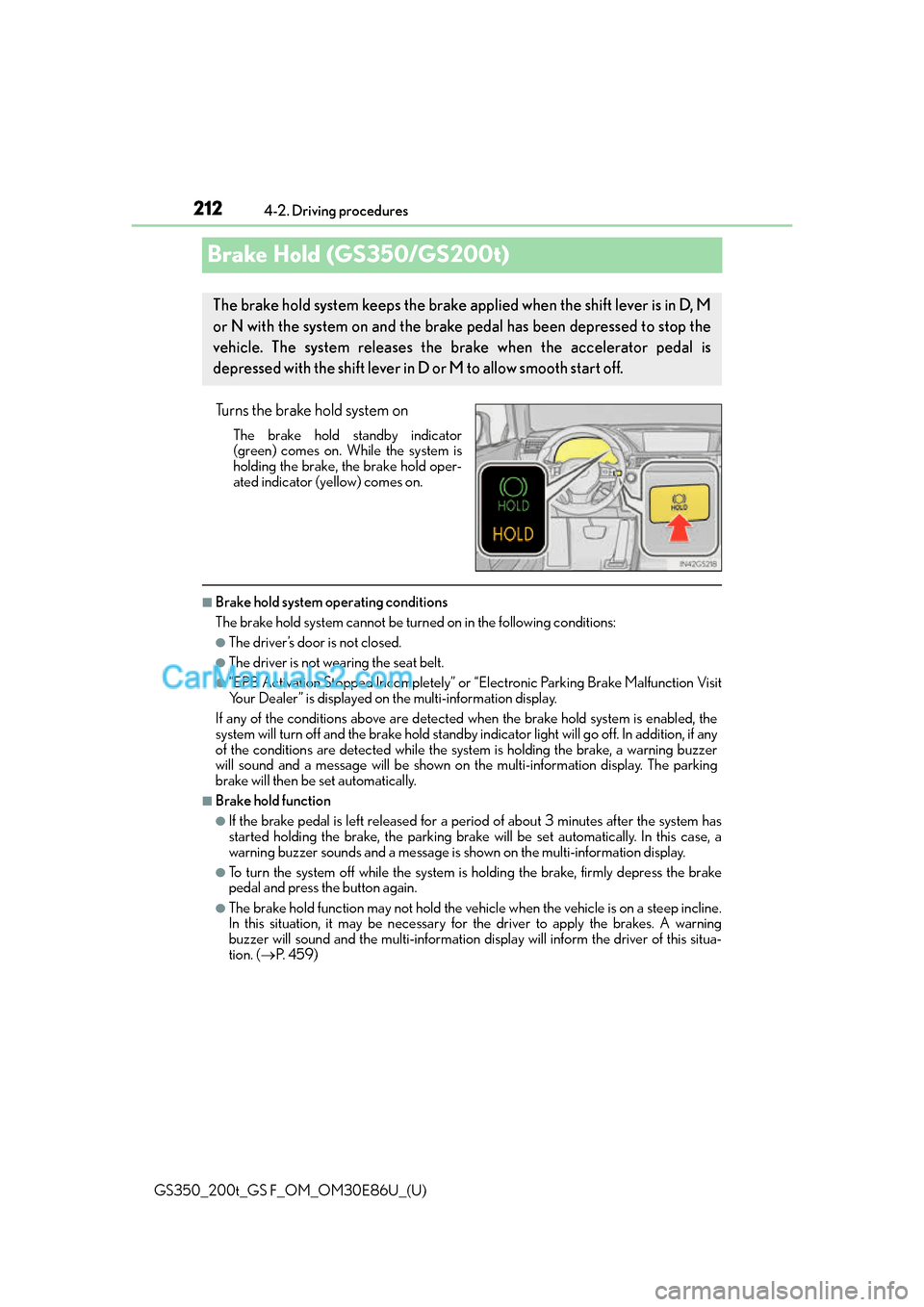
Turns the brake hold system on
The brake hold standby indicator
(green) comes on. Wh
ile the system is
holding the brake, the brake hold oper-
ated indicator (yellow) comes on.
■Brake hold system operating conditions
The brake hold system cannot be turn ed on in the following conditions:
●The driver’s door is not closed.
●The driver is not wearing the seat belt.
●“EPB Activation Stopped Incompletely” or “Electronic Parking Brake Malfunction Visit
Your Dealer” is displayed on the multi-information display.
If any of the conditions above are detected when the brake hold system is enabled, the
system will turn off and the brake hold standby indicator light will go of f. In addition, if any
of the conditions are detected while the sy stem is holding the brake, a warning buzzer
will sound and a message will be shown on th e multi-information display. The parking
brake will then be set automatically.
■Brake hold function
●If the brake pedal is left released for a period of about 3 minutes after the system has
started holding the brake, the parking brake w ill be set automatically. In this case, a
warning buzzer sounds and a message is shown on the multi-information display.
●To turn the system off while the system is holding the brake, firmly depress the brake
pedal and press the button again.
●The brake hold function may not hold the vehicle when the vehicle is on a steep incline.
In this situation, it may be necessary for the driver to apply the brakes. A warning
buzzer will sound and the multi-information di splay will inform the driver of this situa-
tion. ( P. 4 5 9 )
The brake hold system keeps the brake applied when the shift lever is in D, M
or N with the system on and the brake pedal has been depressed to stop the
vehicle. The system releases the brake when the accelerator pedal is
depressed with the shift lever in D or M to allow smooth start off.
Page 269 of 624
GS350_200t_GS F_OM_OM30E86U_(U)
2694-5. Using the driving support systems
4
Driving
This mode employs a radar sensor to detect the presence of vehicles up to
approximately 400 ft. (120 m) ahead, determines the current vehicle-to-vehicle
following distance, and operates to maintain a suitable following distance from
the vehicle ahead.
Note that vehicle-to-vehicle distance will close in when traveling on long downhill
slopes.
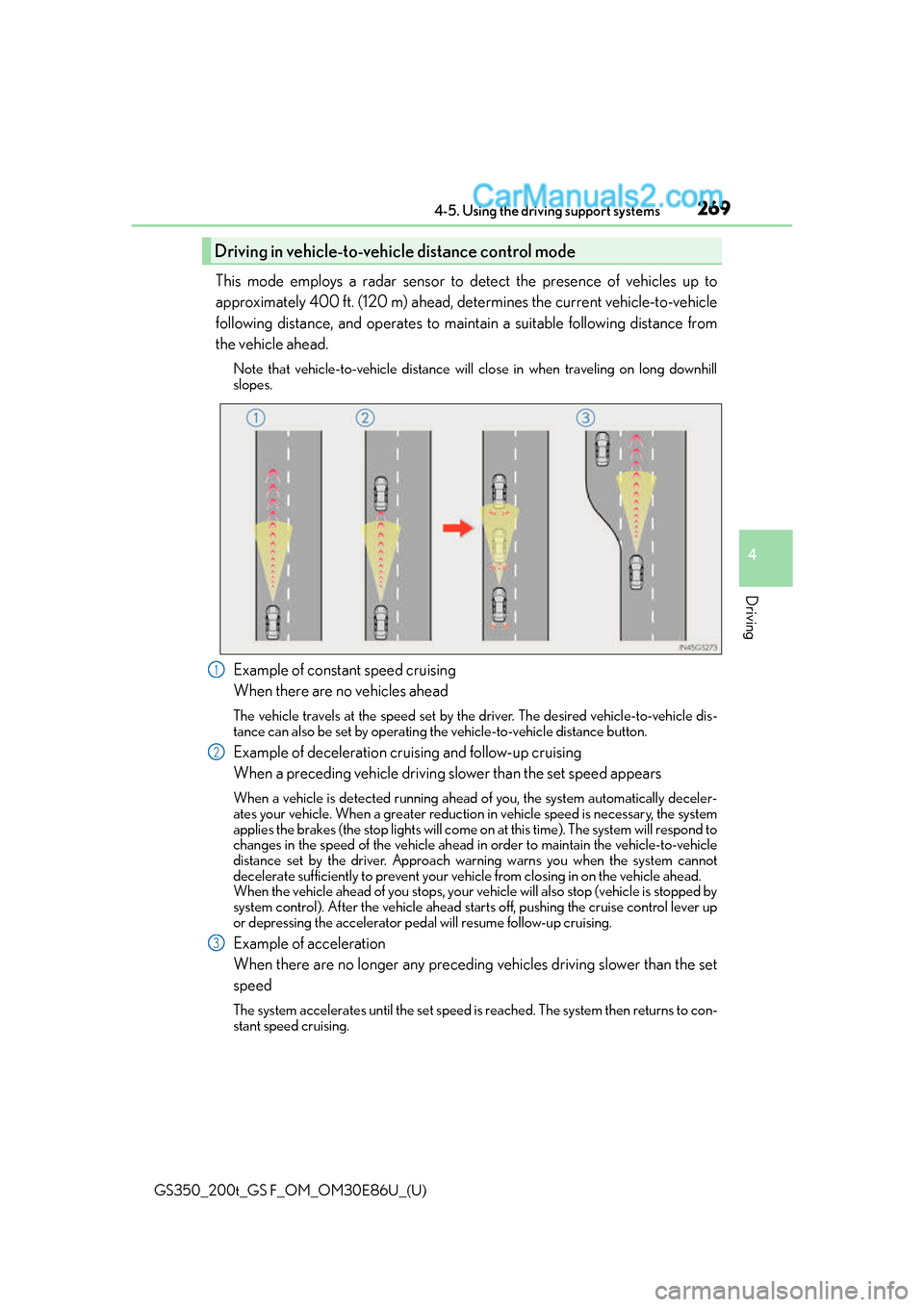
Example of constant speed cruising
When there are no vehicles ahead
The vehicle travels at the speed set by the driver. The desired vehicle-to-vehicle dis-
tance can also be set by operating th e vehicle-to-vehicle distance button.
Example of deceleration cruising and follow-up cruising
When a preceding vehicle driving slower than the set speed appears
When a vehicle is detected running ahead of you, the system automatically deceler-
ates your vehicle. When a greater reduction in vehicle speed is necessary, the system
applies the brakes (the stop lights will come on at this time). The system will respond to
changes in the speed of the vehicle ahead in order to maintain the vehicle-to-vehicle
distance set by the driver. Approach wa rning warns you when the system cannot
decelerate sufficiently to prevent your ve hicle from closing in on the vehicle ahead.
When the vehicle ahead of you stops, your ve hicle will also stop (vehicle is stopped by
system control). After the vehicle ahead starts off, pushing the cruise control lever up
or depressing the accelerator peda l will resume follow-up cruising.
Example of acceleration
When there are no longer any preceding vehicles driving slower than the set
speed
The system accelerates until the set speed is reached. The system then returns to con-
stant speed cruising.
Driving in vehicle-to-vehicle distance control mode
1
2
3
Page 272 of 624
272
GS350_200t_GS F_OM_OM30E86U_(U)4-5. Using the driving support systems
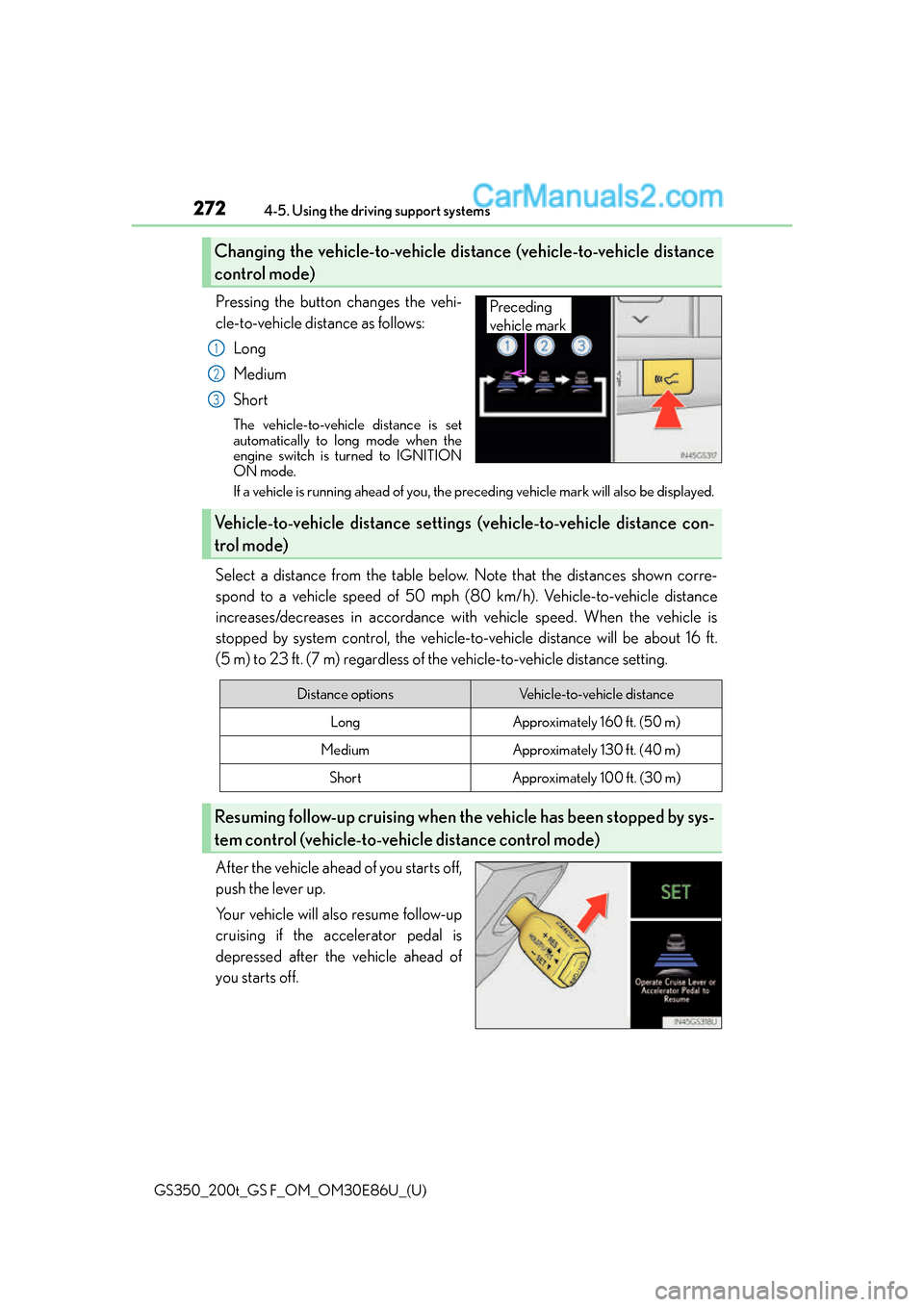
Pressing the button changes the vehi-
cle-to-vehicle distance as follows:
Long
Medium
Short
The vehicle-to-vehicle distance is set
automatically to long mode when the
engine switch is turned to IGNITION
ON mode.
If a vehicle is running ahead of you, the preceding vehicle mark will also be displayed.
Select a distance from the table below. Note that the distances shown corre-
spond to a vehicle speed of 50 mph (8 0 km/h). Vehicle-to-vehicle distance
increases/decreases in accordance with vehicle speed. When the vehicle is
stopped by system control, the vehicle-to -vehicle distance will be about 16 ft.
(5 m) to 23 ft. (7 m) regardless of the vehicle-to-vehicle distance setting.
After the vehicle ahead of you starts off,
push the lever up.
Your vehicle will also resume follow-up
cruising if the accelerator pedal is
depressed after the vehicle ahead of
you starts off.
Changing the vehicle-to-vehicle distance (vehicle-to-vehicle distance
control mode)
Preceding
vehicle mark
1
2
3
Vehicle-to-vehicle distance settings (vehicle-to-vehicle distance con-
trol mode)
Distance optionsVehicle-to-vehicle distance
LongApproximately 160 ft. (50 m)
MediumApproximately 130 ft. (40 m)
ShortApproximately 100 ft. (30 m)
Resuming follow-up cruising when th e vehicle has been stopped by sys-
tem control (vehicle-to-vehicle distance control mode)
Page 336 of 624
336
GS350_200t_GS F_OM_OM30E86U_(U)5-2. Using the air conditio
ning system and defogger
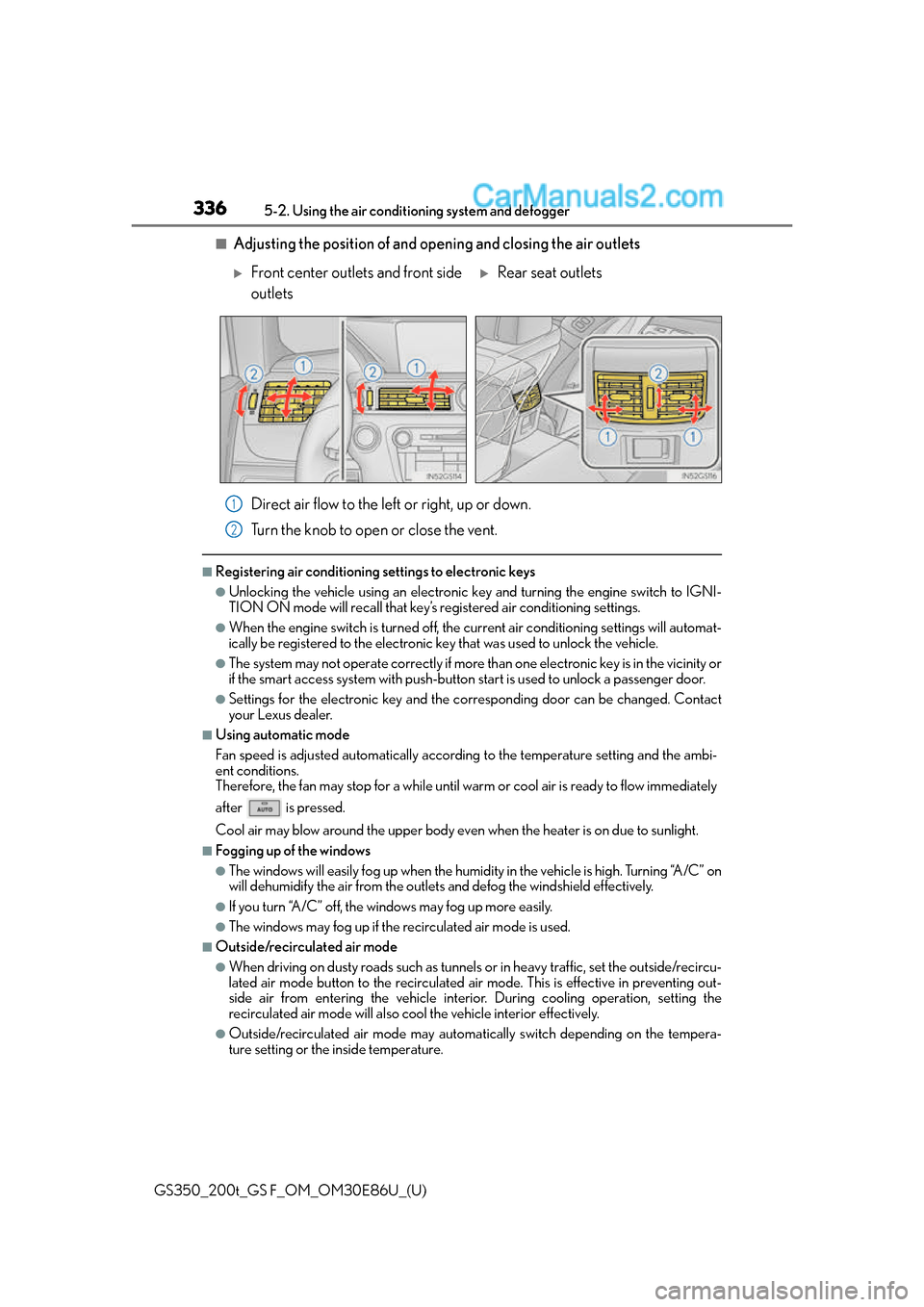
■Adjusting the position of and opening and closing the air outlets
Direct air flow to the left or right, up or down.
Turn the knob to open or close the vent.
■Registering air conditioning settings to electronic keys
●Unlocking the vehicle using an electronic ke y and turning the engine switch to IGNI-
TION ON mode will recall that key’s registered air conditioning settings.
●When the engine switch is tu rned off, the current air conditioning settings will automat-
ically be registered to the electronic key that was used to unlock the vehicle.
●The system may not operate correctly if more th an one electronic key is in the vicinity or
if the smart access system with push-button start is used to unlock a passenger door.
●Settings for the electronic key and the corresponding door can be changed. Contact
your Lexus dealer.
■Using automatic mode
Fan speed is adjusted automatically accordin g to the temperature setting and the ambi-
ent conditions.
Therefore, the fan may stop for a while until warm or cool air is ready to flow immediately
after is pressed.
Cool air may blow around the upper body even when the heater is on due to sunlight.
■Fogging up of the windows
●The windows will easily fog up when the humidity in the vehicle is high. Turning “A/C” on
will dehumidify the air from the outlets and defog the windshield effectively.
●If you turn “A/C” off, the windows may fog up more easily.
●The windows may fog up if the recirculated air mode is used.
■Outside/recirculated air mode
●When driving on dusty roads such as tunnels or in heavy traffic, set the outside/recircu-
lated air mode button to the recirculated ai r mode. This is effective in preventing out-
side air from entering the vehicle interior. During cooling operation, setting the
recirculated air mode will also cool the vehicle interior effectively.
●Outside/recirculated air mode may automa tically switch depending on the tempera-
ture setting or the inside temperature.
Front center outlets and front side
outletsRear seat outlets
1
2
Page 368 of 624
368
GS350_200t_GS F_OM_OM30E86U_(U)5-5. Using the other interior features
■Enabling 2-way communication with a garage door (only available for com-
patible devices)
When enabled, 2-way communication allows you to check the status of the
opening and closing of a garage door
through indicators in your vehicle.
2-way communication is only available if the garage door opener motor used
is a compatible device. (To check device compatibility, refer to
www.HomeLink.com.) Within 5 seconds after programming the garage door opener has been
completed, if the garage door opener motor is trained to HomeLink
®,
both garage door operation indicators will flash rapidly (green) and the
light on the garage door opener moto r will blink twice, indicating that 2-
way communication is enabled.
If the indicators do not flash, perform and within the first 10 presses of
the HomeLink
® button after programming has been completed.
Press a programmed HomeLink
® button to operate a garage door.
Within 1 minute of pressing the HomeLink
® button, after the garage door
operation has stopped, press the “Learn” or “Smart” button on the garage
door opener motor. Within 5 second s of the establishment of 2-way com-
munication with the garage door opener, both garage door operation indi-
cators in the vehicle will flash rapidly (green) and the light on the garage
door opener motor will blink twice, indicating that 2-way communication is
enabled.
■Reprogramming a single HomeLink® button
When the following procedure is performed, buttons which already have
devices registered to them can be overwritten: With one hand, press and hold the desired HomeLink
® button.
When the HomeLink
® indicator starts flashing (orange), continue to hold
the HomeLink® button and perform “Programming HomeLink®” (it
takes 20 seconds for the HomeLink® indicator to start flashing).
Press the appropriate HomeLink
® button. The HomeLink® indicator light
should turn on.
Operating HomeLink®
1
23
2
3
1
2
1
Page 522 of 624
5227-2. Steps to take in an emergency
GS350_200t_GS F_OM_OM30E86U_(U)
■Stopping the engine
Shift the shift lever to P and press the engine switch as you normally do when stopping
the engine.
■Replacing the key battery
As the above procedure is a temporary measure, it is recommended that the electronic
key battery be replaced immediately when the battery is depleted. ( P. 4 2 9 )
■Changing engine switch modes
Release the brake pedal and press the engine switch in step above.
The engine does not start and modes w ill be changed each time the switch is
pressed.( P. 1 9 8 )
■When the electronic key does not work properly
●Make sure that the smart access system wi th push-button start has not been deacti-
vated in the custom ization setting. If it is off, turn the function on.
(Customizable features: P. 5 6 8 )
●Check if battery-saving mo de is set. If it is set, cancel the function. ( P. 151)
WA R N I N G
■When using the mechanical key and operating the power windows or moon roof
Operate the power window or moon roof afte r checking to make sure that there is no
possibility of any passenger having any of their body parts caught in the window or
moon roof.
Also, do not allow children to operate the mech anical key. It is possible for children and
other passengers to get caught in the power window or moon roof.
3