ECO mode Lexus GS350 2020 Workshop Manual
[x] Cancel search | Manufacturer: LEXUS, Model Year: 2020, Model line: GS350, Model: Lexus GS350 2020Pages: 600, PDF Size: 13.38 MB
Page 284 of 600
284
GS350_GS F_OM_OM30J07U_(U)4-5. Using the driving support systems
GS F
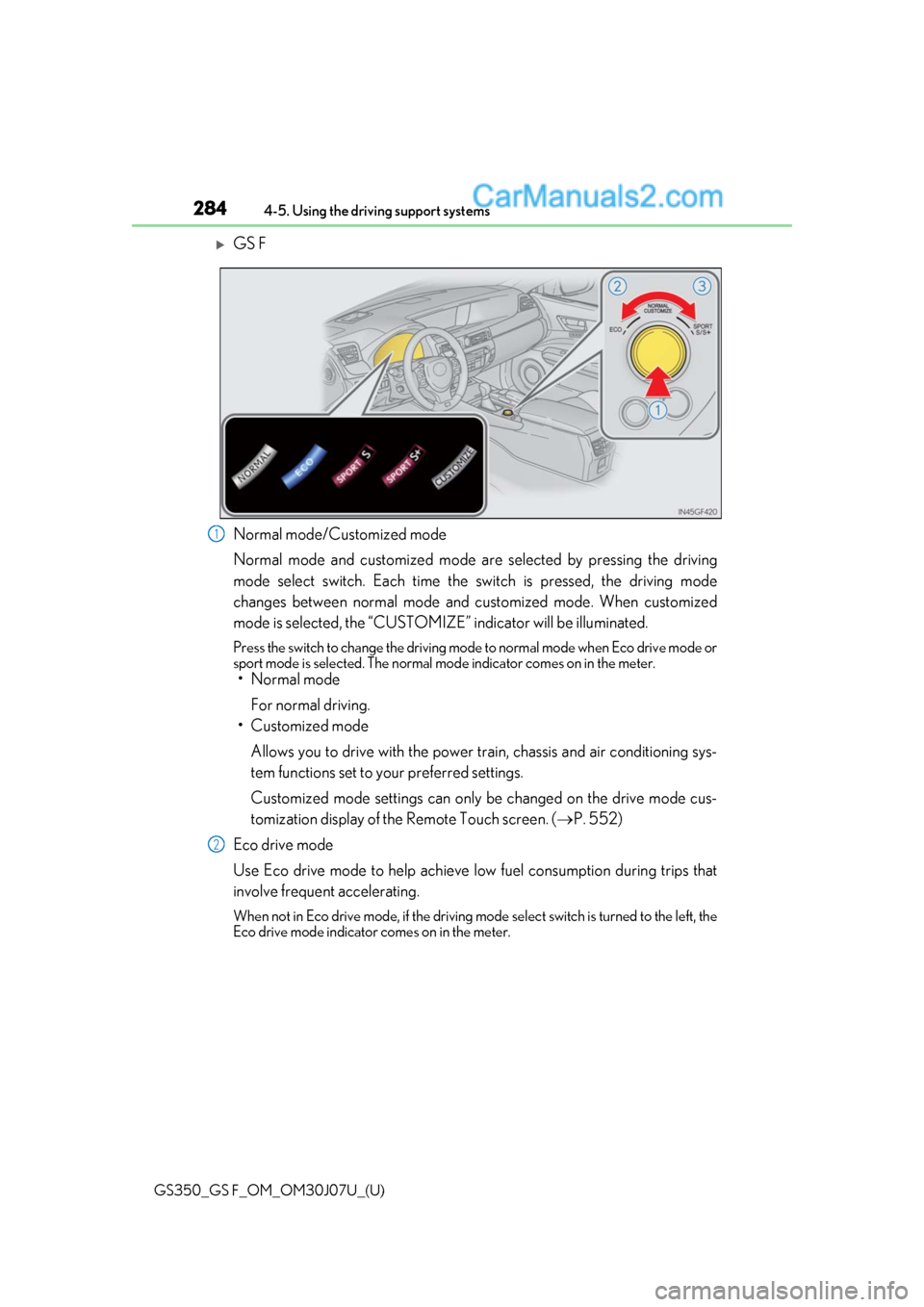
Normal mode/Customized mode
Normal mode and customized mode ar
e selected by pressing the driving
mode select switch. Each time the switch is pressed, the driving mode
changes between normal mode and customized mode. When customized
mode is selected, the “CUSTOMIZE” indicator will be illuminated.
Press the switch to change the driving mode to normal mode when Eco drive mode or
sport mode is selected. The normal mo de indicator comes on in the meter.
• Normal mode
For normal driving.
• Customized mode
Allows you to drive with the power train, chassis and air conditioning sys-
tem functions set to your preferred settings.
Customized mode settings can only be changed on the drive mode cus-
tomization display of the Remote Touch screen. ( P. 552)
Eco drive mode
Use Eco drive mode to help achieve low fuel consumption during trips that
involve frequent accelerating.
When not in Eco drive mode, if the driving mode select switch is turned to the left, the
Eco drive mode indicator comes on in the meter.
1
2
Page 285 of 600

GS350_GS F_OM_OM30J07U_(U)
2854-5. Using the driving support systems
4
Driving
Sport mode•SPORT S mode
Assists acceleration response by co ntrolling the transmission and engine.
When not in SPORT S mode, if the driving mode select switch is turned to the
right, the “SPORT S” indicator comes on in the meter.
•SPORT S+ mode
Provides earlier downshift timing than SPORT S mode in order to maintain
a high engine speed and provides faster gear changes. This mode also
changes the steering feel, suspension control and VDIM control, making it
suitable for powerful sporty driving.
When in SPORT S mode, if the driving mode select switch is turned to the right,
the “SPORT S+” indicator comes on in the meter.
■Operation of the air conditioning system in Eco drive mode
Eco drive mode controls the heating/cooling operations and fan speed of the air condi-
tioning system to enhance fuel efficiency. To improve air conditioning performance, per-
form the following operations:
●Turn off eco air conditioning mode ( P. 320)
●Adjust the fan speed ( P. 319)
●Turn off Eco drive mode
■Automatic operation of the seat heater during Eco drive mode
Eco drive mode controls the heating operatio n and fan speed of the air conditioning sys-
tem to enhance fuel efficiency. If the driving mode select switch is switched to Eco drive
mode in cold temperatures, the seat heater will be automatically operated to assist heat-
ing performance.
■Automatic deactivation of sport mode and customized mode
If the engine switch is turned off after dr iving in sport mode or customized mode, the
drive mode will be changed to normal mode.
■Driving mode pop-up display (12.3-inch display only)
When the driving mode is changed, the sele cted driving mode will be temporarily dis-
played on the side display. ( P. 316)
3
Page 296 of 600
296
GS350_GS F_OM_OM30J07U_(U)4-5. Using the driving support systems
■Automatic cancelation of the selected TVD control mode
SLALOM and TRACK mode are canceled when the engine switch is turned off. When
the engine switch is turned to IGNITION ON mode, the TVD system will be in STAN-
DARD mode.
■Automatic disabling of the TVD system
If a malfunction is de
tected in the TVD system, a warn ing message will be displayed on
the multi-information display ( P. 442) and the TVD system will be disabled automati-
cally. If the system is disabled, driving force will not be distributed by the TVD but through
normal differential operation.
■To protect the system
If the TVD fluid temperature becomes excessively high due to driving for a long time
under extremely high load conditions, a warn ing message will be displayed on the multi-
information display. ( P. 442)
WARNING
■Cautions regarding the use of the system
The driver is solely responsible for safe driving. Do not overly rely on the TVD system.
Always drive safely, taking care to observe your surroundings.
Page 304 of 600
304
GS350_GS F_OM_OM30J07U_(U)4-5. Using the driving support systems
WARNING
■When the TRAC/VSC systems are turned off
Be especially careful and drive at a speed appropriate to the road conditions. As these
are the systems to help ensure vehicle stability and driving force, do not turn the
TRAC/VSC systems off unless necessary.
■Expert mode precautions (GS F)
●Do not use on public roads.
●Use only when the road conditions and safety of the surrounding area can be
ensured.
●Proper use of expert mode requires a prof
essional level of driving skill. When using
expert mode, always check the road condit ions and surrounding area and drive more
carefully than usual.
■Replacing tires
Make sure that all tires are of the specified size, brand, tread pattern and total load
capacity. In addition, make sure that the tire s are inflated to the recommended tire infla-
tion pressure level.
The ABS, TRAC and VSC systems will not function correctly if different tires are
installed on the vehicle.
Contact your Lexus dealer for further in formation when replacing tires or wheels.
■Handling of tires and the suspension
Using tires with any kind of problem or modi fying the suspension will affect the driving
assist systems, and may cause a system to malfunction.
Page 314 of 600
3145-1. Remote Touch screen
GS350_GS F_OM_OM30J07U_(U)
■Screen display during low temperatures
When the ambient temperature is extremely low, screen response may be delayed even
if the Remote Touch is operated.
WARNING
■When using the Remote Touch
●Do not allow fingers, fingernails or hair to become caught in the Remote Touch as this
may cause an injury.
●Be careful when selecting the Remote Touch in extreme temperatures as it may
become very hot or cold due to the temperature inside the vehicle.
NOTICE
■To prevent damage to the Remote Touch
●Do not allow the Remote Touch to come into contact with food, liquid, stickers or lit
cigarettes as doing so may cause it to change color, emit a strange odor or stop func-
tioning.
●Do not subject the Remote Touch to excessive pressure or strong impact as the knob
may bend or break off.
●Do not allow coins, contact lenses or ot her such items to become caught in the
Remote Touch as this may cause it to stop functioning.
●Items of clothing may rip if they become caught on the Remote Touch knob.
●If your hand or any object is on the Remote Touch knob when the engine switch is
turned to ACCESSORY mode, the Remote Touch knob may not operate properly.
Page 320 of 600
320
GS350_GS F_OM_OM30J07U_(U)5-2. Using the air conditio
ning system and defogger
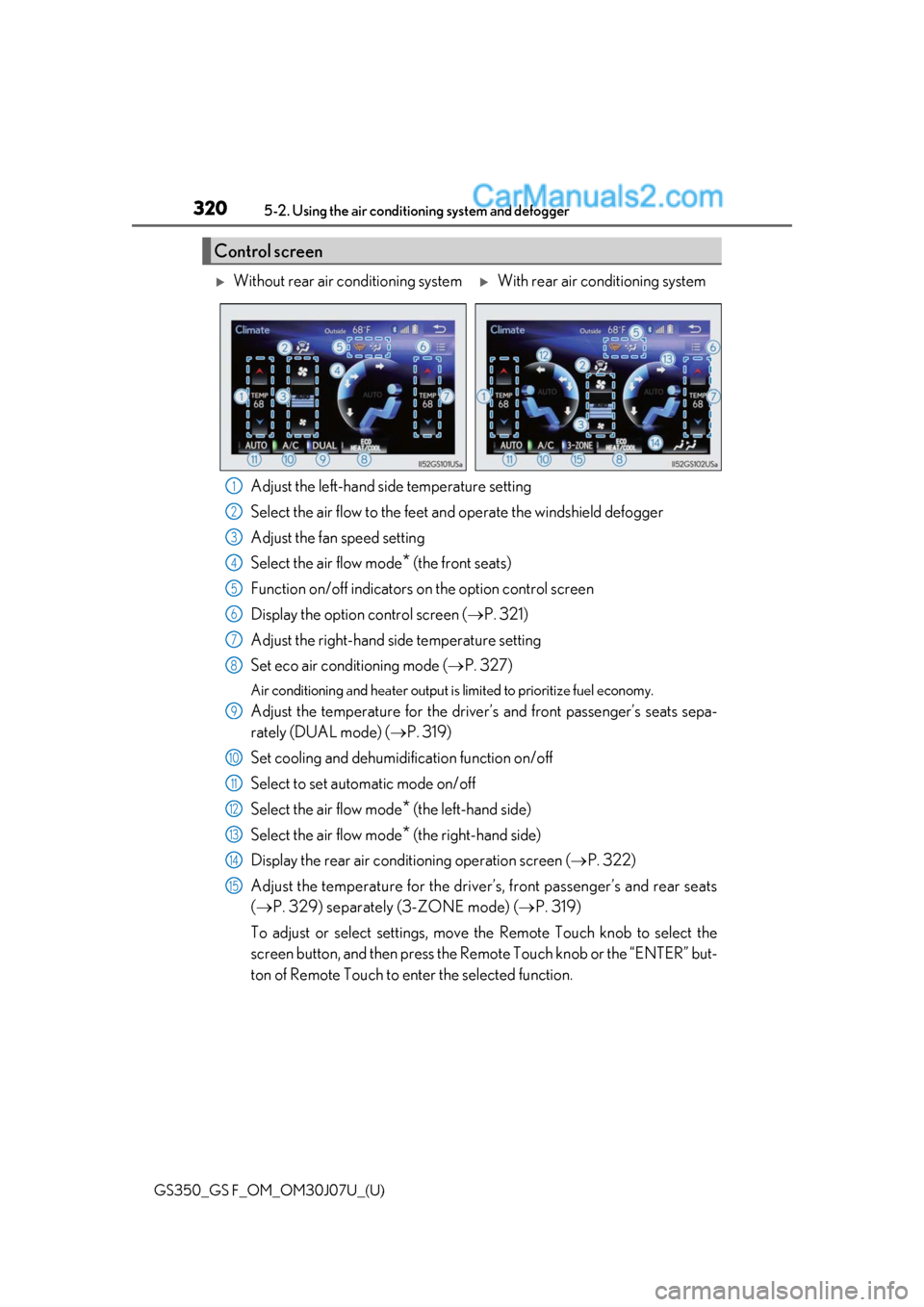
Adjust the left-hand side temperature setting
Select the air flow to the feet an d operate the windshield defogger
Adjust the fan speed setting
Select the air flow mode
* (the front seats)
Function on/off indicators on the option control screen
Display the option control screen ( P. 321)
Adjust the right-hand side temperature setting
Set eco air conditioning mode ( P. 327)
Air conditioning and heater output is limited to prioritize fuel economy.
Adjust the temperature for the driver ’s and front passenger’s seats sepa-
rately (DUAL mode) ( P. 319)
Set cooling and dehumidification function on/off
Select to set automatic mode on/off
Select the air flow mode
* (the left-hand side)
Select the air flow mode
* (the right-hand side)
Display the rear air conditioning operation screen ( P. 322)
Adjust the temperature for the driver ’s, front passenger’s and rear seats
( P. 329) separately (3-ZONE mode) ( P. 319)
To adjust or select settings, move the Remote Touch knob to select the
screen button, and then press the Re mote Touch knob or the “ENTER” but-
ton of Remote Touch to enter the selected function.
Control screen
Without rear air conditioning systemWith rear air conditioning system
1
2
3
4
5
6
7
8
9
10
11
12
13
14
15
Page 327 of 600
GS350_GS F_OM_OM30J07U_(U)
3275-2. Using the air conditioning system and defogger
5
Interior features
■When the outside temperature exceeds 75°F (24°C) and the air conditioning system
is on
●In order to reduce the air co nditioning power consumption, the air conditioning system
may switch to recirculated air mode automa tically. This may also reduce fuel consump-
tion.
●Recirculated air mode is selected as a default mode when the engine switch is turned
on.
●It is possible to switch to outside air mode at any time by pressing .
■Automatic mode for air intake control
In automatic mode, the system detects exhaust gas and other pollutants and automati-
cally switches between outside air and recirculated air modes.
When the dehumidification function is off, and the fan is operating, turning automatic
mode on will activate the dehumidification function.
■Operation of the air conditioning system in Eco drive mode
In the Eco drive mode, the air conditioning sy stem is controlled as follows to prioritize
fuel efficiency:
●Engine speed and compressor operation controlled to restrict heating/cooling capac-
ity
●Fan speed restricted when automatic mode is selected
To improve air conditioning performanc e, perform the following operations:
●Turn off eco air conditioning mode
●Adjust the fan speed
●Turn off Eco drive mode ( P. 281)
■Eco air conditioning mode
When Eco drive mode is selected using the drive mode select switch, eco air condition-
ing mode turns on.
When a drive mode other than Eco drive mo de is selected, eco air conditioning mode
may turn off.
■When the S-FLOW mode operates
If air flows to the driver’s seat only, the te mperature setting for the front passenger’s seat
is not displayed.
■When the outside temperature is low
The dehumidification function may not operate even when “A/C” on the option control
screen is selected.
■Ventilation and air conditioning odors
●To let fresh air in, set the air conditioning system to the outside air mode.
●During use, various odors from inside and outside the vehicle may enter into and accu-
mulate in the air conditioning system. This may then cause odor to be emitted from the
vents.
●To reduce potential odors from occurring:
• It is recommended that the air conditioning system be set to outside air mode prior
to turning the vehicle off.
• The start timing of the blower may be dela yed for a short period of time immediately
after the air conditioning system is started in automatic mode.
Page 336 of 600

336
GS350_GS F_OM_OM30J07U_(U)5-2. Using the air conditio
ning system and defogger
■Automatic operation of the seat heater during Eco drive mode
If the driving mode select swit ch is switched to Eco drive mo de in cold temperatures, the
seat heater may be automatically oper ated to assist heating performance.
■Automatic operation during S-FLOW mode
The front seat heater and ventilator or the re ar seat heater may automatically turn off
when S-FLOW mode is turned on during automatic mode. (P. 319)
■Button lock function (vehicle s with rear control panel)
To prevent inadvertent operation, some bu ttons on the rear armrest can be locked.
( P. 331)
■When the switch is disabled (v ehicles with rear control panel)
When the rear control panel switch cannot be operated even though the button lock
function is released, check whether the switch is disabled due to selecting on
Remote Touch screen. ( P. 325)
■Rear control panel illumination off function (vehicles with rear control panel)
Control panel illumination on the re ar armrest can be turned off. (P. 331)
■Customization
The automatic mode settings for the front seat heaters and ventilators or the rear seat
heaters can be changed. (Customizable features: P. 542)
Page 363 of 600
GS350_GS F_OM_OM30J07U_(U)
3636-1. Maintenance and care
6
Maintenance and care
■Automatic car washes
●Fold the mirrors before washing the vehicle. Start washing from the front of the vehicle.
Make sure to extend the mirrors before driving.
●Brushes used in automatic car washes may scratch the vehicle surface and harm your
vehicle’s paint.
●Rear spoiler (if equipped) may not be washable in some automatic car washes. There
may also be an increased risk of damage to vehicle.
■High-pressure car washes
●As water may enter the cabin, do not bring the nozzle tip near the gaps around the
doors or perimeter of the windows, or spray these areas continuously.
●Before using the car wash, check that the fuel filler door on your vehicle is closed prop-
erly.
■Notes for a smart access system with push-button start
If the door handle becomes wet while the electronic key is within the effective range, the
door may lock and unlock repeatedly. In that case, follow the following correction proce-
dures to wash the vehicle:
●Place the key in a position 6 ft. (2 m) or more separate from the vehicle while the vehi-
cle is being washed. (Take care to ensure that the key is not stolen.)
●Set the electronic key to battery-saving mode to disable the sm art access system with
push-button start. ( P. 158)
■Aluminum wheels (vehicles without matte black painted wheels)
●Remove any dirt immediately by using a neutral detergent.
●Wash detergent off with water immediately after use.
●To protect the paint from damage, make sure to observe the following precautions.
• Do not use acidic, alkaline or abrasive detergent
• Do not use hard brushes
• Do not use detergent on the wheels when they are hot, such as after driving or park- ing in hot weather
■Aluminum wheels (vehicles with matte black painted wheels)
As matte black painted wheels require differ ent cleaning methods than conventional alu-
minum wheels, be sure to observer the follo wing. For details, consult your Lexus dealer.
●Remove dirt using water. If the wheels are excessively dirty, use a sponge or soft cloth
dampened with a diluted neutral detergent to remove the dirt.
●When using detergent, make sure to rinse it off with water immediately. Then use a soft
cloth to wipe off the water.
●To prevent the matte black paint from being damaged, make sure to observe the follow-
ing precautions:
• Do not scrub or polish the wheels using a brush or dry cloth.
• Do not use any wheel coatings or abrasive detergents.
• When using an automatic car wash, disable/ do not select the wheel brush function
(if such an option is available).
• Do not use a high pressure washer or steam cleaner.
• Do not use detergent on the wheels when they are hot, such as after driving or park- ing in hot weather.
Page 364 of 600
364
GS350_GS F_OM_OM30J07U_(U)6-1. Maintenance and care
■Brake
●Brake caliper coating (GS350 with orange
brake calipers for F SPORT models, and
GS F)
• When using detergent, use neutral detergent.
Do not use hard brushes or abrasive cleaners, as they will damage the coating.
• Do not use detergent on the brake calipers when they are hot.
• Wash detergent off immediately after use.
●GS F: Rust may form if the vehicle is parked with wet brake pads or disc rotors, causing
them to stick. Before parking the vehicle after it is washed, drive slowly and apply the
brakes several times to dry the parts.
■Bumpers
Do not scrub with abrasive cleaners.
■Front side windows water-repellent coating (if equipped)
●The following precautions can extend the effectiveness of the water-repellent coating.
• Remove any dirt, etc. from the front side windows regularly.
• Do not allow dirt and dust to accumulate on the windows for a long period. Clean the windows with a soft, damp cloth as soon as possible.
• Do not use wax or glass cleaners that co ntain abrasives when cleaning the windows.
• Do not use any metallic objects to remove condensation build up.
●When the water-repellent performance has become insufficient, the coating can be
repaired. Contact your Lexus dealer.