ECU Lexus GS450h 2008 Owner's Guide
[x] Cancel search | Manufacturer: LEXUS, Model Year: 2008, Model line: GS450h, Model: Lexus GS450h 2008Pages: 599, PDF Size: 14.28 MB
Page 379 of 599
377
3-7. Other interior features
3
Interior features
GS_HV_U
June 19, 2008 1:15 pm
Garage door opener
The garage door opener (HomeLink Universal Transceiver) is manufactured
under license from HomeLink.
Programming the HomeLink (for U.S.A. owners)
The HomeLink
compatible transceiver in your vehicle has 3 buttons
which can be programmed to operate 3 different devices. Refer to the
programming method below appropriate for the device.
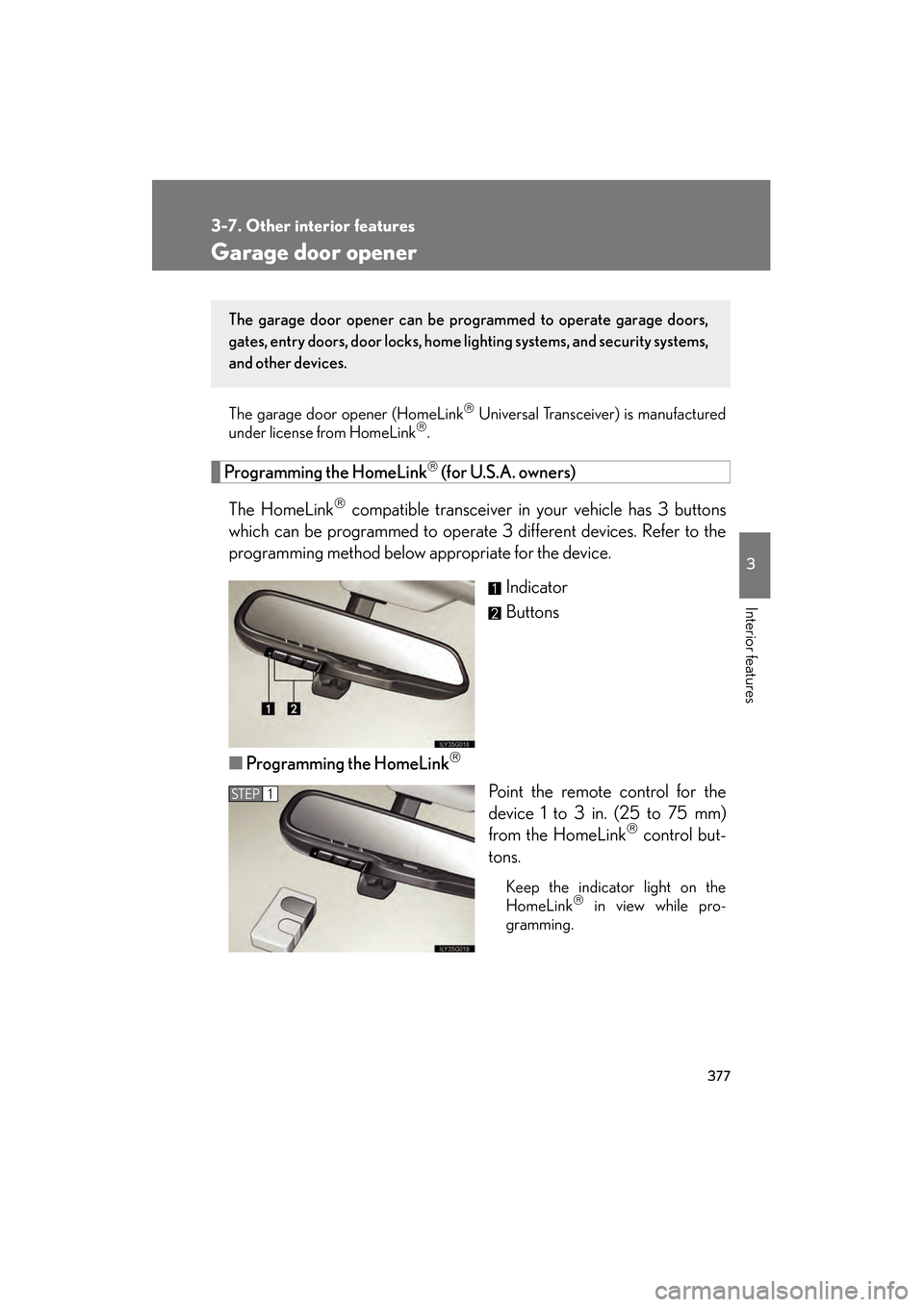
Indicator
Buttons
■ Programming the HomeLink
Point the remote control for the
device 1 to 3 in. (25 to 75 mm)
from the HomeLink
control but-
tons.
Keep the indicator light on the
HomeLink in view while pro-
gramming.
The garage door opener can be pr ogrammed to operate garage doors,
gates, entry doors, door locks, home lighting systems, and security systems,
and other devices.
STEP1
GS450h_HV_U.book Page 377 Thursday, June 19, 2008 1:44 PM
Page 382 of 599
380
3-7. Other interior features
GS_HV_U
June 19, 2008 1:15 pm
■Programming an entry gate (for U.S.A. owners)/Programming all
devices in the Canadian market
Place your transmitter 1 to 3 in. (25 to 75 mm) away from the sur-
face of the HomeLink
.
Keep the indicator light on the HomeLink in view while programming.
Press and hold the selected HomeLink button.
Repeatedly press and release (cycle) the device’s remote control
button for two seconds each until step 4 is completed.
When the indicator light on the HomeLink
compatible trans-
ceiver starts to flash rapidly, release the buttons.
Test the operation of the HomeLink
by pressing the newly pro-
grammed button. Check to see if the gate/device operates cor-
rectly.
Repeat the steps above to program another device for each of
the remaining HomeLink
buttons.
■ Programming other devices
To program other devices such as home security systems, home door
locks or lighting, contact your authorized Lexus dealer for assistance.
■ Reprogramming a button
The individual HomeLink
buttons cannot be erased but can be
reprogrammed. To reprogram a button, follow the “Basic program-
ming” instructions.
STEP1
STEP2
STEP3
STEP4
STEP5
STEP6
GS450h_HV_U.book Page 380 Thursday, June 19, 2008 1:44 PM
Page 388 of 599
386
3-7. Other interior features
GS_HV_U
June 19, 2008 1:15 pm
CAUTION
■While driving
Do not adjust the display.
Be sure to adjust the display only when the vehicle is stopped.
■When doing the circling calibration
Be sure to secure a wide space, and watch out for people and vehicles in the neigh-
borhood. Do not violate any local traffic rules while performing circling calibration.
NOTICE
■To avoid the compass malfunctions
Do not place magnets or any metal objects near the inside rear view mirror.
Doing this may cause a malfunction of the compass sensor.
■To ensure normal operation of the compass
●Do not perform circling calibration of the compass in a place where the earth’s
magnetic field is subject to interference by artificial magnetic fields.
●During calibration, do not operate electric systems (moon roof, power windows,
etc.) as they may interfere with the calibration.
GS450h_HV_U.book Page 386 Thursday, June 19, 2008 1:44 PM
Page 389 of 599
387
3-7. Other interior features
3
Interior features
GS_HV_U
June 19, 2008 1:15 pm
Lexus Link System (if equipped)
The Lexus Link System is a communication service that uses Global Posi-
tioning System (GPS) data and cellular service to provide you with safety,
security and convenience. This system is only operational in GPS and cellu-
lar coverage areas. Button operation and voice commands are used to
operate the system. To operate the system, follow the voice guidance
instructions. For details about service and subscription, call the Lexus Link
Call Center at 1-800-25-LEXUS (1-800-255-3987) (toll-free).
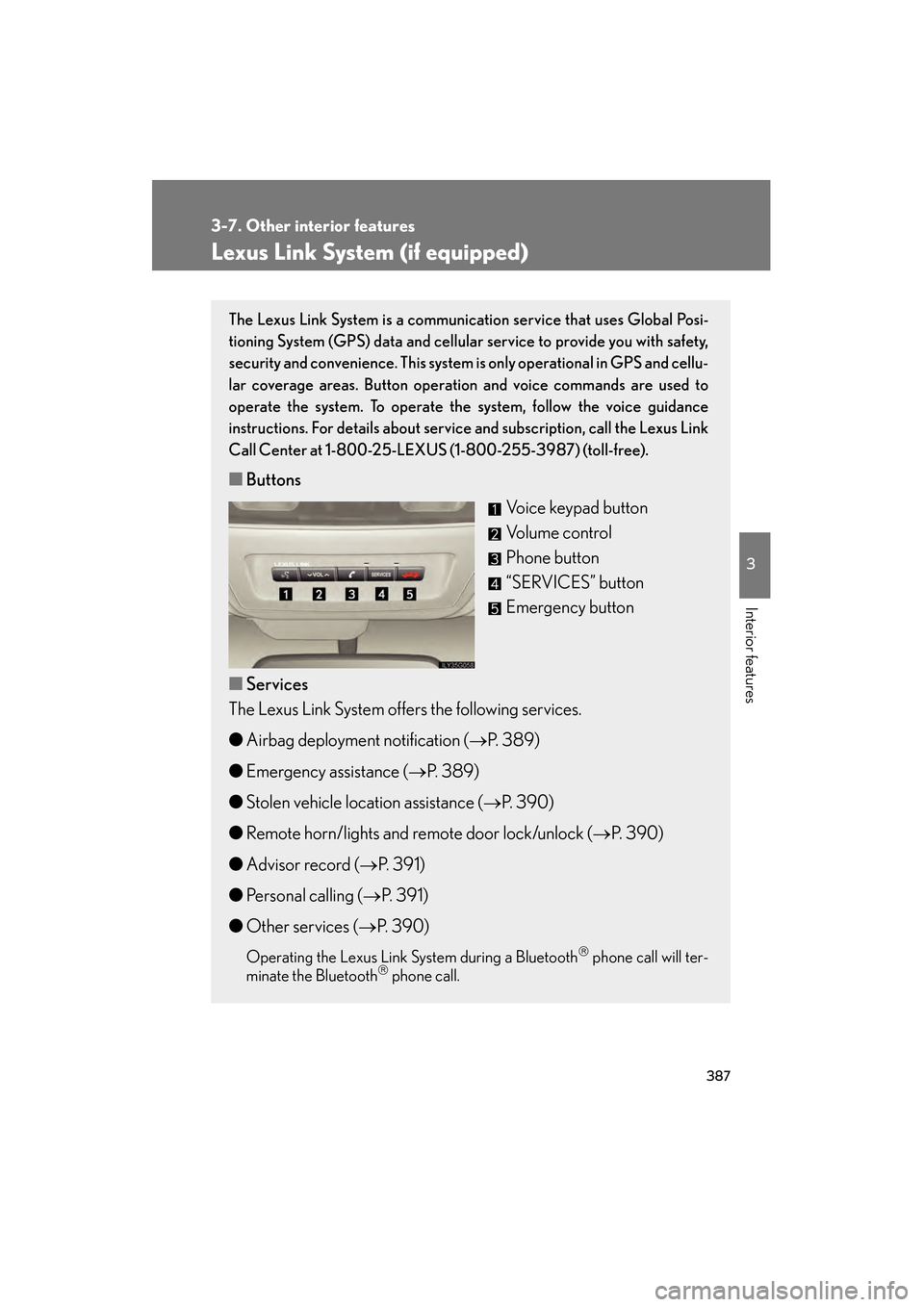
■ Buttons
Voice keypad button
Volume control
Phone button
“SERVICES” button
Emergency button
■ Services
The Lexus Link System offers the following services.
● Airbag deployment notification ( →P. 389)
● Emergency assistance ( →P. 389)
● Stolen vehicle location assistance ( →P. 3 9 0 )
● Remote horn/lights and remote door lock/unlock ( →P. 390)
● Advisor record ( →P. 391)
● Personal calling ( →P. 391)
● Other services ( →P. 390)
Operating the Lexus Link System during a Bluetooth phone call will ter-
minate the Bluetooth phone call.
GS450h_HV_U.book Page 387 Thursday, June 19, 2008 1:44 PM
Page 398 of 599
396
3-7. Other interior features
GS_HV_U
June 19, 2008 1:15 pm
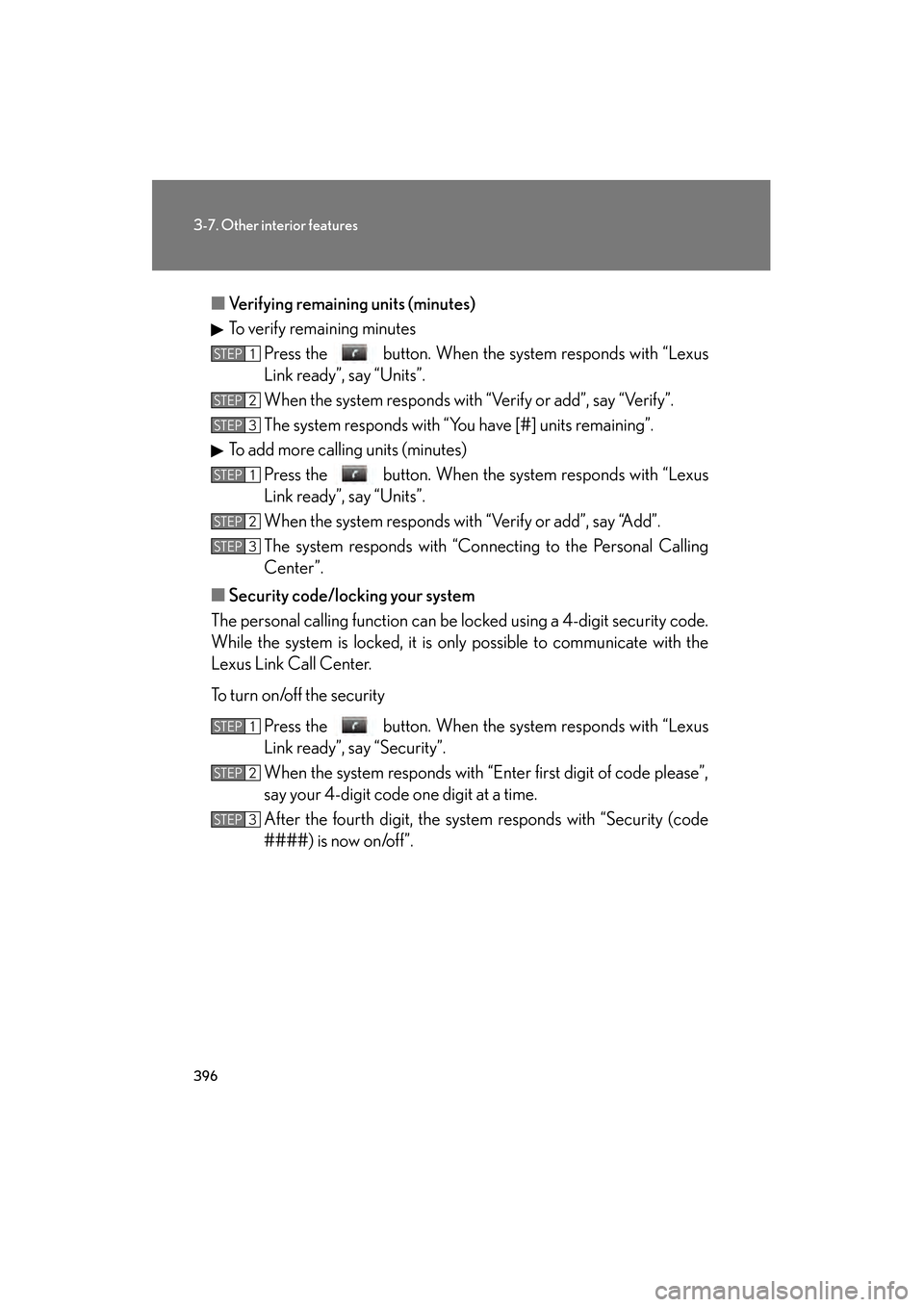
■Verifying remaining units (minutes)
To verify remaining minutes
Press the button. When the system responds with “Lexus
Link ready”, say “Units”.
When the system responds with “Verify or add”, say “Verify”.
The system responds with “You have [#] units remaining”.
To add more calling units (minutes) Press the button. When the system responds with “Lexus
Link ready”, say “Units”.
When the system responds with “Verify or add”, say “Add”.
The system responds with “Connecting to the Personal Calling
Center”.
■ Security code/locking your system
The personal calling function can be lo cked using a 4-digit security code.
While the system is locked, it is only possible to communicate with the
Lexus Link Call Center.
To turn on/off the security
Press the button. When the system responds with “Lexus
Link ready”, say “Security”.
When the system responds with “Enter first digit of code please”,
say your 4-digit code one digit at a time.
After the fourth digit, the system responds with “Security (code
####) is now on/off”.
STEP1
STEP2
STEP3
STEP1
STEP2
STEP3
STEP1
STEP2
STEP3
GS450h_HV_U.book Page 396 Thursday, June 19, 2008 1:44 PM
Page 399 of 599
397
3-7. Other interior features
3
Interior features
GS_HV_U
June 19, 2008 1:15 pm
■Speech recognition information
The Lexus Link speech recognition systems use speech technology that is designed
to understand a wide range of speakers of American English. However, the technol-
ogy may not work as well if a regional or ethnic accent is encountered. If the speech
recognition system does not work properly, refer to the following.
●The system does not recognize your command properly if noise is present. Per-
form the following to improve voice command recognition.
• Turn down or off the air conditioning system.
• Slow down to reduce wind noise.
• Close the windows and the moon roof to block outside noise.
• Have all occupants be quiet so that the system does not recognize their con-
versation as a command.
●When to speak
Say a command within 5 seconds after the system prompts you to speak.
●How to speak
• Speak forcefully and clearly.
• Speak calmly and naturally.
• The driver should speak while facing forward, and the passenger should speak facing the inside rear view mirror.
• Avoid speaking with a rising intonation. Use a flat or falling intonation.
●Tips for one-word commands
• The system recognizes only one word at a time for personal calling. (There are some exceptions, such as “Advanced services” and “My number”.)
• When inputting the security codes or voice-activated keypad number, you
must say them one digit at a time. When inputting a phone number, the
speech recognition system can recognize 7, 10, and 11-digit numbers as well
as the number 911.
GS450h_HV_U.book Page 397 Thursday, June 19, 2008 1:44 PM
Page 413 of 599
411
4-2. Maintenance
4
Maintenance and care
GS_HV_U
June 19, 2008 1:15 pm
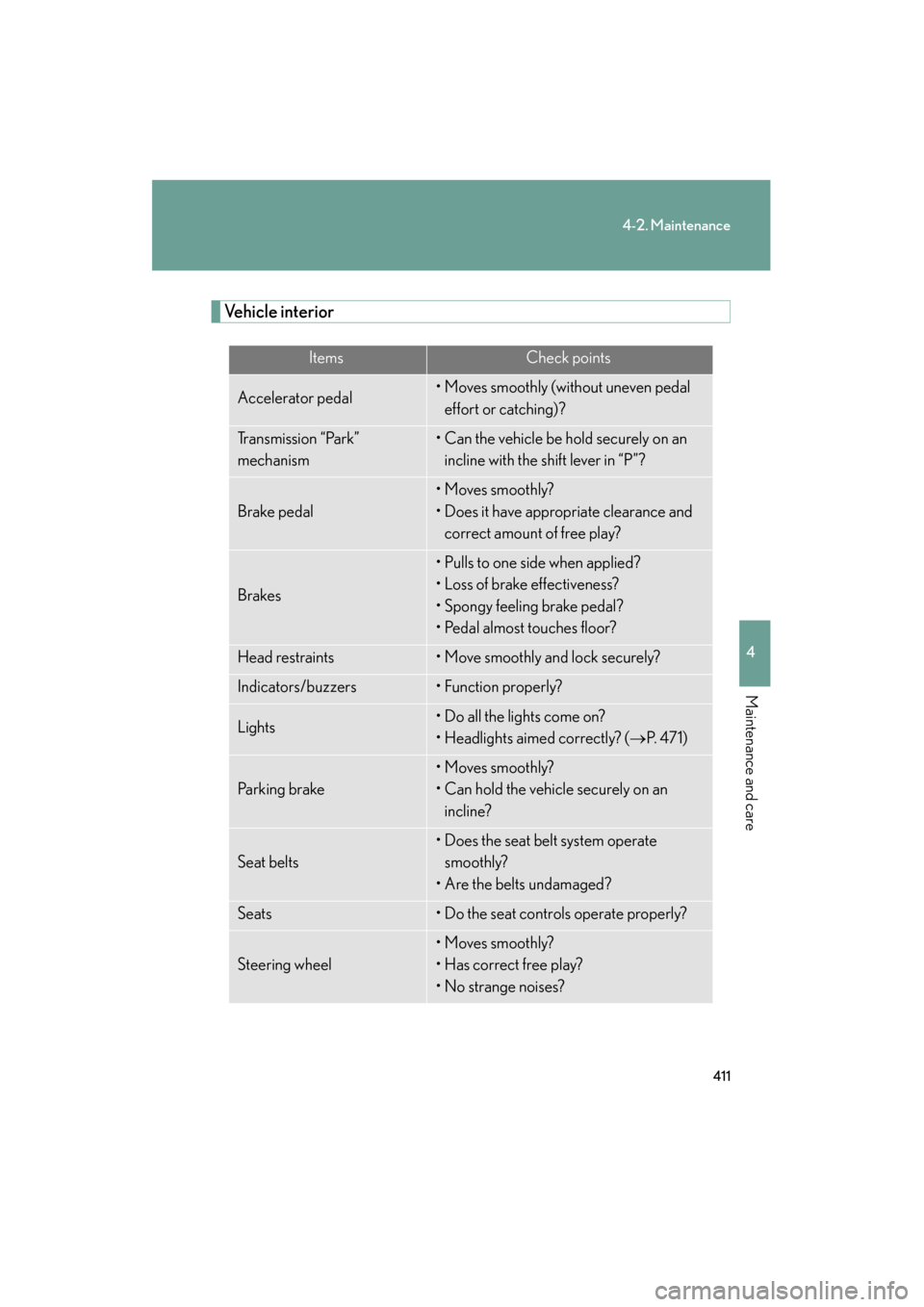
Vehicle interior
ItemsCheck points
Accelerator pedal• Moves smoothly (without uneven pedal effort or catching)?
Transmission “Park”
mechanism• Can the vehicle be hold securely on an incline with the shift lever in “P”?
Brake pedal
• Moves smoothly?
• Does it have appropriate clearance and correct amount of free play?
Brakes
• Pulls to one side when applied?
• Loss of brake effectiveness?
• Spongy feeling brake pedal?
• Pedal almost touches floor?
Head restraints• Move smoothly and lock securely?
Indicators/buzzers• Function properly?
Lights• Do all the lights come on?
• Headlights aimed correctly? ( →P. 4 7 1 )
Pa r k i n g b r a ke
• Moves smoothly?
• Can hold the vehicle securely on an
incline?
Seat belts
• Does the seat belt system operate smoothly?
• Are the belts undamaged?
Seats• Do the seat controls operate properly?
Steering wheel
• Moves smoothly?
• Has correct free play?
• No strange noises?
GS450h_HV_U.book Page 411 Thursday, June 19, 2008 1:44 PM
Page 464 of 599
462
4-3. Do-it-yourself maintenance
GS_HV_U
June 19, 2008 1:15 pm
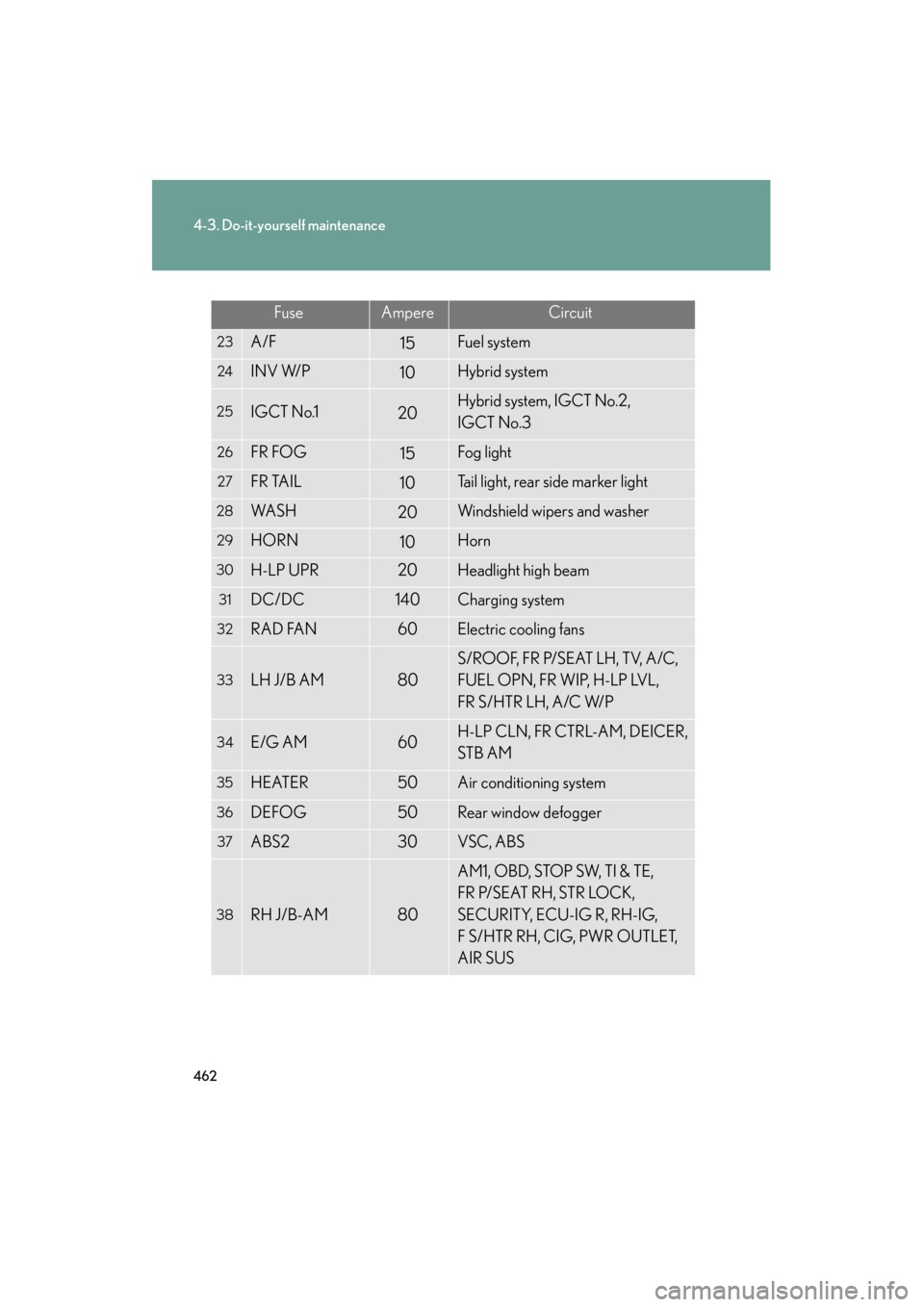
FuseAmpereCircuit
23A/F15Fuel system
24INV W/P10Hybrid system
25IGCT No.120Hybrid system, IGCT No.2,
IGCT No.3
26FR FOG15Fog light
27FR TAIL10Tail light, rear side marker light
28WA S H20Windshield wipers and washer
29HORN10Horn
30H-LP UPR20Headlight high beam
31DC/DC140Charging system
32RAD FAN60Electric cooling fans
33LH J/B AM80
S/ROOF, FR P/SEAT LH, TV, A/C,
FUEL OPN, FR WIP, H-LP LVL,
FR S/HTR LH, A/C W/P
34E/G AM60H-LP CLN, FR CTRL-AM, DEICER,
STB AM
35HEATER50Air conditioning system
36DEFOG50Rear window defogger
37ABS230VSC, ABS
38RH J/B-AM80
AM1, OBD, STOP SW, TI & TE,
FR P/SEAT RH, STR LOCK,
SECURITY, ECU-IG R, RH-IG,
F S/HTR RH, CIG, PWR OUTLET,
AIR SUS
GS450h_HV_U.book Page 462 Thursday, June 19, 2008 1:44 PM
Page 465 of 599
463
4-3. Do-it-yourself maintenance
4
Maintenance and care
GS_HV_U
June 19, 2008 1:15 pm
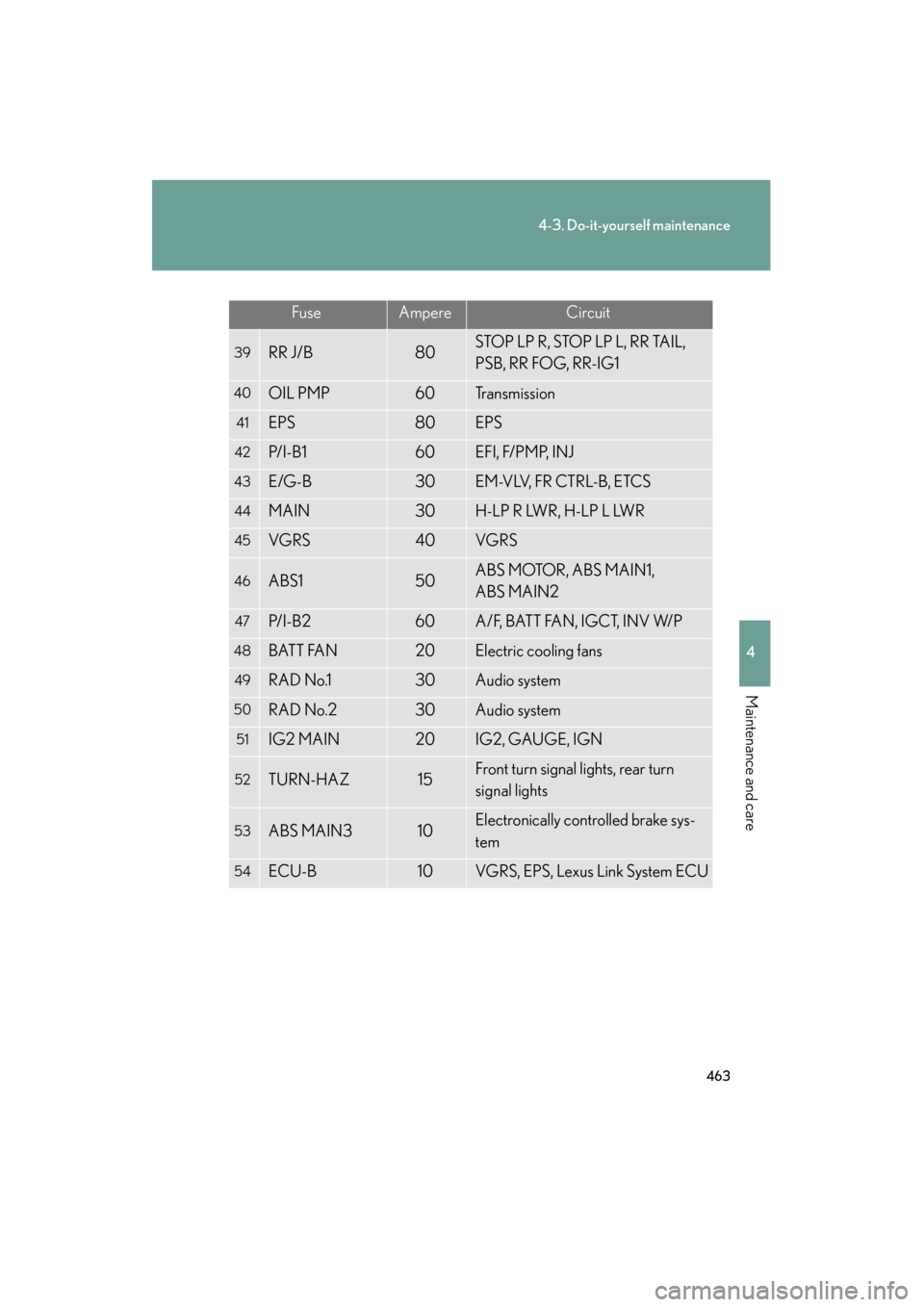
FuseAmpereCircuit
39RR J/B80STOP LP R, STOP LP L, RR TAIL,
PSB, RR FOG, RR-IG1
40OIL PMP60Transmission
41EPS80EPS
42P/ I - B 160EFI, F/PMP, INJ
43E/G-B30EM-VLV, FR CTRL-B, ETCS
44MAIN30H-LP R LWR, H-LP L LWR
45VGRS40VGRS
46ABS150ABS MOTOR, ABS MAIN1,
ABS MAIN2
47P/ I - B 260A/F, BATT FAN, IGCT, INV W/P
48BATT FAN20Electric cooling fans
49RAD No.130Audio system
50RAD No.230Audio system
51IG2 MAIN20IG2, GAUGE, IGN
52TURN-HAZ15Front turn signal lights, rear turn
signal lights
53ABS MAIN310Electronically controlled brake sys-
tem
54ECU-B10VGRS, EPS, Lexus Link System ECU
GS450h_HV_U.book Page 463 Thursday, June 19, 2008 1:44 PM
Page 467 of 599
465
4-3. Do-it-yourself maintenance
4
Maintenance and care
GS_HV_U
June 19, 2008 1:15 pm
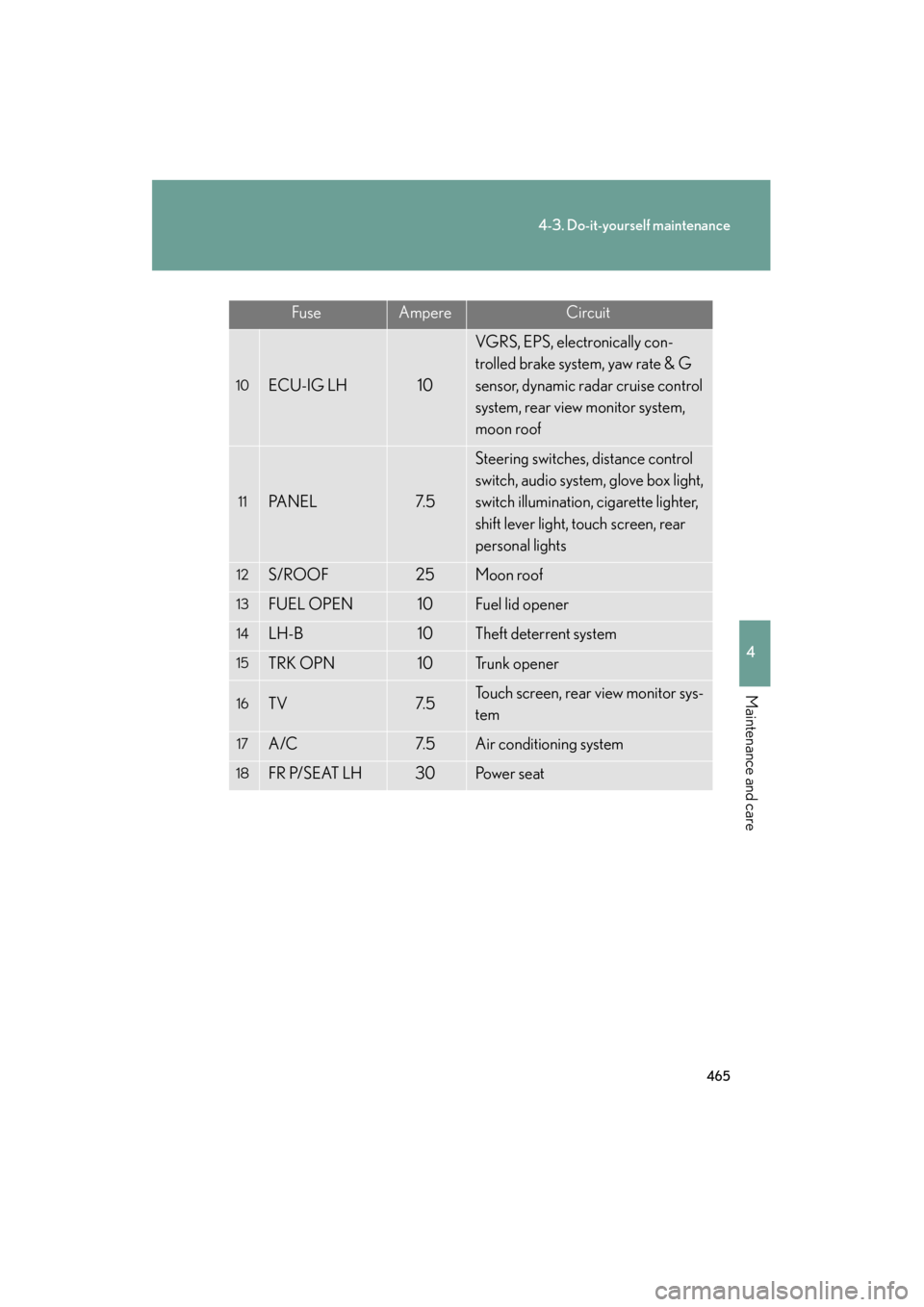
FuseAmpereCircuit
10ECU-IG LH10
VGRS, EPS, electronically con-
trolled brake system, yaw rate & G
sensor, dynamic radar cruise control
system, rear view monitor system,
moon roof
11PA N E L7. 5
Steering switches, distance control
switch, audio system, glove box light,
switch illumination, cigarette lighter,
shift lever light, touch screen, rear
personal lights
12S/ROOF25Moon roof
13FUEL OPEN10Fuel lid opener
14LH-B10Theft deterrent system
15TRK OPN10Tr u n k o p e n e r
16TV7. 5Touch screen, rear view monitor sys-
tem
17A/C7. 5Air conditioning system
18FR P/SEAT LH30Po w e r s e a t
GS450h_HV_U.book Page 465 Thursday, June 19, 2008 1:44 PM