audio Lexus GS450h 2008 Owner's Guide
[x] Cancel search | Manufacturer: LEXUS, Model Year: 2008, Model line: GS450h, Model: Lexus GS450h 2008Pages: 599, PDF Size: 14.28 MB
Page 264 of 599
262
3-3. Using the audio system
GS_HV_U
June 19, 2008 1:15 pm
Playing MP3 and WMA discs
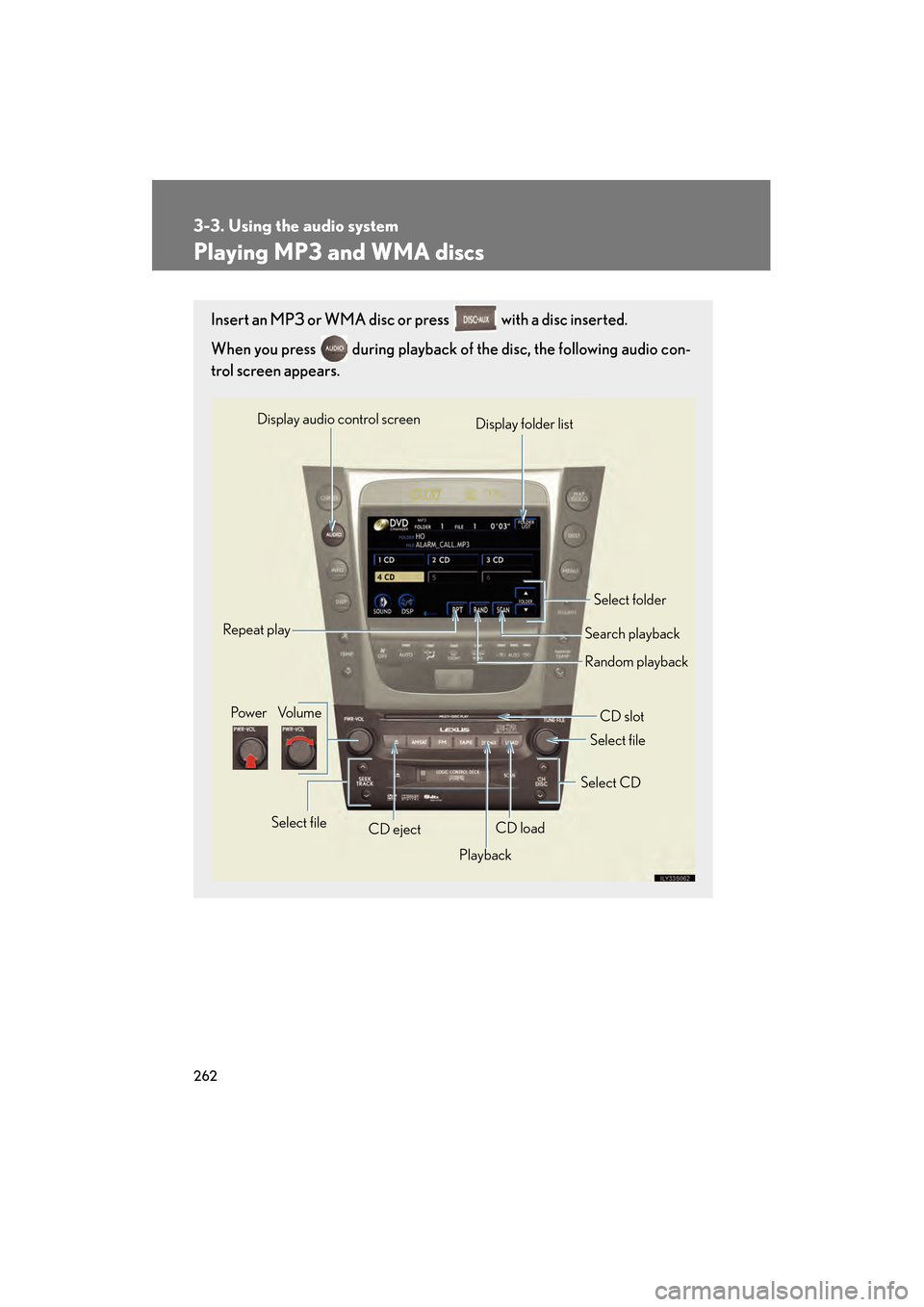
Insert an MP3 or WMA disc or press with a disc inserted.
When you press during playback of the disc, the following audio con-
trol screen appears.
Pow e r Vo l u m eCD ejectPlayback Select folder
Search playback
CD slot
Random playback
Repeat play
Select file
CD loadSelect CD
Display audio control screen
Select file
Display folder list
GS450h_HV_U.book Page 262 Thursday, June 19, 2008 1:44 PM
Page 265 of 599
263
3-3. Using the audio system
3
Interior features
GS_HV_U
June 19, 2008 1:15 pm
Loading, ejecting and selecting MP3 and WMA discs
Refer to the section titled “Using the CD player” for details. ( →P. 2 5 7 )
Selecting a folder
■ Selecting a folder
Touch “FOLDER ” or “ ” on the screen to select the previ-
ous/next folder.
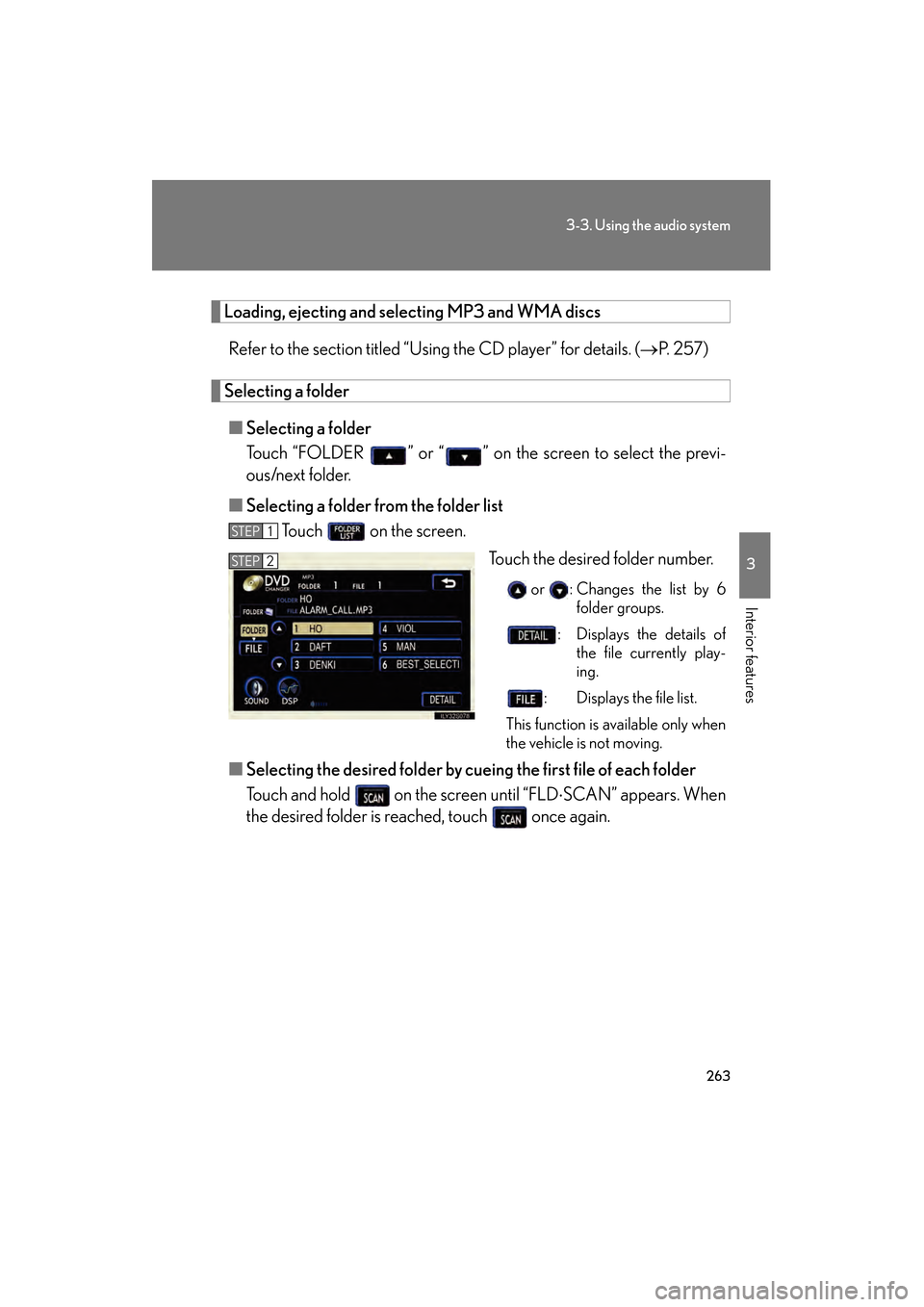
■ Selecting a folder from the folder list
Touch on the screen.
Touch the desired folder number.
or : Changes the list by 6folder groups.
: Displays the details of the file currently play-
ing.
: Displays the file list.
This function is available only when
the vehicle is not moving.
■ Selecting the desired folder by cuei ng the first file of each folder
Touch and hold on the screen until “FLD ⋅SCAN” appears. When
the desired folder is reached, touch once again.
STEP1
STEP2
GS450h_HV_U.book Page 263 Thursday, June 19, 2008 1:44 PM
Page 266 of 599
264
3-3. Using the audio system
GS_HV_U
June 19, 2008 1:15 pm
Selecting and scanning files■ Selecting one fi le at a time
Tu r n o r p r e s s ∧ or ∨ on to select the desired file.
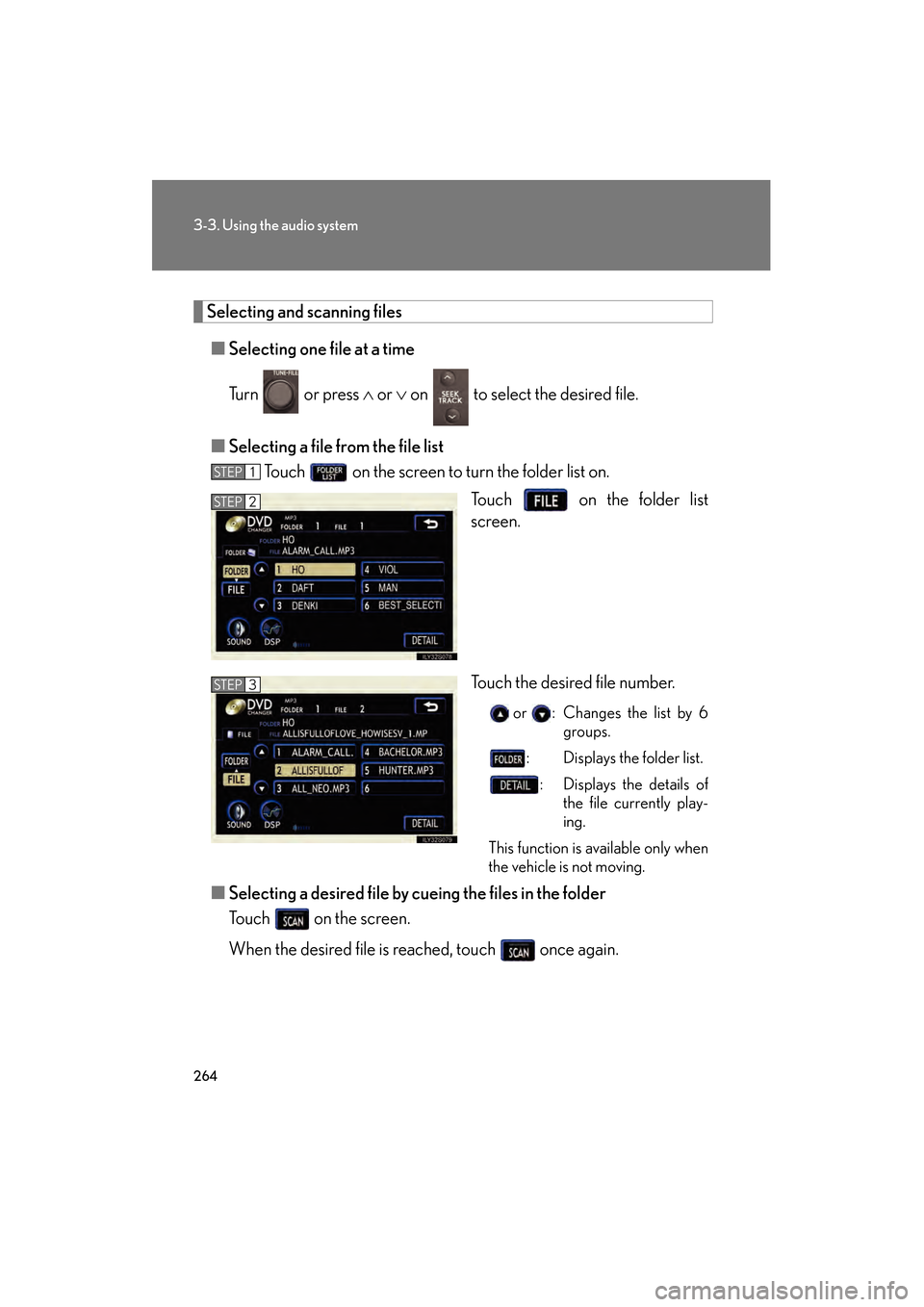
■ Selecting a file fr om the file list
Touch on the screen to turn the folder list on.
Touch on the folder list
screen.
Touch the desired file number.
or : Changes the list by 6groups.
: Displays the folder list.
: Displays the details of the file currently play-
ing.
This function is available only when
the vehicle is not moving.
■ Selecting a desired file by cueing the files in the folder
Touch on the screen.
When the desired file is reached, touch once again.
STEP1
STEP2
STEP3
GS450h_HV_U.book Page 264 Thursday, June 19, 2008 1:44 PM
Page 267 of 599
265
3-3. Using the audio system
3
Interior features
GS_HV_U
June 19, 2008 1:15 pm
File repeatTouch on the screen.
Folder repeatTouch and hold on the screen until the “FLD RPT” appears.
Random playback■ To play files from a particular folder in random order
Touch on the screen.
■ To play all the files on a disc in random order
Touch and hold on the screen until the “FLD RAND” appears.
■Canceling random, repeat and scan playback
Touch , or on the screen once again.
■Error messages
→ P. 2 8 5
GS450h_HV_U.book Page 265 Thursday, June 19, 2008 1:44 PM
Page 268 of 599
266
3-3. Using the audio system
GS_HV_U
June 19, 2008 1:15 pm
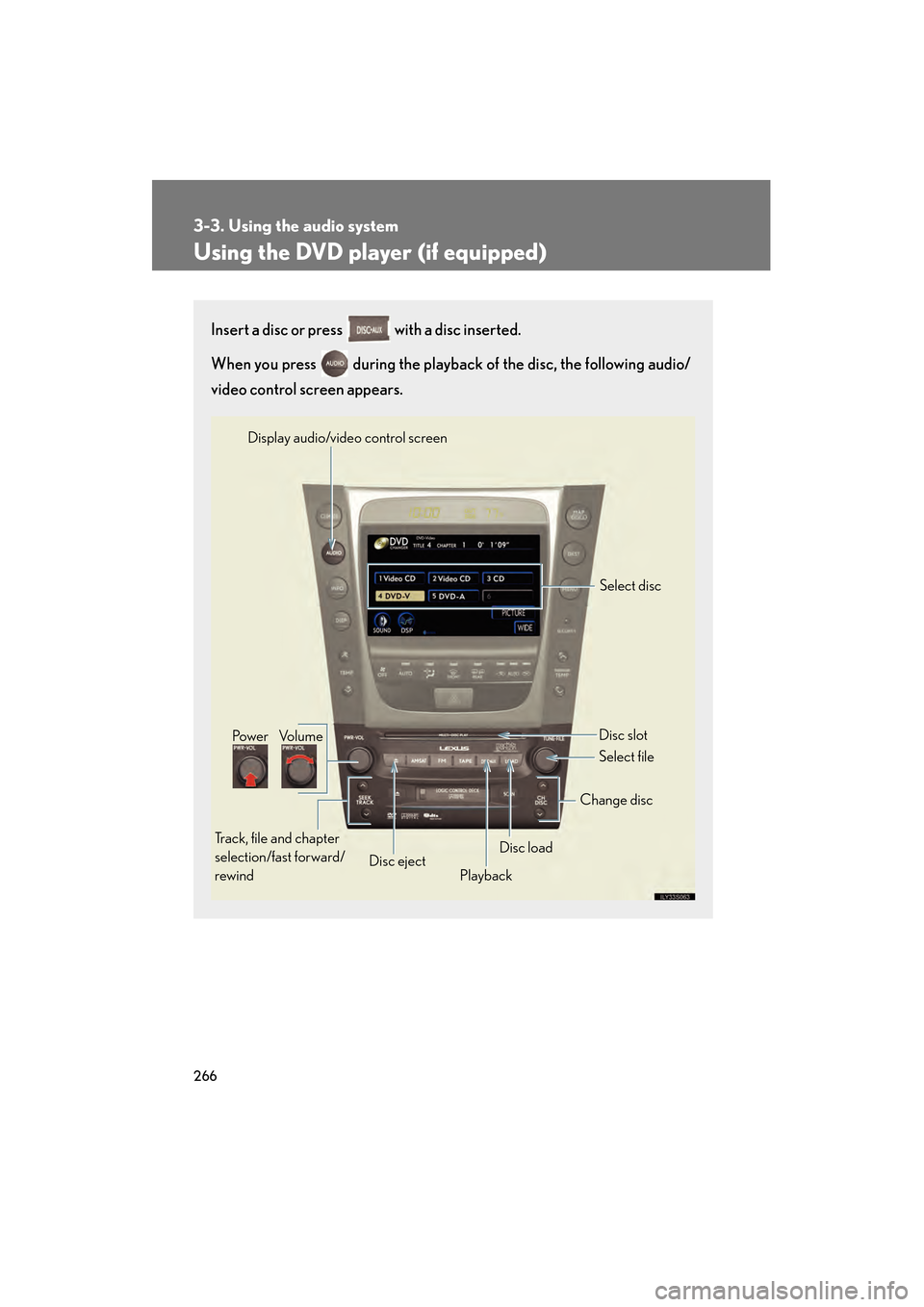
Using the DVD player (if equipped)
Insert a disc or press with a disc inserted.
When you press during the playback of the disc, the following audio/
video control screen appears.
Po w e r Vo l u m e
Track, file and chapter
selection/fast forward/
rewind Disc eject
PlaybackDisc load Change disc
Display audio/video control screen
Select disc
Disc slot
Select file
GS450h_HV_U.book Page 266 Thursday, June 19, 2008 1:44 PM
Page 269 of 599
267
3-3. Using the audio system
3
Interior features
GS_HV_U
June 19, 2008 1:15 pm
Loading a discs■ Loading a single disc
Push .
When the indicator changes from flashing amber to green, insert
a disc after the DVD player door opens.
■ Loading multiple discs
Press and hold until you hear a beep.
When the indicator changes from flashing amber to green, insert
a disc after the DVD player door opens.
After inserting a disc, wait until the indicator changes from flash-
ing amber to green, then insert th e next disc after the DVD player
door has opened.
Repeat steps 2 and 3 until you have inserted all discs.
To cancel the operation, press the or button. If you do not
insert a disc within 15 seconds, loading will be canceled automatically.
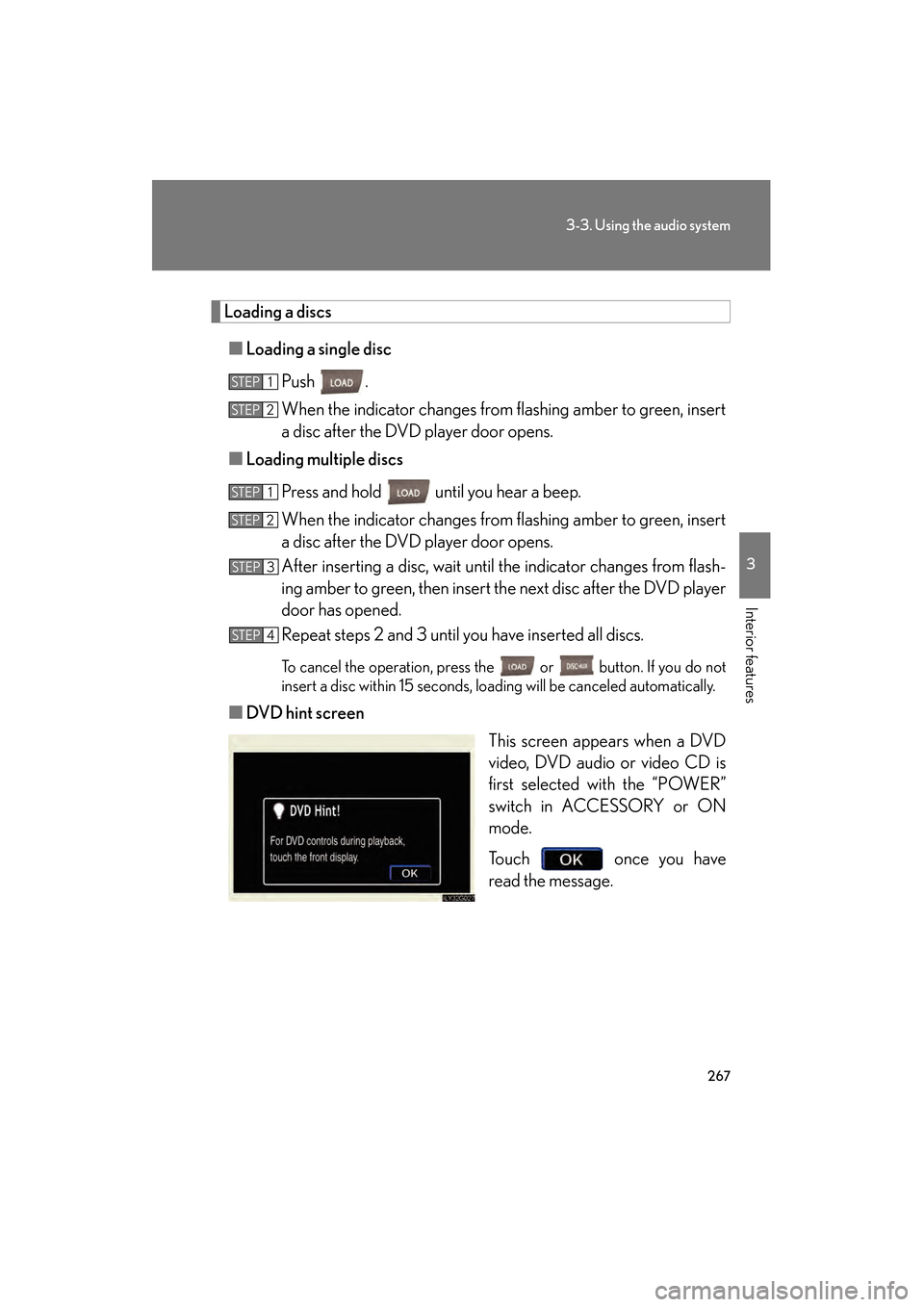
■ DVD hint screen
This screen appears when a DVD
video, DVD audio or video CD is
first selected with the “POWER”
switch in ACCESSORY or ON
mode.
Touch once you have
read the message.
STEP1
STEP2
STEP1
STEP2
STEP3
STEP4
GS450h_HV_U.book Page 267 Thursday, June 19, 2008 1:44 PM
Page 270 of 599
268
3-3. Using the audio system
GS_HV_U
June 19, 2008 1:15 pm
Ejecting discs■ Ejecting a disc
To select the disc to be ejected, touch the desired disc on the
screen or press ∧ or ∨ on .
Press and remove the disc.
■ Ejecting all discs
Press and hold until you hear a beep, then remove the discs.
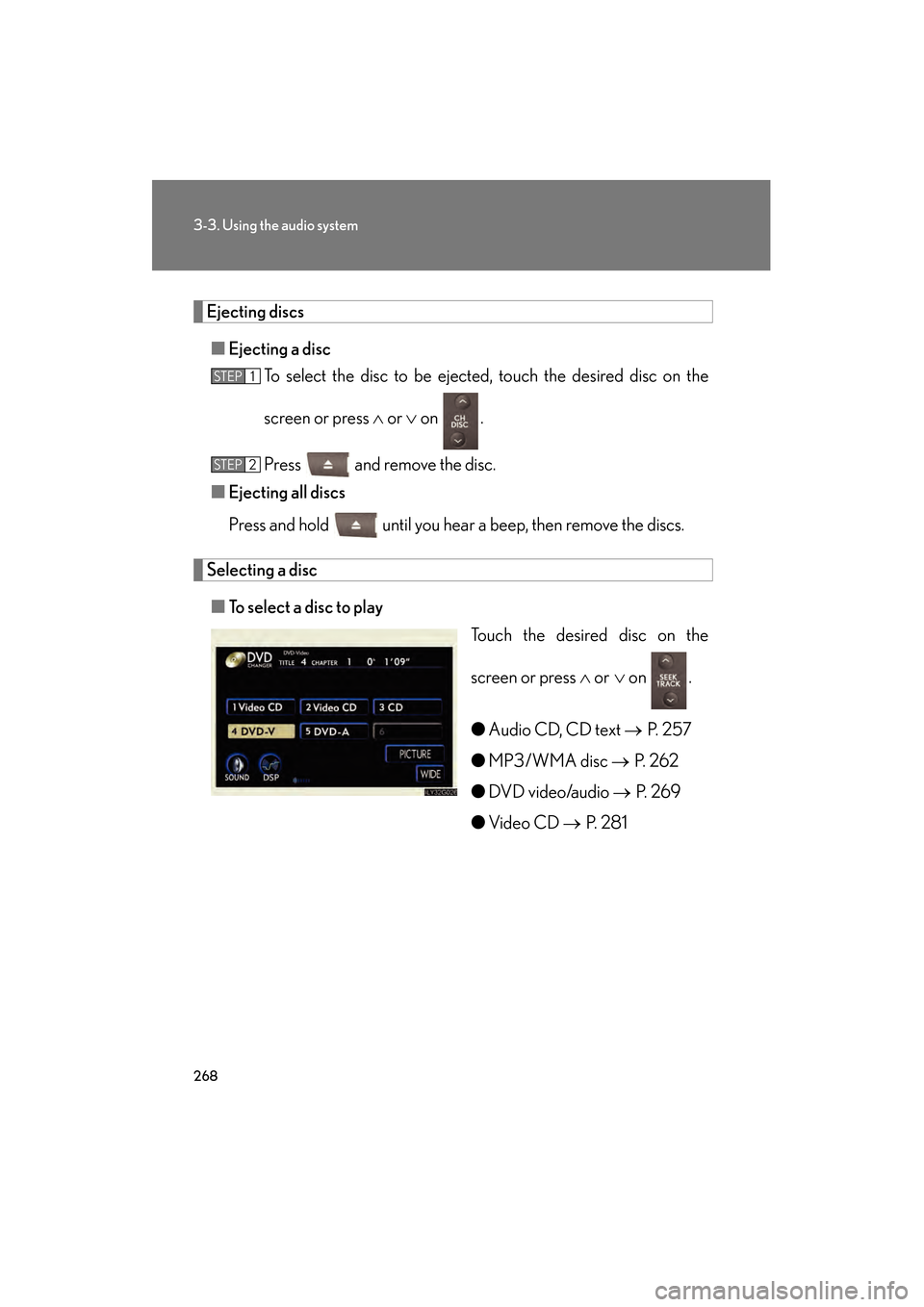
Selecting a disc
■ To select a disc to play
Touch the desired disc on the
screen or press ∧ or ∨ on .
● Audio CD, CD text → P. 2 5 7
● MP3/WMA disc → P. 2 6 2
● DVD video/audio → P. 2 6 9
● Video CD → P. 2 8 1
STEP1
STEP2
GS450h_HV_U.book Page 268 Thursday, June 19, 2008 1:44 PM
Page 271 of 599
269
3-3. Using the audio system
3
Interior features
GS_HV_U
June 19, 2008 1:15 pm
Playing DVD video/audio
For safety reasons, you can enjoy the visual contents of discs only when the
vehicle is completely stopped with the “POWER” switch in ACCESSORY
or ON mode and the parking brake applied. While you are driving, only
audio contents may be played.
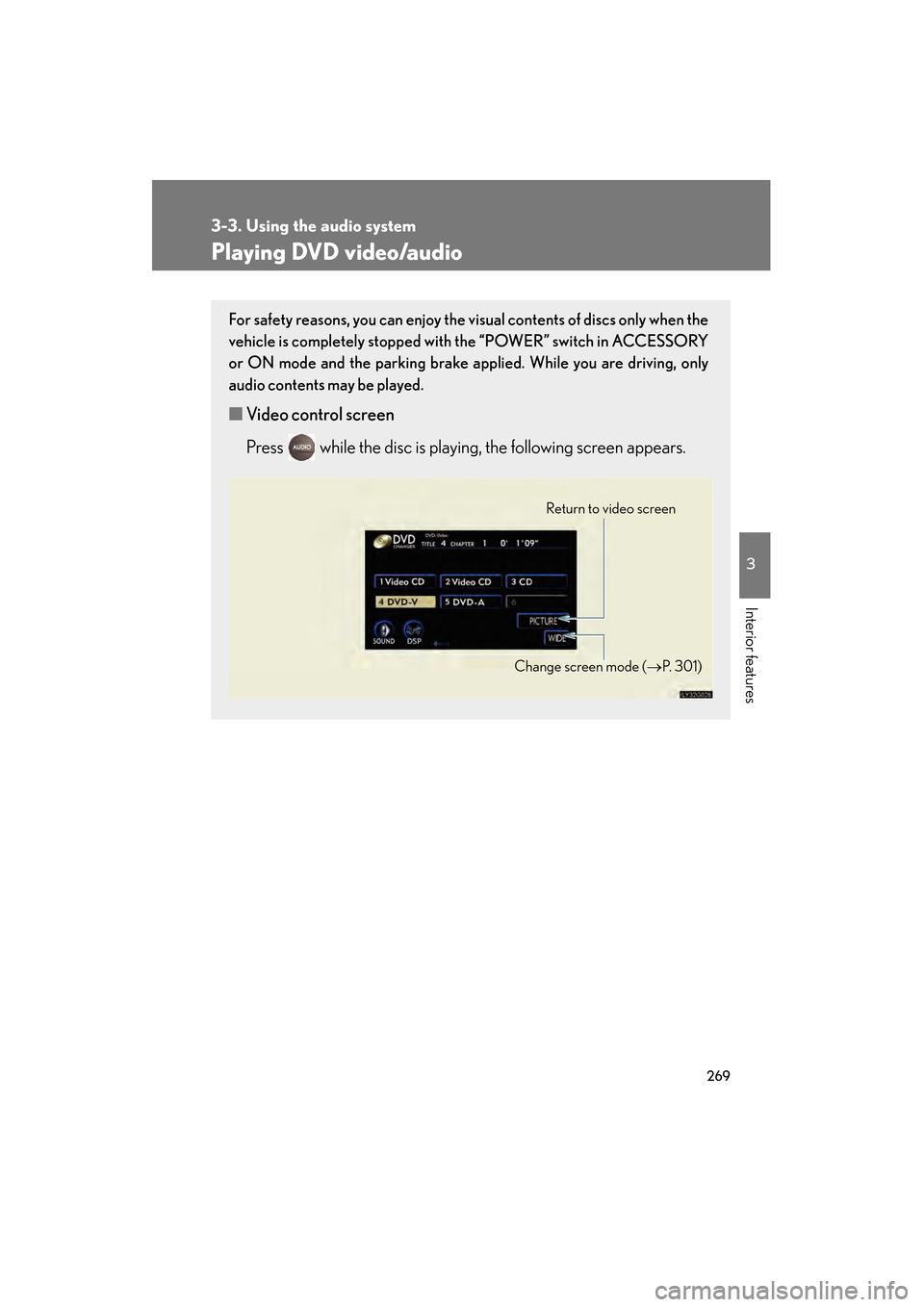
■Video control screen
Press while the disc is playing, the following screen appears.
Return to video screen
Change screen mode ( →P. 3 0 1 )
GS450h_HV_U.book Page 269 Thursday, June 19, 2008 1:44 PM
Page 272 of 599
270
3-3. Using the audio system
GS_HV_U
June 19, 2008 1:15 pm
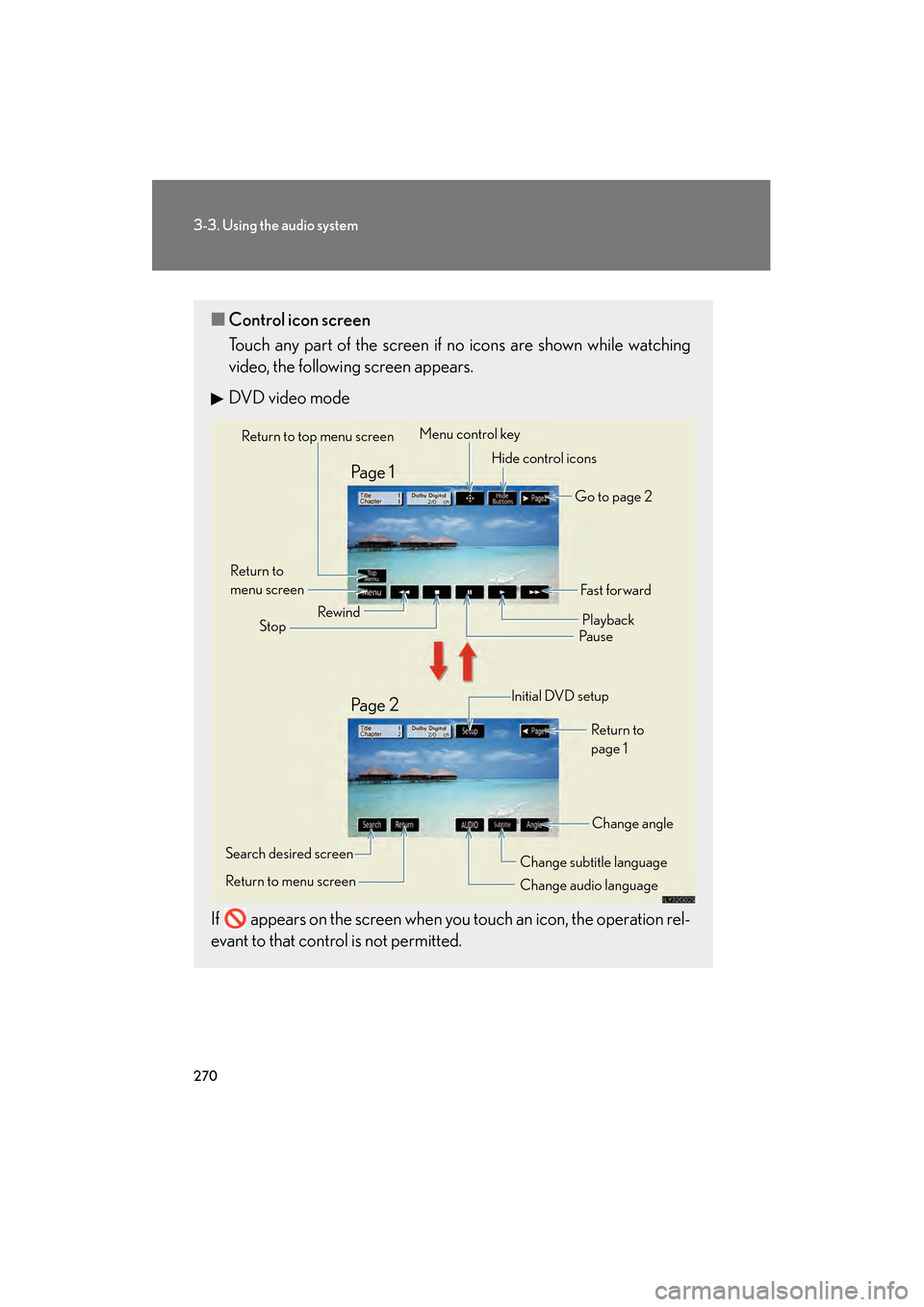
■Control icon screen
Touch any part of the screen if no icons are shown while watching
video, the following screen appears.
DVD video mode
If appears on the screen when you touch an icon, the operation rel-
evant to that control is not permitted.
Return to top menu screen Hide control icons
Return to
menu screen Rewind
Stop Fa s t f o r wa rd
Playback
Pau s e
Menu control key
Go to page 2
Search desired screen
Return to menu screen Change audio language Change subtitle language
Initial DVD setup
Return to
page 1
Change angle
Pa g e 2 Pa g e 1
GS450h_HV_U.book Page 270 Thursday, June 19, 2008 1:44 PM
Page 273 of 599
271
3-3. Using the audio system
3
Interior features
GS_HV_U
June 19, 2008 1:15 pm
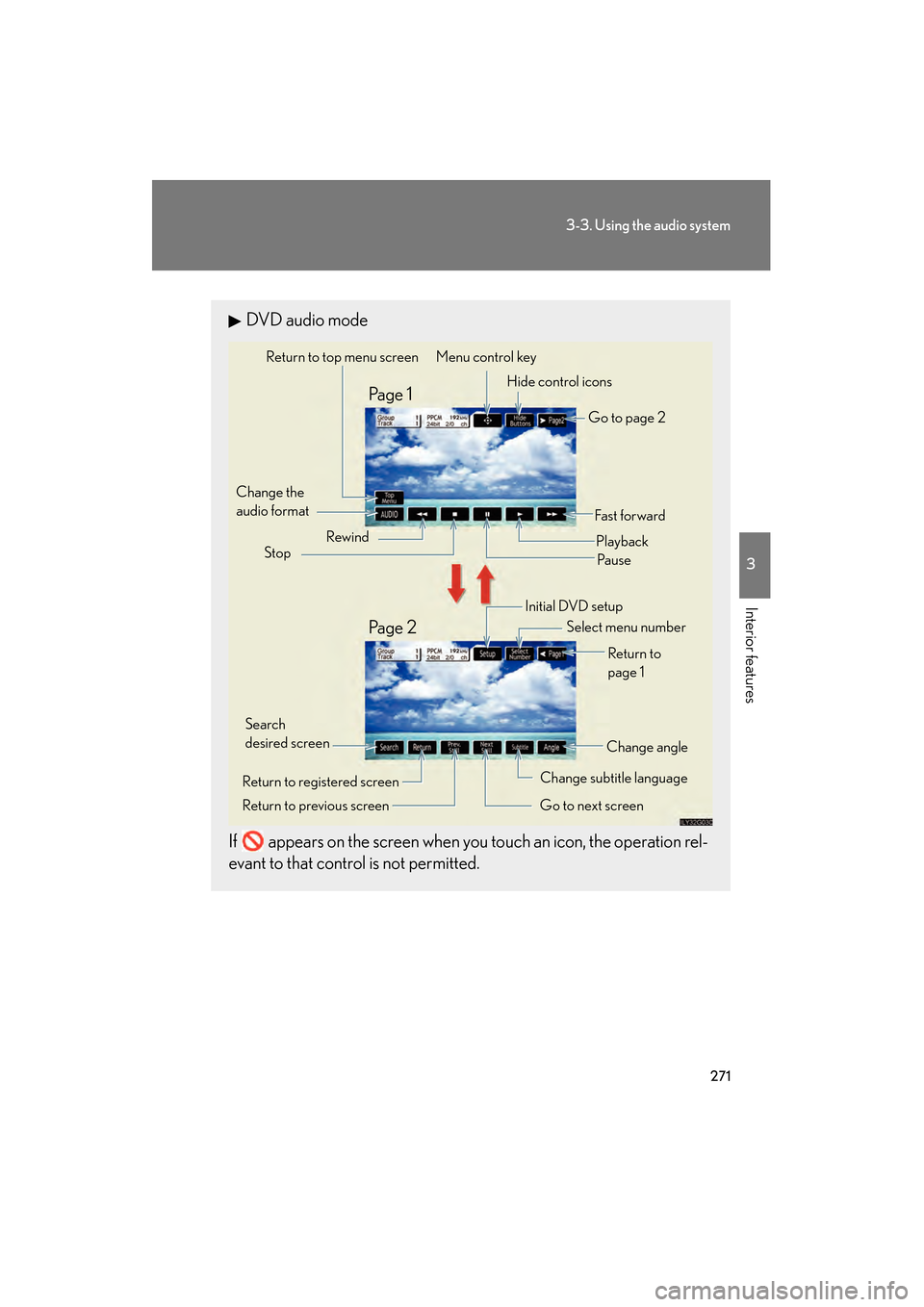
DVD audio mode
If appears on the screen when you touch an icon, the operation rel-
evant to that control is not permitted.
Change the
audio format Change angle
Initial DVD setup
Select menu number
Return to
page 1
Change subtitle language
Return to previous screen Go to next screen
Return to registered screen Return to top menu screen
Hide control icons
Rewind
Stop Fast for ward
PlaybackPa u s e
Go to page 2
Search
desired screen Menu control key
Pa g e 2 Pa g e 1
GS450h_HV_U.book Page 271 Thursday, June 19, 2008 1:44 PM