phone Lexus GS450h 2008 Owner's Guide
[x] Cancel search | Manufacturer: LEXUS, Model Year: 2008, Model line: GS450h, Model: Lexus GS450h 2008Pages: 599, PDF Size: 14.28 MB
Page 330 of 599
328
3-4. Using the hands-free system (for cellular phone)
GS_HV_U
June 19, 2008 1:15 pm
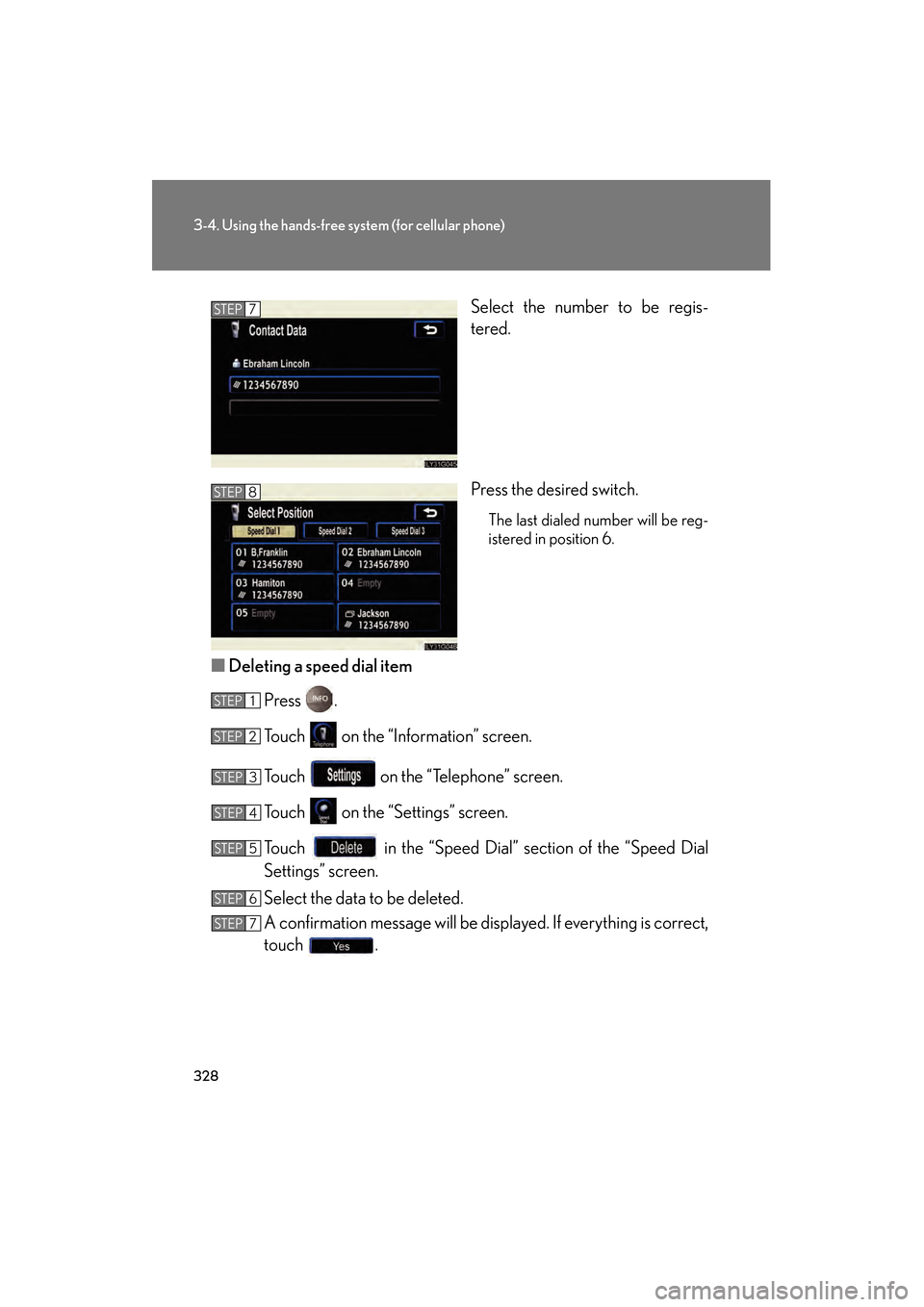
Select the number to be regis-
tered.
Press the desired switch.
The last dialed number will be reg-
istered in position 6.
■Deleting a speed dial item
Press .
Touch on the “Information” screen.
Touch on the “Telephone” screen.
Touch on the “Settings” screen.
Touch in the “Speed Dial” section of the “Speed Dial
Settings” screen.
Select the data to be deleted.
A confirmation message will be displayed. If everything is correct,
touch .
STEP7
STEP8
STEP1
STEP2
STEP3
STEP4
STEP5
STEP6
STEP7
GS450h_HV_U.book Page 328 Thursday, June 19, 2008 1:44 PM
Page 331 of 599
329
3-4. Using the hands-free system (for cellular phone)
3
Interior features
GS_HV_U
June 19, 2008 1:15 pm
Registering/Editing/Deleting a Speed Tone■ Registering a speed tone
You can register up to 6 items.
Press .
Touch on the “Information” screen.
Touch on the “Telephone” screen.
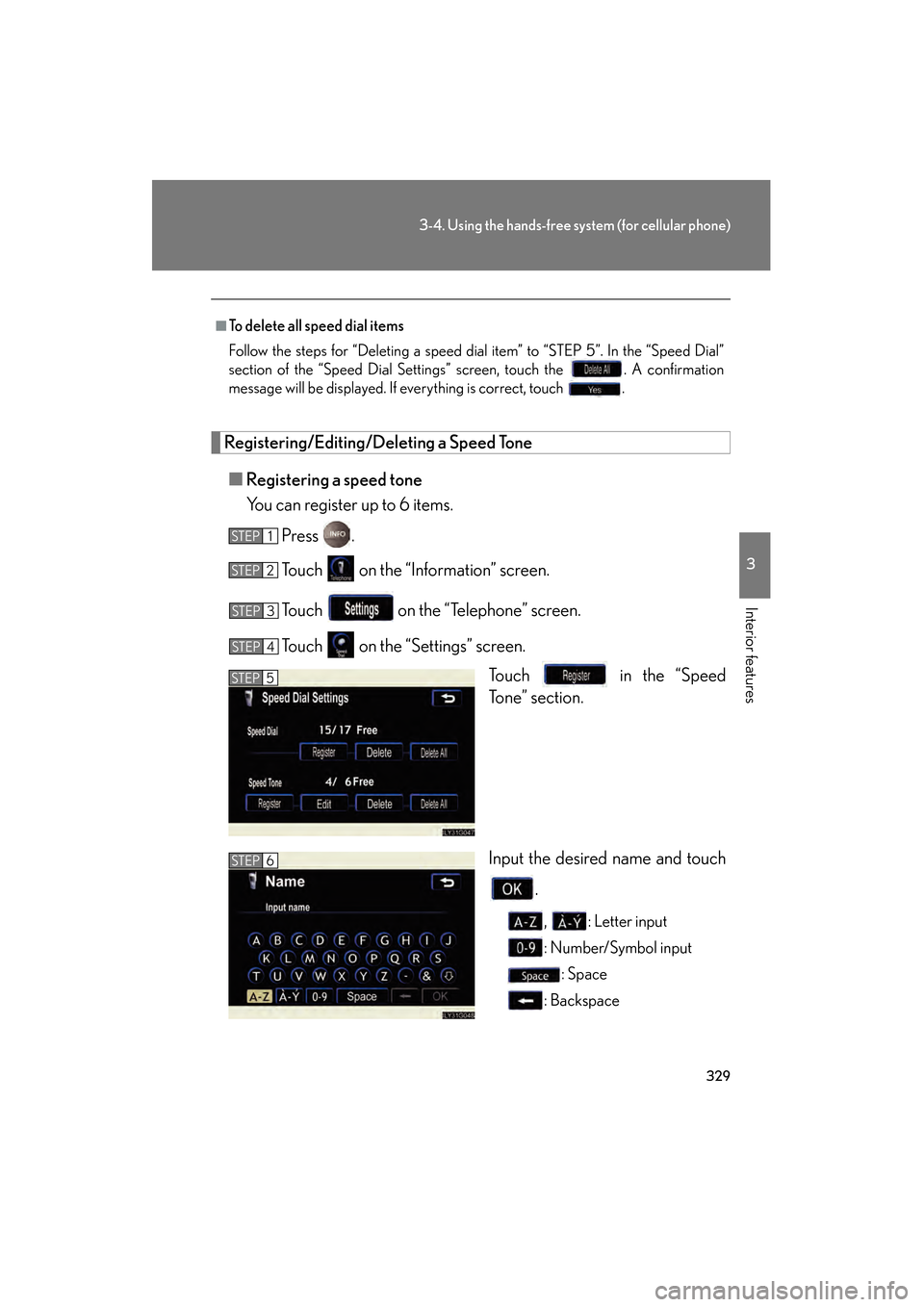
Touch on the “Settings” screen. Touch in the “Speed
Tone” section.
Input the desired name and touch
.
, : Letter input
: Number/Symbol input: Space
: Backspace
■To delete all speed dial items
Follow the steps for “Deleting a speed dial item” to “STEP 5”. In the “Speed Dial”
section of the “Speed Dial Settings” screen, touch the . A confirmation
message will be displayed. If everything is correct, touch .
STEP1
STEP2
STEP3
STEP4
STEP5
STEP6
GS450h_HV_U.book Page 329 Thursday, June 19, 2008 1:44 PM
Page 332 of 599
330
3-4. Using the hands-free system (for cellular phone)
GS_HV_U
June 19, 2008 1:15 pm
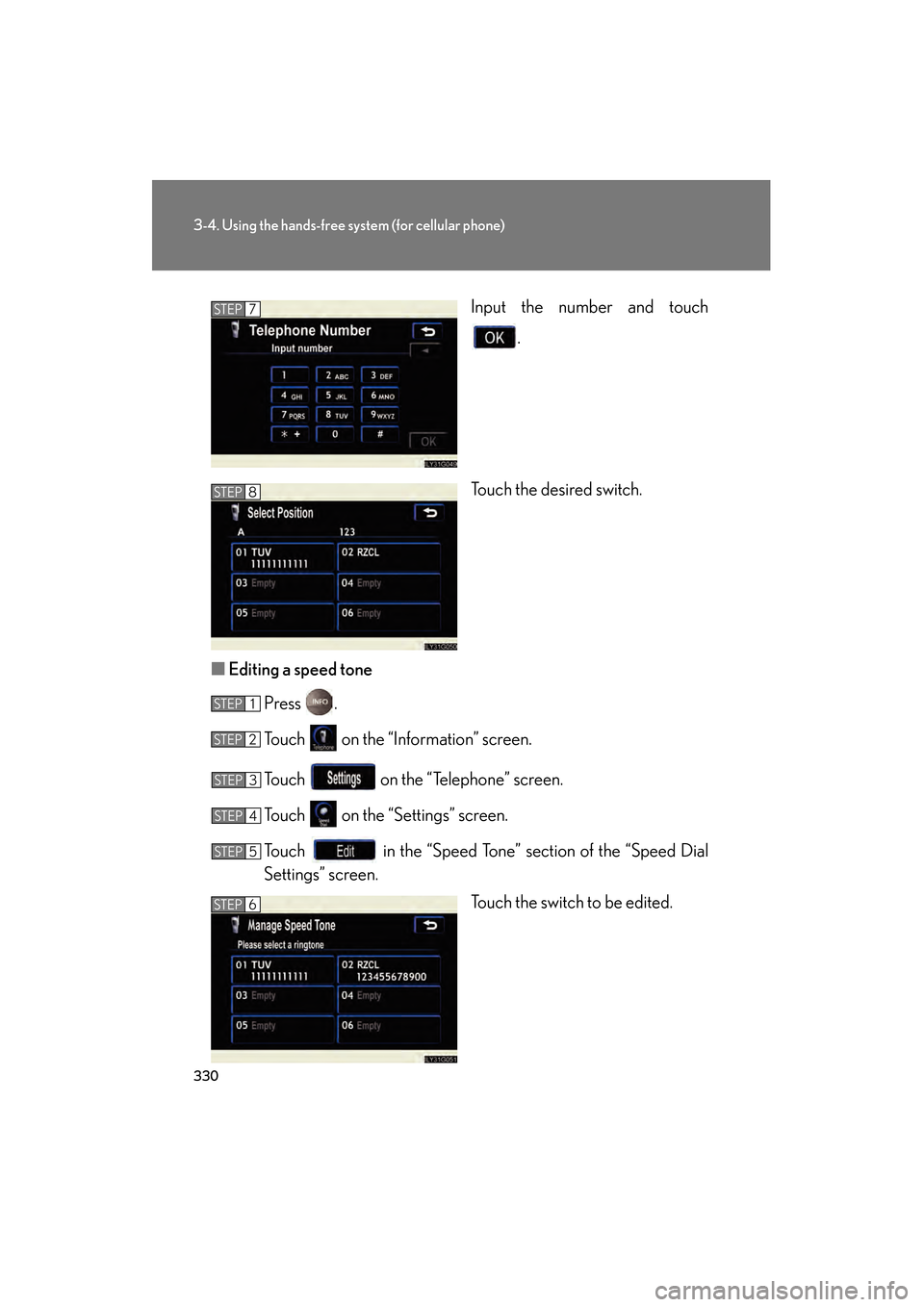
Input the number and touch
.
Touch the desired switch.
■ Editing a speed tone
Press .
Touch on the “Information” screen.
Touch on the “Telephone” screen.
Touch on the “Settings” screen.
Touch in the “Speed Tone” section of the “Speed Dial
Settings” screen. Touch the switch to be edited.STEP7
STEP8
STEP1
STEP2
STEP3
STEP4
STEP5
STEP6
GS450h_HV_U.book Page 330 Thursday, June 19, 2008 1:44 PM
Page 333 of 599
331
3-4. Using the hands-free system (for cellular phone)
3
Interior features
GS_HV_U
June 19, 2008 1:15 pm
Input the name and touch .
Input the number and touch .
■ Deleting a speed tone
Press .
Touch on the “Information” screen.
Touch on the “Telephone” screen.
Touch on the “Settings” screen.
Touch in the “Speed Tone” section of the “Speed Dial
Settings” screen.
Choose the data to delete.
A confirmation message will be displayed. If everything is correct,
touch .
■To delete all speed tone data
Follow the steps “Deleting a speed tone” to “STEP 5”. In the “Speed Tone” section,
touch . A confirmation message will be displayed. If everything is correct,
touch .
STEP7
STEP8
STEP1
STEP2
STEP3
STEP4
STEP5
STEP6
STEP7
GS450h_HV_U.book Page 331 Thursday, June 19, 2008 1:44 PM
Page 334 of 599
332
3-4. Using the hands-free system (for cellular phone)
GS_HV_U
June 19, 2008 1:15 pm
Setting the volume
Press .
Touch on the “Information” screen.
Touch on the “Telephone” screen.
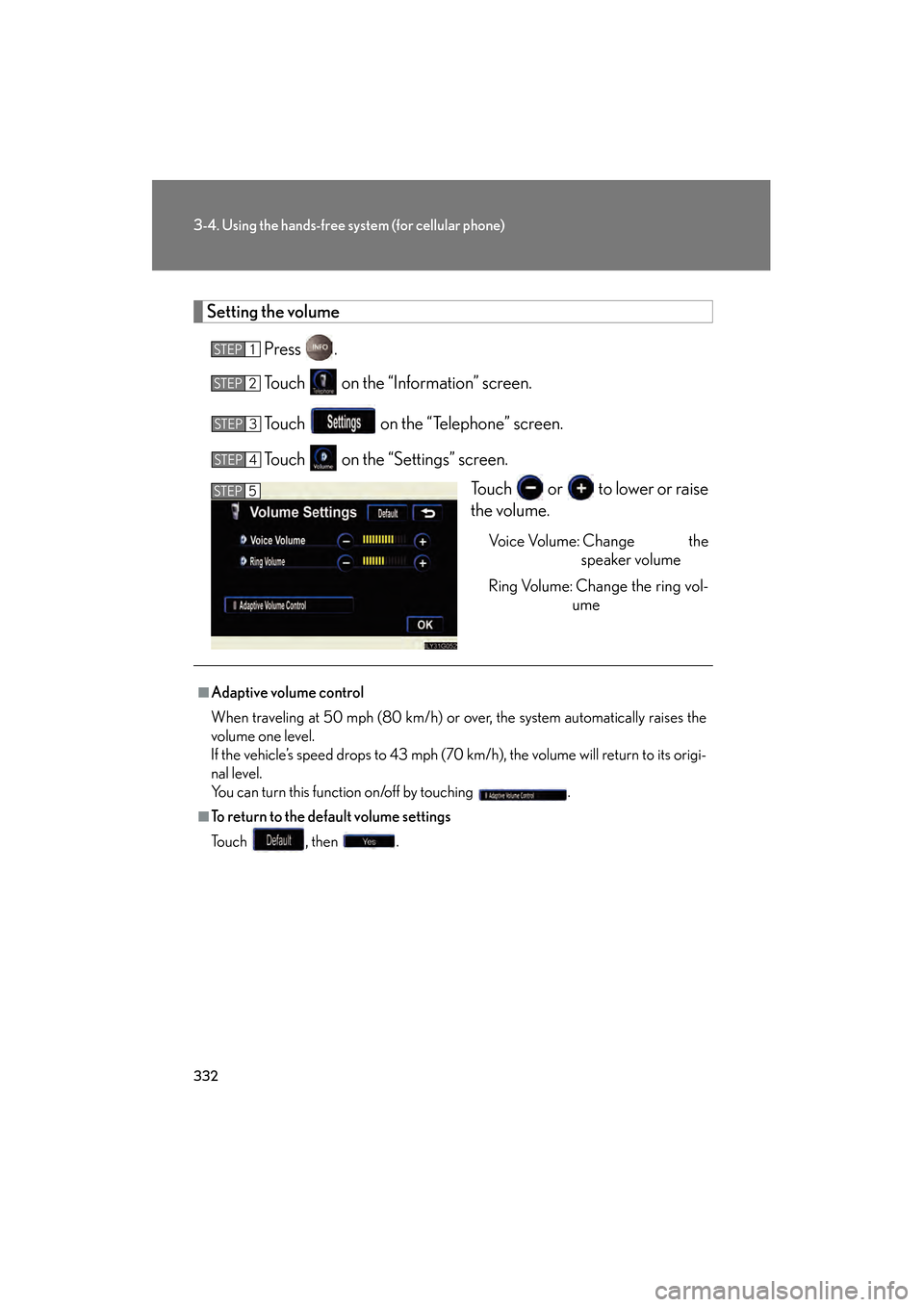
Touch on the “Settings” screen. Touch or to lower or raise
the volume.
Voice Volume: Change thespeaker volume
Ring Volume: Change the ring vol- ume
STEP1
STEP2
STEP3
STEP4
STEP5
■Adaptive volume control
When traveling at 50 mph (80 km/h) or over, the system automatically raises the
volume one level.
If the vehicle’s speed drops to 43 mph (70 km/h), the volume will return to its origi-
nal level.
You can turn this function on/off by touching .
■To return to the default volume settings
To u c h , t h e n .
GS450h_HV_U.book Page 332 Thursday, June 19, 2008 1:44 PM
Page 335 of 599
333
3-4. Using the hands-free system (for cellular phone)
3
Interior features
GS_HV_U
June 19, 2008 1:15 pm
Changing the screen settingsPress .
Touch on the “Information” screen.
Touch on the “Telephone” screen.
Touch on the “Settings” screen.
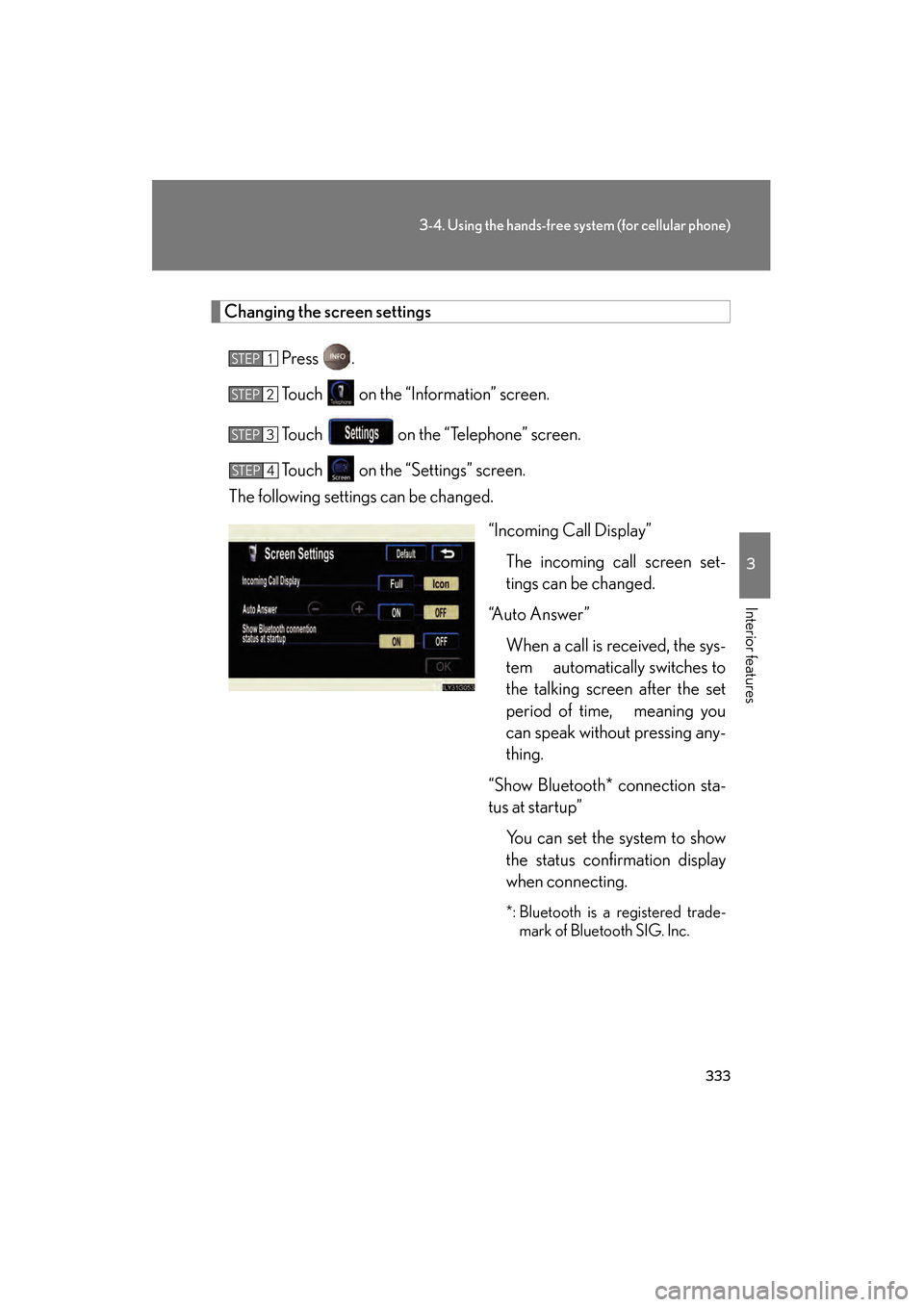
The following settings can be changed.
“Incoming Call Display”The incoming call screen set-
tings can be changed.
“Auto Answer”
When a call is received, the sys-
tem automatically switches to
the talking screen after the set
period of time, meaning you
can speak without pressing any-
thing.
“Show Bluetooth* connection sta-
tus at startup” You can set the system to show
the status confirmation display
when connecting.
*: Bluetooth is a registered trade-mark of Bluetooth SIG. Inc.
STEP1
STEP2
STEP3
STEP4
GS450h_HV_U.book Page 333 Thursday, June 19, 2008 1:44 PM
Page 336 of 599
334
3-4. Using the hands-free system (for cellular phone)
GS_HV_U
June 19, 2008 1:15 pm
■“Incoming Call Display” settings
Select the desired switch.
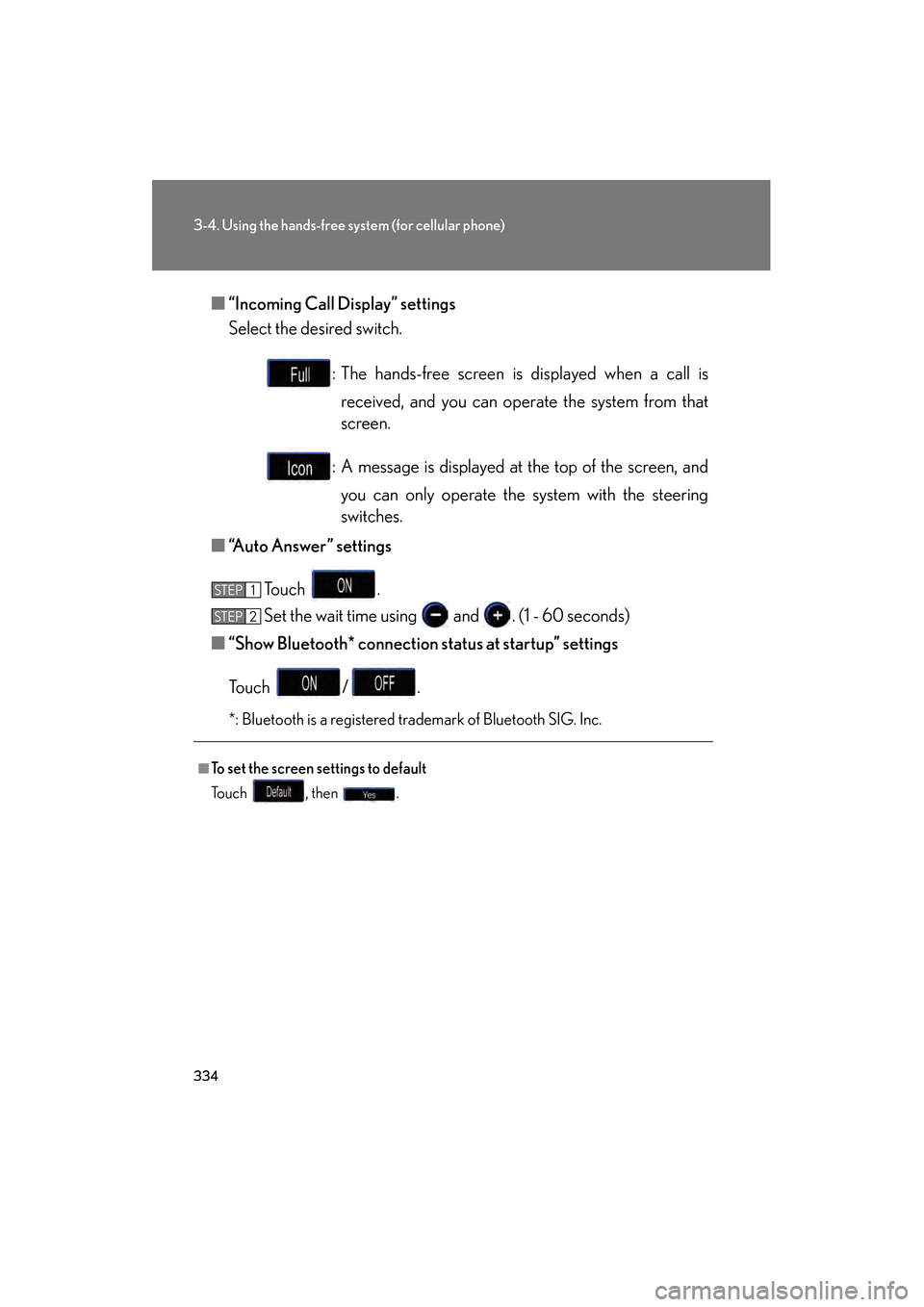
: The hands-free screen is displayed when a call isreceived, and you can operate the system from that
screen.
: A message is displayed at the top of the screen, and you can only operate the system with the steering
switches.
■ “Auto Answer” settings
Touch .
Set the wait time using and . (1 - 60 seconds)
■ “Show Bluetooth* connection status at startup” settings
Touch / .
*: Bluetooth is a registered trademark of Bluetooth SIG. Inc.
■To set the screen settings to default
To u c h , t h e n .
STEP1
STEP6STEP2
GS450h_HV_U.book Page 334 Thursday, June 19, 2008 1:44 PM
Page 337 of 599
335
3-4. Using the hands-free system (for cellular phone)
3
Interior features
GS_HV_U
June 19, 2008 1:15 pm
Phone book settingsUp to 1000 names, 2 items per name, can be registered.
■ Transferring mobile phone data
Press .
Touch on the “Information” screen.
Touch on the “Telephone” screen.
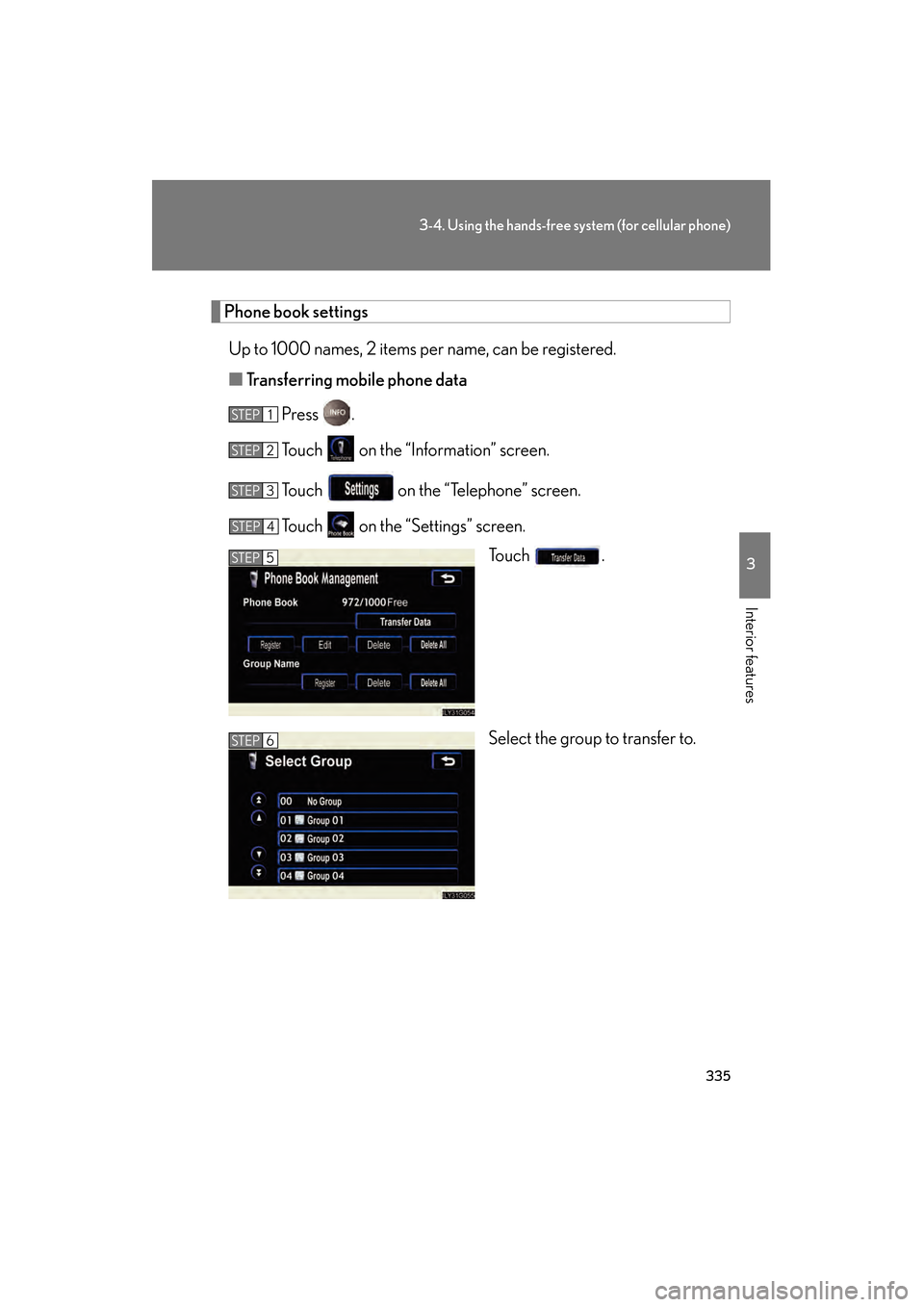
Touch on the “Settings” screen. To u c h .
Select the group to transfer to.
STEP1
STEP2
STEP3
STEP4
STEP5
STEP6
GS450h_HV_U.book Page 335 Thursday, June 19, 2008 1:44 PM
Page 338 of 599
336
3-4. Using the hands-free system (for cellular phone)
GS_HV_U
June 19, 2008 1:15 pm
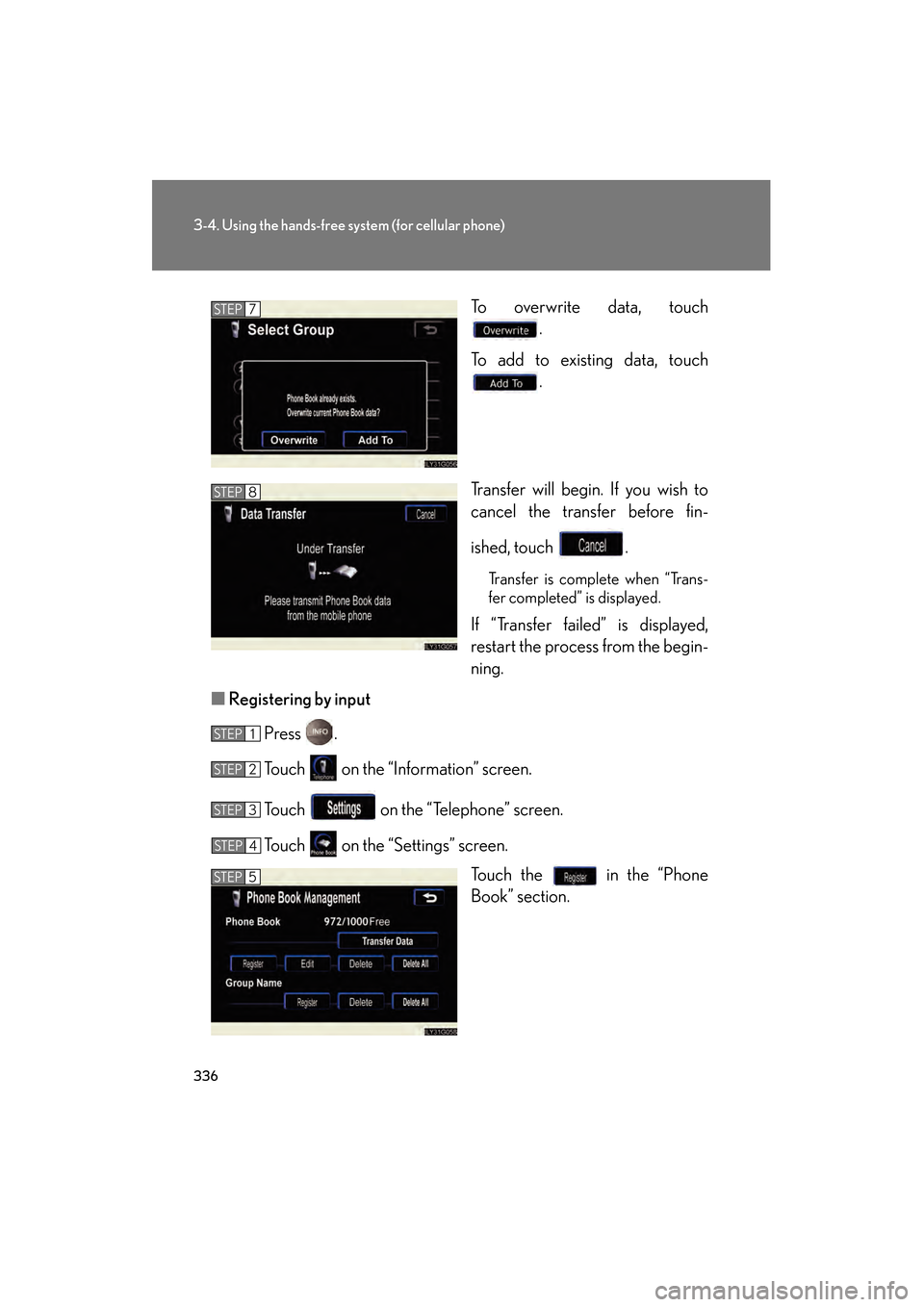
To overwrite data, touch
.
To add to existing data, touch .
Transfer will begin. If you wish to
cancel the transfer before fin-
ished, touch .
Transfer is complete when “Trans-
fer completed” is displayed.
If “Transfer failed” is displayed,
restart the process from the begin-
ning.
■ Registering by input
Press .
Touch on the “Information” screen.
Touch on the “Telephone” screen.
Touch on the “Settings” screen. Touch the in the “Phone
Book” section.
STEP7
STEP8
STEP1
STEP2
STEP3
STEP4
STEP5
GS450h_HV_U.book Page 336 Thursday, June 19, 2008 1:44 PM
Page 339 of 599
337
3-4. Using the hands-free system (for cellular phone)
3
Interior features
GS_HV_U
June 19, 2008 1:15 pm
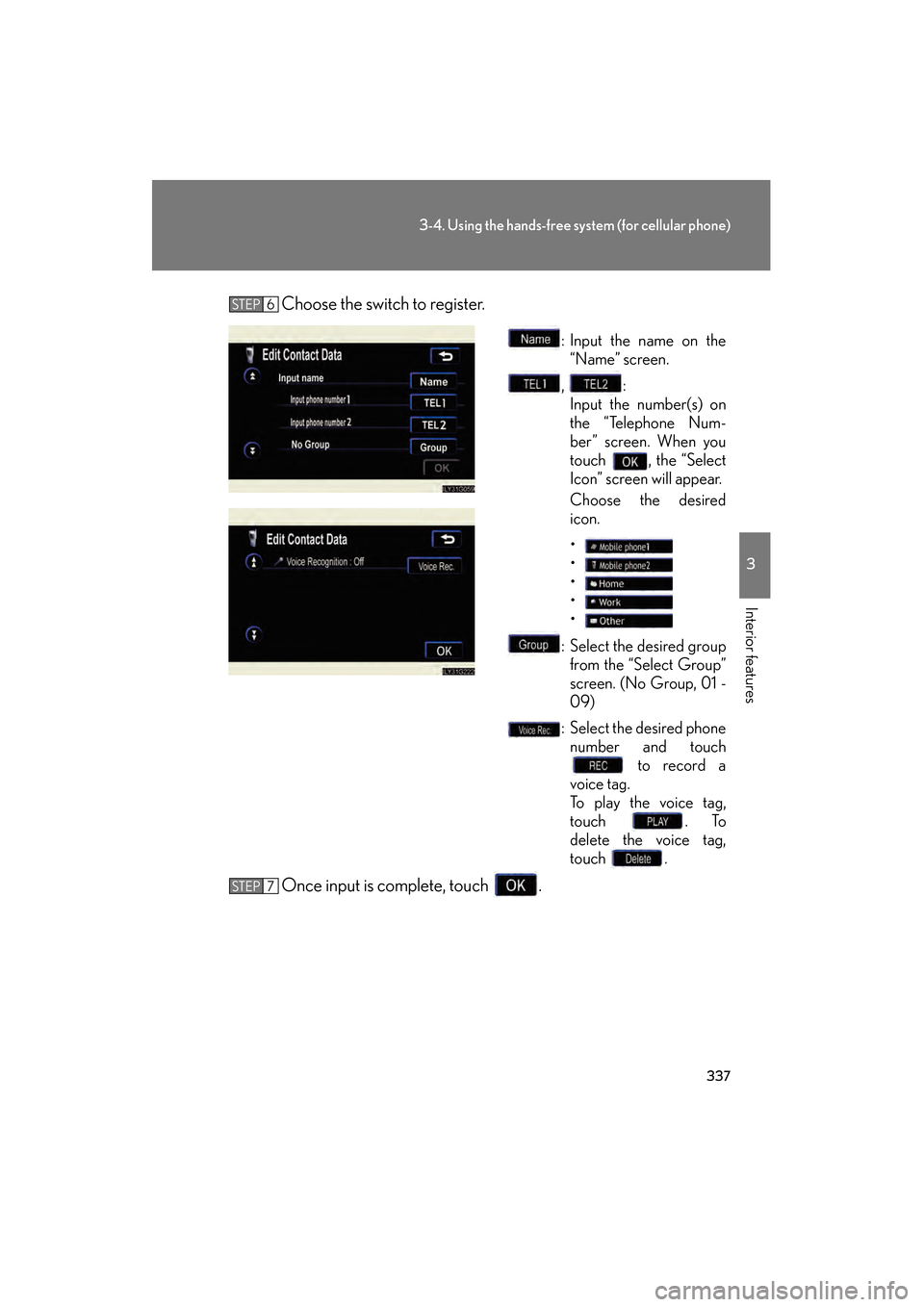
Choose the switch to register.
: Input the name on the“Name” screen.
, : Input the number(s) on
the “Telephone Num-
ber” screen. When you
touch , the “Select
Icon” screen will appear.
Choose the desired
icon.
•
•
•
•
•
: Select the desired group from the “Select Group”
screen. (No Group, 01 -
09)
: Select the desired phone number and touch to record a
voice tag.
To p l a y t h e v o i c e t a g ,
touch . To
delete the voice tag,
touch .
Once input is complete, touch .
STEP6
STEP7
GS450h_HV_U.book Page 337 Thursday, June 19, 2008 1:44 PM