change time Lexus GS450h 2009 Owner's Guide
[x] Cancel search | Manufacturer: LEXUS, Model Year: 2009, Model line: GS450h, Model: Lexus GS450h 2009Pages: 622
Page 371 of 622
370
3-5. Using the interior lights
GS_HV_U (OM30B44U)
April 27, 2009 10:09 am
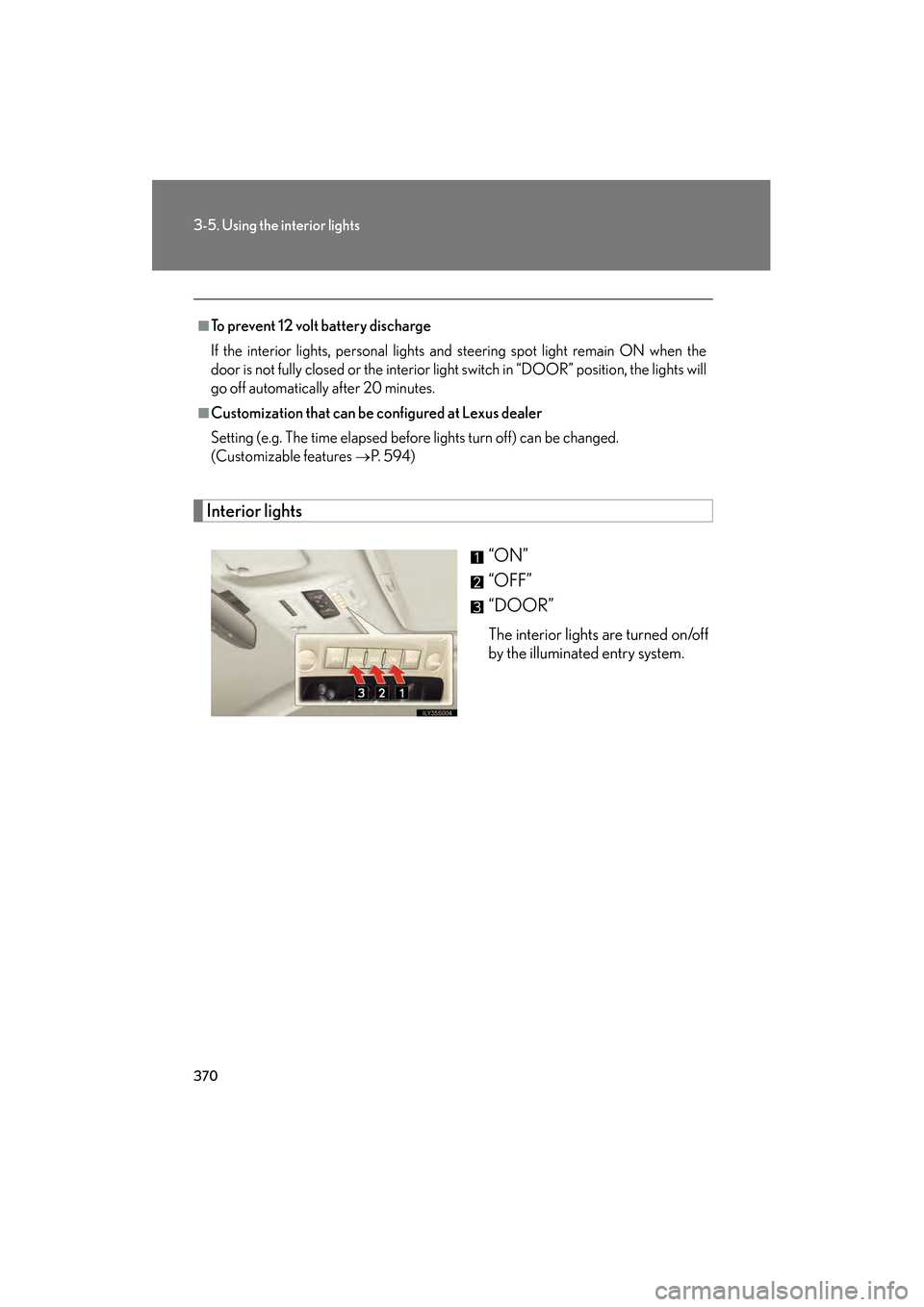
Interior lights“ON”
“OFF”
“DOOR”
The interior lights are turned on/off
by the illuminated entry system.
■To prevent 12 volt battery discharge
If the interior lights, personal lights and steering spot light remain ON when the
door is not fully closed or the interior light switch in “DOOR” position, the lights will
go off automatically after 20 minutes.
■Customization that can be configured at Lexus dealer
Setting (e.g. The time elapsed before lights turn off) can be changed.
(Customizable features
→P. 5 9 4 )
GS450h_HV_U.book Page 370 Monday, April 27, 2009 10:10 AM
Page 391 of 622
390
3-7. Other interior features
GS_HV_U (OM30B44U)
April 27, 2009 10:09 am
■After the “POWER” switch is turned to OFF
The rear sunshade can be raised and lowered for approximately 1 minute.
■Customization that can be configured at Lexus dealer
Time elapsed before the reverse operation feature activates can be changed.
(Customizable features
→P. 5 9 4 )
CAUTION
■When the rear sunshade is being raised or lowered
Do not place fingers or other objects in the fastener section or in the opening.
They may get caught, causing injury.
NOTICE
■To prevent 12 volt battery discharge
Do not operate the rear sunshade when the hybrid system is off.
■To ensure normal operation of the sunshade
Observe the following precautions.
●Do not place excessive load on the motor or other components.
●Do not place objects where they may hinder opening and closing operations.
●Do not attach items to the rear sunshade.
●Keep the opening clean and clear of obstructions.
●Do not operate the rear sunshade continuously over long periods of time.
GS450h_HV_U.book Page 390 Monday, April 27, 2009 10:10 AM
Page 416 of 622
415
3-7. Other interior features
3
Interior features
GS_HV_U (OM30B44U)
April 27, 2009 10:09 am
●Tips for entering a phone number using the “Dial” and “Store” commands
• You do not need to say “Dial”, “Store” or “Verify” after the phone number.
• If the phone number entered is not 7, 10, or 11 digits, use the “Dial” or “Store”command.
• Do not pause between the digits.
• Speech recognition does not recognize the words “Hundred” or “Thousand”. Instead, say each digit.
• Speech recognition often works better when the digits are combined
smoothly into a single phrase.
• If the system does not recognize your command properly, use the “Digit dial” command to enter one digit at a time.
●If problems continue
• Say each one of the syllables in the word clearly.
• Be sure to articulate each sound in the word.
• If the system is confusing 2 commands that are similar, be sure to pronounce
the distinction.
• Avoid clipping short words and syllables.
• Try speaking louder to prevent background noise from drowning out your voice.
●Audible voice prompts
Some of the voice guidance instructions can be changed to Spanish. Press the
button and ask a Lexus Link Advisor.
■Information on Advanced Services
See the Lexus Link area of the Lexus website at www.lexus.com/lexuslink/
or call
the Lexus Link Call Center at 1-800-25-LEXUS (1-800-255-3987) (toll-free) for
more information.
GS450h_HV_U.book Page 415 Monday, April 27, 2009 10:10 AM
Page 417 of 622
416
3-7. Other interior features
GS_HV_U (OM30B44U)
April 27, 2009 10:09 am
■Certification for the Lexus Link System
NOTE:
This device complies with Part 15 of the FCC Rules. Operation is subject to the fol-
lowing two conditions: (1) this device may not cause harmful interference and (2)
this device must accept any interference received, including interference that may
cause undesired operation.
FCC WARNING:
Changes or modifications in construction not expressly approved by the party
responsible for compliance could void the user’s authority to operate the equip-
ment.
Radio Frequency Exposure. This device is approved for Mobile Application only
and, to comply with applicable FCC radio frequency exposure regulations, must be
used with a distance of at least 7.9 in. (20 cm) between the antenna and the body of
any person at all time during use.
FCC ID: SCWTR-423-A2
GS450h_HV_U.book Page 416 Monday, April 27, 2009 10:10 AM
Page 543 of 622
542
5-2. Steps to take in an emergency
GS_HV_U (OM30B44U)
April 27, 2009 10:09 am
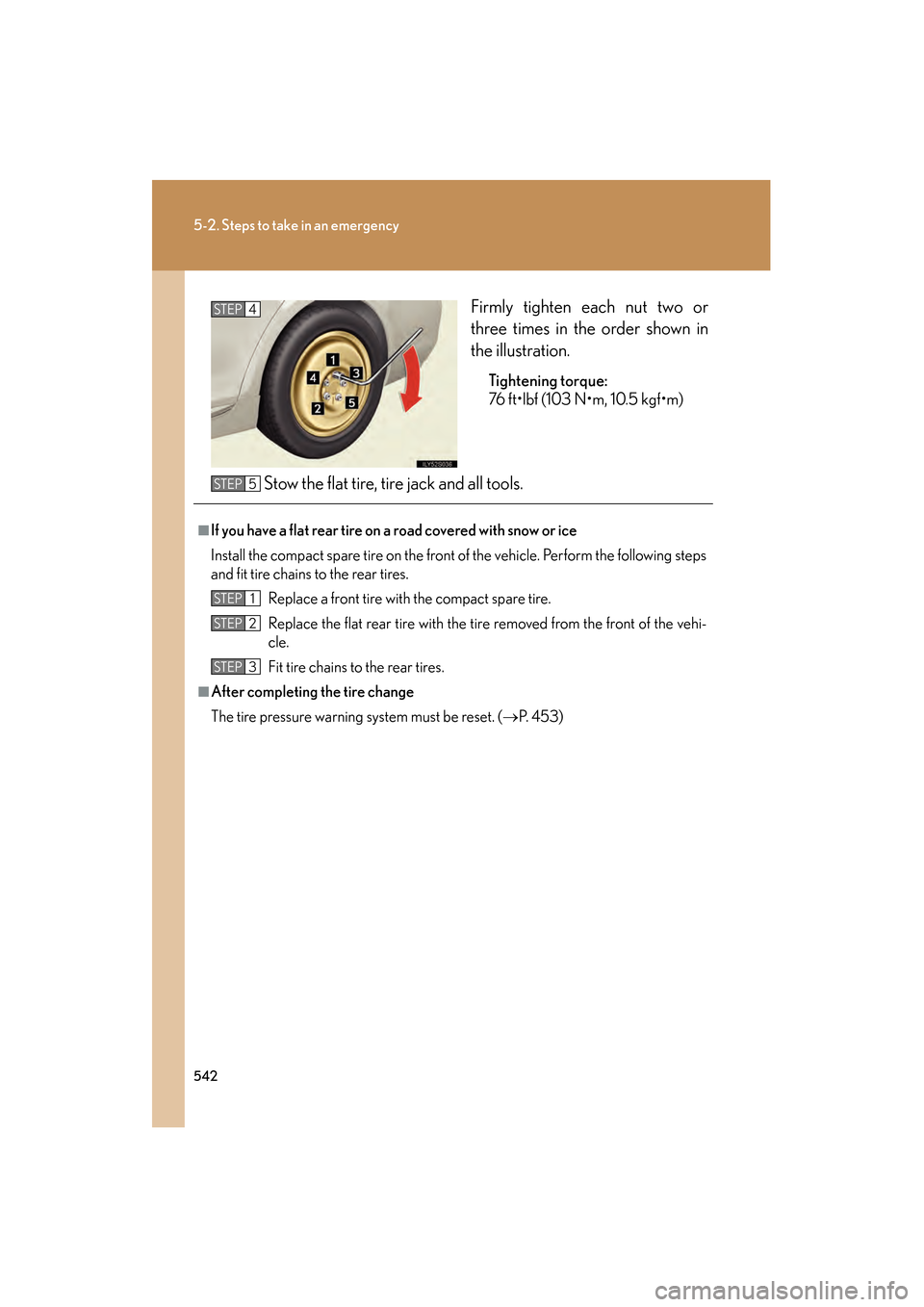
Firmly tighten each nut two or
three times in the order shown in
the illustration.
Tightening torque:
76 ft•lbf (103 N•m, 10.5 kgf•m)
Stow the flat tire, tire jack and all tools.
STEP4
■If you have a flat rear tire on a road covered with snow or ice
Install the compact spare tire on the front of the vehicle. Perform the following steps
and fit tire chains to the rear tires.Replace a front tire with the compact spare tire.
Replace the flat rear tire with the tire removed from the front of the vehi-
cle.
Fit tire chains to the rear tires.
■After completing the tire change
The tire pressure warning system must be reset. ( →P. 4 5 3 )
STEP5
STEP1
STEP2
STEP3
GS450h_HV_U.book Page 542 Monday, April 27, 2009 10:10 AM
Page 553 of 622
552
5-2. Steps to take in an emergency
GS_HV_U (OM30B44U)
April 27, 2009 10:09 am
To change the “POWER” switch modes: Within 10 seconds of the
buzzer sounding, release the brake pedal and press the
“POWER” switch. Modes can be changed each time the switch is
pressed. (
→P. 1 4 9 )
To start the hybrid system: Press the “POWER” switch within 10
seconds after the buzzer sounds, keeping the brake pedal
depressed.
If the “POWER” switch still cannot be operated, contact your Lexus
dealer.
■Stopping the hybrid system
Shift the shift lever to “P” and press the “POWER” switch as you normally do when
stopping the hybrid system.
■Replacing the key battery
As the above procedure is a temporary measure, it is recommended that the elec-
tronic key battery be replaced immediately when the battery depletes.
( → P. 4 7 2 )
STEP3
GS450h_HV_U.book Page 552 Monday, April 27, 2009 10:10 AM
Page 606 of 622
605
Alphabetical index
GS_HV_U (OM30B44U)
April 27, 2009 10:09 am
CareExterior ................................................... 420
Interior..................................................... 423
Seat belts ................................................424
Cargo capacity ...................................... 227
Cargo hooks .......................................... 392
CD player/changer ............................. 274
Chains....................................................... 233
Child-protectors ..................................... 55
Child restraint system Definition.................................................... 121
Installation................................................ 125
Installing CRS with lower anchors ................................................. 126
Installing CRS with seatbelts ......... 128
Installing CRS with top straps ....... 133
Child safety Airbag precautions ............................. 110
Battery precautions..............449, 556
Child restraint system ......................... 121
Child-protectors................................... 55
How your child should wear
the seatbelt ............................................ 77
Installing child restraints ................... 125
Moon roof precautions ..................... 90
Power window lock switch ............. 85
Power window precautions............ 87
Removed electronic key battery
precautions ........................................473
Seat belt comfort guide......................75
Seat belt precautions.......................... 78
Seat heater precautions ................ 387
Trunk precautions .................................. 61
Cigarette lighter ................................... 384 Cleaning
Exterior....................................................420
Interior ..................................................... 423
Seat belts ................................................ 424
Clock .......................................................... 381
Coin holder ............................................. 377
Compass ................................................. 400
Condenser .............................................. 445
Console box ........................................... 374
Cooling system Engine overheating...........................557
Cruise control
Cruise control........................................179
Dynamic radar cruise control....... 183
Cup holders ............................................ 377
Curtain shield airbags.......................... 103
Customizable features ...................... 590
Daytime running light system ........... 170
Defogger Rear window ........................................256
Side mirror.............................................256
Dimension................................................ 564
Dinghy towing ........................................ 237
Display Energy flow .............................................. 29
Multi-information display ................ 166
Touch screen .......................................240
Trip information ....................................167
Warning message.............................. 519
Do-it-yourself maintenance ............. 432
Door courtesy lights ............................ 369
Door pocket............................................ 378C
D
GS450h_HV_U.book Page 605 Monday, April 27, 2009 10:10 AM