steering Lexus GS450h 2009 Repair Manual
[x] Cancel search | Manufacturer: LEXUS, Model Year: 2009, Model line: GS450h, Model: Lexus GS450h 2009Pages: 622
Page 338 of 622
337
3-4. Using the hands-free system (for cellular phone)
3
Interior features
GS_HV_U (OM30B44U)
April 27, 2009 10:09 am
■Made/Received call history list
●If you make a call to or receive a call from a number registered in the phone
book, the name is displayed in the call history.
●If you make multiple calls to the same number, only the last call made is dis-
played in the made calls history.
● is displayed to the left of phone number for unanswered calls.
● is displayed to the left of the phone number for refused calls.
●Calls where the number is unavailable, such as public telephones, are not stored
in the call history.
■When driving
●The functions “Dialing”, “Dialing from th e phone book”, and “Dialing from his-
tory” are unavailable.
●If you press on the steering wheel, the “Speed Dial” screen is displayed. At
this time phone numbers will not be displayed. Choose from the names dis-
played to make a call.
■International calls
You may not be able to make international calls, depending on the mobile phone in
use.
GS450h_HV_U.book Page 337 Monday, April 27, 2009 10:10 AM
Page 339 of 622
338
3-4. Using the hands-free system (for cellular phone)
GS_HV_U (OM30B44U)
April 27, 2009 10:09 am
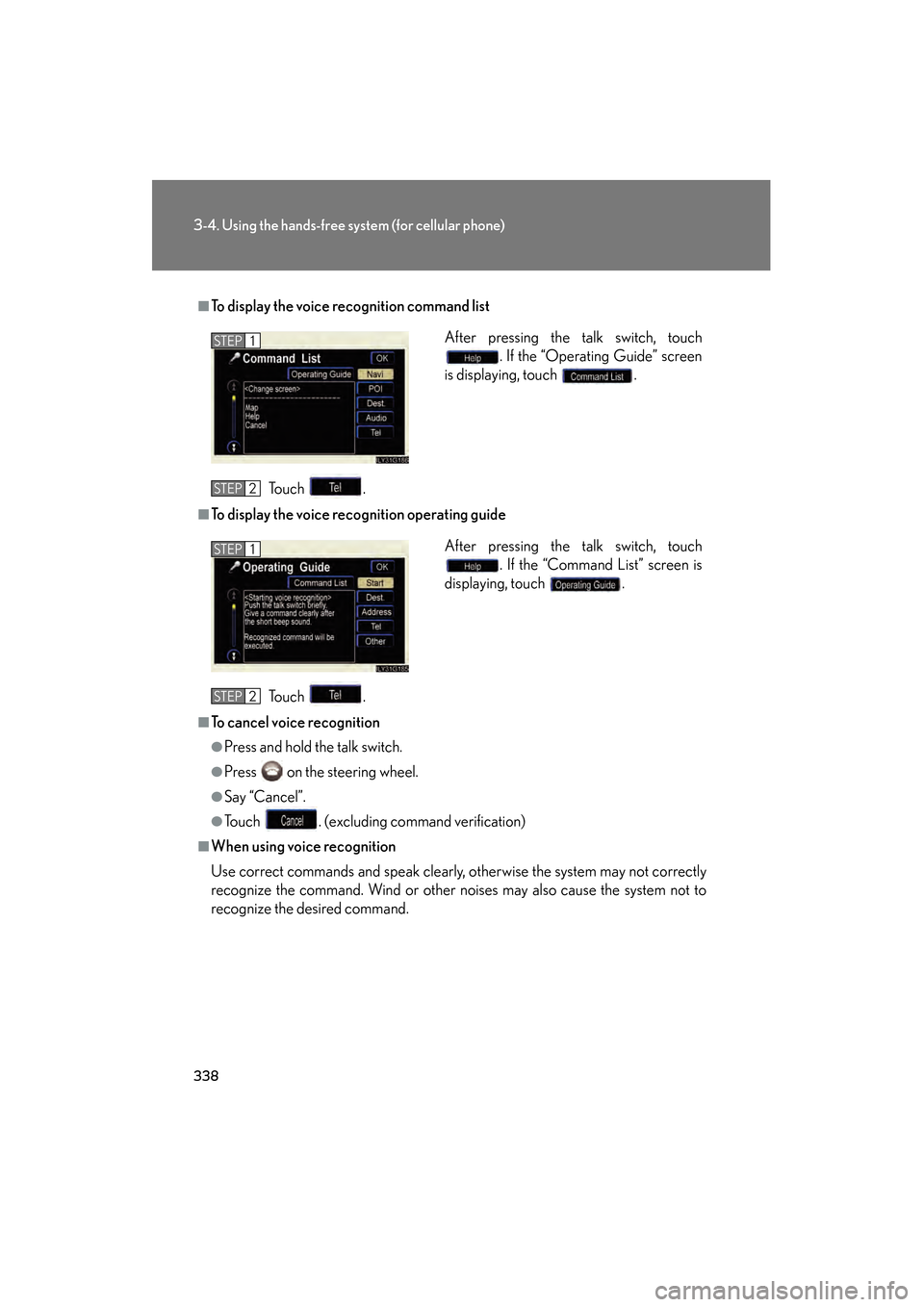
■To display the voice recognition command list
To u c h .
■To display the voice recognition operating guideTo u c h .
■To cancel voice recognition
●Press and hold the talk switch.
●Press on the steering wheel.
●Say “Cancel”.
●Touch . (excluding command verification)
■When using voice recognition
Use correct commands and speak clearly, otherwise the system may not correctly
recognize the command. Wind or other noises may also cause the system not to
recognize the desired command. After pressing the talk switch, touch
. If the “Operating Guide” screen
is displaying, touch .
STEP1
STEP2
After pressing the talk switch, touch . If the “Command List” screen is
displaying, touch .STEP1
STEP2
GS450h_HV_U.book Page 338 Monday, April 27, 2009 10:10 AM
Page 340 of 622
339
3-4. Using the hands-free system (for cellular phone)
3
Interior features
GS_HV_U (OM30B44U)
April 27, 2009 10:09 am
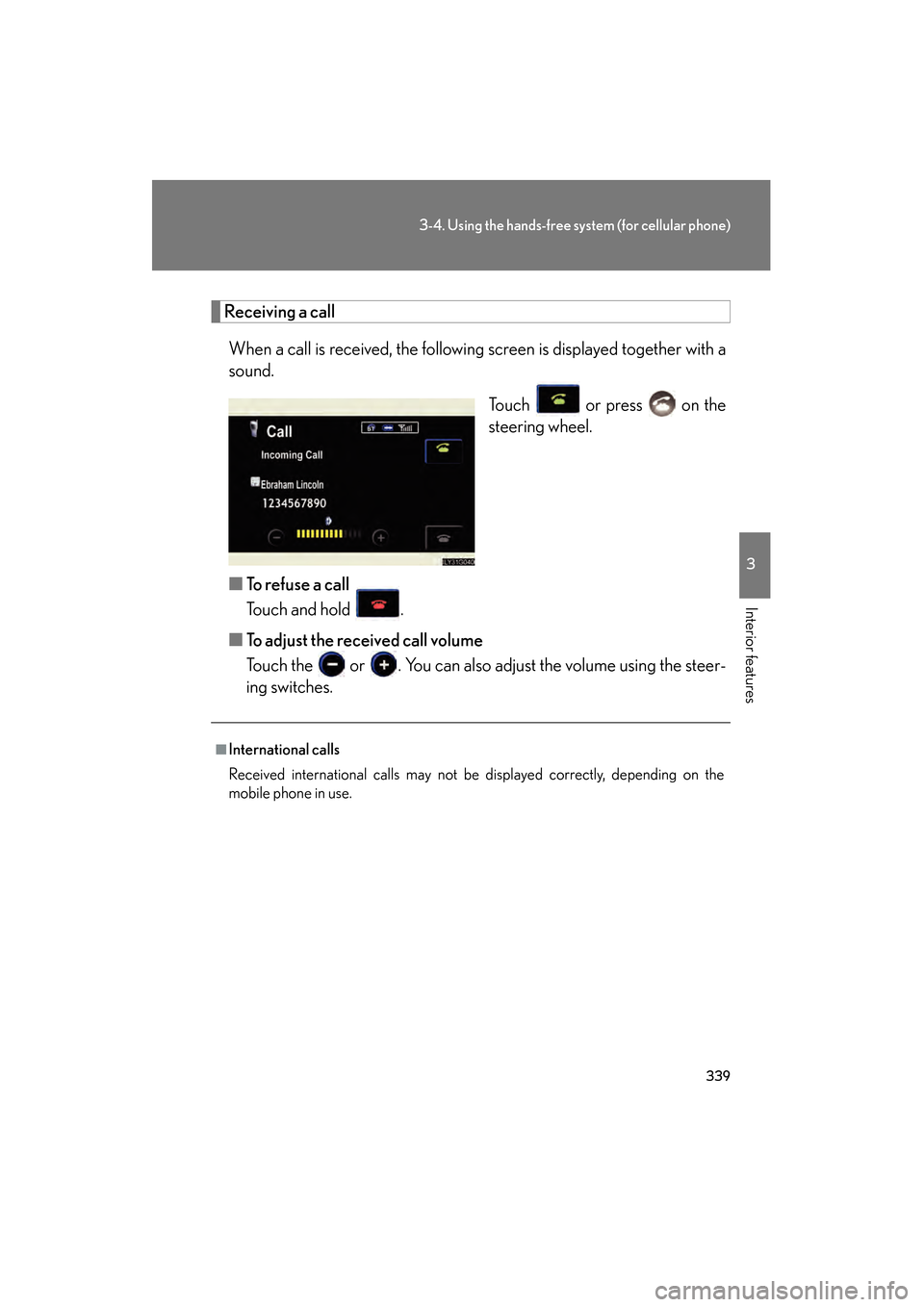
Receiving a callWhen a call is received, the following screen is displayed together with a
sound. Touch or press on the
steering wheel.
■ To refuse a call
Touch and hold .
■ To adjust the received call volume
Touch the or . You can also adjust the volume using the steer-
ing switches.
■International calls
Received international calls may not be displayed correctly, depending on the
mobile phone in use.
GS450h_HV_U.book Page 339 Monday, April 27, 2009 10:10 AM
Page 342 of 622
341
3-4. Using the hands-free system (for cellular phone)
3
Interior features
GS_HV_U (OM30B44U)
April 27, 2009 10:09 am
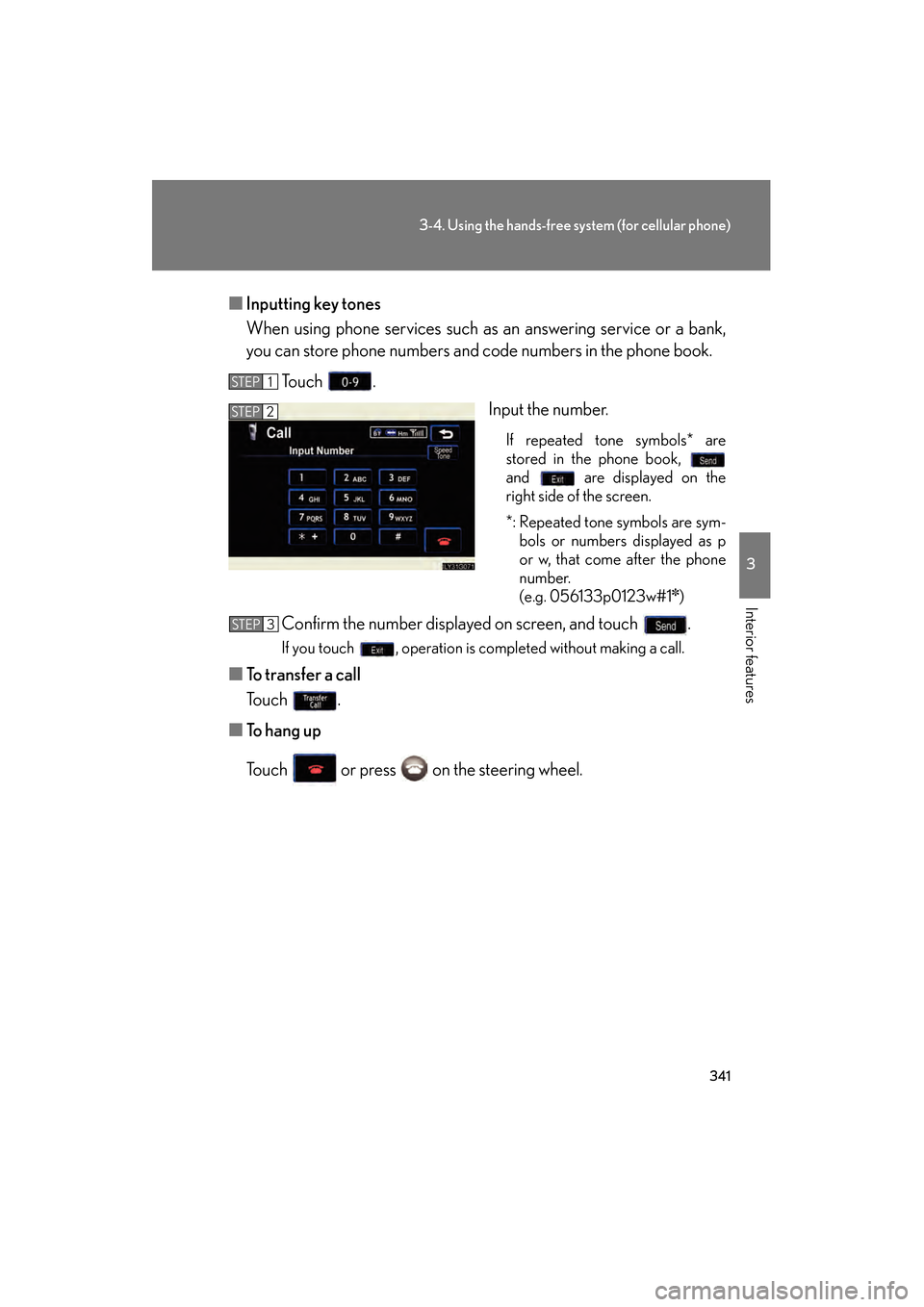
■Inputting key tones
When using phone services such as an answering service or a bank,
you can store phone numbers and code numbers in the phone book.
To u c h . Input the number.
If repeated tone symbols* are
stored in the phone book,
and are displayed on the
right side of the screen.
*: Repeated tone symbols are sym-bols or numbers displayed as p
or w, that come after the phone
number.
(e.g. 056133p0123w#1
✽)
Confirm the number displayed on screen, and touch .
If you touch , operation is completed without making a call.
■ To transfer a call
To u c h .
■ To h a n g u p
Touch or press on the steering wheel.
STEP1
STEP2
STEP3
GS450h_HV_U.book Page 341 Monday, April 27, 2009 10:10 AM
Page 352 of 622
351
3-4. Using the hands-free system (for cellular phone)
3
Interior features
GS_HV_U (OM30B44U)
April 27, 2009 10:09 am
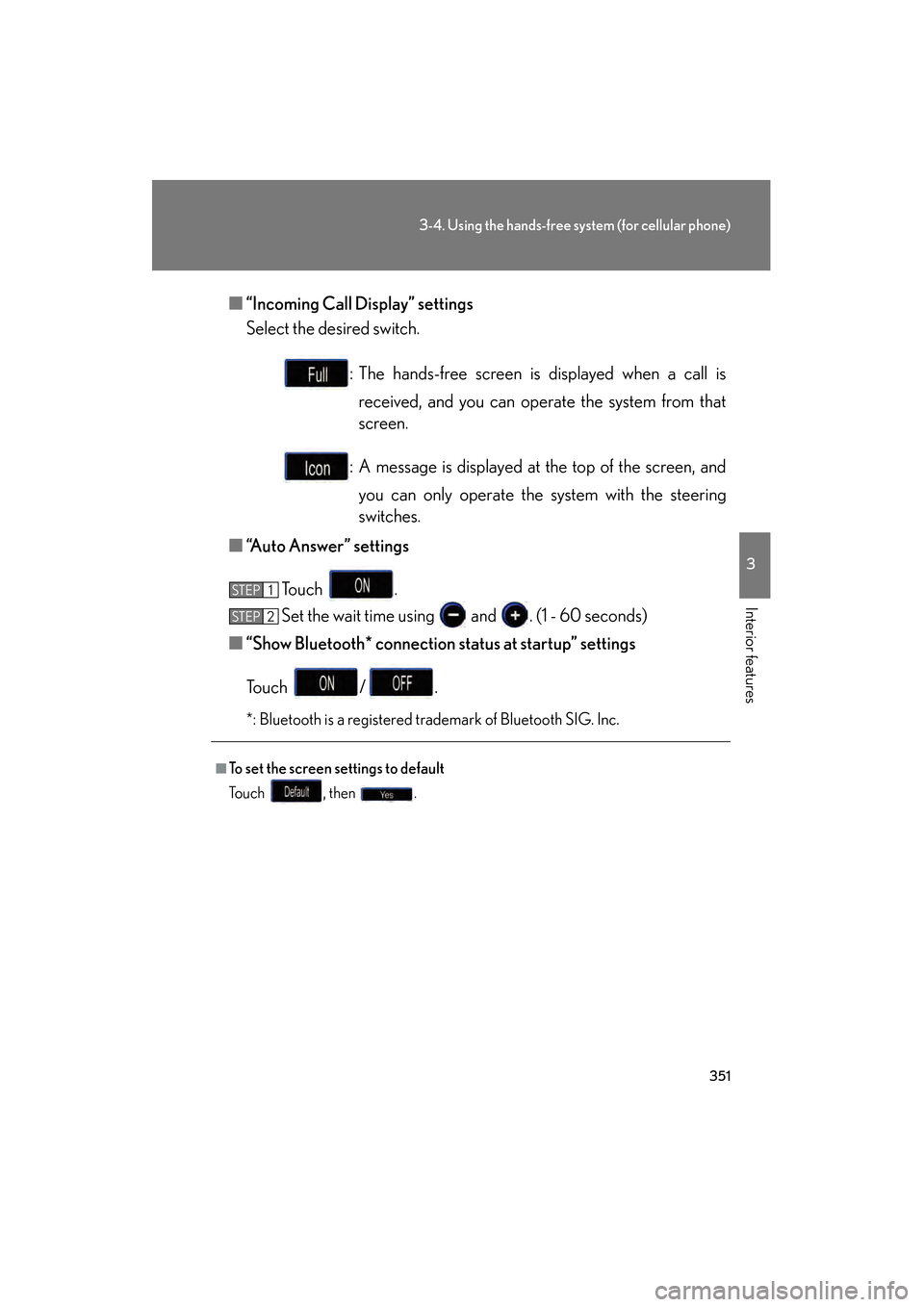
■“Incoming Call Display” settings
Select the desired switch.
: The hands-free screen is displayed when a call isreceived, and you can operate the system from that
screen.
: A message is displayed at the top of the screen, and you can only operate the system with the steering
switches.
■ “Auto Answer” settings
To u c h .
Set the wait time using and . (1 - 60 seconds)
■ “Show Bluetooth* connection status at startup” settings
To u c h / .
*: Bluetooth is a registered trademark of Bluetooth SIG. Inc.
■To set the screen settings to default
To u c h , t h e n .
STEP1
STEP6STEP2
GS450h_HV_U.book Page 351 Monday, April 27, 2009 10:10 AM
Page 370 of 622
369
3
Interior features
GS_HV_U (OM30B44U)
April 27, 2009 10:09 am
3-5. Using the interior lights
Interior lights list
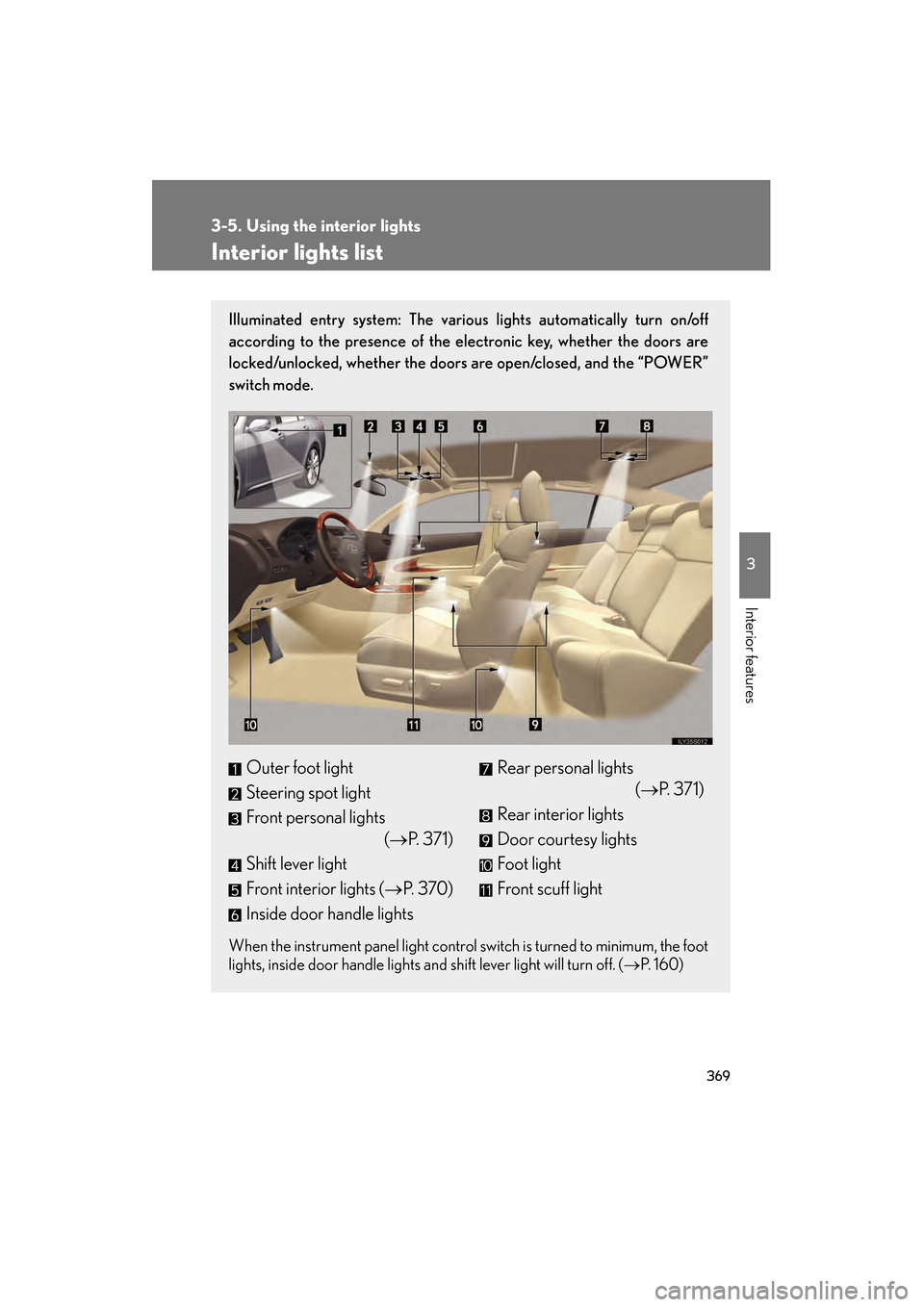
Illuminated entry system: The various lights automatically turn on/off
according to the presence of the electronic key, whether the doors are
locked/unlocked, whether the doors are open/closed, and the “POWER”
switch mode.
When the instrument panel light control switch is turned to minimum, the foot
lights, inside door handle lights and shift lever light will turn off. (→P. 1 6 0 )
Outer foot light
Steering spot light
Front personal lights
(→P. 3 7 1 )
Shift lever light
Front interior lights ( →P. 3 7 0 )
Inside door handle lightsRear personal lights (→P. 371)
Rear interior lights
Door courtesy lights
Foot light
Front scuff light
GS450h_HV_U.book Page 369 Monday, April 27, 2009 10:10 AM
Page 371 of 622
370
3-5. Using the interior lights
GS_HV_U (OM30B44U)
April 27, 2009 10:09 am
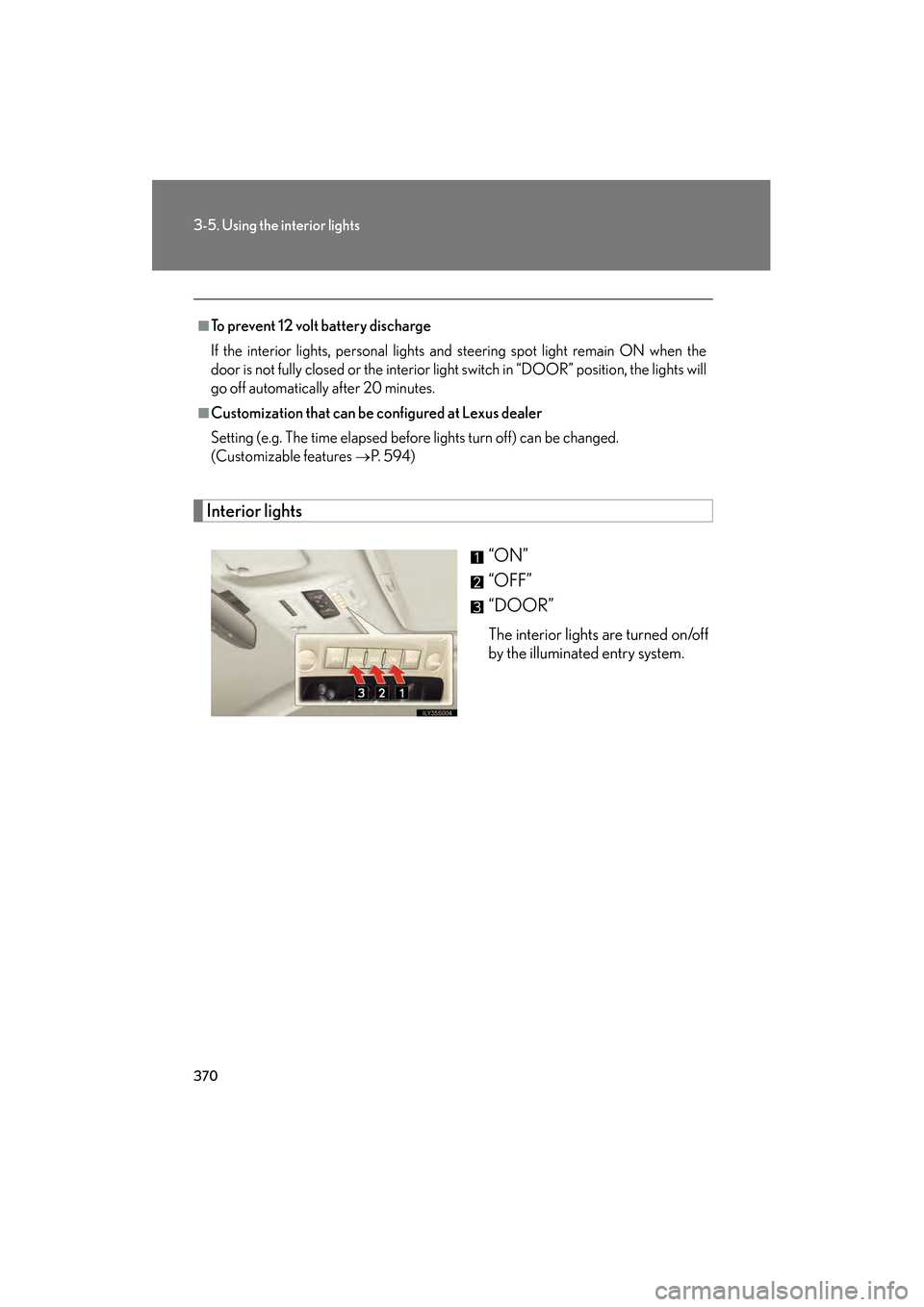
Interior lights“ON”
“OFF”
“DOOR”
The interior lights are turned on/off
by the illuminated entry system.
■To prevent 12 volt battery discharge
If the interior lights, personal lights and steering spot light remain ON when the
door is not fully closed or the interior light switch in “DOOR” position, the lights will
go off automatically after 20 minutes.
■Customization that can be configured at Lexus dealer
Setting (e.g. The time elapsed before lights turn off) can be changed.
(Customizable features
→P. 5 9 4 )
GS450h_HV_U.book Page 370 Monday, April 27, 2009 10:10 AM
Page 430 of 622
429
4-2. Maintenance
4
Maintenance and care
GS_HV_U (OM30B44U)
April 27, 2009 10:09 am
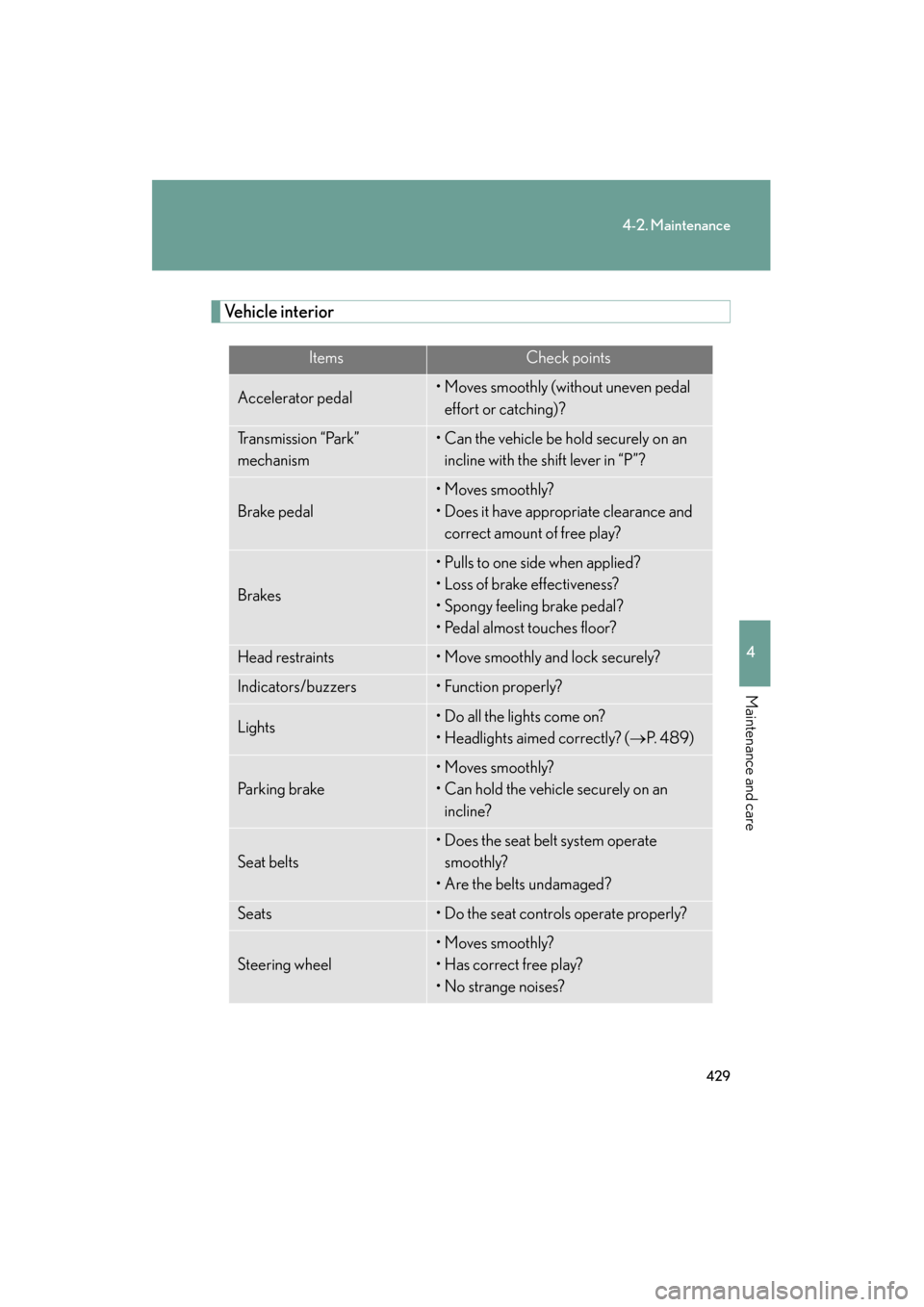
Vehicle interior
ItemsCheck points
Accelerator pedal• Moves smoothly (without uneven pedal effort or catching)?
Transmission “Park”
mechanism• Can the vehicle be hold securely on an incline with the shift lever in “P”?
Brake pedal
• Moves smoothly?
• Does it have appropriate clearance and correct amount of free play?
Brakes
• Pulls to one side when applied?
• Loss of brake effectiveness?
• Spongy feeling brake pedal?
• Pedal almost touches floor?
Head restraints• Move smoothly and lock securely?
Indicators/buzzers• Function properly?
Lights• Do all the lights come on?
• Headlights aimed correctly? ( →P. 4 8 9 )
Pa r k i n g b r a ke
• Moves smoothly?
• Can hold the vehicle securely on an
incline?
Seat belts
• Does the seat belt system operate smoothly?
• Are the belts undamaged?
Seats• Do the seat controls operate properly?
Steering wheel
• Moves smoothly?
• Has correct free play?
• No strange noises?
GS450h_HV_U.book Page 429 Monday, April 27, 2009 10:10 AM
Page 480 of 622
479
4-3. Do-it-yourself maintenance
4
Maintenance and care
GS_HV_U (OM30B44U)
April 27, 2009 10:09 am
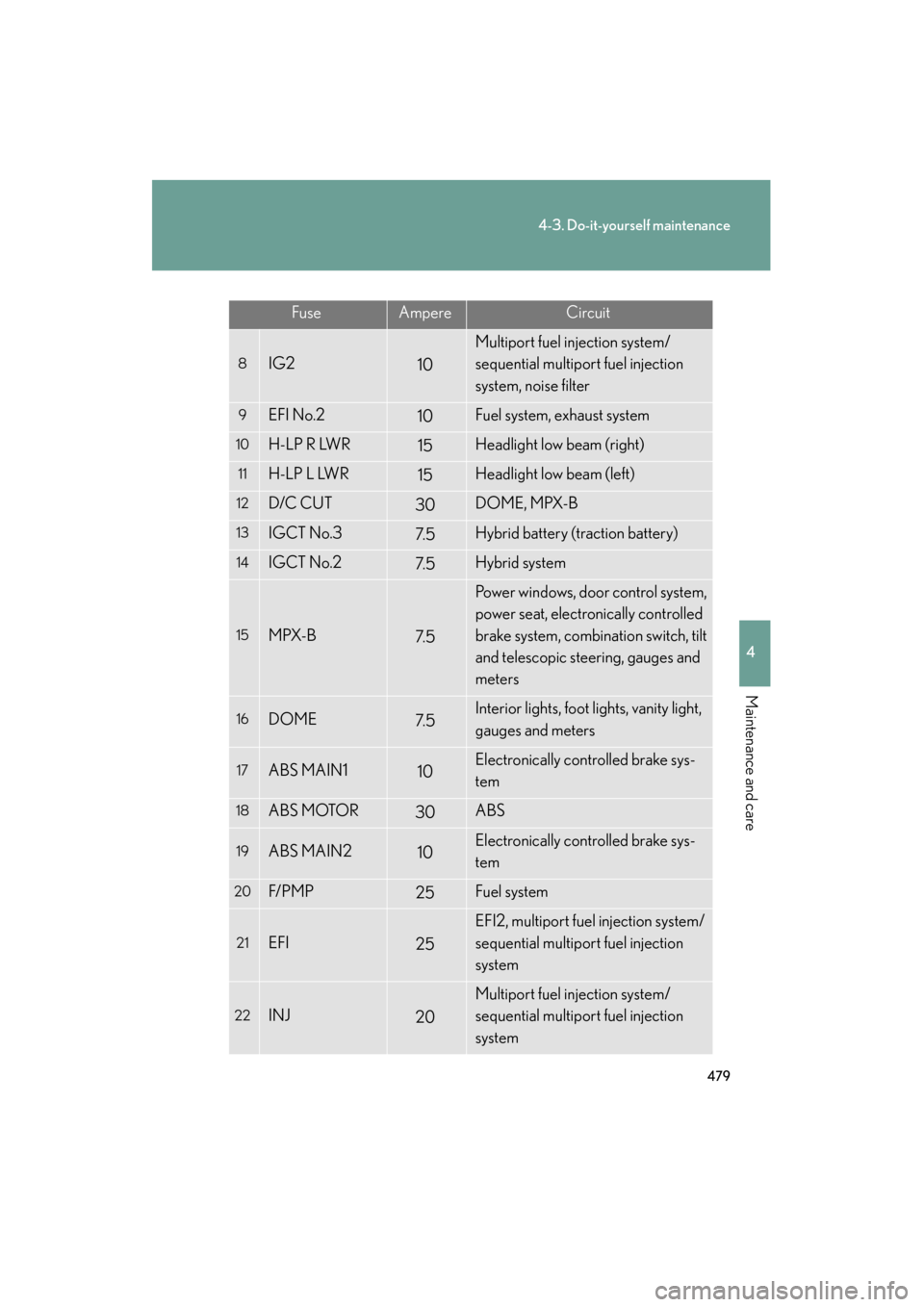
FuseAmpereCircuit
8IG210
Multiport fuel injection system/
sequential multiport fuel injection
system, noise filter
9EFI No.210Fuel system, exhaust system
10H-LP R LWR15Headlight low beam (right)
11H-LP L LWR15Headlight low beam (left)
12D/C CUT30DOME, MPX-B
13IGCT No.37. 5Hybrid battery (traction battery)
14IGCT No.27. 5Hybrid system
15MPX-B7. 5
Power windows, door control system,
power seat, electronically controlled
brake system, combination switch, tilt
and telescopic steering, gauges and
meters
16DOME7. 5Interior lights, foot lights, vanity light,
gauges and meters
17ABS MAIN110Electronically controlled brake sys-
tem
18ABS MOTOR30ABS
19ABS MAIN210Electronically controlled brake sys-
tem
20F/ P M P25Fuel system
21EFI25
EFI2, multiport fuel injection system/
sequential multiport fuel injection
system
22INJ20
Multiport fuel injection system/
sequential multiport fuel injection
system
GS450h_HV_U.book Page 479 Monday, April 27, 2009 10:10 AM
Page 484 of 622
483
4-3. Do-it-yourself maintenance
4
Maintenance and care
GS_HV_U (OM30B44U)
April 27, 2009 10:09 am
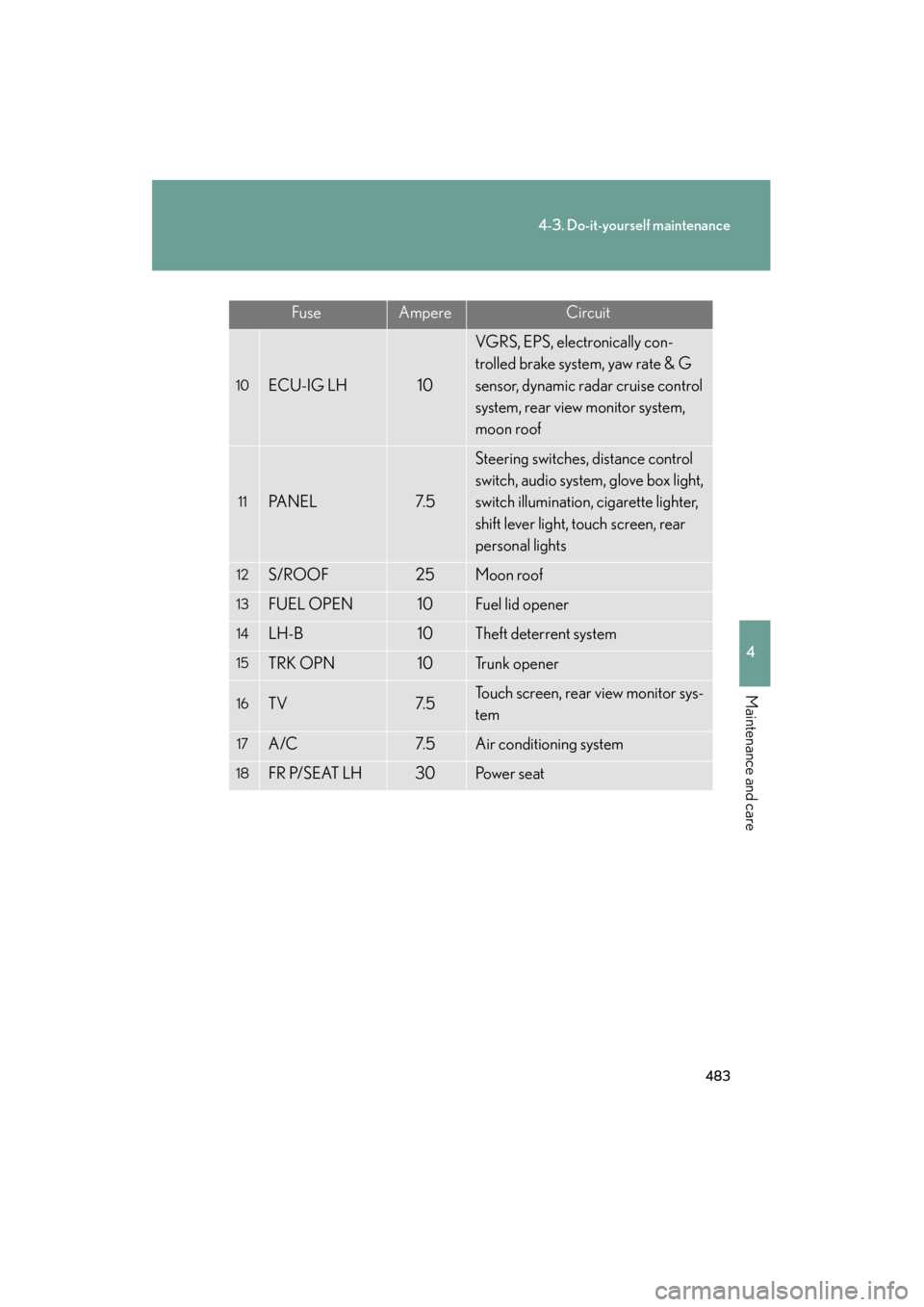
FuseAmpereCircuit
10ECU-IG LH10
VGRS, EPS, electronically con-
trolled brake system, yaw rate & G
sensor, dynamic radar cruise control
system, rear view monitor system,
moon roof
11PA N E L7. 5
Steering switches, distance control
switch, audio system, glove box light,
switch illumination, cigarette lighter,
shift lever light, touch screen, rear
personal lights
12S/ROOF25Moon roof
13FUEL OPEN10Fuel lid opener
14LH-B10Theft deterrent system
15TRK OPN10Tr u n k o p e n e r
16TV7. 5Touch screen, rear view monitor sys-
tem
17A/C7. 5Air conditioning system
18FR P/SEAT LH30Po w e r s e a t
GS450h_HV_U.book Page 483 Monday, April 27, 2009 10:10 AM