steering Lexus GS450h 2009 Workshop Manual
[x] Cancel search | Manufacturer: LEXUS, Model Year: 2009, Model line: GS450h, Model: Lexus GS450h 2009Pages: 622
Page 220 of 622
219
2-4. Using other driving systems
2
When driving
GS_HV_U (OM30B44U)
April 27, 2009 10:09 am
■Reduced effectiveness of EPS
The effectiveness of EPS is reduced to prevent the system from overheating when
there is frequent steering input over an extended period of time. The steering wheel
may feel heavy as a result. Should this occur, refrain from excessive steering input or
stop the vehicle and turn the hybrid system off. The system should return to normal
about 10 minutes.
■VGRS is disabled in the following situations
●During stopping or the steering wheel has been moved for a long time while
driving at lower speeds.
●After the hybrid system is restarted at less than -22°F (-30°C).
CAUTION
Any of the following conditions may result in an accident which could cause death or
serious injury:
■The ABS does not operate effectively when
●The limits of tire gripping performance have been exceeded.
●The vehicle hydroplanes while driving at high speed on a wet or slick road.
■Stopping distance when the ABS is operating will exceed that of normal condi-
tions
The ABS is not designed to shorten the vehicle’s stopping distance. Always main-
tain a safe distance from the vehicle in front of you in the following situations.
●When driving on dirt, gravel or snow-covered roads
●When driving with tire chains
●When driving over bumps in the road
●When driving over roads with potholes or roads with uneven roads
■TRAC may not operate effectively when
Directional control and power may not be achievable while driving on slippery road
surfaces, even if the TRAC is operating.
Do not drive the vehicle in conditions where stability and power may be lost.
GS450h_HV_U.book Page 219 Monday, April 27, 2009 10:10 AM
Page 231 of 622
230
2-5. Driving information
GS_HV_U (OM30B44U)
April 27, 2009 10:09 am
CAUTION
■Things that must not be carried in the trunk
The following things may cause a fire if loaded in the trunk.
●Receptacles containing gasoline
●Aerosol cans
■Storage precautions
Observe the following precautions.
Failing to do so may result in death or serious injury.
●Do not place cargo or luggage in or on the following locations as the item may
get under the brake or accelerator pedal and prevent the pedals from being
depressed properly, block the driver’s vision, or hit the driver or passengers,
causing an accident.
• Driver’s feet
• Front passenger or rear seats (when stacking items)
• Package tray
• Instrument panel
•Dashboard
●Secure all items in the occupant compartment, as they may shift and injure some-
one during sudden braking, sudden swerving or an accident.
■Weight of the load
●Improper loading may cause deterioration of steering or braking control result-
ing in an accident which may cause death or serious injury.
●Do not exceed the maximum axle weight rating or the total vehicle weight rating.
●Even if the total load of occupant’s weight and the cargo load is less than the total
load capacity, do not apply the load unevenly. Improper loading may cause dete-
rioration of steering or braking control which may cause death or serious injury.
GS450h_HV_U.book Page 230 Monday, April 27, 2009 10:10 AM
Page 232 of 622
231
2-5. Driving information
2
When driving
GS_HV_U (OM30B44U)
April 27, 2009 10:09 am
Vehicle load limits
■Total load capacity and seating capacity
These details are also described on the tire and loading information label.
(→ P. 4 6 2 )
CAUTION
■Overloading the vehicle
Do not overload the vehicle.
It may not only cause damage to the tires, but also degrade steering and braking
ability, resulting in an accident.
Vehicle load limits include total load capacity, seating capacity, towing
capacity and cargo capacity.
■Total load capacity: 815 lb. (370 kg)
Total load capacity means the combined weight of occupants, cargo
and luggage.
■ Seating capacity: 5 occupants (Front 2, Rear 3)
Seating capacity means the maximu m number of occupants whose
estimated average weight is 150 lb. (68 kg) per person.
Even if the number of occupants are within the seating capacity, do
not exceed the total load capacity.
■ Towing capacity
Lexus does not recommend towing a trailer with your vehicle.
■ Cargo capacity
Cargo capacity may increase or decrease depending on the weight
and the number of occupants.
GS450h_HV_U.book Page 231 Monday, April 27, 2009 10:10 AM
Page 240 of 622
Interior features3
239
GS_HV_U (OM30B44U)
April 27, 2009 10:09 am
3-3. Using the audio systemAudio system type................. 258
Using the radio......................... 261
Using the cassette player .... 270
Using the CD player .............. 274
Playing MP3 and WMA discs............................ 279
Using the DVD player.......... 283
Playing DVD video/audio .... 286
Playing video CD (with DVD player) .............. 298
CD/DVD player and DVD video disc information ...... 302
Optimal use of the
audio/video system .............. 314
Using the AUX adapter ........ 319
Using the steering switches................................. 320
3-4. Using the hands-free system (for cellular phone)
Hands-free system (for cellular phone) ............ 323
Using the Bluetooth
®
phone ..................................... 328
Setting the hands-free
system .................................... 343 3-5. Using the interior lights
Interior lights list .................... 369
3-6. Using the storage features List of storage features......... 372
3-7. Other interior features Sun visors ................................. 379
Vanity mirrors ......................... 380
Clock .......................................... 381
Outside temperature
display..................................... 382
Ashtrays.................................... 383
Cigarette lighter .................... 384
Power outlet ............................ 385
Seat heaters/ventilators ...... 386
Armrest .................................... 388
Rear sunshade ........................ 389
Floor mats ................................. 391
Trunk features ......................... 392
Garage door opener ............ 394
Compass .................................. 400
Lexus Link System ................. 404
GS450h_HV_U.book Page 239 Monday, April 27, 2009 10:10 AM
Page 260 of 622
259
3-3. Using the audio system
3
Interior features
GS_HV_U (OM30B44U)
April 27, 2009 10:09 am
■Using cellular phones
Interference may be heard through the audio system’s speakers if a cellular phone is
being used inside or close to the vehicle while the audio system is operating.
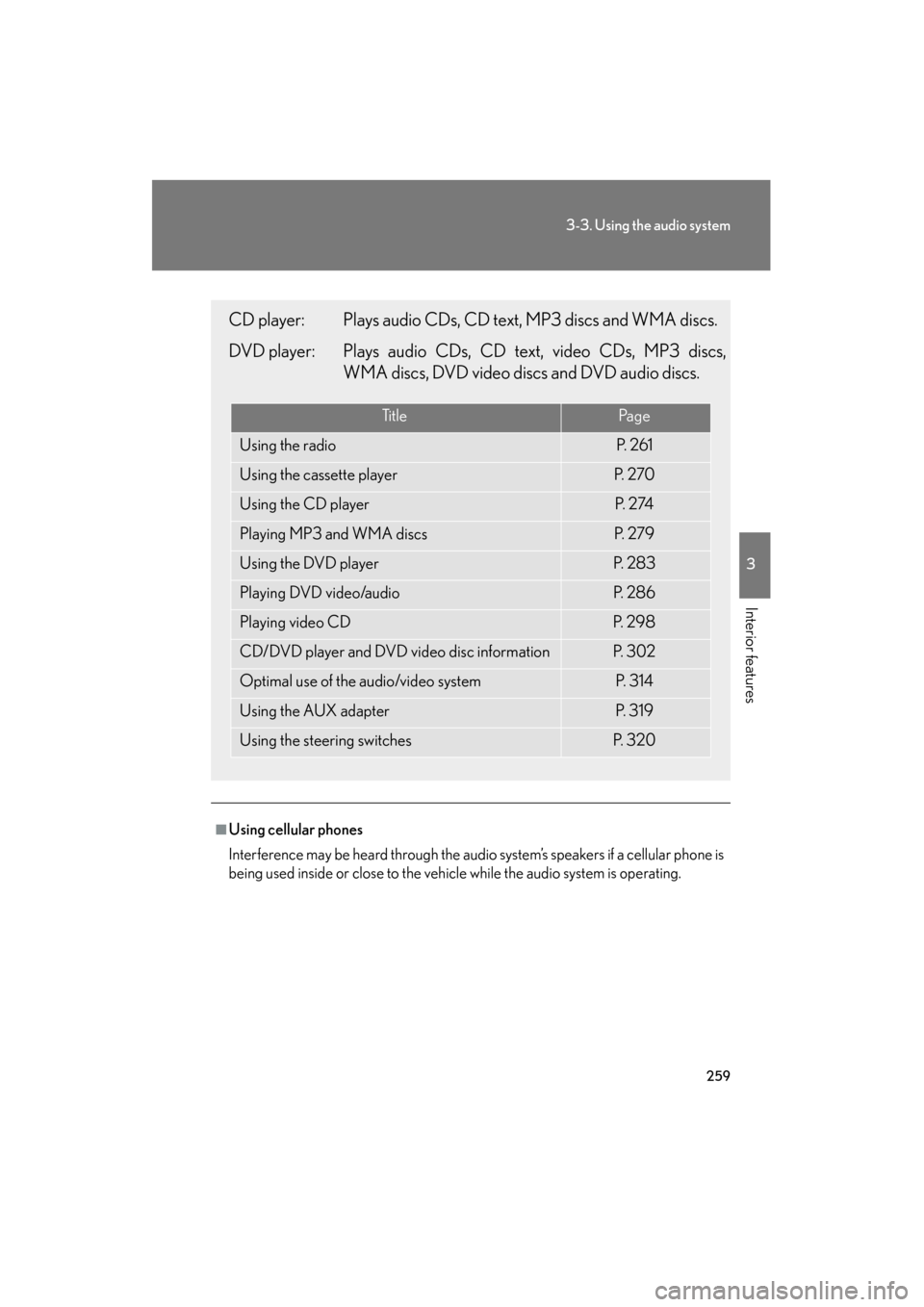
CD player: Plays audio CDs, CD text, MP3 discs and WMA discs.
DVD player: Plays audio CDs, CD text, video CDs, MP3 discs,WMA discs, DVD video discs and DVD audio discs.
Ti t l ePa g e
Using the radioP. 2 6 1
Using the cassette playerP. 2 7 0
Using the CD playerP. 2 74
Playing MP3 and WMA discsP. 2 7 9
Using the DVD playerP. 2 8 3
Playing DVD video/audioP. 2 8 6
Playing video CDP. 2 9 8
CD/DVD player and DVD video disc informationP. 3 0 2
Optimal use of the audio/video systemP. 3 1 4
Using the AUX adapterP. 3 1 9
Using the steering switchesP. 3 2 0
GS450h_HV_U.book Page 259 Monday, April 27, 2009 10:10 AM
Page 321 of 622
320
3-3. Using the audio system
GS_HV_U (OM30B44U)
April 27, 2009 10:09 am
Using the steering switches
Turning on the powerPress when the audio system is off.
The audio system can be turned off by holding the switch down for 1 second
or more.
Changing the audio sourcePress when the audio system is on. The audio source changes as fol-
lows each time the button is pressed. If a cassette tape or disc is not
inserted, that mode will be skipped. FM1 → FM2 → cassette player → CD/DVD player
→ AUX → AM → SAT1 → SAT2 → SAT3
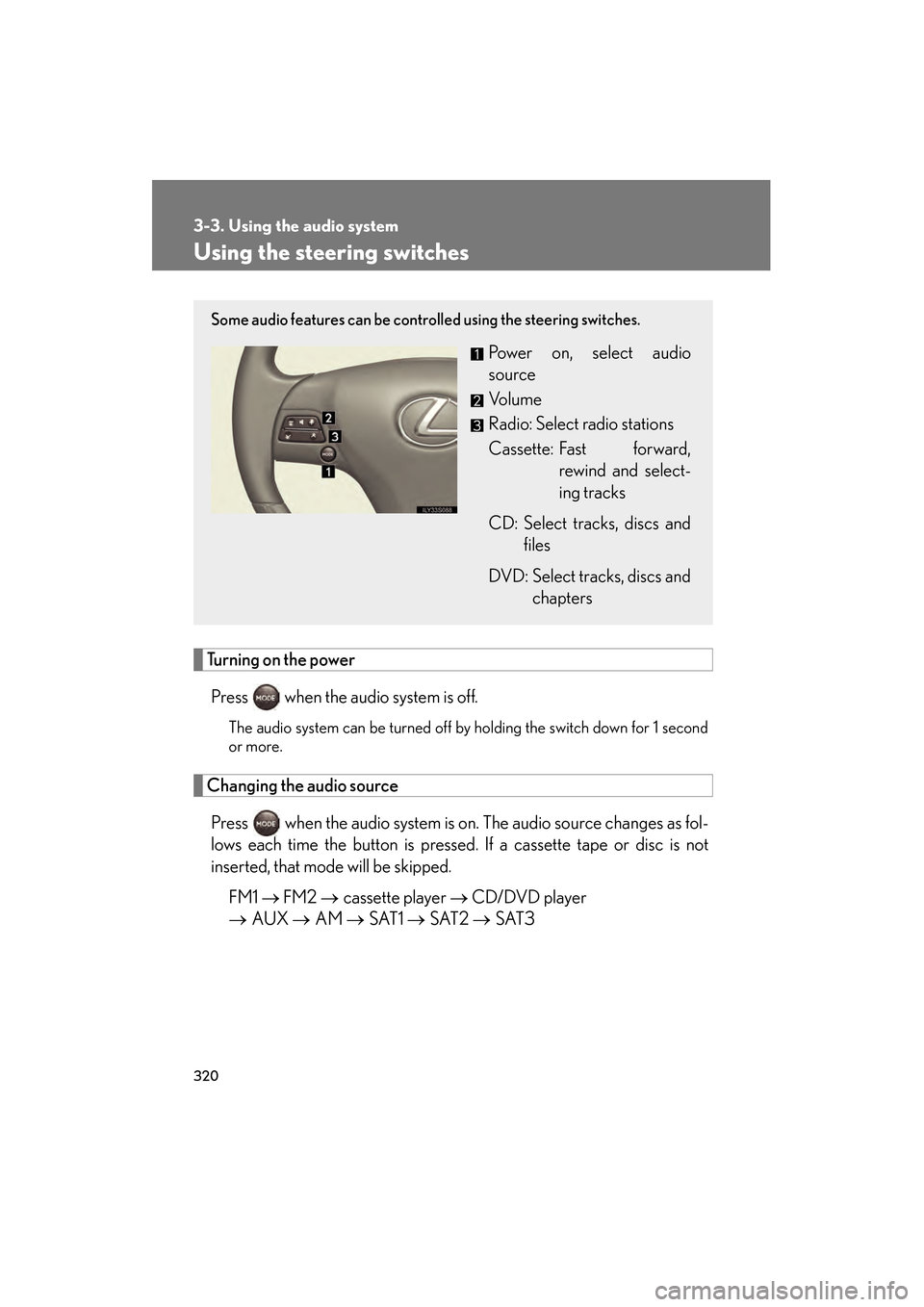
Some audio features can be controlled using the steering switches.
Power on, select audio
source
Vo l u m e
Radio: Select radio stations
Cassette: Fast forward,
rewind and select-
ing tracks
CD: Select tracks, discs and files
DVD: Select tracks, discs and chapters
GS450h_HV_U.book Page 320 Monday, April 27, 2009 10:10 AM
Page 323 of 622
322
3-3. Using the audio system
GS_HV_U (OM30B44U)
April 27, 2009 10:09 am
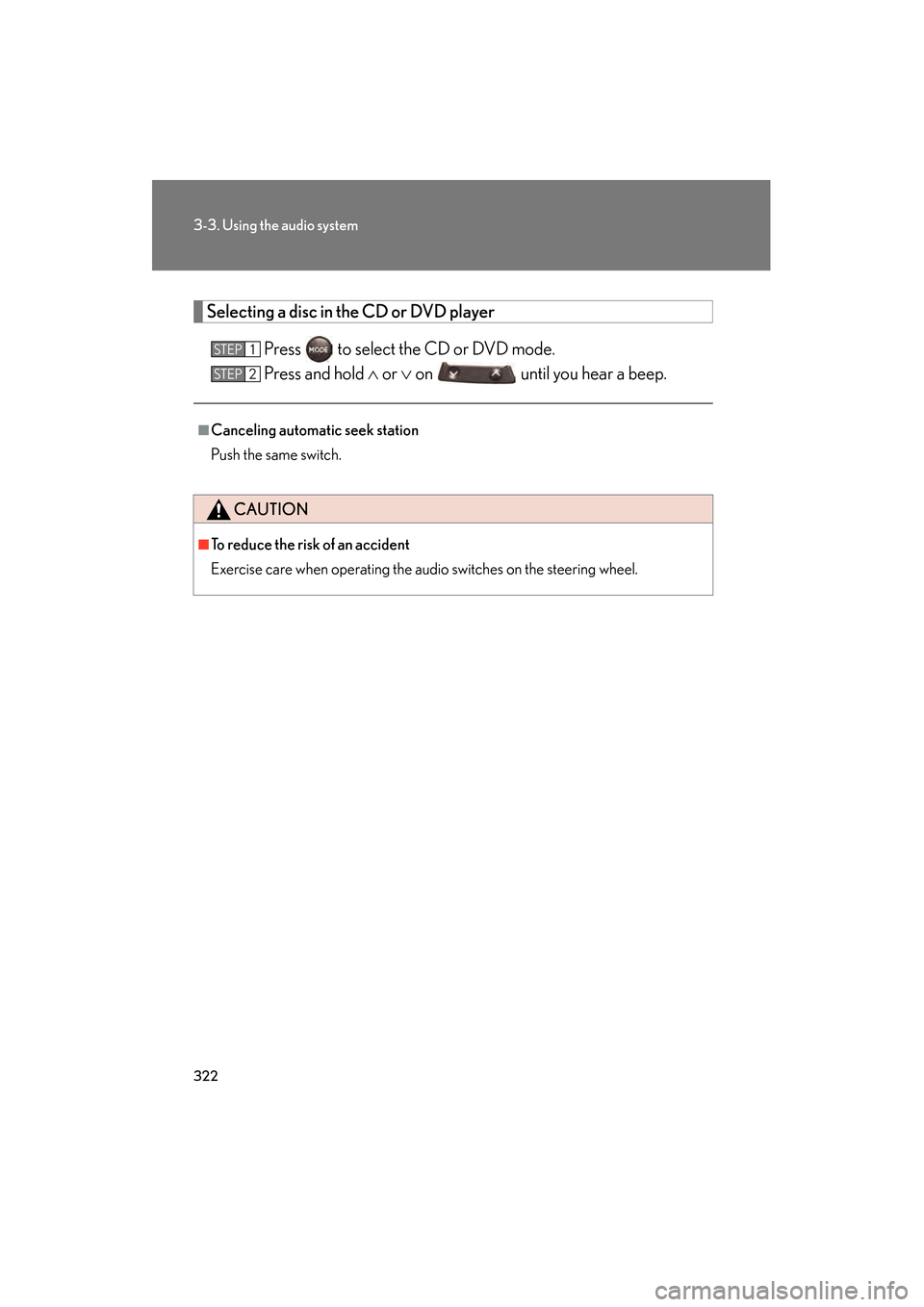
Selecting a disc in the CD or DVD player
Press to select the CD or DVD mode.
Press and hold ∧ or ∨ on until you hear a beep.
■Canceling automatic seek station
Push the same switch.
CAUTION
■To reduce the risk of an accident
Exercise care when operating the audio switches on the steering wheel.
STEP1
STEP2
GS450h_HV_U.book Page 322 Monday, April 27, 2009 10:10 AM
Page 332 of 622
331
3-4. Using the hands-free system (for cellular phone)
3
Interior features
GS_HV_U (OM30B44U)
April 27, 2009 10:09 am
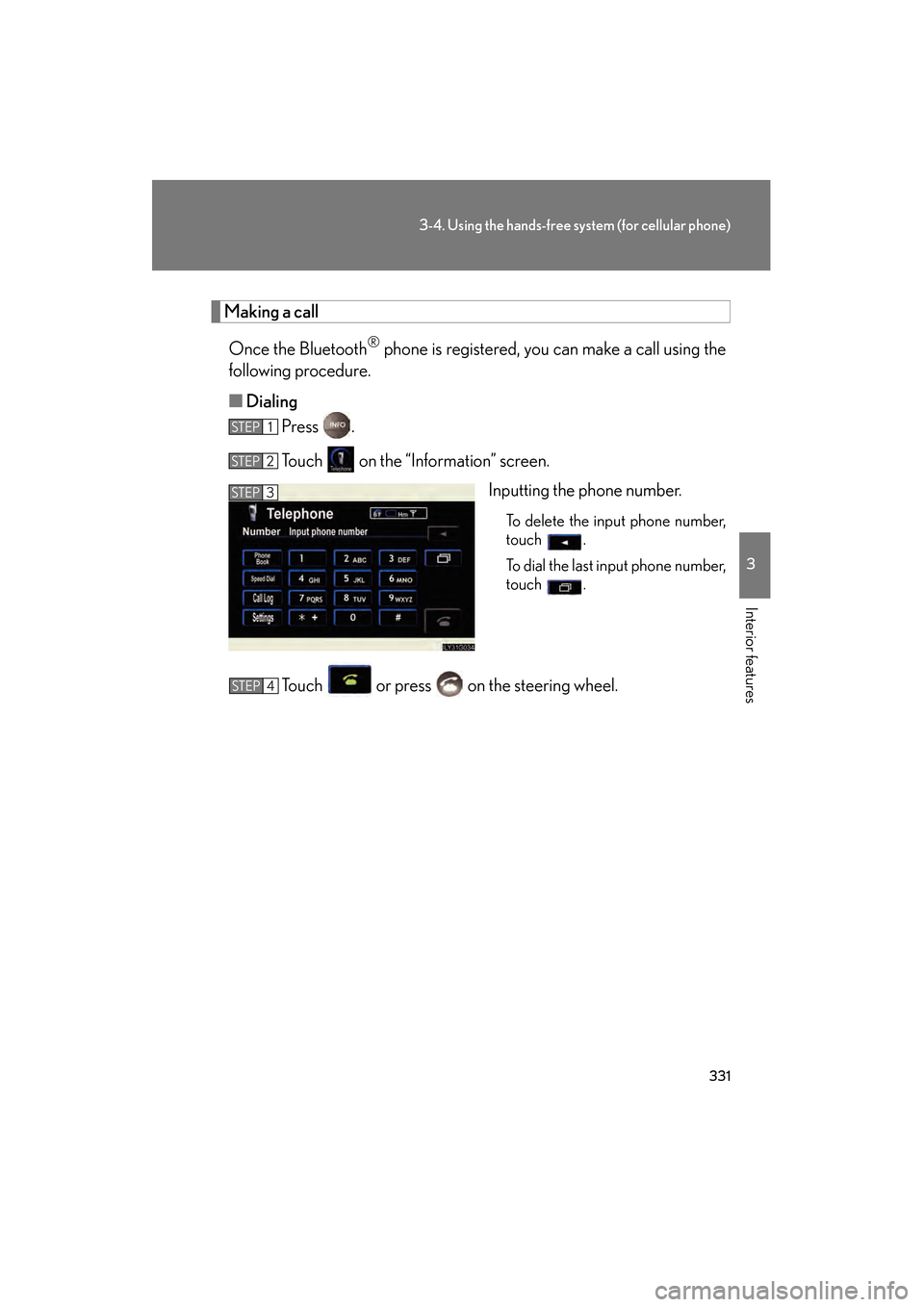
Making a callOnce the Bluetooth
® phone is registered, you can make a call using the
following procedure.
■ Dialing
Press .
Touch on the “Information” screen.
Inputting the phone number.
To delete the input phone number,
touch .
To dial the last input phone number,
touch .
Touch or press on the steering wheel.
STEP1
STEP2
STEP3
STEP4
GS450h_HV_U.book Page 331 Monday, April 27, 2009 10:10 AM
Page 333 of 622
332
3-4. Using the hands-free system (for cellular phone)
GS_HV_U (OM30B44U)
April 27, 2009 10:09 am
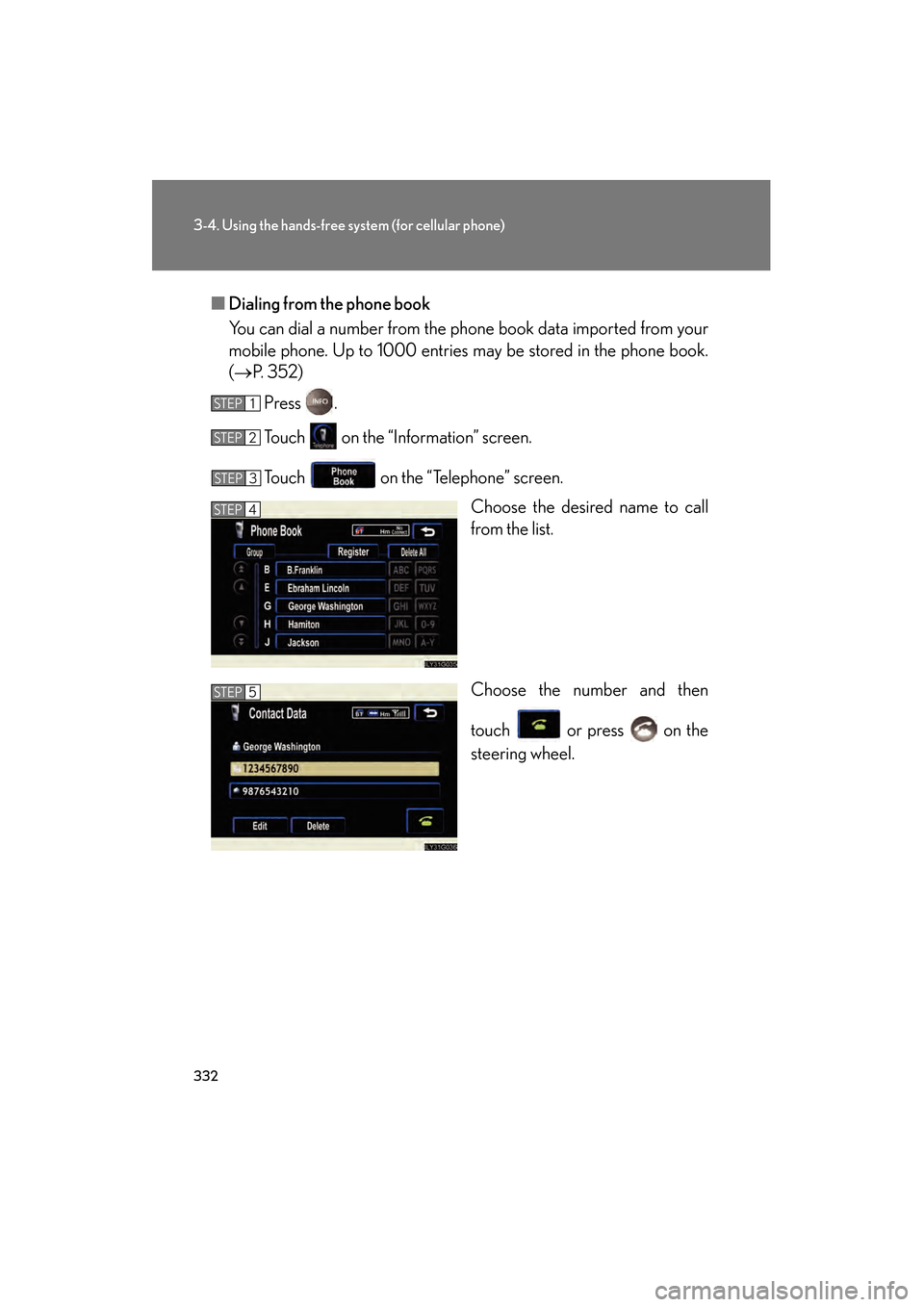
■Dialing from the phone book
You can dial a number from the phone book data imported from your
mobile phone. Up to 1000 entries may be stored in the phone book.
(→ P. 3 5 2 )
Press .
Touch on the “Information” screen.
Touch on the “Telephone” screen. Choose the desired name to call
from the list.
Choose the number and then
touch or press on the
steering wheel.
STEP1
STEP2
STEP3
STEP4
STEP5
GS450h_HV_U.book Page 332 Monday, April 27, 2009 10:10 AM
Page 334 of 622
333
3-4. Using the hands-free system (for cellular phone)
3
Interior features
GS_HV_U (OM30B44U)
April 27, 2009 10:09 am
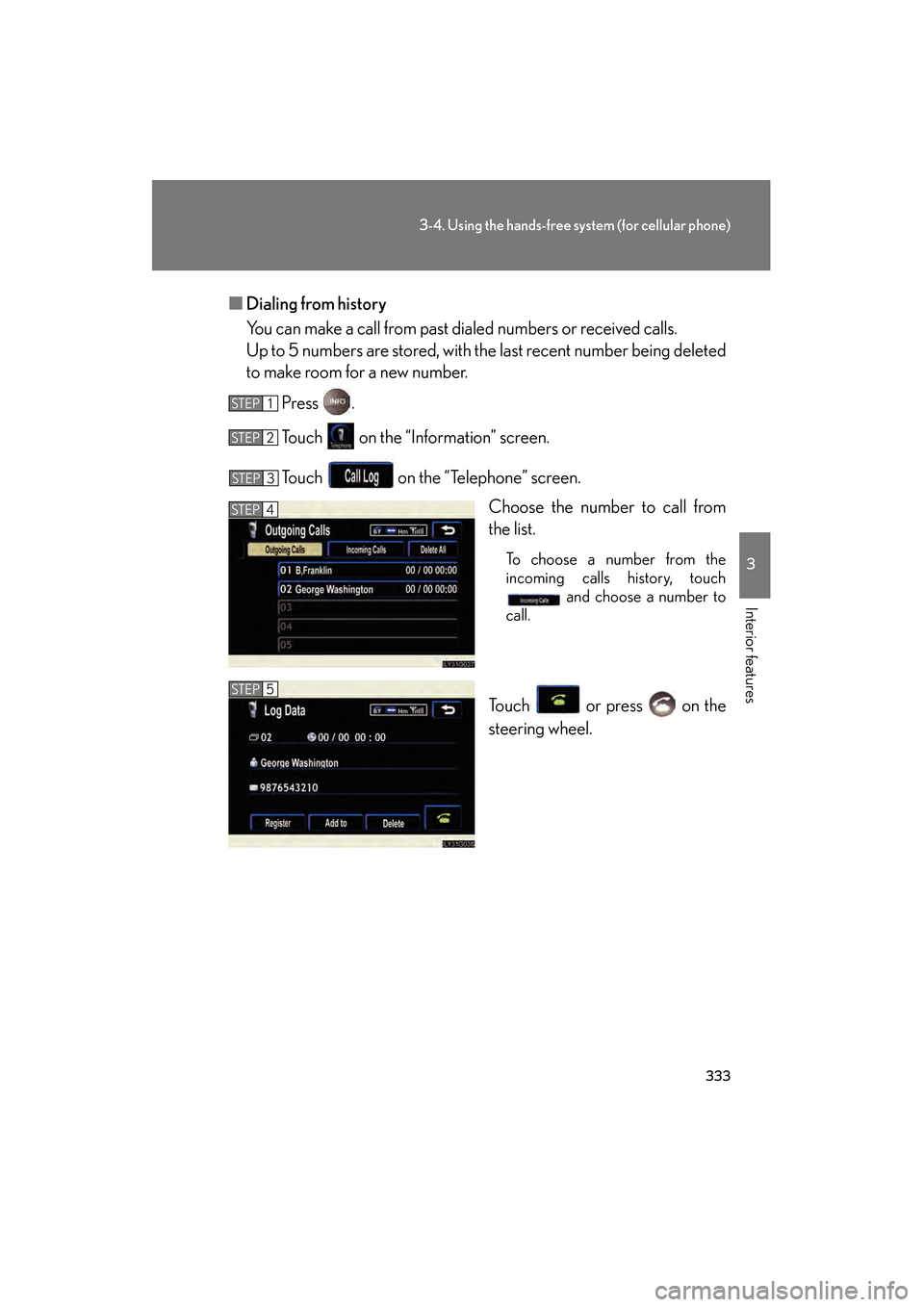
■Dialing from history
You can make a call from past dialed numbers or received calls.
Up to 5 numbers are stored, with the last recent number being deleted
to make room for a new number.
Press .
Touch on the “Information” screen.
Touch on the “Telephone” screen. Choose the number to call from
the list.
To choose a number from the
incoming calls history, touch and choose a number to
call.
Touch or press on the
steering wheel.
STEP1
STEP2
STEP3
STEP4
STEP5
GS450h_HV_U.book Page 333 Monday, April 27, 2009 10:10 AM