Off screen Lexus GS450h 2013 User Guide
[x] Cancel search | Manufacturer: LEXUS, Model Year: 2013, Model line: GS450h, Model: Lexus GS450h 2013Pages: 862, PDF Size: 19.06 MB
Page 345 of 862
3445-1. Remote Touch screen
GS450h_U (OM30D01U)
■Changing the screen off image
Select “Screen Off” on the “Display” screen to turn off the screen. An
image can be copied from a USB memory and can be set to display
when “Screen Off” is selected.
When saving the images to a USB memory, name the folder that the
screen off image is saved to “DisplayOffImage”. If these folder names
are not used, the system cannot download the images. (The folder
names are case sensitive.)
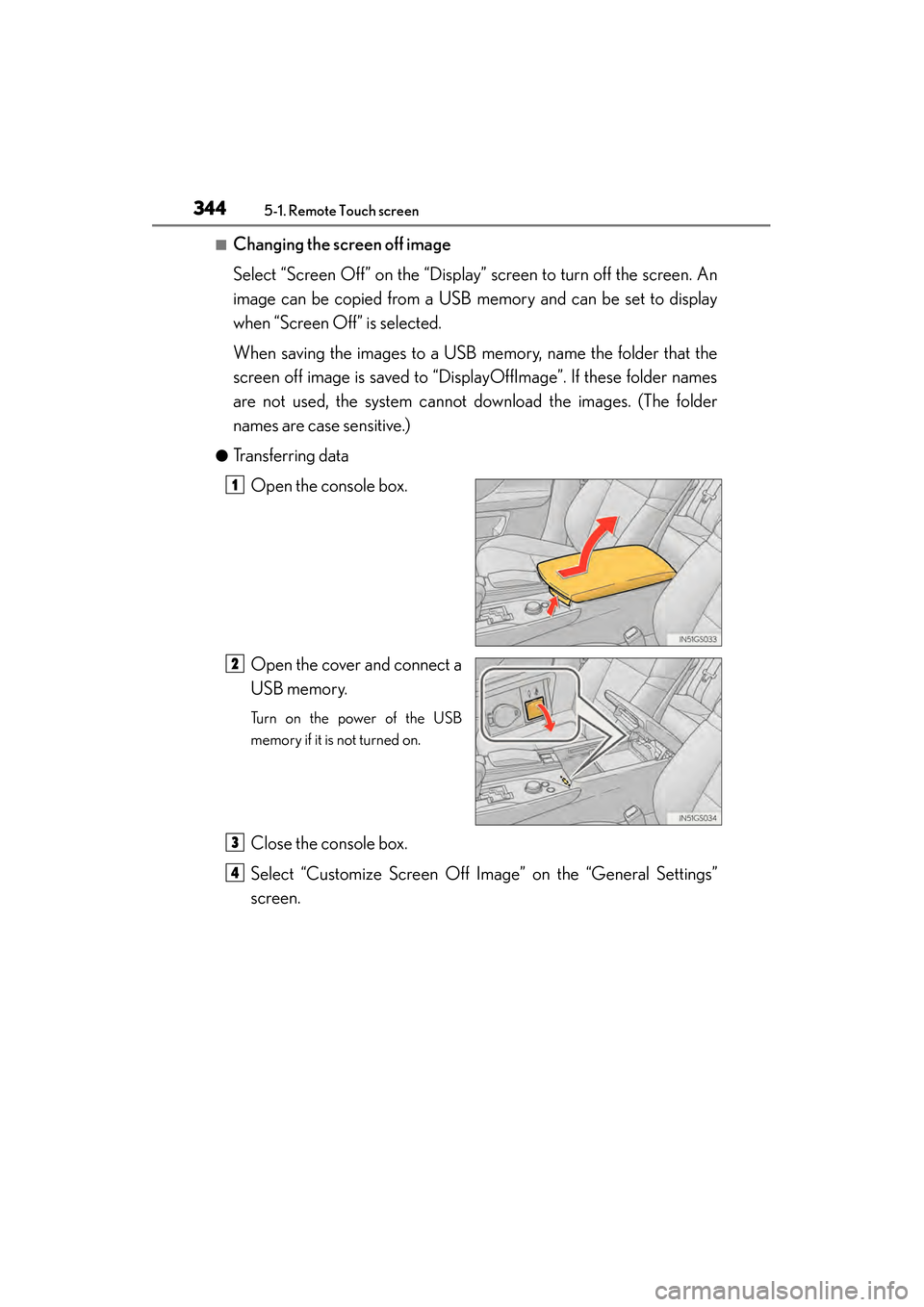
●Transferring dataOpen the console box.
Open the cover and connect a
USB memory.
Turn on the power of the USB
memory if it is not turned on.
Close the console box.
Select “Customize Screen Off Image” on the “General Settings”
screen.
1
2
3
4
GS450h_U.book Page 344 Monday, January 23, 2012 10:20 AM
Page 346 of 862
GS450h_U (OM30D01U)
3455-1. Remote Touch screen
5
Interior features
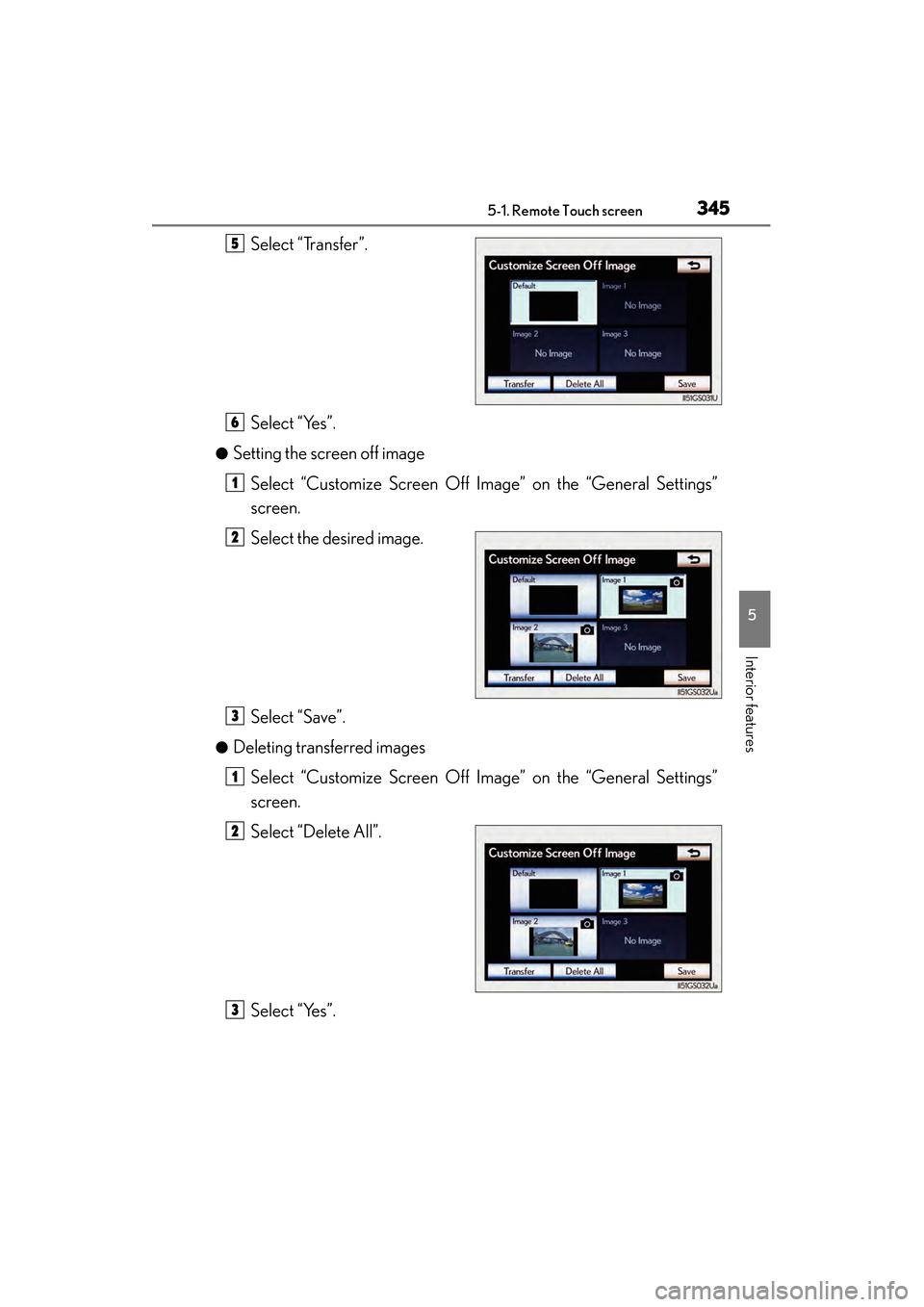
Select “Transfer”.
Select “Yes”.
●Setting the screen off imageSelect “Customize Screen Off Image” on the “General Settings”
screen.
Select the desired image.
Select “Save”.
●Deleting transferred imagesSelect “Customize Screen Off Image” on the “General Settings”
screen.
Select “Delete All”.
Select “Yes”.
5
6
1
2
3
1
2
3
GS450h_U.book Page 345 Monday, January 23, 2012 10:20 AM
Page 348 of 862
GS450h_U (OM30D01U)
3475-1. Remote Touch screen
5
Interior features
■Delete personal data
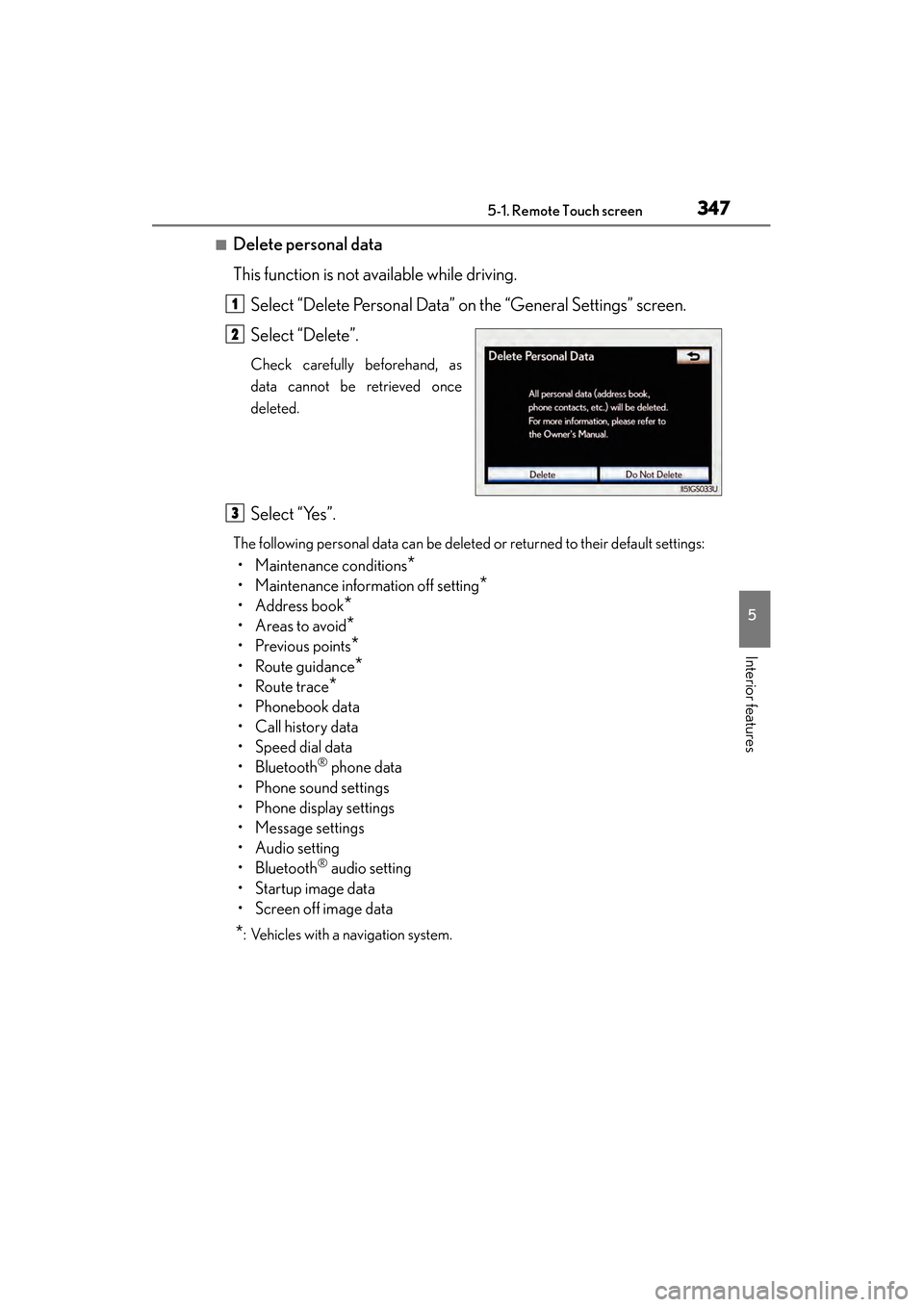
This function is not available while driving.Select “Delete Personal Data” on the “General Settings” screen.
Select “Delete”.
Check carefully beforehand, as
data cannot be retrieved once
deleted.
Select “Yes”.
The following personal data can be deleted or returned to their default settings:
• Maintenance conditions*
• Maintenance information off setting*
• Address book*
•Areas to avoid*
•Previous points*
• Route guidance*
•Route trace*
• Phonebook data
•Call history data
• Speed dial data
•Bluetooth
® phone data
• Phone sound settings
• Phone display settings
• Message settings
• Audio setting
•Bluetooth
® audio setting
•Startup image data
• Screen off image data
*: Vehicles with a navigation system.
1
2
3
GS450h_U.book Page 347 Monday, January 23, 2012 10:20 AM
Page 349 of 862

3485-1. Remote Touch screen
GS450h_U (OM30D01U)
■About startup or screen off images
●The images file extension is JPG or JPEG.
●The images file name, including the file extension, can be up to 32 characters.
●Image files of 10 MB or less can be saved.
●Up to 3 images can be downloaded.
GS450h_U.book Page 348 Monday, January 23, 2012 10:20 AM
Page 350 of 862
GS450h_U (OM30D01U)
3495-1. Remote Touch screen
5
Interior features
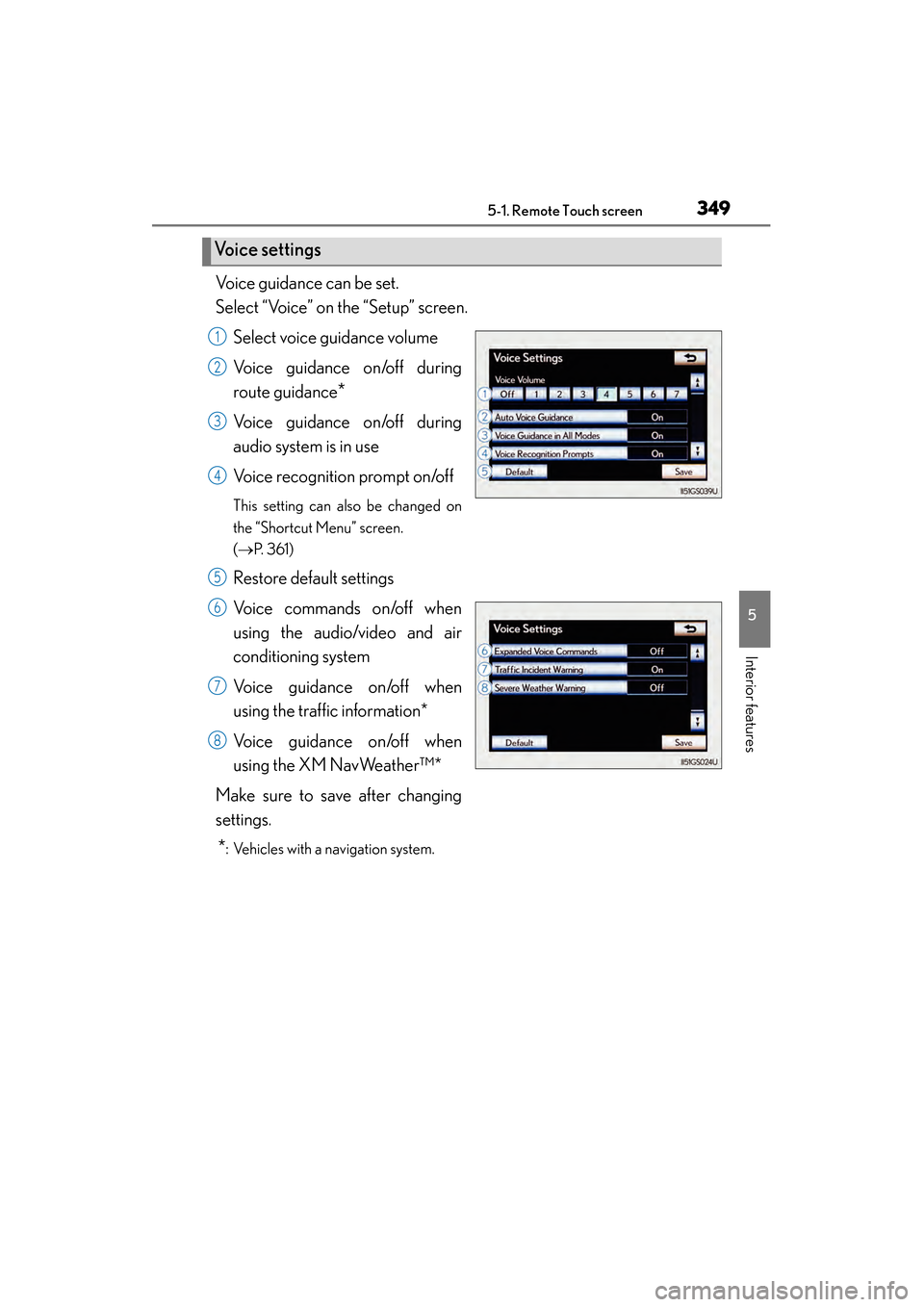
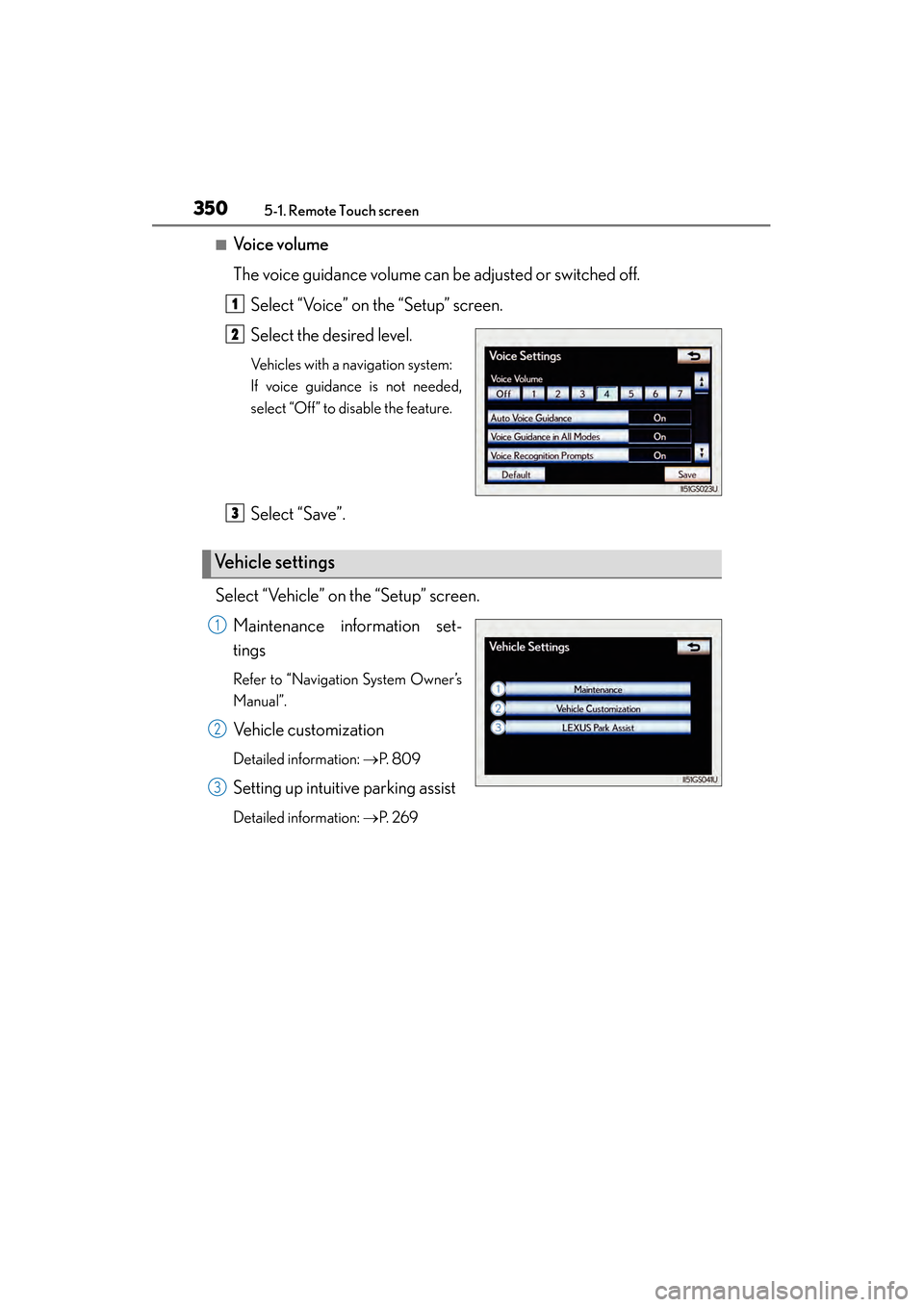
Voice guidance can be set.
Select “Voice” on the “Setup” screen.Select voice guidance volume
Voice guidance on/off during
route guidance
*
Voice guidance on/off during
audio system is in use
Voice recognition prompt on/off
This setting can also be changed on
the “Shortcut Menu” screen.
(→ P. 3 6 1 )
Restore default settings
Voice commands on/off when
using the audio/video and air
conditioning system
Voice guidance on/off when
using the traffic information*
Voice guidance on/off when
using the XM NavWeather™*
Make sure to save after changing
settings.
*: Vehicles with a navigation system.
Vo i c e s e t t i n g s
1
2
3
4
5
6
7
8
GS450h_U.book Page 349 Monday, January 23, 2012 10:20 AM
Page 351 of 862
3505-1. Remote Touch screen
GS450h_U (OM30D01U)
■Voice volume
The voice guidance volume can be adjusted or switched off.Select “Voice” on the “Setup” screen.
Select the desired level.
Vehicles with a navigation system:
If voice guidance is not needed,
select “Off” to disable the feature.
Select “Save”.
Select “Vehicle” on the “Setup” screen. Maintenance information set-
tings
Refer to “Navigation System Owner’s
Manual”.
Vehicle customization
Detailed information: →P. 8 0 9
Setting up intuitive parking assist
Detailed information: →P. 2 6 9
1
2
Ve h i c l e s e t t i n g s
3
1
2
3
GS450h_U.book Page 350 Monday, January 23, 2012 10:20 AM
Page 355 of 862
3545-1. Remote Touch screen
GS450h_U (OM30D01U)
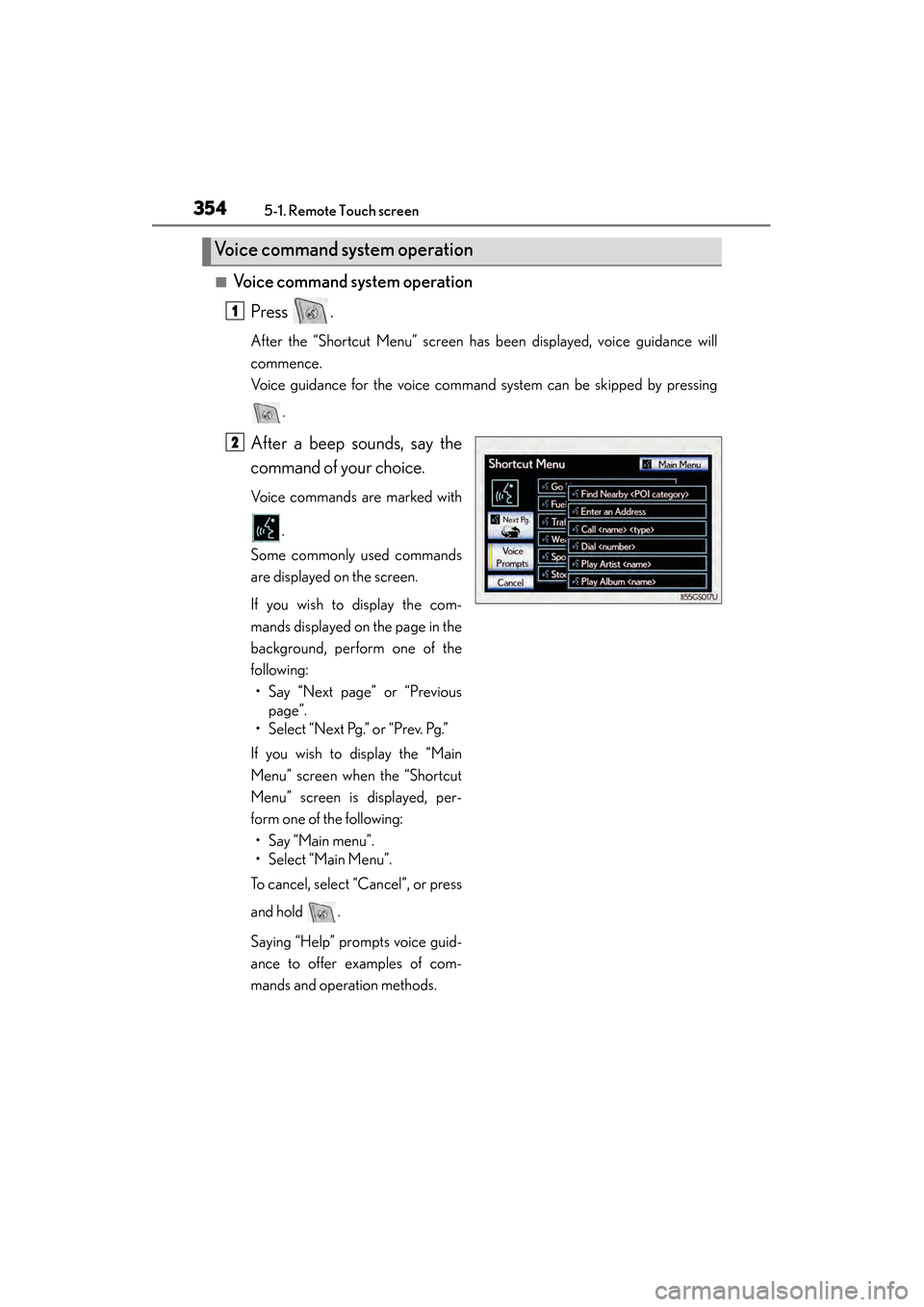
■Voice command system operationPress .
After the “Shortcut Menu” screen has been displayed, voice guidance will
commence.
Voice guidance for the voice command system can be skipped by pressing
.
After a beep sounds, say the
command of your choice.
Voice commands are marked with
.
Some commonly used commands
are displayed on the screen.
If you wish to display the com-
mands displayed on the page in the
background, perform one of the
following: • Say “Next page” or “Previous page”.
• Select “Next Pg.” or “Prev. Pg.”
If you wish to display the “Main
Menu” screen when the “Shortcut
Menu” screen is displayed, per-
form one of the following: • Say “Main menu”.
• Select “Main Menu”.
To cancel, select “Cancel”, or press
and hold .
Saying “Help” prompts voice guid-
ance to offer examples of com-
mands and operation methods.
Voice command system operation
1
2
GS450h_U.book Page 354 Monday, January 23, 2012 10:20 AM
Page 361 of 862
3605-1. Remote Touch screen
GS450h_U (OM30D01U)
■Select audio mode
When expanded voice commands are turned “On”. (→P. 3 4 9 )
*: Bluetooth is a registered trademark of Bluetooth SIG, Inc.
■Air conditioning system command
When expanded voice commands are turned “On”. ( →P. 3 4 9 )
CommandActionShortcut
Menu
“Radio”Sets the audio mode to radio.O
“A M ”Selects the AM band.O
“FM”Selects the FM band.O
“Satellite radio”Selects the satellite radio mode.O
“Disc”Selects the disc audio mode.O
“Auxiliary”Selects the auxiliary audio mode.O
“Bluetooth* audio”Selects the Bluetooth® audio mode.O
“iPod”Selects the iPod audio mode.O
“USB audio”Selects the USB audio mode.O
“A u d i o o n ”Turns the audio system on.O
“Audio off”Turns the audio system off.O
CommandActionShortcut Menu
“Automatic climate
control”Turns air conditioning system on and off.O
“Warmer”Turns temperature up.O
“Cooler”Turns temperature down.O
GS450h_U.book Page 360 Monday, January 23, 2012 10:20 AM
Page 362 of 862
GS450h_U (OM30D01U)
3615-1. Remote Touch screen
5
Interior features
■Voice command system
●Commands that are not displayed in the “Shortcut Menu” screen can be operated
from the “Main Menu” screen.
●If the system does not respond or the confirmation screen does not disappear,
press and try again.
●Voice guidance can be canceled by setting voice prompts to off. Use this setting
when it is desirable to say a command immediately after pressing and hearing
a beep.
■If a voice command cannot be recognized
●If a voice command cannot be recognized within 6 seconds, voice guidance will
say “Pardon?” (“Command not recognized.” will be displayed on the screen) and
voice command reception will restart.
●If a voice command cannot be recognized 2 consecutive times, the voice com-
mand guidance system will say “Paused. To restart voice recognition, push the talk
switch. To cancel voice recognition, push and hold the talk switch.” Voice recogni-
tion will then be suspended. Select “Cancel” or “Go Back”, or press .
■When selecting “Voice Prompts”
●The voice recognition prompt can be set to on or off. This setting can also be
changed on the “Voice Settings” screen. (→P. 3 4 9 )
●Voice recognition will be temporarily suspended. Press again.
GS450h_U.book Page 361 Monday, January 23, 2012 10:20 AM
Page 368 of 862
GS450h_U (OM30D01U)
3675-2. Using the air conditioning system and defogger
5
Interior features
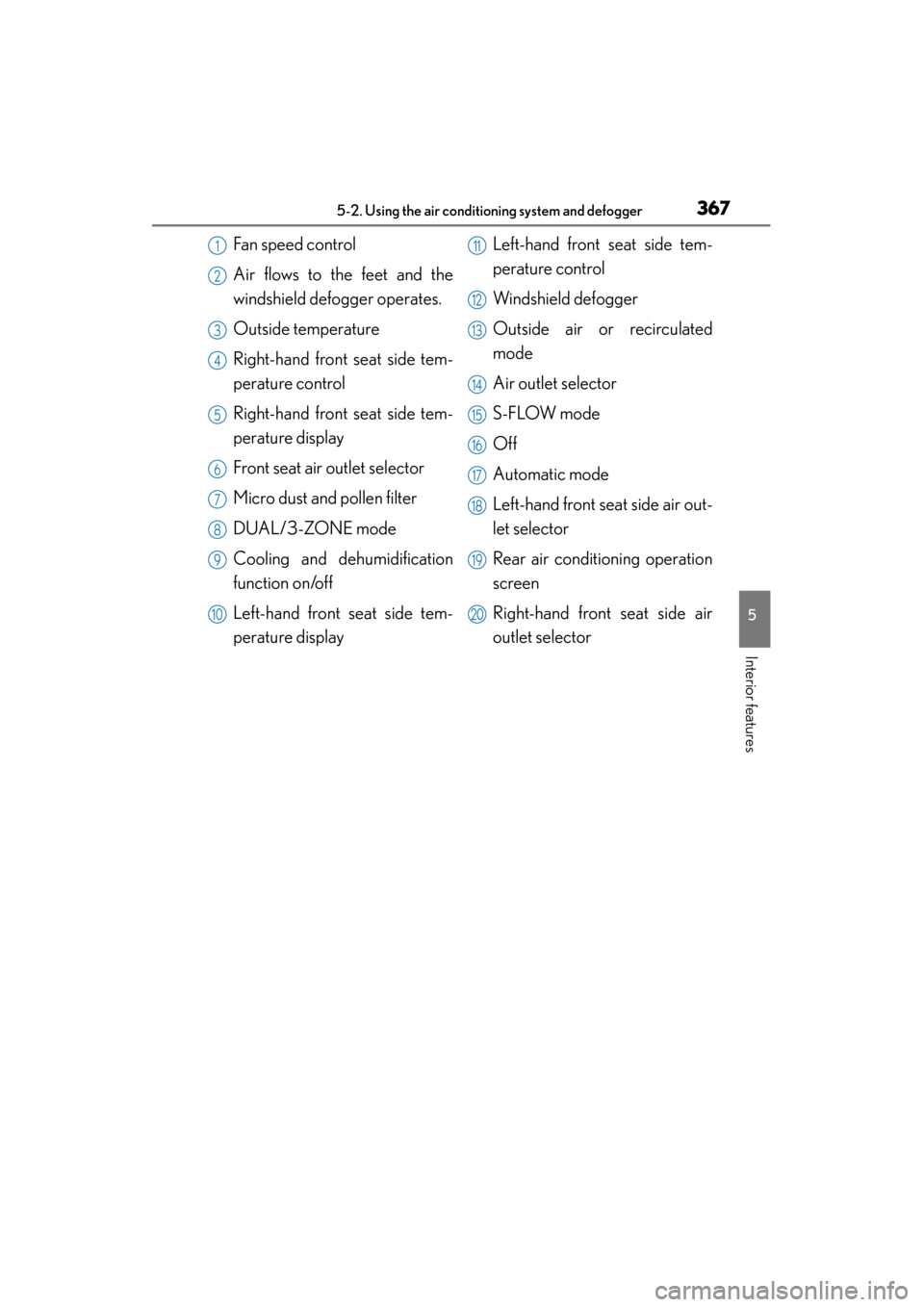
Fan speed control
Air flows to the feet and the
windshield defogger operates.
Outside temperature
Right-hand front seat side tem-
perature control
Right-hand front seat side tem-
perature display
Front seat air outlet selector
Micro dust and pollen filter
DUAL/3-ZONE mode
Cooling and dehumidification
function on/off
Left-hand front seat side tem-
perature displayLeft-hand front seat side tem-
perature control
Windshield defogger
Outside air or recirculated
mode
Air outlet selector
S-FLOW mode
Off
Automatic mode
Left-hand front seat side air out-
let selector
Rear air conditioning operation
screen
Right-hand front seat side air
outlet selector1
2
3
4
5
6
7
8
9
10
11
12
13
14
15
16
17
18
19
20
GS450h_U.book Page 367 Monday, January 23, 2012 10:20 AM