Off screen Lexus GS450h 2013 Owner's Guide
[x] Cancel search | Manufacturer: LEXUS, Model Year: 2013, Model line: GS450h, Model: Lexus GS450h 2013Pages: 862, PDF Size: 19.06 MB
Page 473 of 862
472
GS450h_U (OM30D01U)
5-3. Using the audio system
■Playing the tracks on the album in random order
Select “RAND” on the screen.
Each time “RAND” is selected, the mode changes as follows:
album random → all track random → off
■Playing tracks from all th e albums in random order
Select “RAND” repeatedly until “ALB.RAND” appears on the screen.
To cancel, select “RAND” again.
■Repeating a track
Select “RPT” on the screen.
Each time “RPT” is selected, the mode changes as follows:
track repeat → album repeat → off
■Repeating an album
Select “RPT” repeatedly until “ALB.RPT” appears on the screen.
To cancel, select “RPT” again.
■If you select
The display returns to the previous screen.
■Connecting Bluetooth® audio player
●Selecting “Connect Portable Player” on the “Bluetooth*” screen also connects a
Bluetooth® audio player. ( →P. 566)
●When none of the selectable portable players have been registered, a screen con-
firming registration is displayed. The registration method is the same as phone reg-
istration. ( →P. 559)
●When the currently connected portable player is selected, a screen confirming the
selected player’s disconnection is displayed. ( →P. 559)
●If connection fails once, a changing connection method confirmation screen is dis-
played. If connection fails 2 or more times, a message will be displayed. When this
message is displayed, try again.
*: Bluetooth is a registered trademark of Bluetooth SIG. Inc.
Random playback
Repeat play
GS450h_U.book Page 472 Monday, January 23, 2012 10:20 AM
Page 475 of 862
474
GS450h_U (OM30D01U)
5-3. Using the audio system
■Compatible models
Portable players must correspond to the following specifications:
●Bluetooth® specification
Ver. 1.1 or higher
(Recommended: Ver. 2.1+EDR or higher)
●Profile
• A2DP (Advanced Audio Distribution Profile) Ver. 1.0 or higher
• AVRCP (Audio/Video Remote Control Profile) Ver. 1.0 or higher (Recommended: Ver. 1.4 or higher)
However, please note that some functions may be limited depending on the type of
portable player. Also, the different screen is displayed depending on which portable
player is connecting.
Please go to the website at http://www.lexus.com/
to find approved portable players
for this system.
■Certification
→ P. 5 1 2
■Reconnecting the portable player
If the portable player is disconnected with a poor reception when the power switch is
in ACCESSORY or ON mode, the system automatically reconnects the portable
player.
If you have switched off the portable player yourself, follow the instructions below to
reconnect:
●Select the portable player again
●Enter the portable player
■When transferring ownership of your vehicle
Be sure to remove the registered portable player from the system. ( →P. 5 6 1 )
CAUTION
■While driving
Do not use the portable player or connect the Bluetooth
® system.
NOTICE
■When leaving the vehicle
Do not leave your portable player in the vehicle. The inside of the vehicle may
become hot, causing damage to the portable player.
GS450h_U.book Page 474 Monday, January 23, 2012 10:20 AM
Page 481 of 862
480
GS450h_U (OM30D01U)
5-3. Using the audio system
■Playing files/tracks from a particular folder in random order
Select “RAND” on the screen.
Each time “RAND” is selected, the mode changes as follows:
random (1 folder/album random) → folder/album random (all folders/
albums random) → off
■Playing the all folders/albums from a USB memory in random order
Select “RAND” repeatedly unt il “FLD.RAND”/“ALB.RAND” appears
on the screen.
To cancel, select “RAND” again.
■Repeating a file/track
Select “RPT” on the screen.
Each time “RPT” is selected, the mode changes as follows:
●When “RAND” is off
file/track repeat → folder/album repeat → off
●When “RAND” is on
file/track repeat → off
■Repeating a folder/album
Select “RPT” repeatedly until “FLD.RPT”/“ALB.RPT” appears on the
screen.
To cancel, select “RPT” again.
Available except when random playback is selected
Random playback
Repeat play
sec_05-03.fm Page 480 Monday, January 30, 2012 10:29 AM
Page 489 of 862
488
GS450h_U (OM30D01U)
5-3. Using the audio system
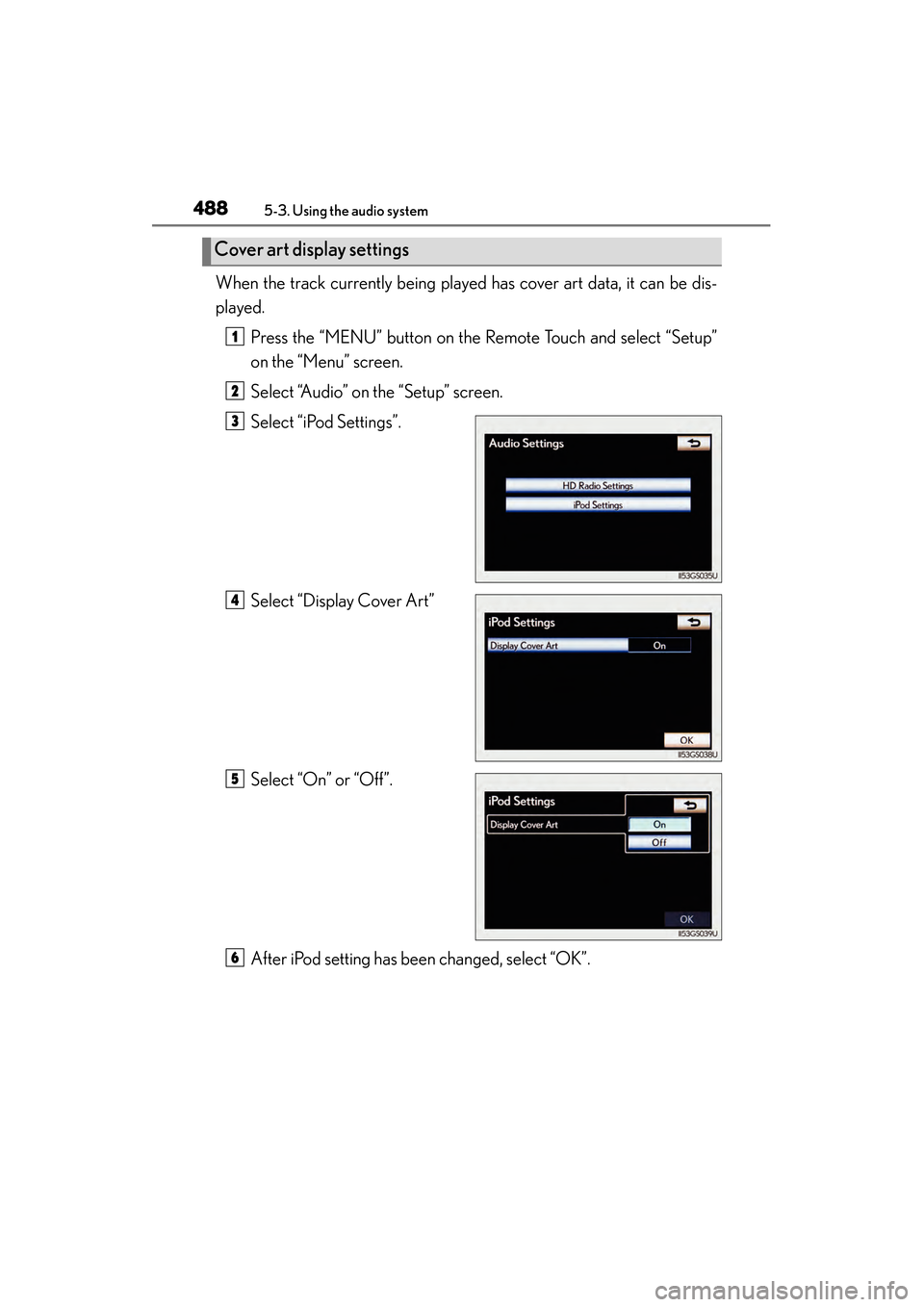
When the track currently being played has cover art data, it can be dis-
played.Press the “MENU” button on the Remote Touch and select “Setup”
on the “Menu” screen.
Select “Audio” on the “Setup” screen.
Select “iPod Settings”.
Select “Display Cover Art”
Select “On” or “Off”.
After iPod setting has been changed, select “OK”.
Cover art display settings
1
2
3
4
5
6
GS450h_U.book Page 488 Monday, January 23, 2012 10:20 AM
Page 492 of 862
GS450h_U (OM30D01U)
4915-3. Using the audio system
5
Interior features
■Playing tracks in random order
Select “RAND” on the screen.
Each time “RAND” is selected, the mode changes as follows:
track shuffle → album shuffle → off
■Playing the albums in random order
Select “RAND” repeatedly until “ALB.RAND” appears on the screen.
To cancel, select “RAND” again.
Select “RPT” on the screen.
“RPT” appears on the screen.
To cancel, select “RPT” again.
■If you select
The display returns to the previous screen.
■About iPod
●“Made for iPod” and “Made for iPhone” mean that an electronic accessory has
been designed to connect specifically to iPod, or iPhone, respectively, and has
been certified by the developer to meet Apple performance standards.
●Apple is not responsible for the operation of this device or its compliance with
safety and regulatory standards. Please note that the use of this accessory with
iPod or iPhone may affect wireless performance.
●iPhone, iPod, iPod classic, iPod nano and iPod touch are trademarks of Apple Inc.,
registered in the U.S. and other countries.
Random playback
Repeat play
GS450h_U.book Page 491 Monday, January 23, 2012 10:20 AM
Page 493 of 862
492
GS450h_U (OM30D01U)
5-3. Using the audio system
■iPod cover art
●Depending on the iPod and the songs in the iPod, iPod cover art may be displayed.
This function can be changed to “On” or “Off”. (→P. 4 8 8 )
●It may take time to display iPod cover art, and the iPod may not be operated while
the cover art display is in process.
●Only iPod cover art that is saved in JPEG format can be displayed.
■iPod functions
●When the iPod connected to the system includes iPod video, the system can only
output the sound by selecting “Video” on the “iPod” screen.
●Depending on the iPod, the video sound may not be able to be heard.
●When an iPod is connected and the audio source is changed to iPod mode, the
iPod will resume play from the same point in which it was last used.
●Depending on the iPod that is connected to the system, certain functions may not
be available. If a function is unavailable due to a malfunction (as opposed to a sys-
tem specification), disconnecting the device and reconnecting it once again may
resolve the problem.
■When using an iPod
You maybe unable to use the instrument panel power outlet if the iPod is connected
to the USB port at the same time.
■Battery charge
When an iPod is connected using a genuine iPod cable, the iPod starts charging its
battery.
■Error messages for iPod
“iPod Error”:
This indicates a problem in the iPod or its connection.
“No music files found.”:
This indicates that there is no music data in the iPod.
“Please check the iPod firmware version.”:
This indicates that the software version is not compatible. Perform the iPod firmware
updates and try again.
“iPod authorization failed.”:
This indicates that it failed to authorize the iPod. Please check your iPod.
sec_05-03.fm Page 492 Monday, January 30, 2012 10:30 AM
Page 508 of 862
GS450h_U (OM30D01U)
5075-4. Using the hands-free phone system (for cellular phone)
5
Interior features
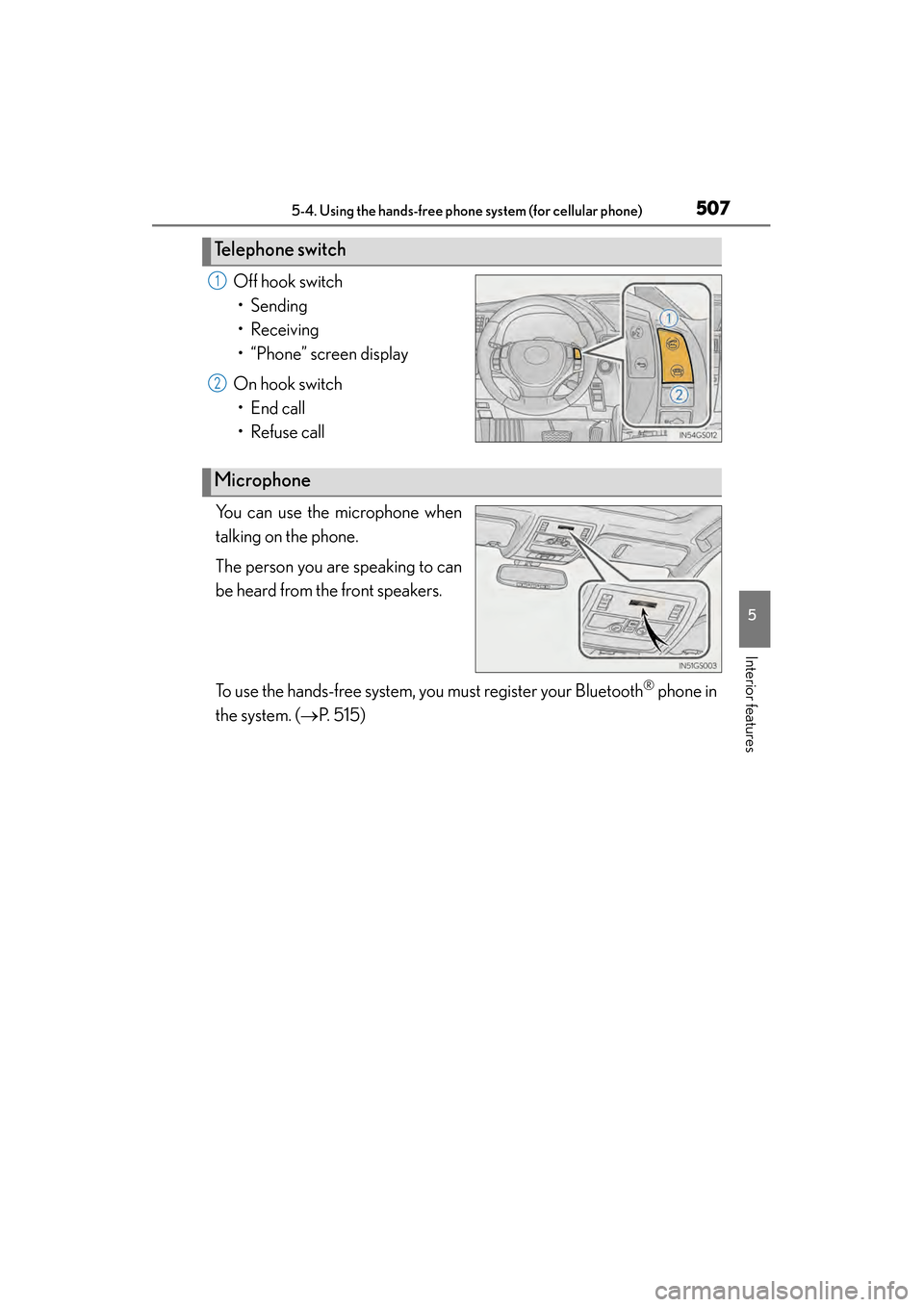
Off hook switch• Sending
• Receiving
• “Phone” screen display
On hook switch • End call
• Refuse call
You can use the microphone when
talking on the phone.
The person you are speaking to can
be heard from the front speakers.
To use the hands-free system, you must register your Bluetooth
® phone in
the system. ( →P. 515)
Te l e p h o n e s w i t c h
1
2
Microphone
GS450h_U.book Page 507 Monday, January 23, 2012 10:20 AM
Page 519 of 862
518
GS450h_U (OM30D01U)
5-4. Using the hands-free phone system (for cellular phone)
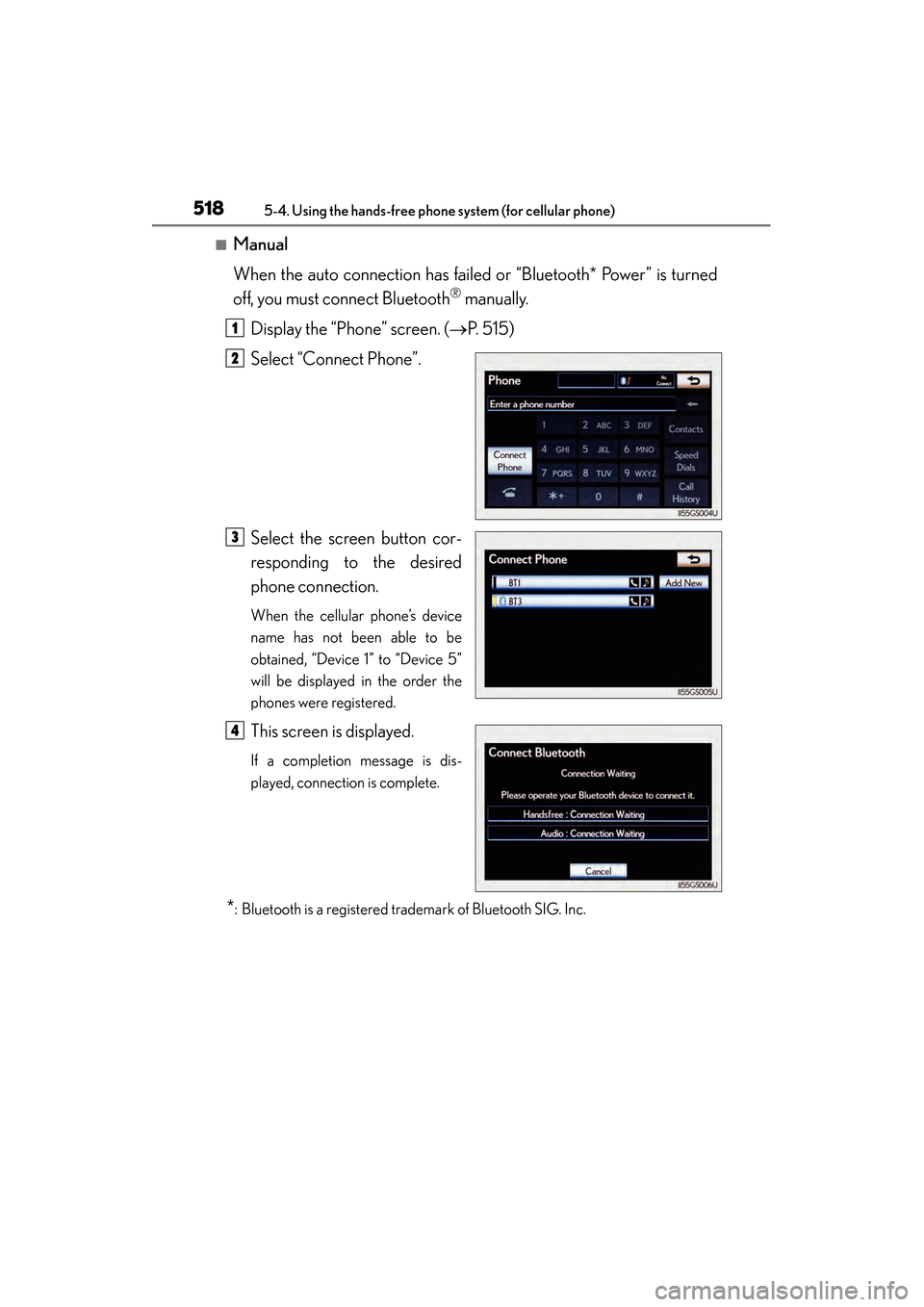
■Manual
When the auto connection has failed or “Bluetooth* Power” is turned
off, you must connect Bluetooth
® manually.
Display the “Phone” screen. ( →P. 515)
Select “Connect Phone”.
Select the screen button cor-
responding to the desired
phone connection.
When the cellular phone’s device
name has not been able to be
obtained, “Device 1” to “Device 5”
will be displayed in the order the
phones were registered.
This screen is displayed.
If a completion message is dis-
played, connection is complete.
*: Bluetooth is a registered trademark of Bluetooth SIG. Inc.
1
2
3
4
GS450h_U.book Page 518 Monday, January 23, 2012 10:20 AM
Page 520 of 862
GS450h_U (OM30D01U)
5195-4. Using the hands-free phone system (for cellular phone)
5
Interior features
■Reconnecting to the Bluetooth® phone
If the system cannot connect due to poor signal strength with the power switch in
ACCESSORY or ON mode, the system will automatically attempt to reconnect.
If the phone is turned off, the system will not attempt to reconnect. In this case, it must
be connected manually, or the phone must be re-selected or re-entered.
■Connecting the phone while Bluetooth® audio is playing
●Bluetooth® audio will stop temporarily.
●It may take time to connect.
■Connecting the phone while another Bluetooth® device is connected
When another Bluetooth
® device is currently connected, a confirmation message
will be displayed. To disconnect the Bluetooth® device, select “Yes”.
■Connecting the phone while 5 Bluetooth® devices have already been registered
When 5 Bluetooth
® devices have already been registered, a registered device
needs to be deleted. Select “Yes” to delete one or more.
Select the device to be deleted, then select “Remove”, and “Yes”.
■If the Bluetooth® phone has a Bluetooth® audio function
When the Bluetooth
® phone to be registered has a Bluetooth® audio function, this
audio function will be registered automatically at the same time and confirmation
message may be displayed. If this screen is displayed, select “Yes” to connect the
audio function or select “No” to cancel the connection.
GS450h_U.book Page 519 Monday, January 23, 2012 10:20 AM
Page 526 of 862
GS450h_U (OM30D01U)
5255-4. Using the hands-free phone system (for cellular phone)
5
Interior features
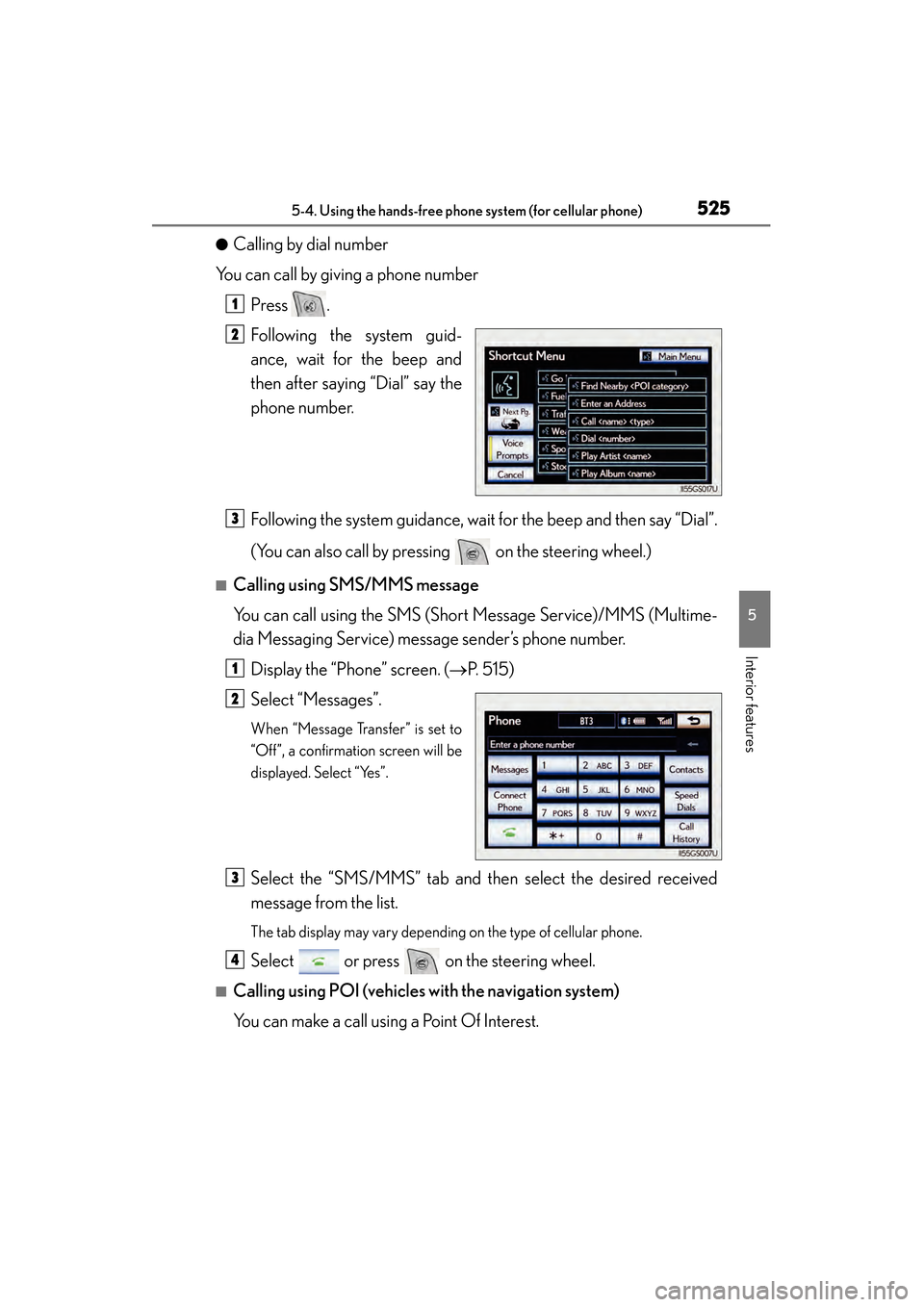
●Calling by dial number
You can call by giving a phone number
Press .
Following the system guid-
ance, wait for the beep and
then after saying “Dial” say the
phone number.
Following the system guidance, wait for the beep and then say “Dial”.
(You can also call by pressing on the steering wheel.)
■Calling using SMS/MMS message
You can call using the SMS (Short Message Service)/MMS (Multime-
dia Messaging Service) message sender’s phone number.Display the “Phone” screen. ( →P. 515)
Select “Messages”.
When “Message Transfer” is set to
“Off”, a confirmation screen will be
displayed. Select “Yes”.
Select the “SMS/MMS” tab and then select the desired received
message from the list.
The tab display may vary depending on the type of cellular phone.
Select or press on the steering wheel.
■Calling using POI (vehicles with the navigation system)
You can make a call using a Point Of Interest.
1
2
3
1
2
3
4
GS450h_U.book Page 525 Monday, January 23, 2012 10:20 AM