brake light Lexus GS450h 2013 User Guide
[x] Cancel search | Manufacturer: LEXUS, Model Year: 2013, Model line: GS450h, Model: Lexus GS450h 2013Pages: 862, PDF Size: 19.06 MB
Page 180 of 862
GS450h_U (OM30D01U)
1794-1. Before driving
4
Driving
CAUTION
■When the vehicle is parked
●Do not leave glasses, cigarette lighters, spray cans, or soft drink cans in the vehi-
cle when it is in the sun.
Doing so may result in the following:
• Gas may leak from a cigarette lighter or spray can, and may lead to a fire.
• The temperature inside the vehicle may cause the plastic lenses and plasticmaterial of glasses to deform or crack.
• Soft drink cans may fracture, causing the contents to spray over the interior of the vehicle, and may also cause a short circuit in the vehicle’s electrical com-
ponents.
●Do not leave cigarette lighters in the vehicle. If a cigarette lighter is in a place such
as the glove box or on the floor, it may be lit accidentally when luggage is loaded
or the seat is adjusted, causing a fire.
●Do not attach adhesive discs to the windshield or windows. Do not place contain-
ers such as air fresheners on the instrument panel or dashboard. Adhesive discs
or containers may act as lenses, causing a fire in the vehicle.
●Do not leave a door or window open if the curved glass is coated with a metal-
lized film such as a silver-colored one. Reflected sunlight may cause the glass to
act as a lens, causing a fire.
●Always apply the parking brake, shift the shift lever to P, stop the hybrid system
and lock the vehicle.
Do not leave the vehicle unattended while the hybrid system is operating.
●Do not touch the exhaust pipes while the hybrid system is operating or immedi-
ately after turning the hybrid system off.
Doing so may cause burns.
GS450h_U.book Page 179 Monday, January 23, 2012 10:20 AM
Page 208 of 862
207
GS450h_U (OM30D01U)4-2. Driving procedures
4
Driving
Pa rk in g b ra ke
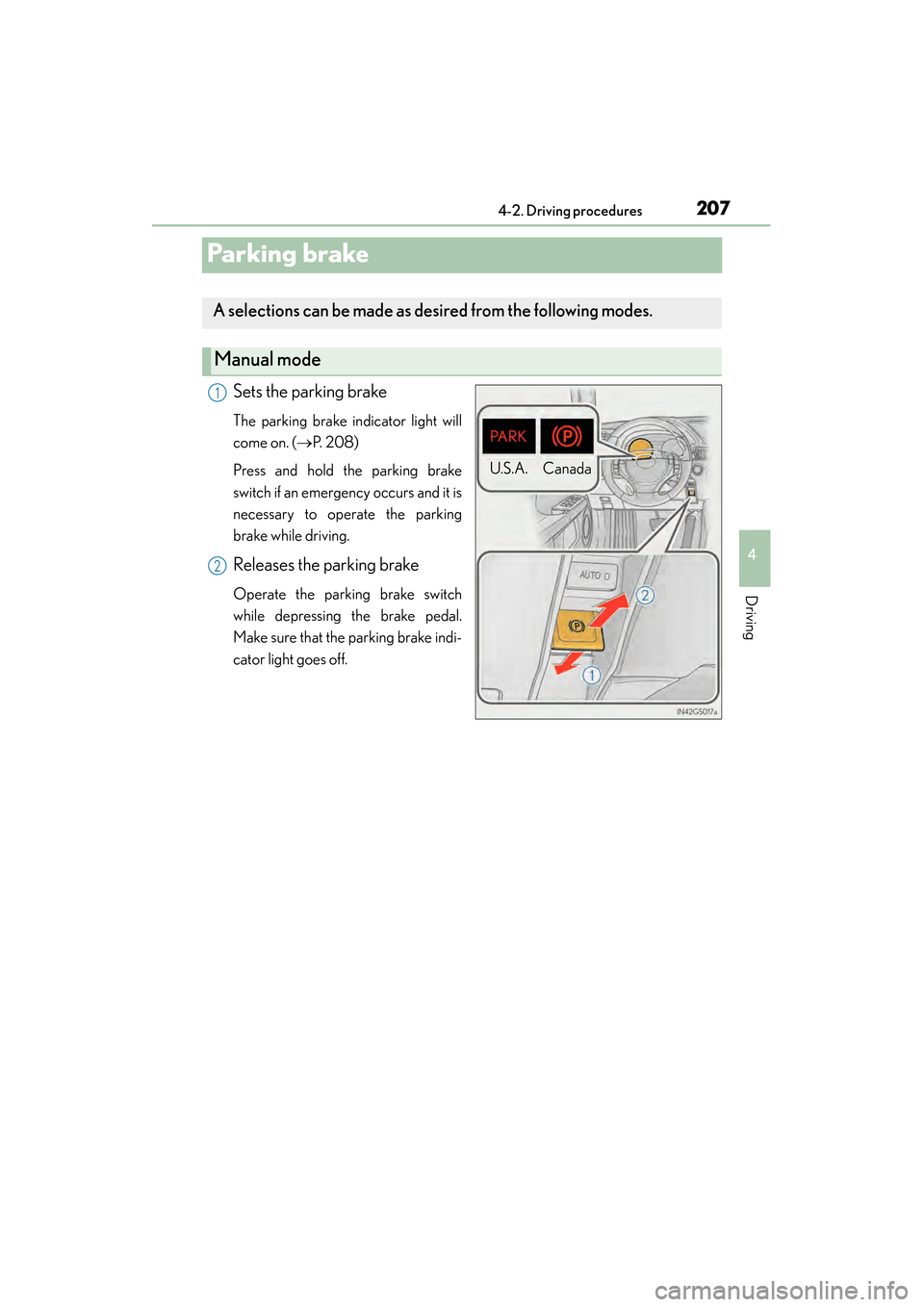
Sets the parking brake
The parking brake indicator light will
come on. ( →P. 2 0 8 )
Press and hold the parking brake
switch if an emergency occurs and it is
necessary to operate the parking
brake while driving.
Releases the parking brake
Operate the parking brake switch
while depressing the brake pedal.
Make sure that the parking brake indi-
cator light goes off.
A selections can be made as desired from the following modes.
Manual mode
U.S.A. Canada
1
2
GS450h_U.book Page 207 Monday, January 23, 2012 10:20 AM
Page 209 of 862
208
GS450h_U (OM30D01U)
4-2. Driving procedures
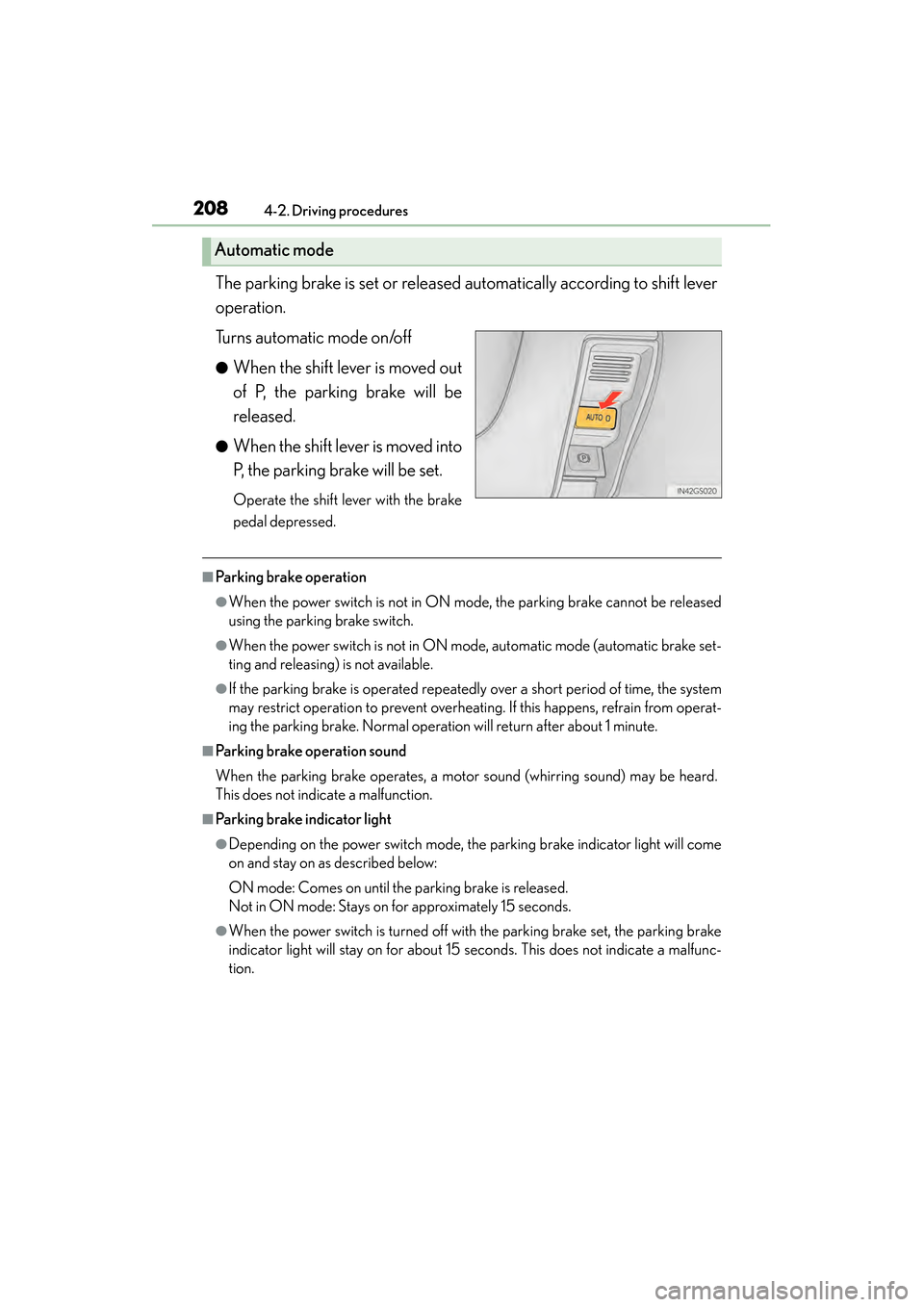
The parking brake is set or released automatically according to shift lever
operation.
Turns automatic mode on/off
●When the shift lever is moved out
of P, the parking brake will be
released.
●When the shift lever is moved into
P, the parking brake will be set.
Operate the shift lever with the brake
pedal depressed.
■Parking brake operation
●When the power switch is not in ON mode, the parking brake cannot be released
using the parking brake switch.
●When the power switch is not in ON mode, automatic mode (automatic brake set-
ting and releasing) is not available.
●If the parking brake is operated repeatedly over a short period of time, the system
may restrict operation to prevent overheating. If this happens, refrain from operat-
ing the parking brake. Normal operation will return after about 1 minute.
■Parking brake operation sound
When the parking brake operates, a motor sound (whirring sound) may be heard.
This does not indicate a malfunction.
■Parking brake indicator light
●Depending on the power switch mode, the parking brake indicator light will come
on and stay on as described below:
ON mode: Comes on until the parking brake is released.
Not in ON mode: Stays on for approximately 15 seconds.
●When the power switch is turned off with the parking brake set, the parking brake
indicator light will stay on for about 15 seconds. This does not indicate a malfunc-
tion.
Automatic mode
GS450h_U.book Page 208 Monday, January 23, 2012 10:20 AM
Page 210 of 862
GS450h_U (OM30D01U)
2094-2. Driving procedures
4
Driving
■When there is a malfunction in the system
Warning lights and/or warning message will turn on or flash. (→P. 7 1 3 , 7 2 6 )
Depending on the condition, the parking brake indicator light may flash.
■Usage in winter time
→ P. 3 2 0
NOTICE
■When parking the vehicle
Before you leave the vehicle, set the parking brake, shift the shift lever to P and
make sure that the vehicle does not move.
■When the system malfunctions
Stop the vehicle in a safe place and check the warning messages.
■When the parking brake cannot be released due to a malfunction
Use the parking brake release tool to manually release the parking brake.
(→ P. 76 5 )
Driving the vehicle with the parking brake set will lead to brake components over-
heating, which may affect braking performance and increase brake wear.
GS450h_U.book Page 209 Monday, January 23, 2012 10:20 AM
Page 211 of 862
210
GS450h_U (OM30D01U)
4-2. Driving procedures
Brake Hold
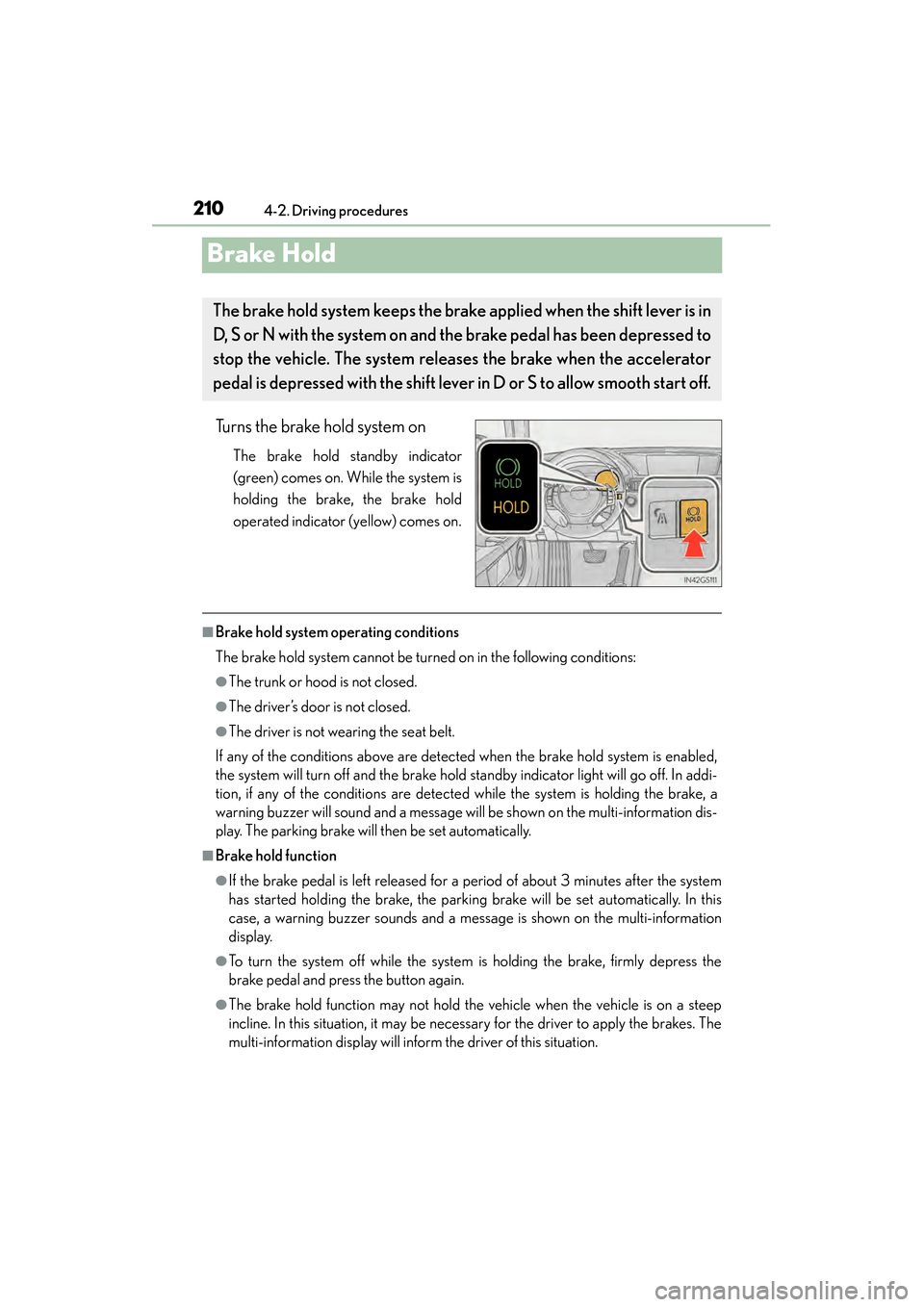
Turns the brake hold system on
The brake hold standby indicator
(green) comes on. While the system is
holding the brake, the brake hold
operated indicator (yellow) comes on.
■Brake hold system operating conditions
The brake hold system cannot be turned on in the following conditions:
●The trunk or hood is not closed.
●The driver’s door is not closed.
●The driver is not wearing the seat belt.
If any of the conditions above are detected when the brake hold system is enabled,
the system will turn off and the brake hold standby indicator light will go off. In addi-
tion, if any of the conditions are detected while the system is holding the brake, a
warning buzzer will sound and a message will be shown on the multi-information dis-
play. The parking brake will then be set automatically.
■Brake hold function
●If the brake pedal is left released for a period of about 3 minutes after the system
has started holding the brake, the parking brake will be set automatically. In this
case, a warning buzzer sounds and a message is shown on the multi-information
display.
●To turn the system off while the system is holding the brake, firmly depress the
brake pedal and press the button again.
●The brake hold function may not hold the vehicle when the vehicle is on a steep
incline. In this situation, it may be necessary for the driver to apply the brakes. The
multi-information display will inform the driver of this situation.
The brake hold system keeps the brak e applied when the shift lever is in
D, S or N with the system on and the brake pedal has been depressed to
stop the vehicle. The system releases the brake when the accelerator
pedal is depressed with the shift lever in D or S to allow smooth start off.
GS450h_U.book Page 210 Monday, January 23, 2012 10:20 AM
Page 212 of 862
GS450h_U (OM30D01U)
2114-2. Driving procedures
4
Driving
■When the parking brake is set automatically while the system is holding the brakes
The parking brake will not be released automatically. Release the parking brake by
operating the parking brake switch, making sure that the parking brake indicator
light goes off. (→P. 2 0 7 )
■When there is a malfunction in the system
Warning lights and/or warning messages will turn on or flash. ( →P. 7 1 3 , 7 2 5 )
CAUTION
■When the vehicle is on a steep incline
When using the brake hold system on a steep incline exercise caution. The brake
hold function may not hold the vehicle in such a situation.
■When stopped on a slippery road
The system cannot stop the vehicle when the gripping ability of the tires has been
exceeded. Do not use the system when stopped on a slippery road.
NOTICE
■When parking the vehicle
The brake hold system is not designed for use when parking the vehicle for a long
period of time. Turning the power switch off while the system is holding the brake
may release the brake, which would cause the vehicle to move. When operating
the power switch, depress the brake pedal, set the parking brake and shift the shift
lever to P.
GS450h_U.book Page 211 Monday, January 23, 2012 10:20 AM
Page 217 of 862
216
GS450h_U (OM30D01U)
4-3. Operating the lights and wipers
■Daytime running light system
●To make your vehicle more visible to other drivers, the parking lights turn on auto-
matically (at an increased intensity) whenever the hybrid system is started and the
parking brake is released. Daytime running lights are not designed for use at night.
●Compared to turning on the headlights, the daytime running light system offers
greater durability and consumes less electricity, so it can help improve fuel econ-
omy.
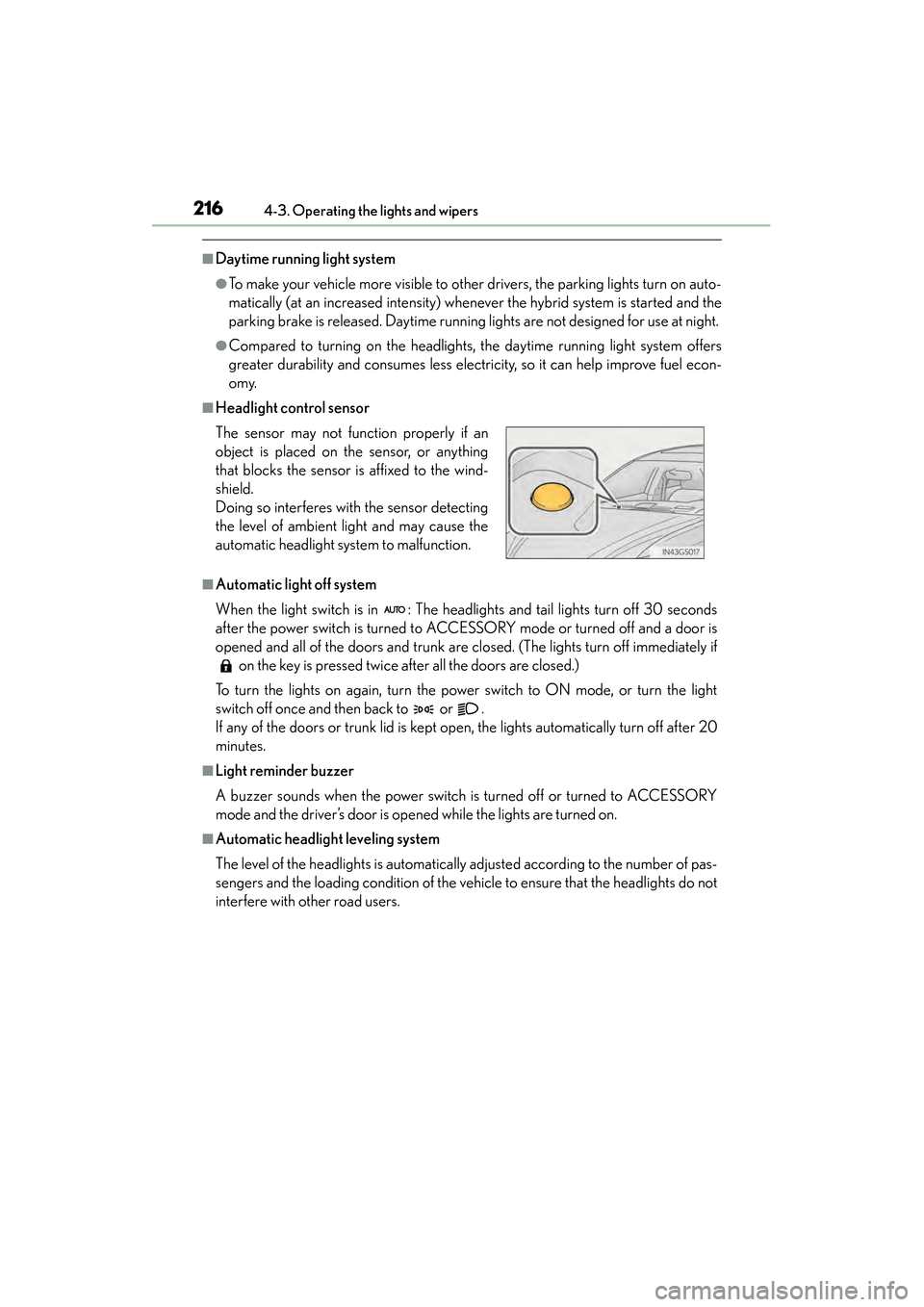
■Headlight control sensor
■Automatic light off system
When the light switch is in : The headlights and tail lights turn off 30 seconds
after the power switch is turned to ACCESSORY mode or turned off and a door is
opened and all of the doors and trunk are closed. (The lights turn off immediately if on the key is pressed twice after all the doors are closed.)
To turn the lights on again, turn the power switch to ON mode, or turn the light
switch off once and then back to or .
If any of the doors or trunk lid is kept open, the lights automatically turn off after 20
minutes.
■Light reminder buzzer
A buzzer sounds when the power switch is turned off or turned to ACCESSORY
mode and the driver’s door is opened while the lights are turned on.
■Automatic headlight leveling system
The level of the headlights is automatically adjusted according to the number of pas-
sengers and the loading condition of the vehi cle to ensure that the headlights do not
interfere with other road users. The sensor may not function properly if an
object is placed on the sensor, or anything
that blocks the sensor is affixed to the wind-
shield.
Doing so interferes with the sensor detecting
the level of ambient light and may cause the
automatic headlight system to malfunction.
GS450h_U.book Page 216 Monday, January 23, 2012 10:20 AM
Page 272 of 862
GS450h_U (OM30D01U)
2714-5. Using the driving support systems
4
Driving
■Intuitive parking assist display
When an obstacle is detected while the rear view monitor system, is in use, the warn-
ing indicator will appear in the top right of the screen even if the display setting has
been set to off.
■Sensor detection information
●The sensor’s detection areas are limited to the areas around the vehicle’s front cor-
ner and rear bumpers.
●Certain vehicle conditions and the surrounding environment may affect the ability
of the sensor to correctly detect obstacles. Particular instances where this may
occur are listed below.
• There is dirt, snow or ice on the sensor. (Wiping the sensors will resolve thisproblem.)
• The sensor is frozen. (Thawing the area will resolve this problem.) In especially cold weather, if a sensor is frozen the screen may show an abnor-
mal display, or obstacles may not be detected.
• The sensor is covered in any way.
• The vehicle is leaning considerably to one side.
• On an extremely bumpy road, on an incline, on gravel, or on grass.
• The vicinity of the vehicle is noisy due to vehicle horns, motorcycle engines, air brakes of large vehicles, or other loud noises producing ultrasonic waves.
• There is another vehicle equipped with parking assist sensors in the vicinity.
• The sensor is coated with a sheet of spray or heavy rain.
• The vehicle is equipped with a fender pole or wireless antenna.
• Towing eyelets are installed.
• The bumper or sensor receives a strong impact.
• The vehicle is approaching a tall or curved curb.
• In harsh sunlight or intense cold weather.
• The area directly under the bumpers is not detected.
• If obstacles draw too close to the sensor.
• A non-genuine Lexus suspension (lowered suspension etc.) is installed.
• People may not be detected if they are wearing certain types of clothing.
In addition to the examples above, there are instances in which, because of their
shape, signs and other objects may be judged by the sensor to be closer than they
are.
GS450h_U.book Page 271 Monday, January 23, 2012 10:20 AM
Page 297 of 862
296
GS450h_U (OM30D01U)
4-5. Using the driving support systems
PCS (Pre-Collision System)∗
◆Pre-collision seat belts (front seat only)
If the pre-collision sensor detects that a collision is unavoidable, the
pre-collision system will retract the seat belt before the collision occurs.
The same will happen if the driver makes an emergency braking or
loses control of the vehicle. (→P. 3 4 )
◆Pre-collision brake assist
When there is a high possibility of a frontal collision, the system applies
greater braking force in relation to how strongly the brake pedal is
depressed.
◆Pre-collision braking
When there is a high possibility of a frontal collision, the system warns
the driver using a warning light, warning display and buzzer. If the sys-
tem determines that a collision is unavoidable, the brakes are automati-
cally applied to reduce the collision speed.
∗
: If equipped
When the radar sensor detects that a frontal collision is highly likely or
even unavoidable, safety systems such as the brakes and seat belts are
automatically engaged to lessen impact as well as vehicle damage.
The pre-collision system can be turned on and off as necessary by oper-
ating the switch. ( →P. 2 9 7 )
GS450h_U.book Page 296 Monday, January 23, 2012 10:20 AM
Page 318 of 862
317
GS450h_U (OM30D01U)4-6. Driving tips
4
Driving
Hybrid vehicle driving tips
■Using Eco drive mode
When using Eco drive mode, the torque corresponding to the acceler-
ator pedal depression amount can be generated more smoothly than it
is in normal conditions. In addition, the operation of the air conditioning
system (heating/cooling) will be minimized, improving the fuel econ-
omy. ( →P. 2 8 6 )
■Use of Hybrid System Indicator
The Eco-friendly driving is possible by keeping the indicate of Hybrid
System Indicator within Eco area. ( →P. 9 2 )
■When braking the vehicle
Make sure to operate the brakes gently and in good time. A greater
amount of electrical energy can be retained when slowing down.
■Delays
Repeated acceleration and deceleration, as well as long waits at traffic
lights, will lead to bad fuel consumption. Check traffic reports before
leaving and avoid delays as much as possible. When encountering a
delay, gently release the brake pedal to allow the vehicle to move for-
ward slightly while avoiding overuse of the accelerator pedal. Doing so
can help control excessive gasoline consumption.
■Highway driving
Control your speed and keep at a constant speed. Also, before stop-
ping at a toll booth or similar, allow plenty of time to release the acceler-
ator and gently apply the brakes. A greater amount of electrical energy
can be retained when slowing down.
For economical and ecological drivin g, pay attention to the following
points:
GS450h_U.book Page 317 Monday, January 23, 2012 10:20 AM