trans Lexus GS450h 2013 User Guide
[x] Cancel search | Manufacturer: LEXUS, Model Year: 2013, Model line: GS450h, Model: Lexus GS450h 2013Pages: 862, PDF Size: 19.06 MB
Page 286 of 862
GS450h_U (OM30D01U)
2854-5. Using the driving support systems
4
Driving
NOTICE
■How to use the camera
●The rear view monitor system may not operate properly in the following cases, or
if the precautions described below are not followed.
• If the back of the vehicle is hit, the position and mounting angle of the cameramay change.
• As the camera has a water proof construction, do not detach, disassemble or modify it. This may cause incorrect operation.
• Do not strongly rub the camera lens. If the camera lens is scratched, it cannot transmit a clear image.
• Do not allow organic solvent, car wax, window cleaner or glass coat to adhere to the camera. If this happens, wipe it off as soon as possible.
• If the temperature changes rapidly, such as when hot water is poured on the vehicle in cold weather, the system may not operate normally.
• When washing the vehicle, do not apply intensive bursts of water to the cam- era or camera area. Doing so may result in the camera malfunctioning.
• When the camera is used under fluorescent lights, sodium light or mercury light etc., the lights and the illuminated areas may appear to flicker.
●Do not expose the camera to strong impact as this could cause a malfunction. If
this happens, have the vehicle inspected by your Lexus dealer as soon as possi-
ble.
GS450h_U.book Page 285 Monday, January 23, 2012 10:20 AM
Page 302 of 862
GS450h_U (OM30D01U)
3014-5. Using the driving support systems
4
Driving
■Automatic cancelation of the pre-collision system
When a malfunction occurs due to sensor contamination, etc. that results in the sen-
sors being unable to detect obstacles, the pre-collision system will be automatically
disabled. In this case, the system will not activate even if there is a collision possibility.
■When there is a malfunction in the system
“PCS” warning light will flash and warning messages will be displayed.
(→ P. 7 1 3 , 7 2 3 )
■Certification
XFor vehicles sold in the U.S.A.
FCC ID: HYQDNMWR004
This device complies with Part 15 of the FCC Rules. Operation is subject to the fol-
lowing two conditions: (1) This device may not cause harmful interference, and (2)
this device must accept any interference received, including interference that may
cause undesired operation.
FCC WARNING
Changes or modifications not expressly approved by the party responsible for com-
pliance could void the user’s authority to operate the equipment.
Radiofrequency radiation exposure Information:
This equipment complies with FCC radiation exposure limits set forth for an uncon-
trolled environment.
This equipment should be installed and operated with minimum distance of 20 cm
between the radiator (antenna) and your body.
This transmitter must not be co-located or operating in conjunction with any other
antenna or transmitter.
XFor vehicles sold in Canada
Operation is subject to the following two conditions: (1) this device may not cause
interference, and (2) this device must accept any interference, including interfer-
ence that may cause undesired operation of the device.
sec_04-05.fm Page 301 Monday, January 30, 2012 10:28 AM
Page 325 of 862
324
GS450h_U (OM30D01U)
4-6. Driving tips
NOTICE
■Repairing or replacing snow tires
Request repairs or replacement of snow tires from Lexus dealers or legitimate tire
retailers.
This is because the removal and attachment of snow tires affects the operation of
the tire pressure warning valves and transmitters.
■Fitting tire chains
The tire pressure warning valves and transmitters may not function correctly when
tire chains are fitted.
■When standing the windshield wipers up
Raise the wipers in line with the windshield. (→P. 3 2 2 )
Failure to do so may result in damage to the wipers and/or the hood.
GS450h_U.book Page 324 Monday, January 23, 2012 10:20 AM
Page 343 of 862
3425-1. Remote Touch screen
GS450h_U (OM30D01U)
●Transferring dataOpen the console box.
Open the cover and connect a
USB memory.
Turn on the power of the USB
memory if it is not turned on.
Close the console box.
Select “Customize Startup Image” on the “General Settings” screen.
Select “Transfer”.
Select “Yes”.
1
2
3
4
5
6
GS450h_U.book Page 342 Monday, January 23, 2012 10:20 AM
Page 344 of 862
GS450h_U (OM30D01U)
3435-1. Remote Touch screen
5
Interior features
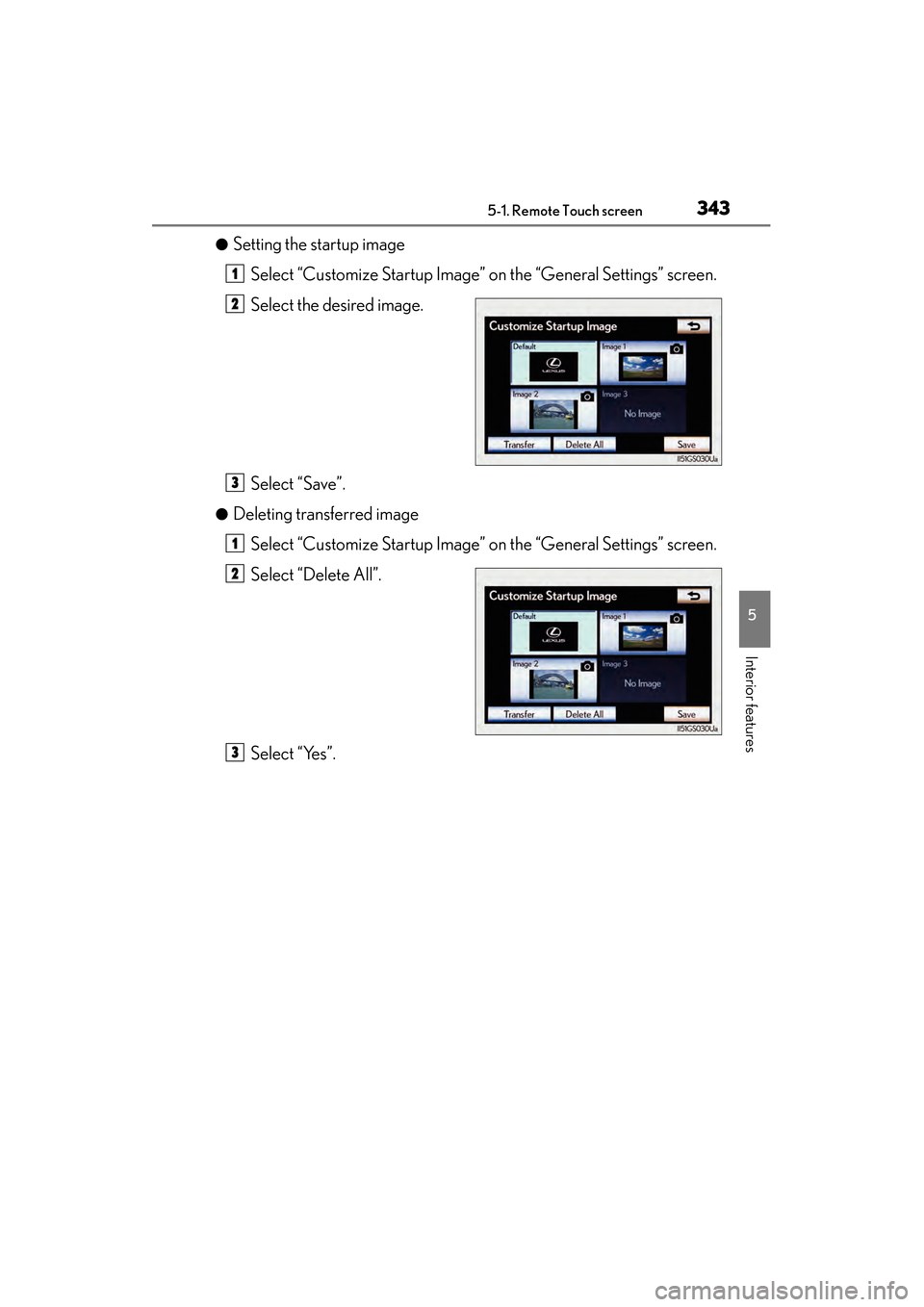
●Setting the startup imageSelect “Customize Startup Image” on the “General Settings” screen.
Select the desired image.
Select “Save”.
●Deleting transferred image
Select “Customize Startup Image” on the “General Settings” screen.
Select “Delete All”.
Select “Yes”.
1
2
3
1
2
3
GS450h_U.book Page 343 Monday, January 23, 2012 10:20 AM
Page 345 of 862
3445-1. Remote Touch screen
GS450h_U (OM30D01U)
■Changing the screen off image
Select “Screen Off” on the “Display” screen to turn off the screen. An
image can be copied from a USB memory and can be set to display
when “Screen Off” is selected.
When saving the images to a USB memory, name the folder that the
screen off image is saved to “DisplayOffImage”. If these folder names
are not used, the system cannot download the images. (The folder
names are case sensitive.)
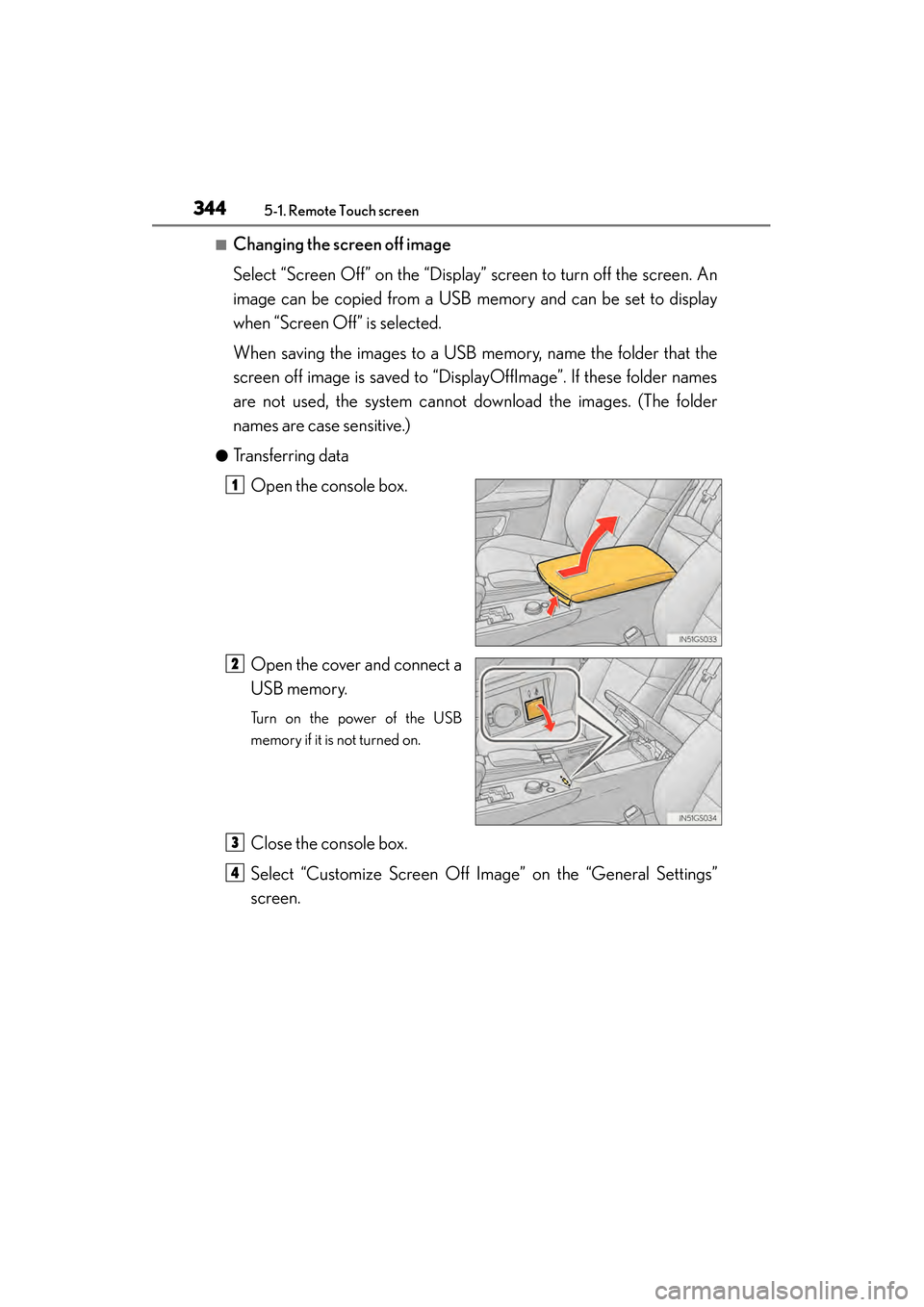
●Transferring dataOpen the console box.
Open the cover and connect a
USB memory.
Turn on the power of the USB
memory if it is not turned on.
Close the console box.
Select “Customize Screen Off Image” on the “General Settings”
screen.
1
2
3
4
GS450h_U.book Page 344 Monday, January 23, 2012 10:20 AM
Page 346 of 862
GS450h_U (OM30D01U)
3455-1. Remote Touch screen
5
Interior features
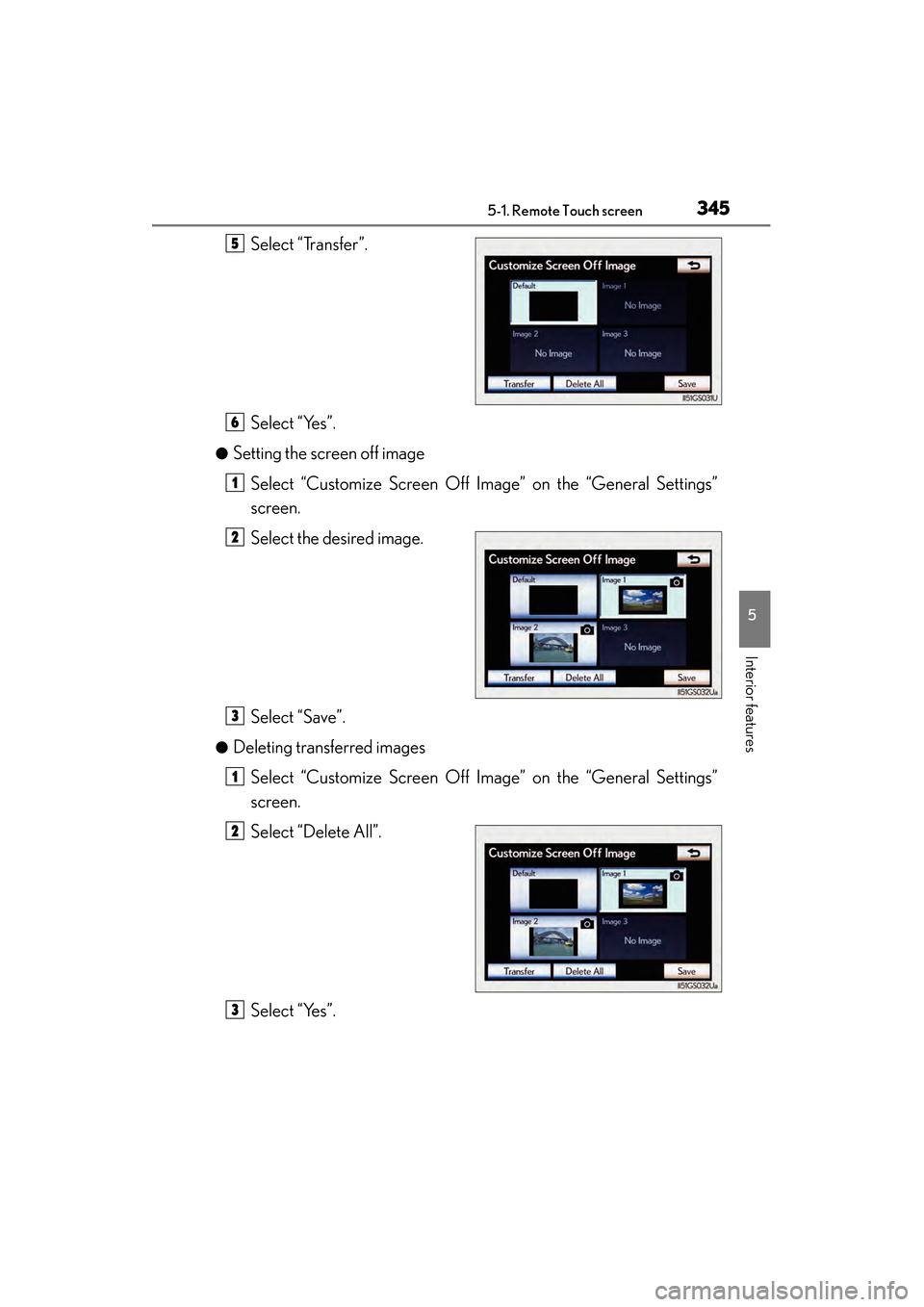
Select “Transfer”.
Select “Yes”.
●Setting the screen off imageSelect “Customize Screen Off Image” on the “General Settings”
screen.
Select the desired image.
Select “Save”.
●Deleting transferred imagesSelect “Customize Screen Off Image” on the “General Settings”
screen.
Select “Delete All”.
Select “Yes”.
5
6
1
2
3
1
2
3
GS450h_U.book Page 345 Monday, January 23, 2012 10:20 AM
Page 423 of 862
422
GS450h_U (OM30D01U)
5-3. Using the audio system
■If you select
The display returns to the previous screen.
■When the 12-volt battery is disconnected
All preset stations are erased.
■Reception sensitivity
●Cargo loaded on the roof luggage carrier, especially metal objects, may adversely
affect the reception of XM® Satellite Radio.
●Maintaining perfect radio reception at all times is difficult due to the continually
changing position of the antenna, differences in signal strength and surrounding
objects, such as trains, transmitters, etc.
●The radio antenna is mounted inside the rear window. To maintain clear radio
reception, do not attach metallic window tinting or other metallic objects to the
antenna wire mounted inside the rear window.
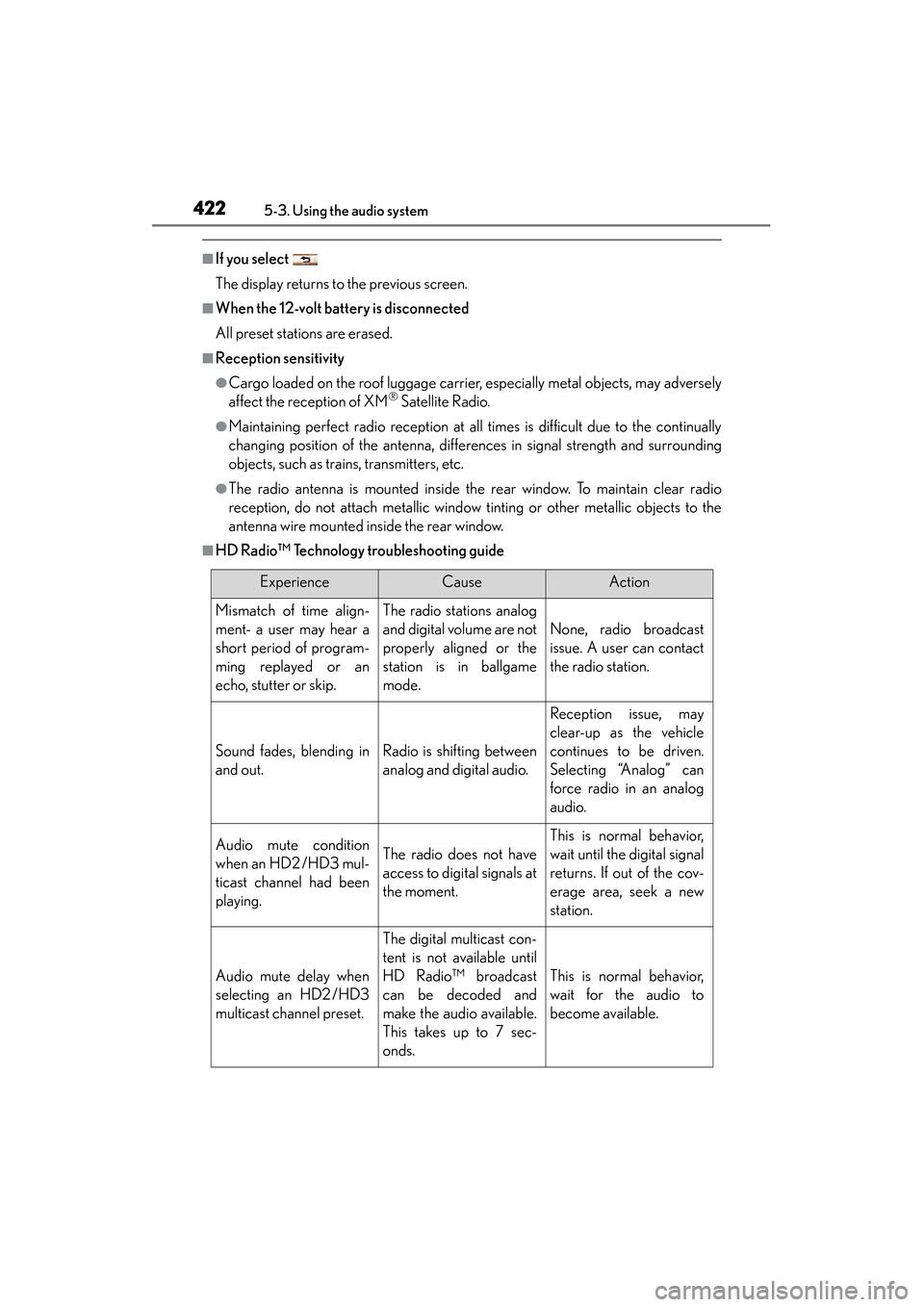
■HD Radio™ Technology troubleshooting guide
ExperienceCauseAction
Mismatch of time align-
ment- a user may hear a
short period of program-
ming replayed or an
echo, stutter or skip.The radio stations analog
and digital volume are not
properly aligned or the
station is in ballgame
mode.
None, radio broadcast
issue. A user can contact
the radio station.
Sound fades, blending in
and out.Radio is shifting between
analog and digital audio.
Reception issue, may
clear-up as the vehicle
continues to be driven.
Selecting “Analog” can
force radio in an analog
audio.
Audio mute condition
when an HD2 /HD3 mul-
ticast channel had been
playing.The radio does not have
access to digital signals at
the moment.
This is normal behavior,
wait until the digital signal
returns. If out of the cov-
erage area, seek a new
station.
Audio mute delay when
selecting an HD2 /HD3
multicast channel preset.
The digital multicast con-
tent is not available until
HD Radio™ broadcast
can be decoded and
make the audio available.
This takes up to 7 sec-
onds.
This is normal behavior,
wait for the audio to
become available.
GS450h_U.book Page 422 Monday, January 23, 2012 10:20 AM
Page 461 of 862
460
GS450h_U (OM30D01U)
5-3. Using the audio system
■The Gracenote® media database
●Music recognition technology and related data are provided by Gracenote®.
Gracenote is the industry standard in music recognition technology and related
content delivery. For more information visit www.gracenote.com
.
●CD and music-related data from Gracenote, Inc., copyright © 2000 to present
Gracenote. Gracenote Software, copyright © 2000 to present Gracenote. One
or more patents owned by Gracenote apply to this product and service. See the
Gracenote website for a non-exhaustive list of applicable Gracenote patents.
Gracenote, CDDB, MusicID, MediaVOCS, the Gracenote logo and logotype,
and the “Powered by Gracenote” logo are either registered trademarks or trade-
marks of Gracenote in the United States and/or other countries.
■Gracenote® End User License Agreement
This application or device contains software from Gracenote, Inc. of Emeryville, Cal-
ifornia (“Gracenote”). The software from Gracenote (the “Gracenote Software”)
enables this application to perform disc and/or file identification and obtain music-
related information, including name, artist, track, and title information (“Gracenote
Data”) from online servers or embedded databases (collectively, “Gracenote Serv-
ers”) and to perform other functions. You may use Gracenote Data only by means of
the intended End-User functions of this application or device.
You agree that you will use Gracenote Data, the Gracenote Software, and
Gracenote Servers for your own personal non-commercial use only. You agree not
to assign, copy, transfer or transmit th e Gracenote Software or any Gracenote Data
to any third party.
YOU AGREE NOT TO USE OR EXPLOIT GRACENOTE DATA, THE
GRACENOTE SOFTWARE, OR GRACENOTE SERVERS, EXCEPT AS
EXPRESSLY PERMITTED HEREIN.
GS450h_U.book Page 460 Monday, January 23, 2012 10:20 AM
Page 464 of 862
GS450h_U (OM30D01U)
4635-3. Using the audio system
5
Interior features
NOTICE
■Discs and adapters that cannot be used
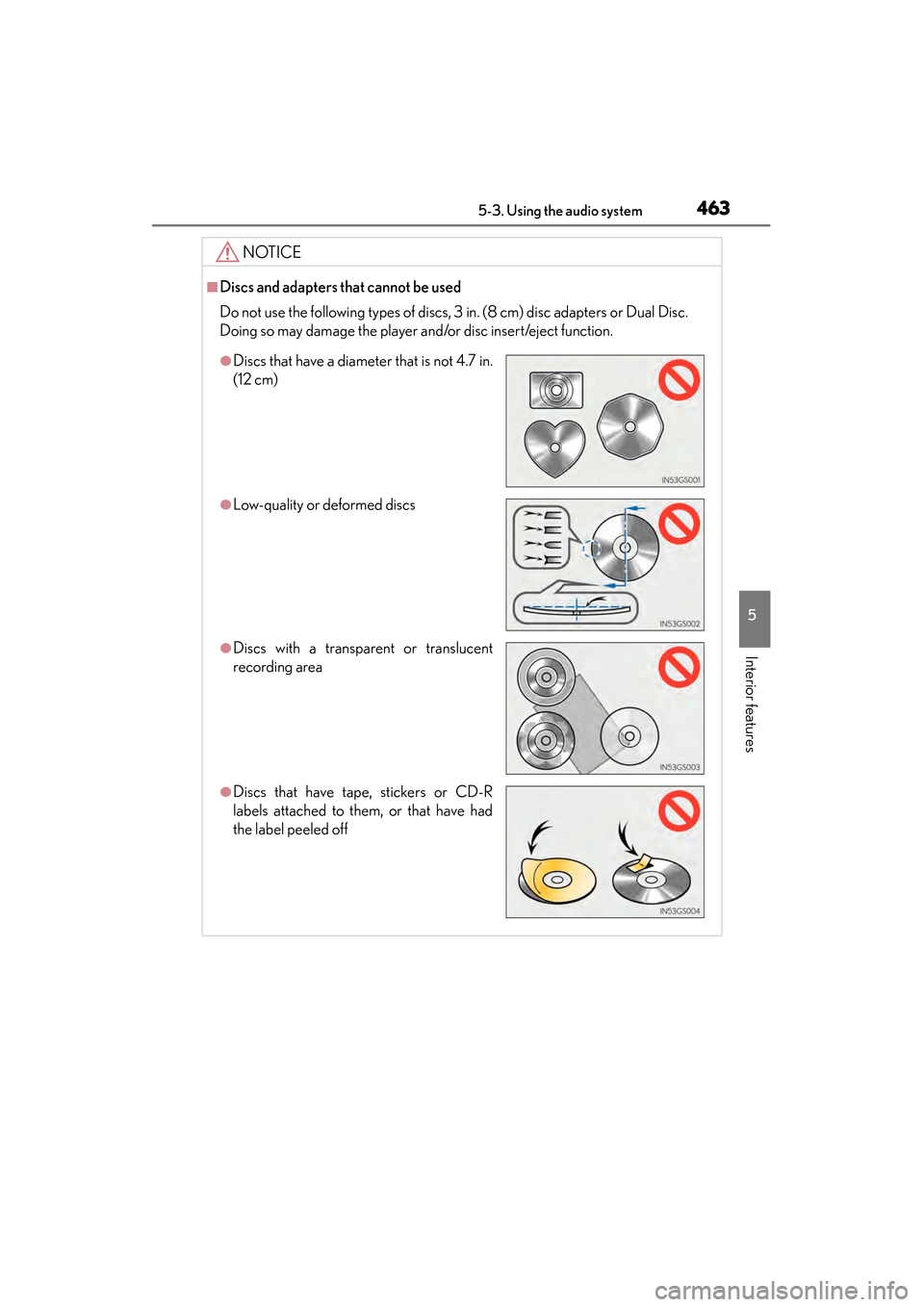
Do not use the following types of discs, 3 in. (8 cm) disc adapters or Dual Disc.
Doing so may damage the player and/or disc insert/eject function.
●Discs that have a diameter that is not 4.7 in.
(12 cm)
●Low-quality or deformed discs
●Discs with a transparent or translucent
recording area
●Discs that have tape, stickers or CD-R
labels attached to them, or that have had
the label peeled off
GS450h_U.book Page 463 Monday, January 23, 2012 10:20 AM