Ev mode Lexus GS450h 2013 Owner's Guide
[x] Cancel search | Manufacturer: LEXUS, Model Year: 2013, Model line: GS450h, Model: Lexus GS450h 2013Pages: 862, PDF Size: 19.06 MB
Page 125 of 862

124
GS450h_U (OM30D01U)
3-2. Opening, closing and locking the doors and trunk
■Effective range (areas within which the electronic key is detected)
When locking or unlocking the
doors
The system can be operated when
the electronic key is within about
2.3 ft. (0.7 m) of an outside door
handle. (Only the doors detecting
the key can be operated.)
When opening the trunk
The system can be operated when
the electronic key is within about
2.3 ft. (0.7 m) of the trunk release
button.
When starting the hybrid sys-
tem or changing power switch
modes
The system can be operated when
the electronic key is inside the vehi-
cle.
■When the door cannot be locked by the lock sensor on the upper part of the door
handle
If the door will not lock even when the topside
sensor area is touched, try touching both the
topside and underside sensor areas at the
same time.
GS450h_U.book Page 124 Monday, January 23, 2012 10:20 AM
Page 126 of 862
GS450h_U (OM30D01U)
1253-2. Opening, closing and locking the doors and trunk
3
Operation of each component
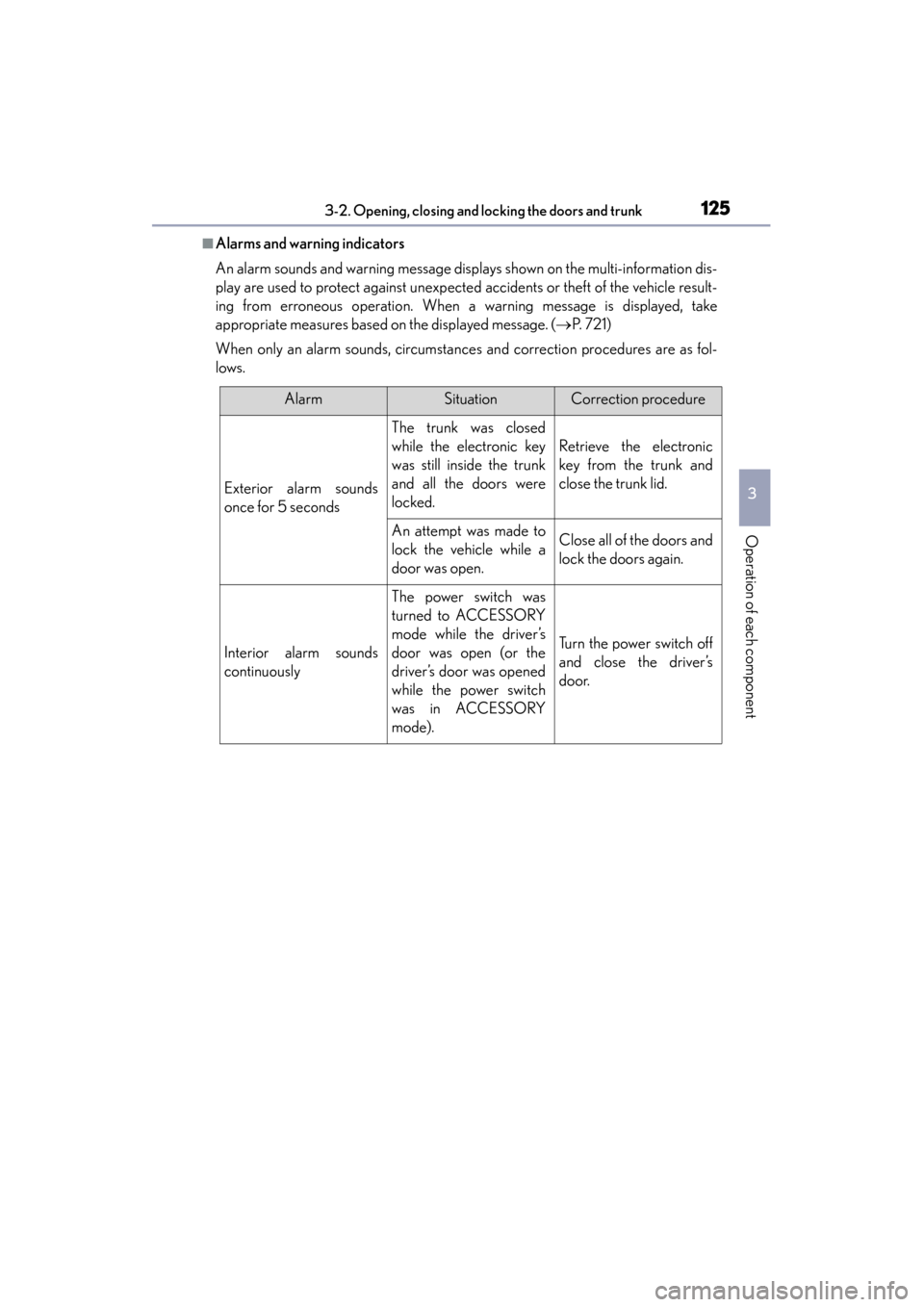
■Alarms and warning indicators
An alarm sounds and warning message displays shown on the multi-information dis-
play are used to protect against unexpected accidents or theft of the vehicle result-
ing from erroneous operation. When a warning message is displayed, take
appropriate measures based on the displayed message. (→P. 7 2 1 )
When only an alarm sounds, circumstances and correction procedures are as fol-
lows.
AlarmSituationCorrection procedure
Exterior alarm sounds
once for 5 seconds
The trunk was closed
while the electronic key
was still inside the trunk
and all the doors were
locked.
Retrieve the electronic
key from the trunk and
close the trunk lid.
An attempt was made to
lock the vehicle while a
door was open.Close all of the doors and
lock the doors again.
Interior alarm sounds
continuously
The power switch was
turned to ACCESSORY
mode while the driver’s
door was open (or the
driver’s door was opened
while the power switch
was in ACCESSORY
mode).
Turn the power switch off
and close the driver’s
door.
GS450h_U.book Page 125 Monday, January 23, 2012 10:20 AM
Page 128 of 862
GS450h_U (OM30D01U)
1273-2. Opening, closing and locking the doors and trunk
3
Operation of each component
■Battery-saving function
The battery-saving function will be activated in order to prevent the electronic key
battery and the 12-volt battery from being discharged while the vehicle is not in
operation for a long time.
●In the following situations, the smart access system with push-button start may take
some time to unlock the doors.
• The electronic key has been left in an area of approximately 6 ft. (2 m) of theoutside of the vehicle for 10 minutes or longer.
• The smart access system with push-button start has not been used for 5 days or longer.
●If the smart access system with push-button start has not been used for 14 days or
longer, the doors cannot be unlocked at any doors except the driver’s door. In this
case, take hold of the driver’s door handle, or use the wireless remote control or the
mechanical key, to unlock the doors.
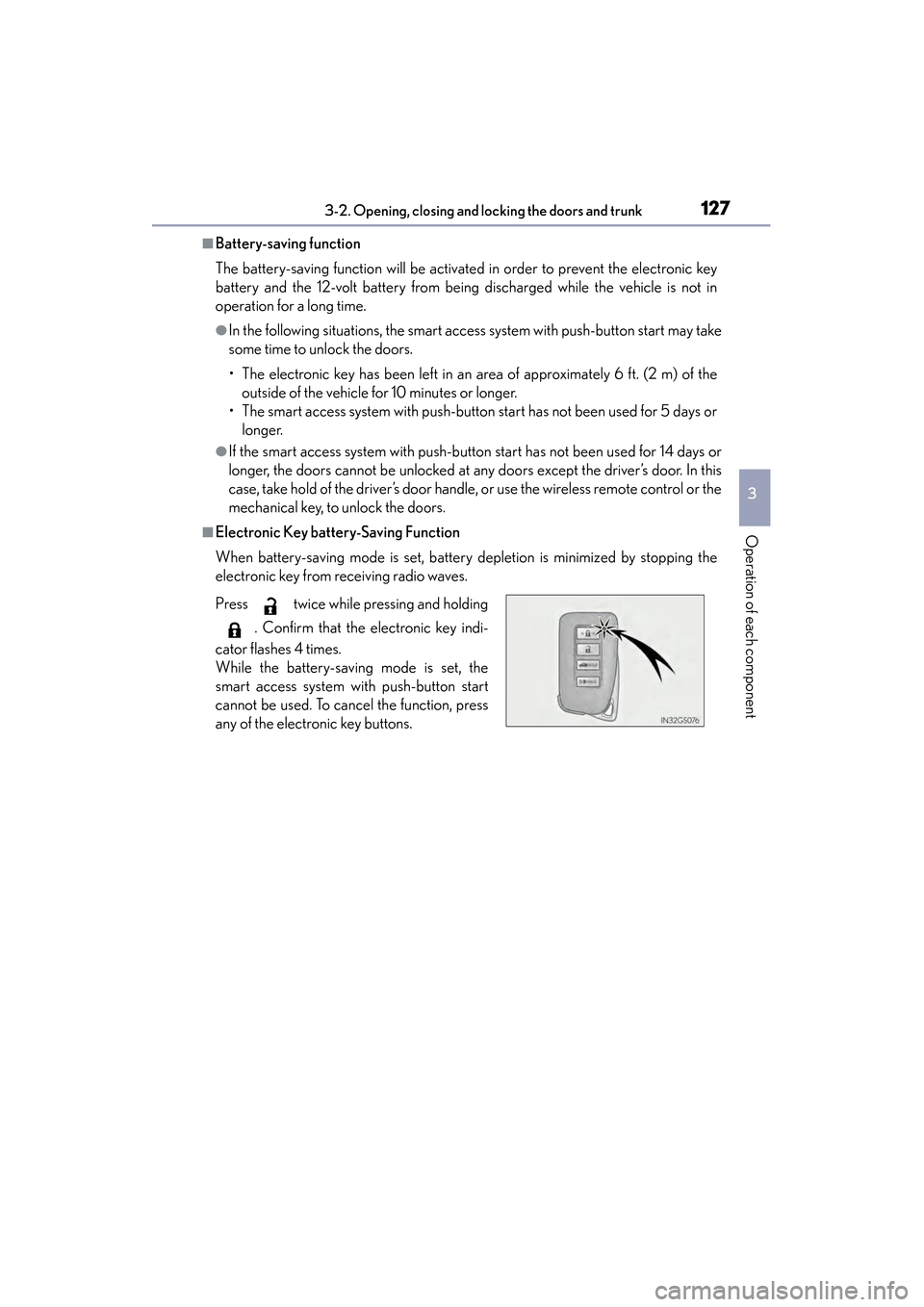
■Electronic Key battery-Saving Function
When battery-saving mode is set, battery depletion is minimized by stopping the
electronic key from receiving radio waves.
Press twice while pressing and holding
. Confirm that the electronic key indi-
cator flashes 4 times.
While the battery-saving mode is set, the
smart access system with push-button start
cannot be used. To cancel the function, press
any of the electronic key buttons.
GS450h_U.book Page 127 Monday, January 23, 2012 10:20 AM
Page 130 of 862
GS450h_U (OM30D01U)
1293-2. Opening, closing and locking the doors and trunk
3
Operation of each component
■Note for the entry function
●Even when the electronic key is within the effective range (detection areas), the
system may not operate properly in the following cases:
• The electronic key is too close to the window or outside door handle, near the
ground, or in a high place when the doors are locked or unlocked.
• The electronic key is near the ground or in a high place, or too close to the rear bumper center when the trunk is opened.
• The electronic key is on the instrument panel, rear package tray or floor, or in the door pockets or glove box when the hybrid system is started or power switch
modes are changed.
●Do not leave the electronic key on top of the instrument panel or near the door
pockets when exiting the vehicle. Depending on the radio wave reception condi-
tions, it may be detected by the antenna outside the cabin and the door will
become lockable from the outside, possibly trapping the electronic key inside the
vehicle.
●As long as the electronic key is within the effective range, the doors may be locked
or unlocked by anyone. However, only the doors detecting the electronic key can
be used to unlock the vehicle.
●Even if the electronic key is not inside the vehicle, it may be possible to start the
hybrid system if the electronic key is near the window.
●The doors may unlock or lock if a large am ount of water splashes on the door han-
dle, such as in the rain or in a car wash when the electronic key is within the effec-
tive range. (The doors will automatically be locked after approximately 60 seconds
if the doors are not opened and closed.)
●If the wireless remote control is used to lock the doors when the electronic key is
near the vehicle, there is a possibility that the door may not be unlocked by the
entry function. (Use the wireless remote control to unlock the doors.)
GS450h_U.book Page 129 Monday, January 23, 2012 10:20 AM
Page 131 of 862

130
GS450h_U (OM30D01U)
3-2. Opening, closing and locking the doors and trunk
■Note for locking the doors
●Touching the door lock sensor while wearing gloves may delay or prevent lock
operation. Remove the gloves and touch the lock sensor again.
●If the door handle becomes wet while the electronic key is within the effective
range, the door may lock and unlock repeatedly. In that case, follow the following
correction procedures to wash the vehicle:
• Place the electronic key in a location 6 ft. (2 m) or more away from the vehicle.(Take care to ensure that the key is not stolen.)
• Set the electronic key to battery-saving mode to disable the smart access sys- tem with push-button start. (→ P. 1 2 7 )
●If the electronic key is inside the vehicle and a door handle becomes wet during a
car wash, a message may be shown on the multi-information display and a buzzer
will sound outside the vehicle. To turn off the alarm, lock all the doors.
●The lock sensor may not work properly if it comes into contact with ice, snow, mud,
etc. Clean the lock sensor and attempt to operate it again, or use the lock sensor
on the lower part of the door handle.
●Fingernails may scrape against the door during operation of the door handle. Be
careful not to injure fingernails or damage the surface of the door.
■Note for the unlocking function
●A sudden approach to the effective range or door handle may prevent the doors
from being unlocked. In this case, return the door handle to the original position
and check that the doors unlock before pulling the door handle again.
●Gripping the door handle when wearing a glove may not unlock the door.
●If the door handle becomes wet while the electronic key is within the effective
range, the door may lock and unlock repeatedly. In that case, follow the following
correction procedures to wash the vehicle:
• Place the electronic key in a location 6 ft. (2 m) or more away from the vehicle. (Take care to ensure that the key is not stolen.)
• Set the electronic key to battery-saving mode to disable the smart access sys- tem with push-button start. (→ P. 1 2 7 )
●If there is another electronic key in the detection area, it may take slightly longer to
unlock the doors after the door handle is gripped.
●Fingernails may scrape against the door during operation of the door handle. Be
careful not to injure fingernails or damage the surface of the door.
GS450h_U.book Page 130 Monday, January 23, 2012 10:20 AM
Page 133 of 862
132
GS450h_U (OM30D01U)
3-2. Opening, closing and locking the doors and trunk
■Electronic key battery depletion
●The standard battery life is 1 to 2 years.
●If the battery becomes low, an alarm will sound in the cabin when the hybrid system
stops. (→P. 74 6 )
●As the electronic key always receives radio waves, the battery will become
depleted even if the electronic key is not used. The following symptoms indicate
that the electronic key battery may be depleted. Replace the battery when neces-
sary. ( →P. 668)
• The smart access system with push-button start or the wireless remote control does not operate.
• The detection area becomes smaller.
• The LED indicator on the key surface does not turn on.
●To avoid serious deterioration, do not leave the electronic key within 3 ft. (1 m) of
the following electrical appliances that produce a magnetic field:
•TVs
• Personal computers
• Cellular phones, cordless phones and battery chargers
• Recharging cellular phones or cordless phones
• Table lamps
•Glass top ranges
■When the electronic key battery is fully depleted
→ P. 668
■Customization
Settings (e. g. smart access system with push-button start) can be changed.
(Customizable features: → P. 807)
■If the smart access system with push-button start has been deactivated in a cus-
tomized setting
●Locking and unlocking the doors and opening the trunk:
Use the wireless remote control or mechanical key. ( →P. 1 3 4 , 76 7 )
●Starting the hybrid system and changing power switch modes: →P. 76 8
●Stopping the hybrid system: →P. 1 9 0
GS450h_U.book Page 132 Monday, January 23, 2012 10:20 AM
Page 139 of 862
138
GS450h_U (OM30D01U)
3-2. Opening, closing and locking the doors and trunk
Move the inside lock button to the lock position.
Close the door.
The door cannot be locked if the power switch is in ACCESSORY or ON
mode, or the electronic key is left inside the vehicle.
The key may not be detected correctly and the door may be locked.
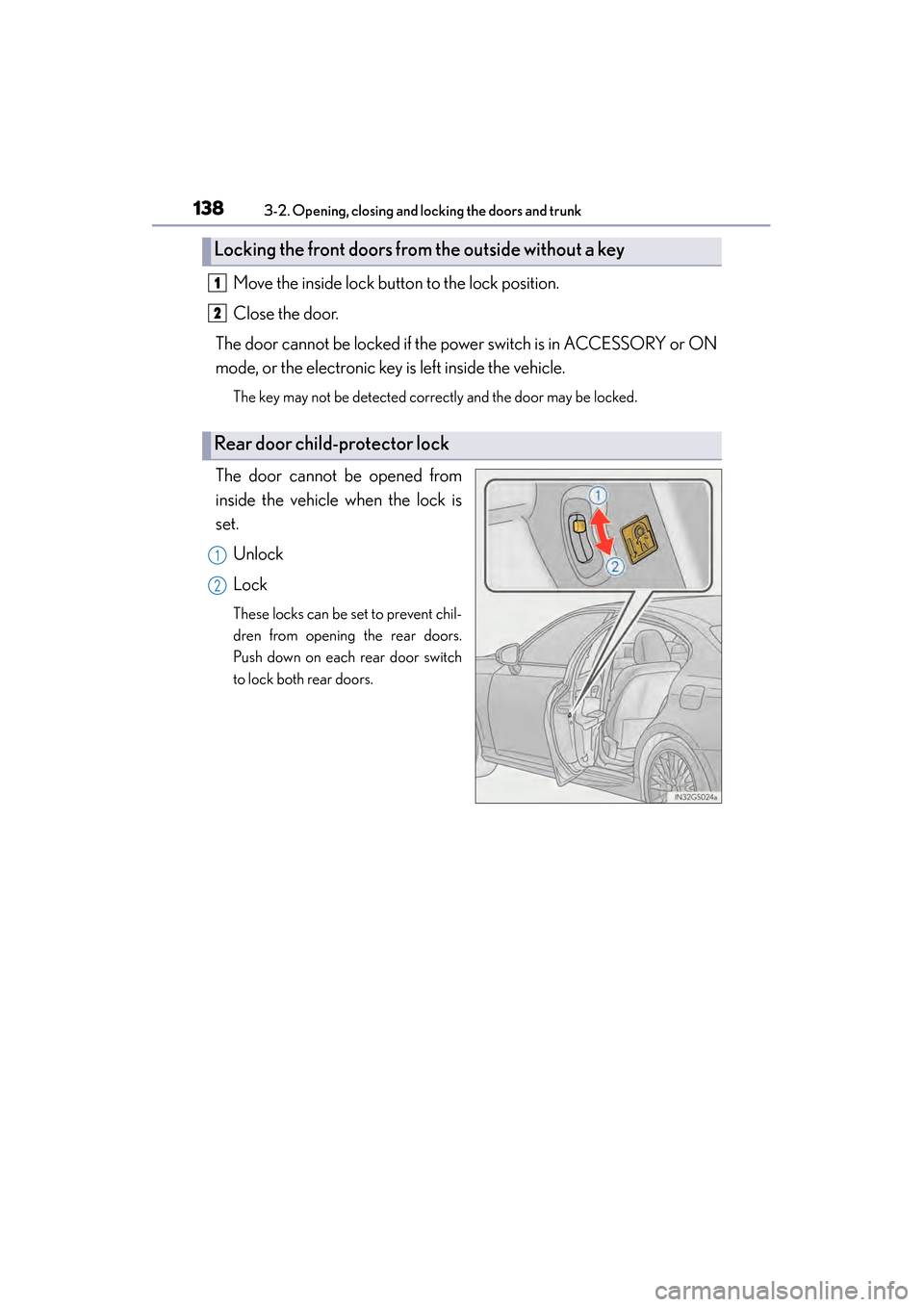
The door cannot be opened from
inside the vehicle when the lock is
set. Unlock
Lock
These locks can be set to prevent chil-
dren from opening the rear doors.
Push down on each rear door switch
to lock both rear doors.
Locking the front doors from the outside without a key
Rear door child-protector lock
1
2
1
2
GS450h_U.book Page 138 Monday, January 23, 2012 10:20 AM
Page 147 of 862
146
GS450h_U (OM30D01U)
3-2. Opening, closing and locking the doors and trunk
CAUTION
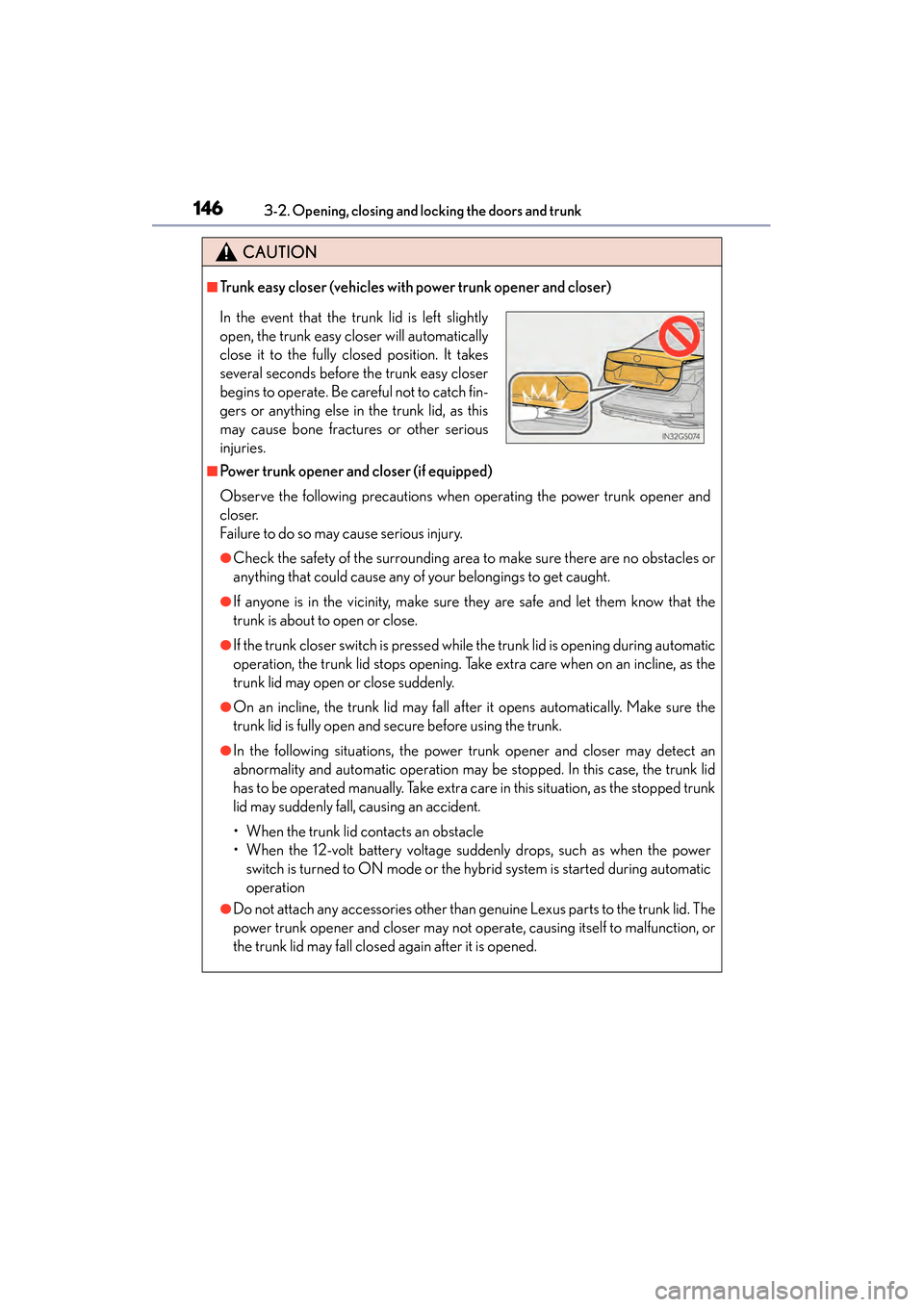
■Trunk easy closer (vehicles with power trunk opener and closer)
■Power trunk opener and closer (if equipped)
Observe the following precautions when operating the power trunk opener and
closer.
Failure to do so may cause serious injury.
●Check the safety of the surrounding area to make sure there are no obstacles or
anything that could cause any of your belongings to get caught.
●If anyone is in the vicinity, make sure they are safe and let them know that the
trunk is about to open or close.
●If the trunk closer switch is pressed while the trunk lid is opening during automatic
operation, the trunk lid stops opening. Take extra care when on an incline, as the
trunk lid may open or close suddenly.
●On an incline, the trunk lid may fall after it opens automatically. Make sure the
trunk lid is fully open and secure before using the trunk.
●In the following situations, the power trunk opener and closer may detect an
abnormality and automatic operation may be stopped. In this case, the trunk lid
has to be operated manually. Take extra care in this situation, as the stopped trunk
lid may suddenly fall, causing an accident.
• When the trunk lid contacts an obstacle
• When the 12-volt battery voltage suddenly drops, such as when the power switch is turned to ON mode or the hybrid system is started during automatic
operation
●Do not attach any accessories other than genuine Lexus parts to the trunk lid. The
power trunk opener and closer may not operate, causing itself to malfunction, or
the trunk lid may fall closed again after it is opened.
In the event that the trunk lid is left slightly
open, the trunk easy closer will automatically
close it to the fully closed position. It takes
several seconds before the trunk easy closer
begins to operate. Be careful not to catch fin-
gers or anything else in the trunk lid, as this
may cause bone fractures or other serious
injuries.
GS450h_U.book Page 146 Monday, January 23, 2012 10:20 AM
Page 150 of 862
GS450h_U (OM30D01U)
1493-3. Adjusting the seats
3
Operation of each component
■Power easy access system
The driver’s seat and steering wheel move in accordance with power switch mode
and the driver’s seat belt condition. The passenger’s seat moves when the passen-
ger’s door is opened. (→P. 1 5 3 )
CAUTION
■When adjusting the seat position
●Take care when adjusting the seat position to ensure that other passengers are
not injured by the moving seat.
●Do not put your hands under the seat or near the moving parts to avoid injury.
Fingers or hands may become jammed in the seat mechanism.
■Seat adjustment
To reduce the risk of sliding under the lap belt during a collision, do not recline the
seat more than necessary.
If the seat is too reclined, the lap belt may slide past the hips and apply restraint
forces directly to the abdomen, or your neck may contact the shoulder belt,
increasing the risk of death or serious injury in the event of an accident.
Adjustments should not be made while driving as the seat may unexpectedly move
and cause the driver to lose control of the vehicle.
■When adjusting the seat positions
Make sure to leave enough space around the feet so they do not get stuck.
GS450h_U.book Page 149 Monday, January 23, 2012 10:20 AM
Page 151 of 862
150
GS450h_U (OM30D01U)
3-3. Adjusting the seats
Driving position memory
Check that the shift lever is in P.
Turn the power switch to ON mode.
Adjust the driver’s seat, steering wheel, and outside rear view mirrors to
the desired positions. (When memorizing the front passenger’s seat,
adjust the front passenger’s seat to the desired positions.)
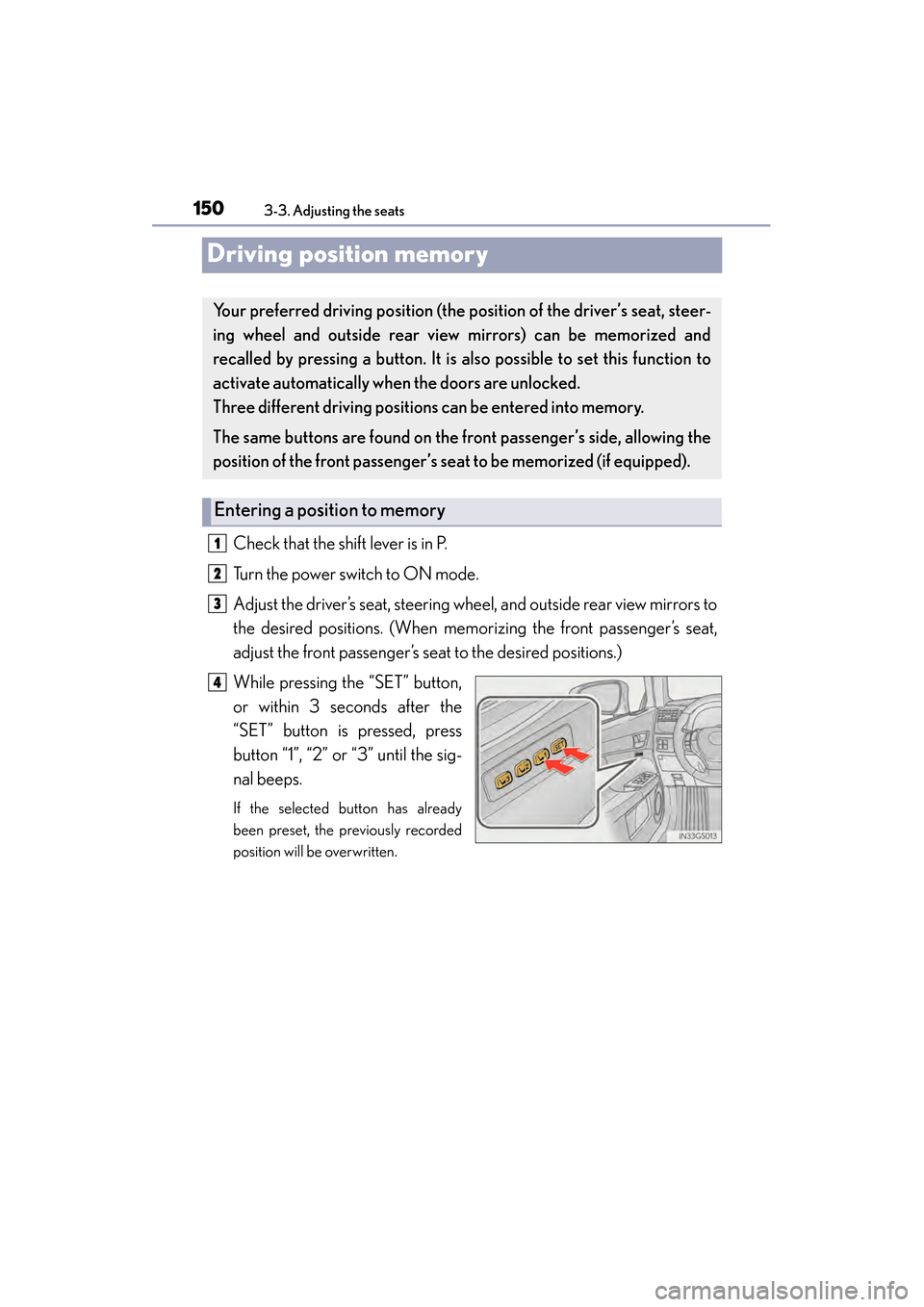
While pressing the “SET” button,
or within 3 seconds after the
“SET” button is pressed, press
button “1”, “2” or “3” until the sig-
nal beeps.
If the selected button has already
been preset, the previously recorded
position will be overwritten.
Your preferred driving po sition (the position of the driver’s seat, steer-
ing wheel and outside rear view mirrors) can be memorized and
recalled by pressing a button. It is also possible to set this function to
activate automatically when the doors are unlocked.
Three different driving position s can be entered into memory.
The same buttons are found on the front passenger’s side, allowing the
position of the front passenger’s se at to be memorized (if equipped).
Entering a position to memory
1
2
3
4
GS450h_U.book Page 150 Monday, January 23, 2012 10:20 AM