steering Lexus GS450h 2013 Repair Manual
[x] Cancel search | Manufacturer: LEXUS, Model Year: 2013, Model line: GS450h, Model: Lexus GS450h 2013Pages: 862, PDF Size: 19.06 MB
Page 530 of 862
GS450h_U (OM30D01U)
5295-4. Using the hands-free phone system (for cellular phone)
5
Interior features
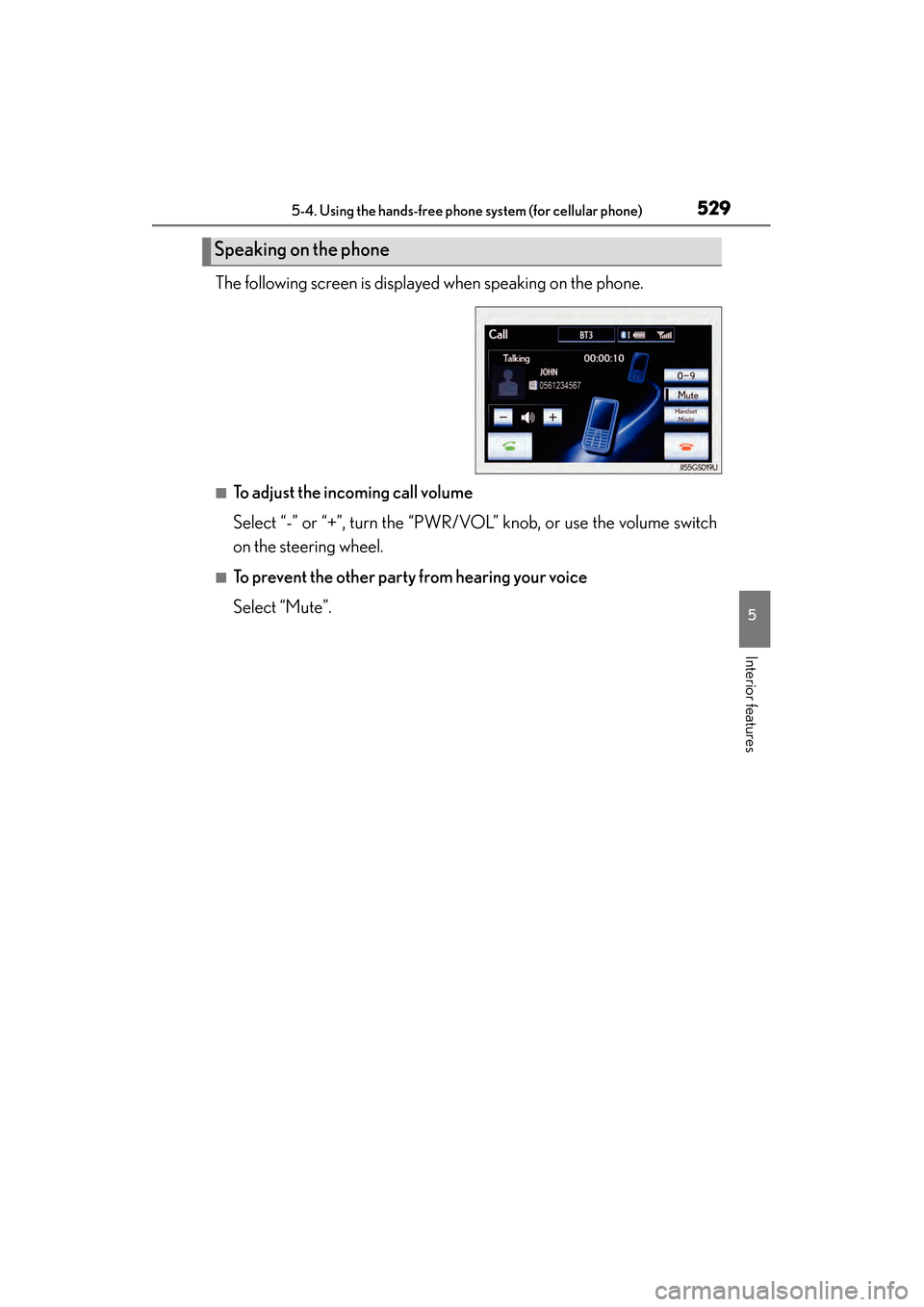
The following screen is displayed when speaking on the phone.
■To adjust the incoming call volume
Select “-” or “+”, turn the “PWR/VOL” knob, or use the volume switch
on the steering wheel.
■To prevent the other party from hearing your voice
Select “Mute”.
Speaking on the phone
GS450h_U.book Page 529 Monday, January 23, 2012 10:20 AM
Page 531 of 862
530
GS450h_U (OM30D01U)
5-4. Using the hands-free phone system (for cellular phone)
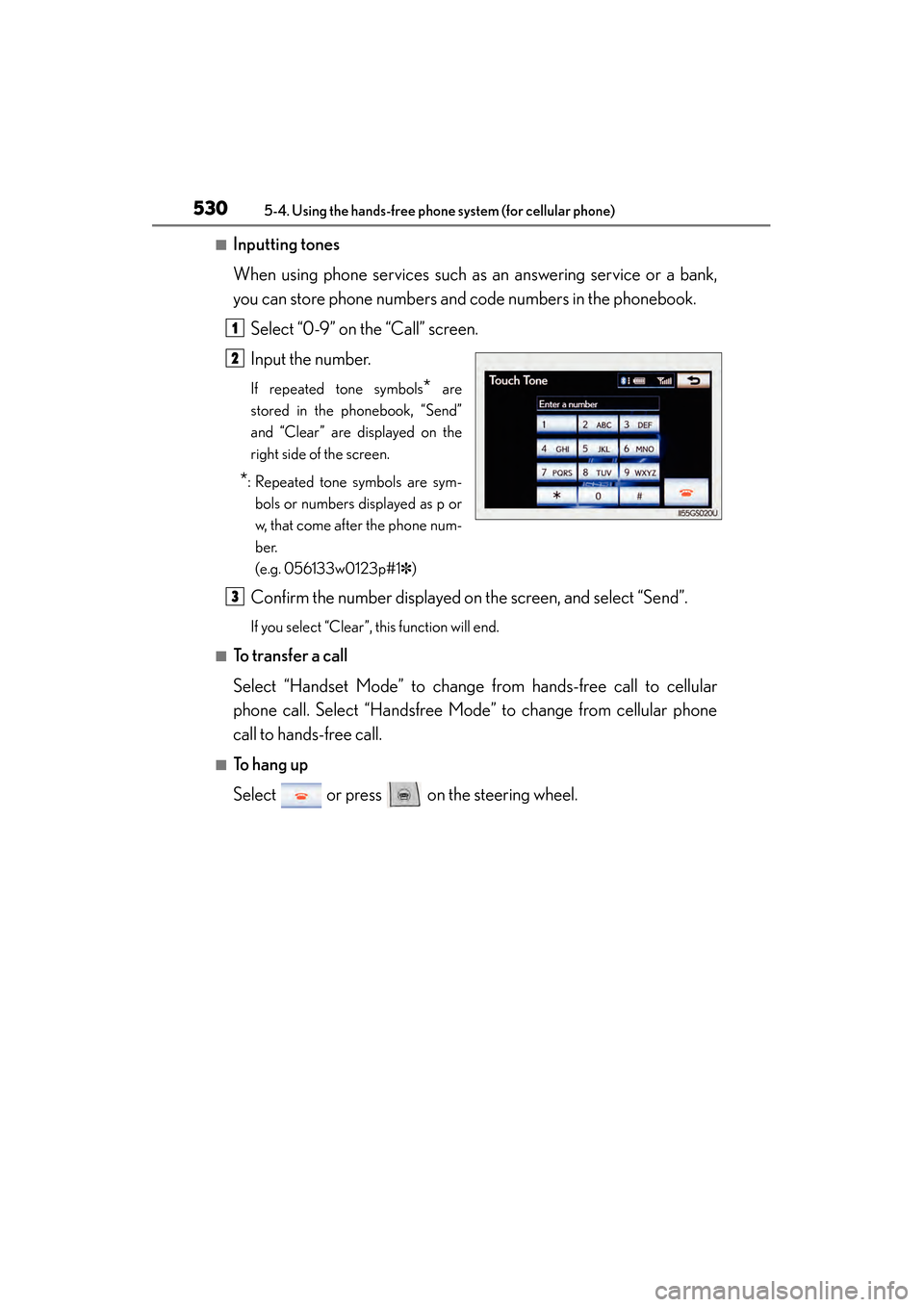
■Inputting tones
When using phone services such as an answering service or a bank,
you can store phone numbers and code numbers in the phonebook.Select “0-9” on the “Call” screen.
Input the number.
If repeated tone symbols* are
stored in the phonebook, “Send”
and “Clear” are displayed on the
right side of the screen.
*: Repeated tone symbols are sym- bols or numbers displayed as p or
w, that come after the phone num-
ber.
(e.g. 056133w0123p#1✽ )
Confirm the number displayed on the screen, and select “Send”.
If you select “Clear”, this function will end.
■To transfer a call
Select “Handset Mode” to change from hands-free call to cellular
phone call. Select “Handsfree Mode” to change from cellular phone
call to hands-free call.
■To h a n g u p
Select or press on the steering wheel.
1
2
3
GS450h_U.book Page 530 Monday, January 23, 2012 10:20 AM
Page 532 of 862
GS450h_U (OM30D01U)
5315-4. Using the hands-free phone system (for cellular phone)
5
Interior features
■Call waiting
When a connected call is interrupted by the third party, the incoming
call message will be displayed.
●To talk with the other party: Select or press on the steer-
ing wheel.
●To refuse the call: Select or press on the steering wheel.
Everytime you select or press on the steering wheel after a
call is interrupted, you will be switched to the other party.
If your cellular phone is not accepted in HFP Ver. 1.5, this function can-
not be used.
■Transferring calls
●It is not possible to transfer from hands-free to a cellular phone while driving.
●If you transfer from a cellular phone to hands-free, the hands-free screen will be
displayed, and you can operate the system using the screen.
●Transfer method and operation may vary according to the cellular phone used.
●For operation of the cellular phone in use, see the phone’s manual.
■Repeated tone symbols
When the “p” pause tone is used, after waiting 2 seconds the tone data up until the
next pause tone will be automatically sent. When the “w” pause tone is used, the tone
data up until the next pause tone will be automatically sent after user operation.
■While driving
Key input is unavailable.
■Voice recognition during a call
“Send Tones” can be operated by voice recognition. ( →P. 3 5 3 )
■Interrupt call operation
Interrupt call operation may differ from depending on your phone company and the
cellular phone.
GS450h_U.book Page 531 Monday, January 23, 2012 10:20 AM
Page 533 of 862
532
GS450h_U (OM30D01U)
5-4. Using the hands-free phone system (for cellular phone)
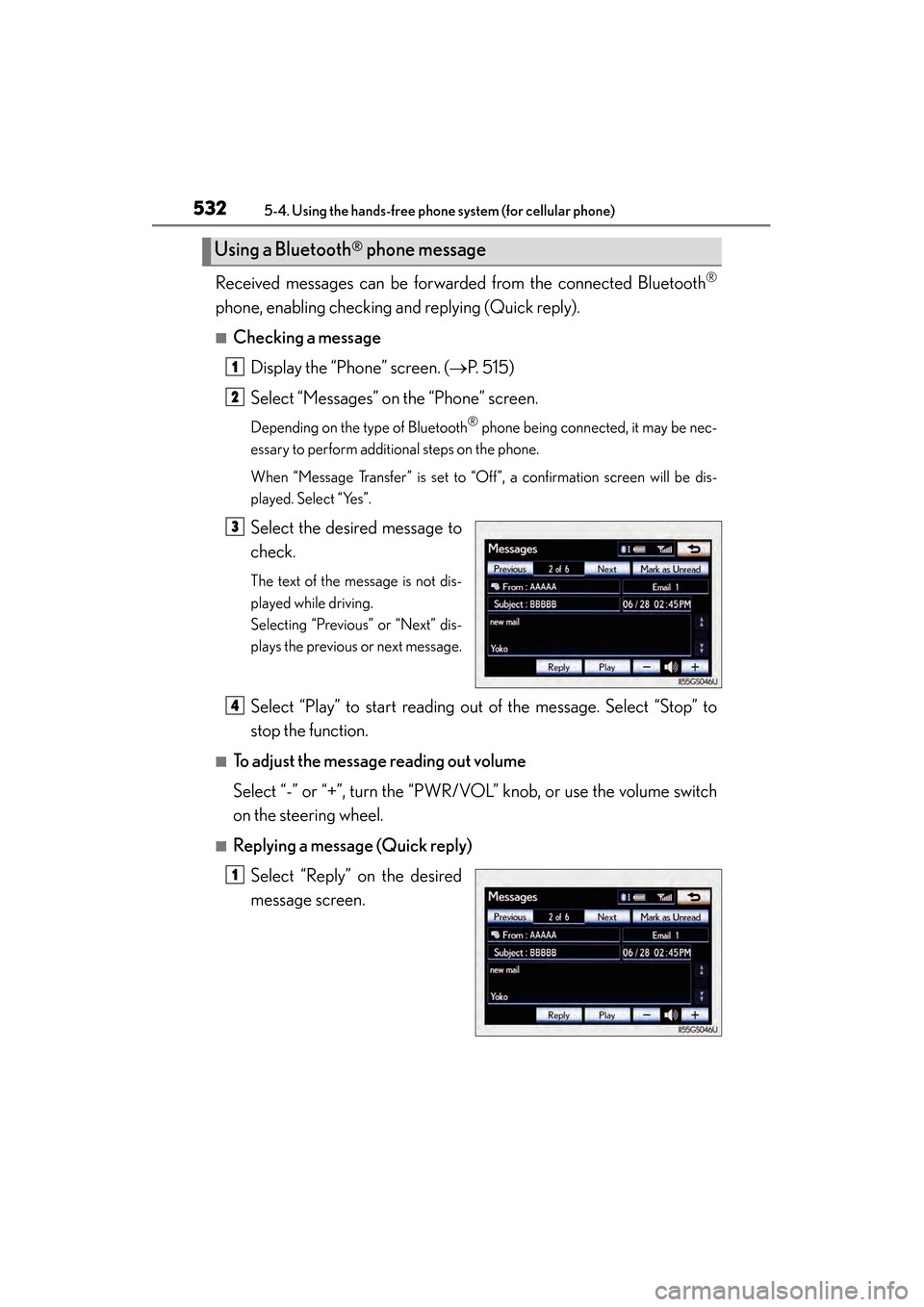
Received messages can be forwarded from the connected Bluetooth®
phone, enabling checking and replying (Quick reply).
■Checking a messageDisplay the “Phone” screen. ( →P. 515)
Select “Messages” on the “Phone” screen.
Depending on the type of Bluetooth® phone being connected, it may be nec-
essary to perform additional steps on the phone.
When “Message Transfer” is set to “Off”, a confirmation screen will be dis-
played. Select “Yes”.
Select the desired message to
check.
The text of the message is not dis-
played while driving.
Selecting “Previous” or “Next” dis-
plays the previous or next message.
Select “Play” to start reading out of the message. Select “Stop” to
stop the function.
■To adjust the message reading out volume
Select “-” or “+”, turn the “PWR/VOL” knob, or use the volume switch
on the steering wheel.
■Replying a message (Quick reply)
Select “Reply” on the desired
message screen.
Using a Bluetooth® phone message
1
2
3
4
1
GS450h_U.book Page 532 Monday, January 23, 2012 10:20 AM
Page 557 of 862
556
GS450h_U (OM30D01U)
5-4. Using the hands-free phone system (for cellular phone)
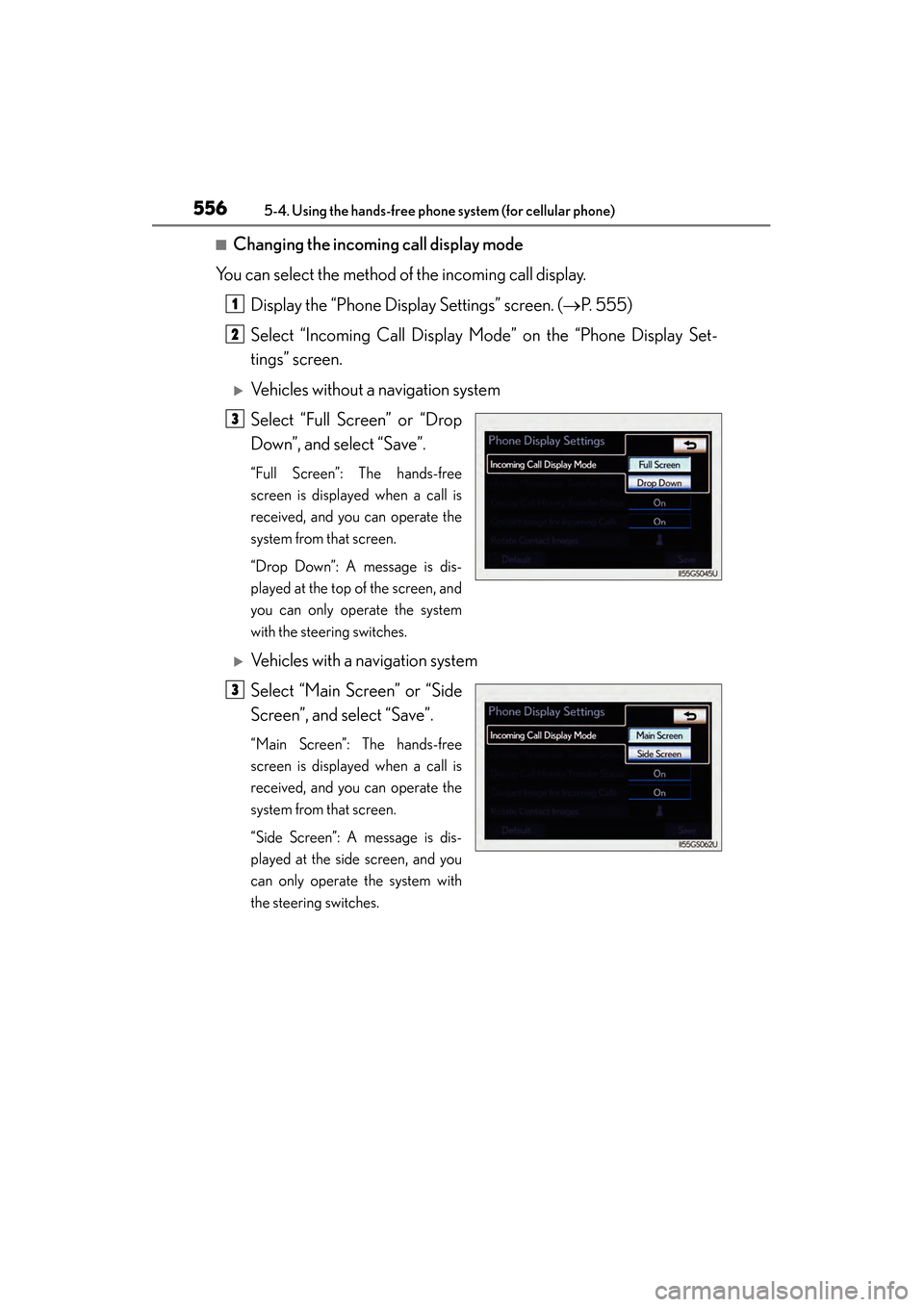
■Changing the incoming call display mode
You can select the method of the incoming call display.
Display the “Phone Display Settings” screen. ( →P. 555)
Select “Incoming Call Display Mode” on the “Phone Display Set-
tings” screen.
XVehicles without a navigation system
Select “Full Screen” or “Drop
Down”, and select “Save”.
“Full Screen”: The hands-free
screen is displayed when a call is
received, and you can operate the
system from that screen.
“Drop Down”: A message is dis-
played at the top of the screen, and
you can only operate the system
with the steering switches.
XVehicles with a navigation system
Select “Main Screen” or “Side
Screen”, and select “Save”.
“Main Screen”: The hands-free
screen is displayed when a call is
received, and you can operate the
system from that screen.
“Side Screen”: A message is dis-
played at the side screen, and you
can only operate the system with
the steering switches.
1
2
3
3
GS450h_U.book Page 556 Monday, January 23, 2012 10:20 AM
Page 589 of 862
588
GS450h_U (OM30D01U)
5-7. Other interior features
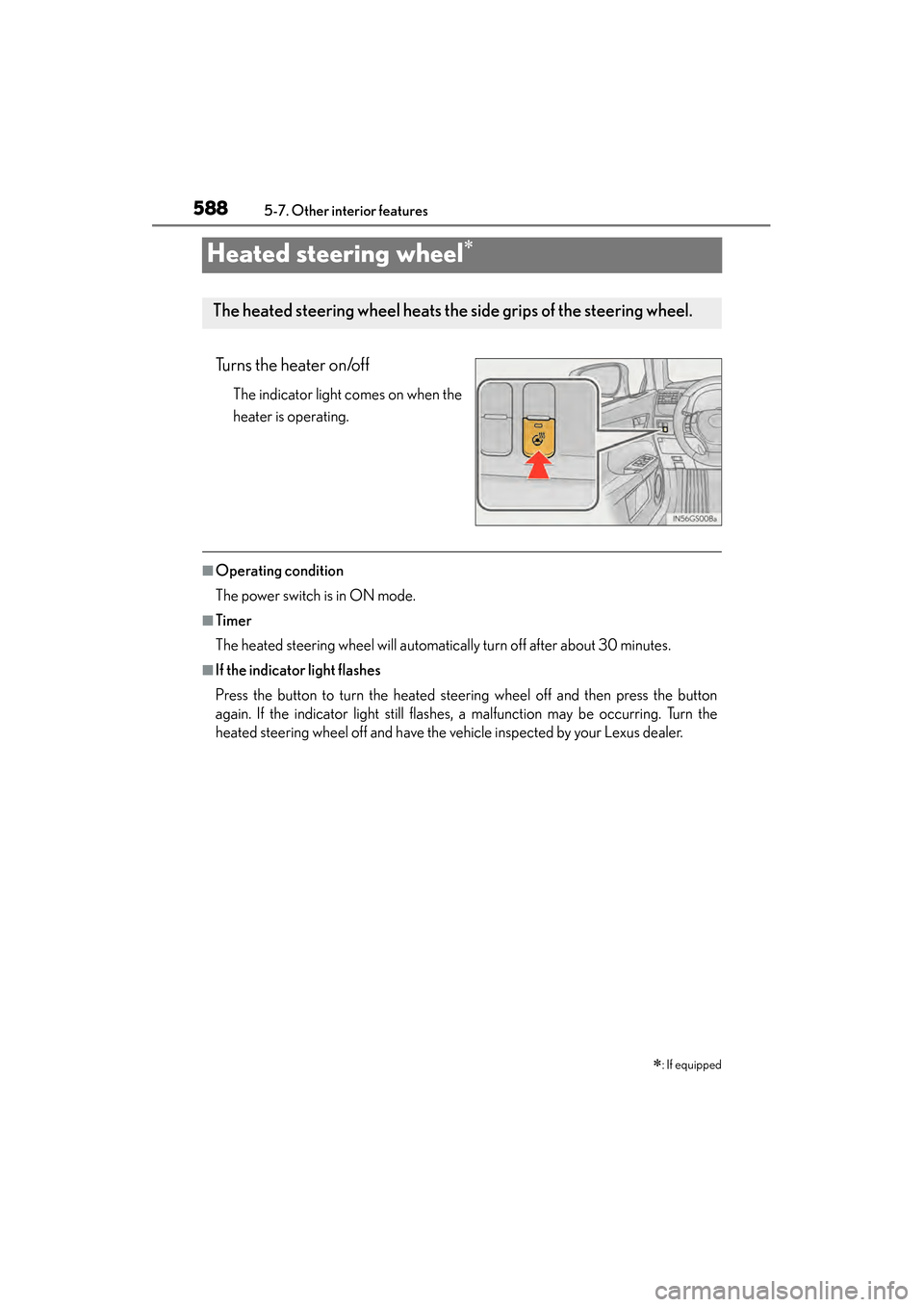
Heated steering wheel∗
Turns the heater on/off
The indicator light comes on when the
heater is operating.
■Operating condition
The power switch is in ON mode.
■Timer
The heated steering wheel will automatically turn off after about 30 minutes.
■If the indicator light flashes
Press the button to turn the heated steering wheel off and then press the button
again. If the indicator light still flashes, a malfunction may be occurring. Turn the
heated steering wheel off and have the vehicle inspected by your Lexus dealer.
∗: If equipped
The heated steering wheel heats the side grips of the steering wheel.
GS450h_U.book Page 588 Monday, January 23, 2012 10:20 AM
Page 590 of 862
GS450h_U (OM30D01U)
5895-7. Other interior features
5
Interior features
CAUTION
■Burns
Care should be taken to prevent injury if anyone in the following categories comes
in contact with the steering wheel when the heated steering wheel is on:
●Babies, small children, the elderly, the sick and the physically challenged
●Persons with sensitive skin
●Persons who are fatigued
●Persons who have taken alcohol or drugs that induce sleep (sleeping drugs, cold
remedies, etc.)
NOTICE
■To prevent the 12-volt battery from being discharged
Turn the switch off when the hybrid system is off.
GS450h_U.book Page 589 Monday, January 23, 2012 10:20 AM
Page 629 of 862
628
GS450h_U (OM30D01U)
6-2. Maintenance
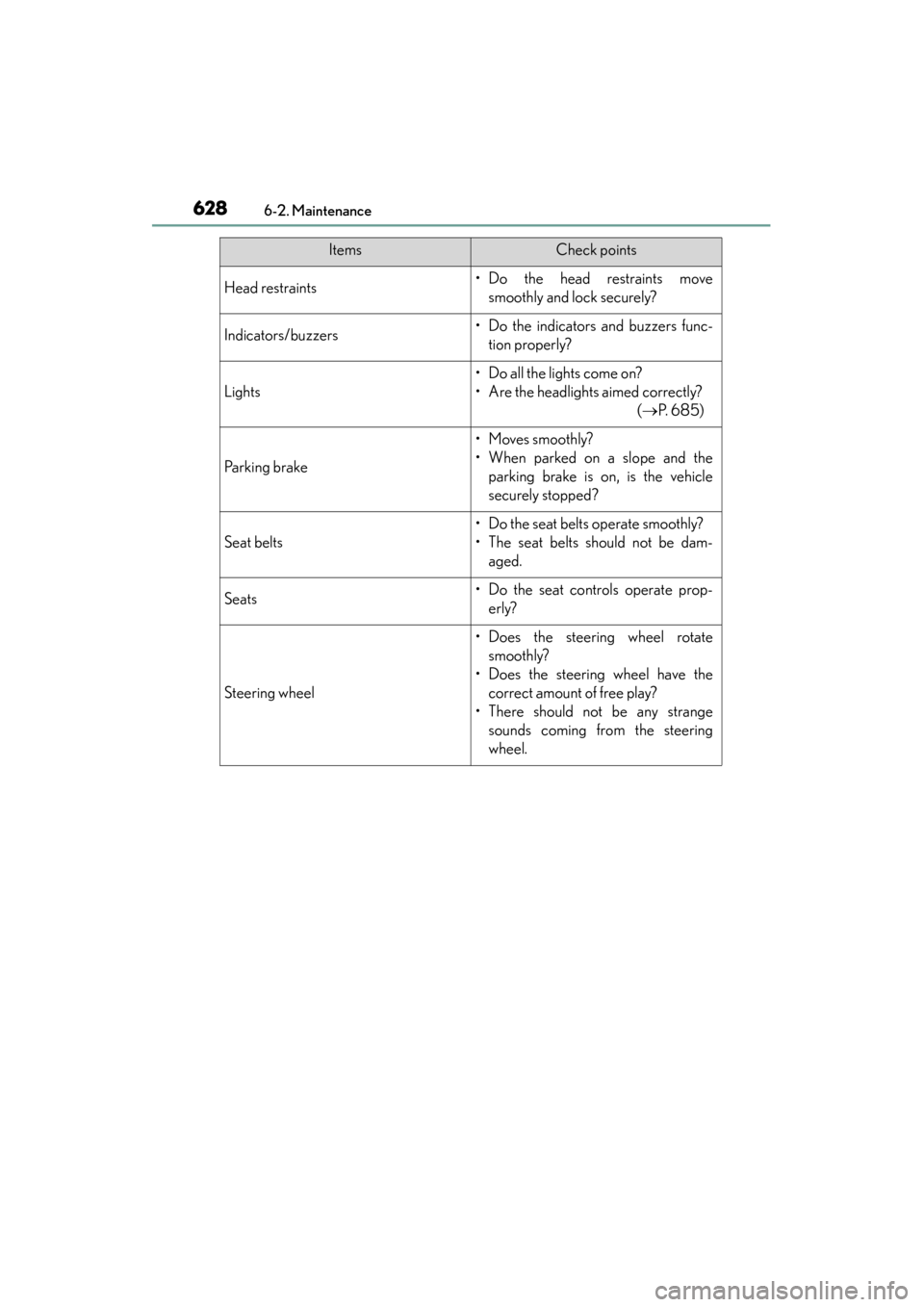
Head restraints• Do the head restraints movesmoothly and lock securely?
Indicators/buzzers• Do the indicators and buzzers func-tion properly?
Lights
• Do all the lights come on?
• Are the headlights aimed correctly? ( →P. 6 8 5 )
Parking brake
• Moves smoothly?
• When parked on a slope and the
parking brake is on, is the vehicle
securely stopped?
Seat belts
• Do the seat belts operate smoothly?
• The seat belts should not be dam-aged.
Seats• Do the seat controls operate prop-erly?
Steering wheel
• Does the steering wheel rotatesmoothly?
• Does the steering wheel have the correct amount of free play?
• There should not be any strange sounds coming from the steering
wheel.
ItemsCheck points
GS450h_U.book Page 628 Monday, January 23, 2012 10:20 AM
Page 676 of 862

GS450h_U (OM30D01U)
6756-3. Do-it-yourself maintenance
6
Maintenance and care
11ABS MAIN 210Brake system
12ABS MAIN 110Brake system
13IGCT NO.130IGCT NO.2, IGCT NO.3, IGCT NO.4,
IGCT NO.5
14ECU-B7. 5Smart access system with push-button start
15INV W/P10Hybrid system
16ETCS10Multiport fuel injection system/sequential
multiport fuel injection system
17EPS-B10Electric power steering system
18D/C CUT30DOME, MPX-B
19HORN10Horn
20ODS5Occupant classification system
21TV7. 5Remote Touch screen
22P/ I - B N O. 280IG2 MAIN, EFI MAIN, EDU, F/PMP, A/F
23ABS NO.230ECB
24P/ I - B N O.150H-LP HI RH, H-LP HI LH, DRL
25H-LP LO30H-LP LO RH, H-LP LO LH
26LH J/B-B40Left-hand junction block
27RH J/B-B40Right-hand junction block
28VGRS40No circuit
29OIL PMP60Oil pump
30IGCT NO.57. 5Power management system, shift position
sensor
31WIP-S7. 5Windshield wipers, driver support system
32WA S H - S5Windshield washer, driver support system
33COMB SW5Windshield wipers
FuseAmpereCircuit
GS450h_U.book Page 675 Monday, January 23, 2012 10:20 AM
Page 679 of 862

678
GS450h_U (OM30D01U)
6-3. Do-it-yourself maintenance
■Driver’s side instrument panel
FuseAmpereCircuit
1STOP7. 5Stop lights, high mounted stoplight
2P/ W- B5Power window master switch
3P/ S E AT 1 F/ L30Po w e r s e a t s
4D/L NO.125Po w e r d o o r l o c k s y s t e m
5NV-IR10Lexus night view
6FL S/HTR10Seat heaters/ventilators
7WIPER30Windshield wipers
8WIPER-IG5Windshield wipers
9LH-IG10
Seat belts, body ECU, AFS, overhead mod-
ule, raindrop sensor, inside rear view mirror,
lane camera sensor (LKA), head-up display,
shift lock system, intuitive parking assist, front
left-hand door ECU, driver monitor system,
Remote Touch screen, electric tilt and tele-
scopic steering column, power seats, moon
roof, windshield wiper de-icer, intuitive park-
ing assist switch, PTC heater, headlight
cleaner
10LH ECU-IG10
VDIM, ECB, D-SW MODULE (Blind Spot
Monitor, heated steering wheel), driver sup-
port system, AFS, EPB, air conditioning sys-
tem
GS450h_U.book Page 678 Monday, January 23, 2012 10:20 AM