ad blue Lexus GS450h 2014 User Guide
[x] Cancel search | Manufacturer: LEXUS, Model Year: 2014, Model line: GS450h, Model: Lexus GS450h 2014Pages: 890, PDF Size: 40.62 MB
Page 387 of 890
386
GS450h_OM_OM30D52U_(U)
5-1. Remote Touch screen
Mobile Assistant
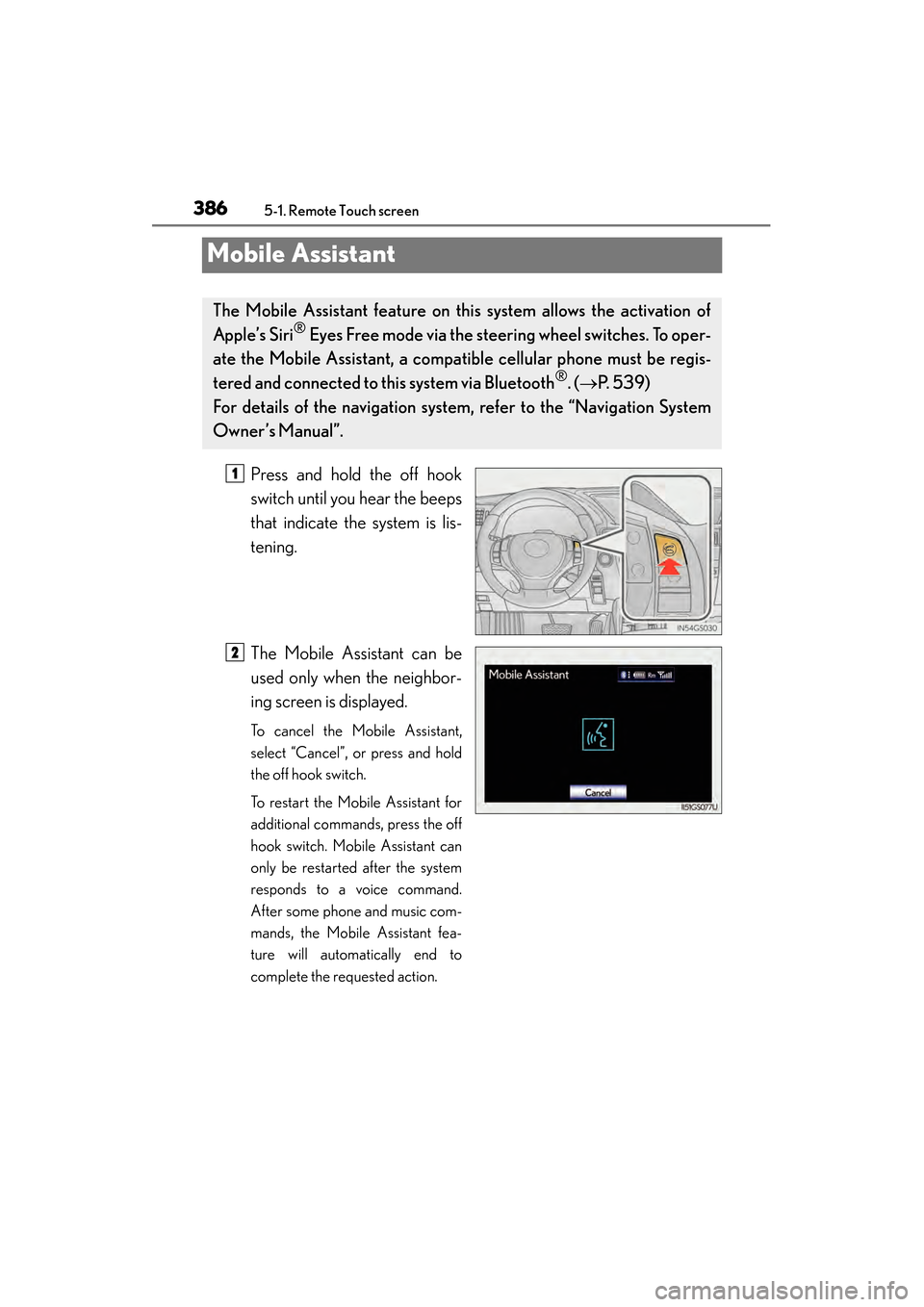
Press and hold the off hook
switch until you hear the beeps
that indicate the system is lis-
tening.
The Mobile Assistant can be
used only when the neighbor-
ing screen is displayed.
To cancel the Mobile Assistant,
select “Cancel”, or press and hold
the off hook switch.
To restart the Mobile Assistant for
additional commands, press the off
hook switch. Mobile Assistant can
only be restarted after the system
responds to a voice command.
After some phone and music com-
mands, the Mobile Assistant fea-
ture will automatically end to
complete the requested action.
The Mobile Assistant feature on this system allows the activation of
Apple’s Siri
® Eyes Free mode via the steering wheel switches. To oper-
ate the Mobile Assistant, a compat ible cellular phone must be regis-
tered and connected to this system via Bluetooth
®. ( → P. 5 3 9 )
For details of the navigation system , refer to the “Navigation System
Owner’s Manual”.
1
2
GS450h_OM_OM30D52U_(U).book Page 386 Monday, July 29, 2013 12:07 PM
Page 388 of 890
GS450h_OM_OM30D52U_(U)
3875-1. Remote Touch screen
5
Interior features
■Adjusting the volume
The volume of the Mobile Assistant can be adjusted using the “PWR/VOL” knob or
steering wheel volume switches. The Mobile Assistant and phone call volumes are
synchronized.
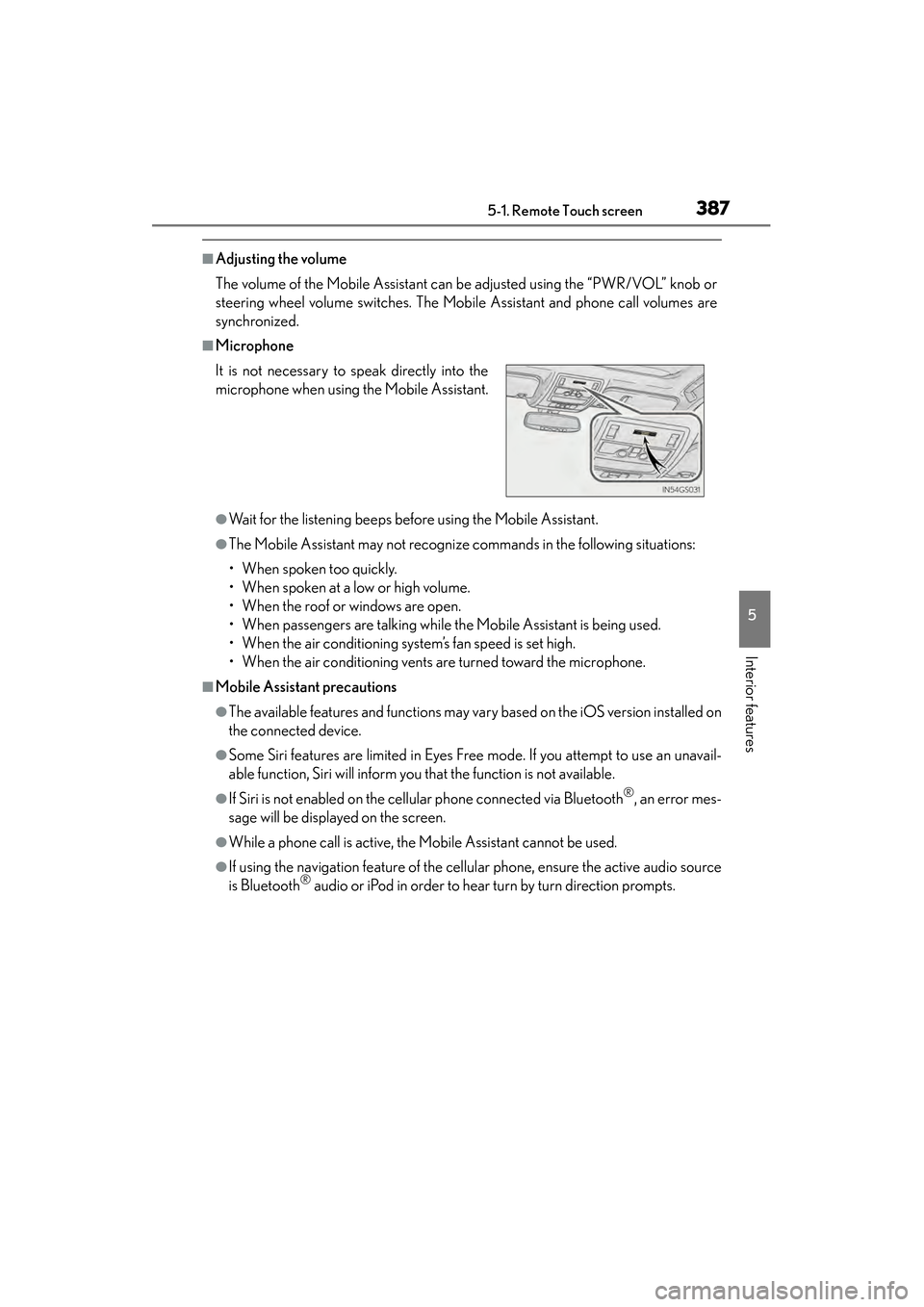
■Microphone
●Wait for the listening beeps before using the Mobile Assistant.
●The Mobile Assistant may not recognize commands in the following situations:
• When spoken too quickly.
• When spoken at a low or high volume.
• When the roof or windows are open.
• When passengers are talking while the Mobile Assistant is being used.
• When the air conditioning system’s fan speed is set high.
• When the air conditioning vents are turned toward the microphone.
■Mobile Assistant precautions
●The available features and functions may vary based on the iOS version installed on
the connected device.
●Some Siri features are limited in Eyes Free mode. If you attempt to use an unavail-
able function, Siri will inform you that the function is not available.
●If Siri is not enabled on the cellular phone connected via Bluetooth®, an error mes-
sage will be displayed on the screen.
●While a phone call is active, the Mobile Assistant cannot be used.
●If using the navigation feature of the cellular phone, ensure the active audio source
is Bluetooth® audio or iPod in order to hear turn by turn direction prompts.
It is not necessary to speak directly into the
microphone when using the Mobile Assistant.
GS450h_OM_OM30D52U_(U).book Page 387 Monday, July 29, 2013 12:07 PM
Page 414 of 890
GS450h_OM_OM30D52U_(U)
4135-3. Using the audio system
5
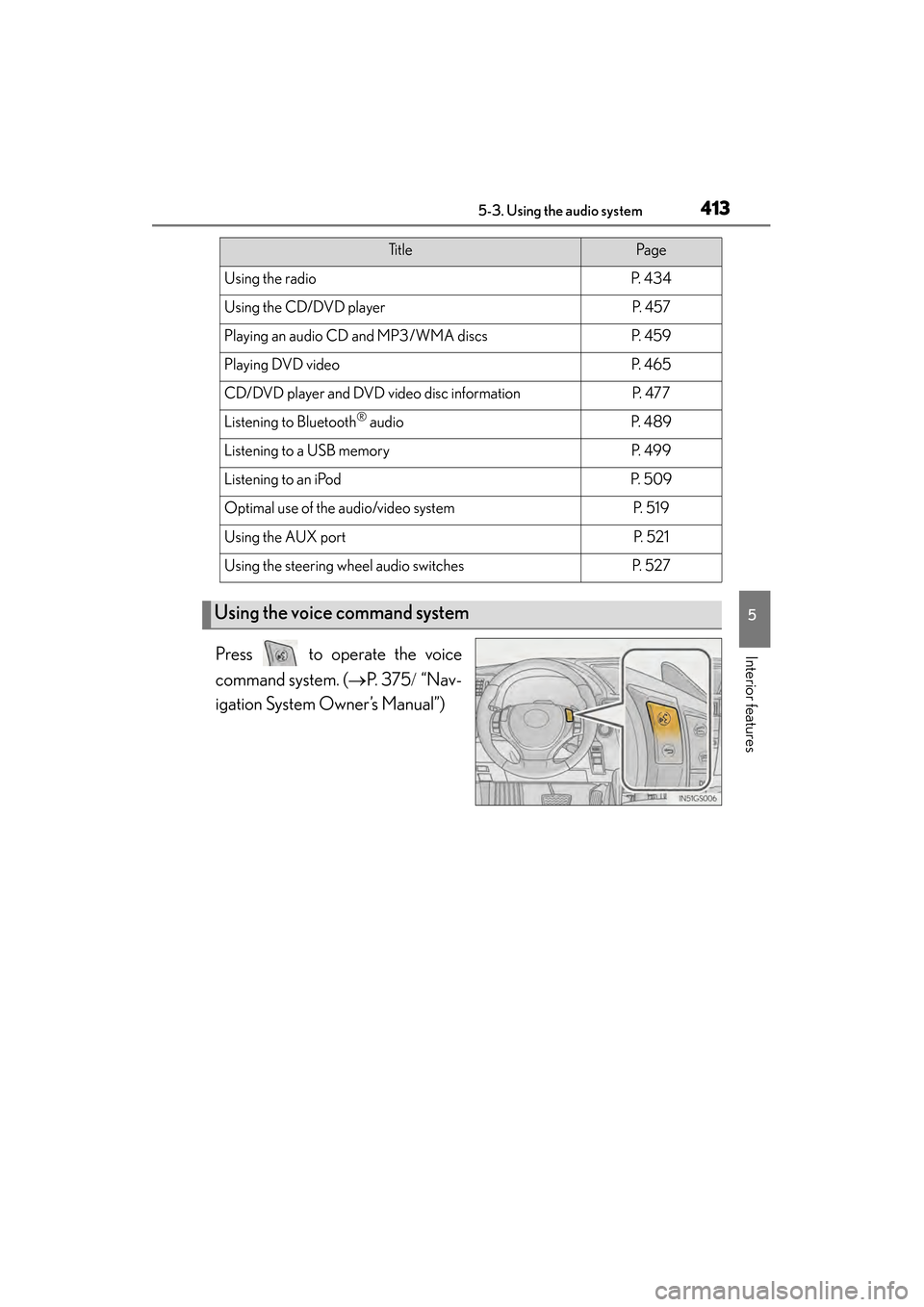
Interior featuresPress to operate the voice
command system. (→P. 3 7 5 / “Nav-
igation System Owner’s Manual”)
Ti t l ePa g e
Using the radioP. 4 3 4
Using the CD/DVD playerP. 4 5 7
Playing an audio CD and MP3/WMA discsP. 4 5 9
Playing DVD videoP. 4 6 5
CD/DVD player and DVD video disc informationP. 4 7 7
Listening to Bluetooth® audioP. 4 8 9
Listening to a USB memoryP. 4 9 9
Listening to an iPodP. 5 0 9
Optimal use of the audio/video systemP. 5 1 9
Using the AUX portP. 5 2 1
Using the steering wheel audio switchesP. 5 2 7
Using the voice command system
GS450h_OM_OM30D52U_(U).book Page 413 Monday, July 29, 2013 12:07 PM
Page 439 of 890
438
GS450h_OM_OM30D52U_(U)
5-3. Using the audio system
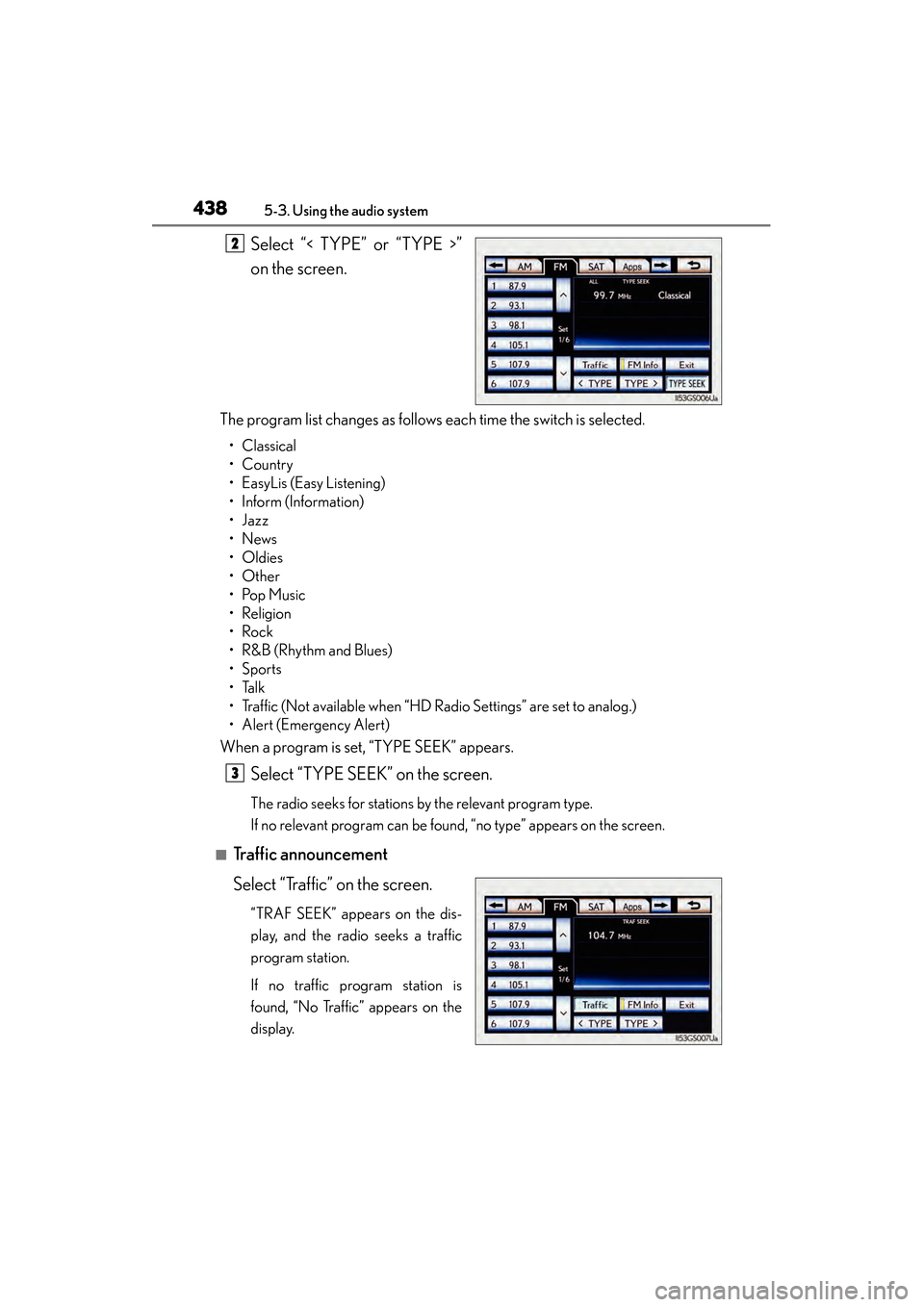
Select “< TYPE” or “TYPE >”
on the screen.
The program list changes as follows each time the switch is selected.
• Classical
•Country
• EasyLis (Easy Listening)
• Inform (Information)
•Jazz
•News
•Oldies
•Other
•Pop Music
•Religion
•Rock
•R&B (Rhythm and Blues)
•Sports
•Talk
• Traffic (Not available when “HD Radio Settings” are set to analog.)
• Alert (Emergency Alert)
When a program is set, “TYPE SEEK” appears.
Select “TYPE SEEK” on the screen.
The radio seeks for stations by the relevant program type.
If no relevant program can be found, “no type” appears on the screen.
■Traffic announcement
Select “Traffic” on the screen.
“TRAF SEEK” appears on the dis-
play, and the radio seeks a traffic
program station.
If no traffic program station is
found, “No Traffic” appears on the
display.
2
3
GS450h_OM_OM30D52U_(U).book Page 438 Monday, July 29, 2013 12:07 PM
Page 447 of 890
446
GS450h_OM_OM30D52U_(U)
5-3. Using the audio system
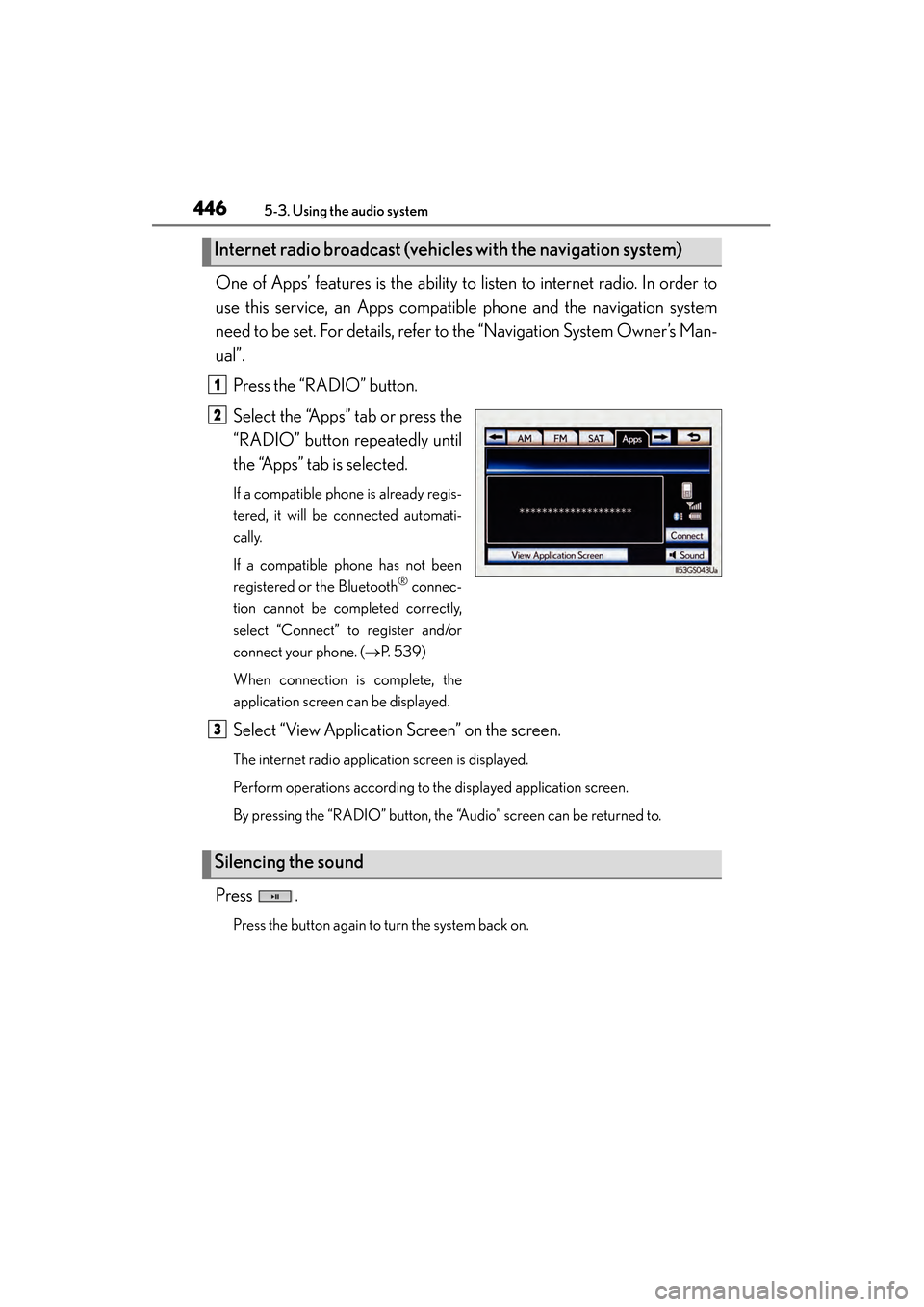
One of Apps’ features is the ability to listen to internet radio. In order to
use this service, an Apps compatible phone and the navigation system
need to be set. For details, refer to the “Navigation System Owner’s Man-
ual”.Press the “RADIO” button.
Select the “Apps” tab or press the
“RADIO” button repeatedly until
the “Apps” tab is selected.
If a compatible phone is already regis-
tered, it will be connected automati-
cally.
If a compatible phone has not been
registered or the Bluetooth
® connec-
tion cannot be completed correctly,
select “Connect” to register and/or
connect your phone. ( →P. 5 3 9 )
When connection is complete, the
application screen can be displayed.
Select “View Application Screen” on the screen.
The internet radio application screen is displayed.
Perform operations according to the displayed application screen.
By pressing the “RADIO” button, the “Audio” screen can be returned to.
Press .
Press the button again to turn the system back on.
Internet radio broadcast (vehicles with the navigation system)
1
2
Silencing the sound
3
GS450h_OM_OM30D52U_(U).book Page 446 Monday, July 29, 2013 12:07 PM
Page 456 of 890
GS450h_OM_OM30D52U_(U)
4555-3. Using the audio system
5
Interior features
■About internet radio (vehicles with the navigation system)
●Other applications can be activated while listening to internet radio.
●An iPhone cannot be connected via Bluetooth® and USB connection at the same
time. However, it is possible to recharge an iPhone while using Apps by connecting
via USB. The system uses the connection method that was used last. Therefore, if
connected via USB after Bluetooth
® connection, it is necessary to reconnect the
iPhone via Bluetooth®.
●Services requiring a separate contract can also be used. For details, refer to
http://www.lexus.com/enform/
or call 1-800-255-3987.
●If internet radio has never been listened to by activating “Apps” from the “Informa-
tion” screen, the “Apps” tab will be dimmed.
GS450h_OM_OM30D52U_(U).book Page 455 Monday, July 29, 2013 12:07 PM
Page 490 of 890
489
GS450h_OM_OM30D52U_(U)5-3. Using the audio system
5
Interior features
Listening to Bluetooth® audio
The Bluetooth® audio system enables users to enjoy music played on a
portable player from the vehicle speaker via wireless communication.
This audio system supports Bluetooth
®, a wireless data system capable
of playing portable audio music with out cables. If your portable player
does not support Bluetooth
®, the Bluetooth® audio system will not
function.
Press the “MEDIA” button if a Bluetooth
® audio player has already
been connected.
Select the “BT Audio” tab or press the “MEDIA” button repeatedly until
the “BT Audio” tab is selected.
GS450h_OM_OM30D52U_(U).book Page 489 Monday, July 29, 2013 12:07 PM
Page 491 of 890
490
GS450h_OM_OM30D52U_(U)
5-3. Using the audio system
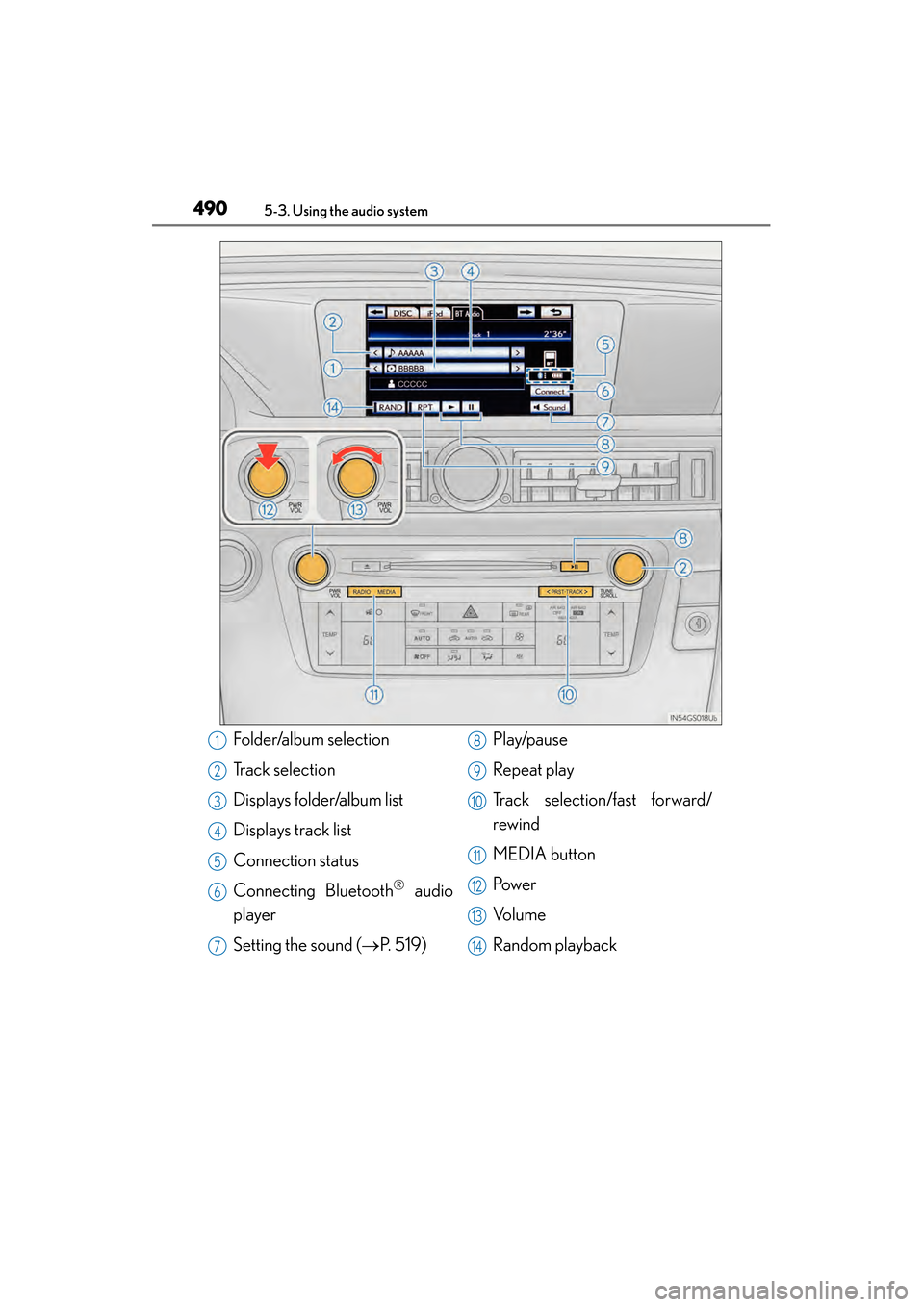
Folder/album selection
Track selection
Displays folder/album list
Displays track list
Connection status
Connecting Bluetooth
® audio
player
Setting the sound ( →P. 5 1 9 ) Play/pause
Repeat play
Track selection/fast forward/
rewind
MEDIA button
Pow e r
Vo l u m e
Random playback
1
2
3
4
5
6
7
8
9
10
11
12
13
14
GS450h_OM_OM30D52U_(U).book Page 490 Monday, July 29, 2013 12:07 PM
Page 493 of 890
492
GS450h_OM_OM30D52U_(U)
5-3. Using the audio system
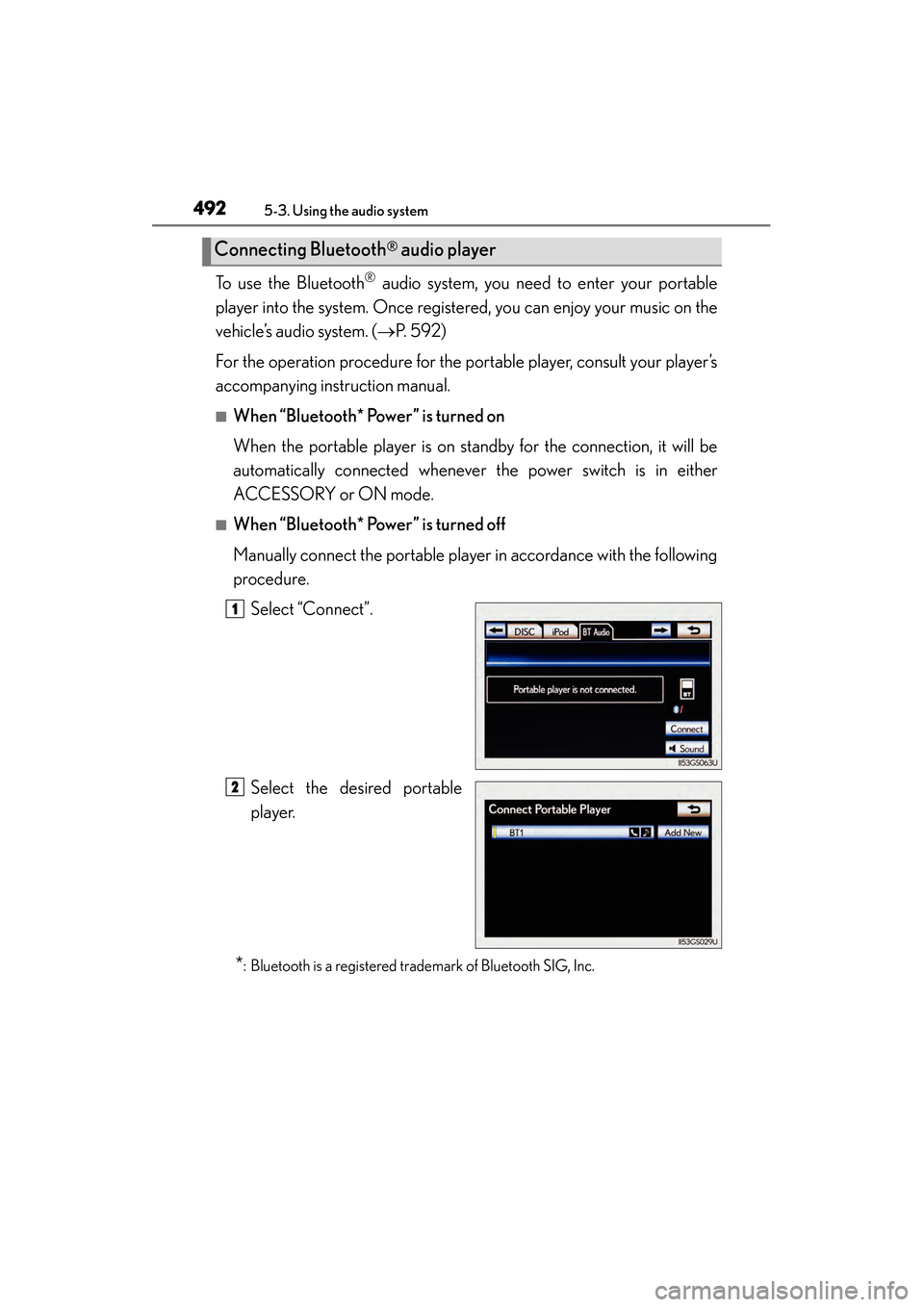
To use the Bluetooth® audio system, you need to enter your portable
player into the system. Once registered, you can enjoy your music on the
vehicle’s audio system. ( →P. 5 9 2 )
For the operation procedure for the portable player, consult your player’s
accompanying instruction manual.
■When “Bluetooth* Power” is turned on
When the portable player is on standby for the connection, it will be
automatically connected whenever the power switch is in either
ACCESSORY or ON mode.
■When “Bluetooth* Power” is turned off
Manually connect the portable player in accordance with the following
procedure. Select “Connect”.
Select the desired portable
player.
*: Bluetooth is a registered trademark of Bluetooth SIG, Inc.
Connecting Bluetooth® audio player
1
2
GS450h_OM_OM30D52U_(U).book Page 492 Monday, July 29, 2013 12:07 PM
Page 494 of 890
GS450h_OM_OM30D52U_(U)
4935-3. Using the audio system
5
Interior features
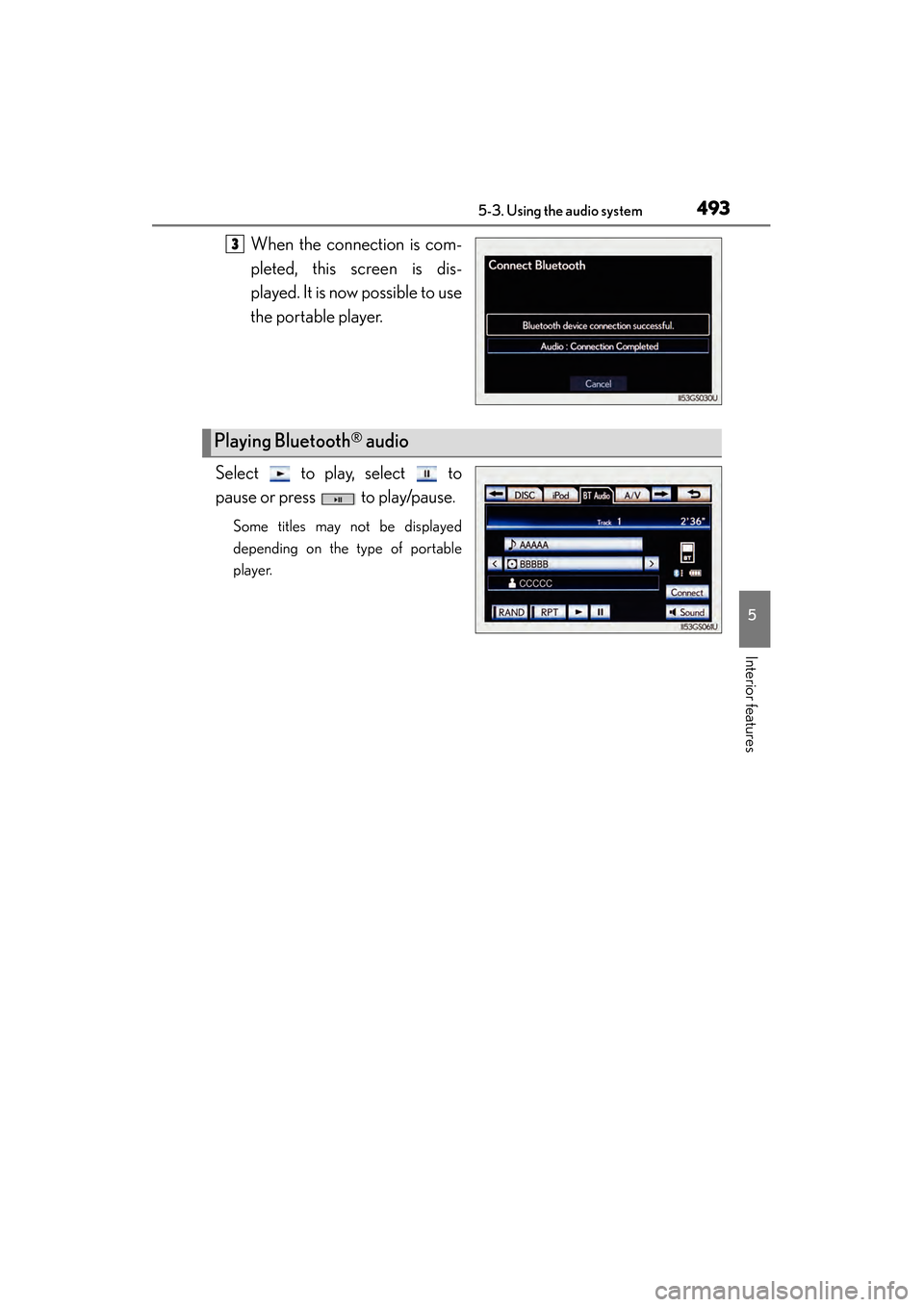
When the connection is com-
pleted, this screen is dis-
played. It is now possible to use
the portable player.
Select to play, select to
pause or press to play/pause.
Some titles may not be displayed
depending on the type of portable
player.
3
Playing Bluetooth® audio
GS450h_OM_OM30D52U_(U).book Page 493 Monday, July 29, 2013 12:07 PM