tow Lexus GS450h 2014 Owner's Guide
[x] Cancel search | Manufacturer: LEXUS, Model Year: 2014, Model line: GS450h, Model: Lexus GS450h 2014Pages: 890, PDF Size: 40.62 MB
Page 253 of 890
252
GS450h_OM_OM30D52U_(U)
4-5. Using the driving support systems
CAUTION
■To avoid inadvertent cruise control activation
Switch the cruise control off using the “ON/OFF” button when not in use.
■Situations unsuitable for dynamic radar cruise control
Do not use dynamic radar cruise control in any of the following situations.
Doing so may result in inappropriate speed control and could cause an accident
resulting in death or serious injury.
●In heavy traffic
●On roads with sharp bends
●On winding roads
●On slippery roads, such as those covered with rain, ice or snow
●On steep downhills, or where there are sudden changes between sharp up and
down gradients
Vehicle speed may exceed the set speed when driving down a steep hill.
●At entrances to expressways
●When weather conditions are bad enough that they may prevent the sensors
from functioning correctly (fog, snow, sandstorm, heavy rain, etc.)
●When an approach warning buzzer is heard often
●During emergency towing
GS450h_OM_OM30D52U_(U).book Page 252 Monday, July 29, 2013 12:07 PM
Page 261 of 890
260
GS450h_OM_OM30D52U_(U)
4-5. Using the driving support systems
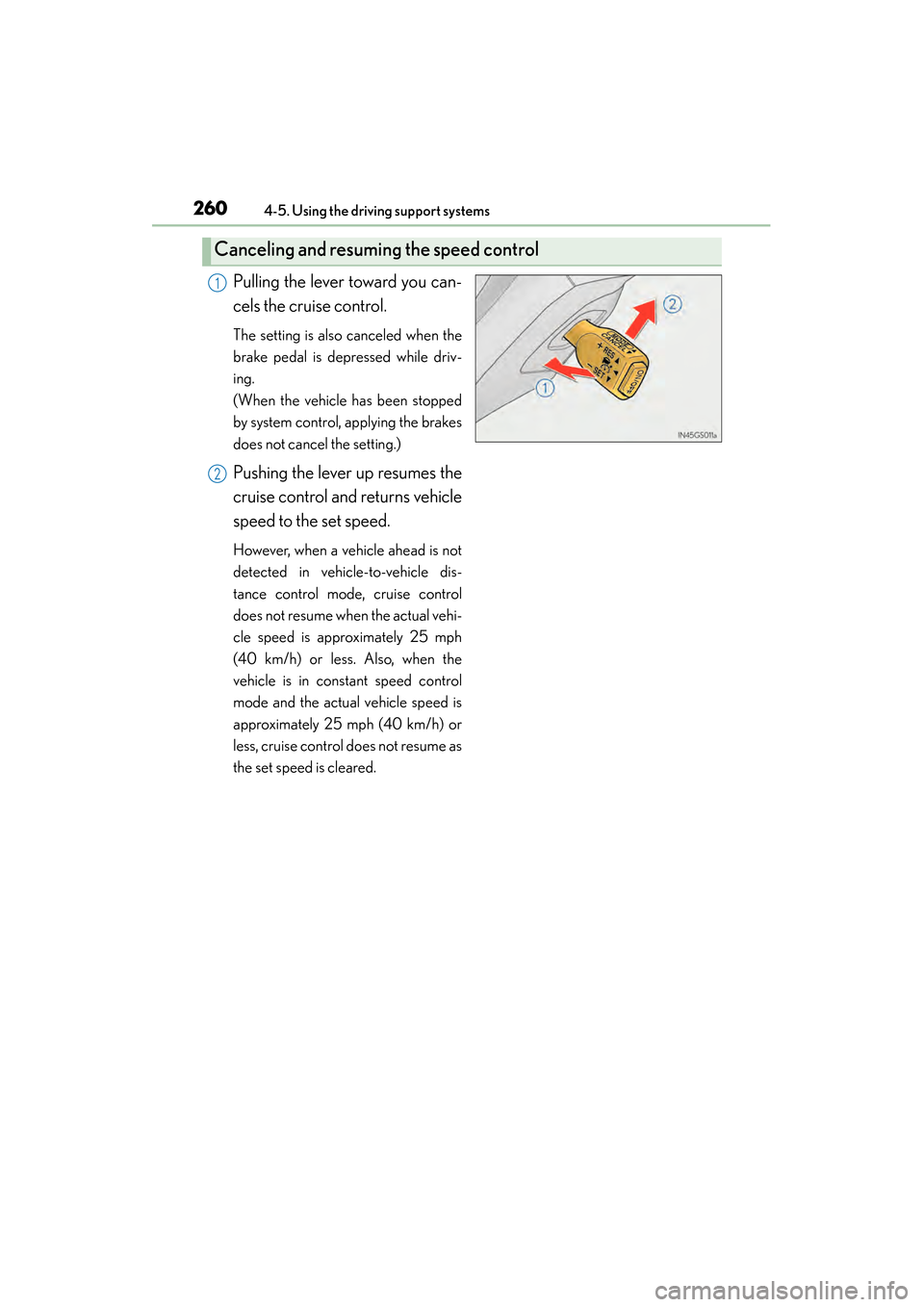
Pulling the lever toward you can-
cels the cruise control.
The setting is also canceled when the
brake pedal is depressed while driv-
ing.
(When the vehicle has been stopped
by system control, applying the brakes
does not cancel the setting.)
Pushing the lever up resumes the
cruise control and returns vehicle
speed to the set speed.
However, when a vehicle ahead is not
detected in vehicle-to-vehicle dis-
tance control mode, cruise control
does not resume when the actual vehi-
cle speed is approximately 25 mph
(40 km/h) or less. Also, when the
vehicle is in constant speed control
mode and the actual vehicle speed is
approximately 25 mph (40 km/h) or
less, cruise control does not resume as
the set speed is cleared.
Canceling and resuming the speed control
1
2
GS450h_OM_OM30D52U_(U).book Page 260 Monday, July 29, 2013 12:07 PM
Page 269 of 890
268
GS450h_OM_OM30D52U_(U)
4-5. Using the driving support systems
CAUTION
■To avoid inadvertent dynamic radar cruise control with full-speed range activa-
tion
Switch the cruise control off using the “ON/OFF” button when not in use.
■Situations unsuitable for dynamic radar cruise control with full-speed range
Do not use dynamic radar cruise control with full-speed range in any of the follow-
ing situations.
Doing so may result in inappropriate speed control and could cause an accident
resulting in death or serious injury.
●In heavy traffic
●On city streets
●On roads with sharp bends
●On winding roads
●On slippery roads, such as those covered with rain, ice or snow
●On steep downhills, or where there are sudden changes between sharp up and
down gradients
Vehicle speed may exceed the set speed when driving down a steep hill.
●At entrances to expressways
●When weather conditions are bad enough that they may prevent the sensors
from functioning correctly (fog, snow, sandstorm, heavy rain, etc.)
●When an approach warning buzzer is heard often
●In areas where the driver is likely to encounter pedestrians, motorcyclists, bicy-
clists, animals, stationary objects or other people/objects not detectable by the
system. (→P. 2 6 7 )
●During emergency towing
GS450h_OM_OM30D52U_(U).book Page 268 Monday, July 29, 2013 12:07 PM
Page 280 of 890
GS450h_OM_OM30D52U_(U)
2794-5. Using the driving support systems
4
Driving
CAUTION
■Situations unsuitable for LKA
Do not use LKA in any of the following situations.
Otherwise, the system may not function correctly and could result in an accident.
●When driving with snow tires, tire chains, a spare tire, or similar equipment
●When the tires have been excessively worn, or when the tire inflation pressure is
low.
●When there are objects or structures along the roadside that might be misinter-
preted as lane markers (such as guardrails, curb, reflector posts, etc.)
●When driving on snowy roads
●When pavement lane markers are difficult to see due to rain, snow, fog, sand, dirt,
etc.
●When there are visible lines on the pavement from road repairs, or if the remains
of old lane markers are still visible on the road
●When driving on slippery roads, such as those covered with rain, ice or snow
●When driving in a lane other than the driving or passing lanes on a freeway or
highway
●When driving on a road with lane closures due to maintenance, or when driving
in a temporary lane
●When emergency towing
NOTICE
■To prevent damage to or incorrect operation of the LKA system
●Do not modify the headlights or attach stickers to the surface of the lights.
●Do not modify the suspension or sun visor, or replace them with non-genuine
parts.
●Do not install or place anything on the hood or the grille. Also, do not install a
grille guard (bull bars, kangaroo bar etc.).
●Do not modify the sun visor or replace it with anything other than a genuine
Lexus product.
●If your windshield needs repairs, contact your Lexus dealer.
GS450h_OM_OM30D52U_(U).book Page 279 Monday, July 29, 2013 12:07 PM
Page 292 of 890
GS450h_OM_OM30D52U_(U)
2914-5. Using the driving support systems
4
Driving
■Intuitive parking assist display
When an obstacle is detected while the rear view monitor system, is in use, the warn-
ing indicator will appear in the top right of the screen even if the display setting has
been set to off.
■Sensor detection information
●The sensor’s detection areas are limited to the areas around the vehicle’s bumpers.
●Certain vehicle conditions and the surrounding environment may affect the ability
of the sensor to correctly detect obstacles. Particular instances where this may
occur are listed below.
• There is dirt, snow or ice on the sensor. (Wiping the sensors will resolve thisproblem.)
• The sensor is frozen. (Thawing the area will resolve this problem.) In especially cold weather, if a sensor is frozen the screen may show an abnor-
mal display, or obstacles may not be detected.
• The sensor is covered in any way.
• The vehicle is leaning considerably to one side.
• On an extremely bumpy road, on an incline, on gravel, or on grass.
• The vicinity of the vehicle is noisy due to vehicle horns, motorcycle engines, air brakes of large vehicles, or other loud noises producing ultrasonic waves.
• There is another vehicle equipped with parking assist sensors in the vicinity.
• The sensor is coated with a sheet of spray or heavy rain.
• The vehicle is equipped with a fender pole or wireless antenna.
• Towing eyelets are installed.
• The bumper or sensor receives a strong impact.
• The vehicle is approaching a tall or curved curb.
• In harsh sunlight or intense cold weather.
• The area directly under the bumpers is not detected.
• If obstacles draw too close to the sensor.
• A non-genuine Lexus suspension (lowered suspension etc.) is installed.
• People may not be detected if they are wearing certain types of clothing.
In addition to the examples above, there are instances in which, because of their
shape, signs and other objects may be judged by the sensor to be closer than they
are.
GS450h_OM_OM30D52U_(U).book Page 291 Monday, July 29, 2013 12:07 PM
Page 385 of 890
3845-1. Remote Touch screen
GS450h_OM_OM30D52U_(U)
■When using the microphone
●It is unnecessary to speak directly into the microphone when giving a command.
●Wait for the confirmation beep before speaking a command.
●Voice commands may not be recognized if:
• Spoken too quickly.
• Spoken at a low or high volume.
• The roof or windows are open.
• Passengers are talking while voice commands are spoken.
• The air conditioning speed is set high.
• The air conditioning vents are turned towards the microphone.
●In the following conditions, the system may not recognize the command properly
and using voice commands may not be possible:
• The command is incorrect or unclear. Note that certain words, accents orspeech patterns may be difficult for the system to recognize.
• There is excessive background noise, such as wind noise.
■When searching for a track
●A USB memory or iPod must be connected to enable track searching and play-
back. ( →P. 5 0 1 , 5 1 1 )
●When a USB memory or iPod is connected, recognition data is created so tracks
can be searched using voice commands.
●Recognition data is updated under the following conditions:
• When the USB memory or iPod data has changed.
• When the voice recognition language is changed. ( →P. 3 6 1 )
●While the recognition data is being created or being updated, a track search can-
not be performed using a voice command.
●While “Play Music” is displayed in the “Shortcut Menu” screen, say “Play Music” to
display the music screen from which searching for a track using a voice command
can be performed.
●When “Play Music” is dimmed in the “Shortcut Menu” screen, it is not possible to
search for a track using a voice command. In this situation, reduce the amount of
music data in the USB memory or iPod and update the recognition data to enable
searching by voice command.
GS450h_OM_OM30D52U_(U).book Page 384 Monday, July 29, 2013 12:07 PM
Page 388 of 890
GS450h_OM_OM30D52U_(U)
3875-1. Remote Touch screen
5
Interior features
■Adjusting the volume
The volume of the Mobile Assistant can be adjusted using the “PWR/VOL” knob or
steering wheel volume switches. The Mobile Assistant and phone call volumes are
synchronized.
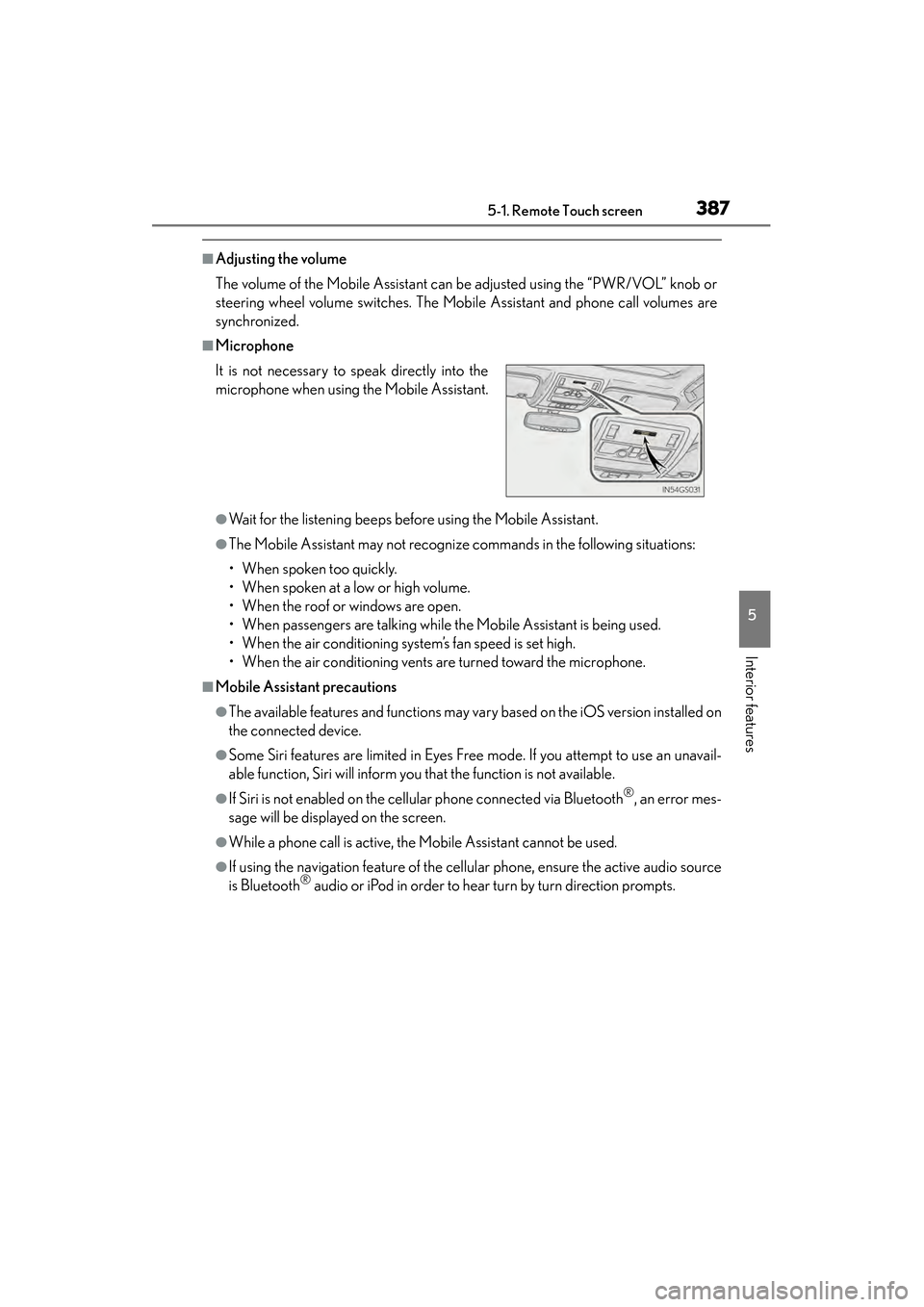
■Microphone
●Wait for the listening beeps before using the Mobile Assistant.
●The Mobile Assistant may not recognize commands in the following situations:
• When spoken too quickly.
• When spoken at a low or high volume.
• When the roof or windows are open.
• When passengers are talking while the Mobile Assistant is being used.
• When the air conditioning system’s fan speed is set high.
• When the air conditioning vents are turned toward the microphone.
■Mobile Assistant precautions
●The available features and functions may vary based on the iOS version installed on
the connected device.
●Some Siri features are limited in Eyes Free mode. If you attempt to use an unavail-
able function, Siri will inform you that the function is not available.
●If Siri is not enabled on the cellular phone connected via Bluetooth®, an error mes-
sage will be displayed on the screen.
●While a phone call is active, the Mobile Assistant cannot be used.
●If using the navigation feature of the cellular phone, ensure the active audio source
is Bluetooth® audio or iPod in order to hear turn by turn direction prompts.
It is not necessary to speak directly into the
microphone when using the Mobile Assistant.
GS450h_OM_OM30D52U_(U).book Page 387 Monday, July 29, 2013 12:07 PM
Page 535 of 890
534
GS450h_OM_OM30D52U_(U)
5-4. Using the hands-free phone system (for cellular phone)
■When using the hands-free system
●The audio system is muted when making a call.
●If both parties speak at the same time, it may be difficult to hear.
●If the incoming call volume is overly loud, an echo may be heard.
●Try to face toward the microphone as much as possible when speaking.
●In the following circumstances, it may be difficult to hear the other party:
• When driving on unpaved roads
• When driving at high speeds
• If a window is open
• If the air conditioning is blowing directly on the microphone
• If the air conditioning is set to high
• There is an effect from the network of the cellular phone
■Conditions under which the system will not operate
●If using a cellular phone that does not support Bluetooth®
●If the cellular phone is turned off
●If you are outside service range
●If the cellular phone is not connected
●If the cellular phone’s battery is low
■Bluetooth® antenna
The antenna is built into the instrument panel. If the cellular phone is behind the seat
or in the console box, or touching or covered by metal objects, connection status
may deteriorate.
■Battery charge/Signal status
●This display may not correspond exactly with the cellular phone itself.
●When the cellular phone is not connected, “No connect” is displayed.
●When the cellular phone is out of the service area or in a place inaccessible by
radio waves, “No Service” is displayed.
■When using Bluetooth® audio and hands-free system at the same time
The following problems may occur.
●The Bluetooth® connection may be cut.
●Noise may be heard on the Bluetooth® audio playback.
GS450h_OM_OM30D52U_(U).book Page 534 Monday, July 29, 2013 12:07 PM
Page 605 of 890
604
GS450h_OM_OM30D52U_(U)
5-6. Using the storage features
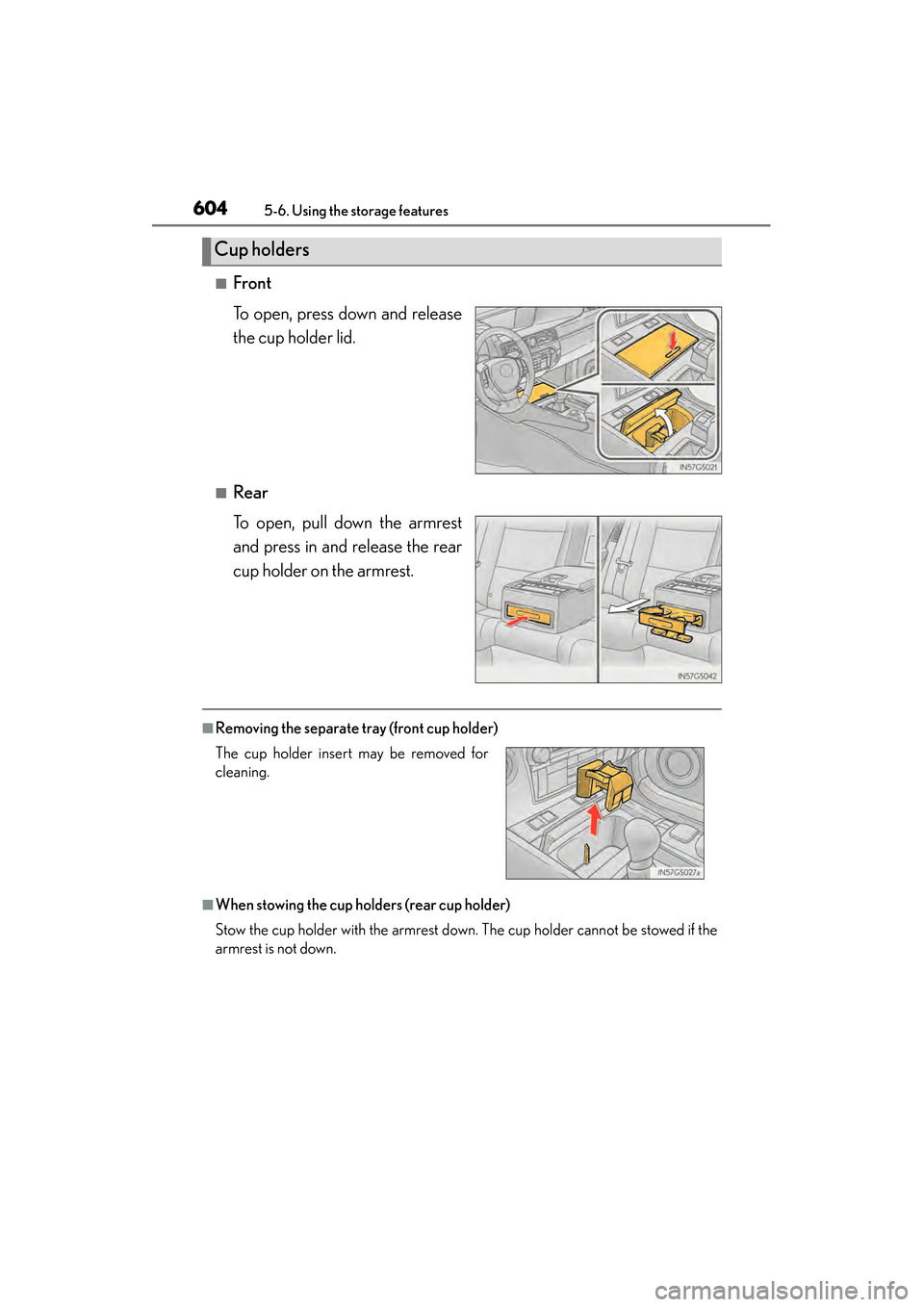
■Front
To open, press down and release
the cup holder lid.
■Rear
To open, pull down the armrest
and press in and release the rear
cup holder on the armrest.
■Removing the separate tray (front cup holder)
■When stowing the cup holders (rear cup holder)
Stow the cup holder with the armrest down. The cup holder cannot be stowed if the
armrest is not down.
Cup holders
The cup holder insert may be removed for
cleaning.
GS450h_OM_OM30D52U_(U).book Page 604 Monday, July 29, 2013 12:07 PM
Page 606 of 890
GS450h_OM_OM30D52U_(U)
6055-6. Using the storage features
5
Interior features
CAUTION
■Items unsuitable for the cup holders
Do not place anything other than cups or aluminum cans in the cup holders.
Other items may be thrown out of the holders in the event of an accident or sudden
braking, causing injury. If possible, cover hot drinks to prevent burns.
NOTICE
■To prevent damage to the rear cup holder
Stow the cup holder before stowing the armrest.
GS450h_OM_OM30D52U_(U).book Page 605 Monday, July 29, 2013 12:07 PM