steering Lexus GS450h 2014 Workshop Manual
[x] Cancel search | Manufacturer: LEXUS, Model Year: 2014, Model line: GS450h, Model: Lexus GS450h 2014Pages: 890, PDF Size: 40.62 MB
Page 350 of 890
349
GS450h_OM_OM30D52U_(U)
5Interior features
5-4. Using the hands-free phone system (for cellular phone)
Hands-free system (for cellular phone) ................ 530
Using a Bluetooth
® phone ....539
Setting the hands-free system (for cellular phone) .................559
Setting the Bluetooth
®........... 584
5-5. Using the interior lights Interior lights list.......................... 597• Interior light ........................... 598
• Personal lights....................... 598
5-6. Using the storage features List of storage features............ 600• Glove box............................... 602
• Console box .......................... 603
• Cup holders........................... 604
• Auxiliary boxes..................... 606
Trunk features .............................. 607 5-7. Other interior features
Sun visors and vanity mirrors ...................609
Clock................................................ 610
Ashtrays ............................................ 611
Power outlets .................................612
Heated steering wheel ..............614
Seat heaters/ seat ventilators ...........................616
Armrest .......................................... 620
Rear sunshade/ rear door sunshades ................621
Coat hooks ................................... 624
Assist grips.................................... 625
Utility hook.................................... 626
Garage door opener.................627
Safety Connect ........................... 634
GS450h_OM_OM30D52U_(U).book Page 349 Monday, July 29, 2013 12:07 PM
Page 387 of 890
386
GS450h_OM_OM30D52U_(U)
5-1. Remote Touch screen
Mobile Assistant
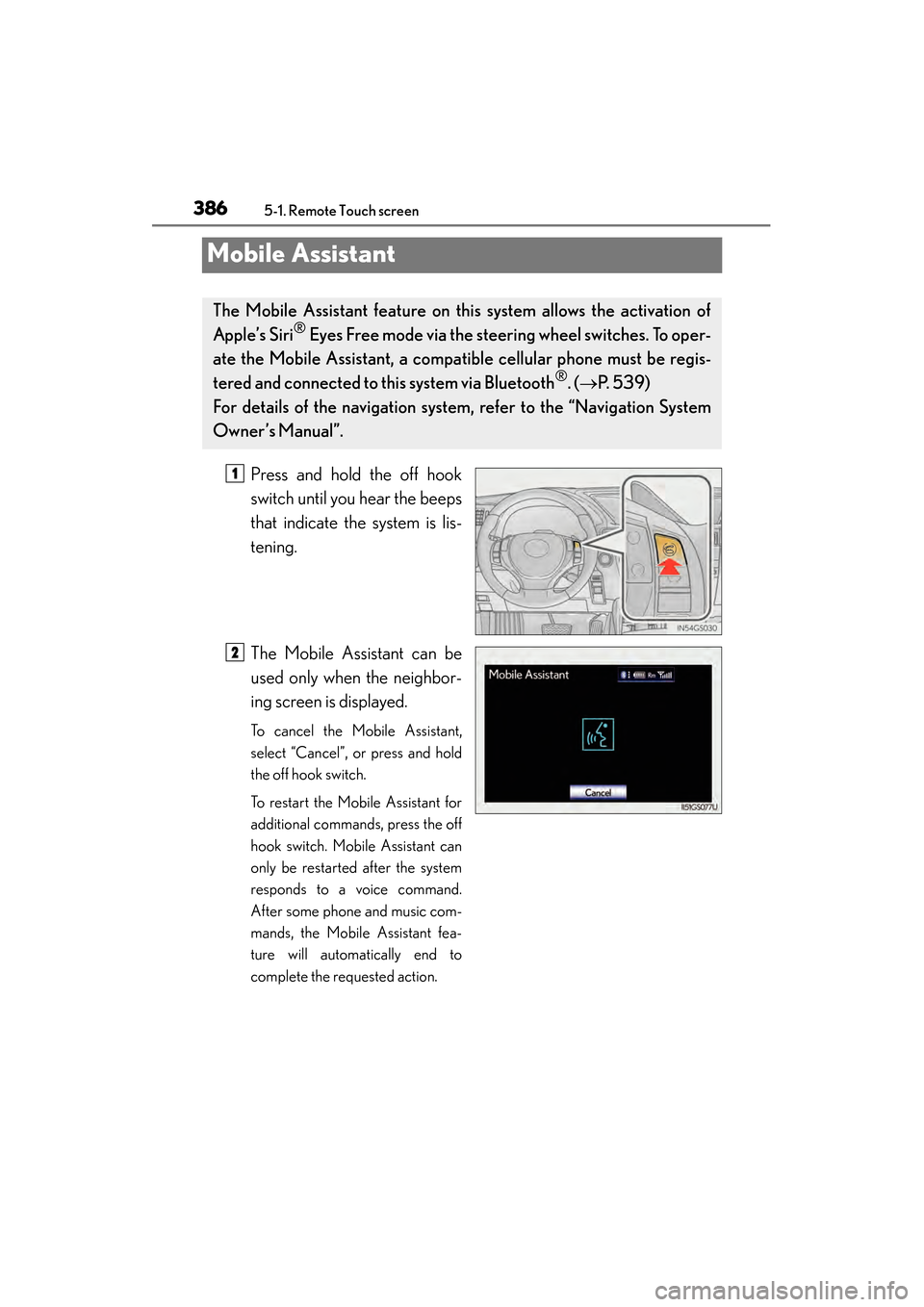
Press and hold the off hook
switch until you hear the beeps
that indicate the system is lis-
tening.
The Mobile Assistant can be
used only when the neighbor-
ing screen is displayed.
To cancel the Mobile Assistant,
select “Cancel”, or press and hold
the off hook switch.
To restart the Mobile Assistant for
additional commands, press the off
hook switch. Mobile Assistant can
only be restarted after the system
responds to a voice command.
After some phone and music com-
mands, the Mobile Assistant fea-
ture will automatically end to
complete the requested action.
The Mobile Assistant feature on this system allows the activation of
Apple’s Siri
® Eyes Free mode via the steering wheel switches. To oper-
ate the Mobile Assistant, a compat ible cellular phone must be regis-
tered and connected to this system via Bluetooth
®. ( → P. 5 3 9 )
For details of the navigation system , refer to the “Navigation System
Owner’s Manual”.
1
2
GS450h_OM_OM30D52U_(U).book Page 386 Monday, July 29, 2013 12:07 PM
Page 388 of 890
GS450h_OM_OM30D52U_(U)
3875-1. Remote Touch screen
5
Interior features
■Adjusting the volume
The volume of the Mobile Assistant can be adjusted using the “PWR/VOL” knob or
steering wheel volume switches. The Mobile Assistant and phone call volumes are
synchronized.
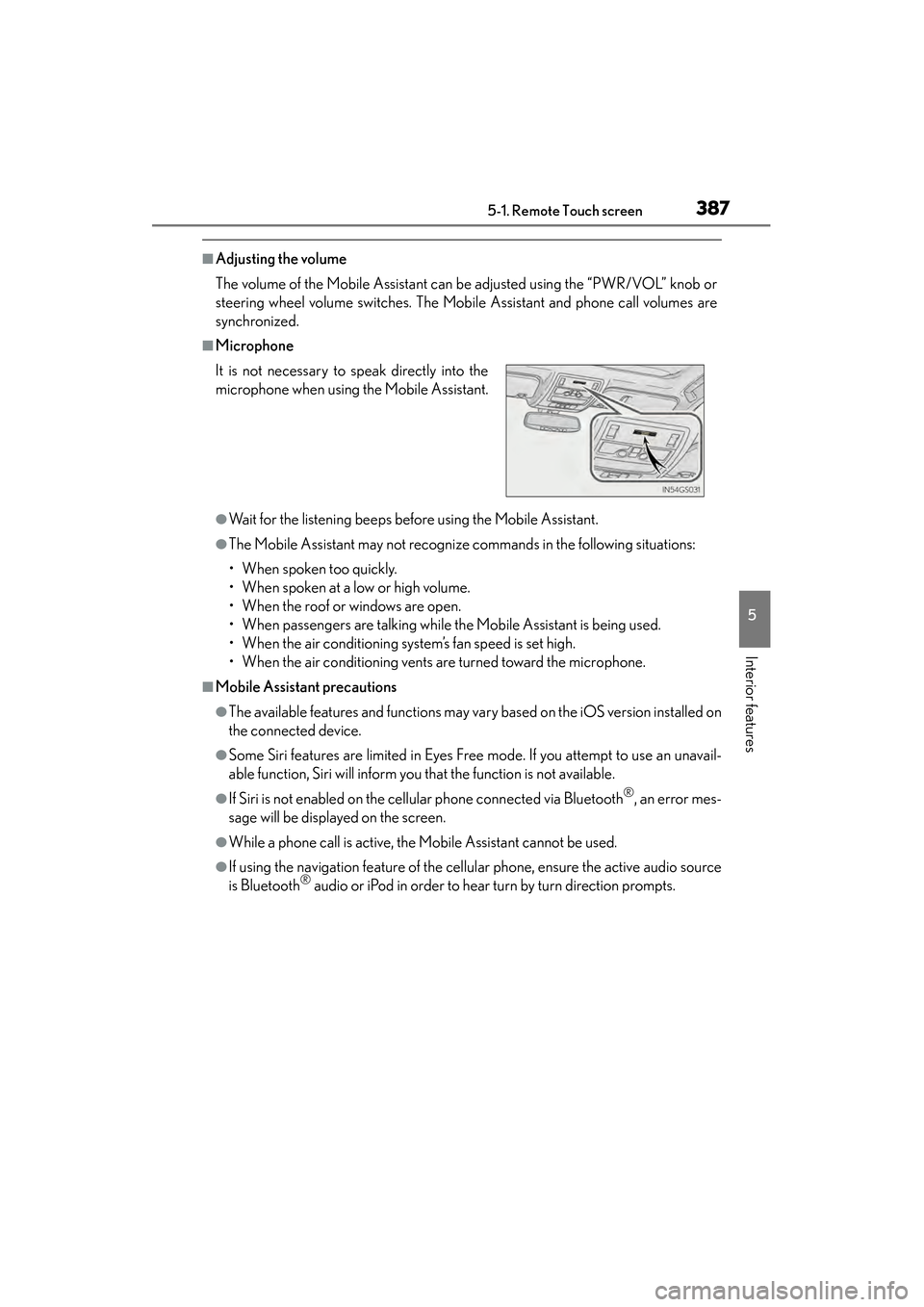
■Microphone
●Wait for the listening beeps before using the Mobile Assistant.
●The Mobile Assistant may not recognize commands in the following situations:
• When spoken too quickly.
• When spoken at a low or high volume.
• When the roof or windows are open.
• When passengers are talking while the Mobile Assistant is being used.
• When the air conditioning system’s fan speed is set high.
• When the air conditioning vents are turned toward the microphone.
■Mobile Assistant precautions
●The available features and functions may vary based on the iOS version installed on
the connected device.
●Some Siri features are limited in Eyes Free mode. If you attempt to use an unavail-
able function, Siri will inform you that the function is not available.
●If Siri is not enabled on the cellular phone connected via Bluetooth®, an error mes-
sage will be displayed on the screen.
●While a phone call is active, the Mobile Assistant cannot be used.
●If using the navigation feature of the cellular phone, ensure the active audio source
is Bluetooth® audio or iPod in order to hear turn by turn direction prompts.
It is not necessary to speak directly into the
microphone when using the Mobile Assistant.
GS450h_OM_OM30D52U_(U).book Page 387 Monday, July 29, 2013 12:07 PM
Page 414 of 890
GS450h_OM_OM30D52U_(U)
4135-3. Using the audio system
5
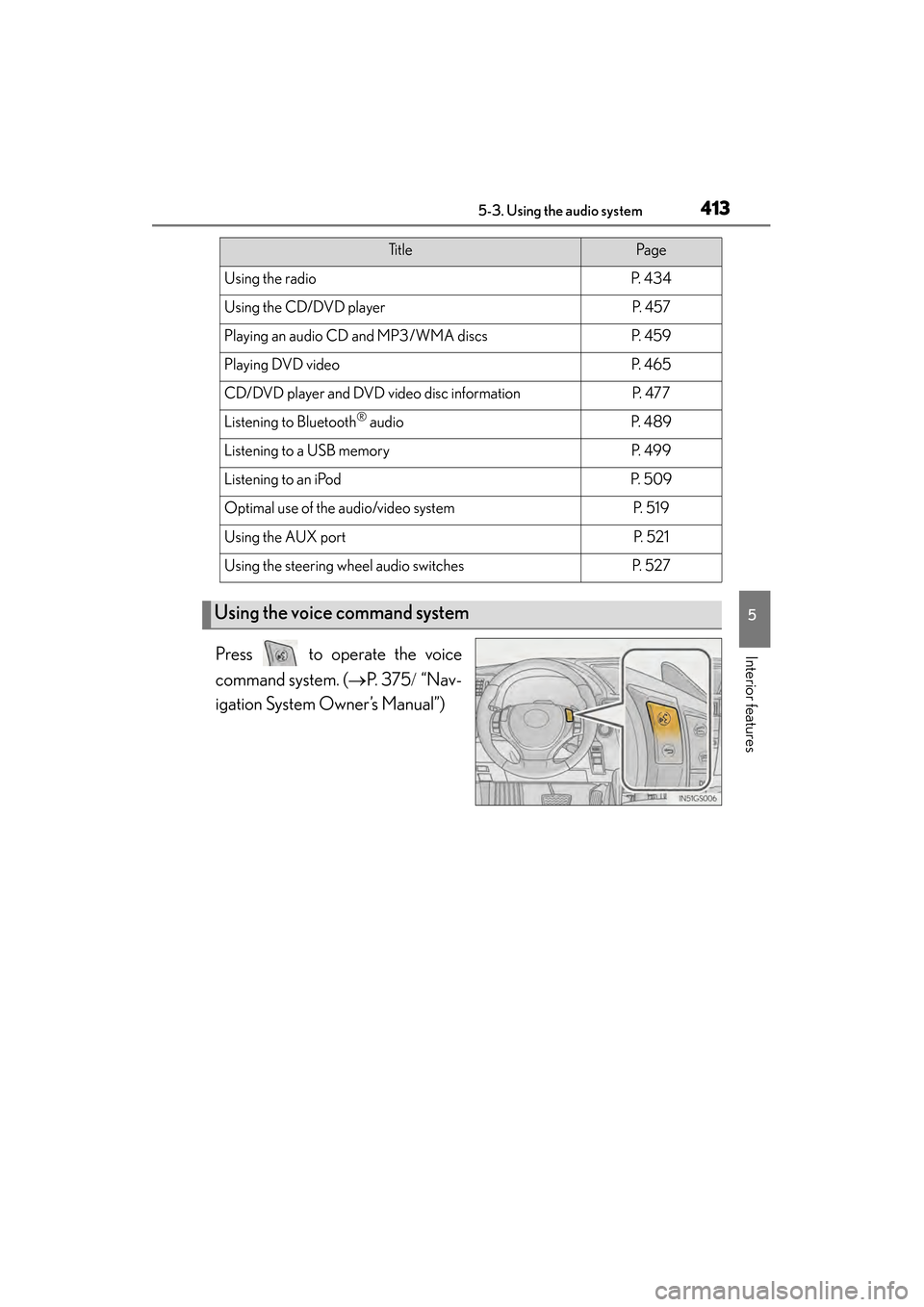
Interior featuresPress to operate the voice
command system. (→P. 3 7 5 / “Nav-
igation System Owner’s Manual”)
Ti t l ePa g e
Using the radioP. 4 3 4
Using the CD/DVD playerP. 4 5 7
Playing an audio CD and MP3/WMA discsP. 4 5 9
Playing DVD videoP. 4 6 5
CD/DVD player and DVD video disc informationP. 4 7 7
Listening to Bluetooth® audioP. 4 8 9
Listening to a USB memoryP. 4 9 9
Listening to an iPodP. 5 0 9
Optimal use of the audio/video systemP. 5 1 9
Using the AUX portP. 5 2 1
Using the steering wheel audio switchesP. 5 2 7
Using the voice command system
GS450h_OM_OM30D52U_(U).book Page 413 Monday, July 29, 2013 12:07 PM
Page 528 of 890
527
GS450h_OM_OM30D52U_(U)5-3. Using the audio system
5
Interior features
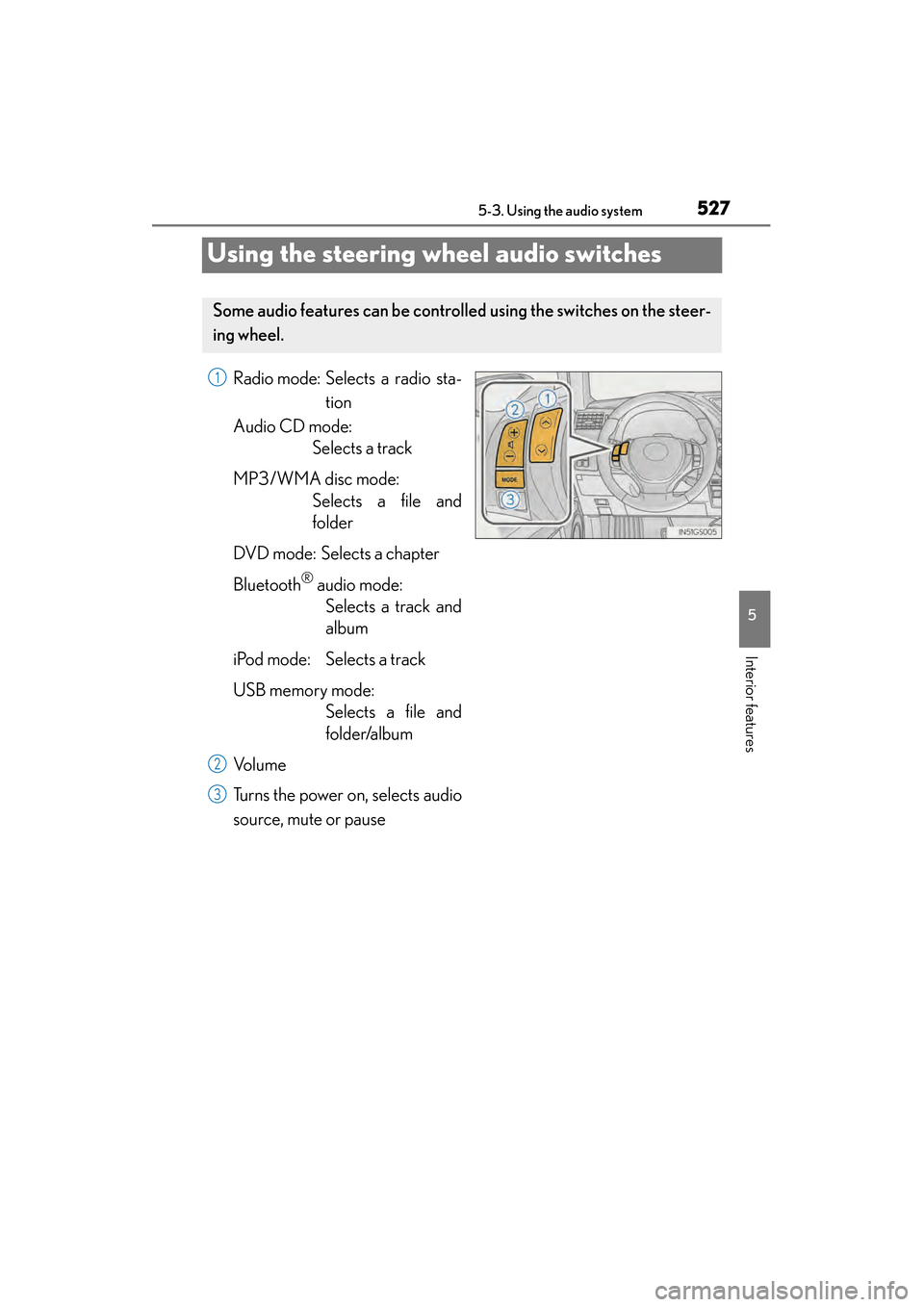
Using the steering wheel audio switches
Radio mode: Selects a radio sta- tion
Audio CD mode: Selects a track
MP3/WMA disc mode: Selects a file and
folder
DVD mode: Selects a chapter
Bluetooth
® audio mode: Selects a track and
album
iPod mode: Selects a track
USB memory mode: Selects a file and
folder/album
Vo l u m e
Turns the power on, selects audio
source, mute or pause
Some audio features can be controll ed using the switches on the steer-
ing wheel.
1
2
3
GS450h_OM_OM30D52U_(U).book Page 527 Monday, July 29, 2013 12:07 PM
Page 530 of 890
GS450h_OM_OM30D52U_(U)
5295-3. Using the audio system
5
Interior features
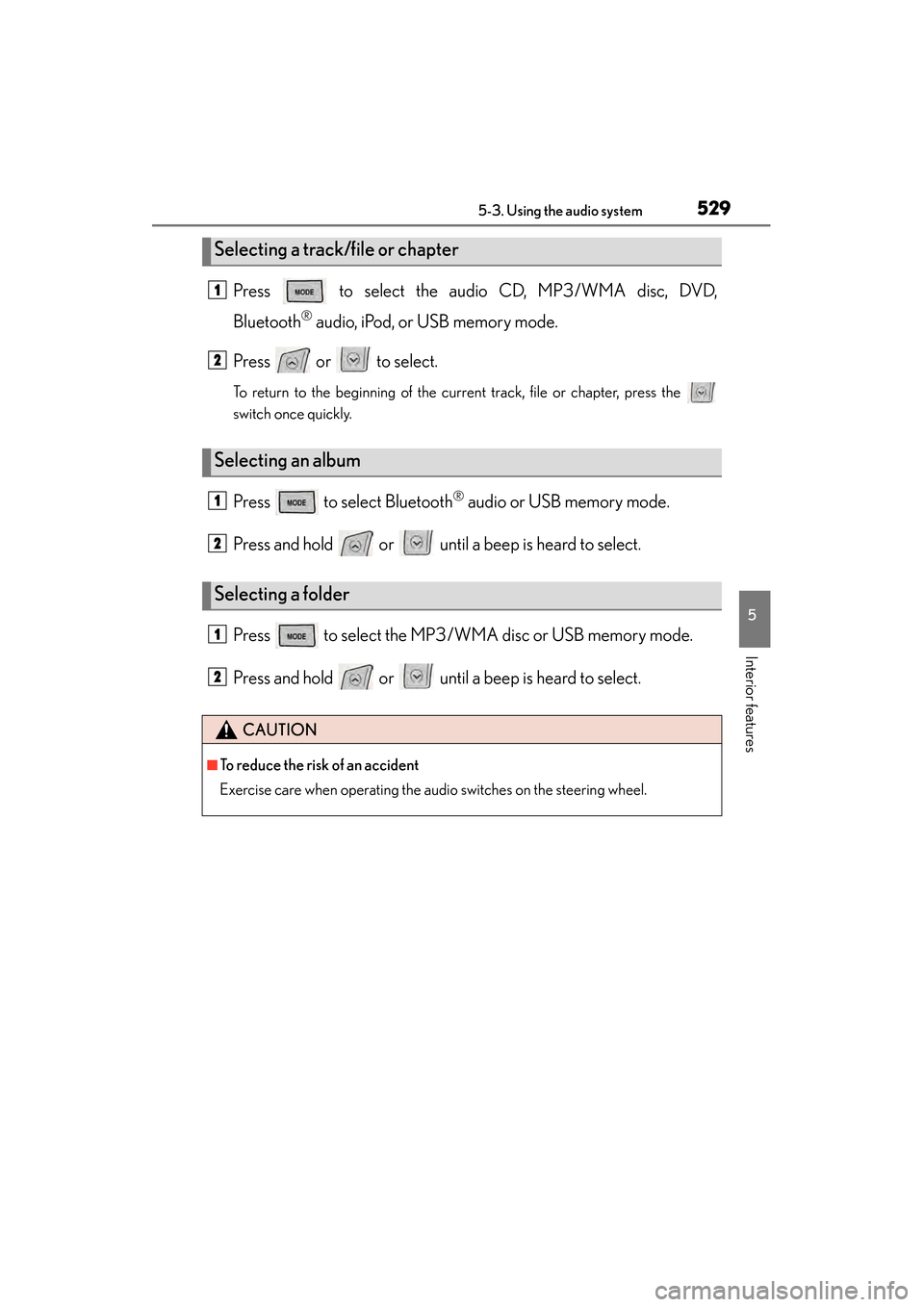
Press to select the audio CD, MP3/WMA disc, DVD,
Bluetooth
® audio, iPod, or USB memory mode.
Press or to select.
To return to the beginning of the current track, file or chapter, press the
switch once quickly.
Press to select Bluetooth® audio or USB memory mode.
Press and hold or until a beep is heard to select.
Press to select the MP3/W MA disc or USB memory mode.
Press and hold or until a beep is heard to select.
Selecting a track/file or chapter
Selecting an album
Selecting a folder
CAUTION
■To reduce the risk of an accident
Exercise care when operating the audio switches on the steering wheel.
1
2
1
2
1
2
GS450h_OM_OM30D52U_(U).book Page 529 Monday, July 29, 2013 12:07 PM
Page 533 of 890
532
GS450h_OM_OM30D52U_(U)
5-4. Using the hands-free phone system (for cellular phone)
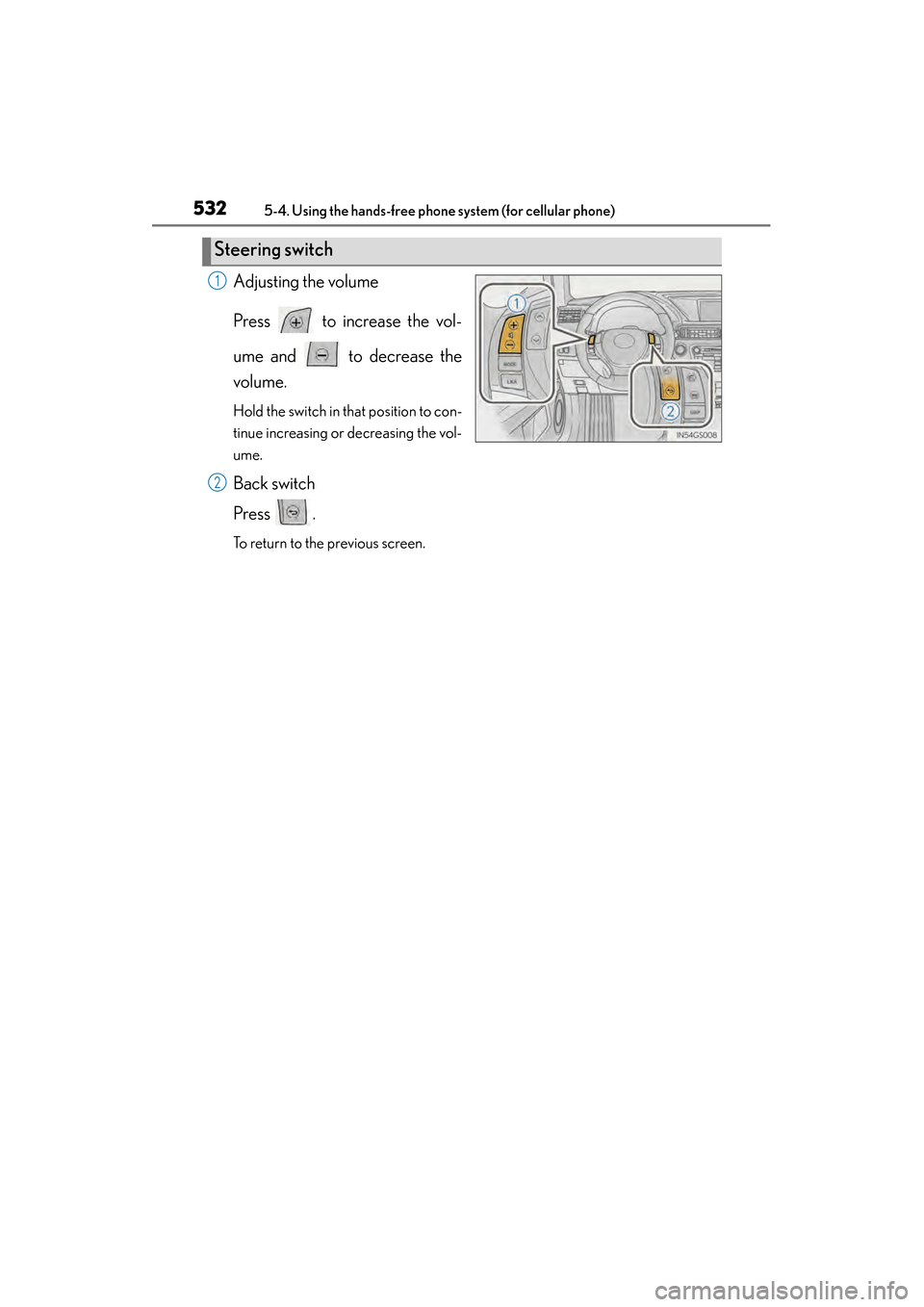
Adjusting the volume
Press to increase the vol-
ume and to decrease the
volume.
Hold the switch in that position to con-
tinue increasing or decreasing the vol-
ume.
Back switch
Press .
To return to the previous screen.
Steering switch
1
2
GS450h_OM_OM30D52U_(U).book Page 532 Monday, July 29, 2013 12:07 PM
Page 540 of 890
539
GS450h_OM_OM30D52U_(U)5-4. Using the hands-free phone system (for cellular phone)
5
Interior features
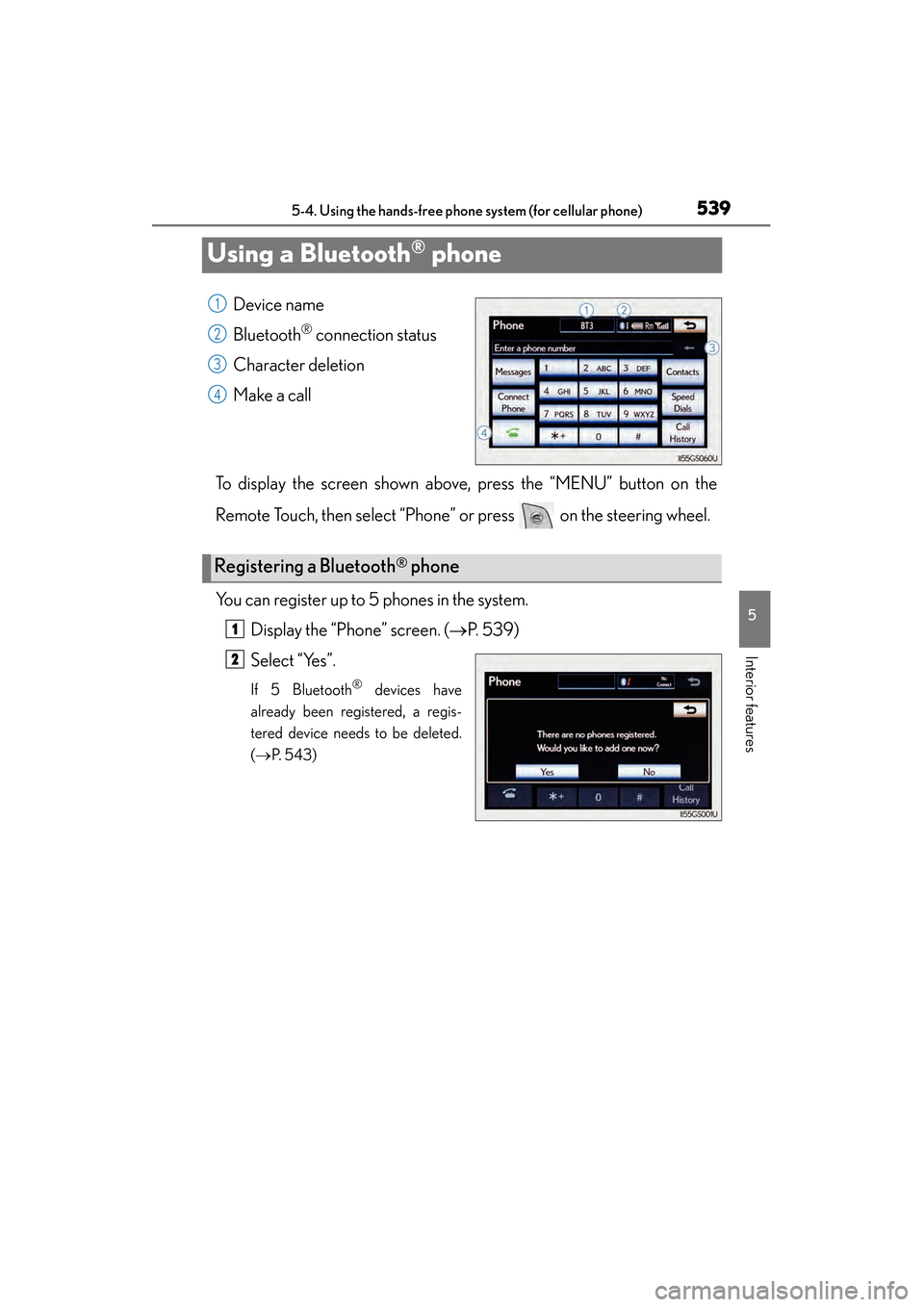
Using a Bluetooth® phone
Device name
Bluetooth
® connection status
Character deletion
Make a call
To display the screen shown above, press the “MENU” button on the
Remote Touch, then select “Phone” or press on the steering wheel.
You can register up to 5 phones in the system. Display the “Phone” screen. ( →P. 5 3 9 )
Select “Yes”.
If 5 Bluetooth® devices have
already been registered, a regis-
tered device needs to be deleted.
( → P. 5 4 3 )
1
2
3
4
Registering a Bluetooth® phone
1
2
GS450h_OM_OM30D52U_(U).book Page 539 Monday, July 29, 2013 12:07 PM
Page 545 of 890
544
GS450h_OM_OM30D52U_(U)
5-4. Using the hands-free phone system (for cellular phone)
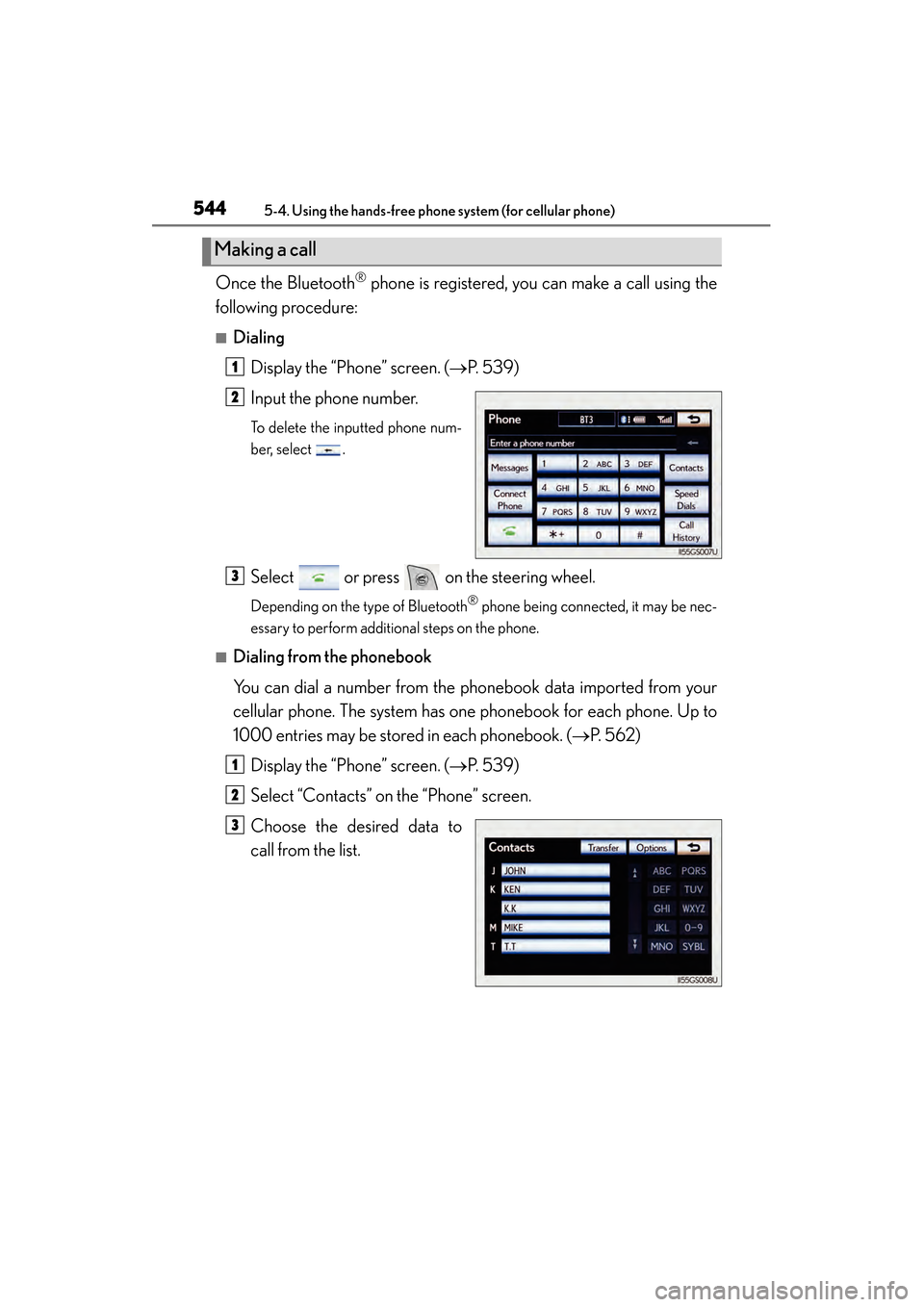
Once the Bluetooth® phone is registered, you can make a call using the
following procedure:
■Dialing
Display the “Phone” screen. ( →P. 5 3 9 )
Input the phone number.
To delete the inputted phone num-
ber, select .
Select or press on the steering wheel.
Depending on the type of Bluetooth® phone being connected, it may be nec-
essary to perform additional steps on the phone.
■Dialing from the phonebook
You can dial a number from the phonebook data imported from your
cellular phone. The system has one phonebook for each phone. Up to
1000 entries may be stored in each phonebook. ( →P. 562)
Display the “Phone” screen. ( →P. 5 3 9 )
Select “Contacts” on the “Phone” screen.
Choose the desired data to
call from the list.
Making a call
1
2
3
1
2
3
GS450h_OM_OM30D52U_(U).book Page 544 Monday, July 29, 2013 12:07 PM
Page 546 of 890
GS450h_OM_OM30D52U_(U)
5455-4. Using the hands-free phone system (for cellular phone)
5
Interior features
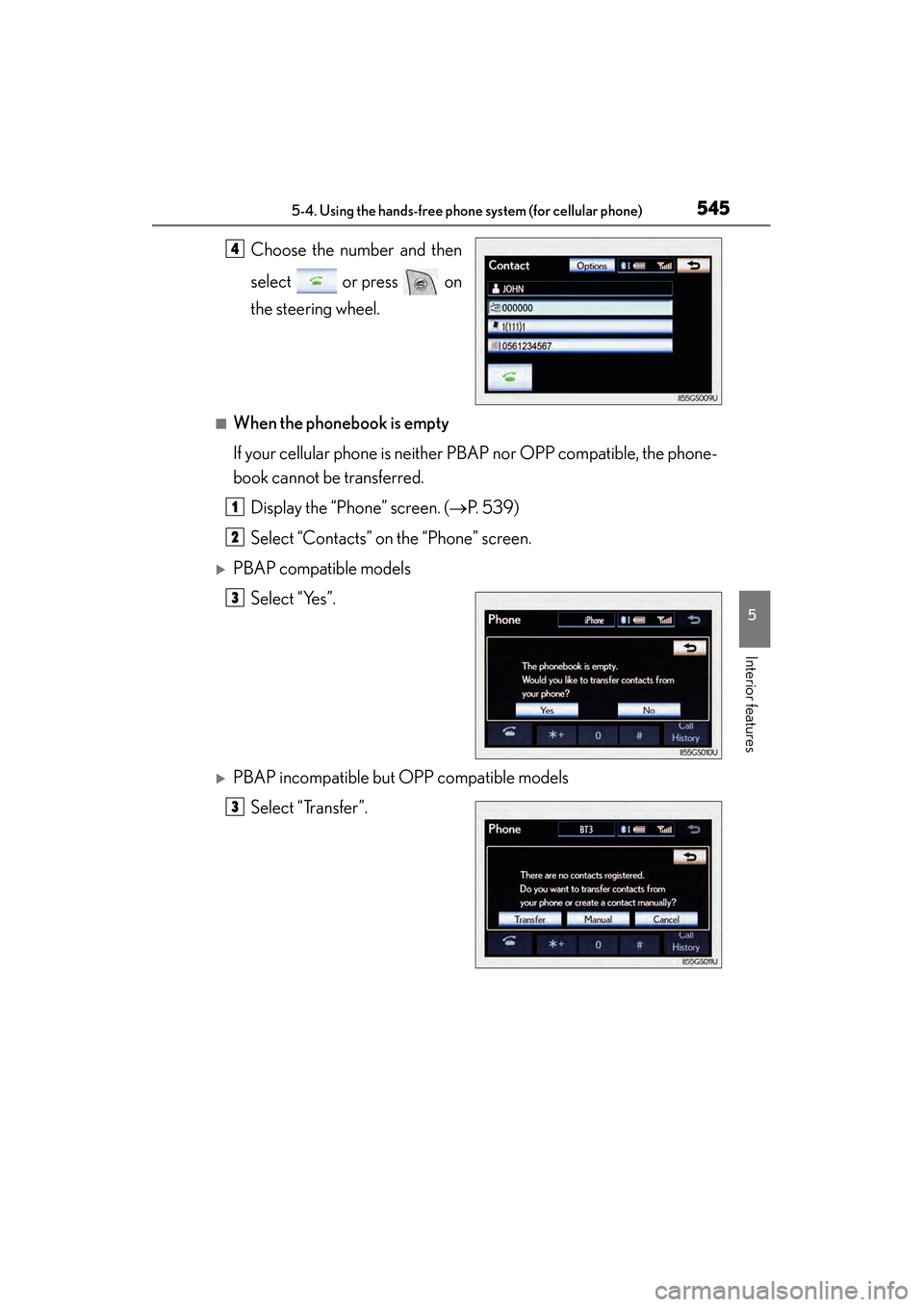
Choose the number and then
select or press on
the steering wheel.
■When the phonebook is empty
If your cellular phone is neither PBAP nor OPP compatible, the phone-
book cannot be transferred.Display the “Phone” screen. ( →P. 5 3 9 )
Select “Contacts” on the “Phone” screen.
XPBAP compatible models Select “Yes”.
XPBAP incompatible but OPP compatible modelsSelect “Transfer”.
4
1
2
3
3
GS450h_OM_OM30D52U_(U).book Page 545 Monday, July 29, 2013 12:07 PM