USB Lexus GS450h 2014 Owner's Manual
[x] Cancel search | Manufacturer: LEXUS, Model Year: 2014, Model line: GS450h, Model: Lexus GS450h 2014Pages: 890, PDF Size: 40.62 MB
Page 5 of 890
TABLE OF CONTENTS4
GS450h_OM_OM30D52U_(U)
5-1. Remote Touch screenRemote Touch .............................350
Remote Touch screen .............. 352
Set up screen ............................... 358
Voice command system ...........375
Mobile Assistant.........................386
5-2. Using the air conditioning system and defogger
Front automatic air conditioning system.........388
Rear air conditioning system .......................................... 404
Rear window and outside rear view mirror defoggers .......... 409
Windshield wiper de-icer........ 410 5-3. Using the audio system
Audio system type ........................ 411
Using the radio ........................... 434
Using the CD/DVD player.....457
Playing an audio CD and MP3/WMA discs ......... 459
Playing DVD video ................... 465
CD/DVD player and DVD video disc information ........... 477
Listening to Bluetooth
® audio ................... 489
Listening to a USB memory ........................ 499
Listening to an iPod...................509
Optimal use of the audio/video system ..........519
Using the AUX port ................... 521
Using the rear seat audio controls........................... 523
Using the steering wheel audio switches...........................527
5Interior features
GS450h_OM_OM30D52U_(U).book Page 4 Monday, July 29, 2013 12:07 PM
Page 349 of 890
348
GS450h_OM_OM30D52U_(U)
5-1. Remote Touch screen Remote Touch............................. 350
Remote Touch screen............... 352
Set up screen .............................. 358
Voice command system .......... 375
Mobile Assistant ........................ 386
5-2. Using the air conditioning system and defogger
Front automatic air conditioning system ........ 388
Rear air conditioning system ......................................... 404
Rear window and outside rear view mirror defoggers.......... 409
Windshield wiper de-icer ........ 410 5-3. Using the audio system
Audio system type ........................ 411
Using the radio............................ 434
Using the CD/DVD player.... 457
Playing an audio CD and MP3/WMA discs ......... 459
Playing DVD video.................... 465
CD/DVD player and DVD video disc information............477
Listening to Bluetooth
® audio ...................489
Listening to a USB memory ........................ 499
Listening to an iPod ...................509
Optimal use of the audio/video system.......... 519
Using the AUX port ...................521
Using the rear seat audio controls........................... 523
Using the steering wheel audio switches .......................... 527
GS450h_OM_OM30D52U_(U).book Page 348 Monday, July 29, 2013 12:07 PM
Page 364 of 890
GS450h_OM_OM30D52U_(U)
3635-1. Remote Touch screen
5
Interior features
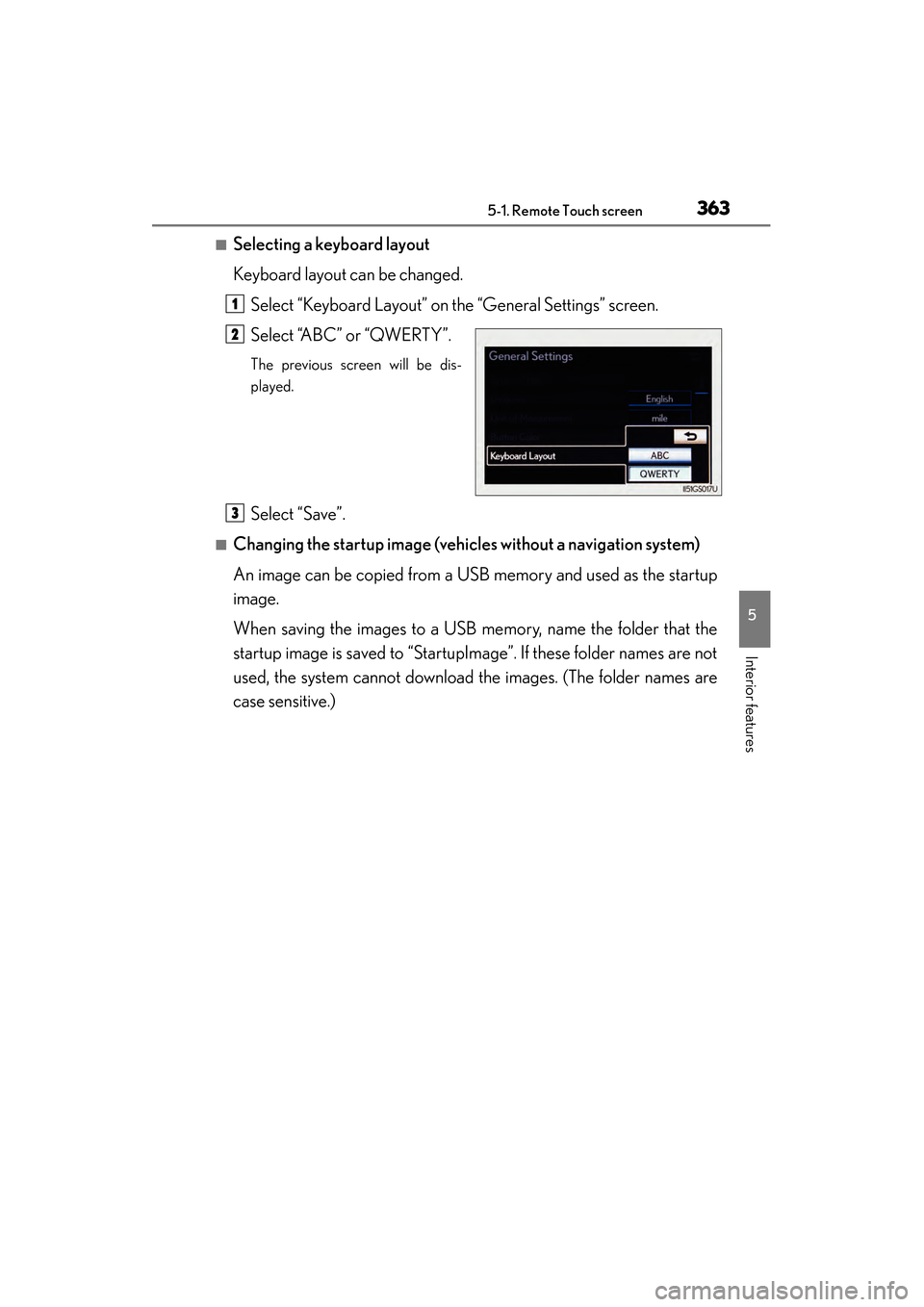
■Selecting a keyboard layout
Keyboard layout can be changed.Select “Keyboard Layout” on the “General Settings” screen.
Select “ABC” or “QWERTY”.
The previous screen will be dis-
played.
Select “Save”.
■Changing the startup image (vehic les without a navigation system)
An image can be copied from a USB memory and used as the startup
image.
When saving the images to a USB memory, name the folder that the
startup image is saved to “StartupImage”. If these folder names are not
used, the system cannot download the images. (The folder names are
case sensitive.)
1
2
3
GS450h_OM_OM30D52U_(U).book Page 363 Monday, July 29, 2013 12:07 PM
Page 365 of 890
3645-1. Remote Touch screen
GS450h_OM_OM30D52U_(U)
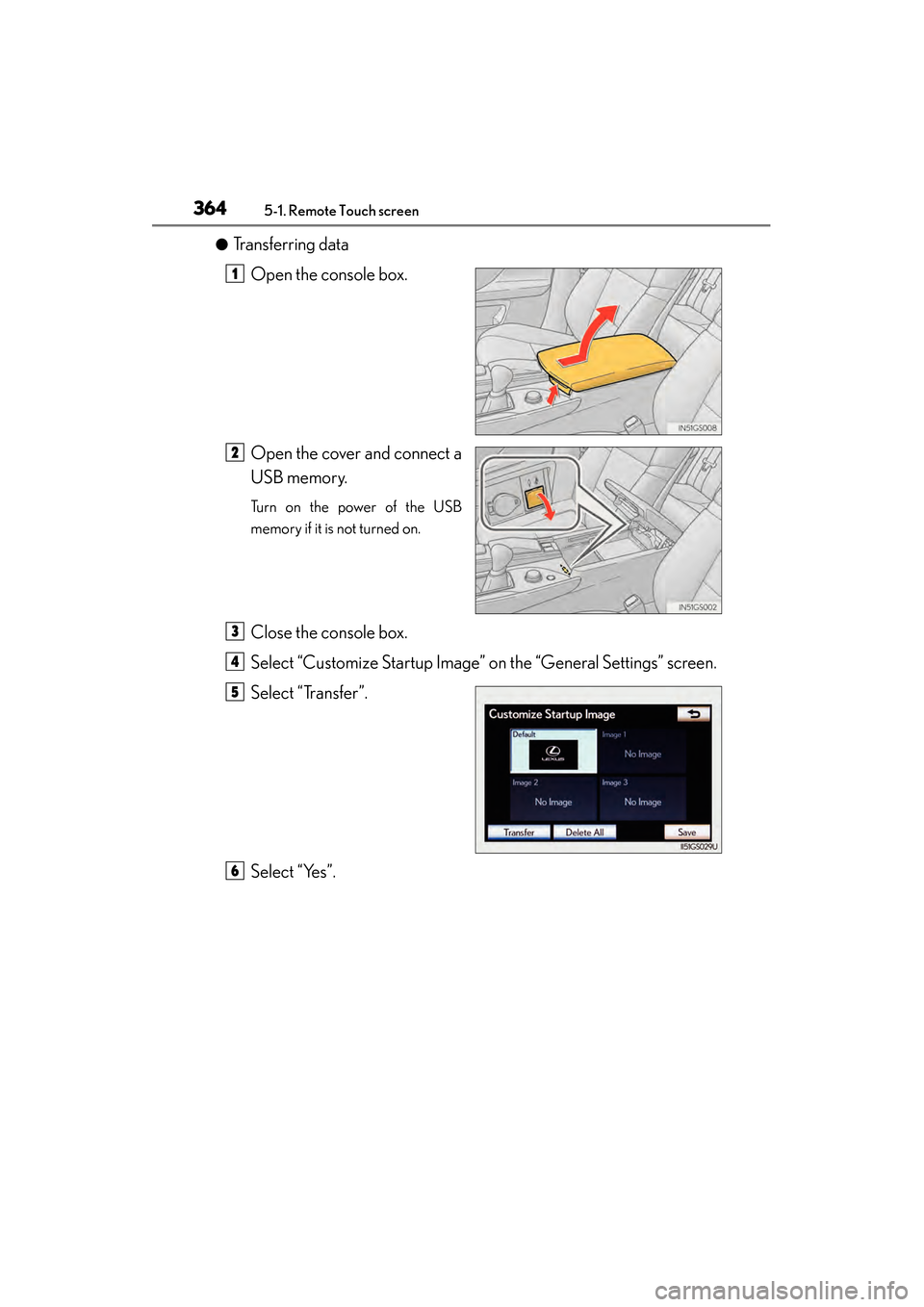
●Transferring dataOpen the console box.
Open the cover and connect a
USB memory.
Turn on the power of the USB
memory if it is not turned on.
Close the console box.
Select “Customize Startup Image” on the “General Settings” screen.
Select “Transfer”.
Select “Yes”.
1
2
3
4
5
6
GS450h_OM_OM30D52U_(U).book Page 364 Monday, July 29, 2013 12:07 PM
Page 367 of 890
3665-1. Remote Touch screen
GS450h_OM_OM30D52U_(U)
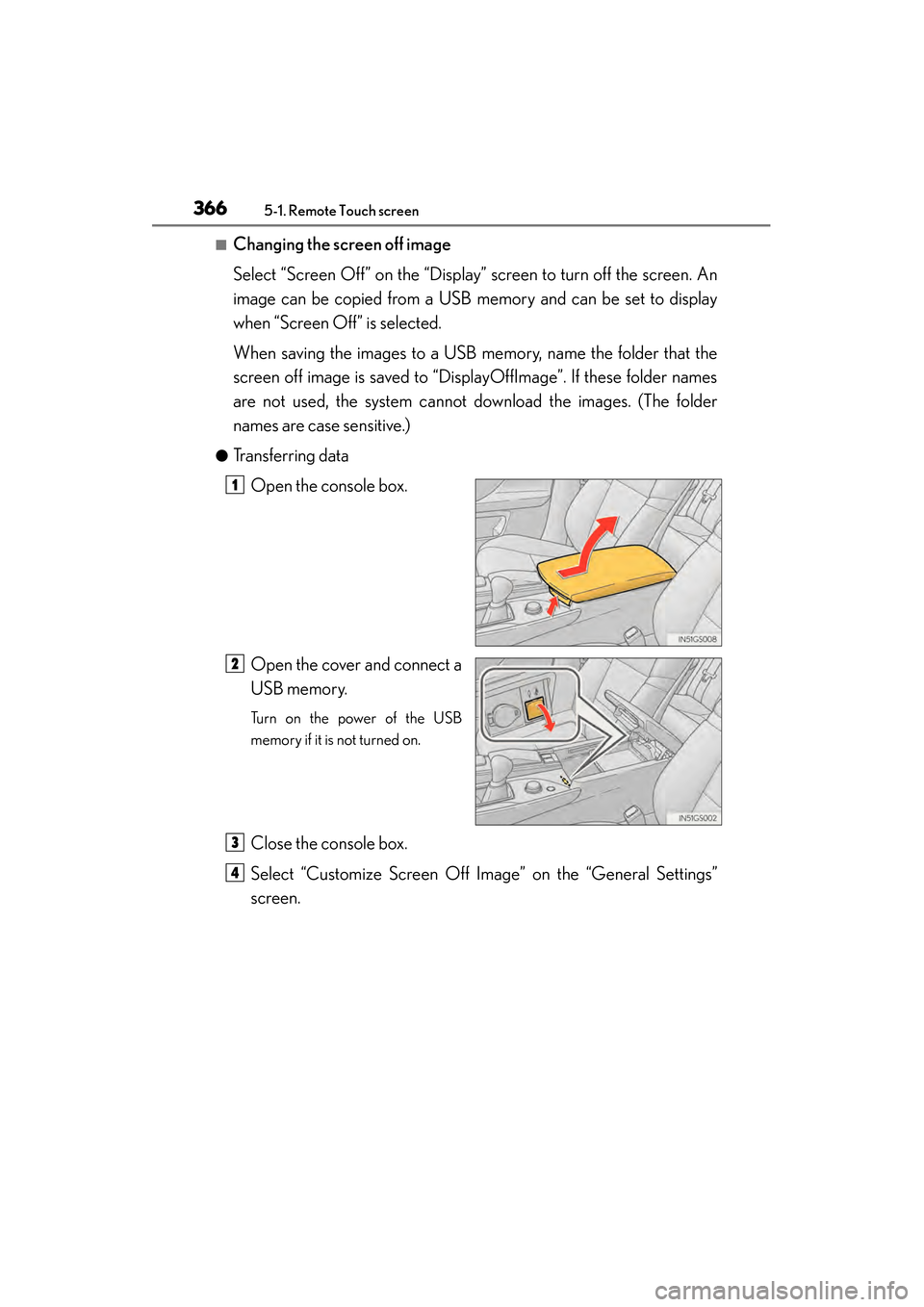
■Changing the screen off image
Select “Screen Off” on the “Display” screen to turn off the screen. An
image can be copied from a USB memory and can be set to display
when “Screen Off” is selected.
When saving the images to a USB memory, name the folder that the
screen off image is saved to “DisplayOffImage”. If these folder names
are not used, the system cannot download the images. (The folder
names are case sensitive.)
●Transferring dataOpen the console box.
Open the cover and connect a
USB memory.
Turn on the power of the USB
memory if it is not turned on.
Close the console box.
Select “Customize Screen Off Image” on the “General Settings”
screen.
1
2
3
4
GS450h_OM_OM30D52U_(U).book Page 366 Monday, July 29, 2013 12:07 PM
Page 383 of 890
3825-1. Remote Touch screen
GS450h_OM_OM30D52U_(U)
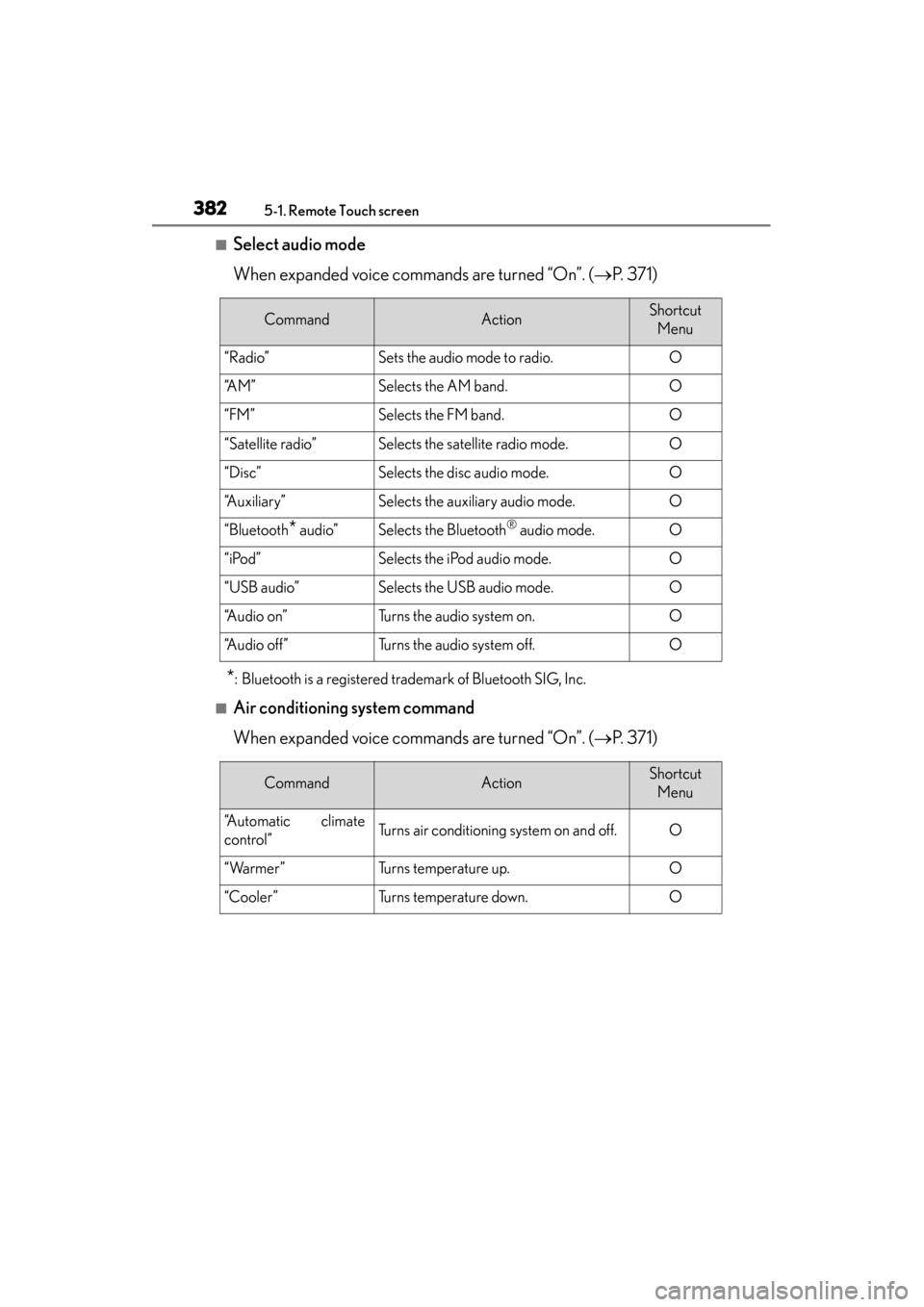
■Select audio mode
When expanded voice commands are turned “On”. (→P. 3 7 1 )
*: Bluetooth is a registered trademark of Bluetooth SIG, Inc.
■Air conditioning system command
When expanded voice commands are turned “On”. ( →P. 3 7 1 )
CommandActionShortcut
Menu
“Radio”Sets the audio mode to radio.O
“A M ”Selects the AM band.O
“FM”Selects the FM band.O
“Satellite radio”Selects the satellite radio mode.O
“Disc”Selects the disc audio mode.O
“Auxiliary”Selects the auxiliary audio mode.O
“Bluetooth* audio”Selects the Bluetooth® audio mode.O
“iPod”Selects the iPod audio mode.O
“USB audio”Selects the USB audio mode.O
“A u d i o o n ”Turns the audio system on.O
“Audio off”Turns the audio system off.O
CommandActionShortcut Menu
“Automatic climate
control”Turns air conditioning system on and off.O
“Warmer”Turns temperature up.O
“Cooler”Turns temperature down.O
GS450h_OM_OM30D52U_(U).book Page 382 Monday, July 29, 2013 12:07 PM
Page 385 of 890
3845-1. Remote Touch screen
GS450h_OM_OM30D52U_(U)
■When using the microphone
●It is unnecessary to speak directly into the microphone when giving a command.
●Wait for the confirmation beep before speaking a command.
●Voice commands may not be recognized if:
• Spoken too quickly.
• Spoken at a low or high volume.
• The roof or windows are open.
• Passengers are talking while voice commands are spoken.
• The air conditioning speed is set high.
• The air conditioning vents are turned towards the microphone.
●In the following conditions, the system may not recognize the command properly
and using voice commands may not be possible:
• The command is incorrect or unclear. Note that certain words, accents orspeech patterns may be difficult for the system to recognize.
• There is excessive background noise, such as wind noise.
■When searching for a track
●A USB memory or iPod must be connected to enable track searching and play-
back. ( →P. 5 0 1 , 5 1 1 )
●When a USB memory or iPod is connected, recognition data is created so tracks
can be searched using voice commands.
●Recognition data is updated under the following conditions:
• When the USB memory or iPod data has changed.
• When the voice recognition language is changed. ( →P. 3 6 1 )
●While the recognition data is being created or being updated, a track search can-
not be performed using a voice command.
●While “Play Music” is displayed in the “Shortcut Menu” screen, say “Play Music” to
display the music screen from which searching for a track using a voice command
can be performed.
●When “Play Music” is dimmed in the “Shortcut Menu” screen, it is not possible to
search for a track using a voice command. In this situation, reduce the amount of
music data in the USB memory or iPod and update the recognition data to enable
searching by voice command.
GS450h_OM_OM30D52U_(U).book Page 384 Monday, July 29, 2013 12:07 PM
Page 414 of 890
GS450h_OM_OM30D52U_(U)
4135-3. Using the audio system
5
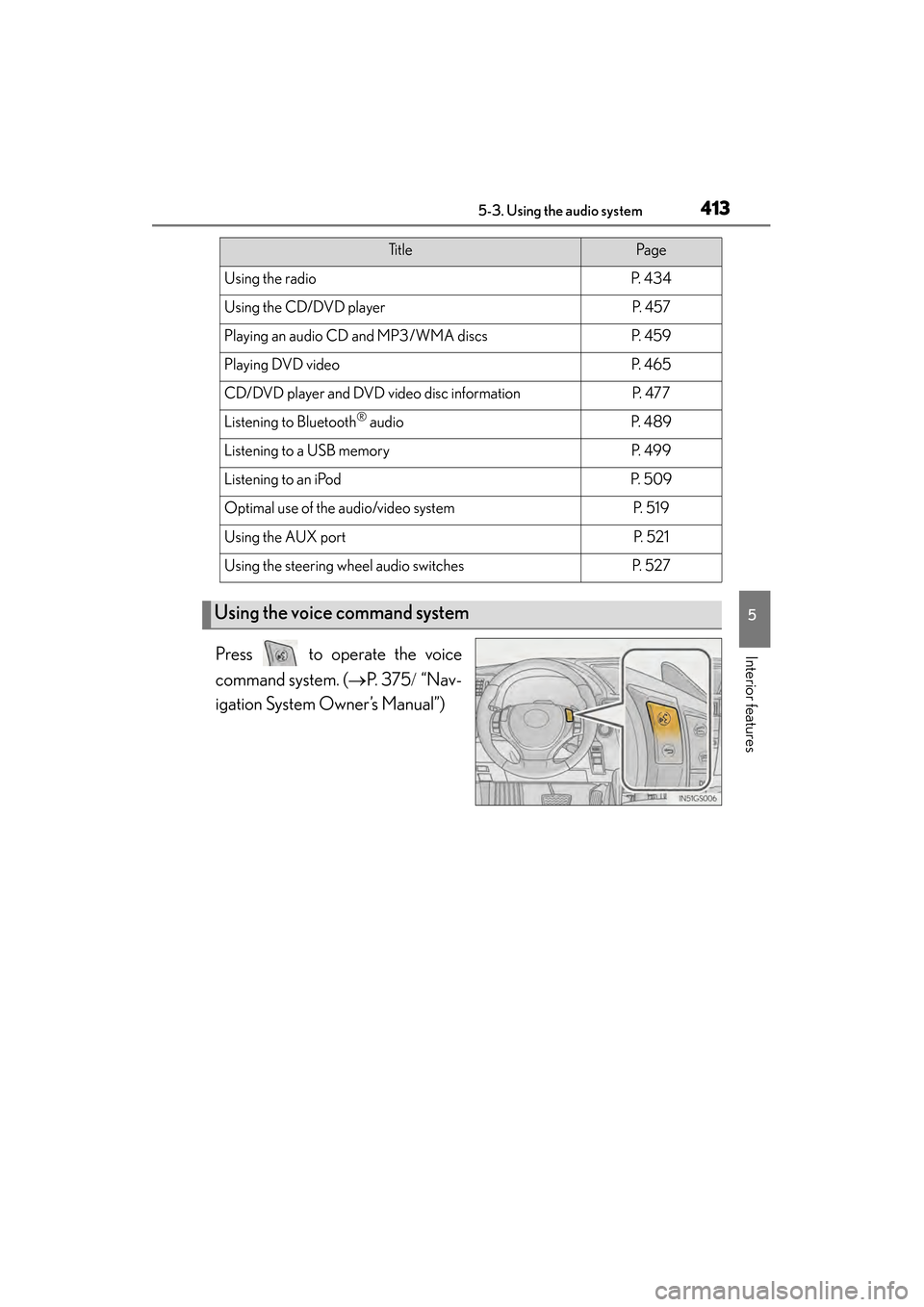
Interior featuresPress to operate the voice
command system. (→P. 3 7 5 / “Nav-
igation System Owner’s Manual”)
Ti t l ePa g e
Using the radioP. 4 3 4
Using the CD/DVD playerP. 4 5 7
Playing an audio CD and MP3/WMA discsP. 4 5 9
Playing DVD videoP. 4 6 5
CD/DVD player and DVD video disc informationP. 4 7 7
Listening to Bluetooth® audioP. 4 8 9
Listening to a USB memoryP. 4 9 9
Listening to an iPodP. 5 0 9
Optimal use of the audio/video systemP. 5 1 9
Using the AUX portP. 5 2 1
Using the steering wheel audio switchesP. 5 2 7
Using the voice command system
GS450h_OM_OM30D52U_(U).book Page 413 Monday, July 29, 2013 12:07 PM
Page 456 of 890
GS450h_OM_OM30D52U_(U)
4555-3. Using the audio system
5
Interior features
■About internet radio (vehicles with the navigation system)
●Other applications can be activated while listening to internet radio.
●An iPhone cannot be connected via Bluetooth® and USB connection at the same
time. However, it is possible to recharge an iPhone while using Apps by connecting
via USB. The system uses the connection method that was used last. Therefore, if
connected via USB after Bluetooth
® connection, it is necessary to reconnect the
iPhone via Bluetooth®.
●Services requiring a separate contract can also be used. For details, refer to
http://www.lexus.com/enform/
or call 1-800-255-3987.
●If internet radio has never been listened to by activating “Apps” from the “Informa-
tion” screen, the “Apps” tab will be dimmed.
GS450h_OM_OM30D52U_(U).book Page 455 Monday, July 29, 2013 12:07 PM
Page 500 of 890
499
GS450h_OM_OM30D52U_(U)5-3. Using the audio system
5
Interior features
Listening to a USB memory
Connecting a USB memory enables you to enjoy music from the vehi-
cle speakers.
Press the “MEDIA” button if a USB memory has already been con-
nected. Select the “USB” tab or press the “MEDIA” button repeatedly
until the “USB” tab is selected.
GS450h_OM_OM30D52U_(U).book Page 499 Monday, July 29, 2013 12:07 PM