phone Lexus GS450h 2015 Opening, closing and locking the doors and trunk / LEXUS 2015 GS450H OWNERS MANUAL QUICK GUIDE (OM30E61U)
[x] Cancel search | Manufacturer: LEXUS, Model Year: 2015, Model line: GS450h, Model: Lexus GS450h 2015Pages: 102, PDF Size: 2 MB
Page 2 of 102
2
GS450h_QG_OM30E61U_(U)
Front Seats ................................................................................................................................. 18
Fuel Tank Cap .................................................................................................................. ......... 96
Garage Door Opener ........................................................................................................... 89
Hands-free System For Cellular Phone
Bluetooth
® phone pairing .........................................................................................................66
Contacts transfer .............................................................................................................. ............. 67
Registering the contacts in the favorites list....................................................................... 68
Calling by name (vehicles with navigation system) ......................................................... 69
Calling by favorites list ...................................................................................................... ........... 69
Calling using e-mail/SMS/MMS message ........................................................................ 70
Receiving a call ............................................................................................................... ................ 70
Steering switches .............................................................................................................. ............. 70
Headlights ..................................................................................................................... ............. 31
Head-up Display...................................................................................................................... 30
Hybrid System .................................................................................................................. ......... 12
Intuitive Parking Assist ....................................................................................................... ... 46
Lexus Enform................................................................................................................... ......... 93
Lexus Enform Safety Connect ............................................................................................. 91
Lexus Night View............................................................................................................... ....... 51
LKA (Lane-Keeping Assist) ................................................................................................. 48
Multi-information Display .................................................................................................... 28
Navigation System Register home .................................................................................................................. ...............60
Destination input - Search by address ................................................................................... 61
Destination input - Search points of interest by name....................................................63
Destination input - Search points of interest by category.............................................64
Destination input - Search points of intere st by telephone number .........................65
Page 8 of 102
8
GS450h_QG_OM30E61U_(U)
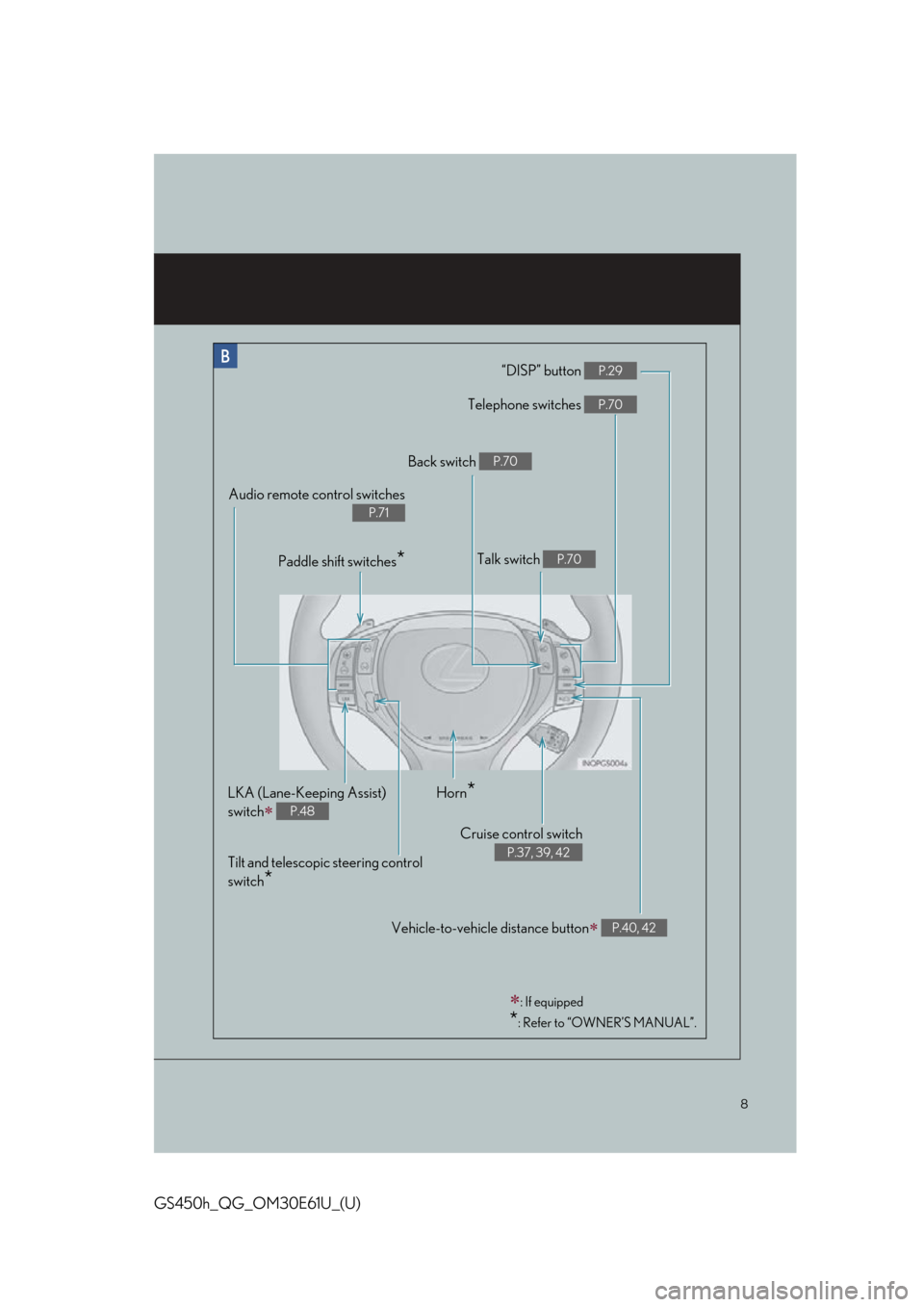
“DISP” button P.29
Telephone switches P.70
Vehicle-to-vehicle distance button P.40, 42
Back switch P.70
Talk switch P.70
Audio remote control switches
P.71
Paddle shift switches*
LKA (Lane-Keeping Assist)
switch
P.48
Cruise control switch
P.37, 39, 42
Horn*
Tilt and telescopic steering control
switch
*
: If equipped
*: Refer to “OWNER’S MANUAL”.
Page 55 of 102
55
GS450h_QG_OM30E61U_(U)
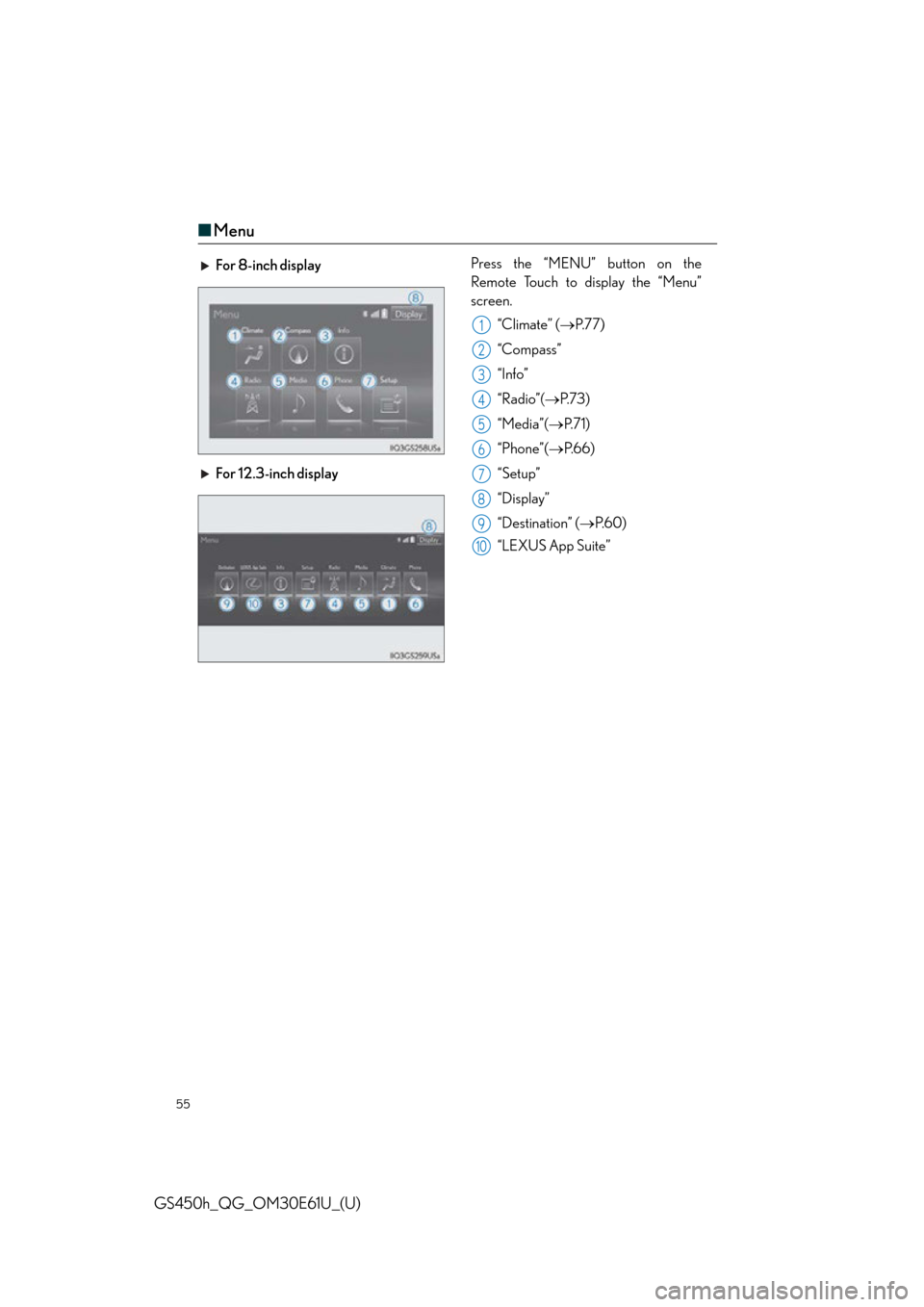
■Menu
For 8-inch display Press the “MENU” button on the
Remote Touch to display the “Menu”
screen.
“Climate” ( P.77)
“Compass”
“Info”
“Radio”( P. 7 3 )
“Media”( P. 7 1 )
“Phone”( P.66)
“Setup”
“Display”
“Destination” ( P. 6 0 )
“LEXUS App Suite”
For 12.3-inch display
1
2
3
4
5
6
7
8
9
10
Page 59 of 102
59
GS450h_QG_OM30E61U_(U)
■Selecting the operation screen
When selecting the side display, move the Re mote Touch knob to the right until is dis-
played at the boundary between the main display and the side display, and then move it fur-
ther to the right. When selecting the main display, move the Remote Touch knob to the left
until is displayed at the bo undary between the main displa y and the side display, and
then move it further to the left.
■ Display the side display
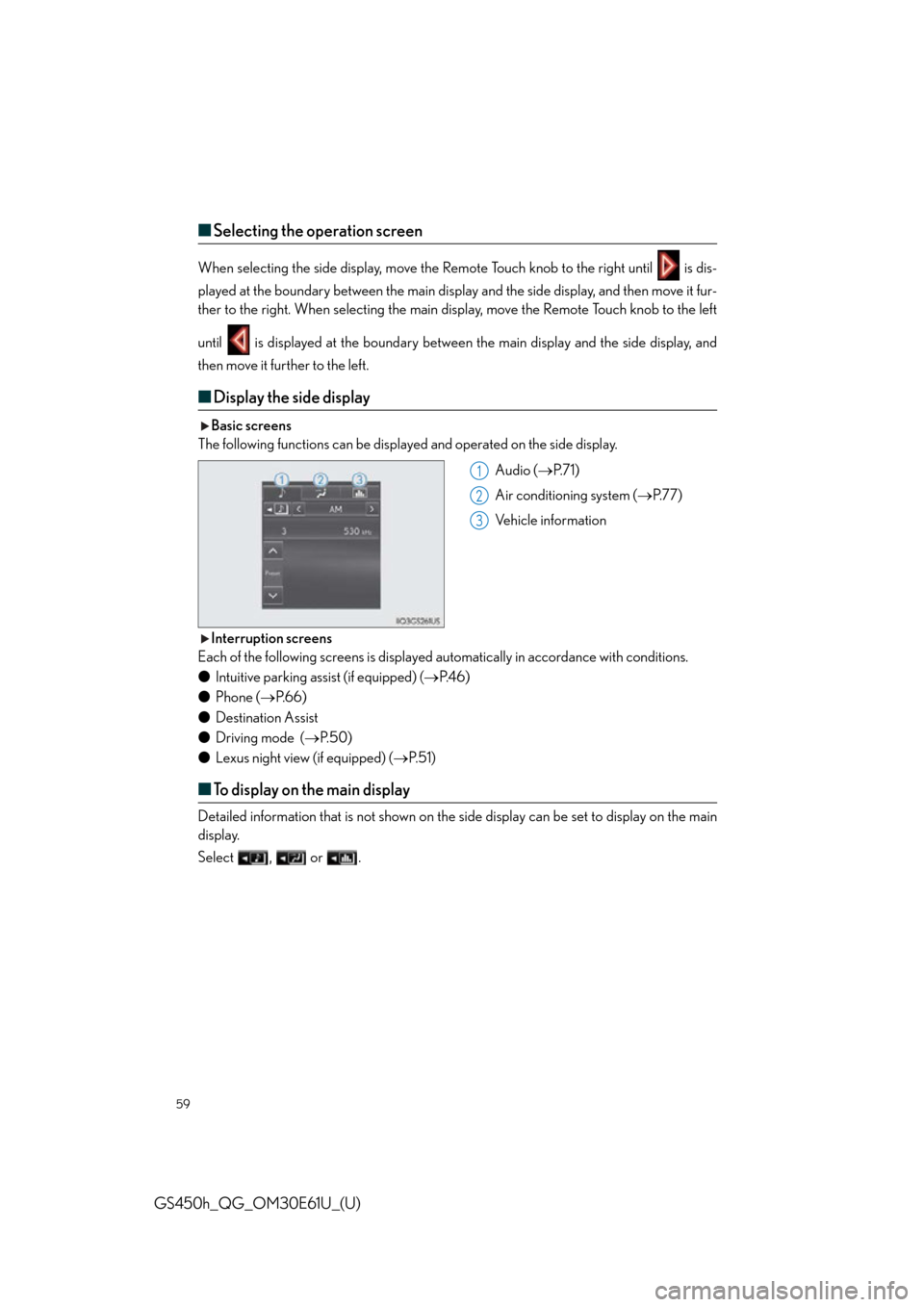
Basic screens
The following functions can be displaye d and operated on the side display.
Audio (P. 7 1 )
Air conditioning system ( P.77)
Vehicle information
Interruption screens
Each of the following screens is displayed au tomatically in accordance with conditions.
● Intuitive parking assist (if equipped) ( P. 4 6 )
● Phone ( P. 6 6 )
● Destination Assist
● Driving mode ( P. 5 0 )
● Lexus night view (if equipped) ( P. 5 1 )
■To display on the main display
Detailed information that is not shown on the si de display can be set to display on the main
display.
Select , or .
1
2
3
Page 65 of 102
65
GS450h_QG_OM30E61U_(U)
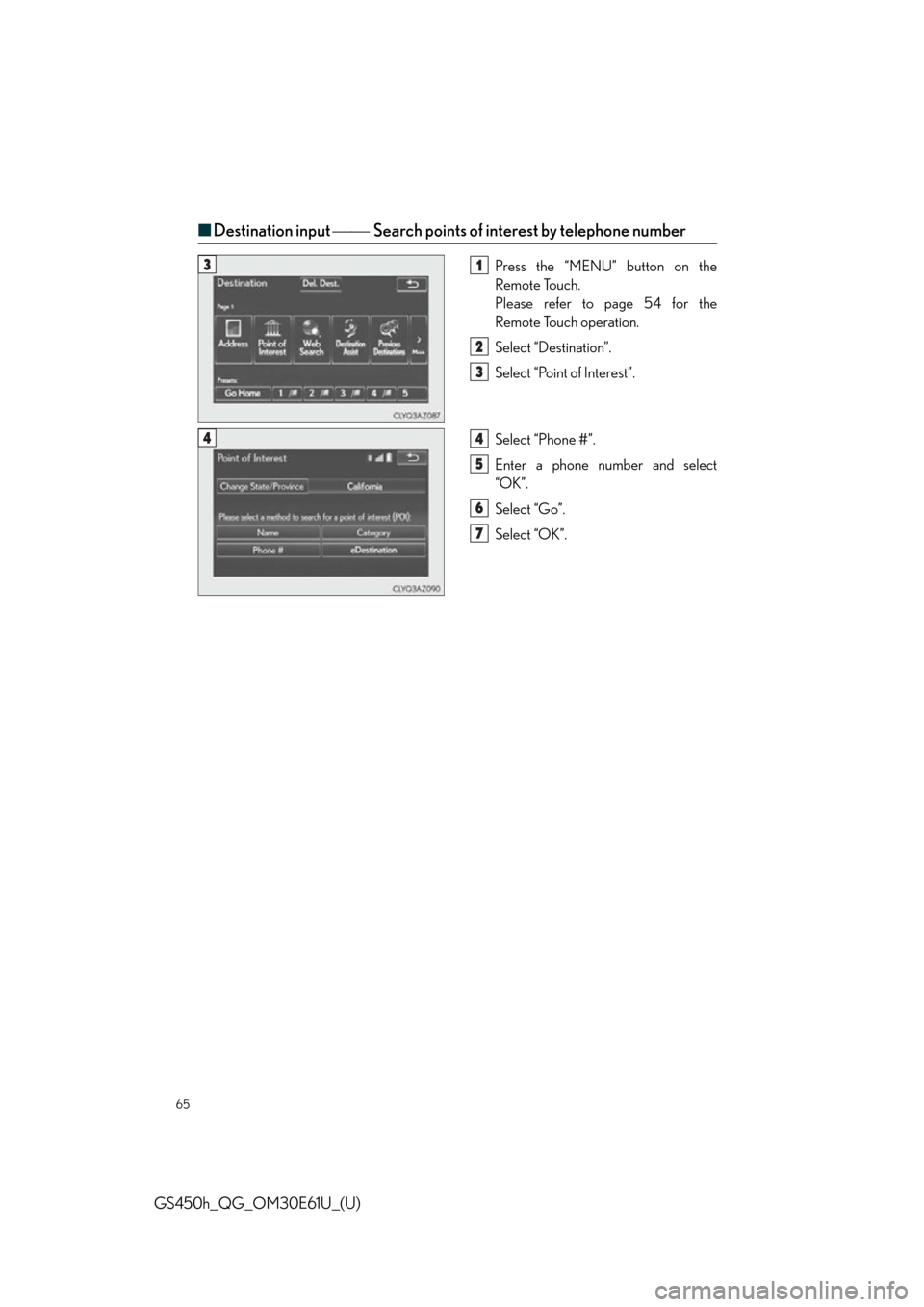
■Destination input Search points of interest by telephone number
Press the “MENU” button on the
Remote Touch.
Please refer to page 54 for the
Remote Touch operation.
Select “Destination”.
Select “Point of Interest”.
Select “Phone #”.
Enter a phone number and select
“OK”.
Select “Go”.
Select “OK”.31
2
3
44
5
6
7
Page 66 of 102

66
GS450h_QG_OM30E61U_(U)
Hands-free System For Cellular Phone
■Bluetooth® phone pairing
Compatible Bluetooth®-equipped phones can be connected to the vehicle, enabling hands-
free operation. Please refer to the cellular ph one manufacturer’s user guide for pairing pro-
cedures, or go to “www.lexus.com/MobileLink
” (for U.S.A.) for more phone information.
To use a Bluetooth
® phone, it is necessary
to first register it in the system.
Press on the steering wheel.
Select “Yes” or “OK”.
When this screen is displayed, search
for the device name displayed on this
screen on the screen of your
Bluetooth
® device.
Refer to the cellular phone user’s man-
ual for cellular phone operation.
Register the Bluetooth
® device using
your Bluetooth
® device.
Check that the following screen is dis-
played when registration is complete.
Select “OK” when the connection sta-
tus changes from “Connecting” to
“Connected”.
2
1
2
33
4
55
66
Page 67 of 102

67
GS450h_QG_OM30E61U_(U)
■Contacts transfer
Press the “MENU” button on the
Remote Touch.
Please refer to page 54 for the
Remote Touch operation.
Select “Setup”.
Select “Phone”.
Select “Contact/Call History Settings”.
Select “Update Contacts from Phone”.
Check that a confirmation screen is
displayed when the operation is com-
plete.31
2
3
44
55
6
Contacts transfer may not be po ssible depending on phone model.
Page 68 of 102

68
GS450h_QG_OM30E61U_(U)
■Registering the contacts in the favorites list
Press the “MENU” button on the
Remote Touch.
Please refer to page 54 for the
Remote Touch operation.
Select “Setup”.
Select “Phone”.
Select “Contact/Call History Settings”.
Select “Add Favorite”.
Select the desired contact to add to the
favorites list.
Check that a confirmation screen is
displayed when the operation is com-
plete.31
2
3
44
55
66
7
Page 69 of 102

69
GS450h_QG_OM30E61U_(U)
■Calling by name (vehicles with navigation system)
You can call by giving a name registered in the contacts. For details, refer to the
“NAVIGATION AND MULTIMEDIA SYSTEM OWNER’S MANUAL”.
Press .
Say “Call
■Calling by favorites list
Press on the steering wheel.
Select the “Favorites” tab and select
the desired contact.
Select the desired number.
Check that the “Call” screen is dis-
played.
11
2
: Pressing this switch turns the voice command system on. Say a command after the
beep.
21
2
33
4
Page 70 of 102
70
GS450h_QG_OM30E61U_(U)
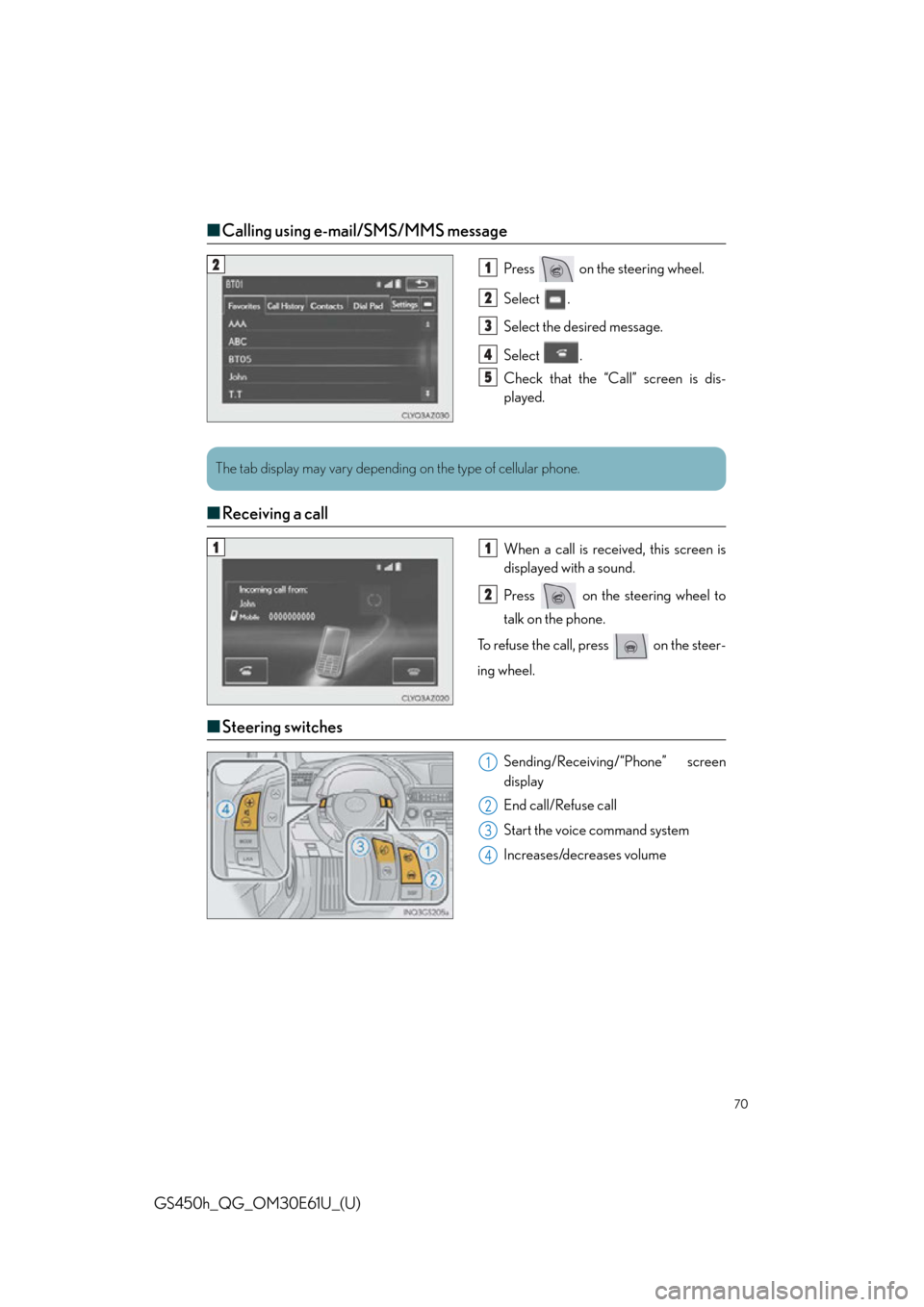
■Calling using e-mail/SMS/MMS message
Press on the steering wheel.
Select .
Select the desired message.
Select .
Check that the “Call” screen is dis-
played.
■Receiving a call
When a call is receiv ed, this screen is
displayed with a sound.
Press on the steering wheel to
talk on the phone.
To refuse the call, press on the steer-
ing wheel.
■ Steering switches
Sending/Receiving/“Phone” screen
display
End call/Refuse call
Start the voice command system
Increases/decreases volume
21
2
3
4
5
The tab display may vary depending on the type of cellular phone.
11
2
1
2
3
4